OpenMES
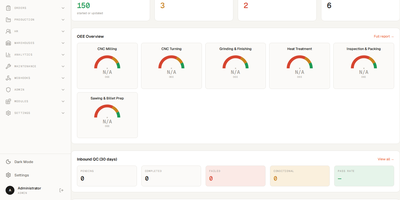
Admins, supervisors, and operators each get their own screens in OpenMES, a free self-hosted manufacturing execution system for small factories. Drag work orders across weekly, daily, hourly, and monthly planner views, and any order that stock cannot cover gets flagged. Automatic scheduling drafts a feasible plan from shift calendars, maintenance, and material shortages, and nothing changes until a supervisor applies it, with undo. Work orders carry partial batches, reusable process templates, and priority scores built from customer tier, planned quantity, and hours until due, and CSV or Excel imports bulk-load orders, materials, and recipes. Operators work from touch-optimized tablet queues, where one tap starts, completes, or reports an issue, even offline, and a critical issue halts production automatically. When a machine stops, MQTT, Modbus TCP, or OPC UA signals record the downtime automatically, and the same signals drive good and reject counters and OEE. At goods-in, an inbound inspection records pass or fail criteria and a disposition such as accept, rework, scrap, or quarantine. Material lots track received and available quantities with hold and release status, and the production cost report splits each finished order into material, labor, and additional costs, with CSV export. Supervisors follow the shift on a live monitor. Webhooks, a REST API, and hook-based modules connect OpenMES to ERP systems and custom code. Running on a dedicated VPS on RepoCloud with guaranteed CPU, RAM, and SSD, full root SSH access, and a browser serial console. AGPL-3.0 licensed.
Supercheck
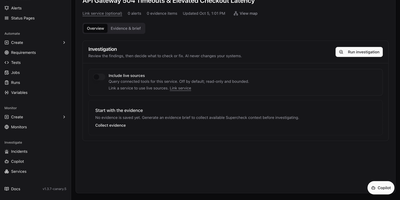
Browser tests, load tests, uptime checks, public status pages, and an AI incident investigator all live in one self-hosted dashboard called Supercheck. Write browser, API, database, custom, and k6 performance tests in a built-in code editor, or record a flow with the Chrome and Edge Recorder extension and save it as a Playwright script. Group tests into scheduled jobs, trigger them from CI with trigger keys, and review run logs, screenshots, traces, and reports. Five monitor types cover HTTP endpoints, website SSL expiry, ping, TCP and UDP ports, and scheduled synthetic browser journeys, with administrator-defined check locations and alerts to email, Slack, Discord, Telegram, Microsoft Teams, or webhooks. Status pages publish component health with 90-day uptime, incidents, scheduled maintenance, badges, and subscriber notifications under a subdomain or custom domain. When something breaks, the incident workspace collects evidence, drafts an evidence brief, and runs a read-only AI investigation across connectors such as GitHub, Prometheus, Grafana, and Kubernetes, while Copilot answers questions about that evidence. Requirements link expectations to tests and show coverage, and AI can extract them from a PRD. Organizations, projects, six roles, API keys, and audit trails keep teams in their lanes, and the CLI pulls, diffs, and deploys resources as code. Running on a dedicated VPS on RepoCloud with guaranteed CPU, RAM, and SSD, full root SSH access, and a browser serial console. AGPL-3.0 licensed.
Smartstore
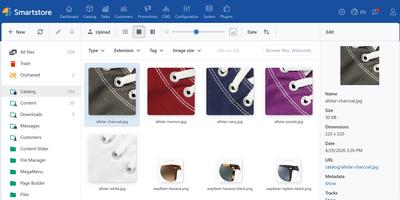
Smartstore is a self-hosted eCommerce platform that lets one install run several multilingual, multi-currency storefronts, with a drag-and-drop page builder and built-in AI writing tools. The catalog takes unlimited products and categories, with variants, bundles, grouped and downloadable products, tier pricing, and cross-selling, while faceted search keeps large assortments easy to filter. Shoppers get a responsive storefront with a streamlined checkout, reviews, wishlists, and wallet or gift-card payments; staff get order, shipment, and return handling plus a dashboard with sales statistics and bestseller lists. Marketing tools cover discounts, coupons, reward points, newsletters, affiliates, a blog, and forums, and the visual Rule Builder grants discounts, offers shipping and payment methods, and assigns customers to roles automatically. AI helpers draft product descriptions and meta tags with OpenAI, Gemini, Claude, DeepSeek, or a self-hosted Ollama model, and image tools create or edit pictures. A Media Manager organizes images and files in folders with filters and metadata. Import and export profiles move catalogs in and out on a schedule, a REST API connects other systems, and tree-based permissions decide which staff roles may do what. The Docker image starts a browser installer that connects to MySQL, PostgreSQL, or SQL Server. Running on a dedicated VPS on RepoCloud with guaranteed CPU, RAM, and SSD, full root SSH access, and a browser serial console. AGPL-3.0 licensed.
MIND
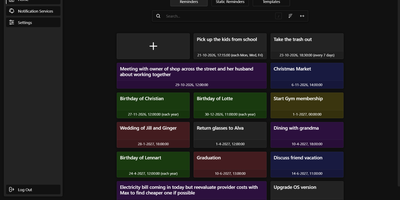
Unlike a calendar alert that rings on one phone, a MIND reminder reaches any of 100+ services, including email, Pushbullet, BlueSky, Cisco Webex Teams, and SMS gateways, from a self-hosted reminder app that you control. Normal reminders fire with second precision once or repeat every few days, once a year, on chosen weekdays, or on a custom cron schedule, while static reminders wait for a button press, so a single tap can tell the family that you are running late. Templates store colour, title, services, and text for fast creation, and the colour-coded library can be searched and sorted, with each reminder enabled, disabled, or tested on demand. Time zone changes, including daylight saving shifts, are accounted for, and sends that fail on a connection error are retried every two minutes until they succeed. Several users can share one instance: the admin panel handles accounts and registration, login lifetime, reverse-proxy URL prefix, debug logs, and scheduled database backups that can be exported and imported, and sign-in supports two-factor authentication. A documented REST API covers reminders, templates, notification services, and static triggers, and the web interface adapts to phone screens. Running on a dedicated VPS on RepoCloud with guaranteed CPU, RAM, and SSD, full root SSH access, and a browser serial console. GPL-3.0 licensed.
SkySend
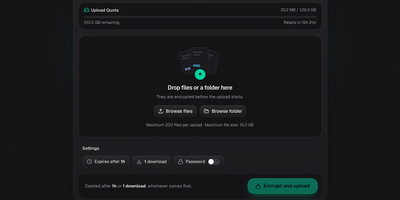
Only the person holding the link can open what you share with SkySend, a self-hosted file and note sharing service that encrypts everything in the browser before it leaves your device. Sending a contract? Drop in the file, several files, or a whole folder, and share the link. Need documents from a client? Send an upload link instead, and whatever comes back is encrypted for you alone. Handing over a password or an SSH key? Write it into a note that burns after reading. Notes can mix text, Markdown, generated passwords, and highlighted code in a single page. Every share can expire by time, stop after a set number of downloads or views, and carry an optional password as a second lock. The command-line client uploads, downloads, and reads notes with the same encryption, and its full-screen mode shows each link as a QR code. No accounts are needed: My Links keeps your shares in the browser, and optional OIDC sign-in limits who may create them. Encrypted uploads sit on local disk or any S3-compatible bucket, and the interface offers 13 languages and three themes. Running on a dedicated VPS on RepoCloud with guaranteed CPU, RAM, and SSD, full root SSH access, and a browser serial console. AGPL-3.0 licensed.
Flowctl
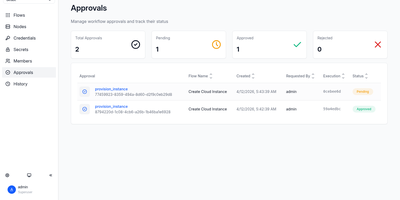
Flowctl turns repetitive ops work, such as granting SSH access, restarting a service, or provisioning a server, into self-service forms that anyone on the team can run without holding credentials. Each workflow is a YAML or HUML file with typed inputs, validation rules, and a list of actions. Actions run in order or as a dependency graph, so independent branches execute in parallel. Every action runs in a Docker container, as a shell script, or as another flow, and scripts can target remote servers over SSH, several at once. Sensitive steps pause until a reviewer approves or rejects them. Output from one action feeds the next, files pass along as artifacts, and failed actions can be retried. Cron schedules with time zones and labels run flows unattended, while logs stream live in the browser. Email, Slack, Mattermost, and webhook notifications announce success, failure, waiting, or cancellation. Teams get isolated namespaces with user, operator, reviewer, and admin roles, OIDC single sign-on, and encrypted storage for SSH keys and secrets. A built-in flow editor means nobody has to hand-write files, and custom executors can be added as Go plugins. Running on a dedicated VPS on RepoCloud with guaranteed CPU, RAM, and SSD, full root SSH access, and a browser serial console. Apache-2.0 licensed.
Thingport
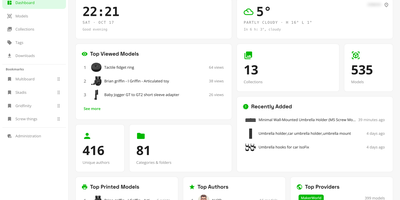
Authors delete listings, and the 3D models go with them, so Thingport stores its own copy of every printable file you import, in a self-hosted library you control. Ten sites feed the library, including MakerWorld, Printables, Thingiverse, and MyMiniFactory: paste a link or use the browser extension, and a model arrives with its files, photos, description, tags, author, and source link. Synced collections add newly bookmarked models as often as every hour. Files you already own come in as STL, 3MF, STEP, OBJ, or LightBurn uploads, ZIPs, folder trees, or drops into a watched consume folder. Each model gets an interactive 3D viewer with a thumbnail for every plate of a multi-plate 3MF. On first open, a check flags surface holes, non-manifold edges, flipped faces, and loose fragments before you slice. Sort with nested categories, collections, and tags, mark favourites, and find anything with full-text search. Optional AI sorts imports into your categories and tidies descriptions, using a local Ollama model or a cloud API. Open any file in Bambu Studio, OrcaSlicer, PrusaSlicer, Cura, or Creality Print, or download a model, tag, or collection as one ZIP. Every user gets a separate library, with invite-only registration, email verification, and single sign-on. A dashboard shows library statistics, profiles show a year-long activity heatmap, and MCP lets an AI assistant work with the collection. Running on a dedicated VPS on RepoCloud with guaranteed CPU, RAM, and SSD, full root SSH access, and a browser serial console. AGPL-3.0 licensed.
Request Tracker
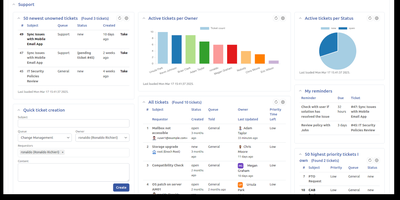
Email-driven ticketing for IT, support, and operations teams: Request Tracker turns every message sent to support@, helpdesk@, or security@ into a tracked ticket with an owner, a priority, a due date, and a complete audit trail. Staff reply to customers and comment privately to colleagues from the web interface or straight from their inbox, while requestors follow their own tickets in a self-service portal. Lifecycles built in a visual editor define custom statuses, transitions, and rights per queue, and scrips fire notifications or automated actions whenever a ticket changes. Service level agreements honor business hours, escalations trigger as deadlines approach, and scheduled tickets recreate recurring chores such as monthly patch windows. A transaction query builder, saved searches, charts, and drag-and-drop dashboards turn ticket history into reports that export to CSV or arrive by email on a schedule. Asset catalogs track laptops, licenses, and servers beside the tickets that mention them, and an Articles knowledge base feeds canned answers into replies. Time worked is logged per ticket with a My Week timesheet, approvals route sensitive requests to the right people, and PGP or S/MIME protects email in both directions. A REST2 API, a command-line client, and more than 400 extensions connect RT to the rest of your tooling. Running on a dedicated VPS on RepoCloud with guaranteed CPU, RAM, and SSD, full root SSH access, and a browser serial console. GPL-2.0 licensed.
Elmo
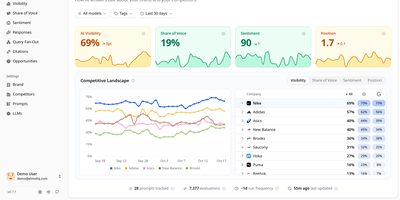
Tracking how ChatGPT, Claude, Gemini, Perplexity, and Google's AI answers talk about your brand, Elmo gives you a self-hosted dashboard for measuring and improving your AI search visibility. A setup wizard reads your website and suggests keywords, competitors, buyer personas, and tracking prompts. Behind the scenes, a worker reruns every tracked prompt on a schedule against the engines you connect, using scraping providers such as BrightData, Oxylabs, or SearchApi for real consumer experiences, or direct OpenAI, Anthropic, Mistral, and OpenRouter APIs. Each run feeds visibility scores per prompt and per model, mention tracking across names, aliases, and domains, sentiment from positive to negative, and each company's position in the answer. The Responses page filters answers by model, tag, prompt, or sentiment and highlights the passage behind each judgment. Citation analysis sorts cited URLs into your domains, competitors, social media, Google properties, and institutional sources. A share-of-voice leaderboard ranks competitors against you over time. Query fan-out shows the web searches engines ran before answering. Opportunities turns the numbers into a prioritized list of content to create, pitch, and seed. Shareable reports reach stakeholders without an account, and a REST API with TypeScript and Python SDKs plus an MCP server lets coding agents query the data. Raw engine output stays in your own database for later audit. Running on a dedicated VPS on RepoCloud with guaranteed CPU, RAM, and SSD, full root SSH access, and a browser serial console. MIT licensed.
Pluton
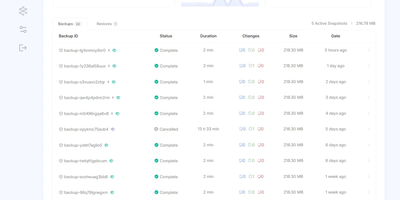
On a schedule you choose, Pluton backs up your folders to cloud storage and other disks, then lets you verify and restore every snapshot and see exactly what happened in a clean, self-hosted web dashboard. Three copies: every plan writes to a primary storage and can replicate to up to two more, so the 3-2-1 rule is a toggle in the plan wizard rather than a weekend project. Two kinds of media: pair a local disk or mounted drive with Backblaze B2, Cloudflare R2, Google Drive, Dropbox, pCloud, SFTP, S3-compatible buckets, or any of 70+ connectors, and press Verify to test a connection before trusting it. One place to look: the plan page charts file counts and sizes over a selectable range, a health strip colors recent runs, and a live panel counts files, bytes, and time remaining while each mirror initializes and replicates. Zero mysteries: every backup keeps a timestamped event timeline from dry run to pruning, and plan logs filter by level and task, search messages, and download as a file. Schedules run from every few minutes to monthly, including chosen weekdays; retention keeps daily, weekly, and monthly snapshots; and scripts can run before or after a job. Alerts reach you by email, Slack, Discord, or ntfy, and optional two-factor sign-in guards the dashboard. Running on a dedicated VPS on RepoCloud with guaranteed CPU, RAM, and SSD, full root SSH access, and a browser serial console. Apache-2.0 licensed.
portracker
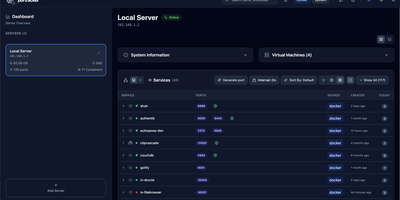
No spreadsheet has to track which service owns which port, because portracker discovers every service and port on your servers and keeps the list current from a self-hosted dashboard. Begin with a single port, shown with its owning service, its source (Docker or the host system), and its address, with internal container ports told apart from ports published to the host. Step back and ports gather into services: expandable cards carrying an icon, a health dot, and a port count, in list, grid, or table layouts, where a Why this status popover names the failing component and the rule that fired. Step back again and each server gets its own panel with hostname, OS, CPU, memory, and uptime, plus TrueNAS apps, VMs, and LXC containers once an API key is added. Step back once more and the whole fleet appears, because other portracker instances can be linked as peers, a VM's instance can be nested under its host, and every server can be searched at once. Along the way, rename services, hide the noisy ones, attach notes, act on a selection in bulk, or press Generate port for an unused number before deploying something new. Optional sign-in with a first-run setup wizard, an autoxpose link that shows public URLs and SSL status, light and dark themes, and keyboard shortcuts finish the picture. Running on a dedicated VPS on RepoCloud with guaranteed CPU, RAM, and SSD, full root SSH access, and a browser serial console. MIT licensed.
Enclosed
Private text, encrypted before it leaves the browser: Enclosed turns passwords, keys, and other secrets into a link that only its holder can open, with no third-party service in between. Can the server read the note? No. It stores only ciphertext and settings, because the decryption key rides in the part of the link after the # sign, which browsers never send. Want a second lock? Add a password, or generate a random one with a click, and share it by another route. Worried about links lingering in chat history? Pick one hour, one day, one week, or one month, and tick Delete after reading so the first view removes the note, with a warning shown to the recipient beforehand. Need more than text? Attach files by button or drag and drop, and recipients download them one by one or all at once. Sending to a phone? Every finished note offers a QR code, downloadable as SVG or PNG. Setting it up for a team? Restrict note creation to signed-in users, create notes from the command line, and let people read the interface in 17 languages with light, dark, or system themes. Running on a dedicated VPS on RepoCloud with guaranteed CPU, RAM, and SSD, full root SSH access, and a browser serial console. Apache-2.0 licensed.
Tagr
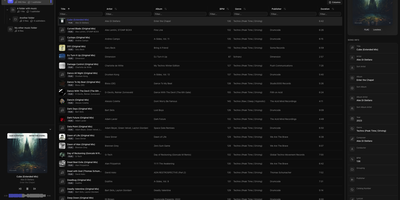
When a music library is full of wrong tags, missing covers, and blank ratings, Tagr lets you fix the whole collection from any browser, on desktop or phone. Three roles divide the work on your own server. Admins mount a music folder, press scan, and get a searchable table of every track, with sortable and filterable columns, more than 40 editable fields, and room for custom tags. Taggers make the changes: edit fields inline, swap album art, and match one song or a whole selection against MusicBrainz, ticking which fields to overwrite. Mistakes are cheap, because every edit is stored in a persistent change history with a revert action, viewable per song or per folder. Rule-based smart playlists, such as every track with an empty comment, show what still needs attention. Listeners browse and play without edit rights, using the waveform player, a Recently played view, and optional ListenBrainz scrobbling that each person connects to their own account. Supported formats include MP3, FLAC, WAV, AAC, OGG, M4A, M4B, WMA, AIFF, and Opus, with changes written straight back into the files. Swipe-friendly panels, an installable PWA, and five interface languages make the phone a comfortable place to work. Running on a dedicated VPS on RepoCloud with guaranteed CPU, RAM, and SSD, full root SSH access, and a browser serial console. AGPL-3.0 licensed.
Fusion
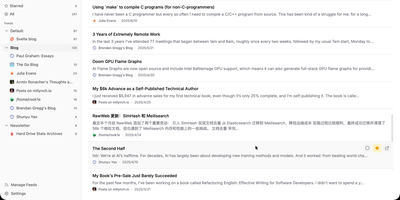
Follow every blog, newsletter, and news site you like from one distraction-free inbox with the self-hosted Fusion RSS reader, which has no AI features by design. A left sidebar lists feed groups with unread counts and jumps between Unread, Starred, and All, while the center list shows articles under filter tabs with read and star buttons on every card. Click a card and a right-hand drawer opens with the full sanitized article, a link to the original, and Previous and Next buttons. Press Cmd or Ctrl+K, or the slash key, to search feeds and articles from anywhere. Stay on the keyboard with Google Reader-style keys such as j and k to move, m to mark read, s to star, and g then u to jump to Unread; the question mark lists them all. Add a feed by entering a site address and letting auto-discovery find it, then pick its group, refresh frequency, and HTTP proxy, or suspend it to pause updates. OPML import and export bring subscriptions in or out. Starred articles are saved as snapshots that outlive their source feed. Fever API compatibility lets Reeder, Unread, and FeedMe read the same library. Sign in with a password or OIDC single sign-on, and install the interface as a PWA with Light, Dark, and System themes in eight languages. Running on a dedicated VPS on RepoCloud with guaranteed CPU, RAM, and SSD, full root SSH access, and a browser serial console. MIT licensed.
Traduora
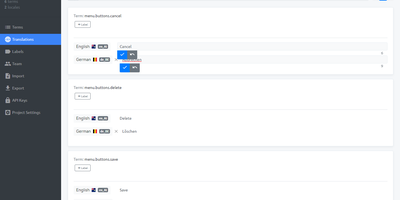
Teams that ship one app in many languages keep every string, translator, and reviewer in a single workspace by hosting their own Traduora translation management platform. Developers import the files they already have: JSON, YAML, PO, XLIFF, CSV, Android XML, iOS Strings, Java properties, PHP array, or RESX. Each string becomes a term that can carry a context note and colored labels. A search bar and a label filter narrow long lists in seconds. Translators open a locale and type inline beside a reference language, with per-locale progress showing how much is finished and a toggle that hides what is already done. Colleagues join by email invitation as admins, editors, or viewers, with optional Google sign-in. Build pipelines get their own API clients, each with a role, to fetch and push translations over a REST API. Exports go back out in whichever format each platform wants, with fallback-locale and untranslated-key options. Mobile and web teams can keep iOS, Android, and website copy in sync from a single source of truth. Running on a dedicated VPS on RepoCloud with guaranteed CPU, RAM, and SSD, full root SSH access, and a browser serial console. AGPL-3.0 licensed.
Waline
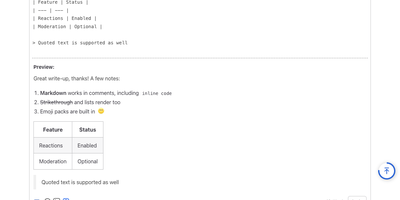
Any blog, documentation site, or static website can host a complete comment section by running its own Waline server, with Markdown, emoji, reactions, and moderation tools included. A visitor writes as a guest, registers an account, or signs in with GitHub, Twitter, Facebook, Weibo, or QQ, and a live preview shows the formatting before anything is posted. Comments accept tables, strikethrough, highlighted code blocks, TeX formulas, custom emoji packs, and Giphy GIF search. On submission, a sanitizer strips scripts and styles while Akismet, per-IP rate limits, keyword and IP block lists, duplicate detection, and reCAPTCHA or Turnstile screen for spam, and an optional review queue holds the comment back until a moderator approves it. The site owner then hears about it by email, WeChat, QQ, Telegram, PushPlus, Discord, or Lark, and the commenter receives reply emails. Once published, readers react with up to nine emoji and sort threads by latest, oldest, or hottest, while pageview and comment counters can appear anywhere on a site and recent-comment and top-commenter widgets fill sidebars. Moderators edit, approve, flag, or delete from the web admin panel, manage users and custom labels, and import earlier discussions from Disqus, Twikoo, Valine, Typecho, Artalk, Commento, or WordPress. Comments stay in your own database, and the widget offers a dark theme and ten languages. Running on a dedicated VPS on RepoCloud with guaranteed CPU, RAM, and SSD, full root SSH access, and a browser serial console. GPL-2.0 licensed.
VitoDeploy
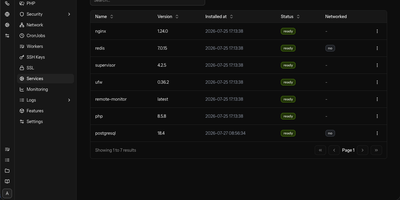
VitoDeploy replaces a pile of SSH sessions and shell scripts with one browser tab for provisioning servers and deploying websites, on a control panel you host yourself. Spin up a server on AWS, Akamai (Linode), DigitalOcean, Vultr, Hetzner, or Proxmox in a few clicks. Attach any Ubuntu machine you already own as a custom server. Add sites built with PHP, Laravel, or WordPress, or run Node.js and Bun apps behind a reverse proxy. Pull code from GitHub, GitLab, Gitea, or Bitbucket. Set environment variables and HTTP basic authentication. Issue Let's Encrypt, wildcard, or custom SSL certificates. Create MySQL, MariaDB, or PostgreSQL databases, manage their users, and send backups to Amazon S3, Wasabi, FTP, SFTP, Dropbox, or local disk. Manage firewall rules, cron jobs, Supervisor workers, Redis, and multiple PHP versions from the same screens. Watch CPU, memory, and disk use for each server, then open a live SSH shell without leaving the page. Agencies split clients into projects, invite teammates as Admins or Users, and send alerts to Slack, Discord, Telegram, or email. Workflows automate deployments, backups, and maintenance. Plugins, DNS record management, export and import of your setup, and a REST API round out the toolkit. The panel itself needs only 1 GB of RAM and 1 CPU core, then manages your other machines over SSH. Running on a dedicated VPS on RepoCloud with guaranteed CPU, RAM, and SSD, full root SSH access, and a browser serial console. AGPL-3.0 licensed.
LLDAP
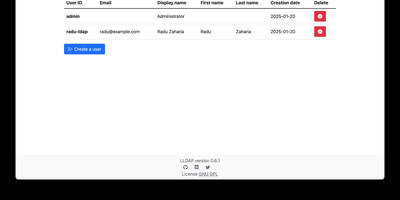
LLDAP is a lightweight user directory that lets all your self-hosted apps share one set of accounts and passwords. It speaks just enough LDAP for Nextcloud, Jellyfin, Gitea, GitLab, Grafana, Home Assistant, Proxmox VE, Vaultwarden, and many more to authenticate users against a single source of truth, with ready-made example configurations for more than 80 services. Day-to-day administration happens in a web interface where you create users, set passwords, upload avatars, build groups, and add members from a dropdown. Regular users can sign in to edit their own profile, and once SMTP is configured they can request a password-reset link by email instead of pinging the admin. Custom attributes (text, numbers, dates, or JPEG photos) are defined on the user and group schema pages, which unlocks integrations that expect fields such as uidNumber or homeDirectory, including Linux logins through PAM. Three built-in groups keep privileges tidy: lldap_admin for full control, lldap_password_manager for password resets, and lldap_strict_readonly for read-only service accounts. Group membership is exposed through memberOf filters, LDAPS secures connections when you expose the port, and a GraphQL API plus a bootstrap script let you manage users, groups, and attributes declaratively from JSON files. Pair it with Authelia, Authentik, or Keycloak when you also want single sign-on and multi-factor prompts. Running on a dedicated VPS on RepoCloud with guaranteed CPU, RAM, and SSD, full root SSH access, and a browser serial console. GPL-3.0 licensed.