SCM-Manager
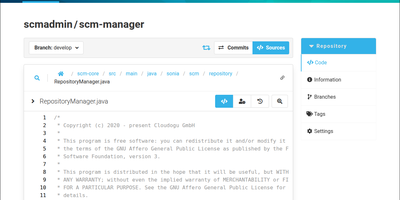
SCM-Manager puts Git, Mercurial, and Subversion repositories behind one web interface, so modern projects and legacy archives live on the same server under the same accounts and permissions. Create or import repositories into namespaces, then browse code, commits, branches, tags, and diffs in the browser instead of cloning just to look around. Central user and group management applies fine-grained permissions per namespace and repository, so contractors see the one project they joined and nothing else. Everything in the interface can also be driven through a Level 3 REST API, which makes bulk repository creation, permission audits, and migration scripts ordinary HTTP calls. Plugins installed from the built-in plugin center add pull-request style code review, build status from your CI, links into issue trackers, and extra authentication providers. Configuration happens entirely in the web interface, with no config files to edit and no separate database or web server to install first. Old Subversion and Mercurial repositories keep working beside new Git projects, which ends the usual two-server split during a long migration. The embedded account system works on its own, and authentication plugins take over when accounts already live in another directory your organization runs. Running on a dedicated VPS on RepoCloud with guaranteed CPU, RAM, and SSD, full root SSH access, and a browser serial console. AGPL-3.0 licensed.

Ultimate Certificate Manager
Ultimate Certificate Manager, or UCM, runs your own certificate authority from a web interface, so issuing, renewing, and revoking certificates stops being a pile of OpenSSL commands. Create root and intermediate CAs, arrange them in a hierarchy, and manage every certificate through its life: issue, sign, renew in place, revoke with a reason, and export as PEM, DER, PKCS#12, or JKS. Devices and servers enroll themselves through ACME, SCEP, and EST endpoints, while OCSP answers status checks in real time and CRL distribution points publish revocations on schedule. Network discovery scans your address space and reports the certificates it finds, so expiring or unknown certificates surface before they cause an outage. Templates define server, client, code-signing, email, and smartcard profiles, with key types from RSA and elliptic curves to post-quantum ML-DSA, and issuance policies can route sensitive requests through an approval queue. Signing keys can live in an HSM so private material never leaves the hardware, and every key at rest can be encrypted under a master key. Operators sign in with passwords, TOTP, WebAuthn, mTLS, LDAP, OAuth2, or SAML, and role-based permissions decide who may issue, approve, or merely audit. Running on a dedicated VPS on RepoCloud with guaranteed CPU, RAM, and SSD, full root SSH access, and a browser serial console. AGPL-3.0 licensed.
Flight Finder
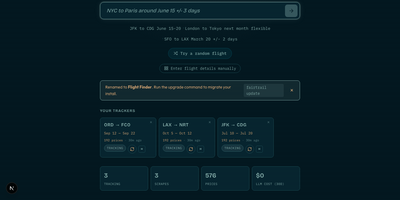
Flight Finder is a self-hosted tracker that watches flight, hotel, and car rental prices for you and alerts you when a fare you care about drops. Search in plain language, such as NYC to Tokyo next month under a set budget, and the app turns that request into tracked routes with flexible date ranges. Price evolution charts show how fares move over days and weeks, so you can see whether a price is genuinely cheap or just pretending. Click any point on a chart to jump straight to the airline booking page, or share the chart through a public link that needs no login. Compare carriers side by side to spot which airlines are softening prices and which are climbing. Test whether browsing from another country changes the quote with the optional VPN comparison. Track hotels by dates, rooms, and guests, follow a specific room rate or the cheapest qualifying offer, and set a target price that triggers a notification. Do the same for car rentals, comparing verified totals before you commit. Alerts arrive through Telegram, email, ntfy, webhooks, Pushover, or WhatsApp, with rules for target prices and percentage drops. Households can share one instance while each person keeps separate trackers and administrators manage assignments. Running on a dedicated VPS on RepoCloud with guaranteed CPU, RAM, and SSD, full root SSH access, and a browser serial console. MIT licensed.
dayGLANCE
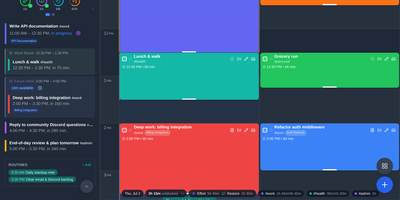
Instead of locking your daily schedule inside proprietary cloud calendars, dayGLANCE offers a privacy-first visual time-blocking planner that syncs directly with your own WebDAV server, Nextcloud instance, or Obsidian vault. Drag tasks from a prioritized Smart Inbox onto an interactive 24-hour timeline, resize blocks as priorities shift, and carve out recurring energy-tagged Frames for deep work or administrative batches. The live Glance panel highlights your current commitment, remaining free time, and daily routines, then transitions into GLANCEahead each evening to preview tomorrow's start time, deadlines, and total committed hours. Switch between multi-day, single-day, weekly, and monthly layouts, or launch the fullscreen Day Dial to view your schedule, solar daylight arc, and watch-style progress complications on a secondary wall display. Long-term work stays organized inside a Goals and Projects hierarchy with duration-weighted progress bars, visual roadmaps, and dedicated hyperGLANCE focus workspaces that pair a Pomodoro timer with project notes and subtasks. Bidirectional Obsidian synchronization reads and writes markdown daily notes and wikilinked tasks directly, while optional bring-your-own-key AI assistants and encrypted backups keep your productivity workflow completely under your control. Running on a dedicated VPS on RepoCloud with guaranteed CPU, RAM, and SSD, full root SSH access, and a browser serial console. MIT licensed.
JobNavigator
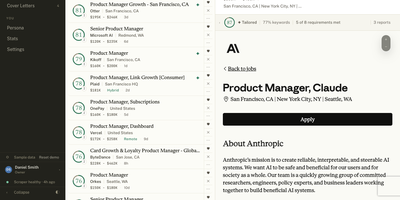
JobNavigator runs your whole job hunt as an automated pipeline, scraping career pages and job boards, scoring every posting against your résumés, and tracking each application to its outcome. Discovery fans out across company career pages through twelve ATS handlers, aggregators like LinkedIn, Indeed, and ZipRecruiter, and a Chrome extension that saves any posting you stumble on. Each new job is scored against your base résumés, lightly for a quick number or in full, with keyword coverage and requirement mapping that show exactly where you match and where you do not. Strong matches get a tailored résumé from eight PDF templates and a cover letter written from your persona, ready for your review before anything is sent. The extension then auto-fills application forms and drafts answers to free-text questions from your stored Q&A bank. Every application moves through stages and interviews in one tracker, while Gmail polling spots replies and updates the status for you, and Telegram delivers new-job alerts and a daily digest. A household can share one install with up to five accounts, each keeping its own jobs, résumés, and PIN, while scraping runs once for everyone. Running on a dedicated VPS on RepoCloud with guaranteed CPU, RAM, and SSD, full root SSH access, and a browser serial console. MIT licensed.
Saki Panel
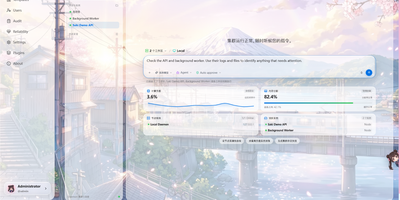
Saki Panel is a self-hosted operations console that manages your game servers, containers, and background processes across multiple Linux machines, with an AI assistant sitting inside the workspace when something breaks. Start, stop, restart, and monitor nine kinds of instances, from Minecraft and Steam game servers to Docker containers, Compose stacks, Node and Python apps, and plain shell commands. Remote nodes connect over SSH and report CPU, memory, and disk metrics to a cluster dashboard, so every machine is visible in one place. When an instance crashes, Saki Watch records the exit and its error fingerprint, then helps diagnose the cause from live logs, files, and metrics instead of making you copy text between a terminal and a chat window. Proposed fixes appear as diffs that need your approval, are graded by risk level, and can roll back automatically if verification fails after a patch. Day to day work happens in the same console: a web terminal, a file manager with an editor and archive support, database tools for SQLite, MySQL, PostgreSQL, and Redis, and cron-scheduled tasks with full run history. Role-based access with dozens of permission codes, audit logs, and incident notifications through webhooks or Telegram keep a small team in control. Running on a dedicated VPS on RepoCloud with guaranteed CPU, RAM, and SSD, full root SSH access, and a browser serial console. Apache-2.0 licensed.
Flus
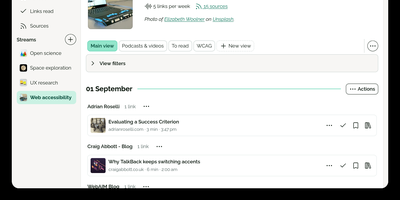
Flus is a calm feed reader, read-later app, and bookmarking space combined into one self-hosted reading home for the blogs, podcasts, video channels, and articles you follow. You follow sources through RSS, Atom, or JSON feeds and organize them into thematic streams, then let the Journal suggest what to read next from everything you follow at a pace you control. Links you want to keep move into collections where annotations and tags record why they mattered, and the to-read and already-read lists keep unfinished reading from silently disappearing. Collections, streams, and individual links can be shared publicly on your profile so others can follow them, or privately with specific collaborators, and everything interoperates through Atom feeds, Mastodon sharing, OPML import, full data export, and a developer API. A powerful search engine finds saved material later, tracking parameters are detected and stripped from URLs, and the installable web app plus browser extensions for Firefox and Chrome make saving a link a one-click habit from anywhere. Running on a dedicated VPS on RepoCloud with guaranteed CPU, RAM, and SSD, full root SSH access, and a browser serial console. AGPL-3.0 licensed.
Engraphis
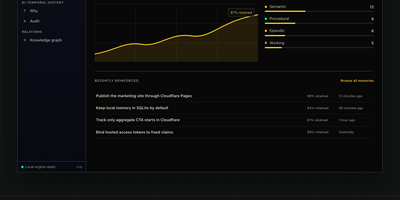
Engraphis is a durable memory layer for coding agents that answers questions like what did we decide about the auth layer three weeks ago, and why, with inspectable project memory that survives across sessions and repositories instead of evaporating when a chat ends. Store a decision once and recall it later in a new session, scoped by workspace, repository, and session so one project's facts never leak into another's context. Recall blends vector, lexical, graph, and code-aware retrieval, then packs the strongest evidence into a hard context budget your agent can actually use. Every returned fact keeps its provenance attached, and the engine cites its support or abstains when the evidence is too weak to trust. Facts are never silently overwritten: bi-temporal history preserves earlier versions, and a timeline view surfaces superseded knowledge when you need to know what used to be true. Index a repository into a code-symbol graph and ask what calls a function before you change it. Conflicting or quarantined memories wait in a review queue for a human decision. Running on a dedicated VPS on RepoCloud with guaranteed CPU, RAM, and SSD, full root SSH access, and a browser serial console. Apache 2.0 licensed.
GymCoach
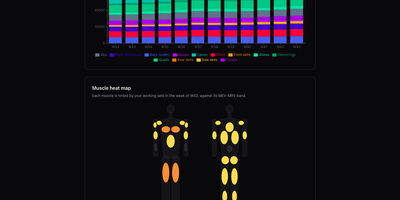
Strength training, cardio, and body metrics land in one workout log on your own server, backed by an optional AI coach that explains its advice from your real numbers. Quick entry such as 100x8@9 logs weight, reps, and effort in one line, with a rest timer, plate-loading calculator, and warm-up ramp beside the set table. A weight picker offers only loads your equipment can build, and a readiness check-in adjusts the suggested load and says why. Templates for 5/3/1 BBB, GZCLP, nSuns, PPL, and Upper/Lower run as written and edit like any custom program. Progress pages chart estimated 1RM, weekly volume per muscle group against MEV and MRV bands, a muscle heat map, bodyweight goals, and a training calendar. Garmin FIT, TCX, and GPX imports need no cloud account and add heart-rate charts and aerobic decoupling to each run or ride. The coach writes a weekly debrief, chats in a streaming conversation, and drafts a full program from a one-sentence goal, using your own Anthropic or OpenRouter key. History imports from Strong or Hevy CSV files with a dry-run preview and exports to CSV or TCX, and an MCP connector lets ChatGPT or other agents analyse it. The app installs as an offline-capable PWA, speaks English, French, Russian, and German, and keeps every user's data separate. Running on a dedicated VPS on RepoCloud with guaranteed CPU, RAM, and SSD, full root SSH access, and a browser serial console. MIT licensed.
Playerr
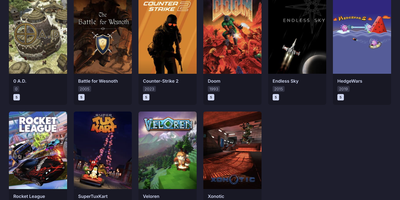
Playerr is a self-hosted library manager that organizes your game collection the way Radarr and Sonarr organize movies and shows, with scanning, metadata, and automated downloads in one web interface. Point it at your game folders and its recognition engine recursively identifies platforms and maps local files to the right titles. Each game is enriched with artwork, descriptions, ratings, and release dates pulled from IGDB and Steam, turning a pile of folders into a browsable collection. Search indexers through Prowlarr and Jackett when you want to grow the library, then hand downloads to qBittorrent, Transmission, SABnzbd, or NZBGet and watch progress from the same screen. Folders are renamed automatically from sanitized IGDB titles while the original release structure stays intact, so the library stays tidy without manual filing. Your Steam library syncs into the same unified view alongside locally stored games. Installation packages are processed automatically, with the primary executable identified to streamline setup. Remote access can be enabled from settings so the collection is reachable from phones, tablets, and laptops on your network. Running on a dedicated VPS on RepoCloud with guaranteed CPU, RAM, and SSD, full root SSH access, and a browser serial console. MIT licensed.
Canvix
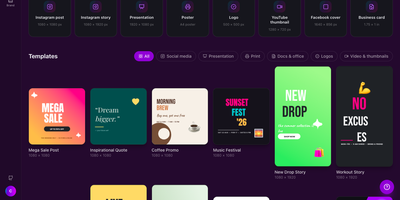
Canvix is a self-hosted design studio that lets anyone create social posts, presentations, posters, logos, and thumbnails in the browser with a drag-and-drop editor, 110 ready-made templates, and exports with no watermarks. You start from a template sized for the platform you are publishing to, then drag in shapes, lines, stickers, and your own images, moving, resizing, and rotating everything directly on the canvas. Text gets proper typography controls, with bundled fonts, styles, spacing, alignment, and curved text that arcs across the design. Layers can be reordered and locked while smart guides snap elements into alignment, and a full undo history plus autosave means a closed tab never costs you the work. Finished designs export as PNG, JPG, SVG, PDF, or video at up to three times resolution, ready to publish anywhere. Free accounts keep each person's designs private to them, while share links open a design for anyone to view or continue editing. Version snapshots let you roll a design back when an experiment goes wrong. The AI tools, magic edit, magic write, background removal, and translation, run against your own API keys, so nothing is metered. An optional MCP endpoint even lets AI assistants create and edit designs for you. Running on a dedicated VPS on RepoCloud with guaranteed CPU, RAM, and SSD, full root SSH access, and a browser serial console. MIT licensed.
HotHost
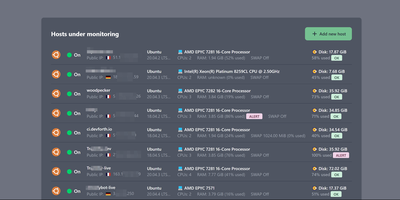
HotHost answers the only two questions that matter about every server you own, is it up and is the disk about to fill, before your users ask them instead. One web container collects metrics from a tiny agent you paste onto each host as a Docker or shell snippet, and the fleet lands in a single table: hostname, public IP, RAM and disk usage, CPU model and cores, swap state, and country. Disk and RAM get loud ALERT badges at a configurable threshold, ninety percent by default, and notifications fire on failure and again on recovery, so a resolved incident closes its own loop. The same console watches your websites directly, requesting each URL on your interval and checking the status code, a required keyword in the response, or basic auth behavior. SSL certificates get an expiration reminder fourteen days out by default, long before the browser warnings start. When memory climbs, the top ten RAM-consuming processes are charted over the last two days, turning "something is eating the box" into a named culprit. Alerts route through Email, Slack, Telegram, or Gmail plugins, and the plugin system accepts your own notifiers. Running on a dedicated VPS on RepoCloud with guaranteed CPU, RAM, and SSD, full root SSH access, and a browser serial console. MIT licensed.
Thesys
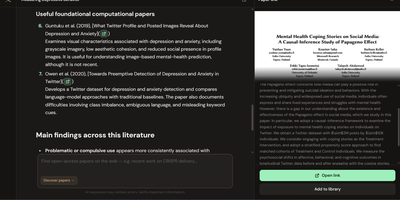
Thesys is a research workspace where you search academic papers, build your own library, and ask questions that answer with citations you can click straight onto the highlighted passage of the PDF. Discovery searches OpenAlex and arXiv in one pool, so a paper you find can be previewed and added to your library without leaving the workspace. Uploaded PDFs are ingested locally, and when you ask a question the answer cites its sources in the document, jumping the preview to the retrieved passage with either a full-passage or a tighter focused highlight. Reader mode opens a paper full-width so you can select any span of text and ask about that exact passage. Document summaries follow a consistent structure of problem statement, methodology, key findings, limitations, and metrics, with citations that still land on the source text. Figures and flowcharts are described during ingest, so questions and summaries can reference them too. When two papers disagree, Compare mode takes one claim and classifies each retrieved pair as corroboratory, contradictory, or neutral, with confidence shown in a side panel. Your bibliography exports as BibTeX, RIS, EndNote, or CSV for whatever reference manager you already use. Papers, embeddings, and chat history stay on your own disk the whole time. Running on a dedicated VPS on RepoCloud with guaranteed CPU, RAM, and SSD, full root SSH access, and a browser serial console. AGPL-3.0 licensed.
Dobase
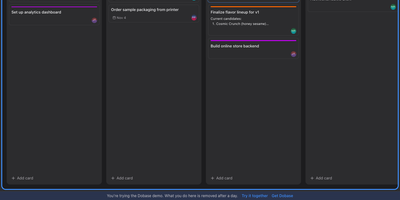
Dobase replaces the scattered pile of team subscriptions with one self-hosted workspace where mail, kanban boards, documents, chat, to-do lists, files, a calendar, and video rooms live side by side. Install only the tools your team needs, and share each one with exactly the collaborators you choose; a board for the whole company and a private todo list can sit in the same window. Several people can type in the same document at once, watching each other's colored cursors while the text merges cleanly, and presence faces in the sidebar show who is inside every tool right now. Open tools arrange themselves as tiles in a wide window, so chat can sit next to the board it discusses and the calendar under the mail you are answering. Pressing Cmd+K searches cards, todos, documents, files, chat, events, and mail in one motion, and nearly everything also works from the keyboard alone. Mail threads conversations and lets you accept calendar invites from the message, files get public links guarded by a password and an expiry, and the calendar syncs with CalDAV services or runs on its own. Video rooms with screen sharing join the same workspace, mentions and notifications follow you, and an email digest catches up anyone who was away. Running on a dedicated VPS on RepoCloud with guaranteed CPU, RAM, and SSD, full root SSH access, and a browser serial console. MIT licensed.
Betterlytics
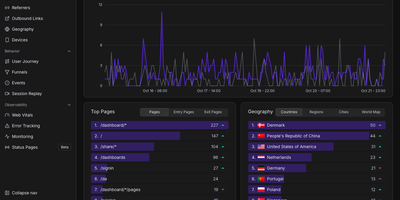
Page views, funnels, session replays, error reports, Core Web Vitals, and uptime checks share one cookieless dashboard in Betterlytics, so teams stop stitching several tools together. The overview charts visitors, page views, bounce rate, and visit duration against the previous period, and annotations mark launches or campaigns right on the timeline. Breakdowns cover referrers, channels, UTM campaigns, browsers, devices, and operating systems, with visitor locations on a world map once an optional MaxMind key is added. Custom events, global properties such as plan or app version, and outbound link tracking show what visitors actually do, while user journey diagrams and funnels reveal where they drift away. Session replay is opt-in per tracking script, masks text and form inputs by default, and can keep recordings in your own S3-compatible bucket. Error tracking groups JavaScript errors with stack traces, a session trail, and a link to the matching replay. Uptime and SSL monitors alert through Slack, Discord, Teams, or webhooks and feed public status pages on your own domain. Teammates join by invitation, two-factor login is available, and a built-in MCP server lets Claude, Cursor, or Codex answer traffic questions. A script of about 3.5 KB or a WordPress plugin handles installation. Running on a dedicated VPS on RepoCloud with guaranteed CPU, RAM, and SSD, full root SSH access, and a browser serial console. AGPL-3.0 licensed.
Senlo
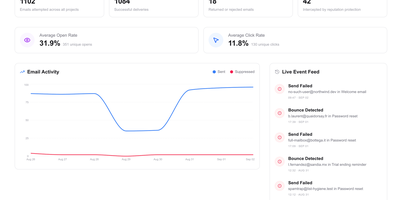
Product teams get a visual home for the transactional and lifecycle emails their application sends with Senlo, which sits on top of the delivery provider they already use instead of replacing it. A drag-and-drop editor builds responsive templates without hand-written HTML, exports to MJML or plain HTML when needed, and keeps templates versioned so edits can be reviewed and rolled back safely. Event-triggered automations turn product activity into onboarding sequences, trial reminders, and win-back flows: your app feeds contact events through the API, and Senlo decides which message goes out next. The transactional API sends a rendered template in one call, so receipts, password resets, and alerts stop living as scattered strings in your codebase. Delivery stops being a black box, with sends, deliveries, bounces, and engagement tracked per workspace, a live feed of failures, and suppressions that block bad addresses before they damage sender reputation. Because sending stays with Resend, Postmark, SES, Mailgun, or your own SMTP server, switching providers never means rebuilding a template. Running on a dedicated VPS on RepoCloud with guaranteed CPU, RAM, and SSD, full root SSH access, and a browser serial console. AGPL-3.0 licensed.
Octo
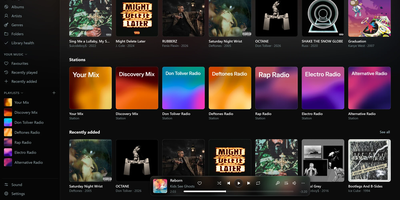
Octo turns Navidrome into a streaming service with a memory: search finds songs you do not own yet, they play the moment you pick them, and the ones you heart come home as properly tagged files that stay in your library forever. Point the music apps you already use at Octo's endpoint and sign in with your Navidrome login, and your library behaves as before, except search now reaches past your shelves and any result streams instantly as a preview with zero disk impact. Press plus or heart a keeper and Octo downloads the best copy it can find, FLAC first, from Soulseek peers or your own Lidarr, catches lossless files that were faked from MP3s, then identifies, tags, covers, and files the song so it appears in your library like something you bought. Bring the music you already love by importing liked songs and playlists from Spotify or any other service; Octo shows what you already own and quietly fetches the rest a few songs an hour. Stations and discovery playlists learn from your listening through Last.fm and refresh themselves, the downloads drawer shows every fetch with its full decision log, and the browser admin dashboard runs settings, notifications, family accounts, and one-click updates. Running on a dedicated VPS on RepoCloud with guaranteed CPU, RAM, and SSD, full root SSH access, and a browser serial console. GPL-3.0 licensed.

Will Be Done
Seven columns, one per day, hold your whole week of tasks in Will Be Done, and rebalancing a crowded Wednesday means dragging a card to Friday. Unfinished tasks keep their day and get a quiet yellow marker instead of piling into tomorrow as red overdue badges. The Today view narrows the screen to one day, and Stash holds the few tasks you want close at hand without picking a date. Projects get kanban boards with columns you define, such as Week, Month, Ideas, and Someday, and separate spaces keep work and personal planning apart. Tasks carry descriptions and checklists, and recurring tasks repeat daily, weekly, monthly, or yearly with custom intervals and end dates. Every device holds a full local database, so planning, completing, and rescheduling happen with no network at all, and changes sync across tabs and devices once the server is reachable. Vim keys such as h, j, k, and l move through everything, and a global quick-add shortcut in the Linux, macOS, and Windows desktop apps captures a task without leaving the window you are in. Todoist and TickTick imports bring existing projects along, and a token-protected HTTP API with OpenAPI docs lets scripts, cron jobs, and bots drop tasks straight into your stash. Running on a dedicated VPS on RepoCloud with guaranteed CPU, RAM, and SSD, full root SSH access, and a browser serial console. AGPL-3.0 licensed.