ChurchCRM
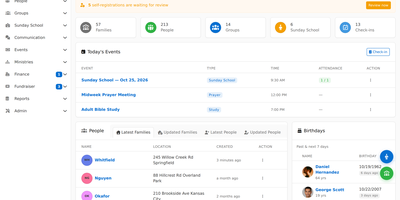
Church offices juggle member directories, giving records, event rosters, and volunteer schedules, and ChurchCRM, a free church management system, brings all of it into one browser-based workspace. Administrators keep a record for every person and family, with contact details, roles, notes, custom properties, and a timeline, while visitors submit a self-registration form that staff approve before it reaches the printed directory. Treasurers log donations against family pledge accounts, follow numbered giving envelopes and multi-year pledges, and batch gifts into deposit slips with printable bank forms. Ministry leaders organize teams, committees, Bible studies, and Sunday School rosters, then schedule volunteers into positions with substitutions and reminder email. Events can be one-time or recurring, appear on month, week, day, and list calendars beside birthdays and anniversaries, and collect attendance through kiosk tablets that alert parents by email or SMS. Members sign in to a portal to update their details, confirm their household, and check the church calendar and their volunteer schedule. A family map shows where households live and which ones are close by. Reports produce directories, mailing labels, birthday lists, financial statements, and custom queries, while CSV import, an Export Hub, and one-click database restore handle moving data. Role-based permissions and two-factor sign-in protect sensitive records, and plugins add MailChimp and Vonage SMS. Running on a dedicated VPS on RepoCloud with guaranteed CPU, RAM, and SSD, full root SSH access, and a browser serial console. MIT licensed.

Ech0
Ech0 is a self-hosted personal microblog that gives you a public timeline of short posts, links, and media on your own domain, with no ads, algorithms, or subscription in the way. Write in a Markdown editor with live preview, organize posts with tags, and let links and GitHub projects unfurl into rich cards while Bilibili and YouTube videos play inline. Attach images, audio, and video to any post, browse them in an inline gallery with built-in players, and manage uploads in a visual file manager. Visitors can like, share, and comment, you moderate from the panel with captcha protection, and RSS lets readers follow without an account. Sign in with passkeys, OAuth2, or OIDC, issue scoped access tokens, and run extra accounts under Owner, Admin, and regular roles. Media can sit on local disk or any S3-compatible bucket, and snapshots, scheduled backups, and portable capsules move the whole timeline to another instance or compile it into a static site. Ech0 Copilot recaps recent posts in one click and lets you chat with your own archive, while an MCP server, webhooks, and a documented API connect AI assistants and automations. Follow live logs in a web console, administer from a terminal UI or CLI, and install it as a PWA with dark mode and multiple languages. Running on a dedicated VPS on RepoCloud with guaranteed CPU, RAM, and SSD, full root SSH access, and a browser serial console. AGPL-3.0 licensed.
TeXlyre
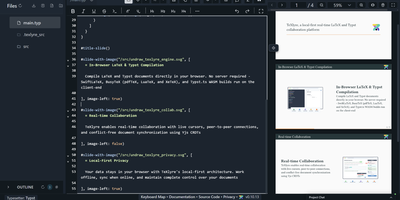
In TeXlyre, two coauthors edit the same LaTeX or Typst file at once, and the PDF compiles inside the browser tab instead of on someone else's server. Start from a template: arXiv preprint, IEEE paper, Tufte book, Beamer deck. pdfTeX, XeTeX, and LuaTeX compile with BibTeX and Biber. Errors turn into readable cards that jump to the failing line. Live cursors show who is typing where. A shared link brings coauthors in, no accounts needed. Chat sits beside the editor, and comments can be discussed and resolved. Tracked insertions and deletions land in a review panel to accept or reject. Draw.io and TikZ editors open inside the project for shared diagrams. MathLive edits a formula under the cursor with a virtual keyboard. A bibliography panel tidies BibTeX, matches DOIs, and imports from Zotero and OpenAlex. Large files travel straight from one collaborator's browser to another. Projects export as ZIP, sync to a local folder, or back up to GitHub, GitLab, Gitea, and Codeberg. Vim, Emacs, and Helix keybindings are one setting away. The app installs as a progressive web app and works offline. Language servers like LTeX LS Plus, Harper, and Tinymist plug in through recipes beside your own signaling and TeX Live package servers. Running on a dedicated VPS on RepoCloud with guaranteed CPU, RAM, and SSD, full root SSH access, and a browser serial console. AGPL-3.0 licensed.
Jetlog
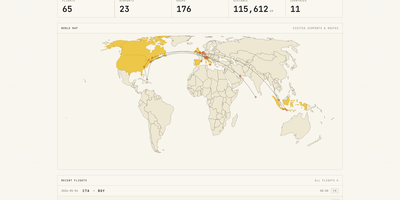
A personal flight logbook you host yourself, Jetlog draws every route you have flown on a pannable world map and turns the totals into charts. The home page opens with counts of flights, airports, hours, distance, and countries above that map, where dots mark visited airports and lines trace each trajectory. Settings let markers and lines grow with visit frequency and shade the countries where you have landed. Logging a flight takes only two airports and a date. Type a flight number and press Fetch to pre-fill the origin, destination, and airline, and a utility links connection flights automatically. Duration and distance are calculated for you and stay editable, with an option to use airport time zones. The All Flights table lists route, times, duration, distance, seat, class, and airline with filters and configurable columns, and each flight opens a detail page with airport data, a route map, tail number, and aircraft. A Statistics page charts flights per month, cumulative distance, most visited airports, most common airlines, ticket class, and seat for any time frame. History arrives through MyFlightRadar24 or custom CSV imports and leaves as CSV or iCal. Family members can share one install with separate logbooks, an admin manages the accounts, and the responsive layout works on a phone at the gate. Running on a dedicated VPS on RepoCloud with guaranteed CPU, RAM, and SSD, full root SSH access, and a browser serial console. GPL-2.0 licensed.
Mere Medical
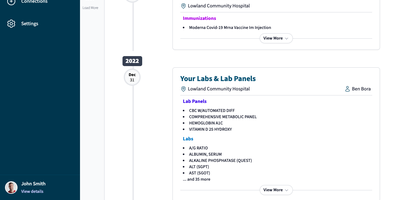
Mere Medical pulls the records from every hospital and clinic patient portal you use into one date-ordered timeline, so lab panels, immunizations, and procedures from different systems sit side by side. Each timeline card shows its facility and, when recorded, the provider, and expands with View More; a Jump To index leaps between years. The Summary tab condenses bookmarked labs, medications, conditions, immunizations, care plans, and allergies onto one dashboard whose cards can be dragged into any order or hidden. Lab results are graphed over time wherever the units line up, and a search bar finds specific entries by keyword. Connections sync from Epic MyChart, Oracle Health (Cerner), Veradigm, DrChrono, eClinicalWorks Healow, athenahealth, and NextGen, and several sources can feed one profile at once. Everything lives on your device, so records stay searchable offline and no account sign-in is needed; an optional password encrypts them at rest. Separate user profiles hold each person's records, and JSON export and import make backups simple. Experimental AI features add semantic search that links a phrase like high blood sugar to related labs, plus a Mere Assistant that answers plain-language questions about your records using local Ollama models or an OpenAI key. Install it on a phone or desktop home screen for quick access in the waiting room. Running on a dedicated VPS on RepoCloud with guaranteed CPU, RAM, and SSD, full root SSH access, and a browser serial console. MIT licensed.

Will Be Done
Seven columns, one per day, hold your whole week of tasks in Will Be Done, and rebalancing a crowded Wednesday means dragging a card to Friday. Unfinished tasks keep their day and get a quiet yellow marker instead of piling into tomorrow as red overdue badges. The Today view narrows the screen to one day, and Stash holds the few tasks you want close at hand without picking a date. Projects get kanban boards with columns you define, such as Week, Month, Ideas, and Someday, and separate spaces keep work and personal planning apart. Tasks carry descriptions and checklists, and recurring tasks repeat daily, weekly, monthly, or yearly with custom intervals and end dates. Every device holds a full local database, so planning, completing, and rescheduling happen with no network at all, and changes sync across tabs and devices once the server is reachable. Vim keys such as h, j, k, and l move through everything, and a global quick-add shortcut in the Linux, macOS, and Windows desktop apps captures a task without leaving the window you are in. Todoist and TickTick imports bring existing projects along, and a token-protected HTTP API with OpenAPI docs lets scripts, cron jobs, and bots drop tasks straight into your stash. Running on a dedicated VPS on RepoCloud with guaranteed CPU, RAM, and SSD, full root SSH access, and a browser serial console. AGPL-3.0 licensed.
Houndarr
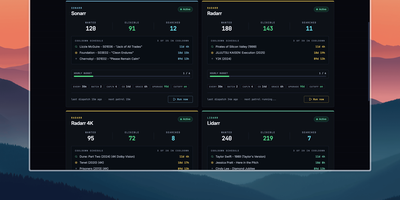
Radarr, Sonarr, and their sibling apps watch RSS feeds for new releases but never go back for what your library is still missing, and Houndarr fills that gap by asking them to search in small, polite batches. It reads the wanted lists of every connected Radarr, Sonarr, Lidarr, Readarr, and Whisparr instance and sends a few search commands per cycle, so a big backlog drains over days instead of arriving as one Search All Missing burst. Each instance has its own batch size, sleep interval, hourly cap, per-item cooldown, and post-release grace period, plus an optional download-queue limit, allowed search windows such as 09:00-23:00, and tag filters that include or exclude items. Three independent passes run per instance: missing items, cutoff-unmet items below your quality profile, and upgrades for files that already meet cutoff, with the last two off until you enable them. Sonarr, Lidarr, and Readarr can search by season, artist, or author, and search order is random or oldest-first. The dashboard shows library health, recent hunts, hourly budgets, and a cooldown schedule per instance, with Run Now buttons for on-demand cycles. The Logs page records every search and skip with its reason in a filterable audit trail that copies as TSV. A key-gated widget endpoint feeds Homepage dashboards, and built-in login or reverse-proxy authentication protects the interface. Running on a dedicated VPS on RepoCloud with guaranteed CPU, RAM, and SSD, full root SSH access, and a browser serial console. AGPL-3.0 licensed.
OpenAlgo
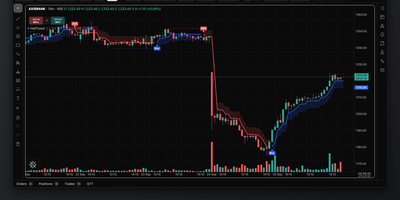
Trading alerts from TradingView, Amibroker, ChartInk, Excel, or a Python script turn into orders at your own broker through OpenAlgo, a self-hosted trading desk for Indian markets. One REST API handles orders, positions, holdings, funds, quotes, and market depth across more than 35 brokers, including Zerodha, Upstox, Angel One, Fyers, and Dhan, while a WebSocket feed streams live prices. Strategies can be wired together without code in Flow, a drag-and-drop canvas of data, indicator, condition, and order nodes with webhook triggers, or written in Python and scheduled with start and stop times in the built-in editor, each in an isolated process with live logs. The charting terminal places orders straight from the chart, with layouts of up to eight charts, over 100 indicators, drawing tools, and bar replay. Options traders get an option chain with live Greeks, OI tracker, max pain, straddle charts, a 3D volatility surface, a GEX dashboard, and a strategy builder with payoff diagrams. Analyzer mode runs any strategy against real market data with 1 crore rupees of sandbox capital. Semi-auto mode in the Action Center holds each order for your approval, and the AI agent charts, analyzes, and drafts strategies but pauses for sign-off on every order. Telegram alerts, a latency monitor, a P&L tracker, and Historify downloads with CSV and Parquet export cover daily operations. Running on a dedicated VPS on RepoCloud with guaranteed CPU, RAM, and SSD, full root SSH access, and a browser serial console. AGPL-3.0 licensed.
ShellHub
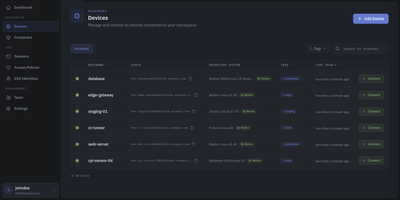
Every server, embedded board, and edge gateway you manage becomes reachable through one SSH address in ShellHub, even when it sits behind NAT with no public IP and no open inbound port. A small agent on each device dials out to your server, so a box on a customer LAN or a cellular link needs nothing beyond outbound web access. Connect with the stock ssh client by typing [email protected]@server, or open a terminal in the browser, and scp, sftp, rsync, and port forwarding work unchanged. SSH identities tie every key to a named team member, so removing someone ends their access on every device at once. Default-deny access policies grant or block members, roles, users, or API keys by device tag, Linux login, and source address, and can require a fresh browser confirmation before a session opens. Provisioning keys enroll whole fleets through automatic, manual, webhook, or allowlist acceptance, with usage limits, expiry dates, and tags. The Sessions page records who connected to which device, as which login, and from where, and browser terminals can be recorded and replayed. A Docker connector turns containers into devices that policies can grant one by one. Four member roles shape what each person can change, and the HTTP API, API keys, and an MCP server let scripts and AI assistants list devices and review sessions. Running on a dedicated VPS on RepoCloud with guaranteed CPU, RAM, and SSD, full root SSH access, and a browser serial console. Apache-2.0 licensed.
MISP
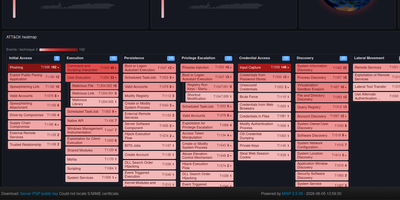
MISP is an open source threat intelligence platform where analysts log indicators and incidents, see how they connect, and share them with trusted organizations. Each case is an event holding attributes and structured objects such as files, network connections, and email messages, with Markdown reports beside the machine-readable data. A correlation engine links events that share values, including fuzzy-hash and CIDR matches, and warning lists flag benign values before they cause false positives. Taxonomies and galaxies tag events with TLP levels, threat actors, malware families, and MITRE ATT&CK techniques. Analysts explore relationships in an event graph and a correlation graph with a timeline, and build drag-and-drop dashboards with maps and ATT&CK heatmaps. Sharing groups control who sees which event, and instances synchronize with partner organizations with distribution settings down to a single attribute. Free-text, URL, bulk, and STIX imports fill the database, and exports reach Suricata, Snort, Zeek, OpenIOC, CSV, STIX 1 and 2, and RPZ zones. A REST API, the PyMISP library, expansion modules, and workflows enrich data and automate publishing. ZeroMQ and Kafka streams announce every change to connected tools. Running on a dedicated VPS on RepoCloud with guaranteed CPU, RAM, and SSD, full root SSH access, and a browser serial console. AGPL-3.0 licensed.
RStudio Server
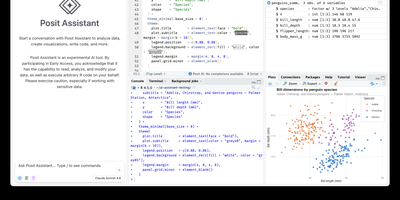
Open a browser tab, sign in, and the whole RStudio workbench is waiting there, running against R on a Linux server instead of your laptop. The familiar four-pane layout holds a source editor, an R console, Environment and History tabs, and Files, Plots, Packages, Help, and Viewer tabs. The editor opens R scripts, R Markdown, Quarto, and Python files, with code completion, diagnostics, section outlines, and a visual mode for Quarto documents. A Terminal tab and a Python console sit beside the R console, and the Data Viewer sorts, filters, and searches data frames and nested lists. Editor breakpoints and tracebacks help debug functions, while Background Jobs run long scripts in separate R sessions so the IDE stays usable. Shiny apps and Plumber APIs run as background jobs with live reload, and a Git pane handles diffs, commits, pushes, and branches. The Connections tab browses databases, and finished reports go to Posit Connect, shinyapps.io, Quarto Pub, or RPubs. Optional Posit Assistant adds an AI chat pane that works with the model provider you choose, and administrators can switch it off. Because everything runs server-side, a class, a lab, or a team can share one large-memory machine and keep computation next to the data without installing anything locally. Running on a dedicated VPS on RepoCloud with guaranteed CPU, RAM, and SSD, full root SSH access, and a browser serial console. AGPL-3.0 licensed.
Loomio
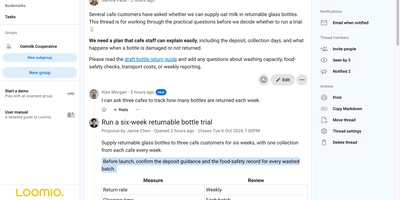
Decisions that scatter across email threads and chat scrollback get one home in Loomio, where a group discusses a question, votes, and publishes what it decided. Every decision starts as a thread with context, comments, @mentions, reactions, tags, and attachments, and tasks inside it carry assignees and emailed due-date reminders. Proposals ask for a defined response plus an optional written reason, using sense check, advice, consent, or consensus templates. Polls handle simple choices, scores, dot voting, ranked choice, meeting-time availability, and multi-winner STV elections. Coordinators set a participation quorum, require a vote share, weight votes, limit voting to appointed delegates, or hide results until close with anonymous voting. Groups nest subgroups, pick Open, Closed, or Secret visibility, and admit members freely, by request, or by invitation. People reply to discussion emails and catch up through a daily digest, and webhook integrations post invitations and outcomes to Slack, Discord, Microsoft Teams, Matrix, and Mattermost. Published outcomes stay searchable, and groups export CSV, HTML, or JSON and print threads to PDF. Comments translate on request, the interface is available in 24 languages, and a user API, server API, and webhooks connect other tools. Running on a dedicated VPS on RepoCloud with guaranteed CPU, RAM, and SSD, full root SSH access, and a browser serial console. AGPL-3.0 licensed.
Velociraptor
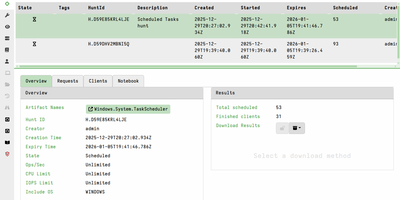
Hunting for a suspicious file, process, or registry key across every endpoint becomes a single hunt in Velociraptor, an endpoint visibility and digital forensics platform. A web console sends tasks to clients on Windows, Linux, and macOS machines, which hold a persistent connection and run each task as soon as it is issued. A hunt runs a VQL artifact, one of more than 400 built in, across selected endpoints, picks up machines that reconnect later, and tracks which hosts have answered. Each hunt and collection opens into a notebook where markdown and live VQL cells group, filter, and timeline the results. A virtual file system browses a client's directories and fetches files through file, NTFS, and registry accessors, with hex and text viewers. Offline collectors bundle chosen artifacts into one binary that writes an optionally encrypted container for later import, suiting machines that never reach the server. Client event queries stream telemetry such as DNS lookups to the server, and server event queries can alert Slack, email, Elastic, or Splunk. Quarantine confines a host's network traffic to the Velociraptor server, and the Shell page runs commands on it. Sign-in works through Google, Azure, GitHub, OIDC, or SAML, with reader, analyst, investigator, and administrator roles. Responders reach for it during threat hunts, compromised host triage with KapeFiles targets, and dead disk image analysis. Running on a dedicated VPS on RepoCloud with guaranteed CPU, RAM, and SSD, full root SSH access, and a browser serial console. AGPL-3.0 licensed.
OHIF Viewer
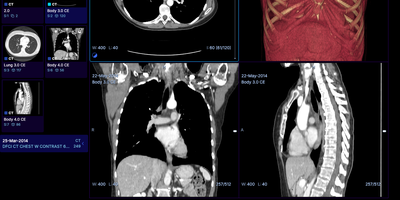
The OHIF Viewer reads CT, MR, PET, and slide microscopy studies straight from a DICOMweb archive and shows them in any browser tab, with no workstation software to install. The study list filters by patient name, MRN, study date, description, modality, and accession number. Each study launches into the workflow mode that fits its modalities. Basic Viewer mode tracks the measurements drawn on images and gathers them in a side panel for review. Layouts include MPR, four-up 3D, volume rendering, and PET/CT fusion with maximum intensity projection. Labelmap tools offer brush, eraser, threshold, and shape segmentation, and DICOM segmentation, RT Structure, and structured report objects display alongside the pixels. PDFs, video clips, ECG waveforms, 4D series, and whole slide microscopy open in the same interface. Hanging protocols arrange series the way each workflow expects. An iframe embed drops the viewer into a portal or research app. Pair it with Orthanc or DCM4CHEE for storage and Keycloak for sign-in. Oncology trial reads, imaging research, and web front ends for a PACS are the usual jobs. Running on a dedicated VPS on RepoCloud with guaranteed CPU, RAM, and SSD, full root SSH access, and a browser serial console. MIT licensed.
MediaWiki
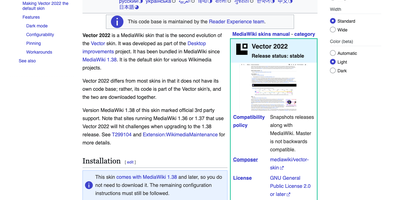
With MediaWiki, the wiki software behind Wikipedia, a team writes one shared knowledge base in plain wikitext or a visual editor while every revision stays saved for comparison and rollback. Page history names the author and edit summary of each change, and a side-by-side diff shows exactly what moved before anyone reverts. Talk pages hold threaded discussions with inline replies, notifications announce mentions and thanks, and watchlists flag the pages you follow. Namespaces, categories, redirects, and reusable templates give a large wiki its structure, and Lua modules written for Scribunto power infoboxes. Uploaded images get automatic thumbnails and a full-screen lightbox. Bundled extensions add PDF handling and math rendering for documentation that needs more than text. Group-based permissions decide who may read, edit, protect, or delete. A wiki can stay open to everyone or sit behind a login. AbuseFilter, CAPTCHAs, blocklists, and two-factor sign-in help fend off spam and account takeovers. Vector 2022 brings a sticky table of contents and an optional dark mode. The interface is localized in over 350 languages. Bots and scripts log in, read, search, and edit with the Action API. Use it for company handbooks, engineering runbooks, course notes, fandom encyclopedias, and public reference sites. Running on a dedicated VPS on RepoCloud with guaranteed CPU, RAM, and SSD, full root SSH access, and a browser serial console. GPL-2.0-or-later licensed.
Gerrit Code Review
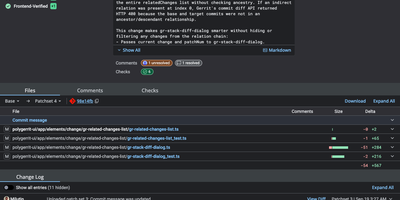
Unlike pull-request forges, Gerrit reviews every Git change as a series of patchsets, and nothing merges until the required approvals are in. Developers upload with a plain git push to a refs/for ref, adding push options for topics, hashtags, work-in-progress, or private changes. Each change gets a page listing reviewers, CCs, an attention set that flags who must act next, and submit requirements driven by labels such as Code-Review and Verified, with a quick approve button for the last missing vote. Side-by-side diffs with syntax highlighting take inline comments written in Markdown, saved as drafts and published together. A Checks tab shows CI runs reported by plugins, and integrations reach Jenkins, GitHub Actions, Zuul, and webhooks. Access rights attach to groups and branch patterns, including regular expressions, and inherit from parent projects and All-Projects. Sign-in works with LDAP, OAuth, OpenID, or HTTP single sign-on, and SAML through a plugin. A query language filters changes by status, owner, reviewer, label, file path, and reviewer count. Projects pick a submit strategy: merge if necessary, fast forward only, rebase if necessary, rebase always, merge always, or cherry pick. A REST API, SSH commands, and a plugin system extend the server, and an optional Review Agent chat panel can summarize a change once an AI provider plugin is installed. Running on a dedicated VPS on RepoCloud with guaranteed CPU, RAM, and SSD, full root SSH access, and a browser serial console. Apache-2.0 licensed.
webtrees
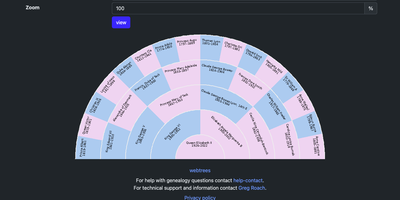
webtrees turns a GEDCOM family file into a private, collaborative genealogy website where relatives anywhere browse ancestors, add photos and sources, and edit together under privacy rules the owner controls. Import a file and each person gets a page of facts, events, and citations, with tabs for families, sources, places, media, and albums and a navigator that jumps to parents, spouses, children, and siblings. Pedigree, fan, hourglass, compact, descendant, interactive, lifespan, relationship, and timeline charts show the same people from different angles, and a pedigree map plots ancestors' birthplaces on OpenStreetMap. Lists sort and filter individuals, families, sources, notes, repositories, and media, with branches that group people by surname. A calendar surfaces births, deaths, marriages, and anniversaries for any day, month, or year, in Gregorian, Julian, Jewish, Hijri, or Jalali dates. Printable PDF reports cover Ahnentafel, family group, descendancy, birth, death, and cemetery records, and search offers general, advanced, and search-and-replace modes for authorized users. Privacy rules apply per site, tree, user, record, and fact, so only authorized users see living people and sensitive details. Editors propose changes, moderators approve them, one site hosts several trees, and the interface comes in more than 60 languages. GEDCOM export lets every tree move to desktop genealogy programs. Running on a dedicated VPS on RepoCloud with guaranteed CPU, RAM, and SSD, full root SSH access, and a browser serial console. GPL-3.0 licensed.
Koha
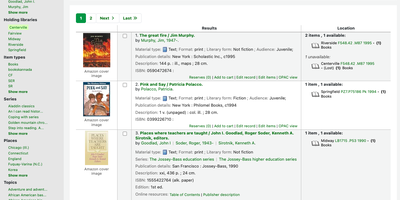
Circulation desk, cataloging workbench, acquisitions office, serials room, and public catalog all share one roof in Koha, an open-source library system that scales across school libraries, branch networks, and consortia. Staff search the catalog with facets for availability, authors, holding libraries, and item types, then open a record to see its cover, subjects, classification numbers, and every copy with its call number, status, and barcode. Catalogers edit MARC 21 or UNIMARC records field by field, copy records in via Z39.50 and SRU searches, and link authorities automatically. At the desk, staff check out, check in, and renew items, work with holds, bookings, and claims, and see overdue warnings and outstanding charges beside each patron. Circulation and fine rules vary by library, patron category, and item type. Acquisitions handles vendors, baskets, budgets, and funds. Serials track subscriptions and issue receiving. A guided report wizard, SQL reports, and statistics wizards summarize circulation and collections. Patrons search the public catalog, place holds, save lists, tag and rate titles, and suggest purchases. Staff tools design notices and slips, print patron cards, set holiday calendars, and import or batch-edit patrons. SIP2 serves self-checkout kiosks, OAI-PMH sets share records, and a REST API exposes patrons, holds, checkouts, and biblios. Lending continues during outages with offline circulation. Running on a dedicated VPS on RepoCloud with guaranteed CPU, RAM, and SSD, full root SSH access, and a browser serial console. GPL-3.0 licensed.