Flare
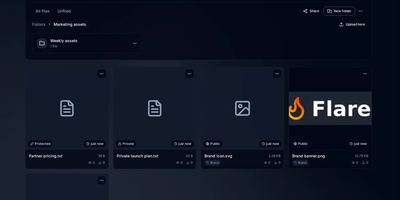
Screenshot, copy link, done: that is the loop Flare is built to make instant on your own server. Connect ShareX, Flameshot, KDE Spectacle, or a plain upload script once, and captures land in a vault you control instead of a third-party host that deletes them next month. Files live in folders with nested structure, bulk moves, automatic tagging rules, and one share link per folder, while previews handle images, video, PDFs, and syntax-highlighted code without downloading anything. Search digs through filenames, dates, and text extracted from images by OCR, so the screenshot from three weeks ago is findable by what it says. Password-protect a sensitive file, keep another private entirely, or publish it with a rich embed that unfurls properly wherever you paste the link. An appearance studio restyles branding, color palettes, and share page layouts, upload profiles carry reusable defaults between browser and screenshot tools, and the extras round out the kit: a URL shortener with click tracking, a pastebin, storage quotas, invite links, and tokens with signed webhooks for your own integrations. Running on a dedicated VPS on RepoCloud with guaranteed CPU, RAM, and SSD, full root SSH access, and a browser serial console. MIT licensed.

Kumiho
Drop a hard drive's worth of comics, e-books, and audiobooks into folders, point Kumiho at them, and the whole collection becomes a library you can browse and read from any browser. The scanner walks nested folders recursively and treats the folders that actually hold pages or files as series, so an existing collection works as it is, with no metadata matching ritual before the first read. Comics and manga open in a responsive viewer built for the format: page turning on a desktop, continuous webtoon scrolling on a phone or tablet. E-books in EPUB, PDF, and TXT open in the same library, while archives in ZIP and CBZ are read directly without unpacking. Audiobooks get a real player, with a chapter list, resume playback that remembers where you stopped, progress tracking, bookmarks, and a sleep timer for listening at night. A series folder can even carry its own soundtrack: an MP3 whose filename matches starts playing as background music while you read. Everything runs from one lightweight Go server in a single Docker container, storing its database and configuration in mounted volumes, so the library sits comfortably on a small VPS next to the files it serves. Running on a dedicated VPS on RepoCloud with guaranteed CPU, RAM, and SSD, full root SSH access, and a browser serial console. Apache 2.0 licensed.
HAProxy Manager
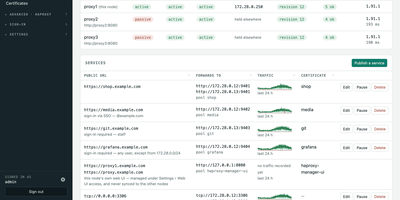
HAProxy Cluster Manager puts a web console on top of HAProxy, so you publish services, issue certificates, and cluster nodes from forms instead of hand-editing haproxy.cfg. Publishing a service takes two inputs, the public URL and the backend address, and the wizard builds the frontend, backend pool, host condition, routing rule, HTTPS listener, certificate, and HTTP redirect, with a preview of the exact configuration before anything applies. Every change is rendered and checked with haproxy -c before it is written, and a failed reload rolls back to the previous file automatically. Certificates come from Let's Encrypt through acme.sh, using HTTP-01 or DNS-01 with about 190 DNS providers, and renewals reload HAProxy and push the new certificate to every node on their own. Any number of nodes share one virtual IP through Keepalived: configuration and certificates sync between them, only the node holding the address is editable, and the dashboard flags split brain, an unclaimed virtual IP, or a node running stale configuration. You can gate services behind basic sign-in or OIDC single sign-on enforced by HAProxy itself, watch traffic statistics and logs, take transition alerts by email, Pushover, or webhook, and expose Prometheus metrics and Home Assistant entities. Running on a dedicated VPS on RepoCloud with guaranteed CPU, RAM, and SSD, full root SSH access, and a browser serial console. GPL-3.0 licensed.

Dewarr
Your want-to-read shelf and your audiobook library finally talk to each other, so the next book you finish can trigger the hunt for the one after it. Dewarr syncs Goodreads shelves, CSV exports, custom public lists, and Hardcover lists, then watches them for new additions worth listening to. Connect Audiobookshelf or Grimmory and it knows what you already own, importing finished downloads into verified library folders instead of leaving files stranded in a downloads directory. Follow authors and series to catch future releases, with back-catalog review, filters, and exclusions before anything is grabbed, including release-day acquisition for titles you are waiting on. When you approve auto-download, it searches MyAnonamouse, Prowlarr, and AudiobookBay, ranks sources by your format, size, and seed preferences, and hands transfers to qBittorrent. Multi-file MP3 releases come back as one chapterized M4B, a chapter per file, ready for your player. The discovery page personalizes shelves with followed lists, award collections, trending books, and new releases. Household members get individual accounts, reading lists, and permissions, with sign-in through OpenID Connect providers or Plex. Notifications for grabs, imports, and digests go out over Discord, ntfy, Apprise, or plain webhooks. Running on a dedicated VPS on RepoCloud with guaranteed CPU, RAM, and SSD, full root SSH access, and a browser serial console. MIT licensed.
Statlite
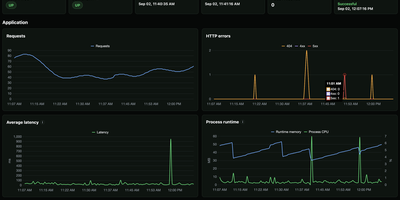
Small server, small monitoring. Statlite watches your applications and their host with a single binary that idles at about 15 MiB, so the observer never becomes the heaviest thing on the box. Point it at a Spring Boot Actuator endpoint and it polls health plus a fixed, curated set of Micrometer metrics: request traffic, latency, CPU, and runtime memory, all drawn as clean charts. Quarkus, Micronaut, and anything else that can answer a fixed JSON metrics profile can join the same dashboard. History lives in one local SQLite file, raw samples only, kept for 90 days by default, so yesterday's latency spike is still there when you go looking. The dashboard also watches the host itself: processor load, memory pressure, and filesystem capacity, including a warning before the metrics database fills its own disk. Restart detection tells you when an application bounced, and per-target Basic Auth support lets you poll protected Actuator endpoints safely. Configuration is one YAML file listing your targets and polling interval, friendly to systemd and Docker alike. Everything is deliberately scoped: no alert manager, no external service, no observability platform to operate. Just open the page and see whether your apps are healthy. Running on a dedicated VPS on RepoCloud with guaranteed CPU, RAM, and SSD, full root SSH access, and a browser serial console. MIT licensed.
Flowplan
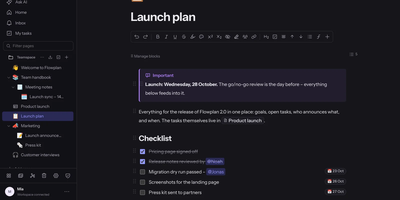
Flowplan puts your team's documents, databases, whiteboards, handwriting notebooks, and daily journal into one self-hosted page tree, so the work lives in a single place you control instead of five subscriptions. Write in a block editor that stays out of the way, and when a number appears mid-sentence, type the calculation and press Tab to drop in the result, or graph functions and vectors in 2D and 3D without leaving the page. The same records can be viewed as a table, board, calendar, timeline, gallery, list, feed, chart, form, or sprint board, with relations, rollups, and formulas tying them together, and projects get ticket numbers, sprints with burndown, and automations on top. Brainstorm on whiteboards with sticky notes, mind maps, and voting; keep a journal page per day with templates and an optional PIN lock; and write by hand in notebooks with lined, grid, or Cornell paper, annotate PDFs, and sketch inside documents with a pressure-sensitive pen. Teammates edit together with live cursors, comment in inline threads, and share single pages with guests through password-protected, expiring links, while permissions reach down to a single record. AI is off until an admin enables it, per feature and per person, and it can run entirely on your own hardware or answer questions about the workspace with links to its sources. Running on a dedicated VPS on RepoCloud with guaranteed CPU, RAM, and SSD, full root SSH access, and a browser serial console. AGPL-3.0 licensed.
Zimi
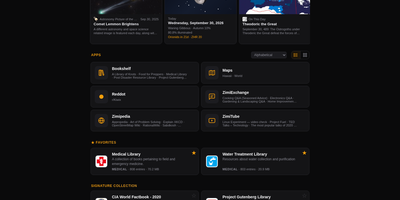
When the internet goes away, your library does not have to: Zimi serves Kiwix ZIM archives of Wikipedia, books, videos and forums through a rich web interface, with one search box querying every archive across more than 100 million articles. Each content type gets its own app: Zimipedia for wikis, the Dictionary for Wiktionary, Bookshelf for books, ZimiTube for video, ZimiExchange for Q&A, Reddot for subreddits and offline street Maps. Bookmarks, lists, likes and highlights live in every app and sync across devices when you sign in, and any article can switch into whichever language edition you hold. The library manages itself: browse the Kiwix catalog of over 1,000 archives, download with one click, let auto-updates keep editions fresh, and seed downloads over BitTorrent with a ratio cap you set. Zimi servers on the same network find each other and pass archives at LAN speed, and one offline switch turns off every internet-bound feature for air-gapped rooms. You can also make your own ZIMs from a web page, a whole site, a video playlist or a folder of files. Access ranges from public to sign-in only with per-archive allowlists, and the JSON API plus MCP server let AI agents search the same library. Docker runs Zimi on port 8899 with your ZIM files and config mounted as volumes. Running on a dedicated VPS on RepoCloud with guaranteed CPU, RAM, and SSD, full root SSH access, and a browser serial console. GPL-3.0 licensed.
Flus
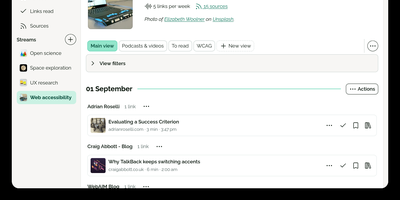
Flus is a calm feed reader, read-later app, and bookmarking space combined into one self-hosted reading home for the blogs, podcasts, video channels, and articles you follow. You follow sources through RSS, Atom, or JSON feeds and organize them into thematic streams, then let the Journal suggest what to read next from everything you follow at a pace you control. Links you want to keep move into collections where annotations and tags record why they mattered, and the to-read and already-read lists keep unfinished reading from silently disappearing. Collections, streams, and individual links can be shared publicly on your profile so others can follow them, or privately with specific collaborators, and everything interoperates through Atom feeds, Mastodon sharing, OPML import, full data export, and a developer API. A powerful search engine finds saved material later, tracking parameters are detected and stripped from URLs, and the installable web app plus browser extensions for Firefox and Chrome make saving a link a one-click habit from anywhere. Running on a dedicated VPS on RepoCloud with guaranteed CPU, RAM, and SSD, full root SSH access, and a browser serial console. AGPL-3.0 licensed.
EveryOS
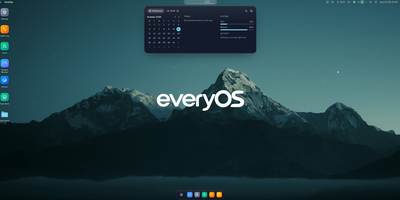
EveryOS gives the Linux server you already own a desktop it never had: open a browser and your machine greets you with windows you can move, snap, and stack, a dock, virtual desktops, widgets, and a launcher, all remembering exactly how you left them. Your files live in a private home with the usual folders, previews, a text editor, and a trash you can restore from, and plugging in a USB disk makes it appear on the desktop ready to mount. An app store installs self-hosted applications from catalogs and follows each deployment, later offering updates that keep your settings, rollbacks when one goes wrong, and backups of app data. The same workspace watches the machine itself: CPU, memory, disk, and network at a glance, systemd services and logs, available package updates, and a Docker view for containers and Compose projects. A real terminal opens in the browser under your own Linux account, Home Assistant arrives as a panel and desktop widgets with its tokens kept on the server, and an AI assistants app can find or install a local model server such as Ollama and chat with it privately. Running on a dedicated VPS on RepoCloud with guaranteed CPU, RAM, and SSD, full root SSH access, and a browser serial console. MIT licensed.
Trina AX
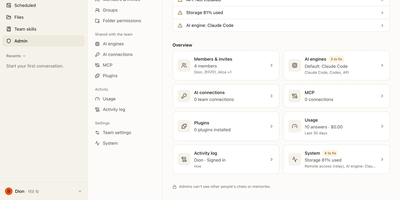
Trina AX is a self-hosted AI workspace where your team chats with real Claude Code and Codex agents that work from your company's own folders, so answers arrive in your formats, with your figures, in your house style. Picture the first morning of a new hire: she asks for a client proposal, and the draft that comes back already reads like the team lead wrote it, because the agent found the same templates and numbers everyone else uses. Admins stock shared, group, and project folders once; everyone else just opens a browser chat on desktop or phone and asks. Nothing leaks sideways in the process, since every file an agent opens is permission-checked as the person asking, and a folder someone cannot see does not exist for their agent in answers, search, previews, or trash. The know-how that makes answers sound right becomes SKILL.md playbooks, governed like ordinary files, and the agent asks a person before editing one. Agents can run up to 150 tool rounds per answer, search the web, spawn sub-agents, and follow scheduled tasks, while admins read an activity log of files touched, never the private conversations themselves. Bring the company Claude or OpenAI account, set per-person usage limits, or route through an Anthropic-compatible gateway to models such as DeepSeek, Kimi, or GLM. Running on a dedicated VPS on RepoCloud with guaranteed CPU, RAM, and SSD, full root SSH access, and a browser serial console. AGPL-3.0 licensed.
Homelab Atlas
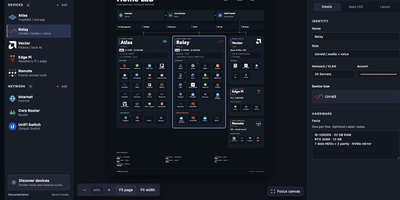
Every homelab eventually earns the question "so what is actually running on all those boxes," and Homelab Atlas turns the answer into a diagram worth posting. Add your servers, the services grouped on each one, and the network gear between them, and the canvas lays everything out automatically with real application logos instead of gray rectangles. Searchable logo pickers work offline, uploads accept your own PNG, JPG, WebP, or SVG marks, and Arrange mode lets you drag and resize cards when the automatic composition is not the story you want to tell. Discovery spares you the typing: point it at Docker or import a saved scan, then review every found device and app, all starting unchecked, before anything joins the diagram as one undoable change. Connections express logical relationships and VLANs, hardware details ride on each card, and your project autosaves in the browser with a downloadable JSON file as the durable copy. When it is time to share, export previews render PNG or SVG with addresses, URLs, and emails hidden by default, plus literal terms you name yourself. Running on a dedicated VPS on RepoCloud with guaranteed CPU, RAM, and SSD, full root SSH access, and a browser serial console. MIT licensed.
lastGLANCE
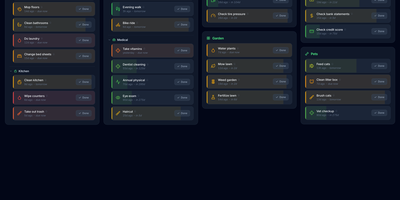
Green means handled, amber means soon, red means overdue: lastGLANCE turns recurring chores and neglected catch-ups into one recency dial you can read at a glance. Add a chore once, set how often it should happen, and its color ages from fresh green through amber to red as days pass, with overdue items floating to the top on their own. Mark a job done and the timer restarts; backdate the entry when you finished it yesterday but only remembered to log it today. Seasonal work hides outside its active months, categories and subcategories arrange into a masonry board, and reminders fire when something crosses its due line. Each chore keeps its own statistics, average interval against target, and a timestamped history with notes, and a contribution-style heatmap in the header charts your whole completion record. People get the same treatment: circles for family, friends, and work contacts show when you last reached out, who usually initiates, and which birthdays arrive in the next thirty days. Households share chores with assignments and a Mine view, everything works offline as an installable PWA, and optional WebDAV or Nextcloud sync merges changes without conflicts under optional end-to-end encryption, with hourly, daily, and weekly remote backups. Running on a dedicated VPS on RepoCloud with guaranteed CPU, RAM, and SSD, full root SSH access, and a browser serial console. MIT licensed.
ProxMate
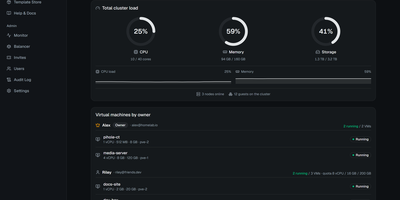
You have a Proxmox cluster with spare capacity and people who keep asking you for a VM: ProxMate turns that cluster into an invite-only cloud where those people help themselves, inside limits you set. Invite links carry CPU, memory, and disk quotas, and tenants spin up VMs or LXC containers from an ISO, the Template Store, or twenty curated cloud images, pasting an SSH key to get a ready-to-SSH box in about a minute. Automatic placement picks the node with the image and the most free capacity, so nobody needs to learn your topology. Projects group machines with per-project usage totals and whole-project start and stop, and any VM can be shared with another tenant as viewer, operator, or manager, never with delete rights. Both a graphical noVNC console and a text console with copy and paste run in the browser, so access never needs open ports, and an optional per-VM browser IDE puts VS Code inside the guest. Backups run on schedules with rolling retention and one-click restore, snapshots are instant, power schedules stop dev boxes overnight, and time-boxed invites suspend access without deleting anything. Admins watch live per-VM sparklines, audit every action, and balance memory across nodes with live migration. Running on a dedicated VPS on RepoCloud with guaranteed CPU, RAM, and SSD, full root SSH access, and a browser serial console. AGPL-3.0 licensed.

RocketplaneIO
RocketplaneIO is a self-hosted AI SRE platform that gives Kubernetes clusters zero-instrumentation eBPF observability plus a copilot capable of safely diagnosing and fixing issues without your telemetry ever leaving your infrastructure. Point it at any cluster, and an eBPF DaemonSet starts capturing HTTP, gRPC, SQL, Redis, and Kafka spans across every service, including compiled binaries, with cross-service context propagation and no code changes required. The live service map draws itself from actual network traffic, matching technology logos from container images and coloring each node's health from RED metrics. Every log line sits two clicks from its parent distributed trace, and a PromQL query engine, embedded from the real Prometheus evaluator, runs over ClickHouse for long-term metric retention. The complete Kubernetes inventory (Services, Ingress, ConfigMaps, network policies, persistent volumes, CRDs) syncs continuously and is searchable alongside traces and logs. When the copilot identifies a problem, it picks from a catalog of roughly 30 risk-classified safe actions; each action verifies its preconditions, captures a before-state snapshot, executes, checks the result, and rolls back automatically on failure. Disruptive operations pause for explicit human approval before proceeding. An MCP endpoint exposes the identical guardrailed toolbox to external AI agents, so Claude Code or Cursor can operate the cluster through the same safety boundary the browser copilot uses. Complex remediations compose as searchable, forkable Starlark workflows that compile deterministically at save. Running on a dedicated VPS on RepoCloud with guaranteed CPU, RAM, and SSD, full root SSH access, and a browser serial console. Apache-2.0 licensed.
LibrePaper
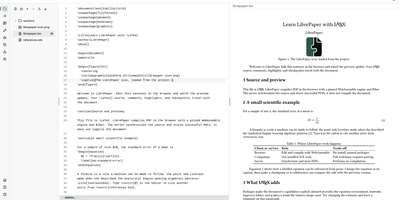
Emailed copies of the same document, each with a different filename and a different set of edits, are where collaborative writing goes to die. LibrePaper keeps one living document in the browser instead: start a project in HTML, Markdown, Typst, LaTeX, or Quarto, or upload an existing one, and the editor renders the compiled result beside the source as you type. Readers highlight the exact passage they mean and comment on it, suggested edits land as tracked changes, and threads resolve on the text in real time. Finished work publishes to its own separate host, so scripts and interactive figures inside a document can never reach a reader's sign-in session. Nobody manages another password: sign-in runs through GitHub, Google, Microsoft Entra ID, ORCID, or any OpenID Connect provider, per-provider lists decide who may publish and who may only comment, and anonymous comments can be switched on for outside reviewers. Every project exports as a complete, independent copy from the command line, which also administers the deployment and can serve a document's tools to an AI agent over MCP. Operators get graphs, account management, and moderation, with per-account storage quotas, upload limits, and retention rules keeping a public instance under control. Four Docker containers behind Caddy with automatic HTTPS, one configuration file, and nightly backups of database and files complete the deployment. Running on a dedicated VPS on RepoCloud with guaranteed CPU, RAM, and SSD, full root SSH access, and a browser serial console. MIT licensed.
Plainspace
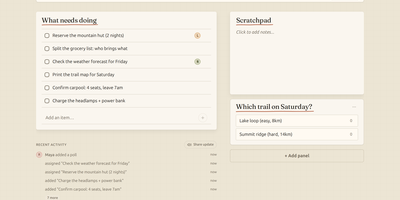
Planning a weekend trip, a household move or a club event in a group chat means the packing list is forty messages up, the poll about dates expired, and nobody remembers who volunteered to book the van. Plainspace gives that chaos one calm page: create a Space, share a single link, and everyone lands on the same shared board of tasks, notes, checklists, polls and availability, in any browser, with no app to install and no account to create. One person adds the campsite options as a poll, another claims the cooking tasks, a third drops the address and gate code into a note, and the whole group watches it come together with live updates as people type, vote and check things off. Optional push reminders nudge the person whose task is due before the plan quietly stalls. It is deliberately not a project management suite: no sprints, no story points, no permission matrices, just the handful of primitives real life actually coordinates with, presented touch-first so it works as well on a phone at the supermarket as on a laptop. Run it for your family, your team or your club on the hosted version, or self-host the same thing with Docker Compose next to the rest of your services. Running on a dedicated VPS on RepoCloud with guaranteed CPU, RAM, and SSD, full root SSH access, and a browser serial console. MIT licensed.
AutoXpose
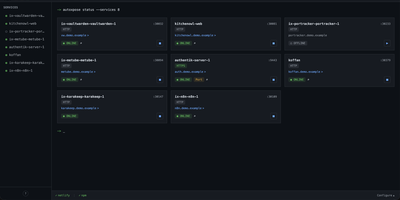
Tag a Docker container with two labels, and AutoXpose turns it into a published service with a DNS record, a reverse proxy route, and HTTPS, without you opening a single provider dashboard. From the web dashboard you connect one of six DNS providers, Cloudflare, Netlify, DigitalOcean, Porkbun, Aliyun, or Tencent DNSPod, and point it at the Nginx Proxy Manager or Caddy instance you already run. It watches your containers continuously after that: a new label creates the record, propagation is verified before the service shows as live, and removing the container removes its public entries too. Auto-expose mode publishes containers the moment they appear, while manual mode stages them in the dashboard for approval first. Color-coded service tags sort what you run into web, database, and media groups at a glance, and dashboard warnings flag misconfigurations before they become broken links. Nginx Proxy Manager access lists attach by label, so an admin panel stays reachable only from the networks you trust. When containers vanish, orphaned cleanup hunts down the stale DNS records and proxy hosts they left behind. Settings and state live inside the same single container, so the publishing pipeline for a homelab or a small fleet stays one compose service you can back up as a unit. Running on a dedicated VPS on RepoCloud with guaranteed CPU, RAM, and SSD, full root SSH access, and a browser serial console. MIT licensed.
TLSPROXY
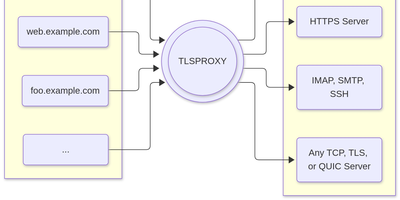
TLSPROXY puts automatic Let's Encrypt TLS in front of every service on your server, so many names can share one port while each backend gets exactly the encryption treatment it needs. Terminate TLS and hand plain text to a local service. Pass raw TLS straight through when the proxy should see nothing. Or terminate and re-encrypt towards a TLS backend, with client certificates checked on the way in. QUIC and HTTP/3 connections terminate here too, and Encrypted Client Hello keeps even the handshake private. Certificates arrive and renew by themselves through http-01 and tls-alpn-01 challenges, PROXY protocol headers preserve real client addresses, and SNI routing with round-robin balancing spreads names across backends. People get in with OpenID Connect, SAML, or passkeys; the same sign-in can mint short-lived SSH user certificates, and built-in certificate authorities manage client and backend credentials for you. Static sites can be served straight from disk, TPM-backed keys keep private material in hardware, and a built-in console shows what the proxy is doing. Running on a dedicated VPS on RepoCloud with guaranteed CPU, RAM, and SSD, full root SSH access, and a browser serial console. MIT licensed.