Lampline
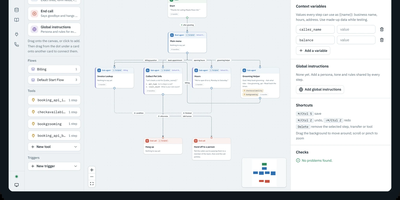
Once a voice agent is imported or built, Lampline connects it to a phone line, sends an AI caller to grade real calls, and keeps it all on your own server. Start by importing a Dialogflow CX or CX Agent Studio export along with a report of anything to check, or build fresh in a drag-and-drop builder that mixes LLM steps with scripted pages for exact lines and form fields. Next, pick one of 20 model providers, including Claude, OpenAI, Gemini, Bedrock, Groq, and DeepSeek, or run Ollama with local speech and no API keys. Test by chat or microphone while each step lights up, and let agents call HTTP and MCP tools and save records in collections of their own. Then connect callers through Twilio, Telnyx, or any SIP trunk, PBX, or session border controller via jambonz, with transfers to a person that carry the call's details as SIP headers. Finally, evals phone the agent over a real line, where an AI Test Caller brings background noise, accents, and interruptions, grades each transcript check by check, and reports typical and p95 response times as callers hear them. Each agent stays a folder of YAML and Markdown that you can review in git and lint or test with the vk CLI. Running on a dedicated VPS on RepoCloud with guaranteed CPU, RAM, and SSD, full root SSH access, and a browser serial console. Apache-2.0 licensed.
Gately
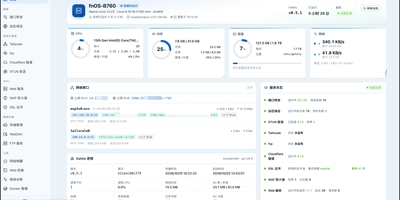
Gately keeps your domain names current, forwards ports, terminates HTTPS, and blocks hostile traffic from one admin console, so a server or home network needs no pile of separate gateway tools. Dynamic DNS updates records at Cloudflare, Alibaba Cloud, Tencent Cloud, DNSPod, Huawei Cloud, Route 53, OVHcloud, Gandi, Namecheap, DuckDNS, and other providers, finding the public address over IPv4 or IPv6 by URL, network interface, or command. Port forwarding relays TCP and UDP with port ranges, failover targets, connection limits, traffic statistics, and PROXY protocol, while SNI routing lets several services share port 443. Certificates are issued and renewed through ACME with DNS-01 wildcards or HTTP-01, then pushed to other hosts over SSH. Web services add per-domain reverse proxies, redirects, and static sites with HTTP/3, WebSocket, load balancing, health checks, rate limiting, caching, and sign-in through OIDC, GitHub, Google, or TOTP-protected shared users. A WAF running the OWASP Core Rule Set and fail2ban-style jails with trap ports and nftables bans guard the edge. Manage Docker containers and Compose projects with one-click upgrades and rollback, open SSH sessions with an SFTP file manager, run ping, traceroute, and speed tests, and receive alerts in Telegram, Discord, Slack, ntfy, or email. An audit log, config history with diff and rollback, encrypted backups, scoped API tokens, and Prometheus metrics round it out. Running on a dedicated VPS on RepoCloud with guaranteed CPU, RAM, and SSD, full root SSH access, and a browser serial console. Apache-2.0 licensed.
WikiDocs
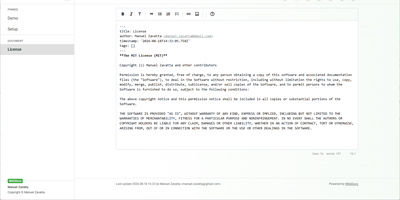
Write your knowledge as plain Markdown files, and WikiDocs turns the folder into a searchable, versioned wiki with no database to set up or back up. Pages carry YAML front matter, so the whole wiki can be copied, archived, or opened in any text editor. An editor with a formatting toolbar handles headings, lists, task lists, links, and images, and pictures can be pasted straight from the clipboard. Math is typeset with KaTeX, Mermaid renders diagrams such as ER models and mind maps, and code blocks get syntax highlighting. Every save keeps a revision, a versions dialog lists them, and deleted pages wait in a trash where they can be restored or erased. Attachments upload and download from any page, namespaces build a page tree in the sidebar with pinned pages on top, and full-text search highlights every match. Public mode publishes a read-only knowledge base, private mode requires sign-in, and administrator and user accounts are managed in the app. Settings cover the wiki title, owner notice, privacy banner, language, timezone, light or dark template, and accent color, and every page has a print button. A desktop app keeps files on your computer and syncs with your self-hosted instance, while a REST API with Swagger documentation lets other tools read and write pages. Running on a dedicated VPS on RepoCloud with guaranteed CPU, RAM, and SSD, full root SSH access, and a browser serial console. MIT licensed.

OpenHabitTracker
Notes, tasks, and habits in one app, synced only to a server you run yourself. Notes are written in Markdown and render right in the list, so reading one costs no clicks. Tasks get a planned date and time, a duration, a checklist, and a timer. Weekly statistics show what got done and how long it took. Habits are measured by how overdue they are, not by an unbroken streak. A habit on a ten day interval that is two days late reads 120 percent. Charts track progress toward the target for today, this week, this month, this quarter, and this year. They also list the ten longest streaks and what you finish on each weekday. Categories and priorities span all three item types. Search reads note text and checklist items, not only titles. Filter by date, status, or how overdue a habit is, then sort with eleven keys. Pick from 26 themes in dark and light mode and 20 languages, with full keyboard and screen reader support. Import and export JSON, YAML, TSV, or Markdown, or bring in a Google Keep Takeout ZIP. Native apps for Windows, Linux, macOS, iOS, and Android sync with your server. The single-user Docker server also serves an OpenAPI spec, a Scalar UI, and a log page behind the same login. Running on a dedicated VPS on RepoCloud with guaranteed CPU, RAM, and SSD, full root SSH access, and a browser serial console. GPL-3.0 licensed.

Revel
Yoga studios, comedy clubs, choirs, and bands use Revel to sell tickets, memberships, and season passes from their own server with no platform fee. Studios and clubs sell monthly or yearly memberships through Stripe and offer series passes that cover a class pack, a course, or a season, with wallet cards that a door scan verifies. Venues design seat maps with sectors, individual seats, and accessible seats, and buyers pick seats on an interactive map while the seats are held at checkout. Bands and DJs sell their own shows with no promoter in between, set pay-what-you-can tiers, open presales to invitation-link holders, and export every buyer's name and email. Communities that vet who comes screen requests with questionnaires reviewed automatically, manually, or both, and keep private guest lists, invitation-only events, and a fuzzy-matched blacklist. Buyers check out a multi-tier cart without an account, using discount codes and fixed-price, free, or pay-at-the-door tiers. Tickets arrive as QR PDFs or Apple Wallet and Google Wallet passes, and door staff check guests in by scanning. Organizers run waitlists with time-limited offers, announcements, reminders, and a Telegram bot for RSVPs and invitations. Revenue and VAT reports export as XLSX or PDF, and VIES checks buyer VAT IDs. The web app speaks English, German, Italian, French, Spanish, and Portuguese. Running on a dedicated VPS on RepoCloud with guaranteed CPU, RAM, and SSD, full root SSH access, and a browser serial console. MIT licensed.
Synaplan
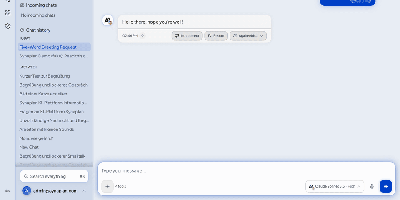
Instead of a separate chatbot for each channel, Synaplan runs one self-hosted AI assistant for your team, website visitors, WhatsApp line, and inbox, and shows what every reply cost. In the web app, connect OpenAI, Anthropic, Gemini, Groq, Mistral, xAI, Hugging Face, or local Ollama. Each kind of work gets its own model, from chat and image to video and audio, and every answer carries a Free, Low, Mid, or High cost badge. A planner splits a big request into a task graph and sends each step to the model that fits. On your website, one script tag adds a chat widget, and a human operator can take over any conversation live. On WhatsApp Business and email, the assistant replies on the channel where the question arrived. Behind every channel sits one knowledge base: upload PDFs, Word and Excel files, or images with OCR, and semantic search feeds them into answers. Saved tasks run on demand or on a schedule, approvals pause any action that writes, and watched pages mail you a diff when a URL changes. Connections reach Microsoft 365, Dropbox, Nextcloud, ownCloud, WebDAV, CalDAV, Jira, and Confluence. An MCP server and an Anthropic-compatible endpoint let Claude, Cursor, and Claude Code use your instance. Users and groups share folders and assistants, and admins see usage and health. Running on a dedicated VPS on RepoCloud with guaranteed CPU, RAM, and SSD, full root SSH access, and a browser serial console. Apache-2.0 licensed.
MCPHub
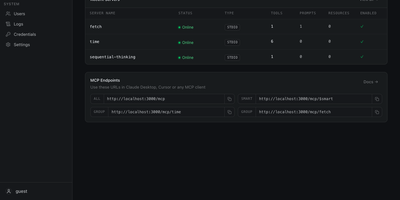
One endpoint for every MCP server you run: MCPHub gathers local and remote Model Context Protocol servers behind stable URLs, so AI clients connect once and see what you allow. Claude Code, Cursor, and Cherry Studio can use four routes: everything at /mcp, a named group at /mcp/{group}, one server at /mcp/{server}, or semantic tool search at /mcp/$smart. Smart routing runs vector search on PostgreSQL with pgvector and an OpenAI-compatible key, so the model gets a shorter tool list. Servers attach over stdio, SSE, or streamable HTTP, OpenAPI services can be wrapped as MCP tools, and changes apply without downtime. In the other direction, MCP tools can be exported as an OpenAPI 3.0.3 spec for OpenWebUI and other OpenAPI clients. Bearer keys, OAuth 2.0 (client and server modes), and GitHub or Google sign-in in database mode control access, with per-user visibility for servers and groups. Encrypted per-user credentials let one shared server use each person's own key. Logs show tool-call activity, request status, and latency, health checks track each connection, and the dashboard controls which tools, prompts, and resources each server exposes. Large text tool results can be compressed, interactive MCP Apps are proxied through MCPHub routes, and a built-in market lets you browse a server catalog. Typical uses include a team-wide gateway, per-project groups, and direct single-server routes for debugging. Running on a dedicated VPS on RepoCloud with guaranteed CPU, RAM, and SSD, full root SSH access, and a browser serial console. Apache-2.0 licensed.

HFS
HFS turns any folder on a server into a file-sharing site that visitors open in a browser, with no upload step and no space or bandwidth cap beyond your own disk. Visitors browse, search, and download single files or whole folders as ZIP archives that start streaming immediately, and interrupted uploads or downloads can resume. A virtual file system lets you arrange and rename what is shared without touching the files on disk, while accounts and per-folder permissions decide who can see, download, upload, or delete. The admin web panel covers HTTPS with built-in certificate generation, bandwidth limits globally or per IP address, geographic blocking by country, and live connection monitoring with disconnect and IP ban. Plugins add thumbnails, share links, LDAP, two-factor sign-in, download quotas, and notifications, and a few lines of JavaScript in the admin panel can change the look or the backend behavior without a restart. The front end speaks 27+ languages, works on phones, and includes a media player for audio and video. Typical uses include sending large files to friends without uploading them first, publishing a download area, and collecting uploads from visitors. Running on a dedicated VPS on RepoCloud with guaranteed CPU, RAM, and SSD, full root SSH access, and a browser serial console. GPL-3.0 licensed.
mitmproxy
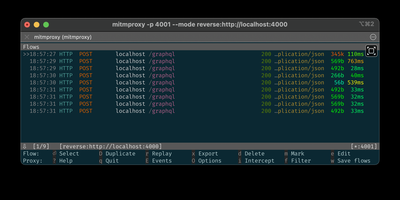
A man-in-the-middle proxy you run on purpose, mitmproxy lets developers and testers inspect, edit, and replay HTTP and HTTPS traffic from any client. Point a browser, phone, or script at it and every HTTP/1, HTTP/2, HTTP/3, WebSocket, and TLS-protected connection appears as a flow you can open, search, and filter. Content views turn payloads from HTML to Protobuf into readable text. Intercept a request or response before it moves on, change its headers, body, or status by hand, then release it, or save the flow and replay it to the client or the server later. Map local and map remote rules answer requests with files or other URLs, while blocklists, anticache, sticky cookies, and proxy authentication cover routine test chores. Choose the interface that fits the job: a keyboard-driven terminal console, mitmweb in the browser with a Capture tab that sets up WireGuard devices with a QR code, or mitmdump for unattended logging in scripts. Proxy modes include regular, local capture, WireGuard, transparent, reverse, upstream, SOCKS5, and DNS. Addons written in Python add custom rewriting, recording, and automation. Teams use it for debugging, testing, privacy measurements, and penetration testing. Running on a dedicated VPS on RepoCloud with guaranteed CPU, RAM, and SSD, full root SSH access, and a browser serial console. MIT licensed.
VanBlog
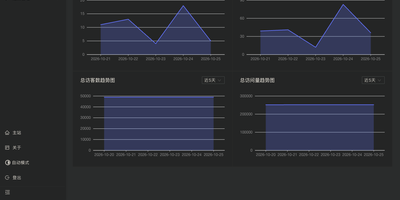
Publish a personal blog you fully own, with a Markdown writing desk, an admin dashboard, and reader-facing pages all in one install. Write posts with live preview, Mermaid diagrams, math formulas, and custom highlight blocks, then paste or upload images straight from the editor or import existing Markdown files when moving over from another platform. Posts and drafts can be managed in bulk, filed under categories and tags, and locked behind passwords for individual articles or whole categories. Readers get a table of contents, code copy buttons, search, RSS feeds, friend links, and donation links, and pages follow their light or dark preference on phones and desktops. The dashboard charts visitors and page views, with Google Analytics and Baidu Analytics as optional add-ons, while Waline comments bring email notifications and webhooks. Image storage is built in, with compression and watermarking, or can be handed to PicGo, object storage, or GitHub. Pipelines run custom code or call webhooks after selected events, custom pages and CSS, HTML, or JavaScript reshape the layout, and collaborator accounts with permissions plus API tokens let several authors share one site or feed a separate frontend. Backups, import and export, and update notices live in the admin panel, and HTTPS certificates for your domain are issued and renewed automatically. Running on a dedicated VPS on RepoCloud with guaranteed CPU, RAM, and SSD, full root SSH access, and a browser serial console. GPL-3.0 licensed.
Traefik Manager
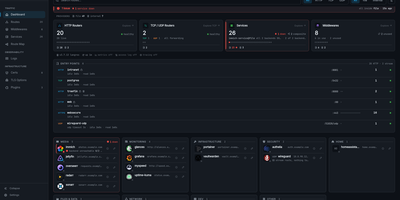
Where Traefik's built-in dashboard only shows what is running, Traefik Manager lets you change it: add routes, middlewares, and services from forms and wizards instead of editing YAML by hand. A first-run wizard connects to the Traefik API, creates a route for the manager itself, and sets the admin password. After that, the dashboard turns every route into a launchable app card with live health, and the Route Map draws each request from entry point through middlewares to backend. New routes use a slide-in form for HTTP, TCP, or UDP with several domains and backends, sticky sessions, and health checks. 30 middleware wizards handle authentication, rate limiting, headers, CORS, and redirects, and weighted, mirroring, or failover services can be built on their own. For day-to-day monitoring, the Certificates tab tracks expiry from acme.json, the Logs tab turns the access log into clickable analytics, the CrowdSec tab lists attacks and bans, and alerts reach Discord, Slack, ntfy, Telegram, and more. Changes to traefik.yml apply with a one-click restart, every edit is backed up locally and can be pushed to a git repository, and a lightweight agent brings remote Traefik servers into the same interface. Sign in with TOTP two-factor or OIDC single sign-on, in any of 14 languages. Running on a dedicated VPS on RepoCloud with guaranteed CPU, RAM, and SSD, full root SSH access, and a browser serial console. GPL-3.0 licensed.
Elasticvue
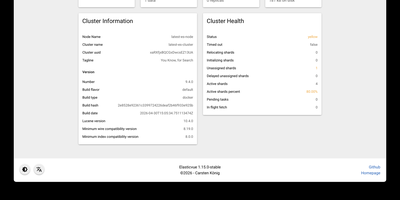
Elasticvue is a graphical interface for Elasticsearch where you can inspect cluster health, browse indices, search and edit documents, and send REST queries. Start on the Home tab, which summarizes status, nodes, shards, indices, document counts, and disk usage. Nodes shows load, CPU, RAM, heap, and disk for each member, and Shards lays out every primary and replica in a grid with a switch for shard allocation. Indices handles creation, aliases, templates, and bulk actions. Search runs query string searches across an index pattern, opens any hit in a JSON editor for updates or deletion, and downloads results as JSON. Rest sends any request from tabbed editors with history, saved queries, and examples, while Snapshots manages repositories and backups. Version 1.16 adds user and role management for Elasticsearch clusters. Secured clusters connect with basic authentication, API keys, or AWS IAM credentials, and the Docker image preloads cluster definitions from an environment variable or a mounted JSON file. Elasticvue supports every Elasticsearch version, even end-of-life releases, and speaks English, Chinese, French, Russian, Japanese, and Italian. Running on a dedicated VPS on RepoCloud with guaranteed CPU, RAM, and SSD, full root SSH access, and a browser serial console. MIT licensed.
Aimeos
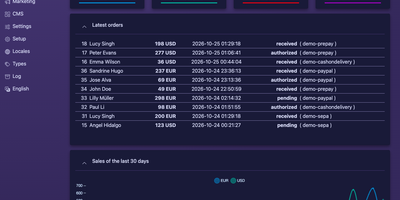
One admin backend can run a single online shop or a whole marketplace of independent sellers. The dashboard shows the latest orders and sales graphs. Panels cover products, stock, customers, subscriptions, orders, suppliers, and coupons. Aimeos handles bundle, voucher, virtual, configurable, custom, and event products. Block and tier pricing work out of the box. Discounts, vouchers, and a flexible basket rule system are built in. Subscriptions renew through recurring payments. Checkout offers more than 100 payment gateways. Storefronts come in 30+ languages, with full right-to-left support and AI-based text translation. Rich snippets help search engines read product pages, and layouts are optimized for phones and tablets. Switch on multi-vendor mode and sellers can register themselves, then manage their own site as administrators or as editors with limited rights. A JSON REST API following jsonapi.org feeds custom frontends, progressive web apps, and native mobile apps. A GraphQL API handles administration. The built-in MCP server lets AI assistants such as Claude or ChatGPT search, create, update, and delete products, orders, and customers within the permissions of the account that connects. Prisma brings AI into the admin interface to write product descriptions, translate content, generate images, and remove backgrounds with the provider you choose. Every component is modular, so any part can be extended or replaced. Running on a dedicated VPS on RepoCloud with guaranteed CPU, RAM, and SSD, full root SSH access, and a browser serial console. MIT and LGPLv3 licensed.

RSS-Bridge
RSS-Bridge gives a feed to every website that never offered one, so social profiles, video channels, and news pages become subscriptions for any feed reader. Pick a bridge, enter a username or search term, and the generated URL returns Atom, JSON, HTML, MRSS, plaintext, or Sfeed output. Dedicated bridges cover YouTube channels and playlists, public Telegram channels, Reddit users and subreddits, Mastodon instances, Twitch channels, TikTok accounts, SoundCloud users, and Rumble channels. When a site has no bridge, CssSelectorBridge and XPathBridge scrape its pages into a feed from the CSS selectors or XPath expressions you provide. FilterBridge keeps or drops items by keyword, FeedMergeBridge folds several feeds into one stream, and FeedReducerBridge thins out noisy sources. Caching keeps upstream services from banning your server for repeated updates, and a token or HTTP basic authentication keeps a private instance closed to strangers. The enabled_bridges setting limits which bridges appear in the menu, and a failing bridge reports its error as a feed item, so your reader notifies you the moment one breaks. A new bridge is one small class file dropped into the bridges folder, and a mounted config folder carries your custom settings across container restarts. Running on a dedicated VPS on RepoCloud with guaranteed CPU, RAM, and SSD, full root SSH access, and a browser serial console. Unlicense licensed.
BISHENG
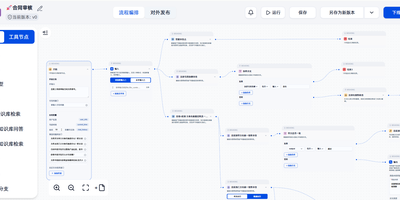
Document review, fixed-layout report generation, and multi-step research that ends in a PPT, Excel, or Word file all run inside BISHENG, a self-hosted workspace for enterprise AI applications. Review and report flows are drawn on a visual canvas where a circle becomes a loop, side-by-side nodes run in parallel, and a multi-item selection runs as a batch. A running flow can stop for a person to give input, confirm, or make changes, and chat and automation share one flow type. Research goes to Task Mode: give it a goal plus any files, knowledge bases, tools, and skills, and it writes a checklist, hands research to parallel sub-agents, and returns a report with clickable citation markers. Teams sharing documents use Knowledge Spaces, with folders, tags, keyword search, AI Q&A that shows its sources, and permissions down to a single file for people, departments, or user groups. For a daily news briefing, Channels turn WeChat official accounts and websites into topic feeds and save articles as knowledge in one click. Admins connect OpenAI-compatible APIs, Azure OpenAI, Anthropic, Qwen, DeepSeek, and local Ollama models, then govern access with approvals, audit logs, SSO, and LDAP. Private document parsing reads printed text, handwriting, tables, layouts, and seals, and a service-account Open API lets other systems call applications and knowledge bases. Running on a dedicated VPS on RepoCloud with guaranteed CPU, RAM, and SSD, full root SSH access, and a browser serial console. Apache 2.0 licensed.
Apache DolphinScheduler
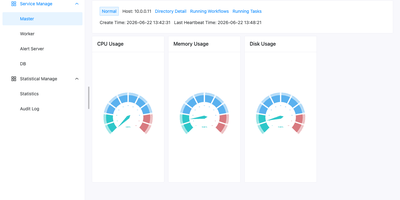
When nightly SQL, Spark, and Python jobs outgrow cron, Apache DolphinScheduler replaces the tangle with a visual workflow orchestrator where every dependency is a line on a drag-and-drop canvas. More than 30 built-in task types cover Shell, SQL, Python, HTTP, Spark, Flink, Kubernetes, SeaTunnel, and Jupyter, while logic nodes add sub-workflows, conditions, switches, and dependencies across projects. Workflows can also be written as code through a Python SDK, YAML, or the Open API and run on timezone-aware cron schedules. Backfill reruns a workflow across a date range or a hand-picked list of dates, in serial or parallel, and any instance can be modified, rolled back, and rerun without touching the saved template. Kill, pause, and resume running tasks, and choose whether a failure ends the run or lets parallel branches continue. Alert groups route results to Email, Slack, Telegram, PagerDuty, Feishu, DingTalk, webhooks, or custom scripts. Tenants, worker groups, and environments isolate teams on shared infrastructure, with project and data source permissions. A Resource Center stores scripts and task files locally or on HDFS, MinIO, and cloud object storage, and the monitor page shows master, worker, and database health at a glance. Standalone, Cluster, Docker, and Kubernetes deployments scale from one node to many masters and workers that can join or leave a running cluster. Running on a dedicated VPS on RepoCloud with guaranteed CPU, RAM, and SSD, full root SSH access, and a browser serial console. Apache 2.0 licensed.
REI3
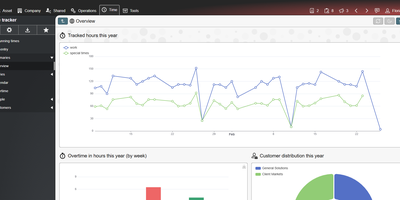
Replace the spreadsheet that quietly runs your department with a proper multi-user application that you design in a browser with REI3, a self-hosted low-code platform. Authors define their data model once, then assemble forms, lists, calendars, Gantt plans, Kanban boards, and charts around it, with form states that show, hide, or require inputs as a record moves through its workflow. Calendars create records from a drag-selected time range, Kanban cards change state by drag and drop, and bulk-update forms edit hundreds of records at once. Phones scan barcodes and QR codes through the camera, and signature pads capture drawings. Roles and record-level access policies decide who sees what, sign-in runs through LDAP, OpenID Connect, or multi-factor authentication, and end-to-end encryption keeps selected fields unreadable even to administrators. REST endpoints work in both directions, ICS feeds publish calendars, CSV moves data in bulk, and IMAP and SMTP accounts connect applications to email. A drag-and-drop PDF editor produces letterheads, labels, and documents with signatures and barcodes. More than a dozen free ready-made applications, including tickets, time tracking, IT assets, a password safe, and a CRM, install from the admin panel. Running on a dedicated VPS on RepoCloud with guaranteed CPU, RAM, and SSD, full root SSH access, and a browser serial console. MIT licensed.
Oxynote
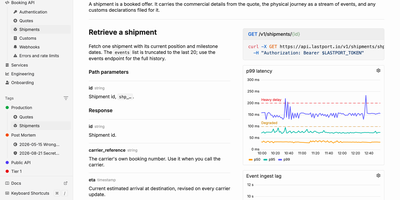
When an alert fires at 3 a.m., the live chart, the runbook, and the fix are already on one page of Oxynote, a self-hosted technical wiki. The chart is a Live Metrics block that runs its own Prometheus or SQL query and draws a time series, bar chart, or gauge. Several such blocks side by side make a dashboard inside the page. Around it, the editor works like Notion, with checklists, callouts, titled code blocks, Mermaid diagrams, Figma embeds, images, and files. Internal APIs get Stripe-style reference pages with the endpoint, a curl example, and a sample response beside the explanation. Mark a page reviewable and every edit lands in a draft. A block-aware diff shows renamed endpoints, fields, and reworded sentences in one red and green view until a reviewer approves. Freshness hooks watch GitHub files, container images, web pages, or dates, and remind maintainers when something a page depends on changes. Teammates edit together live and see who holds which block. Comments attach to a word, a diagram line, or a whole chart, with replies and an inbox for mentions. The Rubber Duck assistant edits pages and runs block queries with Anthropic, OpenAI, Google, OpenRouter, or a local Ollama model, and MCP lets Claude Code and Codex read and write the docs. Running on a dedicated VPS on RepoCloud with guaranteed CPU, RAM, and SSD, full root SSH access, and a browser serial console. Apache-2.0 licensed.