Workavera
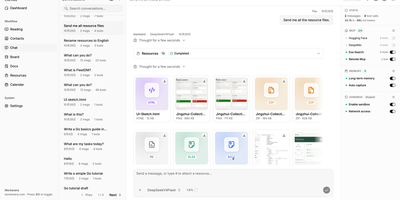
Workavera gives freelancers and small teams one self-hosted workspace for projects, docs, calendar, and files, with an AI assistant that actually does the work. Ask Chat to plan a project and it picks one of ten Kanban templates, creates tasks with states, priorities, and deadlines, and shows every reasoning step and tool call. Boards support custom workflow states, labels, members, and due dates, plus a read-only timeline you can share with clients by public link. Docs offers a rich-text editor with slash commands, version history, Markdown and HTML export, AI editing, and public pages. Calendar merges personal events with Board deadlines, including recurring events and reminders. Resources holds PDFs, Office files, code, images, archives, and SQLite databases that you attach to any chat with + or #, and an optional per-user Linux sandbox lets the assistant run Python or Node scripts to OCR a scanned PDF, clean a spreadsheet, or batch-rename files. Reading saves links with AI summaries, Discover follows sources such as GitHub Trending and Hacker News, and Contacts keeps a searchable team directory. Claude Code, Cursor, and other MCP clients connect with an API key, outside MCP servers plug into Chat, and models come from OpenAI, Anthropic, or Google endpoints or a local LM Studio, Ollama, vLLM, or llama.cpp server. Native Android and iOS apps put the workspace on your phone. Running on a dedicated VPS on RepoCloud with guaranteed CPU, RAM, and SSD, full root SSH access, and a browser serial console. Apache-2.0 licensed.
W-CMS
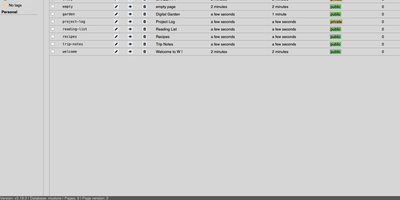
Taking notes and publishing a website usually need two different tools, but W treats them as the same act. Every page you create gets its own address, and a privacy level marks it public, private, or not yet published. The editor offers tabs for Markdown content, CSS, a custom body template, and JavaScript, with a metadata panel for title, description, tags, date, and authors. Home view lists every page with sorting, filters, search, and saved bookmarks for common queries. Two alternative views draw pages as a link graph and, for pages with coordinates, as markers on a map. A media manager organizes uploads in folders, offers a thumbnail gallery, and can optimize images for the web. Several users can work together with reader, editor, super editor, and admin roles, and optional LDAP sign-in is available in beta. Templates share layouts across pages, URL commands like add and edit speed up navigation, and an experimental API opens the data to scripts. Pages keep working even with JavaScript turned off. Everything is stored in plain files, so no database server is needed. Running on a dedicated VPS on RepoCloud with guaranteed CPU, RAM, and SSD, full root SSH access, and a browser serial console. AGPL-3.0 licensed.
Wally
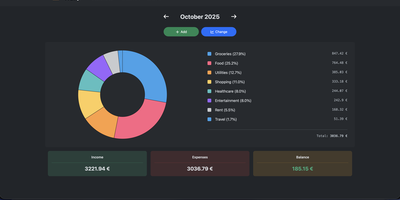
Started as an ExpenseOwl-inspired project, Wally grew into a lightweight, self-hosted expense tracker more capable in every direction its author touched. The backend is Python FastAPI over SQLite, which means every deployment ships a full REST API with interactive documentation at /api/docs - automating imports or wiring in external tools requires no reverse engineering, and when the optional login page is enabled you can mint scoped API keys from the Settings page for token-based integrations. The transactions view is built on AG Grid, bringing real search, column sorting, and per-column filtering to your ledger, with a footer totaling rows, income, and expenses for whatever slice you have filtered. Dashboards go beyond the usual monthly doughnut: a Change button swaps in year-scale line graphs so you can track a single category - restaurants, say - across time. Recurring transactions edit intelligently, letting you apply changes to all instances or only future ones. CSV import and export use a simple six-column format handled from Settings, the refined dark theme is genuinely easy on the eyes, and the interface is translated into more than ten languages. The whole thing runs from one small container with a single data volume.
WebDuck
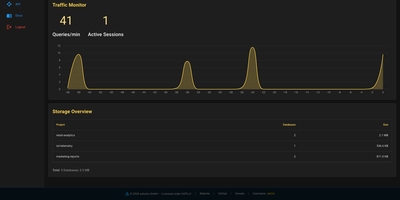
A DuckDB file is fast, but sharing one across a team usually means passing it around by hand. WebDuck puts DuckDB behind a server, so analysts and applications reach the same databases through a REST API or a dark amber web interface. Projects group databases, and each database can carry its own API password with read, write, or admin access levels. The dashboard shows server status, a live view of incoming REST traffic, and storage use. A browse view offers tree navigation, infinite scroll, and inline cell editing. The SQL editor runs multi-statement scripts, keeps a query history, accepts Alt+Enter to execute, and can load a whole SQL file. Import and export handle CSV, Parquet, and JSON up to 256 MB. Deleted databases move to a trash where they can be restored. Per-database write protection and a compression action keep files safe and small. Administrators sign in with bcrypt-hashed passwords and JWT tokens, and the interface ships in English and German. Setup comes through Docker, pip, or a YAML file, and a small command line initializes the server, adds users, and reports status. Running on a dedicated VPS on RepoCloud with guaranteed CPU, RAM, and SSD, full root SSH access, and a browser serial console. AGPL-3.0 licensed.
Cited
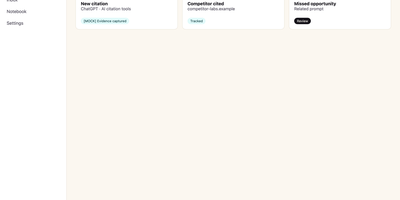
Buyers now ask an AI assistant before they ever visit your website, and Cited tells you whether your brand made it into the answer. Verify your domain with a DNS record, choose the buyer-like prompts worth watching, and Cited checks them on schedule across ChatGPT, Claude, Gemini, Perplexity, Google AI Mode, and Google AI Overviews. Every meaningful appearance becomes a durable evidence note in your citation inbox: open one to see the exact prompt, the response snapshot, where your domain appeared, and the first-seen history. It distinguishes a true source citation from a brand mention without a link, an explicit recommendation, and the uncomfortable one, a missed opportunity where a competitor got cited and you did not. Competitor tracking runs continuously, so you see rivals earning answers in your category while there is still time to respond. Notes can be annotated, organized through new, seen, saved, and resolved states, and exported for reporting. Email alerts flag meaningful new events and a weekly digest summarizes what changed, so checking becomes a habit instead of another dashboard to babysit. Workspace roles and local credentials keep a small marketing team organized on your own PostgreSQL database. Running on a dedicated VPS on RepoCloud with guaranteed CPU, RAM, and SSD, full root SSH access, and a browser serial console. AGPL-3.0 licensed.
Eidon
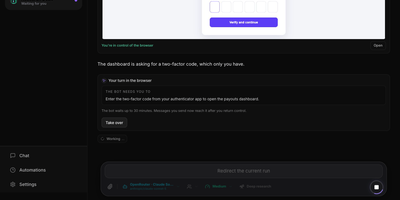
Beyond a plain chat for quick questions, Eidon gives you a team of AI agents, each with its own browser, workspace, and memory, and a Chief of Staff that routes your requests. Ask for anything and it answers, hands the job to a specialist, or creates a new agent for it, and agents message each other and report back. Open an agent's live browser view and watch it work. At a sign-in, a two-factor code, a CAPTCHA, or a payment it stops and waits for you, and you hand control back with a note. Passwords come from an encrypted vault and are typed into the page, never passed to the model. Shell commands and MCP tools run only after you allow them once, always, or never, and emails and Slack messages arrive as drafts to edit. Chat lets you rewind, branch, edit, or regenerate any message, queue follow-ups while a reply streams, and share a read-only link. Deep research drafts an editable plan of up to twelve steps and returns a cited report. Memories wait for your approval. Automations run on an interval, daily, weekly, or once, and alert you through ntfy, Pushover, webhooks, or web push. Connect OpenAI-compatible or Anthropic providers, MCP servers, web search, image generation, and voice dictation, with a private account for each person. Running on a dedicated VPS on RepoCloud with guaranteed CPU, RAM, and SSD, full root SSH access, and a browser serial console. AGPL-3.0 licensed.
TranscrIA
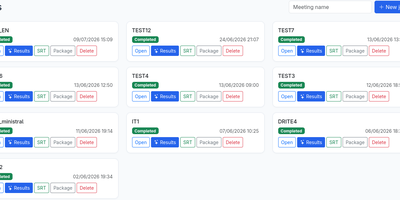
Long meeting recordings become corrected, speaker-labelled transcripts, structured summaries, and Word minutes in TranscrIA, with no per-minute bill. An audio check scores each upload and plots a difficulty timeline before transcription starts, and a single slider then picks the deliverable, from plain subtitles to a full quality package. Detected speakers arrive with playable excerpts, talk time, and an acoustic gender hint, and you confirm names, participants, and a domain glossary, while attached PDF, Word, or PowerPoint files ground the summary in the real agenda. A local OpenAI-compatible model corrects the text, and a waveform editor with speaker lanes handles splitting, merging, undo, and restorable versions. Chat lets you question a finished transcript and apply a fix across every deliverable, or ask across all meetings you may see and get cited answers plus a My Actions list. Eighteen meeting types shape the Word minutes, and meetings on Jitsi, Zoom, Visio, and Google Meet can be captured live over outbound-only connections. Roles, groups, single sign-on through OIDC or LDAP, personal API tokens, and an exportable audit trail suit shared use. Transcription runs on NVIDIA GPUs or, with the Kroko engine, on CPU alone, and an approved cloud LLM can write summaries when no GPU is present. The interface speaks French, English, Portuguese, and beta German, Spanish, and Italian. Running on a dedicated VPS on RepoCloud with guaranteed CPU, RAM, and SSD, full root SSH access, and a browser serial console. Apache-2.0 licensed.
Tale
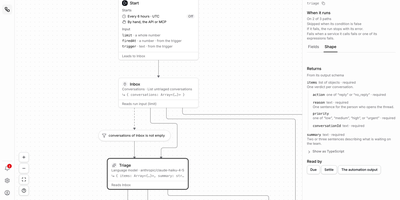
One workspace for the whole job: Tale puts your team and your AI agents on the same project board, so a question becomes an assigned task, a reviewed report, and files you can open. Describe the work with a brief, source files, and completion criteria, then assign it to a teammate or an agent. Agents get their own runtime (Claude Code, Codex, Cursor, Gemini CLI, Hermes, OpenClaw, OpenCode, Pi, or Qwen Code), model, skills, and tools, and work in a persistent sandbox; a manager agent can delegate ready tasks. Steer with @mentions in task comments, then accept the result or send it back. Chat shows the sources behind an answer and compares two models side by side in Arena. Knowledge holds documents, short entries, crawled websites, products, and contacts for retrieval within each team's access. Automations are versioned workflows with schedule, webhook, and event triggers, tests before deployment, playback of finished runs, and approval before protected writes; ready-made templates triage Gmail, Outlook, and IMAP inboxes, review pull requests, and send daily task digests. Coding agents connect over MCP with an access level you choose and can revoke. Roles, teams, budgets, guardrails, and a hash-chained audit log keep the work governed. Running on a dedicated VPS on RepoCloud with guaranteed CPU, RAM, and SSD, full root SSH access, and a browser serial console. MIT licensed.
TradingAgents GUI
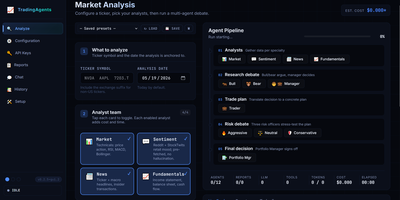
Built atop the TauricResearch TradingAgents framework with nearly 100,000 GitHub stars, TradingAgents GUI transforms a CLI-only multi-agent LLM stock analysis pipeline into a polished web application accessible at localhost:5000. The system deploys twelve specialized AI agents — fundamental analysts, sentiment experts, technical analysts, bull and bear researchers, a trader, risk management team, and portfolio manager — who collaboratively debate market conditions through structured LangGraph workflows before producing a final BUY, SELL, or HOLD recommendation. The interface supports ten LLM providers including OpenAI, Anthropic, Google, OpenRouter, DeepSeek, Ollama, xAI, Qwen, GLM, and MiniMax, with a first-run wizard that auto-detects configured API keys and tests connections. A live pipeline visualization shows each agent's status with real-time progress bars, while the tabbed output area separates Live Feed, Reports preview, and Tool calls into dedicated panes. The three-pane Reports tab provides searchable indexing, table-of-contents navigation, and export to Markdown, HTML, or PDF formats. Report length control across Concise, Standard, and Comprehensive modes saves up to 50% on token costs. Multi-session chat allows pinning past reports as grounding context with live token counting and context-window warnings. Three built-in themes — Terminal, Modern, and Bloomberg — persist per browser. Docker Compose deployment maps port 5000 with persistent report storage. Running on a dedicated VPS on RepoCloud with guaranteed CPU, RAM, and SSD, full root SSH access, and a browser serial console. Apache 2.0 licensed.
Twigex
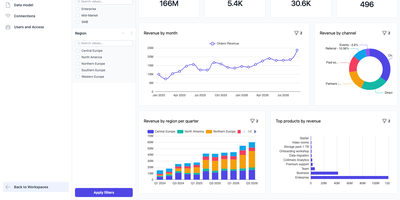
Teams that juggle a file drive, a chat app, a task tracker, and a dashboard tool can fold all four into one self-hosted workspace. Twigex stores files on local disk or S3-compatible storage, shares them with users, groups, or public read-only links, and opens office documents in EuroOffice or Collabora for simultaneous editing. Chat offers channels and direct messages with reactions, mentions, and link previews. Video calls and scheduled meetings run through LiveKit, and guests can join a channel by link. Projects organize work as tables of tasks with custom fields and subtasks, viewable as a grid, kanban board, Gantt timeline, or calendar. Collimato, the analytics module, connects to databases and APIs, models the data, and builds charts and dashboards with filters and KPI cards. The admin area covers users, groups, roles, storage backends, SMTP, office editing, and security settings. The Community Edition is free to run from one binary, a Docker Compose stack, or a Helm chart on Kubernetes. Running on a dedicated VPS on RepoCloud with guaranteed CPU, RAM, and SSD, full root SSH access, and a browser serial console. AGPL-3.0 licensed.
Quire Ink
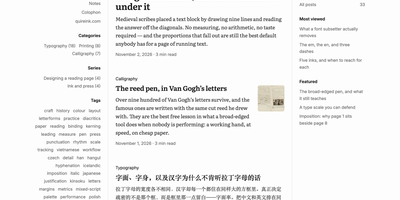
Quire Ink is a long-term blog for a single writer, with a built-in MCP server so an AI assistant can draft, schedule and publish posts on your behalf. You write in the browser with an autosaving Markdown editor that handles tables, footnotes, callouts, maths, galleries and video, and it keeps every revision. Pressing Publish sends the post to your site, your RSS feed, your newsletter subscribers and, if you switch it on, Mastodon, with no algorithm or ads in between. Readers get a pen of their own. They highlight in five inks, underline in pencil or ring a word, and the marks stay in their browser with no account. Four reading themes (plain paper, source code, newspaper and notebook), six light and dark palettes and a paginated book mode restyle the whole site from the admin. Connected over MCP, Claude or another assistant can read your traffic, clear spam, rearrange the front page and build a theme that passes the same checks as Settings. Posts from WordPress, Ghost, Substack and Medium arrive with images and old links intact, and one button exports everything as plain Markdown. Comments need no account. The admin works on a phone, in eleven languages. Running on a dedicated VPS on RepoCloud with guaranteed CPU, RAM, and SSD, full root SSH access, and a browser serial console. AGPL-3.0 licensed.
Kaeso
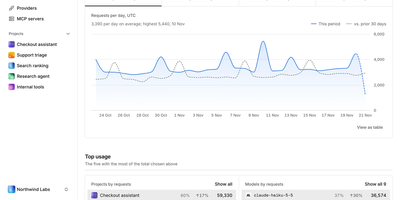
Point every app, SDK, and coding tool at one endpoint, and Kaeso routes each request to the provider or self-hosted model that should answer it, with budgets, logs, and access control built in. Apps keep speaking the OpenAI, Anthropic, Gemini, or ElevenLabs format, and Kaeso translates each request, reply, and stream for whichever provider sits behind the model name. Beyond chat it serves embeddings, reranking, decision models that answer typed questions with probabilities, images, video, speech, transcription, music, and batches. Alias routes add conditions, weighted splits, fallbacks, and retries, key pools spread a project over several keys of one provider, and retiring models send Deprecation and Sunset headers, show who still calls them, and offer a one-click move to the replacement. Hard or soft budgets and rate limits per project, member, service account, or key are checked before the provider is called, and guardrails mask or block secrets, email addresses, IBANs, and card numbers before the model sees them. Teams get single sign-on over OpenID Connect, SCIM 2.0, roles, and request logs that keep content only where the organization, project, or request allows. A playground compares models side by side, and a per-project MCP portal lets claude.ai, ChatGPT, or Cursor call your MCP servers. Claude Code and Codex can use Kaeso as their model provider, so every session is logged and budgeted. Running on a dedicated VPS on RepoCloud with guaranteed CPU, RAM, and SSD, full root SSH access, and a browser serial console. MIT licensed.
NodeDR POS
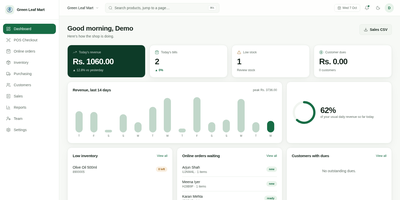
Scan a barcode, press Enter, and the sale is done: that is the whole rhythm of NodeDR POS at a shop counter. A USB scanner works, and so does a phone or tablet camera. Each sale can carry tax breakdowns with GSTIN and HSN codes, percentage or flat discounts, loyalty points, store credit, and customer dues for short payments. Cash, UPI with a payment QR, and card are supported in more than 20 currencies. Receipts print through the browser, download as PDF, or go straight to a USB thermal printer. Inventory takes bulk CSV or Excel imports, generates printable EAN-13 barcode labels, looks up unknown barcodes in free product databases, and flags low stock. Purchasing adds suppliers, purchase orders, and reorder suggestions. Orders from WooCommerce, Shopify, or a custom site flow through a New, Packing, Ready, and Collected board. Phone and laptop sellers can switch on IMEI tracking with warranty lookup. A customer display shows the live cart on a second screen. Reports cover revenue, gross profit, average bill, category mix, and busy hours, with staff roles and A4 tax invoices alongside. Running on a dedicated VPS on RepoCloud with guaranteed CPU, RAM, and SSD, full root SSH access, and a browser serial console. AGPL-3.0 licensed.
brain.md
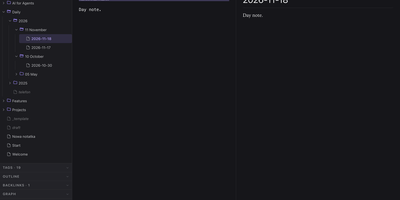
Your notes stay a folder of plain markdown files, and your AI agents get a safe, permissioned way to read, search, and write them. Open an existing Obsidian vault and wikilinks, embeds, callouts, math, mermaid diagrams, tasks, frontmatter, and aliases all work, in a live editor with a scroll-synced preview, a command palette, a quick switcher, and a task list across the whole vault. A graph view maps notes and links, with hover highlights, folder and tag filters, and a local graph beside the current note. Semantic search, switched on in Settings, indexes notes on every save with a bundled local embedder, or with Ollama, LM Studio, OpenAI, or any compatible endpoint, and a Related panel surfaces similar notes and suggests tags. An MCP server with 18 tools and two resources lets Claude Code, Cursor, and other agents search, read, and write notes, with read and write rights set per folder and a write refused when another agent changed the note first. Saves are committed to git with the person or agent named, so History shows diffs and restores any version. An optional password protects the web app and the MCP endpoint, with Google, GitHub, Keycloak, or Authentik sign-in as another door, and hidden-note rules keep scratch files out of the tree and search. Running on a dedicated VPS on RepoCloud with guaranteed CPU, RAM, and SSD, full root SSH access, and a browser serial console. AGPL-3.0-or-later licensed.
Hivemill
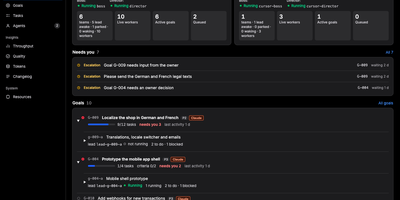
When you hand Hivemill a goal, AI coding agents build it, separate agents review and test it, and a judge decides the merge, all on a Linux server you control. You describe the outcome to a boss agent, a director staffs a lead, and the lead splits it into tasks, each with its own git worktree and branch. A coder opens a pull request and stops, because it cannot review, test, or merge its own work. The reviewer reads the diff, QA runs real tests against your acceptance criteria, and by default the judge merges only when both verdicts pass; anything else returns to the coder with findings. Pull requests, CI checks, and merges run through the GitHub CLI. Claude Code is the default runtime, a Cursor Agent org can run beside it, and hooks enforce each role's prompt and permissions. A spawn gate queues new agents until memory, load, and your Claude usage windows allow, so one modest machine stays responsive. Scheduled jobs mail the director recurring chores with a token cap per run, and a daily retro agent studies rejected work. Typical first jobs are bounded changes such as a filtered CSV export, a mobile navigation fix, or a duplicate-order check before import. A read-only web dashboard tracks goals, tasks, live agents, throughput, quality, and estimated cost per task. Running on a dedicated VPS on RepoCloud with guaranteed CPU, RAM, and SSD, full root SSH access, and a browser serial console. MIT licensed.
Helpdock
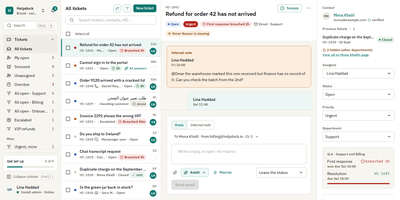
With Helpdock, every brand you run gets its own inboxes, help center and chat widget on one install, plus an AI assistant that answers only from that brand's own knowledge. Email over IMAP or webhook, Telegram, WhatsApp, Messenger, Instagram, a web form and the REST API all land in the same tickets, with shared statuses, assignment and rules. Agents work from saved views, internal notes, macros and a keyboard-first inbox, and a collision warning appears when two people open the same ticket. SLA clocks follow business hours, holidays and time zones, and pause in the statuses you pick. Workflow rules can be test-run before going live, and a CSAT survey goes out when a ticket closes. The help center publishes articles in English and Arabic on each brand's own domain, with right-to-left layouts and search in both languages. The assistant cites its sources, hands the chat to a person when the knowledge base has no answer, drafts articles from closed tickets and suggests replies to agents. Importers for Zendesk, Freshdesk and Zoho Desk bring history across without messaging a single customer. Staff sign in with passkeys, two-factor codes or SAML and OpenID Connect single sign-on. Running on a dedicated VPS on RepoCloud with guaranteed CPU, RAM, and SSD, full root SSH access, and a browser serial console. AGPL-3.0 licensed.
Depl0y
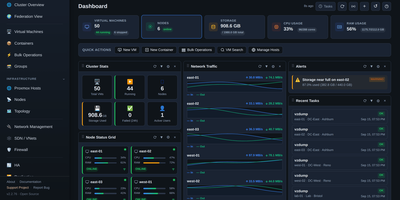
Three Proxmox sites, a lab host in the corner, and a rack of Dell and HPE servers can all share one screen when Depl0y runs the show. The dashboard totals virtual machines, containers, CPU, RAM, storage, and network traffic across every registered endpoint, with draggable widgets, alerts, and recent task feeds. Virtual machine pages cover start, stop, restart, snapshots, cloning, migration, templates, and a browser console, and node pages add metric charts, storage, networking, and update status. A guided failover wizard checks quorum, storage, and disks, then protects a guest so it restarts on another node if its host fails. A topology view maps hosts, guests, bridges, storage, and BMCs, with PNG, SVG, and draw.io export. Hardware pages poll iDRAC and iLO for health, temperature, power draw, DIMMs, drives, and firmware, and power controls reach machines that are fully off. Deployment tools build VMs from cloud images, import OVA, VMDK, and QCOW2 files, and launch self-hosted LLM guests. Admin, Operator, and Viewer roles, TOTP, host pinning, and a searchable audit log keep access tidy. MSPs managing client clusters, homelabs with several nodes, and data center teams that want hypervisor and hardware status together are the target audience. Running on a dedicated VPS on RepoCloud with guaranteed CPU, RAM, and SSD, full root SSH access, and a browser serial console. MIT licensed.
Taxonero
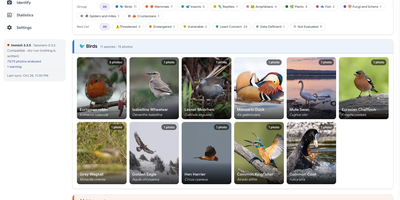
Taxonero turns a photo library into a species log: it finds the birds, insects, plants, and fungi in your pictures, names them, and tags them on your own server without touching the originals. Subjects are detected with MegaDetector v6 and OWLv2, identified by BioCLIP 2 across about 950,000 taxa, and checked against GBIF observations to see whether the species lives where the photo was taken. Confident, locally plausible results are confirmed automatically, and the rest wait in a review dashboard with status tabs, group filters, bulk actions, and a keyboard-driven viewer showing candidates, confidence, and a range map. Compare candidates with iNaturalist reference photos, draw boxes by hand, and set a location for photos without GPS. Species pages show names in 15 languages, taxonomy, range maps, and Wikipedia articles, a tree view runs from kingdom to species, and statistics cover accumulation curves and seasonality. The Identify page names a dropped image without storing it. Results reach Immich as hierarchical tags and a description, or XMP sidecar files for local folders, darktable, and Lightroom Classic, and one action removes what it wrote to Immich. Writes are dry-run by default, and its API key cannot delete or upload photos. Install it from CPU, NVIDIA, AMD, or Intel Docker images, a TrueNAS SCALE file, or a desktop app for Windows, macOS, and Linux. Running on a dedicated VPS on RepoCloud with guaranteed CPU, RAM, and SSD, full root SSH access, and a browser serial console. AGPL-3.0 licensed.