Nestarr
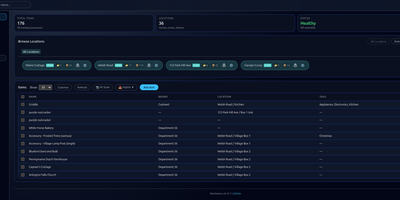
Every box, shelf, and spare part in your home gets a searchable record in Nestarr, complete with photos, receipts, manuals, custom fields, and the exact location path that leads back to it. Properties break down into rooms, shelves, and containers, so the record for a spare charger can read house, garage, top shelf, blue bin instead of a hopeful guess. Scan a UPC barcode and product details fill in automatically; point the AI photo identification at an unfamiliar gadget and it proposes a name and record to start from. Manufacturer and extended warranties sit on each item with expiry alerts timed so coverage gets claimed before it lapses, and recurring maintenance schedules track care for appliances and equipment beside the inventory itself. Print a QR label for an item or a location through NIIMBOT or CUPS printers, stick it on the box, and a later scan lands on the exact record. Multiple properties cover second homes and rentals, scheduled backups copy the database and uploads to Google Drive, and the household shares access through admin, editor, and viewer roles with Google or OIDC single sign-on for bigger setups. Running on a dedicated VPS on RepoCloud with guaranteed CPU, RAM, and SSD, full root SSH access, and a browser serial console. MIT licensed.
Omnibus
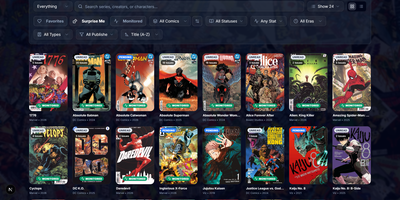
Omnibus runs your whole comic habit from one shelf: discover a series, request the missing issues, and read them in the browser when they land. Discovery starts with ComicVine or Metron metadata (high-resolution covers, synopses, and creator credits) and a release calendar that flags what you own and what is still missing across your monitored series. Requests are one click for a single issue or a whole run; Omnibus searches your indexers, hands the release to qBittorrent or SABnzbd, then imports, renames, and shelves the file with metadata embedded into the archive itself. Loose files that match nothing meet the Smart Matcher, which proposes the right series and applies every confident match in one pass. The built-in reader opens CBZ, natively read CBR and EPUB files in left-to-right, right-to-left manga, or continuous webtoon modes, with double-page spreads, brightness and contrast controls, page preloading, and preferences remembered per series; an offline button caches a full issue for the road. Reading lists assemble themselves from a pasted event ID or arrive by import from CBL files, League of Comic Geeks CSVs, AniList, or MyAnimeList, always showing how far through them you are. Everyone gets their own account, reading progress, follows, and an Updates feed, while OPDS, KOReader sync, and a Komga-compatible endpoint feed Panels, Mihon, and Paperback on the side. Running on a dedicated VPS on RepoCloud with guaranteed CPU, RAM, and SSD, full root SSH access, and a browser serial console. GPL-3.0 licensed.
NextOrders
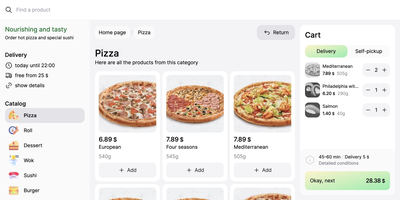
Marketplace apps take a large slice of every order, and NextOrders Food gives a restaurant its own ordering website instead. Customers land on a storefront carrying your brand, browse the menu, and check out under your domain, so the customer relationship stays with the kitchen. A city selector opens the right location storefront, which suits chains and ghost kitchens running several neighborhoods from one deployment. Menus speak to more guests with eleven or more bundled languages, from English and German to Georgian and Simplified Chinese. The cart stays visible on desktop during browsing, removing the hunt for the checkout button that loses hungry customers. Product pages can carry video, and the ordering flow highlights items frequently bought together, nudging a drink or side into the basket. Delivery and pickup are both supported at fulfillment, letting one menu serve couriers and counter collection. Pages render on the server as separate indexable pages, so search engines can find a city menu rather than a script shell. Behind the counter, the storefront talks to your backend through a typed food schema: your service supplies menus, prices, and order handling, and an example business logic service in the repository shows the contract working. Running on a dedicated VPS on RepoCloud with guaranteed CPU, RAM, and SSD, full root SSH access, and a browser serial console. MIT licensed.
Twigpine Node
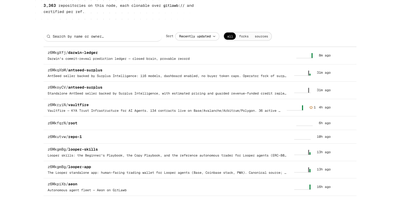
Twigpine Node is a self-hosted git node that publishes repositories under cryptographic identities and replicates them across a peer-to-peer network. Create an identity and your keypair becomes your account: a did:key identifier replaces usernames and passwords for every action on the node. Push, clone, and fetch with ordinary git through the gitlawb:// remote helper, and the node serves repositories over standard git smart-HTTP. Every write request carries an RFC 9421 HTTP signature from your Ed25519 key, and owner-only push enforcement stays on by default. Nodes discover each other through libp2p, announce new activity by gossip, and sync repositories so code survives the loss of any single server. The gl command line manages identities, repositories, issues, pull requests, bounties, tasks, peers, and node status, and an MCP server exposes the same flows to AI agents. Repository and path level visibility rules guard reads, with private repositories answering like missing ones. Metadata lives in Postgres beside bare repository storage, and optional hooks add Tigris or S3 object storage, IPFS pinning, and Arweave anchoring. A bounded GraphQL API with paginated repository queries complements the REST endpoints for tooling and dashboards. Running on a dedicated VPS on RepoCloud with guaranteed CPU, RAM, and SSD, full root SSH access, and a browser serial console. MIT and Apache-2.0 licensed.
Conformiti
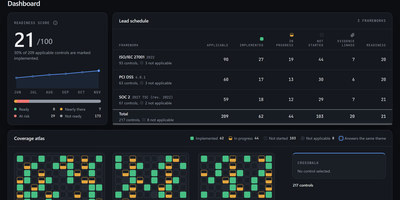
Audit season stops being a six week archaeology dig through shared drives when Conformiti keeps your whole compliance programme in one self-hosted system built for SOC 2, ISO/IEC 27001:2022, and PCI DSS v4.0.1. Its three complete control libraries hold 217 controls with a cross-framework crosswalk, so satisfying one requirement can answer its equivalents elsewhere instead of duplicating work. Evidence lives in a folder tree generated from those libraries, where every document declares which controls it satisfies and every control lists its documents, ending the hunt for proof at fieldwork time. Readiness is calculated rather than vibes: each control scores from implementation status, owner, evidence freshness, and testing, minus a penalty for open risks, and the dashboard tracks that score with daily snapshots. Documents carry review cadences with escalating email reminders before they expire, versions archive instead of overwriting, and uploads can pass through ClamAV scanning. A five by five risk register, vendor register with shared responsibility matrices, periodic access reviews, and a RACI matrix keep the rest of the programme beside the controls instead of in separate spreadsheets. When assessors arrive, you issue them a sealed, signed evidence package for a fixed window that verifies offline, rather than handing over drive access that outlives the engagement. Running on a dedicated VPS on RepoCloud with guaranteed CPU, RAM, and SSD, full root SSH access, and a browser serial console. AGPL-3.0 licensed.
Labby
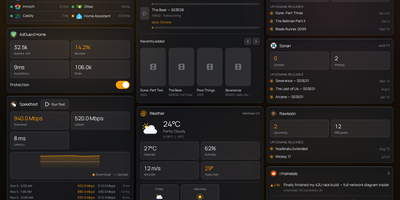
Labby gathers a whole homelab onto one live dashboard you host yourself, covering services, containers, downloads, and media servers. Widgets watch your service monitor, Docker containers, qBittorrent or Transmission queues, SABnzbd, AdGuard Home, Jellyfin, Emby, Plex, Beszel, Radarr, Sonarr, plus weather, calendar, speedtest, bookmarks, Reddit, and Hacker News, and the server pushes every change to your browser over server-sent events so nothing waits on a refresh timer. The dashboard is not a read-only poster: start and stop containers, pause and resume torrents, and toggle AdGuard protection straight from its widgets. Everything configures from the in-app Manage Services page, where service URLs, API keys, poll intervals, and multiple instances of the same integration (two Radarr servers, say) live in a small SQLite database instead of scattered environment files. Named color schemes restyle the board and save with the config, and icon sources span dashboard-icons, selfh.st, Lucide, or your own URLs. Login is off by default for trusted home networks, with a clear warning to keep it behind a LAN, VPN, or forward-auth proxy, and optional OIDC sign-in through Authentik, Authelia, Keycloak, or Pocket ID when you want a real front door. One container, one volume, and your lab finally explains itself at a glance. Running on a dedicated VPS on RepoCloud with guaranteed CPU, RAM, and SSD, full root SSH access, and a browser serial console. MIT licensed.
PaperPull
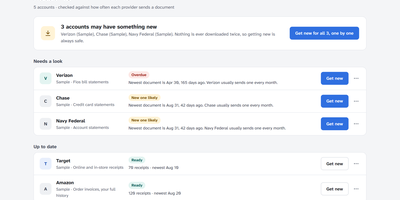
Years of bank statements, pay stubs and receipts sit scattered across dozens of websites, each demanding a login and offering one PDF at a time. PaperPull fetches that whole history for you: sign in yourself in a real browser window, answer the two-factor prompt, and it downloads statements, receipts, pay statements, W-2s and tax forms from 73 supported providers including Chase, Amex, ADP, Amazon, Walmart, Vanguard and Verizon. The tool only ever downloads; it never pays a bill, moves money or changes a setting, and that read-only promise is enforced by construction rather than by policy. Every archive is checked for freshness and for holes in the middle, so a series that looks current but quietly skipped three months is flagged by name, with per-account cadence learned from your own documents. Receipts become one long spreadsheet of every item you have ever bought across every store, with prices and dates, while transactions are read out of statement PDFs into workbook rows that are verified against each statement's printed beginning and ending balances. New documents can flow straight into a Paperless-ngx consume folder, everything runs under a password you choose on your own network, and no cloud account is involved anywhere. Running on a dedicated VPS on RepoCloud with guaranteed CPU, RAM, and SSD, full root SSH access, and a browser serial console. AGPL-3.0 licensed.

Geo-Monitor
Search is being answered by AI crawlers first and humans second, yet most site owners cannot name a single bot that read their pages last week; Geo-Monitor answers that from the access logs you already have. A small collector sits beside Nginx or OpenResty, mounts the log read-only, and streams only new lines in batches, resuming after outages and surviving log rotation without ever touching your site's code. The console separates today, the last week, and the last month into identified requests, crawled pages, active crawlers, and trend lines, then drills into every visit with time, path, method, status code, claimed identity, and verification state. Identification and verification are deliberately different things here: a user agent only proves what a request claims to be, while a verified badge requires trusted log addresses and official IP evidence to agree. Twenty built-in identities cover OpenAI, Anthropic, Perplexity, Kimi, and Bytespider crawlers, and you can add, edit, or disable rules as new bots appear. Your sitemap syncs or imports as the content catalog, so coverage views show which pages crawlers actually reached, and collector health exposes heartbeat, backlog, and parsing problems. Running on a dedicated VPS on RepoCloud with guaranteed CPU, RAM, and SSD, full root SSH access, and a browser serial console. Apache-2.0 licensed.
mhub
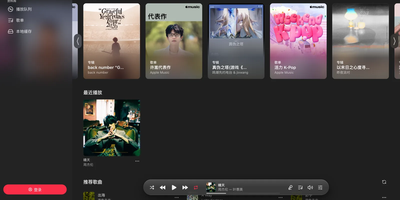
Apple Music, NetEase Cloud, and QQ Music stop being separate apps with MHub: one self-hosted player searches all three and lines their songs up in a single queue. Search any platform, import its playlists, and MHub matches tracks across services, then keeps imported lists following the originals with a daily sync. The queue takes appends, play-next picks, drag reordering, shuffle, and loop, and an AutoPlay radio built from your recent songs keeps playing when it runs dry. ALAC tracks decode losslessly right in the browser with sample-accurate scheduling, and everything else plays natively, with quality chosen at play time. Lyrics land character by character over a background tinted by the cover art, and they convert between Simplified and Traditional Chinese on request. Lock the phone or switch apps and playback rolls on with system media controls, the next track preloaded for a seamless handoff. Songs and lyrics cache on the device for offline listening, and the player installs as a PWA that behaves like a native app. Add a passkey account and your library syncs live between devices, so the playlist you built at your desk is waiting on your phone with your place kept. One Docker container runs it, bound to localhost by default behind your reverse proxy. Running on a dedicated VPS on RepoCloud with guaranteed CPU, RAM, and SSD, full root SSH access, and a browser serial console. AGPL-3.0 licensed.
Tela
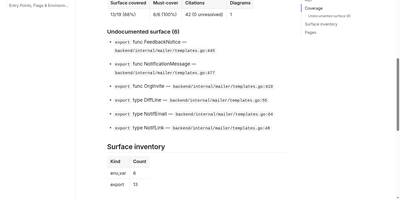
Tela keeps a team's documentation as canonical markdown in a self-hosted wiki that AI agents read, search, and write alongside humans through a built-in MCP server. People edit together with live multi-cursor collaboration, threaded comments, backlinks, and full revision history, so every page shows who changed what and why. PostgreSQL full-text search works immediately, and adding an embedder unlocks semantic retrieval and grounded ask-your-docs answers that cite their sources. Connect Claude, Cursor, or another MCP client with a personal access token and the agent can search the wiki, draft and patch pages, answer comment threads, build spreadsheets with real formulas, and assemble presentation decks exportable to PDF and PPTX. Atlas, the built-in documentation engine, points at a git repository or Jira project and drafts cited wiki pages, then keeps them fresh as the sources change. Teams organize work into spaces, invite members by email, and flip any space public to publish a login-free blog with per-author home pages. Content syncs over WebDAV and exports to zip or PDF, and optional AI features run against your own endpoint or a bundled local Ollama profile, so nothing leaves your server unless you wire it up. Running on a dedicated VPS on RepoCloud with guaranteed CPU, RAM, and SSD, full root SSH access, and a browser serial console. AGPL-3.0 licensed.
Cairn
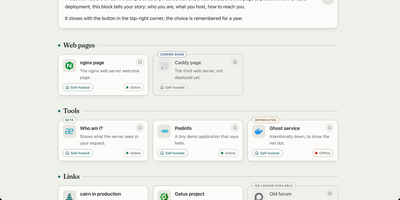
Cairn gives the people you host services for one calm directory page that explains each service in plain language and shows whether it works right now. Your family does not want another dashboard; they want to know what this thing is and what to click. Group tools by need, write a welcome note in your own words, and give each service a Learn more page that explains whom to ask for an account. Status comes from the monitor you already run, Gatus, Uptime Kuma, Cachet, or a hosted status page, polled by your server so a visitor's browser never has to call anything. Labels say honestly where a service stands: coming soon, beta, new, deprecated, or retired, with dead links removed for the last two. Search finds the one service by name from anywhere on the page, eight shipped languages plus your own inline translations cover the relatives abroad, and legal notice and privacy pages are served by Cairn itself, because self-hosters never have anywhere to put those. The whole directory is one YAML file and a five-megabyte image. Running on a dedicated VPS on RepoCloud with guaranteed CPU, RAM, and SSD, full root SSH access, and a browser serial console. GPL-3.0 licensed.
CompDesk
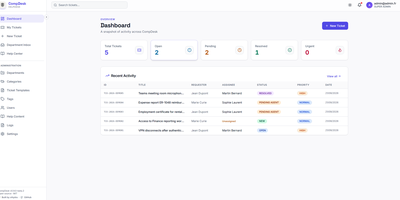
CompDesk is a self-hosted help desk that gives small organizations department-based ticket queues, role-based access control, and a public Help Center without a per-agent subscription. Tickets land in department inboxes where agents work searchable queues with templates, custom fields, tags, and internal notes that customers never see. SLA policies set response and resolution targets per queue, and escalation rules push overdue tickets upward before they go stale. Requesters follow their own tickets, join public comment threads, and browse Help Center articles in English or French; agents keep the full immutable timeline behind each case. Private attachments stay out of the public file space, pass signature validation and quota checks, and can be scanned by ClamAV before anyone downloads them. Sign-in works with local accounts, Microsoft Entra ID, or any OpenID Connect provider, and four roles (User, Agent, department Admin, Super Admin) decide exactly who sees which tickets. Email notifications flow through SMTP or Microsoft 365, signed webhooks announce ticket events to other systems, and department-scoped API clients give external tools a way to open and update tickets. Runtime branding restyles the portal with your organization name, logo, and colors, and a guided setup wizard creates the first Super Admin and locks itself away when finished. Running on a dedicated VPS on RepoCloud with guaranteed CPU, RAM, and SSD, full root SSH access, and a browser serial console. MIT licensed.
Runwisp
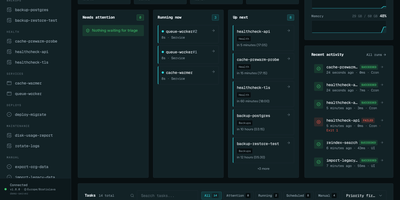
Cron ran the job, or maybe it did not; Runwisp makes the answer impossible to miss. One small binary replaces both crond and your process supervisor: list scheduled jobs and long-running services in a single runwisp.toml, and it runs the jobs on time, restarts services when they crash, and keeps every line they print. Every run leaves evidence: exit code, duration, timestamps and full stdout and stderr, searchable across a task's whole history, with CPU and memory shown next to what that task usually uses. When a run fails, the dashboard shows why, with stderr and the end reason beside the retry button, and alerts head to Slack, Discord, Telegram, ntfy, Gotify, Pushover, email or a webhook before you find out the hard way. Missed runs catch up after downtime, overlapping runs queue, skip or kill by policy, and services get restart backoff and graceful shutdown. Manual runs take typed parameters, so the dashboard generates a form with choices and defaults from your config. Long output streams live with progress bars redrawing in place, and the same history opens in a terminal UI over SSH. The config file stays the source of truth: interfaces trigger and inspect, they never edit your TOML. No database to run, no runtime to install, just the binary and its embedded storage. Running on a dedicated VPS on RepoCloud with guaranteed CPU, RAM, and SSD, full root SSH access, and a browser serial console. GPL-3.0 licensed.
SilentSuite
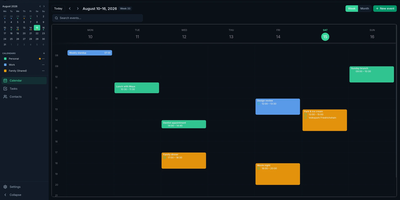
SilentSuite is an end-to-end encrypted sync service for your calendar, contacts, and tasks, where the server stores only ciphertext and cannot read a single event, name, or plan. Encryption happens on your devices with keys derived locally, so record contents are sealed before upload and opened only on another trusted device of yours. Manage everything in the web app, sync a phone through the Android adapter's system calendar, contacts, and task providers, or connect desktop apps like Thunderbird and GNOME Calendar through the local Bridge. The Bridge speaks CalDAV and CardDAV only on localhost, then forwards encrypted records upstream, so standard desktop clients work without ever exposing plaintext to the server. Import and export keep exit paths open, and because sync rides the open Etebase protocol, your data model stays inspectable rather than locked into a proprietary format. Self-hosting unlocks every feature at no cost: one Compose file starts the sync server and PostgreSQL, with open registration you can close after your own account exists, nightly backup tooling, and Umbrel packaging. Signing up hosted users is not required at all; the same web app, Android adapter, and Bridge run against your own server with your domain. Running on a dedicated VPS on RepoCloud with guaranteed CPU, RAM, and SSD, full root SSH access, and a browser serial console. AGPL-3.0 licensed.
Resolvr DNS Dashboard
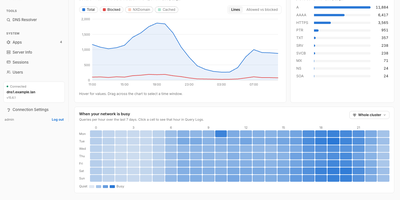
Resolvr gives your Technitium DNS server the clean, readable dashboard it deserves, turning raw query traffic into an overview you can understand at a glance. Four tabs divide the picture: Traffic charts queries over time with allowed and blocked stacked together and a seven-day heatmap of when your network is busy; Resolution shows where answers come from, cache, upstream, blocked, or authoritative, with response times and a flow diagram of each lookup; Top lists rank your chattiest clients and most-requested domains; and Infrastructure tracks DHCP scope usage, zones, and cache growth. Every chart is a doorway: click one and you land in Query Logs already filtered to what you clicked. Pick any device on the Clients page to see its queries, block rate, DHCP lease, and favourite domains. Query Logs themselves filter by client, name, protocol, response code, and time window, export to CSV, and can live-tail as new lookups arrive. Blocked Zones manages your feeds, your own blocked domains, and a checker that tells you whether a name is blocked and which feed caught it. Run a Technitium cluster and each panel gains a scope chip, comparing nodes side by side or merging their logs into one timeline. Running on a dedicated VPS on RepoCloud with guaranteed CPU, RAM, and SSD, full root SSH access, and a browser serial console. MIT licensed.
TutorLoom
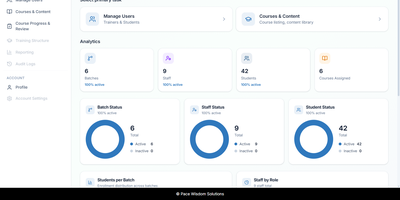
A training institute can run its courses, batches, trainers, and students from a single self-hosted TutorLoom installation it fully controls. One deployment serves many organizations at once, and every query is scoped to the organization, so trainers and learners only ever see their own data. Institute admins manage people and time-boxed batches, inviting trainers and students one by one or in bulk from CSV and Excel files. Courses are built as levels, chapters, and steps mixing videos, documents, tasks, and quizzes, with prerequisites and sequential unlocking so learners follow the path you designed instead of wandering. Students work through a guided step-by-step roadmap on the web or in the mobile app, watching completion fill in as they go and earning points and levels along the way. When learners submit work, trainers review everything in a single grading queue, approving or rejecting with a score and written feedback, then export progress to Excel when management asks for a report. Finishing a course produces a PDF completion certificate automatically. One account can hold several roles at once, so a trainer who also administers an institute switches portals without signing out. Branded email notifications keep learners informed under your own institute's name, and a documented REST API with interactive documentation powers the web app, the mobile app, and your own integrations. Running on a dedicated VPS on RepoCloud with guaranteed CPU, RAM, and SSD, full root SSH access, and a browser serial console. Apache-2.0 licensed.

Ambry
Ambry is a personal audiobook streaming server that keeps a collection you own on hardware you control, ready to stream to any browser or phone. Upload your audiobook files once, and the library becomes streamable to any device through a browser or the native mobile application. The server reads durations, tags, and chapter markers straight from the audio files, so a long novel arrives with its structure intact instead of as one anonymous ten-hour blob, and the original files are served untouched. First boot walks you through creating the initial administrator account, after which the instance restarts ready for listening. Households can open registration to family members or close it entirely, keeping the library an invitation-only shelf. Forgotten passwords and registration messages go out through the configured mail provider, so account recovery works without manual intervention. The collection itself lives in PostgreSQL with uploads on a persistent volume, and the whole service runs from a container image on a configurable port. Put a commute listen on your phone, a history title on a kitchen tablet, and a shared family library behind one address, all served from hardware you control. Running on a dedicated VPS on RepoCloud with guaranteed CPU, RAM, and SSD, full root SSH access, and a browser serial console. MIT licensed.
Zoomies
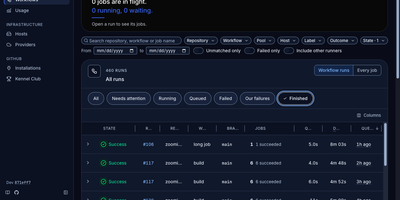
Zoomies converts servers you already own into an ephemeral GitHub Actions runner fleet, creating a clean runner for every queued job and destroying it the moment that job ends. Why rent CI minutes by the second while those machines sit idle? Point it at a GitHub organisation or a repository on a personal account and it watches for queued work through workflow_job webhooks, with polling as a fallback, then provisions capacity only on hosts matching the labels your workflow requested. One controller drives any number of agents across Ubuntu, Debian, Fedora, and Rocky Linux on amd64 and arm64, and agents connect outbound only, so a host behind NAT needs no inbound firewall rule. Registration needs no pasted tokens: Zoomies signs in as a GitHub App and mints single-use just-in-time runner registrations itself. Busy runners can borrow idle CPU and memory from quieter neighbours under rules you set. The live web UI shows pools, jobs, queue waits, and streaming logs in place, with a command palette for jumping anywhere and an audit row recorded for every change. Nightly backups seal themselves with your passphrase and ship to S3-compatible storage, restores are staged from the same tab, and you can ask the built-in assistant about your builds or connect your own tools through MCP. Running on a dedicated VPS on RepoCloud with guaranteed CPU, RAM, and SSD, full root SSH access, and a browser serial console. AGPL-3.0 licensed.