RStudio Server
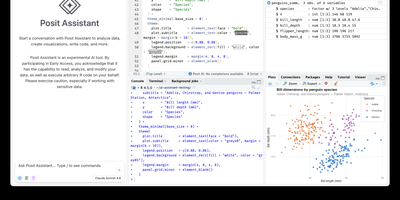
Open a browser tab, sign in, and the whole RStudio workbench is waiting there, running against R on a Linux server instead of your laptop. The familiar four-pane layout holds a source editor, an R console, Environment and History tabs, and Files, Plots, Packages, Help, and Viewer tabs. The editor opens R scripts, R Markdown, Quarto, and Python files, with code completion, diagnostics, section outlines, and a visual mode for Quarto documents. A Terminal tab and a Python console sit beside the R console, and the Data Viewer sorts, filters, and searches data frames and nested lists. Editor breakpoints and tracebacks help debug functions, while Background Jobs run long scripts in separate R sessions so the IDE stays usable. Shiny apps and Plumber APIs run as background jobs with live reload, and a Git pane handles diffs, commits, pushes, and branches. The Connections tab browses databases, and finished reports go to Posit Connect, shinyapps.io, Quarto Pub, or RPubs. Optional Posit Assistant adds an AI chat pane that works with the model provider you choose, and administrators can switch it off. Because everything runs server-side, a class, a lab, or a team can share one large-memory machine and keep computation next to the data without installing anything locally. Running on a dedicated VPS on RepoCloud with guaranteed CPU, RAM, and SSD, full root SSH access, and a browser serial console. AGPL-3.0 licensed.
SkillHub
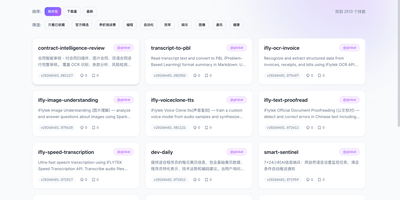
SkillHub gives teams a private, npm-style registry for AI agent skills, so a useful skill package is published once, reviewed, versioned, and installed into a compatible agent from the command line. Upload a package from the web console, the CLI, or the REST API, pick PUBLIC, NAMESPACE_ONLY, or PRIVATE visibility, and track releases with semantic versions plus tags such as beta and stable. Team namespaces keep their own members with Owner, Admin, and Member roles and publishing policies, while full-text search filters by namespace, downloads, ratings, and recency and hides whatever a user may not see. Every submission enters a review queue: namespace admins approve or reject team skills, platform admins decide promotions to the global scope, and each governance action lands in the audit log. A built-in Skill Scanner inspects published packages and shows its report on the skill page, with optional behavioral, LLM, VirusTotal, and Cisco AI Defense engines. Members can star and rate skills, follow download counts, receive notifications, and report problem packages. Skill suites bundle several skills into one versioned collection with an entry skill, scoped API tokens serve the CLI and scripts, and the interface speaks English, Simplified Chinese, Russian, and Korean. Packages live on local disk or S3-compatible storage such as MinIO. Running on a dedicated VPS on RepoCloud with guaranteed CPU, RAM, and SSD, full root SSH access, and a browser serial console. Apache-2.0 licensed.
MiroTalk C2C
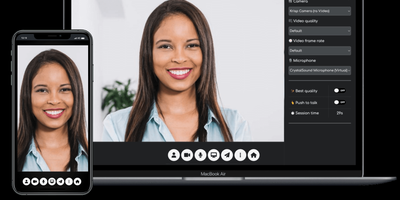
MiroTalk C2C is a self-hosted WebRTC cam-to-cam calling server that turns one private link into an encrypted one-to-one video call in the browser, with nothing for guests to download or sign up for. Create a room, pick how you want to join, and share the room ID: the other person opens it and you are face to face with video, audio, and screen sharing between desktops and phones. Push-to-talk and best-quality toggles sit next to camera, microphone and video quality controls in the in-call settings, and session time stays visible so lengthy calls never surprise you. Replace your background with the built-in Off, Blur, or Image modes processed locally in your browser, and show your camera as a picture-in-picture bubble in a corner of a shared screen so presentations keep a human face. The meeting is private by design: you choose the room and how you join before entering, and media stays encrypted between participants. Host it with the official Docker image on your own infrastructure to keep media and signaling under your control, embed calls into your own products with the direct room join and REST API, and use ngrok support for quick testing. Running on a dedicated VPS on RepoCloud with guaranteed CPU, RAM, and SSD, full root SSH access, and a browser serial console. AGPL-3.0 licensed.
Hopp
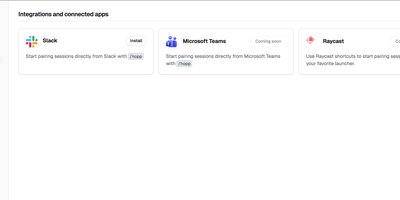
Meeting-app screen sharing was built for slide decks, and it shows when two engineers chase a bug across a codebase together; Hopp rebuilds screen sharing for exactly that job. Click a teammate and their screen opens in under a second: no meeting links, no calendar invites, no "can you see my screen?" ritual. Both sides get real keyboard and mouse control with sub-100ms latency, so guests type, click, and navigate instead of dictating instructions. Rooms hold up to 10 people for mob programming, code reviews, and onboarding, all with shared cursors so everyone can point at the line they mean. When words fail, draw or type annotations directly on the shared screen. The stream defaults to 4K, so small fonts and subtle diffs stay readable, and noise-cancelling audio keeps voices clear with no separate call app. You share any application, not just a browser tab, so debugging in Grafana or reviewing a design works as well as editing code. App Veil hides the windows you pick, such as password managers or chat, from the shared screen. Slack starts sessions with one /hopp command, and custom keyboard shortcuts keep frequent actions in flow. The server is yours: a Docker Compose stack with PostgreSQL, Redis, LiveKit, and Caddy auto-TLS serves the web dashboard and media, and the desktop app points at your backend, not a vendor cloud. Running on a dedicated VPS on RepoCloud with guaranteed CPU, RAM, and SSD, full root SSH access, and a browser serial console. AGPL-3.0 licensed.
AgentBox
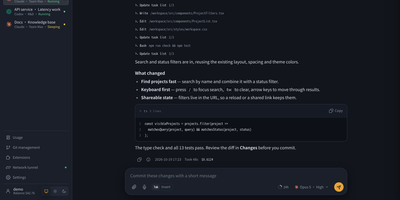
AgentBox is a self-hosted browser workspace that runs Claude Code and Codex CLI on a server you control, so a task goes from chat to reviewed code without leaving one place. Open a workspace from an empty project, an uploaded archive, or a Git clone, then talk to the agent in streaming web chat or drop into its original interactive terminal when you want the CLI itself. Files persist between sessions along with your home configuration and chat history, so a project picked up on a laptop continues on a phone exactly where it stopped. Review per-file diffs line by line before committing, pushing, or opening a pull request, and download the result when no Git connection is configured. Shared files, layered home templates, Claude skills, and MCP configuration carry your setup into every new workspace, with per-workspace overrides when a project differs. A trusted team shares central account pools with per-user scopes, while every model request is recorded with tokens, cache hit rate, cost, and latency, exportable to CSV and optionally capped by credits. An optional tunnel reaches allowlisted repositories and databases on private networks, and six interface styles with light and dark modes keep long sessions comfortable. Running on a dedicated VPS on RepoCloud with guaranteed CPU, RAM, and SSD, full root SSH access, and a browser serial console. Apache-2.0 licensed.
Dockpeek
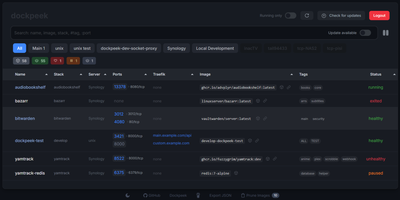
Fleet-wide container discovery, live log streaming, and Traefik reverse-proxy routing converge into Dockpeek, a lightweight Docker dashboard built for multi-host server environments. System administrators can launch web applications with one click through automatic port binding detection and integrated Traefik label parsing that extracts public routing hostnames directly from container configurations. The platform monitors multi-host environments through encrypted Docker socket proxies, letting operators inspect running containers, query published network ports, and trigger image updates from a unified control panel. Native Docker Swarm integration auto-detects active cluster managers, mapping swarm services and replicated tasks alongside standalone workloads while flagging degraded service replicas. Built-in log inspectors stream stdout and stderr outputs in real time with line-filtering controls to diagnose crashed services without opening remote SSH terminals. Operators can track image registries for newer digest tags, review pending updates across container fleets, and trigger graceful rolling container recreations directly from the dashboard. Running on a dedicated VPS on RepoCloud with guaranteed CPU, RAM, and SSD, full root SSH access, and a browser serial console. MIT licensed.
codex-lb
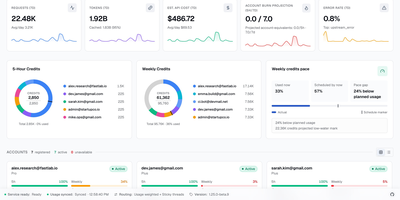
codex-lb turns a handful of ChatGPT accounts into one dependable endpoint for Codex CLI, OpenCode, OpenClaw, Hermes Agent, and any OpenAI-compatible client. Accounts join through an OAuth flow, and the dashboard shows each one's 5-hour and weekly quota as percent remaining, with reset times, plan, and a seven-day trend. Eight routing strategies, including capacity weighted, round robin, and sequential drain, pick an account per request, and sticky threads keep a session on the same account to preserve warm prompt caches. API keys carry expiry dates, model allowlists, reasoning-effort policies, per-account scoping, and token or cost limits per day, week, or month. Overview cards chart requests, tokens, cached share, estimated cost, error rate, and a weekly credit pace, and a searchable request log lists the model, transport, status, tokens, and cost of every call. A cost report breaks spend down by day, model, user agent, and account, with time to first token and tokens per second charts. Dashboard access is protected by a password with optional TOTP, a read-only guest mode, roles, and invites. Settings cover reset-credit handling, upstream proxy pools, model sources, a firewall, and a quota planner, and light and dark themes are built in. Running on a dedicated VPS on RepoCloud with guaranteed CPU, RAM, and SSD, full root SSH access, and a browser serial console. MIT licensed.
HolaOS
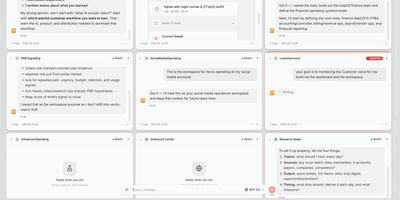
With over 6,500 GitHub stars, HolaOS bills itself as an "open agent computer" that reimagines the traditional operating system as a shared workspace where humans and AI agents collaborate across files, browsers, and 100+ integrated tools simultaneously. Unlike chat-only interfaces, HolaOS places live application UIs—Notion-style editors, browsers, custom workspace apps—side by side with the agent conversation, so operators always see what agents are doing and can intervene at any moment. The persistent memory system stores workspace knowledge locally as Markdown files and embedded vectors via SQLite vec, enabling RAG-powered recall that survives session boundaries without the typical context window bloat. Safe Session Compaction reserves roughly 70% of the model context window for fresh reasoning while folding older history into structured checkpoints that retain goals, constraints, progress, and decisions. Agents connect to Linear, GitHub, Slack, Jira, HubSpot, Gmail, and dozens more through one-click OAuth, automatically fetching relevant signals and converting scattered app data into working memory. BYOK support for Claude, GPT, and Gemini models lets operators use their own API keys at zero markup, while built-in Kimi K3 and GLM-5.2 models provide ready-to-use alternatives. Skills package reusable workflows that any agent can invoke on demand, and scheduled triggers enable autonomous digests, monitors, and reports. The runtime supports independent server deployment alongside the desktop client. Running on a dedicated VPS on RepoCloud with guaranteed CPU, RAM, and SSD, full root SSH access, and a browser serial console. Modified Apache 2.0 licensed.
DCM
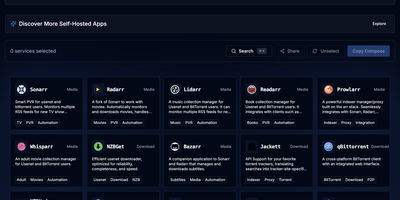
DCM is a visual builder that eliminates docker-compose copy-paste anxiety for home server enthusiasts. The TypeScript and Next.js web interface on port 7576 presents a curated catalog of popular self-hosted applications organized into categories: media management with Jellyfin, Plex, Sonarr, Radarr, and Prowlarr; dashboards like Homarr and Heimdall; databases including PostgreSQL, MariaDB, MongoDB, and Redis; monitoring stacks with Grafana and Prometheus; download clients like qBittorrent and NZBGet; security tools including Vaultwarden; storage solutions like Nextcloud; and home automation via Home Assistant. Select any combination of containers and DCM generates both compose.yaml and .env files with correct volume mounts, environment variables, PUID/PGID ownership, network modes, and port mappings — ready to paste into your terminal. Automatic port conflict detection identifies clashing services and reassigns ports before you ever hit a deployment error. The Template Gallery ships predefined multi-container stacks for common setups: media servers, development environments, database clusters, and monitoring solutions — some incorporating ten or more services in a single template. Built as a static Next.js export served from a 62 MB multi-arch Docker image supporting amd64, arm64, and arm/v7, DCM runs on everything from rack servers to Raspberry Pis. Share generated configurations via URL or download them locally. Running on a dedicated VPS on RepoCloud with guaranteed CPU, RAM, and SSD, full root SSH access, and a browser serial console. AGPL-3.0 licensed.
CyberScraper 2077
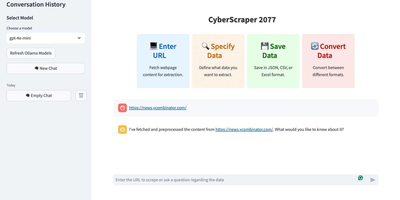
With 3,100+ GitHub stars, CyberScraper 2077 replaces brittle CSS selectors and XPath queries with natural language data extraction powered by Large Language Models. Users paste a URL, describe the data they want in plain English, and the AI extracts structured results from any website — no HTML parsing knowledge required. The tool supports three LLM backends: OpenAI GPT models for maximum accuracy, Google Gemini for cost-effective extraction, and local Ollama instances for fully private scraping where URLs and data never leave your server. Built on Python asyncio with Playwright browser automation, it handles concurrent page fetching with content-based and query-based LRU caching to minimize redundant API calls. The Streamlit web interface runs on port 8501 and provides one-click export to JSON, CSV, HTML, SQL, Excel, and direct Google Sheets upload. Tor network integration routes requests through onion routing for anonymous scraping of both clearnet and .onion hidden service sites with automatic circuit management and stream isolation. Stealth mode randomizes user agents, manages cookies, and controls JavaScript execution timing to bypass bot detection systems. Multi-page scraping navigates through paginated results with automatic URL pattern detection. Docker deployment packages all dependencies including Playwright browsers into a single container. Running on a dedicated VPS on RepoCloud with guaranteed CPU, RAM, and SSD, full root SSH access, and a browser serial console. MIT licensed.
LLMIO
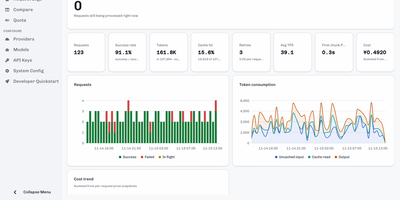
Every provider has its own API, quota, and price list, and LLMIO puts them all behind one door. Clients speak OpenAI Chat Completions, OpenAI Responses, Anthropic Messages, or Gemini, and a protocol bridge translates between OpenAI and Anthropic formats, including streaming events, when the upstream differs. Each model name maps to several providers with weights, a lottery or rotor load strategy, retry limits, and timeouts, and routing can follow tool calling, structured output, and image support. A per-model circuit breaker and rate-limit fallback keep one failing upstream from taking the rest down. The dashboard shows live requests, success rate, tokens, cache hits, retries, tokens per second, and cost, and analytics add trend, breakdown, latency, error, and model performance views with provider, key, and status filters. The request log records trace and session IDs with full request and response inspection, and a compare page lines up to six requests to show how a prompt cache builds. Access keys carry expiry dates, model allow-lists, and optional body logging. Quota sources, time-of-day pricing, and scheduled log cleanup round out the console. Running on a dedicated VPS on RepoCloud with guaranteed CPU, RAM, and SSD, full root SSH access, and a browser serial console. MIT licensed.
Subtitle Translator
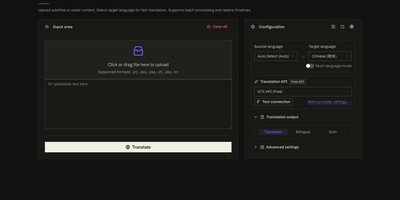
A whole season of subtitles can be translated in a single drop, with every timecode left exactly where it was. Subtitle Translator strips cue numbers and timing out of each file, sends only the dialogue to the translation engine, and puts everything back afterward, so a model never gets the chance to scramble a timeline. Pick any of 120+ target languages, or turn on multi-language mode to export several at once. Engines range from DeepL, Google, and Azure to dozens of LLM providers, gateways, and any OpenAI-compatible endpoint, including a local Ollama or LM Studio model. Context-aware mode feeds surrounding lines to the model for steadier dialogue and consistent character voices, and a glossary keeps names and product terms fixed across episodes. Bilingual output stacks original and translation in one file, either as plain SRT or as ASS with separate styles for each line. SRT, VTT, ASS, and LRC convert between each other during translation. Translated lines are cached, so a rate-limit pause or a closed tab only costs the missing lines. A text extractor strips timing for summaries and scripts. The interface itself is available in 18 languages, and companion tools handle Markdown, JSON locale files, and plain text. A back catalog of course videos or fan-subbed episodes becomes a weekend job instead of a month-long slog. Running on a dedicated VPS on RepoCloud with guaranteed CPU, RAM, and SSD, full root SSH access, and a browser serial console. MIT licensed.
pi-dispatch
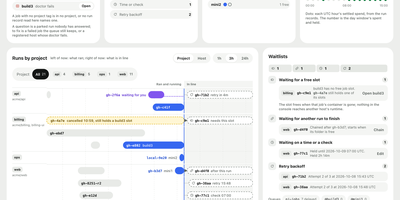
pi-dispatch turns one AI coding agent into a swarm that works in the background and reports to a single web page. Jobs start from a nightly schedule, a labeled issue, or a comment, then wait in one shared queue until a machine has room. Each job runs in a sealed box that is thrown away afterwards, reaches only the internet addresses you allow, and stops at the dollar limits you set per day, week, and month. When an agent hits a decision, it parks a question with options and a recommendation, and no model spend accrues until you answer. The overview shows what needs you, what is queued, what is running, and what today has cost. A Zero touch page tracks how often runs needed a person, per project, so you can see how far to step back. On GitHub, GitLab, Forgejo, and Azure DevOps the work ends as a proposed change that a human merges. Fleet, Spend, Triggers, and Models pages cover several machines, budgets per project, and fallback models. Running on a dedicated VPS on RepoCloud with guaranteed CPU, RAM, and SSD, full root SSH access, and a browser serial console. MIT licensed.
AgentRQ
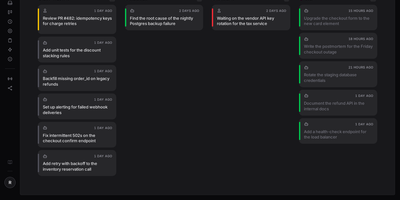
Where AI agents and people share one real-time workspace, an agent blocked on your decision never waits unnoticed until morning, and that workspace is AgentRQ, a human-in-the-loop task manager for agent fleets. In that workspace agents pull assigned tasks over MCP, report progress as they work, ask questions in the open, and pause visibly instead of going dark. Cards travel from Not Started to Ongoing to Blocked to Done on a list or Kanban board, and a Blocked card returns to work the second you answer from any device. Sensitive tool calls wait for an Allow click; flip YOLO on a task and they proceed automatically, still recorded call by call in a searchable trajectory. A timeline under every task totals how long the agent worked, waited, or stayed blocked. Scheduling spawns tasks on a cadence, completed tasks fire named events, and events hand new tasks to subscribed workspaces, chaining a release pipeline without glue code. Each project lives in an isolated workspace with its own agent, memory, skills, and Slack channel, and workspace memory carries yesterday's lessons into today's session. Voice-dictated tasks transcribe on device, 55 ACP-compatible agents connect through one gateway, and agents running on your own machines expose their terminals and resource use remotely. Running on a dedicated VPS on RepoCloud with guaranteed CPU, RAM, and SSD, full root SSH access, and a browser serial console. AGPL-3.0 licensed.
Elasticvue
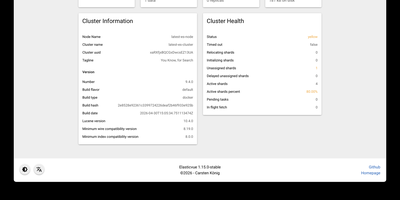
Elasticvue is a graphical interface for Elasticsearch where you can inspect cluster health, browse indices, search and edit documents, and send REST queries. Start on the Home tab, which summarizes status, nodes, shards, indices, document counts, and disk usage. Nodes shows load, CPU, RAM, heap, and disk for each member, and Shards lays out every primary and replica in a grid with a switch for shard allocation. Indices handles creation, aliases, templates, and bulk actions. Search runs query string searches across an index pattern, opens any hit in a JSON editor for updates or deletion, and downloads results as JSON. Rest sends any request from tabbed editors with history, saved queries, and examples, while Snapshots manages repositories and backups. Version 1.16 adds user and role management for Elasticsearch clusters. Secured clusters connect with basic authentication, API keys, or AWS IAM credentials, and the Docker image preloads cluster definitions from an environment variable or a mounted JSON file. Elasticvue supports every Elasticsearch version, even end-of-life releases, and speaks English, Chinese, French, Russian, Japanese, and Italian. Running on a dedicated VPS on RepoCloud with guaranteed CPU, RAM, and SSD, full root SSH access, and a browser serial console. MIT licensed.
GitBucket
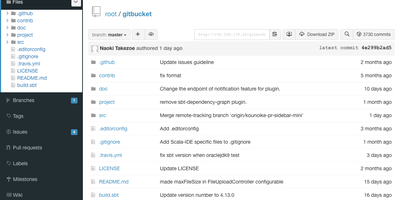
One downloadable WAR file gives your team a complete GitHub-style home for its code, with no per-seat bill and no repositories living on someone else's terms. You create public or private repositories and reach them over HTTP, HTTPS, or SSH, with Git LFS handling large binary assets alongside ordinary commits. The repository viewer includes an online file editor, so quick fixes and documentation tweaks happen in the browser without a local clone. Every repository carries its own issue tracker, pull request workflow, and wiki, keeping discussion, review, and project documentation next to the code they describe. Activity timelines and email notifications keep collaborators aware of new issues, comments, and merges as they happen. Administrators manage users and groups directly, connect account management to LDAP, and protect the instance with fine-grained repository visibility. A plug-in system extends the platform, and official plug-ins add gists, emoji, static Pages hosting, and richer notifications, while community plug-ins widen the menu further. Tools that already speak the GitHub API can point at your GitBucket instead, because its web API deliberately mirrors GitHub's. Upgrades stay simple: stop the process, replace the WAR, and restart with the same data directory. Running on a dedicated VPS on RepoCloud with guaranteed CPU, RAM, and SSD, full root SSH access, and a browser serial console. Apache-2.0 licensed.
Grasp
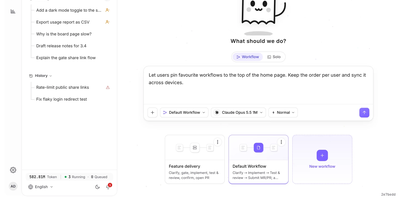
One sentence in, one reviewed pull request out: Grasp sends coding agents through a visual workflow in isolated sandboxes and leaves every approval to people. Describe a task on the home page and run it as a workflow or a Solo session. A clarify agent first asks one question at a time as clickable option cards with a recommended answer, then writes a requirement spec and plan and builds a page mock you can annotate. Workflows are drawn on a visual canvas with six node types, and failure and rollback edges send work back to an earlier step. Eight agent CLIs, including Claude Code, Codex, Cursor, and OpenCode, can run as agent nodes in a Docker, Kubernetes, or E2B sandbox shared by the nodes of a run. Runs pause at human gates in a shared inbox, and a temporary one-time link lets a reviewer without an account approve or reject. Solo sessions give a single agent an IDE, terminal, and browser, and a noVNC panel lets you watch its Chromium and take over with a click. Specs, plans, test results, and HTML previews are kept as versioned artifacts. A token page breaks cost down by workflow, source, and model. Agents push branches and open pull requests or merge requests through gh, glab, or SSH credentials stored per repository. Running on a dedicated VPS on RepoCloud with guaranteed CPU, RAM, and SSD, full root SSH access, and a browser serial console. MIT licensed.
Plandex
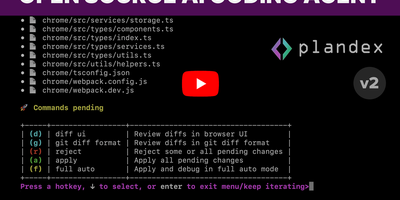
With 15,500 GitHub stars and over 1,100 forks, Plandex delivers a terminal-based AI coding agent purpose-built for the complex, multi-file tasks that overwhelm single-file AI assistants. The Go-powered server maintains a cumulative diff review sandbox that quarantines all AI-generated changes from your project files until you explicitly approve them — enabling 20-file refactors where you cherry-pick good changes and reject bad ones without touching git. A 2M token effective context window loads only what each step requires, while tree-sitter project maps index repositories exceeding 20M tokens across 30+ programming languages, providing structural awareness of class hierarchies, function signatures, and import graphs without burning tokens on full file content. The configurable model pack system assigns different models to different roles — Claude for planning, GPT for coding, Gemini for summarization — supporting Anthropic, OpenAI, Google, OpenRouter, Azure OpenAI, AWS Bedrock, DeepSeek, Perplexity, and Ollama for local models. Full auto mode handles end-to-end autonomous workflows including high-level planning, context loading, implementation, terminal command execution, and automated debugging of both terminal and browser applications. The interactive REPL provides fuzzy auto-complete, version-controlled sandbox branching, rewind to any previous point, and Git integration for commit message generation. The Plandex Server exposes 60+ REST API endpoints for programmatic orchestration across organizations, projects, plans, and branches. Deploy via Docker Compose for self-hosted operation with your own API keys. Running on a dedicated VPS on RepoCloud with guaranteed CPU, RAM, and SSD, full root SSH access, and a browser serial console. MIT licensed.