Octobox
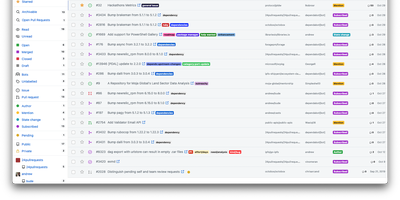
What Gmail did for email, Octobox does for GitHub notifications: an ephemeral, unmanageable stream becomes an inbox you can actually triage. GitHub marks notifications read the moment you glance at them and lets old ones vanish days later; heavy maintainers end up building elaborate Gmail filter systems just to cope. Octobox - a Ruby on Rails app over PostgreSQL - syncs your notifications into a persistent inbox with an explicit archived state: mark a thread done, and if the issue or PR sees new activity, it pops back automatically, so nothing silently falls through. Triage is keyboard-driven with Gmail-style shortcuts (j/k to navigate, e to archive, m to mute, s to star), and multi-select clears noisy repositories in bulk. Filtering is where it earns its keep: slice by repository, organization, type, action, state, reason, CI status, labels, author, assignee, or bot origin, combine prefix search filters, and pin favorite searches to the sidebar. The optional GitHub App enriches entries with live PR/CI status and labels so you can decide without clicking through. Auto-archive rules clear merged PRs and closed issues; muting and snoozing silence the rest. A REST API supports integrations. Self-hosting keeps your notification metadata - a map of everything you work on - on your own server.
Otter Wiki
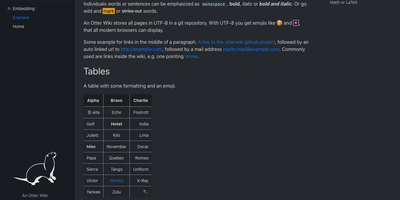
Every page in Otter Wiki is a plain Markdown file and every save is a git commit, so a small team gets a simple wiki whose history never goes missing. The editor highlights Markdown as you type, offers a toolbar for headings, lists, tables, code, alerts, and images, and can show a live preview beside the source. Paste or drop an image into the editor and it is stored as a page attachment. History, blame, and changelog views, with RSS and Atom feeds, show who changed what and when. Beyond standard Markdown you get footnotes, task lists, math formulas, Mermaid diagrams, alert boxes, and spoiler or folded blocks, plus experimental embeddings such as sortable data tables, info boxes, image frames, videos, and included pages. A customizable sidebar shows a menu, a page index, or both. Search offers case-sensitive and regular expression options. Dark mode is built in. Admins decide whether anonymous visitors, registered users, or approved users may read, write, or upload, grant rights per user, close registration, or require email confirmation. An optional, experimental git web server lets people clone, pull, and push the wiki, and changes can be pushed to or pulled from a remote repository over SSH. Running on a dedicated VPS on RepoCloud with guaranteed CPU, RAM, and SSD, full root SSH access, and a browser serial console. MIT licensed.
Indico
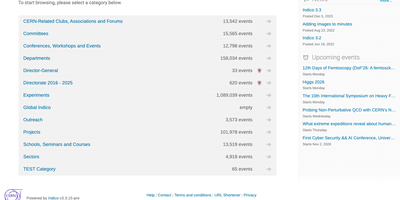
From the call for abstracts to the badge handed over at the registration desk, Indico handles every step of running a conference, plus the weekly meetings and one-off lectures that fill the calendar around it. Events live in a nested tree of categories, and access rules can be set per category, event, session, or single contribution, with custom roles inside each event. Speakers submit abstracts, track reviewers score them against questions the organizers define, judges accept or reject them, and accepted talks become contributions that sit in a drag-and-drop timetable of color-coded sessions. Registration forms are assembled field by field, carry fees, and take payment through PayPal, Stripe, or SIX Payment plugins; attendees get QR-coded tickets, and a badge editor prints name tags for the whole room. A paper reviewing workflow collects full papers. Meeting pages keep minutes and slide decks attached to the talk they belong to. The room booking module adds approvals, recurring reservations, and audiovisual equipment, and the Zoom plugin creates online sessions straight from an event page. Calendar views span a month, week, or day, filter by category, and export to iCal for subscriptions. Scripts pull event data from the HTTP export API as JSON or XML with personal API tokens. Running on a dedicated VPS on RepoCloud with guaranteed CPU, RAM, and SSD, full root SSH access, and a browser serial console. MIT licensed.
Medusa
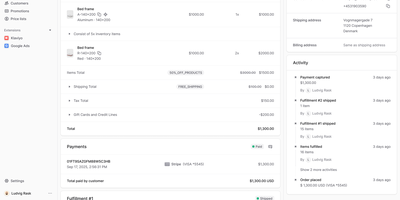
With over 35,000 GitHub stars and 460 contributors, Medusa is the headless commerce framework that gives development teams full ownership of their e-commerce backend without license fees, per-transaction charges, or revenue sharing. The modular architecture ships over 18 domain modules covering products, collections, categories, inventory, pricing, carts, orders, payments, fulfillment, promotions, customers, users, API keys, and stock locations, each independently usable and replaceable. REST and GraphQL APIs expose every commerce operation to any frontend framework — official starters exist for Next.js with community options for Nuxt, Remix, and Gatsby. The React-based admin dashboard provides out-of-the-box order management, product maintenance, promotions configuration, B2B accounts, and multi-warehouse inventory, extensible via the Admin SDK for custom views and workflows. The workflow engine orchestrates long-running commerce processes like checkout, fulfillment, and returns with compensating transactions for reliability. Over 200 official and community plugins integrate Stripe, PayPal, Klarna, Algolia, Meilisearch, SendGrid, Mailchimp, Contentful, Sanity, and Klaviyo. Native multi-region and multi-currency support handles tax-inclusive pricing, region-specific payment and fulfillment providers, and localized storefronts from a single backend. Enterprises including Viessmann, Makro PRO, and INSPIRED Pet Nutrition run Medusa in production. Self-hosting deploys via Docker or directly on Node.js with PostgreSQL and Redis. Running on a dedicated VPS on RepoCloud with guaranteed CPU, RAM, and SSD, full root SSH access, and a browser serial console. MIT licensed.
Modoboa
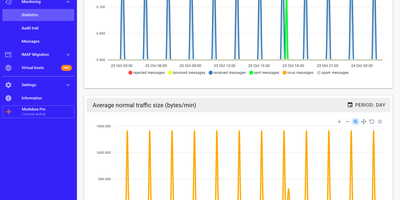
Modoboa turns a bare mail server into a managed hosting platform, with one web console for domains, mailboxes, aliases, and quotas, plus a full webmail for the people using them. Roles separate super administrators, resellers, domain administrators, and ordinary users, with caps on how many mailboxes and aliases each administrator may create and daily sending limits per domain or mailbox. The webmail offers conversation view, folder subscriptions, scheduled sending, attachments, and search across headers and message bodies. Calendars and address books sync with standard clients, and calendars can be shared. Each user writes Sieve filters and autoreplies in the browser. Deliverability checks cover MX records and DNSBL listings, DKIM keys are generated per domain, and DMARC aggregate reports become per-domain visual reports. Amavis quarantine pages and an Rspamd frontend help with spam. Traffic graphs show message volume. Accounts authenticate against the local database, LDAP, Active Directory, or an existing SMTP server, with TOTP codes or WebAuthn security keys as a second factor. Thunderbird and Outlook configure themselves through built-in autoconfig and autodiscover endpoints. An IMAP migration tool pulls mailboxes from another provider as each person signs in. Administrators can brand the console with custom logos, extend it through plugins, and automate it through a documented REST API. Running on a dedicated VPS on RepoCloud with guaranteed CPU, RAM, and SSD, full root SSH access, and a browser serial console. ISC licensed.
MoneyMatter
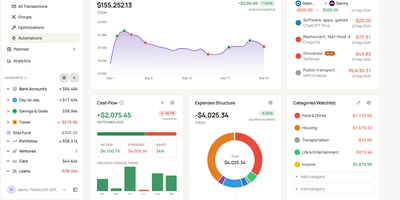
Your bank balance is only part of what you own, and MoneyMatter adds the rest: cash accounts, brokerage portfolios, cars, loans, and private deals roll into one net worth figure in your base currency. Add transactions by hand, import CSV, OFX, QFX, YNAB, Wallet, or Microsoft Money files, or let an AI model you provide parse a statement, while Monobank, SimpleFIN, Lunch Flow, and Walutomat connections sync accounts automatically. Each transaction can carry categories, tags, payees, notes, attachments, and splits, transfers and refunds link to their counterparts, and automation rules tidy new entries. Envelope-style budgets assign money to lines with Assigned, Activity, and Available columns and rollover rules, savings goals read progress from account balances, subscriptions and bills send reminders, and loans show payoff projections. Stocks, ETFs, and crypto are priced daily, vehicles depreciate along a curve, and a FIRE planner estimates years to Lean, Regular, Fat, Barista, and Coast FIRE. A customizable dashboard, cash flow, money flow, net worth history, trends comparison, and pivot table chart the results. Share accounts with a household member, export JSON, CSV, or XLSX, back up everything, or connect Claude, ChatGPT, or Claude Code through the built-in MCP server. Running on a dedicated VPS on RepoCloud with guaranteed CPU, RAM, and SSD, full root SSH access, and a browser serial console. AGPL-3.0 licensed.
Supertokens Core
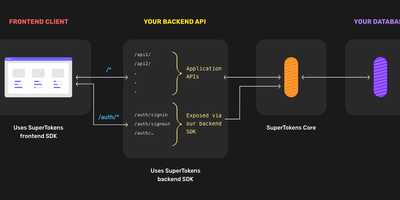
Authentication that lives inside your application rather than behind a redirect to an external identity provider - SuperTokens takes a fundamentally different architecture from Auth0 and AWS Cognito. Three tiers make that work - frontend SDKs (React, Angular, Vue, vanilla JS, React Native) render overridable login UI and manage tokens; backend SDKs (Node.js, Python, Go) expose auth endpoints on your own API domain; and SuperTokens Core, the piece you host here, is the stateless HTTP service handling core auth logic, password hashing, token signing, and database operations against PostgreSQL. The recipe system keeps features decoupled: use email/password, social login, passwordless (magic links, OTP), phone-password, multi-factor authentication (TOTP, WebAuthn), user roles, and microservice auth - individually or combined; you can even use SuperTokens purely for session management alongside another login provider. Sessions are where it shines: rotating refresh tokens with theft detection, automatic access-token refresh, CSRF protection, and secure cookie handling out of the box - the details that become vulnerabilities when hand-rolled. Verification happens locally in your backend via cached JWT signing keys, so the Core stays off the hot path. Self-hosted means no user limits, free forever, with all user data in your database. Apache-licensed.
Hasura
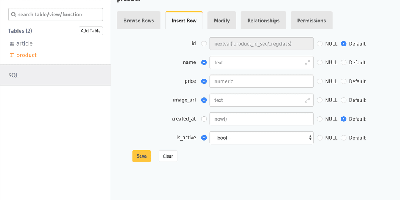
A PostgreSQL database becomes a production-grade GraphQL API the moment Hasura GraphQL Engine points at it: track tables and relationships - existing schemas included - and full query, mutation, and subscription types appear with where, order_by, limit, offset, and on_conflict arguments, no resolvers or boilerplate written. Its Haskell core compiles GraphQL to efficient SQL, and any query becomes a real-time live query with a single keyword, powering dashboards and collaborative UIs over standard GraphQL subscriptions. Authorization is where Hasura earns its enterprise reputation: role-based access control with row- and column-level permission policies driven by session variables from JWTs, auth webhooks, or headers - each role effectively sees its own GraphQL schema containing only what it may touch, integrating cleanly with Auth0, Firebase, or homegrown auth. Event triggers fire webhooks on inserts, updates, and deletes for asynchronous business logic; Actions extend the schema with custom REST handlers; remote schema stitching merges external GraphQL services into one endpoint; and auto-generated REST endpoints serve clients that skip GraphQL. A browser console handles data modeling and API exploration, the CLI manages migrations and metadata as code, and deployment is a single stateless Docker container beside Postgres.

MCSManager
Hosting a Minecraft survival world, a Terraria server, and a Palworld host no longer means juggling SSH sessions and screen windows, because MCSManager puts every instance behind one web panel. A built-in marketplace installs game servers from ready-made templates, filtered by operating system and tagged with the Java version each one needs, while any Docker Hub image, uploaded ZIP archive, or plain process can run as an instance with its own start command, stop command, and live terminal. Docker instances get memory, CPU, port mapping, and volume settings, and each instance can auto start, auto restart, and run scheduled tasks. For Minecraft servers, the plugin and mod manager (Beta) searches Modrinth and CurseForge, and the file manager handles maps, configs, and uploads. Administrators create user accounts and assign instances to them, so friends or paying customers only see their own servers, which suits small hosting businesses that sell game servers. Extra machines join as nodes and connect to the same panel, and the drag-and-drop dashboard can be rearranged to taste. The interface supports many languages. Running on a dedicated VPS on RepoCloud with guaranteed CPU, RAM, and SSD, full root SSH access, and a browser serial console. Apache-2.0 licensed.
phpMyFAQ
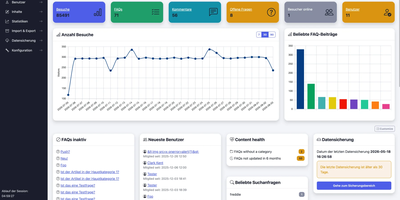
Publish the answers your team keeps repeating as a multilingual, searchable FAQ with phpMyFAQ, a knowledge base whose admin area handles writing, review, and permissions. Organize entries in nested categories that you rearrange by drag and drop, attach files, add tags and related FAQs, and let visitors leave comments. A WYSIWYG editor with an image manager writes each answer, a wiki-style revision history restores earlier versions, and a news system posts announcements. Full-text search covers every language, and optional Elasticsearch or OpenSearch backends handle larger collections. The interface covers more than 40 languages with right-to-left layouts, automatic content negotiation, and translated categories and entries. Privileges work per user and per group, so an editor can change an entry without being allowed to delete it, and categories can be limited to chosen readers. Sign in through LDAP, Active Directory, or Microsoft Entra ID, protect accounts with two-factor authentication, or try experimental passkeys. The dashboard charts 30 days of visits, lists inactive FAQs, and checks installed files against published hashes. Export entries to PDF, publish a dynamic sitemap, back up your content, and filter spam with built-in protections. Dark, light, and high-contrast themes keep the public site comfortable to read. Scripts and AI assistants reach the knowledge base through a REST API with an OpenAPI specification or an experimental MCP server, and plugins extend it. Running on a dedicated VPS on RepoCloud with guaranteed CPU, RAM, and SSD, full root SSH access, and a browser serial console. MPL-2.0 licensed.
Busabase
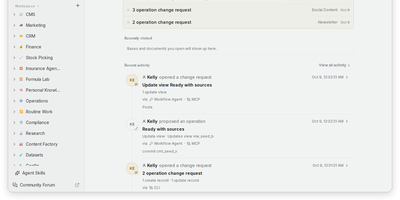
Every AI agent session starts from zero, and Busabase fixes that: it is an open-source workspace where agents and people share records, docs, skills, and apps, and every agent write arrives as a reviewable change. Bases hold typed records with relations, views, and forms, while Docs, Files, Whiteboards, and Workflows live in the same tree, so a project's data and context stay together. Skills are SKILL.md playbooks that any connected agent can look up before it acts. Each write becomes a Change Request carrying a message, a field-level diff, an author, and history; your permissions decide whether it merges at once or waits in the Inbox for approval, and any change can be reversed. Ask an agent to turn a Base into a dashboard, CRM, or content desk and it runs as an AirApp on live workspace data. Claude Code, Codex, Cursor, Gemini CLI, n8n, or your own process can connect through MCP, OpenAPI, the CLI, TypeScript and Python SDKs, or an in-app chat session. Templates install a complete setup, with sample data and an agent manual, in one command. Start it with one command and no accounts, because the open-source edition is a single-user workspace with no sign-in screen. Running on a dedicated VPS on RepoCloud with guaranteed CPU, RAM, and SSD, full root SSH access, and a browser serial console. MIT licensed.
Tiny File Manager
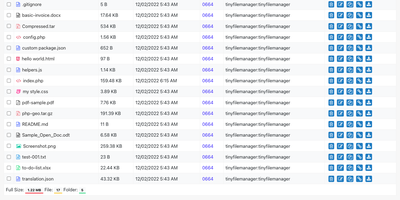
Browse, upload, edit, preview, and archive the files on your server from any web browser, with no FTP client, no shell session, and no database to set up. Tiny File Manager lists every folder in a sortable table showing size, modified date, permissions, and owner, with a search box that filters as you type. Drag files into the upload zone, send several at once, or paste a URL for the server to fetch. Rename items, select several to copy, move, delete, or pack into a zip or tar archive, and extract uploaded archives on the server. Click any text file to open the built-in editor, which offers syntax highlighting for 150+ languages and 35+ color themes, so quick fixes to configs and scripts happen where the files live. Images, audio, video, and text open in a preview without downloading, and every file has a copyable direct link. Give teammates or clients their own accounts, each locked to a root folder you choose, mark accounts read-only, and limit uploads to approved file extensions. Hide folders you never want listed, restrict access with IP allow and block lists, switch between light and dark themes, pick from 35+ interface languages, and use the responsive layout on a phone. Setup is one file copied to a web server, or one Docker container. Running on a dedicated VPS on RepoCloud with guaranteed CPU, RAM, and SSD, full root SSH access, and a browser serial console. GPL-3.0 licensed.
Betterlytics
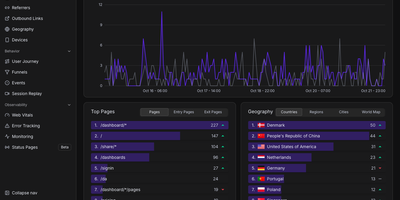
Page views, funnels, session replays, error reports, Core Web Vitals, and uptime checks share one cookieless dashboard in Betterlytics, so teams stop stitching several tools together. The overview charts visitors, page views, bounce rate, and visit duration against the previous period, and annotations mark launches or campaigns right on the timeline. Breakdowns cover referrers, channels, UTM campaigns, browsers, devices, and operating systems, with visitor locations on a world map once an optional MaxMind key is added. Custom events, global properties such as plan or app version, and outbound link tracking show what visitors actually do, while user journey diagrams and funnels reveal where they drift away. Session replay is opt-in per tracking script, masks text and form inputs by default, and can keep recordings in your own S3-compatible bucket. Error tracking groups JavaScript errors with stack traces, a session trail, and a link to the matching replay. Uptime and SSL monitors alert through Slack, Discord, Teams, or webhooks and feed public status pages on your own domain. Teammates join by invitation, two-factor login is available, and a built-in MCP server lets Claude, Cursor, or Codex answer traffic questions. A script of about 3.5 KB or a WordPress plugin handles installation. Running on a dedicated VPS on RepoCloud with guaranteed CPU, RAM, and SSD, full root SSH access, and a browser serial console. AGPL-3.0 licensed.
OpenTakeoff
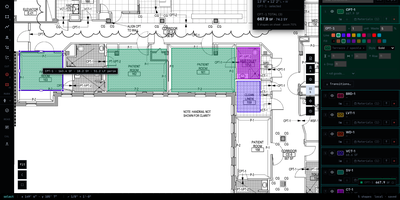
From a PDF plan set to a waste-adjusted material order takes one browser tab: OpenTakeoff measures floors, walls, and fixtures at the drawn scale and never uploads a single drawing. Drag in a PDF, image, or zip plan set, view up to four sheets side by side, and search sheet text, while stitching joins floors split across a match line. Scale comes from the drawn scale note or a known dimension, and a check tool reports percent error before a wrong scale can skew a bid. Area, linear, and count tools carry condition colors, CAD hatches, waste percentages, and wall heights, and a marquee over the architect's finish schedule turns approved rows into conditions. Supporting materials convert coverage rates into rounded-up order quantities, and roll-goods mode lays out lanes, seams, and cuts to scale. Totals in SF, SY, LF, and EA export to CSV, JSON, Excel, print, or a marked-set PDF, while named revisions compare addenda as quantity deltas. Highlighters, revision clouds, callouts, and notes mark up sheets on a layer that is never counted, and dimension lines label measured lengths at the sheet scale. An MCP server with more than 50 tools lets AI agents open plans, set scale, and measure rooms, and each shape they draw stays a dashed proposal until a person accepts it. Running on a dedicated VPS on RepoCloud with guaranteed CPU, RAM, and SSD, full root SSH access, and a browser serial console. AGPL-3.0 licensed.
TextBee
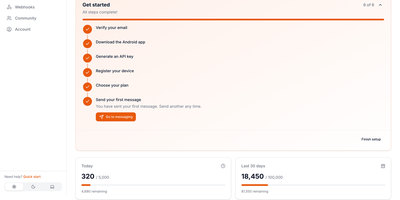
TextBee turns an Android phone with a SIM card into an SMS gateway your applications can call, so one-time codes, alerts, reminders, and two-way conversations go out as ordinary texts from a real number. Pair a phone by scanning a QR code in the dashboard, then send messages from the REST API, the dashboard, or the JavaScript SDK. Bulk campaigns load from a CSV file and are paced to stay within carrier limits, and any message can be scheduled up to 72 hours ahead. With several phones or SIM cards attached, each message can name the device and SIM it should use. Every message moves through pending, dispatched, sent, delivered, or failed, and the history view lists all devices together. Incoming texts appear in the dashboard and the API, and webhooks push received messages and delivery reports to your server with an HMAC-SHA256 signature you can verify. An official MCP server lets AI assistants send texts and read replies. API keys, devices, usage, and webhook subscriptions are all managed from one web interface. Running on a dedicated VPS on RepoCloud with guaranteed CPU, RAM, and SSD, full root SSH access, and a browser serial console. MIT licensed.
Isso
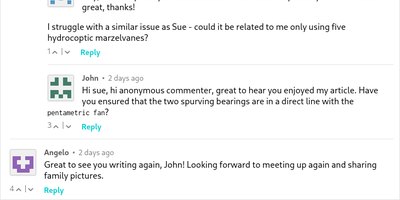
Named from the German "Ich schrei sonst" - roughly "or I'll scream" - Isso is a lightweight Python/JavaScript commenting server, a drop-in Disqus replacement for people who noticed what Disqus does to reader privacy and page load times. The design premise is printed right in the docs: comments are not Big Data. So the backend is a single SQLite file rather than a database cluster, and the entire client is one embeddable JavaScript file - 65 kB, 20 kB gzipped - that you drop into any static site, blog, or CMS. Commenters write in Markdown, need no account, and can edit or delete their own comments within a configurable window (15 minutes by default). Spam control comes from an optional moderation queue: held comments stay invisible until you activate them via an admin interface or email notification links. Migration is a first-class feature, with importers for Disqus and WordPress exports, so years of existing threads move over intact. Because everything is server-rendered from your own instance, no third party tracks your readers, and real-world switchers report smaller pages and faster loads than the Disqus embed. MIT-licensed, running since 2012.
LibreTranslate
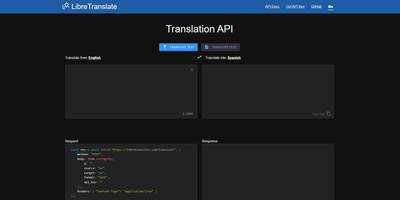
Machine translation with no Google, no Azure, no per-character billing, and no text leaving your infrastructure: LibreTranslate is a free, open-source translation API that runs entirely on your own server. The engine underneath is Argos Translate, which runs OpenNMT neural models with SentencePiece tokenization and Stanza sentence-boundary detection, all offline. Models install as portable .argosmodel packages covering dozens of languages - English, Spanish, French, German, Chinese, Japanese, Russian, Arabic, Hindi, Portuguese, and many more - and Argos handles automatic pivoting: with es-to-en and en-to-fr installed, it chains them to translate es-to-fr without a direct model. The API is a straightforward HTTP POST to /translate with source and target language codes, returning JSON - simple enough that the ecosystem has clients in every major language and integrations across tools like Weblate and Mastodon. Beyond plain text it translates HTML while preserving markup and handles whole file uploads (documents in, translated documents out), plus automatic language detection when the source is unknown. A clean bundled web UI serves interactive translation for end users, and optional API keys with rate limits control access. AGPL-licensed and trainable with custom models, it is the standard answer when translation must be private, unmetered, and self-contained - GDPR-sensitive text never touches a third party.
GymCoach
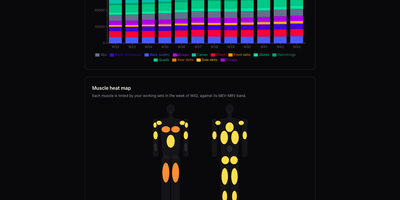
Strength training, cardio, and body metrics land in one workout log on your own server, backed by an optional AI coach that explains its advice from your real numbers. Quick entry such as 100x8@9 logs weight, reps, and effort in one line, with a rest timer, plate-loading calculator, and warm-up ramp beside the set table. A weight picker offers only loads your equipment can build, and a readiness check-in adjusts the suggested load and says why. Templates for 5/3/1 BBB, GZCLP, nSuns, PPL, and Upper/Lower run as written and edit like any custom program. Progress pages chart estimated 1RM, weekly volume per muscle group against MEV and MRV bands, a muscle heat map, bodyweight goals, and a training calendar. Garmin FIT, TCX, and GPX imports need no cloud account and add heart-rate charts and aerobic decoupling to each run or ride. The coach writes a weekly debrief, chats in a streaming conversation, and drafts a full program from a one-sentence goal, using your own Anthropic or OpenRouter key. History imports from Strong or Hevy CSV files with a dry-run preview and exports to CSV or TCX, and an MCP connector lets ChatGPT or other agents analyse it. The app installs as an offline-capable PWA, speaks English, French, Russian, and German, and keeps every user's data separate. Running on a dedicated VPS on RepoCloud with guaranteed CPU, RAM, and SSD, full root SSH access, and a browser serial console. MIT licensed.