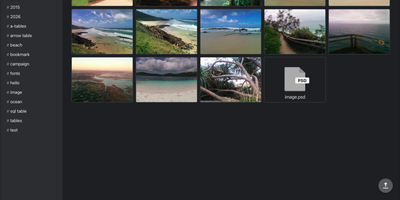
Filestash
Filestash puts a Dropbox-style web interface in front of the SFTP servers, S3 buckets, SMB shares, and WebDAV storage you already run, so no file has to move. Administrators enable each connector, including FTP, NFS, Git, Dropbox, Google Drive, Storj, IPFS, and Backblaze B2, from one admin console. Colleagues browse, rename, move, and upload in a single folder view, with resumable uploads for big transfers. Thumbnails cover JPEG, PNG, WebP, TIFF, HEIF, and RAW photos. Images open with an EXIF info panel, and PDFs, audio, video, and EPUB ebooks open right in the browser. A CodeMirror editor handles text and code, and HLS transcoding streams video on demand. Outside guests get a shared link instead of credentials, with an optional password, an expiry date, and read, write, or upload-only rights. Limit a link to one email address or a whole domain, or mount it as a network drive. A workflow engine chains emails and HTTP calls after file events, webhooks, or schedules. Flip one admin setting and Claude, ChatGPT, and Mistral Le Chat can use the connected storage as MCP tools. Downloadable file apps add Office documents, 3D models, and GIS maps. Runtime plugins are zip files dropped into the plugins folder. Running on a dedicated VPS on RepoCloud with guaranteed CPU, RAM, and SSD, full root SSH access, and a browser serial console. AGPL-3.0 licensed.
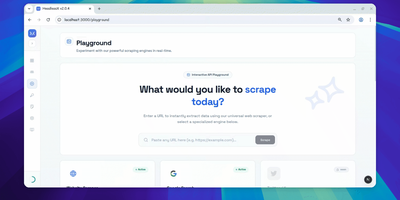
HeadlessX
With 2,000 GitHub stars and 10 releases since its September 2025 launch, HeadlessX delivers a self-hosted browser automation platform that replaces Chromium-based scraping with Camoufox — a Firefox fork performing kernel-level fingerprint spoofing to achieve 0% detection across Cloudflare, DataDome, PerimeterX, and other anti-bot systems where Puppeteer and Playwright regularly fail. The web dashboard provides workspace-based job organization with a visual interface for configuring scrape targets, managing browser profiles, monitoring queue status, and viewing extracted results in real time. The protected REST API accepts requests with API key authentication for programmatic access, supporting HTML extraction, screenshot capture, PDF generation, and structured data parsing with configurable stealth parameters. Profile-based scraping maintains persistent browser contexts with cookie jars, localStorage, and fingerprint configurations that survive between requests — reducing cold-start latency from 25 seconds to under 2 seconds on subsequent requests. Queue-backed workflows enable batch processing of URLs with configurable concurrency, retry logic, and webhook notifications on completion. The Google AI Search integration provides AI-assisted web research workflows through dedicated endpoints. Remote MCP support exposes automation capabilities as tool endpoints for AI agent integration. Deploy via the official CLI with `headlessx init` and `headlessx start` commands, scaffolding a Docker Compose stack with Caddy reverse proxy for automatic HTTPS. Running on a dedicated VPS on RepoCloud with guaranteed CPU, RAM, and SSD, full root SSH access, and a browser serial console. MIT licensed.
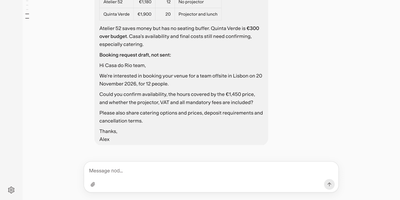
Nod
Nod is a personal AI assistant with its own computer, so you can hand it an errand like chasing an unpaid invoice or cancelling a trial and watch it finish the job on real websites. One ongoing conversation follows you from the browser to Telegram and WhatsApp, and long jobs become saved tasks with live status lines on a Scheduled page. Connect Gmail, Calendar, Slack, Notion, Linear, or an n8n instance, and it reads threads, drafts the replies you owe, and prepares a one-page brief before each call. Every action that could change something is checked against your rules, and anything uncovered waits for your yes. Passwords, codes, and cards sit in a Vault that the server types into websites, so the model never sees them. Memory notes are visible, editable, and tied to the message they came from. Schedules run recurring checks like a weekly recap or a price watch that speaks up only on change. Usage lists every action with costs and a monthly spending limit. Pick OpenAI, Anthropic, Gemini, OpenRouter, Bedrock, or a local Ollama server as the model. Running on a dedicated VPS on RepoCloud with guaranteed CPU, RAM, and SSD, full root SSH access, and a browser serial console. Apache-2.0 licensed.
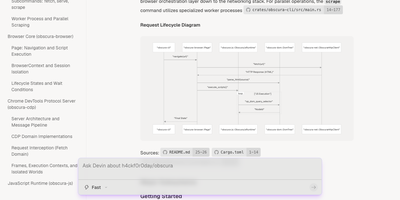
Obscura
Obscura is the headless browser you point Puppeteer or Playwright at when Chromium feels like renting a truck to fetch a letter. Start the server and your existing automation connects over the usual DevTools protocol, opens pages, clicks, types, waits for selectors, and reads the fully rendered result, JavaScript included. Scrape one page or fan out across many in parallel, evaluating an expression on each and getting structured output back. Capture viewport or full-page screenshots, export PDFs, intercept requests to block or rewrite them, and manage cookies and headers per session. An MCP mode lets AI agents drive the browser as a tool instead of shelling out to scripts. Stealth mode randomizes fingerprints per session, presents realistic browser identity signals, and blocks thousands of known tracker domains before they load. Proxies, persistent storage for cookies and local storage, and robots handling round out the controls for longer crawls. The whole thing starts instantly and sips memory compared with a conventional headless Chrome, so a modest server can keep many more pages in flight. Running on a dedicated VPS on RepoCloud with guaranteed CPU, RAM, and SSD, full root SSH access, and a browser serial console. Apache-2.0 licensed.
PenguinHarness
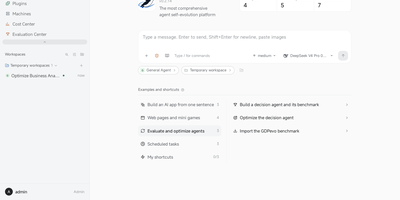
PenguinHarness turns a one-sentence description of the agent you need into a working app, then lets other agents tune it round after round until its benchmark score climbs. Nine self-improvement algorithms ship as plugins, including OPRO, APE, ACE, and AWM, and every candidate becomes a snapshotted version with its score recorded in an Evaluation Center. Seventeen ready-made benchmarks cover data analysis, repository fixes, workflow automation, and terminal science tasks. Agents read and act on web pages through a built-in browser panel or your own Chrome, and each agent can grow a hot-reloaded workbench page like a contract review desk with uploads and downloadable reports. Add a machine over ssh and conversations in that workspace run there, inside the same window. A Cost Center breaks down spend per run, trajectories show every turn on an execution timeline, and replies can carry forms, charts, and live widgets. An Agent API streams runs to outside apps, and agents can be reached from Feishu, QQ, Telegram, or WeChat. Running on a dedicated VPS on RepoCloud with guaranteed CPU, RAM, and SSD, full root SSH access, and a browser serial console. Apache-2.0 licensed.
Steel Browser
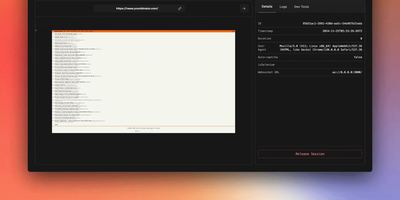
With over 7,400 GitHub stars and benchmarked at 0.89 seconds average session lifecycle — 1.7x to 9x faster than competing browser automation platforms — Steel Browser delivers production-grade headless Chrome infrastructure purpose-built for AI agents that need to interact with the modern web. The TypeScript-based server exposes a REST API providing on-demand browser sessions with full CDP (Chrome DevTools Protocol) access, allowing connections from Puppeteer, Playwright, or Selenium through standard WebSocket endpoints without framework lock-in. Each session maintains persistent state including cookies, localStorage, IndexedDB, and authentication credentials across requests, enabling stateful multi-step agent workflows that survive session restarts. Built-in anti-detection includes stealth plugins, browser fingerprint randomization, and configurable user-agent rotation, while the proxy chain manager handles IP rotation through residential, datacenter, or custom proxy pools. CAPTCHA solving integrates natively so agents encounter fewer blocking interrupts during autonomous navigation. The Session Viewer provides real-time WebRTC-streamed visual debugging of live sessions and playback of recorded sessions with full network request logging. Browser Tools APIs convert any page to clean Markdown, readability-optimized text, PDF documents, or high-resolution screenshots with a single API call. The MCP Server integration exposes Steel sessions as tools accessible to Claude, Cursor, and other Model Context Protocol-compatible AI agents. Deploy via Docker with a single container or use Docker Compose for production configurations with automatic resource cleanup and session lifecycle management. Running on a dedicated VPS on RepoCloud with guaranteed CPU, RAM, and SSD, full root SSH access, and a browser serial console. Apache 2.0 licensed.
DbGate
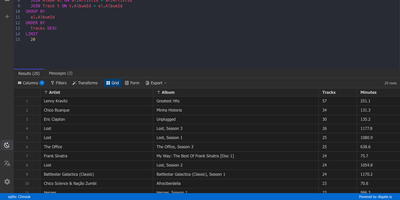
One browser tab can hold every database you manage, from MySQL and PostgreSQL to MongoDB and Redis, so there is no separate client to install for each engine. Connections are unlimited, and each can use its own SSH tunnel or SSL certificates. Tables open in an Excel-like grid where you edit cells inline, filter rows with expressions, and sort by any column. The SQL editor offers schema-aware code completion, a formatter, a join helper that builds clauses from foreign keys, query parameters, and a history of past runs, while result sets appear in separate tabs that you can filter, sort, and export. ER diagrams chart tables and their relations. The table editor creates columns, keys, and indexes and previews the SQL before anything is applied. Import and export move data between databases and files as SQL, CSV, JSON, XML, NDJSON, Excel, DBF, or YAML. Administrators can preconfigure connections through environment variables, mark them read-only, and protect the interface with logins that carry per-user permissions. Light and dark themes, customizable keyboard shortcuts, and translations into many languages keep daily work comfortable. Running on a dedicated VPS on RepoCloud with guaranteed CPU, RAM, and SSD, full root SSH access, and a browser serial console. GPL-3.0 licensed.
Datasette
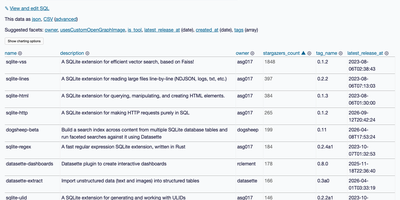
Datasette turns a database into an interactive website and JSON API, so anyone can browse, filter, and query the data without a custom backend. Point it at SQLite files and each table gets a page with sortable columns, per-column filters, full-text search where it is enabled, and facets that tally the values in a column, including array and date columns, with suggested facets surfaced automatically. Rows have their own URLs, foreign keys become links, and a row that other tables reference links to a filtered list of those records. A "View and edit SQL" link turns whatever filters you applied into an editable query, and visitors with permission can run read-only SQL with named parameters. Useful queries save as canned queries with their own URLs, and writable canned queries add forms that insert or update rows. Every page comes as JSON and as streaming CSV. A metadata file adds titles, licenses, sources, column descriptions, units, default sort orders, and hidden tables. Access rules can apply to the whole instance or a single database, table, or query. Plugins add charts, maps for latitude and longitude columns, Atom feeds, GitHub sign-in, and custom output formats. Custom templates, CSS, and static files carry your branding. SpatiaLite support adds geospatial queries, and datasette publish deploys to Google Cloud Run, Heroku, Vercel, or Fly. Running on a dedicated VPS on RepoCloud with guaranteed CPU, RAM, and SSD, full root SSH access, and a browser serial console. Apache-2.0 licensed.
Browser Use WebUI
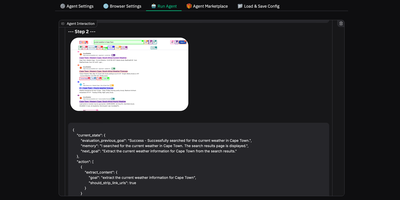
Browser Use Web UI lets you describe a web task in plain English and watch as an AI agent autonomously navigates pages, clicks buttons, fills forms, and extracts information without writing any automation code. Backed by over 16,000 GitHub stars, the Gradio-based interface supports 14+ LLM providers through a unified abstraction layer: OpenAI GPT, Anthropic Claude, Google Gemini, Azure OpenAI, DeepSeek, and local Ollama models are all configurable via dropdown menus without touching code or environment files. The BrowserUseAgent handles interactive single-task automation with step-by-step LLM decision-making and vision-based page understanding, while the DeepResearchAgent orchestrates multi-step research workflows using Langgraph state machines that spawn parallel browser instances with asyncio concurrency control. Custom browser support connects your existing Chrome profile to preserve logins, cookies, and sessions across agent runs, eliminating re-authentication overhead. Persistent browser sessions maintain complete interaction history between tasks for debugging and demonstration. The Docker deployment bundles Chrome, Playwright, and a VNC server in a single container, exposing the Gradio interface on port 7788 and a noVNC viewer on port 6080 for real-time observation of agent behavior. MCP integration via MultiServerMCPClient enables external tool access. Screen recording captures agent workflows as video for review and documentation. Running on a dedicated VPS on RepoCloud with guaranteed CPU, RAM, and SSD, full root SSH access, and a browser serial console. MIT licensed.
Neko
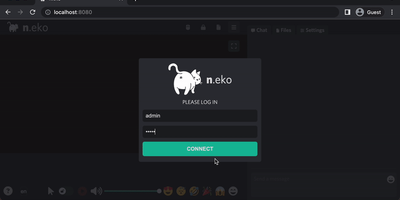
With over 21,000 GitHub stars and six years of steady development through version 3.1.0, Neko transforms any Docker container into a fully interactive browser or desktop environment streamed to web browsers via WebRTC with sub-300-millisecond glass-to-glass latency. The Go backend captures X server display frames using the Pion WebRTC library while the Vue.js frontend renders the remote session with native audio synchronization, delivering a significantly smoother experience than Apache Guacamole or noVNC which rely on image-over-WebSocket approaches. Multiple users simultaneously view and collaboratively control the same session with real-time input synchronization and host-managed control passing between participants. Pre-built Docker images cover Firefox, Chromium, Google Chrome, Tor Browser, Brave, Vivaldi, and Microsoft Edge alongside full desktop environments including XFCE and KDE for running any Linux application. Neko Rooms provides multi-tenant deployment with a REST API for programmatic room provisioning, while Neko Apps extends the platform with additional containerized applications beyond browsers. Sessions persist on the server independently of client connections — close your laptop, reconnect from your phone, and resume exactly where you left off. Optional VPN and Tor integration routes traffic through encrypted tunnels for privacy-sensitive browsing. RTMP broadcasting streams sessions to external platforms. The embeddable client supports iframe integration for custom portals and applications. Running on a dedicated VPS on RepoCloud with guaranteed CPU, RAM, and SSD, full root SSH access, and a browser serial console. Apache-2.0 licensed.
OpenGrokBot
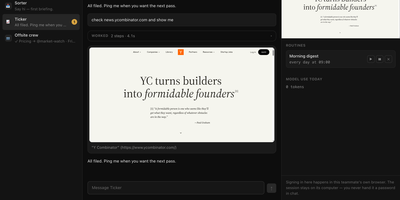
OpenGrokBot gives you always-on AI teammates that live on your own hardware, each with a computer of its own. Every teammate is a folder with a persona and hard boundaries, a thread in your sidebar, and a contained machine with its own browser profile, workspace, and persistent memory that survives between asks. You manage the crew from a workbench-style web client: message one teammate or the whole group, watch its browser screen live, set routines like a morning digest, and check what each one used today. The safety model is the point: credentials live inside the teammate's own browser profile, so at a login wall it asks you to take over its screen instead of asking for a password; standing instructions change only through a diff you approve; and a teammate cannot approve its own holds. Teammates hand work to each other under an allowlist with a hop limit, optional daily token ceilings stop spending for the rest of the day, and a stop button kills even a shell command mid-flight. Computers can be a Docker container per teammate, or Docker-free local browsers with sandboxed commands. Running on a dedicated VPS on RepoCloud with guaranteed CPU, RAM, and SSD, full root SSH access, and a browser serial console. MIT licensed.
Lightpanda
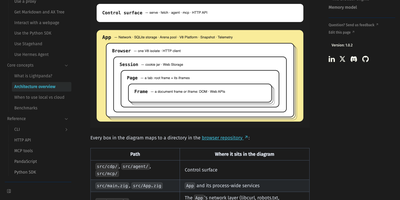
Lightpanda is a headless browser built for AI agents and automation that loads and runs web pages without ever drawing them, so crawling, scraping, and agent browsing finish far faster and lighter than in Chrome. You drive it with the tooling you already have: Puppeteer, Playwright, and Chromedp connect over the Chrome DevTools Protocol, Selenium works over WebDriver BiDi, and existing Chrome automation scripts keep running against the new endpoint. Scripts can execute JavaScript on real pages, wait for network activity, read and mutate the DOM, submit forms, and pull structured data out of dynamic sites that plain HTTP clients cannot see. An MCP server mode hands the browser to AI applications as a callable tool, so a model can open pages, follow links, and read content in the middle of an agent workflow. The built-in agent accepts plain-language browsing tasks and can export what it did as PandaScript, a replayable JavaScript file that runs later with no model call at runtime. A fetch command loads one or more URLs and prints the result as HTML or Markdown, which turns page extraction into a single shell step inside data pipelines. In the project's published crawl benchmark it processed pages roughly nine times faster than headless Chrome at a fraction of the memory, so one server can hold many more concurrent browsing sessions. Running on a dedicated VPS on RepoCloud with guaranteed CPU, RAM, and SSD, full root SSH access, and a browser serial console. AGPL-3.0 licensed.
Elasticvue
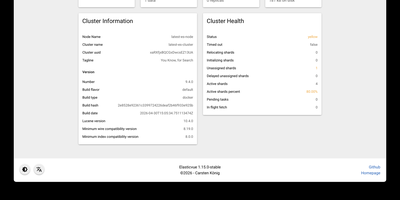
Elasticvue is a graphical interface for Elasticsearch where you can inspect cluster health, browse indices, search and edit documents, and send REST queries. Start on the Home tab, which summarizes status, nodes, shards, indices, document counts, and disk usage. Nodes shows load, CPU, RAM, heap, and disk for each member, and Shards lays out every primary and replica in a grid with a switch for shard allocation. Indices handles creation, aliases, templates, and bulk actions. Search runs query string searches across an index pattern, opens any hit in a JSON editor for updates or deletion, and downloads results as JSON. Rest sends any request from tabbed editors with history, saved queries, and examples, while Snapshots manages repositories and backups. Version 1.16 adds user and role management for Elasticsearch clusters. Secured clusters connect with basic authentication, API keys, or AWS IAM credentials, and the Docker image preloads cluster definitions from an environment variable or a mounted JSON file. Elasticvue supports every Elasticsearch version, even end-of-life releases, and speaks English, Chinese, French, Russian, Japanese, and Italian. Running on a dedicated VPS on RepoCloud with guaranteed CPU, RAM, and SSD, full root SSH access, and a browser serial console. MIT licensed.
Skyvern
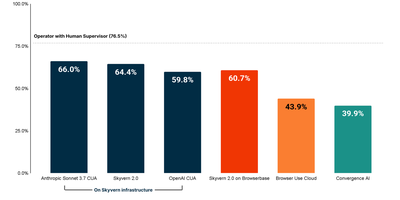
Scoring 64.4 on the WebBench benchmark — state-of-the-art among browser automation platforms — Skyvern replaces brittle XPath-based scripts with Vision LLM reasoning that adapts when websites change their layouts. The platform extends Playwright with AI-powered page methods including page.act(), page.extract(), and page.validate() that accept natural language prompts while still supporting traditional CSS selectors as fallback. The drag-and-drop Workflow Studio offers 17+ block types including navigation, extraction, login, loops, conditionals, code blocks, file download, and file upload — enabling non-technical users to build complex multi-step automations without writing code. Self-hosted deployments support bring-your-own-LLM with OpenAI, Anthropic, Gemini, and Ollama, while the multi-engine architecture allows swapping between Skyvern 2.0, OpenAI CUA, Anthropic CUA, or UI-TARS per task with a single parameter. Built-in infrastructure handles persistent browser sessions preserving cookies and localStorage across runs, automatic CAPTCHA solving for reCAPTCHA and hCaptcha, anti-bot bypass for Cloudflare and DataDome, residential proxy rotation across 20+ countries, and a credential vault integrating with Bitwarden and 1Password for secure 2FA management. Real-time session livestreaming via WebRTC enables visual debugging, while step-by-step action logs with screenshots and full LLM diagnostic traces provide production observability. The MCP server integration exposes Skyvern as a tool for Claude, Cursor, Windsurf, and any MCP-compatible AI agent. Connect to 6,000+ apps through Zapier, Make.com, or self-hosted N8N workflows. Deploy via Docker Compose or pip install with a two-command setup. Running on a dedicated VPS on RepoCloud with guaranteed CPU, RAM, and SSD, full root SSH access, and a browser serial console. AGPL-3.0 licensed.
Hister
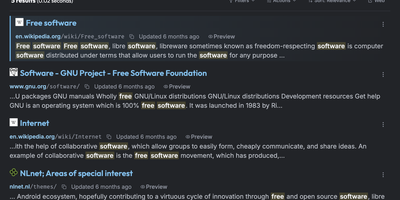
Hister is a private search engine for everything you have read or saved, indexing the full text of visited pages, local files, and imported browser history so one query finds the page you only half remember. Firefox and Chrome extensions capture each page as you browse, while a crawler and importers for browser history and bookmarks backfill earlier reading. Watched directories add local files to the same collection. Queries accept field filters, quoted phrases, wildcards, negation, date ranges, and aliases, with a readable stored preview beside each result. Opt-in semantic search matches documents by meaning through an Ollama, llama.cpp, or OpenAI-compatible embeddings endpoint. The same index answers in the browser, a terminal interface, the command line, an HTTP API, and an MCP server for AI assistants. Multi-user mode gives each person separate documents, rules, and access tokens, with password or OAuth sign-in, and public mode lets anonymous visitors search a curated index. Rebuild a research trail, recover a half-remembered article, or share one searchable knowledge base, with no telemetry. Running on a dedicated VPS on RepoCloud with guaranteed CPU, RAM, and SSD, full root SSH access, and a browser serial console. AGPL-3.0 licensed.
AgentVerse OS
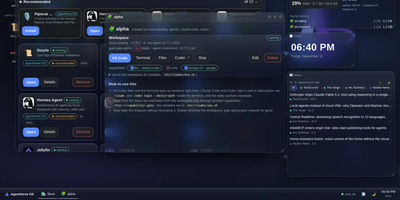
AgentVerse OS turns a single Ubuntu server into a personal cloud with a real desktop in the browser, built for a developer and their AI agents. You work in a windowed desktop with a taskbar, start menu, and widgets for system monitoring, clock, news, weather, and projects, and the same desktop opens from a laptop, tablet, or phone while everything stays on the server. Each project gets an isolated Incus container with Docker inside, its own network and gate, plus VS Code, a terminal, files, and git in the browser. The Agents app runs Claude Code, Codex, Gemini CLI, pi, and Antigravity inside the workspace, with permission prompts you approve from any device, scheduled routines, model menus, conversation search and export, and a ledger of what each session spent. When you close your laptop the agents keep working, and you pick the conversation up later exactly where it stopped. A built-in store merges the Runtipi, Coolify, and Umbrel catalogs into about 945 installable apps with guided setup, credentials shown in the app card, snapshots, and rollback. Projects request capabilities such as storage.s3, llm, or notify instead of hardcoding addresses, scheduled ZFS snapshots feed a restic backup repository, and access arrives only through your Tailscale network with real certificates. Running on a dedicated VPS on RepoCloud with guaranteed CPU, RAM, and SSD, full root SSH access, and a browser serial console. Apache-2.0 licensed.
Tiny File Manager
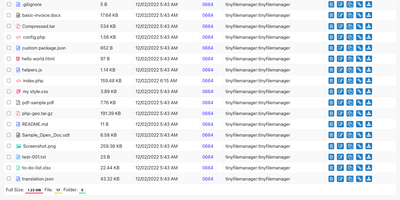
Browse, upload, edit, preview, and archive the files on your server from any web browser, with no FTP client, no shell session, and no database to set up. Tiny File Manager lists every folder in a sortable table showing size, modified date, permissions, and owner, with a search box that filters as you type. Drag files into the upload zone, send several at once, or paste a URL for the server to fetch. Rename items, select several to copy, move, delete, or pack into a zip or tar archive, and extract uploaded archives on the server. Click any text file to open the built-in editor, which offers syntax highlighting for 150+ languages and 35+ color themes, so quick fixes to configs and scripts happen where the files live. Images, audio, video, and text open in a preview without downloading, and every file has a copyable direct link. Give teammates or clients their own accounts, each locked to a root folder you choose, mark accounts read-only, and limit uploads to approved file extensions. Hide folders you never want listed, restrict access with IP allow and block lists, switch between light and dark themes, pick from 35+ interface languages, and use the responsive layout on a phone. Setup is one file copied to a web server, or one Docker container. Running on a dedicated VPS on RepoCloud with guaranteed CPU, RAM, and SSD, full root SSH access, and a browser serial console. GPL-3.0 licensed.
FoxProfile
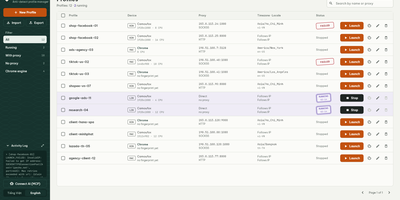
Every account you run deserves its own browser identity, and FoxProfile keeps those identities permanently separate instead of letting them bleed into one another. Create a profile once and it remembers its device: screen, GPU, CPU cores, fonts, and canvas noise are generated on first launch and reused on every later one, so the fingerprint a site saw yesterday is the fingerprint it sees tomorrow. Sessions stick too: history, cookies, and logins live in the profile directory, and the tabs you left open reopen where you left them. Each profile carries its own proxy (HTTP, HTTPS, SOCKS4, or SOCKS5, with a built-in checker) while timezone and locale follow the exit IP automatically or stay pinned to your choice, and the Check IP button compares the exit address across three services and flags mismatches or datacenter addresses. Cookies move in and out as standard editor JSON or Netscape files, whole profiles travel as ZIP archives, and bulk actions launch, stop, or delete fleets at once. On a server, the web panel runs profiles headlessly so you can manage them and view their screens from anywhere, the REST API scripts everything, and the MCP server lets AI agents drive the browsers directly. Running on a dedicated VPS on RepoCloud with guaranteed CPU, RAM, and SSD, full root SSH access, and a browser serial console. MIT licensed.