JupyterHub
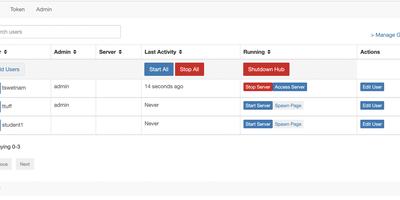
One server, a login for everyone, and a private JupyterLab in every browser tab: that is the whole pitch, and for classrooms and research teams it is transformative. JupyterHub authenticates each user against your existing identity system (campus OAuth, GitHub, Google, LDAP, or local accounts), then spawns a dedicated single-user server just for them, with their files, their kernels, and their compute allocation. Users open notebooks, terminals, and extensions in JupyterLab without installing anything, and their environment is identical whether they log in from a lab workstation or a laptop at home. The Spawner decides where those servers live: plain processes on one machine for a small class, Docker containers for isolation, or Kubernetes pods that scale across a cluster for a whole university. Administrators manage users, groups, and named servers from the admin panel, grant precise permissions through roles and scopes, and watch start times and profiles for every running server. External services plug into the Hub API, so dashboards, autograders, and portals can authenticate through the same OAuth machinery. When a user disappears for the semester break, culling stops their idle server and frees the resources. Running on a dedicated VPS on RepoCloud with guaranteed CPU, RAM, and SSD, full root SSH access, and a browser serial console. BSD-3-Clause licensed.
Odysseus
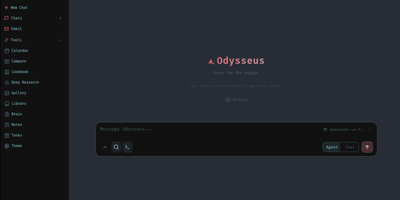
Agents with tool use, deep research, a document editor, an IMAP/SMTP email client with AI triage, notes, tasks, and a CalDAV-synced calendar - Odysseus bundles all of it into one open-source, self-hosted AI workspace. It runs local models through Ollama, vLLM, or llama.cpp and cloud APIs like OpenAI and OpenRouter, with a hardware-aware Cookbook that scans your machine and recommends quantized models that fit. Persistent memory uses ChromaDB with hybrid vector-plus-keyword retrieval, web search runs through a bundled SearXNG instance, and agents can use MCP servers, files, and shell access with safety controls, plus custom skills and scheduled agent tasks. A blind Compare mode runs side-by-side model duels with identities hidden and accumulates Elo-style ratings from your votes, so model selection is based on your actual workloads rather than leaderboard claims. Deep research mode - adapted from the Tongyi DeepResearch approach - reads sources through SearXNG and produces cited reports, while the email client tags, summarizes, sets reminders, and drafts replies locally rather than through a third-party mail AI. The writing-first document editor adds AI edits, Markdown and HTML support, and version history. The stack is Python 3.11 with FastAPI, SQLite for state, and a vanilla JS frontend, licensed AGPL-3.0 with zero telemetry. Because agents can read email and execute commands, keep authentication enabled and never expose it as a public unauthenticated service.
Academic Commercialization Agent
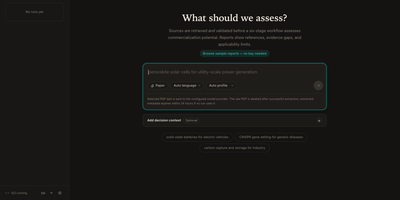
Got a research paper and no idea if anyone would pay for it? Academic Commercialization Agent answers with a cited triage report instead of a hunch. Type a topic or attach a paper PDF, pick a report language and scoring profile, and follow the run as it works through academic, patent, and market evidence. The result opens with a decision brief: an overall readiness score out of 100, the strongest evidence, the biggest risk, and a recommended first step. A scorecard breaks that number into technology readiness, manufacturing readiness, patent position, market accessibility, and evidence confidence, with a short reason behind each bar. The full report adds opportunities, risks, evidence limitations, reviewer notes, and a numbered reference list. Optional decision context captures who is deciding, what they own, and what choice is on the table, so the verdict reads as a license, invest, pilot, or spin-out call. Run history keeps every analysis searchable, interrupted runs resume from their last checkpoint, and two runs can be compared side by side. Reports export to Markdown or PDF and share by link, and a Sources search finds saved excerpts by ID or keyword. Six finished sample reports, one in Chinese, open without any key. A technology transfer office facing a pile of new disclosures can rank them in a first pass before spending expert time. Running on a dedicated VPS on RepoCloud with guaranteed CPU, RAM, and SSD, full root SSH access, and a browser serial console. MIT licensed.
ThoughtDAG
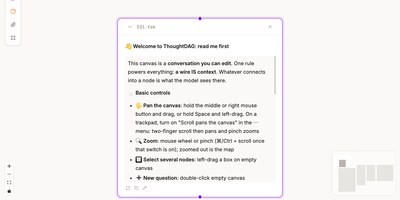
ThoughtDAG turns a long AI conversation from a scroll you cannot rearrange into a map you can edit, branch, and reconnect. Every question and answer becomes a node on an infinite canvas, and the wires between nodes are not decoration: they decide exactly what context the model sees next. Follow a promising thread, park a side question on its own branch, or cut a wire when an early assumption starts poisoning later answers, all without deleting the work that led there. Zoom out to read the shape of an investigation, then zoom back in to full answers, attachments, and highlighted passages. Drop in documents and files as material nodes, ask questions from them, and preview precisely what will be sent before a model runs. Past coding agent sessions can be opened as read-only graph mirrors, so a discussion that started in a terminal can be inspected, cited, and continued on the canvas. Memory lives in readable dossiers that collect decisions and open questions per topic, with sources attached, and relevant dossiers join new questions when you ask. Export a backup, a Markdown context chain, or a thought map that shares the structure of your thinking without dumping the whole transcript. Running on a dedicated VPS on RepoCloud with guaranteed CPU, RAM, and SSD, full root SSH access, and a browser serial console. MIT licensed.
QuantMind
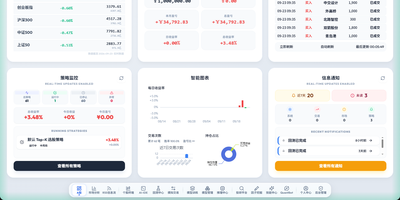
From raw market data to a simulated trade, every step of quant research happens in one web console. A home dashboard shows index levels, a paper account, strategy status, and recent fills at a glance, and a market analysis page tracks sector rotation and money flow. A stock terminal pairs candlestick charts with company profiles, financial and valuation tabs, and model score curves. Researchers describe a trading hypothesis in plain language, and the factor mining workspace drafts expressions, evolves them, and stores the winners in a factor library. The training studio offers thirteen algorithms, from boosted trees to recurrent networks, with walk-forward stability checks and local or remote GPU scheduling. The backtest center reports returns, Sharpe ratio, drawdown, and an equity curve for any date range, stock pool, and rebalance rhythm. Daily batch inference ranks the whole market, and a rolling news feed tags headlines as bullish or bearish. Paper trading replays real exchange rules, including price limits, lot sizes, fees, and slippage. A chat assistant can run these steps from a sentence, including through messaging apps. Running on a dedicated VPS on RepoCloud with guaranteed CPU, RAM, and SSD, full root SSH access, and a browser serial console. AGPL-3.0 licensed.
RStudio Server
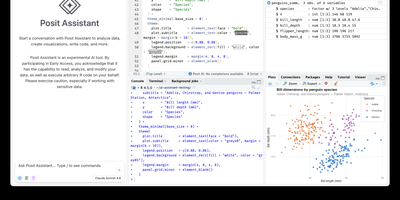
Open a browser tab, sign in, and the whole RStudio workbench is waiting there, running against R on a Linux server instead of your laptop. The familiar four-pane layout holds a source editor, an R console, Environment and History tabs, and Files, Plots, Packages, Help, and Viewer tabs. The editor opens R scripts, R Markdown, Quarto, and Python files, with code completion, diagnostics, section outlines, and a visual mode for Quarto documents. A Terminal tab and a Python console sit beside the R console, and the Data Viewer sorts, filters, and searches data frames and nested lists. Editor breakpoints and tracebacks help debug functions, while Background Jobs run long scripts in separate R sessions so the IDE stays usable. Shiny apps and Plumber APIs run as background jobs with live reload, and a Git pane handles diffs, commits, pushes, and branches. The Connections tab browses databases, and finished reports go to Posit Connect, shinyapps.io, Quarto Pub, or RPubs. Optional Posit Assistant adds an AI chat pane that works with the model provider you choose, and administrators can switch it off. Because everything runs server-side, a class, a lab, or a team can share one large-memory machine and keep computation next to the data without installing anything locally. Running on a dedicated VPS on RepoCloud with guaranteed CPU, RAM, and SSD, full root SSH access, and a browser serial console. AGPL-3.0 licensed.
Prime Agent
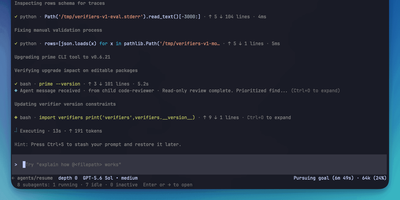
With over 14,000 GitHub stars and 41 releases since its May 2026 launch, Prime Agent delivers a fundamentally different approach to AI coding agents by treating the agent's own operating environment as programmable state that improves through use. The Recursive Language Model architecture provides the model exactly one tool — a persistent IPython kernel — where file operations, shell commands, subagent delegation via rlm() function calls, and context management all happen through code rather than rigid tool-calling schemas. Subagents launch as independent sessions with their own model, kernel, and history, communicating results through agent_message.send() without blocking the parent. The Continual Harness stores supplemental prompts, memories, skill descriptions, and reusable subagent specifications as durable state that the /refine command updates through small, evidence-backed edits with full rollback by ID. Daemon-backed sessions keep running when the terminal disconnects, with automatic context compaction summarizing older messages while preserving recent state. The TUI provides an Agent View for monitoring, switching between, and steering multiple live sessions simultaneously. Autonomous mode operates within configurable turn, token, and time budgets with user-defined quality gates. Persistent goals, heartbeats, and scheduled prompts maintain continuity across terminal sessions. Compatible with Anthropic Claude, OpenAI, Google Gemini, local models via Ollama or vLLM, and Prime Inference endpoints. Install via a single curl command on Linux or macOS. Running on a dedicated VPS on RepoCloud with guaranteed CPU, RAM, and SSD, full root SSH access, and a browser serial console. MIT licensed.
Bisibility
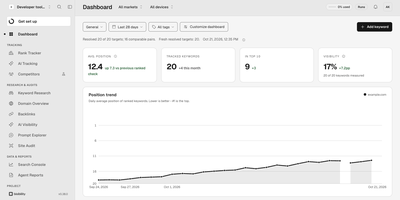
Bisibility puts your Google rankings, keyword research, and backlink profile in one application that runs on your server instead of behind a per-seat subscription. Track every keyword by market and device, watch positions move over time, and open the stored snapshot of the actual results page behind any check to see exactly what Google showed. Alerts flag the movements that matter, while competitor share of voice shows whose visibility is growing at your expense. The keyword explorer surfaces suggestions with search volume, trends, cost per click, difficulty, and intent, and shows the estimated price before a lookup runs, so research never surprises your wallet. Backlink and domain views break down referring domains, anchors, and new and lost links next to estimated traffic and top pages for any site you type in. Search Console clicks, impressions, and queries are kept beyond the usual retention window, and a recurring prompt tracker follows how AI answer engines cite your brand over time. Results flow outward through a versioned API, MCP access, signed webhooks, and CSV exports. Running on a dedicated VPS on RepoCloud with guaranteed CPU, RAM, and SSD, full root SSH access, and a browser serial console. AGPL-3.0 licensed.
ENZO
ENZO is a self-hosted AI workspace where you bring your own provider API keys and chat with more than 300 models from nine providers in one streaming interface with normal, thinking, research, and coding modes. You describe an agent in plain English and a two-pass builder drafts its full operating manual, picks the tools the task needs, and keeps improving from your activity through a per-agent neural layer you can inspect. Seventy-four bundled skills give agents ready-made domain playbooks, and a skill editor lets you write your own. Agents can read Gmail, check Calendar, search the web, and run a deep-research loop that writes its own queries under hard budgets so it cannot burn your key. Coding mode writes a multi-file project, boots it, and previews it live while telling you when something is broken. A unified model marketplace compares providers with live health checks, download counts, and benchmarks, and a built-in music player streams songs with a five-band equalizer. Your keys stay sealed in a passphrase-encrypted browser vault and travel only to the provider you picked, so there is no ENZO account, usage meter, or subscription taking a cut. Running on a dedicated VPS on RepoCloud with guaranteed CPU, RAM, and SSD, full root SSH access, and a browser serial console. Apache-2.0 licensed.
CaseCite
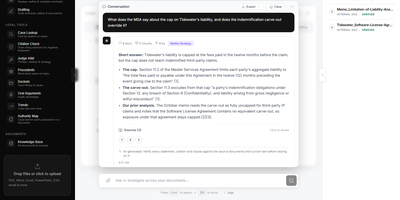
CaseCite puts a law firm's own files under questioning, returning cited answers, contract reviews, and drafted agreements without surrendering a single document to an outside legal platform. Ask a question across the indexed corpus and receive answers tied to the exact source passage, then narrow the search to selected files or a folder when only those should count. For bigger questions, deep research lays out a plan of sub-questions you can edit first, verifies every quote against its source, and keeps a step log of what was searched. Contracts can be analyzed, questioned one at a time, or compared clause by clause across two to four agreements against a baseline, with redlines exported as native Word tracked changes. Tabular review extracts the fields you define from hundreds of contracts at once, shows the supporting passage and estimated cost beside each value, and exports to Excel or CSV. Drafting starts from up to four precedent documents, and long agreements get a section plan for your approval before each section is written and reconciled. Each client engagement lives in its own matter workspace with controlled access and an activity feed, while case lookup, citation checking, judge analytics, dockets, oral arguments, and authority maps cover the caselaw side. Running on a dedicated VPS on RepoCloud with guaranteed CPU, RAM, and SSD, full root SSH access, and a browser serial console. Apache 2.0 licensed.
Quant-UX
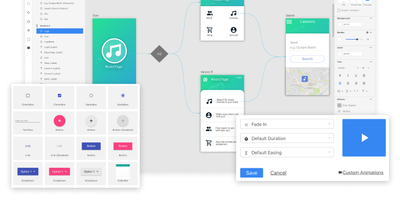
Most design tools stop at prototyping; Quant-UX also measures how real users actually perform with the prototype. The visual editor creates prototypes that behave like real apps - functional input widgets, animations, form validation, data binding across screens, and business logic modeled with REST requests and decision elements. Design systems are first-class, with components, design tokens, and master screens; if you design elsewhere, drop in image files or import from Figma. Testing is a shared link or QR code - no installs on the tester's side. Define user tasks up front, and Quant-UX records every session: click heatmaps show where users found (or missed) actionable elements, user journey graphs expose lost users, drop-off charts reveal where tasks stall, and success rates and task KPIs are extracted automatically into a dashboard. An A/B test operator wires two design variants into one prototype and compares task duration, success rate, and interaction counts. In-prototype surveys collect qualitative feedback alongside the numbers, and an AI assistant generates prototype fragments like styled forms on request. The RepoCloud deployment runs the full stack - frontend, backend, and WebSocket server containers over MongoDB - so all test recordings and research data stay on your infrastructure.
Depictio
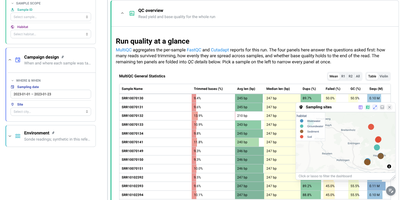
For teams drowning in pipeline output nobody reads, Depictio turns workflow results into dashboards you can hand to a collaborator. A MultiQC tab answers the first questions about a sequencing run: how many reads survived trimming, how evenly they spread across samples, and whether base quality holds to the end of the read, all in one glanceable table. Filter by sample, habitat, site, or sampling date on the left and every panel on the page follows, from community composition cards counting distinct taxa and phyla to differential abundance views that show what was tested, what survives correction, and how large the effects are. Alpha diversity tabs summarise richness and evenness per sample with rarefaction curves, and a sampling sites map lets you click or lasso points to filter the whole dashboard by geography. Forty two ready-made templates cover nf-core pipelines such as ampliseq, atacseq, and airrflow, while outputs from Nextflow, Snakemake, Galaxy, or plain shell scripts feed the same builder. Even a classic tabular dataset becomes an overview of distributions, box plots, and threshold counts, so the same tool serves a wet lab and a data science team. Running on a dedicated VPS on RepoCloud with guaranteed CPU, RAM, and SSD, full root SSH access, and a browser serial console. MIT licensed.
Uwazi
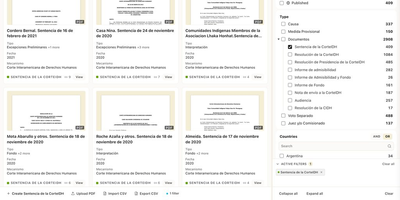
Human rights teams, legal researchers, and archivists use Uwazi to turn scattered documents and case records into searchable, structured collections that the public or trusted partners can explore online. You design templates that define exactly which fields each record carries, from dates and locations to people, organizations, and document types, then import material through the interface or in bulk from CSV files. Uploaded PDFs and documents become full-text searchable, so a phrase buried inside a scanned report is as findable as the metadata typed beside it. Relationships connect related entities across the collection, letting you trace how a person, an event, and a piece of evidence fit together instead of keeping them in isolated folders. Curators build public pages with live filters, maps, and visualizations drawn directly from collection data, while granular permissions decide which records stay private, which are shared with specific groups, and which are published for everyone. Multi-language support lets the same collection serve readers in several languages, and activity logs keep an audit trail of edits. Running on a dedicated VPS on RepoCloud with guaranteed CPU, RAM, and SSD, full root SSH access, and a browser serial console. MIT licensed.
LLM Wiki v2
Instead of burying your documents in a vector index you cannot inspect, LLM Wiki v2 files them into a Markdown wiki you can read, browse, and question. Drop text, Markdown, or PDF files anywhere on the page and each one is catalogued automatically, filed into a folder that says what it holds, and linked to the notes it relates to. Ask a question and the answer cites the exact notes it used, with clickable sources you can open, verify, and correct. New documents update the note on their subject instead of piling up as disconnected chunks, so what you teach it stays taught. A small classifier routes filing and questions through the folder tree, keeping the wiki quick and cheap as it grows, and you can browse the tree, follow see-also links, move or delete notes, and watch the tokens spent by both the model and the classifier. Connect OpenRouter, OpenAI, Gemini, a local Ollama, or any compatible endpoint, and expose the same wiki to Claude Code or Codex as long-term memory they can recall from and write to. Because every note is plain Markdown in a folder you own, the whole knowledge base can live in git beside your other files. Running on a dedicated VPS on RepoCloud with guaranteed CPU, RAM, and SSD, full root SSH access, and a browser serial console. AGPL-3.0 licensed.

FoJin
Ask a question about Buddhist scripture in plain language and get an answer that points to the exact passage it came from. FoJin brings thousands of texts from hundreds of digital libraries into one search box, so a reader no longer jumps between a dozen archives with different layouts. The AI assistant, called XiaoJin, answers with clickable citations that open the original text, and it can also reply in the voice of historical masters scoped to their own tradition. Search covers classics, translators, and catalog numbers, with filters by country and collection. Reading pages show full text, and parallel views line up translations in many languages, with Chinese, Pali, and Tibetan versions of the same sutra side by side. Thirty-nine dictionaries answer term lookups, a knowledge graph maps people, lineages, and places, and a data source directory shows what each collection offers. Readers can save collections, bookmarks, and annotations, then export citations in BibTeX, RIS, or APA. A read-aloud mode highlights each sentence in sync with audio. Quote verification confirms that a sentence really exists in the canon, and where. Running on a dedicated VPS on RepoCloud with guaranteed CPU, RAM, and SSD, full root SSH access, and a browser serial console. Apache-2.0 licensed.
eLabFTW
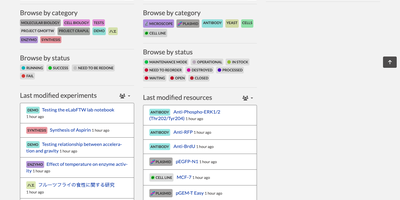
For research teams that need to show what was recorded and when, eLabFTW® is an electronic lab notebook that keeps experiments, lab inventory, and equipment bookings in one shared, searchable system. Each experiment holds rich-text notes, tables, images, checkable steps, custom metadata fields, tags, statuses, and attached files. Templates turn a protocol you repeat into a one-click starting point. A separate resource database catalogs antibodies, plasmids, cell lines, chemicals, and instruments, and typing # in an experiment links straight to any of them. Compounds import from PubChem by CID or CAS number, arriving with formulas, identifiers, and hazard data. The inventory tree maps buildings and their sub-locations, records where each container is stored, and tracks quantity and unit. Book a microscope by dragging a slot on the scheduler, and permissions decide who may reserve what. Entries can be signed with Ed25519 keys and timestamped through RFC 3161 authorities such as DFN, Digicert, and GlobalSign, or anchored on the Bloxberg blockchain; a timestamp archive can never be edited or deleted. Export to PDF, ZIP, CSV, JSON, or .eln archives, and import .eln or CSV files when moving from spreadsheets or another notebook. Users sign in locally or through SAML2 or LDAP, and an API with per-user keys lets instruments and scripts read and write entries. Running on a dedicated VPS on RepoCloud with guaranteed CPU, RAM, and SSD, full root SSH access, and a browser serial console. AGPL-3.0 licensed.
Insights LM
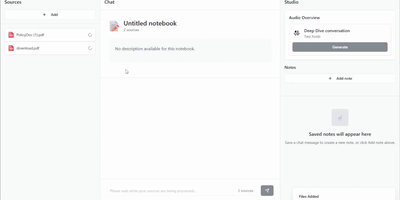
Insights LM gives you a NotebookLM-style research assistant that runs on your own infrastructure and answers strictly from the documents you feed it. Build a notebook for a project, drop in PDFs, pasted text, website links, and audio files, then ask questions in plain language and get answers grounded in those sources rather than the open internet. Every answer carries citations you can click to jump straight to the passage it came from, so verifying a claim takes seconds instead of a fresh search. Findings worth keeping become notes saved alongside the notebook, building a private knowledge base that grows with your research. When reading is too slow, generate an audio overview and listen to two hosts discuss your material like a podcast episode, perfect for absorbing a long report on a walk. Teams use it to interrogate internal documentation, onboard new hires against company knowledge, and brief themselves before meetings without uploading confidential files to a third-party service. Because the whole stack is yours, you choose which AI models do the reading, including local models for fully private work. Running on a dedicated VPS on RepoCloud with guaranteed CPU, RAM, and SSD, full root SSH access, and a browser serial console. MIT licensed.
AI Researcher
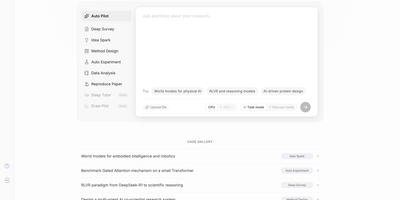
Accepted as a NeurIPS 2025 Spotlight paper and rapidly approaching 6,000 GitHub stars, AI-Researcher from the Hong Kong University Data Science Lab delivers the first fully autonomous scientific research system — a multi-agent platform that takes a list of reference papers and returns a complete research contribution with working code, validated experiments, and a formatted academic manuscript. The pipeline orchestrates five distinct phases: a Resource Collector systematically gathers materials from arXiv, IEEE Xplore, ACM Digital Library, Google Scholar, GitHub, and Hugging Face; an Idea Generator performs gap analysis against semantic embeddings to produce 3-5 novel hypotheses with feasibility scores; an Algorithm Designer transforms concepts into functional implementations; a Validation Engine automates testing, performance evaluation, and iterative optimization; and a Manuscript Creator generates polished full-length papers with figures, tables, and citations. The Gradio-based web GUI provides intuitive tabs for environment configuration, example selection, and real-time monitoring of research progress, while the production deployment at novix.science offers immediate browser access without local setup. Scientist-Bench provides a standardized benchmark comprising state-of-the-art papers across diverse AI research domains for evaluating autonomous research capabilities. The system supports multiple LLM providers including OpenAI, Anthropic, Google Gemini, and OpenRouter models with per-task routing for cost optimization. Deploy via Python with pip dependencies or Docker containerization. Running on a dedicated VPS on RepoCloud with guaranteed CPU, RAM, and SSD, full root SSH access, and a browser serial console. Apache-2.0 licensed.