Papermark
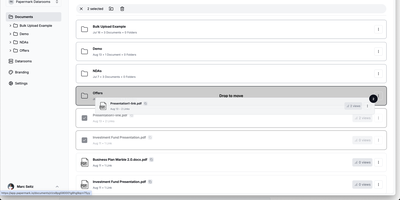
With nearly 9,000 GitHub stars and adoption by over 60,000 companies across 100 countries, Papermark is the open-source DocSend alternative that turns document sharing into a data-rich conversation between you and your viewers. Every shared document generates page-by-page analytics showing exactly which pages capture attention, how long viewers spend on each section, where they drop off, and whether they return for a second look, with real-time notifications the moment a document is opened. Virtual data rooms support unlimited folders with drag-and-drop organization, bulk uploads, granular per-viewer permissions, dynamic watermarking that stamps each page with the viewer's identity, and NDA gating that requires agreement before access. Custom branding applies your logo, colors, and custom domain to every shared link and download page, while email verification and password protection add authentication layers. The AI Data Room Copilot lets viewers chat with uploaded documents, ask questions, and receive contextual summaries directly within the data room interface. The developer platform exposes 43 REST API operations covering data rooms, documents, folders, links, visitors, and analytics, with an MCP server for AI agent integration and a CLI for automation. Built on Next.js with TypeScript, Prisma ORM, PostgreSQL, NextAuth.js authentication, and shadcn/ui components. Running on a dedicated VPS on RepoCloud with guaranteed CPU, RAM, and SSD, full root SSH access, and a browser serial console. AGPLv3 licensed.
Doccano
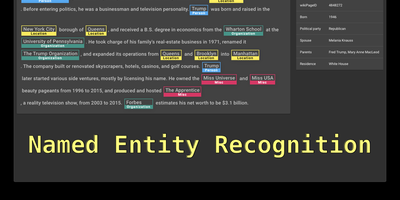
Doccano is a text annotation platforms for building machine learning training datasets. The web-based interface supports text classification for sentiment analysis and document categorization, sequence labeling for named entity recognition with overlapping entity support and relation extraction between labeled spans, and sequence-to-sequence annotation for text summarization and machine translation pairs. Collaborative annotation enables multiple annotators to work on the same project simultaneously with per-user progress tracking, annotation guidelines, example assignment to specific members, and filtering by assignee. Auto-labeling integrates with external machine learning model APIs through configurable request and response mapping templates, allowing pre-annotation that annotators can review and correct. Data import accepts plain text, JSONL, CoNLL, and Excel formats, while export produces JSONL and CoNLL datasets compatible with spaCy, Hugging Face Transformers, PaddleNLP, and other training frameworks through the doccano-transformer library. The Django backend with Django REST Framework exposes a complete RESTful API for programmatic project creation, dataset management, and annotation retrieval via the official doccano-client Python library. Celery handles background tasks including dataset import and export processing with Flower providing task monitoring. One-click deployment supports AWS CloudFormation and Heroku alongside Docker Compose for self-hosted environments. Running on a dedicated VPS on RepoCloud with guaranteed CPU, RAM, and SSD, full root SSH access, and a browser serial console. MIT licensed.
Chartbrew
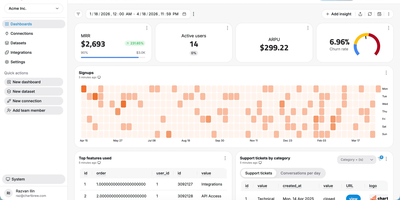
Chartbrew transforms raw database queries and API responses into polished, shareable dashboards without requiring a data engineering team. Connect to MySQL, PostgreSQL, MongoDB, Firestore, or any REST API, then build datasets using the visual query editor with syntax highlighting and auto-completion. Charts render through Chart.js with line, bar, pie, donut, radar, polar, KPI card, and table visualizations, each customizable with colors, legends, filters, and goal indicators. An AI assistant accelerates dashboard creation by generating queries and suggesting chart configurations from natural language descriptions of the metrics you want to track. Reusable datasets let teams prepare data transformations once and share them across multiple charts, while automatic scheduling through BullMQ and Redis refreshes data at intervals from every 10 minutes to monthly. The embed feature generates standalone chart URLs for insertion into external websites, internal tools, or customer portals, and the Reporting API enables programmatic dashboard management and automated report delivery. Team workspaces with role-based permissions control who can view, edit, or manage data connections. Nearly 4,000 GitHub stars reflect steady community adoption. The platform runs on Node.js with Express and Sequelize ORM, supporting MySQL or PostgreSQL as its application database. Running on a dedicated VPS on RepoCloud with guaranteed CPU, RAM, and SSD, full root SSH access, and a browser serial console. FSL-1.1-MIT licensed (converts to MIT two years after each release).
Bloomberg Terminal
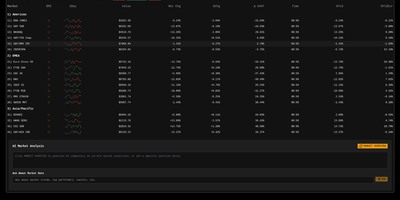
With 1,450+ GitHub stars and a live demo on Vercel, this Bloomberg Terminal clone delivers a professional-grade financial dashboard without the $24,000 annual seat license. The Next.js 15 App Router with React 19 and TypeScript serves a single-page terminal interface optimized for constantly mutating financial data, with partial pre-rendering enabling sub-500ms initial loads even on data-heavy views. Upstash Redis caches AlphaVantage market data to minimize API calls while maintaining sub-second update latency through React Query polling with configurable refresh rates. OpenAI integration provides AI-powered market insights, sentiment analysis, and trend interpretation directly within the terminal interface. Multiple specialized views cover market data tables with bid/ask spreads, financial news aggregation with category filtering, market movers highlighting top gainers and losers, and volatility analysis with historical comparison charts. Jotai atoms manage local state for watchlists, layout preferences, and terminal sessions while React Query handles server-state synchronization with aggressive stale-while-revalidate caching. The shadcn/ui component library with Tailwind CSS delivers accessible, keyboard-navigable interface elements styled after Bloomberg's iconic dark terminal aesthetic. Security features include origin restriction, rate limiting via Redis, and Zod-based input validation on all API routes. Motion (formerly Framer Motion) animates transitions between views and data updates without layout shift. Running on a dedicated VPS on RepoCloud with guaranteed CPU, RAM, and SSD, full root SSH access, and a browser serial console. MIT licensed.
Saltcorn
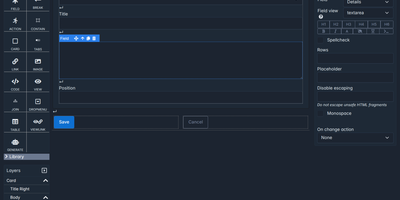
Spreadsheets and old Access databases give way to custom business apps that a team builds itself in a browser with Saltcorn, a no-code database application builder. Tables hold related records with typed and calculated fields, and CSV files import straight into them. Views start from patterns such as list, show, edit, filter, kanban, calendar, gantt, map, and chart, then take shape on a drag-and-drop canvas with a layers tree and desktop, tablet, and mobile previews. A view can embed another view, so clicking a row narrows the others and builds a cross-filtering dashboard with no glue code. Triggers react to row changes, schedules, logins, and API calls, while visual workflows branch, loop, and pause for a person's form before resuming days later. An AI copilot drafts tables, pages, and workflows from a plain-language prompt. The same views also become native Android and iOS apps with offline mode, PDF or image documents, and responsive emails. Every table, view, and page carries a minimum user role, and an auto-generated REST API exposes the data. Packs such as project management and an address book start an app from a ready template. Running on a dedicated VPS on RepoCloud with guaranteed CPU, RAM, and SSD, full root SSH access, and a browser serial console. MIT licensed.
Pluton
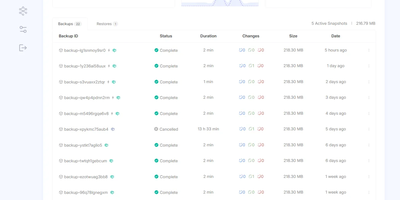
On a schedule you choose, Pluton backs up your folders to cloud storage and other disks, then lets you verify and restore every snapshot and see exactly what happened in a clean, self-hosted web dashboard. Three copies: every plan writes to a primary storage and can replicate to up to two more, so the 3-2-1 rule is a toggle in the plan wizard rather than a weekend project. Two kinds of media: pair a local disk or mounted drive with Backblaze B2, Cloudflare R2, Google Drive, Dropbox, pCloud, SFTP, S3-compatible buckets, or any of 70+ connectors, and press Verify to test a connection before trusting it. One place to look: the plan page charts file counts and sizes over a selectable range, a health strip colors recent runs, and a live panel counts files, bytes, and time remaining while each mirror initializes and replicates. Zero mysteries: every backup keeps a timestamped event timeline from dry run to pruning, and plan logs filter by level and task, search messages, and download as a file. Schedules run from every few minutes to monthly, including chosen weekdays; retention keeps daily, weekly, and monthly snapshots; and scripts can run before or after a job. Alerts reach you by email, Slack, Discord, or ntfy, and optional two-factor sign-in guards the dashboard. Running on a dedicated VPS on RepoCloud with guaranteed CPU, RAM, and SSD, full root SSH access, and a browser serial console. Apache-2.0 licensed.
Multiwoven
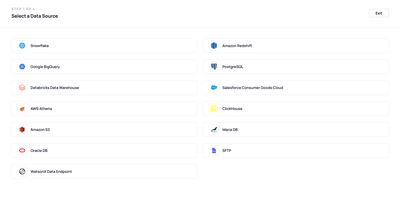
When warehouse data never reaches the CRM, ad platform, or help desk that needs it, Multiwoven is the open-source reverse ETL platform that syncs it there on a schedule. Sources include Snowflake, BigQuery, Redshift, Databricks, PostgreSQL, ClickHouse, MariaDB, Oracle, Amazon S3, and SFTP. Models define what to move: write SQL with a 100-row preview, pick tables in a visual selector, or reuse existing dbt models. Destinations span Salesforce, HubSpot, Klaviyo, Mailchimp, Zendesk, Slack, Airtable, Google Sheets, Stripe, Facebook Custom Audiences, HTTP endpoints, and vector stores such as Pinecone, Qdrant, and Weaviate. Each sync maps model columns onto destination objects like Salesforce Account, Contact, or Opportunity, then runs as a full refresh or as an incremental sync that moves only new or changed rows, optionally tracked by a cursor field. Schedules can be manual, an interval from minutes to weeks, or a cron expression. A dashboard reports sync activity, each run records its status with successful and failed row counts, and failed runs can trigger status emails. Workspaces keep sources, models, syncs, and destinations separate for each team, while Admin, Member, and Viewer roles and email invitations control access. A connector framework lets teams add sources or destinations that are not yet supported. Running on a dedicated VPS on RepoCloud with guaranteed CPU, RAM, and SSD, full root SSH access, and a browser serial console. AGPL-3.0 licensed.
PenX
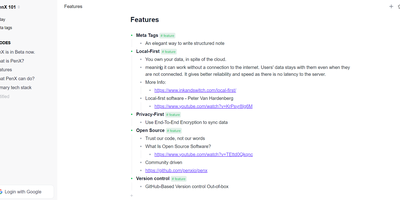
PenX delivers an open-source structured note-taking application that functions as a personal database disguised as an elegant editor — combining the outline workflow of Workflowy and Roam Research with the structured data capabilities of Tana through MetaTags that transform every note into a queryable database record. The local-first architecture stores all data on-device using PGLite, an in-process PostgreSQL-compatible engine, ensuring data ownership regardless of cloud connectivity. End-to-end encryption protects all synchronized data so that even the sync server cannot read your notes, tasks, ideas, or documents. GitHub-based version control provides out-of-the-box backup and history with full commit-level recovery. MetaTags are the core innovation — attaching structured tags to any note converts it into a database entry with typed fields, enabling table views, filters, and queries across your knowledge base without imposing rigid folder hierarchies. The daily notes workflow encourages free-form capture while MetaTags handle organization automatically, letting you record thoughts without deciding physical location upfront. AI-driven features assist with content generation, summarization, and intelligent search across your personal data hub. Real-time sync keeps web, desktop, and mobile in perfect alignment. Cross-platform availability includes web, desktop for Windows, macOS, and Linux, iOS, and Chrome extension. Deploy the web service via Next.js with pnpm using tRPC and Prisma. Running on a dedicated VPS on RepoCloud with guaranteed CPU, RAM, and SSD, full root SSH access, and a browser serial console. AGPL-3.0 licensed.
Ralph
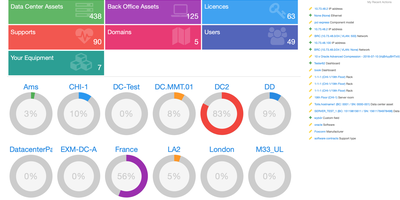
Ralph tracks thousands of assets across data centers and back offices through a unified CMDB, DCIM, and asset management platform, providing the same capabilities as ServiceNow, Device42, and Sunbird dcTrack without per-asset licensing fees. Used by Allegro in production and backed by over 2,500 GitHub stars, it is built on Python 3 with Django and Django REST Framework. Interactive data center floor plans support drag-and-drop rack placement, front and rear rack views showing U-level asset positioning, power consumption tracking per PDU, and ethernet and fiber connection mapping. The back office module manages laptops, desktops, printers, mobile phones, and accessories with user assignment tracking, warehouse inventory, stock-taking audits, and automated loan workflows. IP address management handles network environments with DHCP and DNS integration alongside network topology visualization. Software license tracking monitors per-user and per-core allocations with usage calculations, compliance reporting, and expiration alerts, while vendor support contracts track SLA agreements and warranty renewal dates. The transitions system automates asset lifecycle processes through configurable workflows that trigger HTTP webhooks, custom Python scripts, email notifications, and Puppet and Ansible configuration management integration. Custom fields extend the data model with text, numbers, dates, choices, and URLs per asset type, accessible via the REST API. Multi-tenant architecture organizes assets by regions, data centers, service environments, and business units. Deploy via Docker with the allegro/ralph image alongside MySQL and Redis. Running on a dedicated VPS on RepoCloud with guaranteed CPU, RAM, and SSD, full root SSH access, and a browser serial console. Apache 2.0 licensed.
WikiDocs
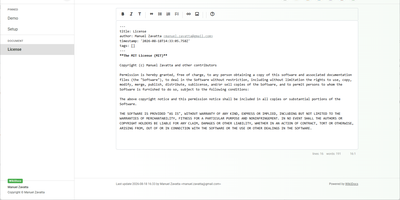
Write your knowledge as plain Markdown files, and WikiDocs turns the folder into a searchable, versioned wiki with no database to set up or back up. Pages carry YAML front matter, so the whole wiki can be copied, archived, or opened in any text editor. An editor with a formatting toolbar handles headings, lists, task lists, links, and images, and pictures can be pasted straight from the clipboard. Math is typeset with KaTeX, Mermaid renders diagrams such as ER models and mind maps, and code blocks get syntax highlighting. Every save keeps a revision, a versions dialog lists them, and deleted pages wait in a trash where they can be restored or erased. Attachments upload and download from any page, namespaces build a page tree in the sidebar with pinned pages on top, and full-text search highlights every match. Public mode publishes a read-only knowledge base, private mode requires sign-in, and administrator and user accounts are managed in the app. Settings cover the wiki title, owner notice, privacy banner, language, timezone, light or dark template, and accent color, and every page has a print button. A desktop app keeps files on your computer and syncs with your self-hosted instance, while a REST API with Swagger documentation lets other tools read and write pages. Running on a dedicated VPS on RepoCloud with guaranteed CPU, RAM, and SSD, full root SSH access, and a browser serial console. MIT licensed.
Motor Admin
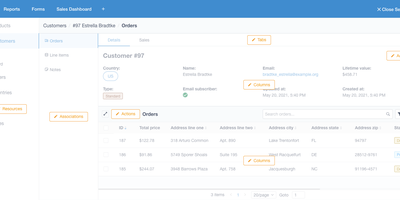
Stop building internal tools and ship your actual product - Motor Admin exists for exactly that. Point this Ruby/Vue application at a PostgreSQL, MySQL, MariaDB, or SQL Server database and it generates a complete CRUD admin panel from your schema in under a minute - search, filters, create, update, delete, all through a polished UI, with every customization done through in-app settings rather than a DSL or boilerplate code. What elevates it beyond CRUD generators is the business-intelligence half: write SQL queries (with variables) and render results as tables, numbers, line/bar/ pie charts, funnels, or markdown; organize reports into shared dashboards; and attach queries and dashboards directly to resource pages as tabs, so an order record shows its revenue history in place. Operations beyond CRUD are covered by custom actions and a WYSIWYG forms builder that posts to your existing REST or GraphQL APIs - send a refund, trigger an email, whatever your backend exposes. Email alerts deliver scheduled reports, Slack sends personalized report alerts, and intelligence search spans all resources. Governance is included: role-based permissions with row- and column-level control (CanCanCan), an audit log of admin activity, multiple database connections, and configuration sync between staging and production. Mobile-optimized, AGPL-licensed, also available as a Rails engine.
db-ui
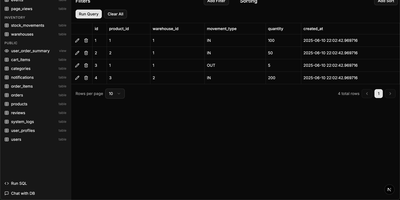
Traditional database management tools like pgAdmin and phpMyAdmin were built for DBAs, not for the rest of the team that just needs to look up a record or run a quick query. db-ui strips away the complexity and gives you a clean, modern interface that anyone can use. Browse tables in a paginated grid view with inline editing, filtering, and sorting built right into the column headers. The sidebar lists every table and view across all schemas with fuzzy search (Cmd+K to focus) that filters results as you type. Click any table to see its data, or switch to the schema introspection view to visualize columns, types, constraints, and relationships without writing a single query. The SQL editor provides syntax highlighting, result visualization in tabular format, and one-click CSV export for downstream analysis. For questions about your data model, the integrated AI chat assistant has full access to your database schema and can help you understand table relationships, write complex queries, suggest indexes, and provide optimization recommendations with streaming responses. Connect to PostgreSQL, MySQL, or Microsoft SQL Server through environment variables and deploy the whole application as a single Docker container. On RepoCloud, deploy db-ui on a dedicated VPS with root SSH access and direct connectivity to your database servers under the MIT license.
Jetlog
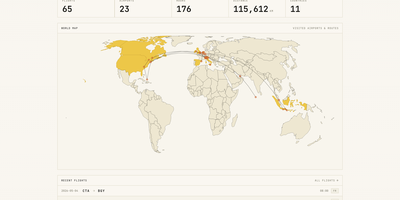
A personal flight logbook you host yourself, Jetlog draws every route you have flown on a pannable world map and turns the totals into charts. The home page opens with counts of flights, airports, hours, distance, and countries above that map, where dots mark visited airports and lines trace each trajectory. Settings let markers and lines grow with visit frequency and shade the countries where you have landed. Logging a flight takes only two airports and a date. Type a flight number and press Fetch to pre-fill the origin, destination, and airline, and a utility links connection flights automatically. Duration and distance are calculated for you and stay editable, with an option to use airport time zones. The All Flights table lists route, times, duration, distance, seat, class, and airline with filters and configurable columns, and each flight opens a detail page with airport data, a route map, tail number, and aircraft. A Statistics page charts flights per month, cumulative distance, most visited airports, most common airlines, ticket class, and seat for any time frame. History arrives through MyFlightRadar24 or custom CSV imports and leaves as CSV or iCal. Family members can share one install with separate logbooks, an admin manages the accounts, and the responsive layout works on a phone at the gate. Running on a dedicated VPS on RepoCloud with guaranteed CPU, RAM, and SSD, full root SSH access, and a browser serial console. GPL-2.0 licensed.