Open Source App Cloud Marketplace
Deploy, host, and scale with one click, at half the cost. Then customize with AI agents.
llamactl
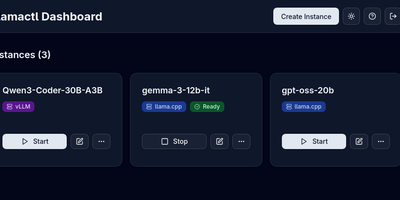
One dashboard and one API address for every local model you run, across llama.cpp, vLLM and MLX: that is llamactl. Create an instance in the web UI, pick a backend, and the server assigns ports and API keys, starts the model, and shows its health next to every other instance you run. Models download straight from HuggingFace inside the dashboard, in GGUF for llama.cpp or Safetensors for vLLM, so stocking a new model never means juggling command lines and file paths. Your applications keep talking to familiar endpoints, because llamactl exposes OpenAI chat completions and Anthropic messages routes and sends each request to the model named in the call. A llama.cpp router instance can serve several models from one process and load them on demand, and idle instances stop on a timer or make room through LRU eviction when the GPU gets crowded. Groups cap how many heavy models run at once, backends can live in Docker containers with GPU access, and instances on other machines appear in the same central dashboard with automatic routing. API keys minted in the UI guard both inference and management calls. Running on a dedicated VPS on RepoCloud with guaranteed CPU, RAM, and SSD, full root SSH access, and a browser serial console. MIT licensed.
LapisLLM
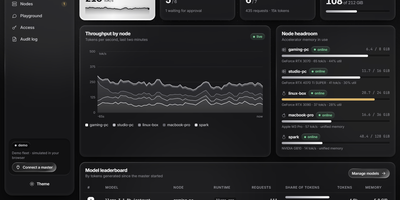
Behind one OpenAI-compatible endpoint, LapisLLM turns the old gaming PC, the work laptop, and the Apple Silicon Mac you already own into a single self-hosted model fleet. A master keeps the registry and routes every request to the right machine, and a small agent on each box runs llama.cpp, vLLM, or MLX and reports its GPU or unified memory. Clients need one base URL and one API key, pick models by name, and see which machine answered in an X-Lapis-Node header. Admission checks free memory minus a reserve before any model starts, first on the master and again on the agent, and a refusal states the numbers. Best-fit placement packs small models onto small machines so the big box stays free, and previews each decision before you commit. New machines stay pending until an admin types the fingerprint printed on that machine, and scoped API keys are shown exactly once. Self-healing brings back the models that should be running after a restart, one at a time per node, while models you stopped stay stopped. Drain a machine out of rotation without clients noticing, export the fleet to JSON without secrets, and scrape Prometheus metrics. The lapis demo command runs a real master with five simulated nodes, so the console can be explored without a GPU. Running on a dedicated VPS on RepoCloud with guaranteed CPU, RAM, and SSD, full root SSH access, and a browser serial console. MIT licensed.
Glideship
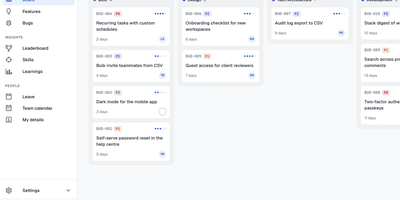
As a self-hosted alternative to Jira and Linear, Glideship swaps sprint ceremonies for twelve AI agents that handle intake, specs, estimates, test plans, and retrospectives while your team keeps every decision. Post a request in Slack and the Triage agent interviews you in-thread, checks existing work for duplicates by vector search, and queues a proposed BUD for a product manager to create or reject. Each BUD, short for Business Understanding Document, holds the spec, tech spec, test plan, acceptance criteria, and history of one feature as it moves from design through development, testing, and UAT to production. Delivery dates come from AI-PERT and 10,000 Monte Carlo simulations, reported as P50, P70, and P85 per phase instead of story points. A code-graph indexer scans multiple repositories, clusters features across them, and answers blast-radius questions such as what breaks if this file changes. Skill profiles rebuilt nightly from git history suggest the best-fit developer, while XP, levels, and a leaderboard reward work that reaches production. Choose Claude Code, GitHub Copilot, OpenAI Codex, or Ollama per organization, and a built-in MCP server lets any MCP client draft BUDs and read team context. Bring existing issues over from Jira, then give HR and Sales a People workspace with leave and work-from-home requests, loss-of-pay warnings, Slack approvals, policies per location, a team calendar, and encrypted employee records. Running on a dedicated VPS on RepoCloud with guaranteed CPU, RAM, and SSD, full root SSH access, and a browser serial console. Apache-2.0 licensed.
Geo-Monitor
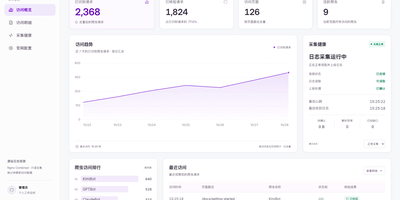
Search is being answered by AI crawlers first and humans second, yet most site owners cannot name a single bot that read their pages last week; Geo-Monitor answers that from the access logs you already have. A small collector sits beside Nginx or OpenResty, mounts the log read-only, and streams only new lines in batches, resuming after outages and surviving log rotation without ever touching your site's code. The console separates today, the last week, and the last month into identified requests, crawled pages, active crawlers, and trend lines, then drills into every visit with time, path, method, status code, claimed identity, and verification state. Identification and verification are deliberately different things here: a user agent only proves what a request claims to be, while a verified badge requires trusted log addresses and official IP evidence to agree. Twenty built-in identities cover OpenAI, Anthropic, Perplexity, Kimi, and Bytespider crawlers, and you can add, edit, or disable rules as new bots appear. Your sitemap syncs or imports as the content catalog, so coverage views show which pages crawlers actually reached, and collector health exposes heartbeat, backlog, and parsing problems. Running on a dedicated VPS on RepoCloud with guaranteed CPU, RAM, and SSD, full root SSH access, and a browser serial console. Apache-2.0 licensed.
Work-Calendar
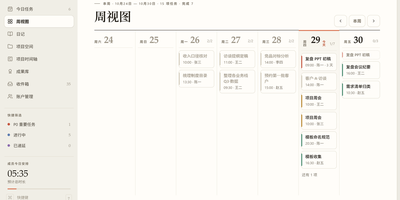
Small teams do not need another cloud subscription to know who is doing what this week: Work-Calendar runs your whole plan, do, finish, archive loop on one little server you own. The week view lays out every member's tasks across seven day columns with today highlighted, so standups start from the same picture instead of five private lists. Three kinds of tasks cover real work: project tasks, one-off tasks you can assign to yourself or teammates, and fixed recurring tasks on daily, weekday, monthly, or specific-date schedules. Anything unfinished carries over to the next day automatically, and completion records can be corrected by the assignee or sent back with a reason by the owner. Projects get spaces with folders, files up to 20MB, meetings with AI-generated minutes from pasted or dictated transcripts, timelines, and closing reports that an admin approves. Roles for superadmin, admin, and member, plus per-group rules, decide who may create projects directly, who needs approval, and who can use the built-in AI assistant, which drafts task and project changes as reviewable cards rather than acting silently. Inbox notifications, personal diaries, and daily statistics round out the routine, and keyboard shortcuts drive the whole interface. Running on a dedicated VPS on RepoCloud with guaranteed CPU, RAM, and SSD, full root SSH access, and a browser serial console. MIT licensed.
DocIntel
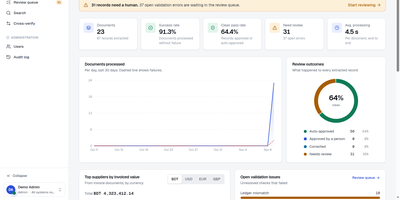
Drop in a pile of invoices, receipts, scans, or ledgers and DocIntel hands back validated, searchable records, asking a person only about the doubtful ones. It reads PDFs, phone photos, TIFF scans, Excel sheets, and CSV files. Scans get deskewed, denoised, and upscaled before OCR. A 1,000-page PDF is split into individual invoices in seconds. Every extracted value must be found on the page, or it is stored as null instead of guessed. A rule engine reads each document, and an optional model from Anthropic, Gemini, Groq, OpenAI, or Ollama adds a second opinion that flags disagreements. Totals, taxes, line items, dates, and duplicate files are checked for consistency. Invoices can be cross-verified against a ledger in another PDF or an Excel file, with field-level differences. The review screen shows the source page beside the fields and highlights where each value was found. Inline corrections trigger re-validation and keep a full history. Search works by keyword, by meaning, or both, with filters and export to CSV, Excel, or JSON. Viewer, reviewer, and admin roles control who can upload, approve, or delete, and an audit log records every action. Administrators can switch the AI model, key, and OCR engine from the settings page without a restart. Running on a dedicated VPS on RepoCloud with guaranteed CPU, RAM, and SSD, full root SSH access, and a browser serial console. MIT licensed.
Neohabit
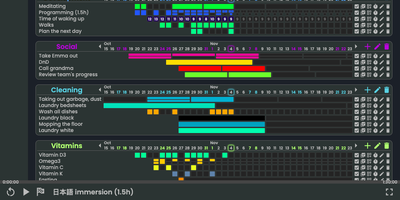
Most habit trackers punish a single missed day, so Neohabit lets you build routines that happen X times in Y days, like three workouts in five days or one deep-work session every three days, and adjust the target mid-streak as the habit gets easier. Your progress renders as GitHub-style contribution heatmaps in three styles: monochromatic grids for simple check-ins, numeric grids that record values such as calories, spending, reps, or hours up to two billion, and fractured grids that split each period into up to sixteen segments for habits done many times a day. Related habits group into projects with a one-dimensional daily view, and skill trees let you plan progressions, for example raising a reading target from twenty minutes to an hour in planned steps. You can ease into a new routine by starting at once in four days instead of daily, track things you want to reduce as well as build, hover any cell for period details, and rearrange projects and habits by dragging them. Multiple accounts, light and dark themes, keyboard shortcuts, and a polished mobile browser interface round out daily use, and a single command brings the whole thing up with prebuilt images ready to go. Running on a dedicated VPS on RepoCloud with guaranteed CPU, RAM, and SSD, full root SSH access, and a browser serial console. AGPL-3.0 licensed.
Spica
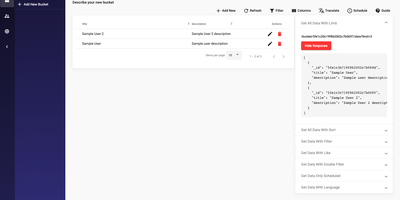
Spica skips the month of backend plumbing every new project starts with: data models, CRUD endpoints, logins, file storage, and an admin panel nobody wants to build. It hands you that whole layer as a running platform, so your first day is spent modeling your actual product. Define your data in Buckets and the REST API, with a GraphQL API alongside it, is generated automatically, complete with rules on each bucket as an entry-level security layer. Add custom policies so each user role reaches exactly the data and technical areas it should, then place your business logic in cloud functions triggered by events. Content teams get a back-office they can actually use: customized bucket views with a few clicks, inline image editing, data history, and localization for editors working in more than one language. Identities cover your users and editors, storage serves your files, and webhooks push events out to tools like Slack or Zapier when something changes. Run it as a backend engine for an application you are building, or purely as a headless CMS feeding a frontend that lives somewhere else. Running on a dedicated VPS on RepoCloud with guaranteed CPU, RAM, and SSD, full root SSH access, and a browser serial console. AGPL-3.0 licensed.
APEX Content Engine
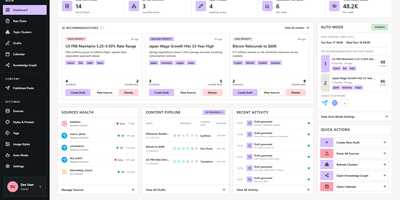
Telegram channels, RSS feeds, YouTube videos, and web articles go in, and researched, fact-checked posts for Telegram, LinkedIn, X, and email come out of APEX Content Engine. Collected posts are summarized, tagged, and embedded, then grouped by similarity into topic clusters that rank by priority, freshness, and source diversity. A cluster or a hand-chosen set of posts, a style preset, languages, and formats go into a pipeline that researches, writes, styles, translates, fact-checks, and optionally illustrates the draft, while a gate can block publishing as long as fact-check issues stay open. Drafts go out immediately or on a schedule, with X posts as a single tweet or a thread, and a month, week, or list calendar lays out everything planned. Auto Mode can run unattended inside chosen days, times, topics, and daily limits, either publishing once a fact-check comes back clean or stopping at a ready draft. A knowledge graph links raw and published posts by topic, continuation, contradiction, and supplement, and drafts export as PDF or PPTX. Provider keys for AI, Telegram, X, LinkedIn, and email can be pasted into the app and are encrypted at rest. Admin, editor, and viewer roles control access, Telegram alerts announce a ready draft, and a daily AI budget per organization stops spending once it is reached. Running on a dedicated VPS on RepoCloud with guaranteed CPU, RAM, and SSD, full root SSH access, and a browser serial console. MIT licensed.
Mongo Manager
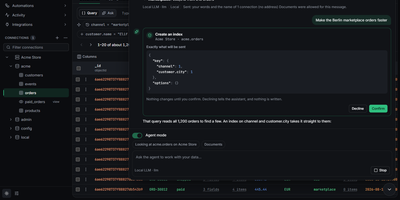
MongoDB Compass is a desktop app for one person; Mongo Manager runs once on your own server and opens in every teammate's browser. Tell its AI agent what you want in plain words, and it writes and runs the query or pipeline, showing each step. Every change, whether to a collection, an index, a backup, a schedule, or a user, waits on a card for your confirmation. Decline, and nothing is written. Anthropic, Google Gemini, any OpenAI-compatible server, or Ollama on your own network can power it, and personal data stays hidden from it. Documents show as a table, cards, or JSON, with a visual filter builder and bulk updates previewed before they run. The aggregation builder previews each stage on a sample, and a slow query shows its plan as a tree with the index that would help. Live charts keep seven days of history, and alerts reach you by e-mail or webhook. Replica set members, replication lag, change streams, and sharded clusters show up live, while rules hide personal fields from people who should not see them. Roles, per-connection access, two-factor sign-in, and a hash-chained audit log keep a team in order. Backups run on a schedule to S3, Google Drive, WebDAV, or a server folder, and live sync ends with a cutover. Running on a dedicated VPS on RepoCloud with guaranteed CPU, RAM, and SSD, full root SSH access, and a browser serial console. AGPL-3.0 licensed.
Select
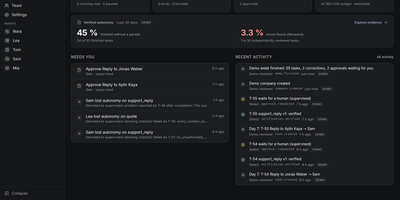
Every result an AI agent hands in is checked by code against a delivery contract, and Select, a self-hosted agent platform, lets that agent skip your approval only once its record earns it. A YAML contract per task type defines the checks, which the system runs itself before keeping a receipt with the contract version, every check, and the evidence. Autonomy is earned per agent and task type: supervised, then sampled, then autonomous after a streak of verified successes, and back to supervised at the first blocking failure or human correction. Payments, contracts, taxes, and hiring always stay supervised, and a counter shows the autonomy rate beside the errors people found afterwards. Mail arrives over IMAP, is triaged and routed by code, and becomes replies and quotes that go out once over SMTP, only after approval. The approval screen shows the exact e-mail or content that would leave, the reason a person is asked, and the proof. Agents use Anthropic, OpenAI, Gemini, or Ollama models inside an org chart with permissions and budgets, and agents running elsewhere report through a submission API. Operations cover cost budgets with a hard stop, an emergency stop, and an audit log with CSV export. A demo company replays a recorded week with fictional data, so receipts and approvals can be explored without an API key. Running on a dedicated VPS on RepoCloud with guaranteed CPU, RAM, and SSD, full root SSH access, and a browser serial console. AGPL-3.0 licensed.
SimpleDMS
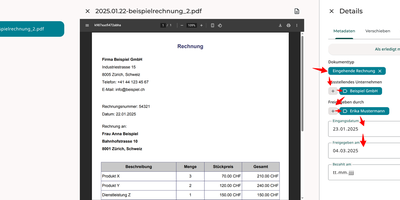
Small businesses file every invoice, contract, and letter by what it is instead of by folder with SimpleDMS, a document management system built around types, tags, and searchable metadata. Upload a document to the inbox, pick its type, and the sidebar offers exactly the tags and fields that type needs, so an incoming invoice asks for the issuing company and receipt date instead of a blank properties page. Name-giving attributes label each file automatically from its own metadata, and the Browse view finds it again by company, date, or approver in seconds. Spaces act as workspaces with their own document types, tags, and permissions, so the team shares project files in one space, exchanges papers with an accountant or customers in another, and keeps private records apart. Tag groups such as companies and employees stay consistent across thousands of documents, date and text fields capture the facts you search by later, and values can be corrected at any time when a document was filed in haste. Dark mode is built in, the interface runs comfortably on a tablet at the scanner, and no analytics or tracking watch how your office works. Running on a dedicated VPS on RepoCloud with guaranteed CPU, RAM, and SSD, full root SSH access, and a browser serial console. AGPL-3.0 licensed.
AGenUI Studio
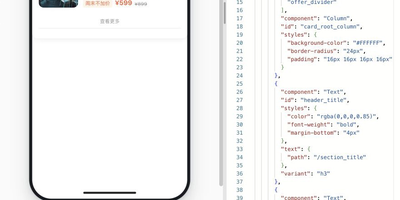
AGenUI Studio turns a written description into a working interface card: an AI agent generates the UI, binds it to your APIs and data, and packages it so it runs anywhere, no Studio required. Bring your own model by entering any OpenAI-compatible or Anthropic Messages endpoint and key in the console settings, and generation proceeds contract-first, steered by design rules you publish as versioned Markdown revisions. You preview each card live as it is generated, then refine it over multiple turns while every component, binding, and action you did not target stays protected from accidental edits. The console also manages the supporting cast: a local knowledge base, API definitions, and reusable operators, all starting from bundled demo data you can swap for real services whenever you are ready. When a card is finished, download it as a self-contained Runtime Package carrying its data sources, bindings, actions, and operators, and execute it with the bundled Card Runtime inside your own application, or register a delivery target and publish straight from the workbench over a callback or a message queue. Applications subscribe to native run events over HTTP and SSE, and production deployments can replace the local defaults piece by piece, MySQL for storage, Redis for hot state, MCP services for knowledge and data, while the packages keep the same contracts. Running on a dedicated VPS on RepoCloud with guaranteed CPU, RAM, and SSD, full root SSH access, and a browser serial console. Apache-2.0 licensed.

BookHeaven Server
BookHeaven Server turns a scattered folder of EPUB files into a proper library you can browse, organize and read from anywhere, with your progress following you between devices. Import books by copying them into a watched folder or uploading them, and the server reads metadata straight from each file, grouping everything by author, series, collection and tag. When a title, author or cover is wrong, you fix it in the browser and the correction is written back into the EPUB itself, so edits survive even if the file moves elsewhere; missing covers can be fetched from the internet. Each person gets a profile with its own reading progress, including start date, last read date, percentage, elapsed time and finished date, and progress can also be corrected manually. Any OPDS reader app can browse and download from the built-in catalog at /opds/v1, while KOReader devices sync progress by pointing at your server and signing in with a profile name. Upload your favorite fonts once and every connected device can download them, with styles and weights mapped per file or split from a single font. The companion Android reader, built for e-ink screens, discovers the server automatically on your network and downloads books for offline reading. Running on a dedicated VPS on RepoCloud with guaranteed CPU, RAM, and SSD, full root SSH access, and a browser serial console. GPL-3.0 licensed.
Vanilla Cookbook
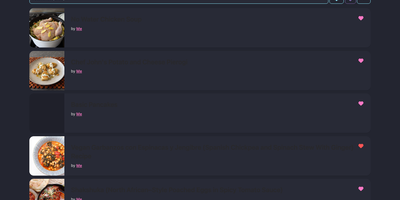
Every family recipe, bookmarked food blog post, and meal-prep formula stays organized inside Vanilla Cookbook, a self-hosted culinary library that converts volumetric measurements into precise gram weights and scales servings on the fly. Paste a URL or click the browser bookmarklet to scrape recipes from hundreds of cooking websites. Plain-text ingredient strings split automatically into structured quantities, units, preparation notes, and optional or to-serve badges. Home bakers switch effortlessly between US cups, imperial ounces, and metric grams across thousands of ingredient density profiles. Inline oven temperatures, fractions, and numeric ranges adjust automatically as serving counts change. Nutritional text parses into a structured per-serving breakdown, while integrated shopping lists, cooking logs, and equipment lists keep weekly grocery planning synchronized across desktop browsers and Progressive Web App mobile devices. Connecting an optional OpenAI, Anthropic, Google Gemini, Ollama, or LiteLLM endpoint unlocks AI fallback scraping for pages lacking Schema.org markup, automatic recipe translation, verbose direction summarization, photo-to-recipe extraction, and vector-based semantic search. Multi-user accounts, OAuth authentication, public recipe sharing links, and bulk import or export tools give households full control over their cookbook data. Running on a dedicated VPS on RepoCloud with guaranteed CPU, RAM, and SSD, full root SSH access, and a browser serial console. GPL-3.0 licensed.
Mabeyn
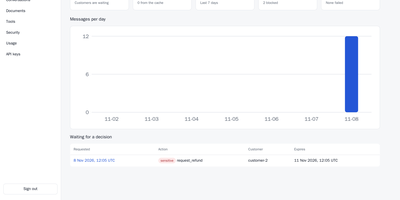
Customer-support bots tend to fail in two ways, inventing answers and taking actions nobody approved, and Mabeyn is a support agent built to stop both. Upload PDF, Markdown, or HTML files, or add a public web page, and policy answers come only from that material, citing the exact section and admitting when nothing fits. Register HTTP endpoints from your backend as tools, label each read, write, or sensitive, and attach policies that check the real order; the customer's identity comes from the verified session, never the model. Sensitive actions such as refunds wait in an approval queue that shows the exact arguments and the thread; once an admin approves, the answer reaches the shopper's chat without a reload. Returning shoppers are remembered: facts they state are kept for 180 days, instructions and personal data are never stored, and customers and admins can read or erase every note. A four-layer firewall screens messages, uploaded documents, tool calls, and replies, masks card numbers and e-mail addresses on the way out, and logs each block as a filterable security event. Businesses stay isolated in separate workspaces, each with secret and publishable API keys, per-customer rate limits, and daily token and cost reports. One script tag adds a streaming chat bubble to any page, and a shopper who asks for a person flags the conversation as escalated. Running on a dedicated VPS on RepoCloud with guaranteed CPU, RAM, and SSD, full root SSH access, and a browser serial console. MIT licensed.
Genkan
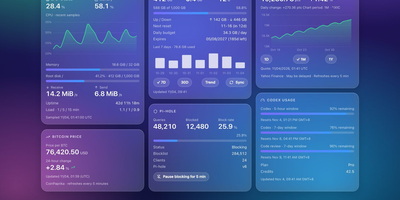
Your homelab home page can take orders from an AI assistant: ask Claude or Cursor to add Jellyfin, Sonarr and Radarr to Media with health checks, and Genkan updates the page on the spot. Other requests work the same way: group services by type, pin the five used most, or move dead links to an Archive category. The AI tab in Settings offers a one-click prompt for the Agent Skill, which calls the REST API, and a built-in MCP server with 29 tools. Links sit on a wallpaper as frosted-glass capsules, grouped into workspaces and categories, with a pinned row and sorting by use, recency or dragging. Slash or Ctrl+K searches every workspace and falls back to a web search. Seventeen bundled plugins add resizable widgets for weather, world clocks, countdowns, Pi-hole stats, RSS, Hacker News, a to-do list and Markdown notes, plus wallpaper feeds such as NASA APOD. Plugins from other authors show their permissions and source in a market before you enable one, and each runs in a sandbox with time and memory limits. A green or red dot beside each link reports its health, and favicons download on their own. Editing needs the admin login, a read-only guest mode shares the page, and JSON export and import carry everything to another instance. Running on a dedicated VPS on RepoCloud with guaranteed CPU, RAM, and SSD, full root SSH access, and a browser serial console. MIT licensed.
Unkey
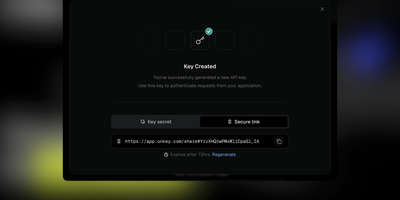
Unkey is the open-source platform that unifies API key management, rate limiting, deployment, and observability into a single control plane. The Go API service validates keys with sub-millisecond latency using regional Redis caches and MySQL 8.0 persistent storage, while ClickHouse captures every verification event for per-key and per-keyspace analytics with filterable time-series charts, request counters, and active key tracking. Keyspaces organize API keys by product, environment, or tier, each configurable with custom prefixes, byte lengths, IP whitelists, encrypted key recovery, and delete protection. Per-key settings include expiration dates, rate limit quotas with configurable windows, RBAC roles and permissions, owner identities linking multiple keys to a single user or organization, and key rotation with grace periods from immediate revocation through 24-hour overlap. The deployment pipeline connects GitHub repositories for automatic Docker container builds, generates preview environments per commit, promotes tested versions to production, and validates releases with OpenAPI diff detection flagging breaking changes before production. The edge gateway authenticates and rate-limits requests at the closest region before routing to the nearest API instance. Immutable audit logs track every key creation, verification, deletion, and configuration change with actor, timestamp, and event metadata. The CLI provides terminal access to key management, analytics queries, and deployment operations. On RepoCloud, deploy Unkey on a dedicated VPS with Docker, root SSH access, and complete control over your API infrastructure, all under the AGPL license.