Depl0y
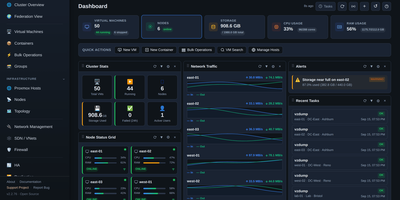
Three Proxmox sites, a lab host in the corner, and a rack of Dell and HPE servers can all share one screen when Depl0y runs the show. The dashboard totals virtual machines, containers, CPU, RAM, storage, and network traffic across every registered endpoint, with draggable widgets, alerts, and recent task feeds. Virtual machine pages cover start, stop, restart, snapshots, cloning, migration, templates, and a browser console, and node pages add metric charts, storage, networking, and update status. A guided failover wizard checks quorum, storage, and disks, then protects a guest so it restarts on another node if its host fails. A topology view maps hosts, guests, bridges, storage, and BMCs, with PNG, SVG, and draw.io export. Hardware pages poll iDRAC and iLO for health, temperature, power draw, DIMMs, drives, and firmware, and power controls reach machines that are fully off. Deployment tools build VMs from cloud images, import OVA, VMDK, and QCOW2 files, and launch self-hosted LLM guests. Admin, Operator, and Viewer roles, TOTP, host pinning, and a searchable audit log keep access tidy. MSPs managing client clusters, homelabs with several nodes, and data center teams that want hypervisor and hardware status together are the target audience. Running on a dedicated VPS on RepoCloud with guaranteed CPU, RAM, and SSD, full root SSH access, and a browser serial console. MIT licensed.
Vedetta
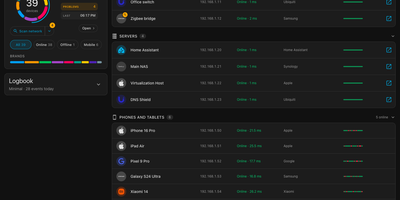
Your router calls it "Unknown device" at 192.168.1.23; Vedetta calls it the kitchen light and shows its work. Vedetta is a Home Assistant app that scans your local network, identifies what each device actually is, and explains every identification. One scan lists every device it can find with presence and latency history, in tile or list view, light or dark, on a computer or a phone. Behind each name sits the recognition engine: it weighs many weak clues together, counts a repeated fact once, groups devices by family, and shows certainty honestly, keeping anything doubtful in Other rather than inventing a label. Tap the info marker beside a name, brand, or type and a pop-up lists every clue, its weight, and the hypotheses that were rejected. Names or rooms you set by hand are never overwritten by later scans, and sleeping phones are remembered instead of flickering in and out. Choose from three search levels depending on how hard you want it to probe, let the nightly deep search refresh the picture, and use the network doctor to spot duplicate addresses, repeated restarts, devices that drop together, or a slowing gateway. It can also publish what you choose to Home Assistant and MQTT, display devices from other networks your Home Assistant already sees, and mask exports before they leave the machine. Running on a dedicated VPS on RepoCloud with guaranteed CPU, RAM, and SSD, full root SSH access, and a browser serial console. MIT licensed.
Joulenap
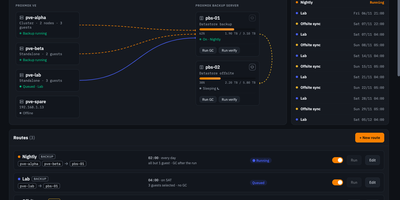
A dedicated backup server is the right way to keep copies on separate hardware, and a strangely expensive one to leave humming in the corner for a job that runs twenty minutes a night. Joulenap lets that machine sleep: at the scheduled hour it sends a Wake-on-LAN packet to your Proxmox Backup Server, waits until the API answers, runs the backup, applies retention, runs garbage collection and verification if you asked for them, then powers the box back down or suspends it for network cards that only wake from sleep. You describe your setup as routes: which hosts back up to which backup server, on what schedule, keeping how many copies, with guests as everything on a host or an explicit list. Fan several hosts into one server nightly, or copy one backup server to another across town for an off-site second copy with its own retention. A second route kind starts nothing at all: your Proxmox hosts keep their own schedules while Joulenap simply wakes the box, watches their tasks, and switches it off when they go quiet. Watch live task output, stop a run mid-flight if you must, and get results through Apprise, Telegram, ntfy, Discord or email per route. Status widgets feed Homepage, Homarr, Dashy and Glance, and a Prometheus endpoint lets Grafana alert you when a guest stops being backed up. Running on a dedicated VPS on RepoCloud with guaranteed CPU, RAM, and SSD, full root SSH access, and a browser serial console. AGPL-3.0 licensed.
Compass
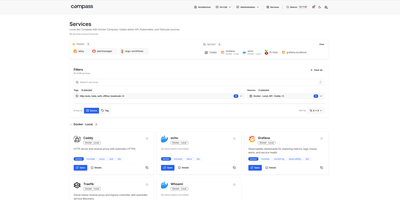
Every homelab outgrows the browser bookmark folder, and Compass answers by building the front page for you, discovering your services automatically instead of asking you to maintain cards by hand. Point it at Docker, Kubernetes, Tailscale, Headscale, NetBird, DNS records, a JSON API, or a plain static list, and it renders everything it finds as a searchable directory with icons, descriptions, and tags filled in from a catalog when a source leaves them blank. Each card shows whether the service is actually up, using the Prometheus or Gatus monitor you already run, and pinned and recent services keep daily tools one click away. Opening a service reveals its connection details, source metadata, extra links such as runbooks and health endpoints, and panels you embed from Grafana. Markdown pages live beside the directory, so architecture notes and on-call runbooks sit in the same navigation, with live service cards and charts embedded directly inside the prose. A debug view shows per-source health, what each source returned, and why a service you expected is missing, while group-based access decides which sources each person can see. Running on a dedicated VPS on RepoCloud with guaranteed CPU, RAM, and SSD, full root SSH access, and a browser serial console. Apache License 2.0 licensed.
KaletaCMS
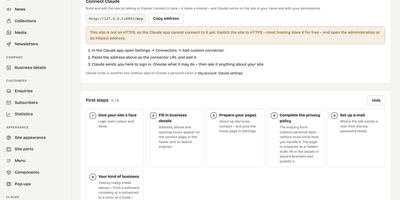
Kaleta is a business-website CMS where the page you edit is the page your visitors get, not a preview of it. The visual builder works on the live canvas: add sections, drag elements, edit text in place, and style every element separately for desktop, tablet, phone, and hover before you publish. Forty-six elements and forty ready-made sections cover pricing tables, timelines, before-and-after sliders, galleries, accordions, carousels, maps, and mega menus. Consistency comes from a design-token system: change one colour, font, spacing, or radius token and the whole site follows, with a WCAG contrast check on every colour pair and export in the W3C token format. Blocks you reuse become components edited once and updated everywhere, and each page carries its own search title, sharing image, and visibility, with the last twenty publications kept as versions. Moving in is a first-class feature: importers take WordPress exports including WooCommerce products and Polylang or WPML translations, plus Ghost, Blogger, Joomla, Drupal, and Webflow, creating a redirect from every old address so rankings survive. An optional AI assistant connected through MCP builds pages and handles chores only as drafts you approve. Forms, booking, enquiries, media folders with focal-point cropping, multilingual publishing, and GDPR duties such as automatic personal-data deletion are built in rather than bolted on. Running on a dedicated VPS on RepoCloud with guaranteed CPU, RAM, and SSD, full root SSH access, and a browser serial console. GPL-2.0 licensed.
LabTether
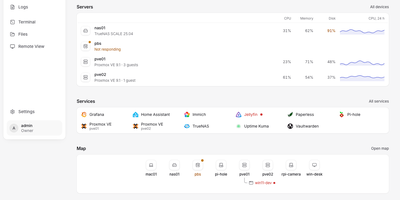
LabTether is a self-hosted control hub that puts every machine, VM, and container in your homelab on one screen. The dashboard surfaces what needs attention first, then lists servers with CPU, memory, disk, and 24-hour charts beside the services you run. Connect Proxmox VE, Proxmox Backup Server, TrueNAS, Portainer, and Home Assistant with an API key, and add agents on Linux, macOS, or Windows machines for live metrics. Open a terminal, a file browser, or a VNC, RDP, SPICE, or WebRTC remote desktop on any node from the browser. Alert rules, notification routes, and maintenance silences group related problems into incidents you can track to the fix, and a dependency map shows what else goes down before you reboot something. Saved actions run on a group or a schedule, webhooks forward hub events, and package updates start with a dry run. A built-in MCP server hands Claude, Cursor, or any MCP client 32 tools, each API key limited to the scopes you allow. Two-factor login, OIDC single sign-on, owner, admin, operator, and viewer roles, and an audit log keep access tidy. Running on a dedicated VPS on RepoCloud with guaranteed CPU, RAM, and SSD, full root SSH access, and a browser serial console. Apache-2.0 licensed.
Narratarr
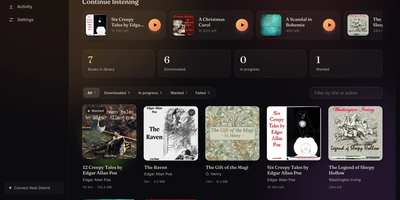
Narratarr finds free audiobooks, fetches them through your download stack, and plays them back in the browser, so a book goes from curiosity to chapter one in a single click. Discovery starts with more than 30,000 legal titles from LibriVox and Old-Time Radio, browsable by genre, popularity, language, and format. Search forgives your spelling: type a mangled author name and the right books still surface, ranked by how well they match. Every title shows its runtime, format, size, and description before you commit, and one click queues the download, files it under Author and Title with cover art attached, and tracks progress live on the Activity page. Playback needs no second app. The built-in player handles chapters, including markers buried inside m4b files, plays from three-quarter speed to triple speed, and offers a sleep timer that can stop at the chapter boundary. Your place is kept per listener, so a household can share one library without losing anyone's bookmark. Follow authors and series on the Wanted list and new releases arrive on their own; notifications land in ntfy, Gotify, Discord, or any webhook when downloads start and finish. Ebooks ride along too, readable as EPUBs in the same interface. Running on a dedicated VPS on RepoCloud with guaranteed CPU, RAM, and SSD, full root SSH access, and a browser serial console. MIT licensed.
Jellydash
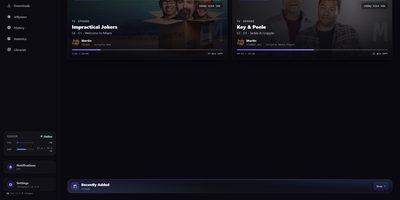
Jellydash answers the questions every Jellyfin admin asks, starting with who is watching right now and whether that stream is transcoding. Live cards show each session's artwork, user, quality, progress, and playback method, including the reason a transcode was needed, and live TV channels appear with real program progress. Behind the scenes, a background poller records every play even when nobody has the dashboard open, building a history you can search, filter by user or library, and export to CSV with poster art intact. Older Jellyfin or Emby Playback Reporting backups import in seconds, so years of viewing are not lost when you switch. Statistics turn that history into watch-time trends, top users, device and client activity, codec breakdowns, and transcode reasons, and clicking a chart opens the exact plays behind it. A monthly recap looks back at a finished month with rankings and daily activity, while trending and all-time most-watched strips show what your household actually loves. Optional pages follow Jellyseerr requests as they arrive and read the status of SABnzbd, qBittorrent, Transmission, Deluge, and NZBGet clients without ever touching their queues. Server activity, maintenance tasks, and system status stay one click away, and selected users can be excluded from monitoring entirely. When someone presses play, a notification can reach your phone through Telegram, Pushover, Discord, ntfy, Gotify, or Web Push. Running on a dedicated VPS on RepoCloud with guaranteed CPU, RAM, and SSD, full root SSH access, and a browser serial console. MIT licensed.
VolumeVault
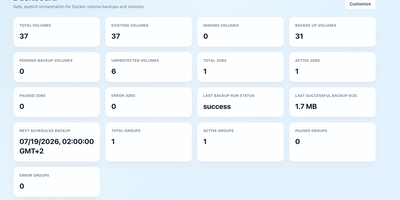
VolumeVault turns Docker volume backups into a routine you can prove: it schedules them, stores them off the box, and restores them into brand-new volumes so original data is never the test subject. A guided web dashboard discovers every Docker volume on the host and shows backup coverage per volume or per Compose and Swarm stack, including the size of the latest known backup, so gaps are visible before they matter. Each job runs on an hourly, daily, weekly or cron schedule with retention by days or archive count, include and exclude filters, and a choice of whether containers stop during the run. Archives land where you keep them: AWS S3, Cloudflare R2, any S3-compatible store, WebDAV, SFTP, Azure Blob, Dropbox, Google Drive or a local path, with credentials encrypted at rest. Restores download and verify the archive first, then unpack it into a new volume by default; overwriting the original demands an explicit confirmation. Several volumes can ride one grouped schedule that reports once for the whole set, and containers can volunteer themselves for backup through Docker labels. Small agent containers extend the same jobs to other Docker hosts, including encrypted cross-host restores into fresh volumes, while API tokens let scripts and dashboards drive everything the UI can. Running on a dedicated VPS on RepoCloud with guaranteed CPU, RAM, and SSD, full root SSH access, and a browser serial console. Apache-2.0 licensed.
OhMyBuddy
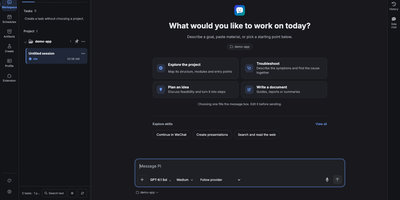
Give your AI assistant a name, a memory you can actually inspect, and a permanent seat on your own server. OhMyBuddy has two sides that share the same models and tools. The Buddy side keeps one ongoing conversation, learns your preferences, and shows a receipt under any reply that saved something, so every memory can be reviewed, edited, or undone. The Workspace side opens real project folders with threads, streaming tool calls, file diffs, side chats, and a branching history view. Add scheduled tasks, an artifacts library, and a media lab for image, video, and speech generation. Connect extensions, MCP tools, a browser, and subagents when a job needs more hands. Sessions live on the server, so a laptop, a tablet, and a phone home screen all continue the same chat, with notifications when a reply finishes. Bring Claude, GPT, Gemini, DeepSeek, or any OpenAI-compatible relay, and protect the instance with an access token. Keep a personal AI on hardware you control, reachable from every device you own. Running on a dedicated VPS on RepoCloud with guaranteed CPU, RAM, and SSD, full root SSH access, and a browser serial console. ISC licensed.
AgentFlux
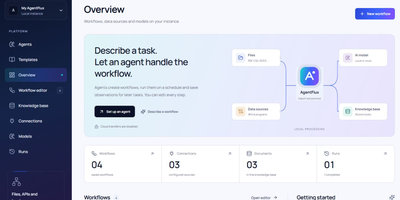
Describe the task in plain words, pick the sources and model it may use, and an agent plans the workflow before running it. That is the core loop: agents build editable visual workflows from a task description, execute them on demand or on a schedule, and keep everything traceable. Prefer building by hand and the canvas offers 17 preconfigured steps, branching, undo and redo, JSON import and export, plus eight starter templates. Feed it real work by importing PDF, DOCX, XLSX, CSV, JSON, and text files, or by connecting folders, HTTP endpoints, and approved local programs. Upload a screen recording and it identifies the actions with timestamps, turning a demonstrated process into an editable workflow you can refine. Model calls go to the endpoint you choose: Ollama, LM Studio, vLLM, or any OpenAI-compatible service, local or cloud with your own credentials. Every run can be inspected step by step, cancelled mid-flight, and exported as JSON, CSV, or Markdown reports. Observations from completed runs land in a knowledge and learnings store, where you review them and promote the useful ones into reusable skills for the next task. The Docker release bundles the application with FFmpeg and local Whisper support, and your documents stay on your own machine. Running on a dedicated VPS on RepoCloud with guaranteed CPU, RAM, and SSD, full root SSH access, and a browser serial console. Apache License 2.0 licensed.
Retinue
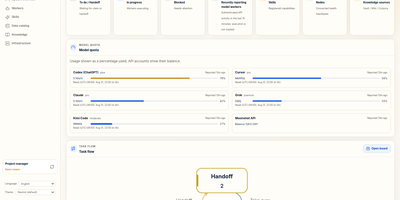
Retinue shows who is doing what across a fleet of AI agents, on a shared board where every task is a card with exactly one holder, a written acceptance check, and a receipt chain that cannot be rewritten. Operators publish cards, agents claim them through MCP or a token-scoped HTTP API, report progress, and hand off, and an agent that is not the holder gets a refusal when it tries to write. The Home dashboard counts what is waiting, running, and blocked, charts task flow and dispatch, and shows quota gauges for Claude, Codex, Cursor, Grok, and Kimi subscriptions. A collaboration workspace draws delegation graphs, device and model timelines, module contributions, and message conversations for any selected task. Operations pages report token usage by worker, and a data health page flags stale reports and duplicate identities. Read-only importers pull session data from Claude Code and Codex, and optional Lark, Feishu, and Telegram bridges turn chat messages into intents. The interface switches between English and Simplified Chinese. Running on a dedicated VPS on RepoCloud with guaranteed CPU, RAM, and SSD, full root SSH access, and a browser serial console. AGPL-3.0 licensed.
xEdit
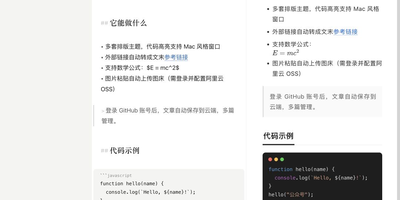
xEdit is a free, open-source Markdown editor that keeps your notes as plain text, on your device or on your own server, and hands AI clients a proper door instead of a scrape. Write in live preview, where headings, code and images render in place and only the line under your cursor shows its source, or flip to a split view when you want both sides visible. Slash commands insert headings, callouts, tables, to-dos, code blocks and media, and wiki links tie notes together by title, with renames updating every link that points at the note. Any checkbox in any note with a date rolls up into a Today view, and nested folders, global search and a recoverable trash keep a growing library tidy. Choose where notes live: browser storage, a local folder of Markdown files, or cloud sync with an offline mirror on every device. Cloud notes gain version history with line-by-line diffs and one-click rollback, share links that collect comments on selected passages, and exports to Markdown, HTML, PDF, PNG and Word. Pick one of thirteen layout themes and copy straight into WeChat or Zhihu with styles inlined and math intact, then connect Claude or Cursor through the built-in MCP server to search, organize and edit the whole library. Running on a dedicated VPS on RepoCloud with guaranteed CPU, RAM, and SSD, full root SSH access, and a browser serial console. MIT licensed.
Doca
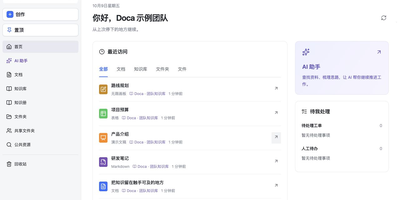
Doca puts rich text, Markdown, spreadsheets, slides, and an infinite canvas under one login and one permission model, giving individuals and small teams a self-hosted workspace for writing together. Every format supports real-time co-editing with presence, comments, saved history, and manual snapshots, and rich text and Markdown documents can be restored to an earlier version. Documents live in knowledge libraries with tree navigation, invitations, inherited permissions, share links, and trash, while personal files and shared folders sit on local disk or S3-compatible storage. Knowledge books go further: they subscribe to sources, run an editable workflow, keep source evidence, and route results through human review. A personal AI assistant, powered by whichever model you configure, searches authorized documents, reads PDF and Office attachments, edits images, and prepares browser drafts. MCP services let external AI clients such as Codex use those tools under your permissions. Sign in with a password, OIDC, Google, GitHub, WeChat, or QQ, review registrations before they go live, and send webhooks to other systems. A plugin SDK and marketplace add business modules, and a browser extension clips pages into documents. The interface ships in Chinese and English. Running on a dedicated VPS on RepoCloud with guaranteed CPU, RAM, and SSD, full root SSH access, and a browser serial console. MIT licensed.
Craftsail Growth
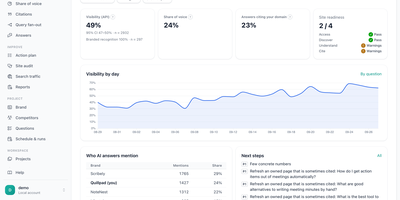
Buyers now ask an AI assistant for recommendations instead of typing a search, and Craftsail Growth shows whether those answers name your brand or a competitor. It puts your buyers' questions to ChatGPT, Claude, Gemini, Grok, Perplexity, DeepSeek, Kimi, Doubao, GLM, and MiniMax through their official APIs several times a day, so visibility per engine and per question carries confidence intervals instead of one vanity number. Share of voice ranks you against the competitors you track with a leaderboard and a trend line. Citation reports sort every cited URL into owned, competitor, review, social, and reference sources next to the web searches the engines actually ran. A site audit works through access, discovery, understanding, and citation in fix order, checking robots rules for AI crawlers, llms.txt, structured data, and answerable content. A ranked action plan blends citations, the audit, and Search Console data, and each accepted action carries an acceptance check that verifies itself on the next run. Creating a project from your website address crawls the site and drafts brand facts, competitors, and buyer prompts for you to review. Google Search Console and GA4 import, generated llms.txt, JSON-LD, and FAQ snippets, scheduled runs, reports, several projects and users, manual sampling sheets, and a dashboard in English, Chinese, and Portuguese round it out. Running on a dedicated VPS on RepoCloud with guaranteed CPU, RAM, and SSD, full root SSH access, and a browser serial console. AGPL-3.0 licensed.
AGenUI Studio
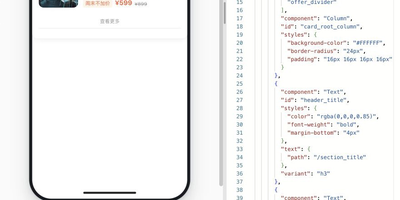
AGenUI Studio turns a written description into a working interface card: an AI agent generates the UI, binds it to your APIs and data, and packages it so it runs anywhere, no Studio required. Bring your own model by entering any OpenAI-compatible or Anthropic Messages endpoint and key in the console settings, and generation proceeds contract-first, steered by design rules you publish as versioned Markdown revisions. You preview each card live as it is generated, then refine it over multiple turns while every component, binding, and action you did not target stays protected from accidental edits. The console also manages the supporting cast: a local knowledge base, API definitions, and reusable operators, all starting from bundled demo data you can swap for real services whenever you are ready. When a card is finished, download it as a self-contained Runtime Package carrying its data sources, bindings, actions, and operators, and execute it with the bundled Card Runtime inside your own application, or register a delivery target and publish straight from the workbench over a callback or a message queue. Applications subscribe to native run events over HTTP and SSE, and production deployments can replace the local defaults piece by piece, MySQL for storage, Redis for hot state, MCP services for knowledge and data, while the packages keep the same contracts. Running on a dedicated VPS on RepoCloud with guaranteed CPU, RAM, and SSD, full root SSH access, and a browser serial console. Apache-2.0 licensed.
Nimbus
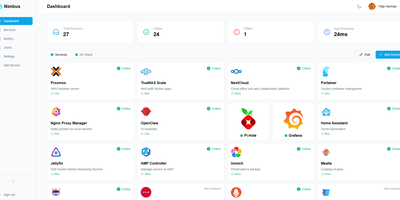
Nimbus is a self-hosted homelab dashboard that turns your scattered pile of services into a polished, organized command center with real-time health monitoring for every endpoint you care about. The dashboard displays live status cards for each registered service, tracking response times down to the millisecond and graphing uptime history so you can spot degradation before it becomes an outage. Health checks run on configurable intervals with smart self-signed certificate handling, meaning your internal services with self-issued TLS do not trigger false alarms. Multi-user support comes standard: local accounts authenticate via JWT, while OAuth2 integration with Google, GitHub, and Discord lets team members sign in with existing credentials. Role-based access control and a built-in admin panel give you granular authority over who sees what. Each user personalizes their view with custom backgrounds, light or dark mode, accent color themes, and drag-and-drop service tile arrangement. Services group into named categories and cards resize to fit your preferred layout, with both grid and list view modes available. Prometheus metrics export feeds your existing Grafana stack, and webhook notifications alert you instantly when a service goes offline. Custom service icons upload directly or auto-fetch from the Dashboard Icons collection. Zero-config Docker deployment gets you running in under 30 seconds with a single docker-compose command. Running on a dedicated VPS on RepoCloud with guaranteed CPU, RAM, and SSD, full root SSH access, and a browser serial console. AGPL-3.0 licensed.
Valet Homelab
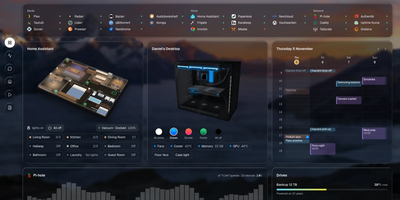
Open one page and see what is happening across every service in your homelab, then ask an AI assistant about downloads, lights, or what to watch tonight. Valet shows live status for 185 integrations, from Plex, Sonarr, and Immich to Home Assistant, Pi-hole, and Uptime Kuma, with progress bars and numbers that update without refreshing. Cards include a 3D floor plan with light controls, a PC with case and cooling controls, a calendar, backup health that flags overdue copies, and a year in review. The assistant works with a local or hosted model, switches models per chat, answers by voice, and supports slash commands, including your own. Anything it changes waits for your approval, and Valet works fine with the AI switched off. A wall mode at the /wall address turns a tablet or spare monitor into a read-from-across-the-room display with cards you pick, pages that take turns, and dimming at night. Add Valet to a phone Home Screen to install it as an app with its own notifications. API keys stay on the server, and there is no account and no telemetry. Running on a dedicated VPS on RepoCloud with guaranteed CPU, RAM, and SSD, full root SSH access, and a browser serial console. MIT licensed.