ReadyLLM
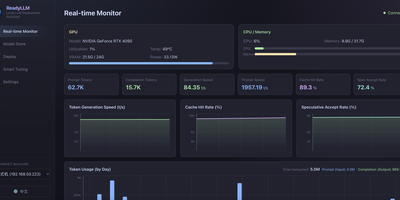
Your inference server should not sit mostly idle while a model crawls along at ten tokens per second, so ReadyLLM gives you a visual way to deploy, watch, and tune LLMs until the hardware is actually earning its keep. Add the machine under your desk or a remote box over SSH, let hardware detection read its GPU, VRAM, CPU, and memory, and get model recommendations that fit what you own instead of wishful downloads. A model store catalogs text, image, and video models with parameter counts, precision, resolutions, and real weight filenames, background downloads from multiple sources, and integrity checks when they land. One click starts or stops llama.cpp, vLLM, or SGLang services, installs a missing engine matched to your GPU backend, and leaves runtime parameters open for manual tweaks. Live curves track GPU utilization, memory, throughput, and latency as requests flow. When speed disappoints, two-phase auto tuning searches the knobs that matter, checks VRAM feasibility before it wastes your time, and benchmarks honestly against latency, throughput, or prefill goals; an AI tuning mode can reason through the same loop across several rounds. Beyond chat models, ComfyUI generation covers text-to-image and text-to-video, storyboards, shot-by-shot long video, and upscaling, with prompts optionally expanded first. Running on a dedicated VPS on RepoCloud with guaranteed CPU, RAM, and SSD, full root SSH access, and a browser serial console. MIT licensed.
Neohabit
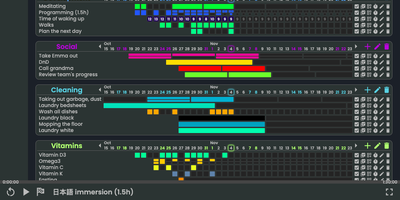
Most habit trackers punish a single missed day, so Neohabit lets you build routines that happen X times in Y days, like three workouts in five days or one deep-work session every three days, and adjust the target mid-streak as the habit gets easier. Your progress renders as GitHub-style contribution heatmaps in three styles: monochromatic grids for simple check-ins, numeric grids that record values such as calories, spending, reps, or hours up to two billion, and fractured grids that split each period into up to sixteen segments for habits done many times a day. Related habits group into projects with a one-dimensional daily view, and skill trees let you plan progressions, for example raising a reading target from twenty minutes to an hour in planned steps. You can ease into a new routine by starting at once in four days instead of daily, track things you want to reduce as well as build, hover any cell for period details, and rearrange projects and habits by dragging them. Multiple accounts, light and dark themes, keyboard shortcuts, and a polished mobile browser interface round out daily use, and a single command brings the whole thing up with prebuilt images ready to go. Running on a dedicated VPS on RepoCloud with guaranteed CPU, RAM, and SSD, full root SSH access, and a browser serial console. AGPL-3.0 licensed.
mmar
Expose a service running on your laptop to the public internet in one command, through a tunnel server that you control. mmar pairs a small client with a self-hosted server: run the client against a local port and it registers a tunnel, receives a generated subdomain, and prints the public URL that now forwards to your machine. Every request that arrives shows up in live client logs, so a webhook test or a shared preview carries a visible trail of hits as they happen. Multiple local ports can be exposed on different subdomains at the same time, which suits a frontend, an API and a callback receiver running side by side during development. On the server side, two listeners do the work, one for HTTP traffic and one for the TCP tunnel connections, and a protected stats page returns JSON listing connected clients, their subdomains and creation times. Wildcard DNS plus a Caddy layer4 proxy with automatic wildcard certificates turns a personal domain into tunnel territory, and credential hashes guard the stats endpoint. The hosted mmar.dev service offers a free starting point on a generated subdomain, and the same single binary moves the whole arrangement onto your own infrastructure when control matters more. Running on a dedicated VPS on RepoCloud with guaranteed CPU, RAM, and SSD, full root SSH access, and a browser serial console. AGPL-3.0 licensed.
GitArena
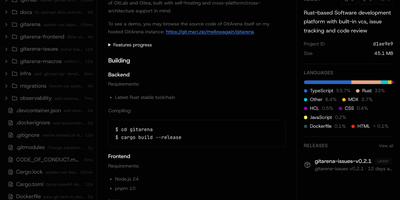
GitArena gives your team its own place to host code, combining repository hosting, issue tracking, and code review in one lightweight service you run yourself. Push and pull over HTTP or SSH, browse code in the browser with syntax highlighting, blame, and raw views, and follow commit history with diffs branch by branch. Repositories can be forked, archived, tagged, and released with downloadable assets, and every project gets an issue tracker with labels, milestones, assignees, and a kanban board. Issues are stored natively in Git using the git-bug format, so they travel with the repository and remain readable offline with the git-bug CLI. Merge requests collect changes for review before they land, while organizations and teams control who can see and change each project. Search spans code, repositories, issues, and users from one box, profiles show contribution graphs and activity, and sign-in supports passwords, SSH keys, passkeys, and OAuth single sign-on. A REST API exposes the platform to your own tooling, and the whole service runs from a single Docker Compose stack or a compiled binary with a separate frontend build. Running on a dedicated VPS on RepoCloud with guaranteed CPU, RAM, and SSD, full root SSH access, and a browser serial console. MIT licensed.
FeedCraft
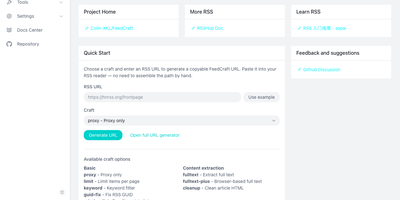
Excerpt-only feeds, truncated teasers, and articles in languages you do not read make RSS feel broken; FeedCraft sits between the source and your reader and fixes the feed itself. Pick from more than twenty single-step crafts: extract the full article text, even from JavaScript-rendered pages through a headless browser, translate titles or whole articles, add AI introductions and summaries, strip ads and clutter, or filter items by keyword, embedding similarity, or a natural-language prompt to your own LLM. Chain crafts into FlowCraft pipelines, so one pass can limit a feed to ten items, fetch every full text, drop the advertorials, and summarize what survives. Save the result as a recipe and FeedCraft hands you a permanent crafted feed URL that drops straight into the reader you already use, while portable mode transforms any feed on the fly from a single crafted URL prefix. When a site has no feed at all, the visual generators build one from a webpage with CSS selectors, from a JSON API with curl import, or straight from search results. Running on a dedicated VPS on RepoCloud with guaranteed CPU, RAM, and SSD, full root SSH access, and a browser serial console. GPL-3.0 licensed.
LifeGLANCE
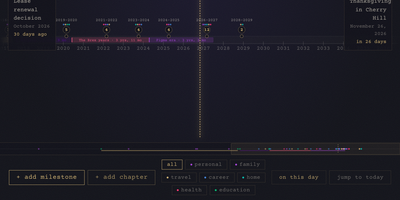
Birthdays, graduations, house moves, weddings, and the trip you keep promising yourself for next year all belong on the same line, and LifeGLANCE draws that line as one zoomable timeline of your life, past and future. Pan smoothly from a single week out to multiple decades, then zoom back in when a dense year needs room; cluster badges keep crowded stretches readable, and a minimap scrubbar jumps you across decades without endless scrolling. Each milestone carries a title, a date at day, month, or year precision, a category, a note, and a link, and you can attach photos, audio, and video directly to the moments they belong to. Birthdays and anniversaries repeat annually with an end year you set. Switch between All, Past, and Future views, search titles and notes in full text, or open On This Day to see what happened on this date in earlier years. A stats panel and summary modal turn the line into counts and patterns. Import calendar events from an ICS file, export the whole timeline as a high-resolution PNG, or back everything up and restore it as JSON. Running on a dedicated VPS on RepoCloud with guaranteed CPU, RAM, and SSD, full root SSH access, and a browser serial console. MIT licensed.
Vanilla Cookbook
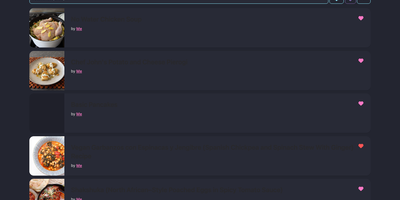
Every family recipe, bookmarked food blog post, and meal-prep formula stays organized inside Vanilla Cookbook, a self-hosted culinary library that converts volumetric measurements into precise gram weights and scales servings on the fly. Paste a URL or click the browser bookmarklet to scrape recipes from hundreds of cooking websites. Plain-text ingredient strings split automatically into structured quantities, units, preparation notes, and optional or to-serve badges. Home bakers switch effortlessly between US cups, imperial ounces, and metric grams across thousands of ingredient density profiles. Inline oven temperatures, fractions, and numeric ranges adjust automatically as serving counts change. Nutritional text parses into a structured per-serving breakdown, while integrated shopping lists, cooking logs, and equipment lists keep weekly grocery planning synchronized across desktop browsers and Progressive Web App mobile devices. Connecting an optional OpenAI, Anthropic, Google Gemini, Ollama, or LiteLLM endpoint unlocks AI fallback scraping for pages lacking Schema.org markup, automatic recipe translation, verbose direction summarization, photo-to-recipe extraction, and vector-based semantic search. Multi-user accounts, OAuth authentication, public recipe sharing links, and bulk import or export tools give households full control over their cookbook data. Running on a dedicated VPS on RepoCloud with guaranteed CPU, RAM, and SSD, full root SSH access, and a browser serial console. GPL-3.0 licensed.
Dopbase
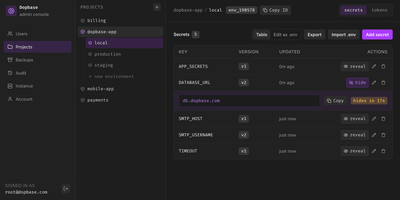
Dopbase keeps your application secrets out of scattered .env files and stores them, encrypted one by one, in a single self-hosted server you run as one file. You organize everything by project and environment, so the payment service has its own development, staging, and production values, and the same key can hold a different encrypted value in each place. Every secret is an individual record that can be updated, revealed, versioned, or rolled back without touching the others, and reading metadata never exposes a value. When an application starts, one command asks the server for an environment and injects exactly those values into the process, removing its own token before the child process runs. People sign in to the Admin UI with roles for root, admins, members, and even AI agents that can read metadata but change nothing. CI jobs and servers use runner tokens scoped to a single environment, so a staging credential can never read production. You can import and export .env files, edit secrets as a table or as raw env text, connect single sign-on through providers like Keycloak, and read an audit history of checks, reveals, and changes. Full-instance backups and the master key stay under your control on your own disk. Running on a dedicated VPS on RepoCloud with guaranteed CPU, RAM, and SSD, full root SSH access, and a browser serial console. Apache-2.0 licensed.
Ziit
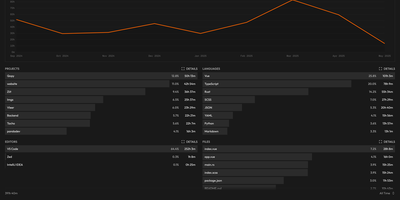
Ziit tracks where your coding hours actually go and shows the answer in a dashboard you host yourself. Install the extension in VS Code, any of its forks, or a JetBrains IDE, and every editing session streams to your instance with its project, language, editor, file, branch, and operating system attached. The dashboard filters by time range and breaks your work down by project and language, so a week of effort becomes a readable chart instead of a vague memory. You sign in with GitHub or email and password, import existing history from WakaTime or a WakAPI instance, and keep building on years of data instead of starting over. README badges embed live coding time for a project into any repository page, turning your profile into a quiet proof of work. A public stats page summarizes the whole instance, and a public leaderboard ranks who logged the most coding hours, which makes self-hosted instances double as community scoreboards. Because the server, the database, and the extensions are all yours, no third-party service sees which files you opened or how long a private project took. Teams can run one instance for everyone and compare effort across projects with the same filters. Running on a dedicated VPS on RepoCloud with guaranteed CPU, RAM, and SSD, full root SSH access, and a browser serial console. AGPL-3.0 licensed.
Watchtower
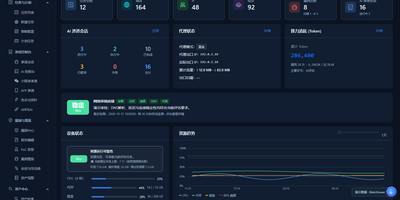
Watchtower puts AI-driven security assessments into one web console, where sessions probe your attack surface while every request, finding, and piece of evidence is captured as it happens. The AI session console follows the attack surface, session progress, tool calls, and findings as an assessment runs, so you can watch an engagement unfold instead of reading a log afterwards. A built-in proxy workflow records HTTP and HTTPS traffic history with highlighted patterns, and any captured request can be sent to the Repeater for editing, replay, and response comparison. Mobile work is covered too: connect phones over USB or wireless, capture app traffic separately from accessibility control, and import WeChat mini-program packages to configure an assessment session. A public vulnerability intelligence library can be searched by component, severity, and source and kept synchronized locally, giving assessments current context without sending your targets anywhere. Findings are managed by source, severity, and status, each linked back to its supporting evidence, and the report editor assembles them with a live preview, impact notes, and remediation guidance. The dashboard tracks assets, tasks, AI sessions, token usage, and runtime resources, and task admission is budgeted against physical memory so heavy scans do not starve the host. Running on a dedicated VPS on RepoCloud with guaranteed CPU, RAM, and SSD, full root SSH access, and a browser serial console. GPL-3.0 licensed.
Shell Online
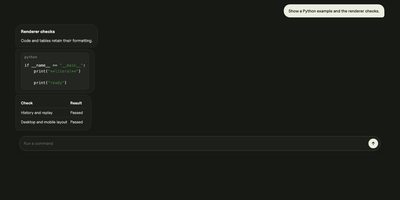
Shell Online lets a terminal session running on your own computer follow you to any browser, so your coding agent keeps working while you are away from your desk. Prefix the command you already run, such as shell claude, shell codex, or shell opencode, and your terminal prints a link, a password, and a QR code that open the same live session on a phone, tablet, or another computer. You watch output as it happens and reply to prompts from wherever you are, and closing the browser leaves the process running until it exits on its own. Inviting a teammate takes the same link: share it read-only so they can watch without typing, or let them type into the session with you. Terminal traffic is end-to-end encrypted by default, file access stays off until you deliberately expose a chosen directory, and a scoped MCP grant can let another agent inspect or steer a session for a limited time. With an account, linked machines and their sessions gather in one web app with team sharing. The relay the sessions pass through can run on your own server with the standalone Docker deployment, pointed at by the unchanged CLI. Running on a dedicated VPS on RepoCloud with guaranteed CPU, RAM, and SSD, full root SSH access, and a browser serial console. MIT licensed.
Overlook
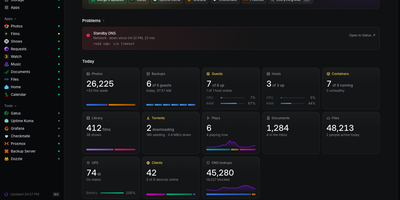
Overlook is a read-only status page that tells you at a glance whether your whole homelab is healthy, by pulling live answers from the monitoring, server, network, storage, and media tools you already run. The page leads with what is wrong, listing the checks your existing check engine is alerting on for as long as they fail, so the page and your alerts never disagree. Below that sit Servers, Network, Storage, and Apps, each marked up, degraded, or down with the last 30 results of its checks and its own detail page showing guests, DNS clients, or disk detail. A Today strip gives one figure from every source, such as guests running, DNS lookups, photos added, or the watts your UPS is drawing, while a weekly view lists each area's problems and events across the last seven days. Your apps appear as links with a dot that says whether each one answers, and chores due this week, waiting updates, batteries to change, and requests awaiting approval collect in one place you act on in the tool itself. A browser setup page appears before any config exists, tests each source you enter, and writes the config and secrets files for you. Running on a dedicated VPS on RepoCloud with guaranteed CPU, RAM, and SSD, full root SSH access, and a browser serial console. MIT licensed.

HEISS UI
ComfyUI's node graph is where workflows are built, not where pictures get made, and HEISS UI is the calm studio that sits on top of your ComfyUI server for the daily prompt, wait, look, tweak loop. Thirty model families work out of the box, from SD 1.5 and SDXL to Flux.2, Qwen-Image, Krea 2, and Wan 2.2, and missing text encoders, VAEs, or node packs each get a Download button, with Get all for the lot. Pick 2K and the model draws at 2048 in one run with no upscale in between, or send any finished picture to 2K or 4K with SeedVR2 in one click. Import your own workflow and it becomes clean controls over the same graph, with usual inputs connected and guesses marked for review. Paint over part of a picture and say what it becomes, and only that part changes, with inpainting across 18 image families and no extra nodes. The gallery auto-groups ten takes of one idea into a single tile, and opens on your phone while your rendering machine does the work. A Hidden vault locks private images behind Touch ID, Windows Hello, or a password; new PNGs can carry Civitai-ready metadata, and Zen mode shows only prompt and picture. Run it beside ComfyUI with Docker or npm on port 8787, or point it at ComfyUI on another machine. Running on a dedicated VPS on RepoCloud with guaranteed CPU, RAM, and SSD, full root SSH access, and a browser serial console. MIT licensed.
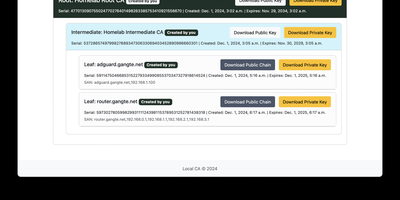
LocalCA
Your internal services deserve padlocks that browsers actually trust, and LocalCA is a small certificate authority you run yourself to issue them. From the web interface you create a self-signed root, install it once on your browsers and client devices, and then mint intermediate and leaf certificates underneath it for each service you host. Proxmox, Pi-hole, Jellyfin, Grafana, and the rest of a homelab stop showing insecure warnings and start presenting certificates your devices accept. The root can carry your own name, so the trust store shows your branding rather than a generic authority. Issued certificates also serve mutual TLS setups, where clients present certificates of their own before a service lets them in. Deployment stays deliberately small: a Docker Compose file brings the application up, ARM images cover Raspberry Pi class hardware, and a configurable time zone keeps expiry timestamps readable for your region. A reverse proxy path prefix is supported for placing the interface behind Traefik or Nginx at an address like /localca. Treat the instance as internal infrastructure, because issued private keys live in its database: keep it on a private network, change the default administrator password immediately, and restrict access to the host. Running on a dedicated VPS on RepoCloud with guaranteed CPU, RAM, and SSD, full root SSH access, and a browser serial console. AGPL-3.0 licensed.

Ambry
Ambry is a personal audiobook streaming server that keeps a collection you own on hardware you control, ready to stream to any browser or phone. Upload your audiobook files once, and the library becomes streamable to any device through a browser or the native mobile application. The server reads durations, tags, and chapter markers straight from the audio files, so a long novel arrives with its structure intact instead of as one anonymous ten-hour blob, and the original files are served untouched. First boot walks you through creating the initial administrator account, after which the instance restarts ready for listening. Households can open registration to family members or close it entirely, keeping the library an invitation-only shelf. Forgotten passwords and registration messages go out through the configured mail provider, so account recovery works without manual intervention. The collection itself lives in PostgreSQL with uploads on a persistent volume, and the whole service runs from a container image on a configurable port. Put a commute listen on your phone, a history title on a kitchen tablet, and a shared family library behind one address, all served from hardware you control. Running on a dedicated VPS on RepoCloud with guaranteed CPU, RAM, and SSD, full root SSH access, and a browser serial console. MIT licensed.
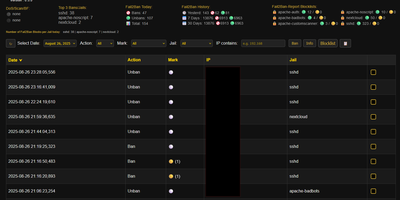
Fail2Ban Report
Fail2Ban quietly bans thousands of bots on a typical VPS and just as quietly keeps the whole story buried in a log file nobody reads, and Fail2Ban Report digs that story out into a dashboard you will actually open. Shell scripts convert each day of fail2ban.log into JSON, and the web interface lays every ban and unban on a searchable, filterable timeline you can slice by jail, server, or time window. Aggregated statistics for today, yesterday, seven days, and thirty days show which jails absorb the most attacks, while markers flag repeat offenders and escalating ban counts so persistent scanners stand out from one-time noise. Blocklists live per jail and per server as plain JSON, and ban or unban actions execute through UFW, giving you permanent bans that survive independently of jail restarts. Bulk actions handle whole ranges at once, with a pending state until the next sync applies them. Multiple servers feed one console through a pull-based HTTPS endpoint, so a fleet of small machines reports to a single pane without exposing SSH. Optional AbuseIPDB and IP-Info lookups add reputation and region context to any address. Running on a dedicated VPS on RepoCloud with guaranteed CPU, RAM, and SSD, full root SSH access, and a browser serial console. GPL-3.0 licensed.
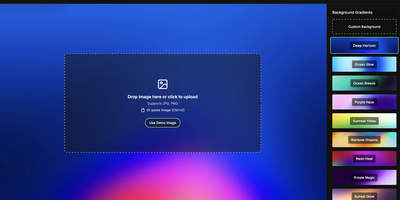
Moocup
Drop your screenshot, a base style is applied, style it however you wish, and export - "that's basically it," says Moocup's own author, and the description holds. The workflow is genuinely seconds long. Drag an image in and it lands on an attractive backdrop immediately; from there you adjust backgrounds, gradients, padding, borders, shadows, and framing with live preview until it matches your taste, then export a high-quality image ready for a portfolio page, README, blog post, tweet, or slide deck. There are no accounts, no watermarks, and no upload to anyone's cloud - as a self-hosted static app, your screenshots never leave your infrastructure, which matters when the screenshot shows a proprietary dashboard or unreleased product. It runs entirely in the browser from a tiny nginx container, works on any device, and requires zero design skill: the smart defaults do the heavy lifting, and everything else is optional tinkering.
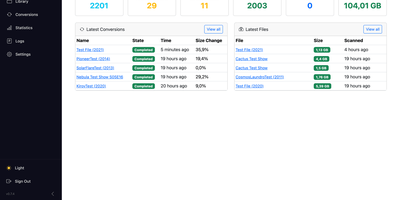
Muxarr
Muxarr cleans up your media library by stripping out the audio and subtitle tracks you will never use, so players stop offering twenty subtitle options and the wrong dub. Tell it which languages you actually watch and read, and it keeps those tracks while dropping commentary, foreign dubs, and redundant subtitles. Nothing is re-encoded: video and audio are copied as they are, so quality is identical and a large film finishes in about a minute instead of hours. Spare audio tracks alone often free ten to thirty percent of a file, which adds up quickly across a big library. Profiles apply different rules per directory, so anime, family films, and western shows can each keep different languages, with priority ordering, per-language limits, and fallback rules like English subtitles only when German ones are missing. Regional variants are understood, distinguishing Quebec French from France French or Latino from Castilian Spanish. When Sonarr or Radarr import something new, a webhook sends it straight to Muxarr, and original language detection makes sure a foreign film keeps its real soundtrack. Track names get cleaned of encoder tags, default and forced flags are fixed, and every output is validated before it replaces the original. Running on a dedicated VPS on RepoCloud with guaranteed CPU, RAM, and SSD, full root SSH access, and a browser serial console. GPL-3.0 licensed.