Wordpress
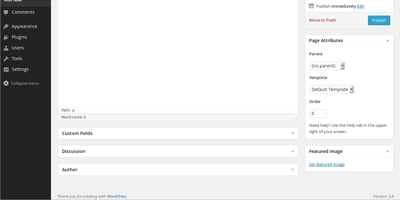
Roughly 43% of all websites and over 60% of the CMS market run on WordPress - the GPL-licensed platform that scales from a personal blog to publishing operations and WooCommerce stores. The Gutenberg block editor composes pages from reusable blocks, and full site editing extends block control to headers, footers, and templates; tens of thousands of plugins and themes cover essentially every capability a site might need, from SEO and caching to membership and e-commerce. WordPress 7.0 "Armstrong" marks the platform's biggest structural update since Gutenberg itself: a React-based DataViews admin replaces the legacy list tables with instant filtering, a provider-agnostic AI Client API ships with connectors for OpenAI, Anthropic, and Google, media processing moves into the browser via WebAssembly, and a universal Font Library manages typography across block, hybrid, and classic themes with local hosting for GDPR compliance. New Breadcrumbs, Icons, and lightbox Gallery blocks reduce plugin dependence, and server-side PHP block registration simplifies development. The REST API and WP-CLI make it automatable end to end. Self-hosting is what WordPress was designed for: your content, database, plugin choices, and upgrade schedule stay entirely under your control, free of wordpress.com plan limits.
Vicoa
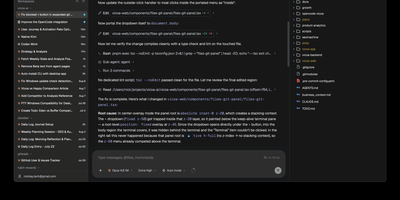
A team of coding agents, run in parallel from your desk, your browser, and your phone: Vicoa is an agentic IDE and control center, so one developer can steer a whole fleet instead of babysitting terminal tabs. Run 40+ coding agents side by side in one workspace: Claude Code, Codex, OpenCode, Gemini, Cursor, GitHub Copilot, Kimi, and more are built in, and 30+ additional agents connect through the Agent Client Protocol. Each agent gets its own git worktree and branch, so several can change one repository without overwriting each other, and every session's status sits in one list. Connect Mac, Windows or Linux machines, a VPS, or a remote server, pick where each session runs, and bring existing subscriptions or API keys. Start a session at your desk and steer it from the iOS or Android app on the train: approve a step, answer a question by dictation, or review the live git diff and file tree from your phone, with push notifications when an agent needs a decision or finishes. Plan work on the task board and start a session straight from a task, schedule cron automations that pick work up on their own, and share a live session link so teammates can watch or prompt alongside you. Host the backend and realtime server yourself with Docker, or drive everything from the CLI. Running on a dedicated VPS on RepoCloud with guaranteed CPU, RAM, and SSD, full root SSH access, and a browser serial console. AGPL-3.0 licensed.
ExtendDB
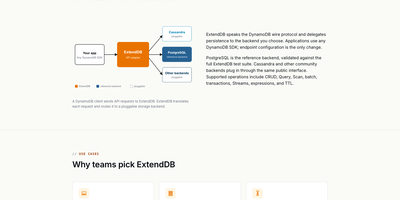
ExtendDB is a DynamoDB-compatible database server that answers the DynamoDB wire protocol from your own infrastructure, so applications written for DynamoDB run unchanged against a database you operate. Any AWS SDK, the AWS CLI, or DynamoDB tooling points at the ExtendDB endpoint and keeps working: tables, items, Query and Scan with key conditions and filters, batch reads and writes, and transactions all behave as the SDK expects. Streams feed change data to your own consumers, TTL expires items on schedule, vector indexes add cosine, Euclidean, and dot product search to on-demand tables, and point-in-time export and import move data in and out. Storage is pluggable, with PostgreSQL as the reference backend, SQLite embedded for small installs, and MongoDB and Cassandra for teams already running them. Every request is SigV4-signed and evaluated by a built-in IAM-style engine with users, groups, roles, policies, permission boundaries, and access keys, and TLS is mandatory on every connection. A web management console administers accounts and credentials, and a JSON metrics endpoint reports DynamoDB-style CloudWatch metric names and dimensions. The server runs as a daemon or in the foreground under Docker, Kubernetes, or systemd, healthchecks without extra tooling, and keeps serving in air-gapped environments with no internet connection at all. Running on a dedicated VPS on RepoCloud with guaranteed CPU, RAM, and SSD, full root SSH access, and a browser serial console. Apache-2.0 licensed.
Sim Studio
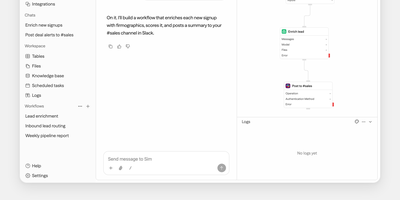
Sim Studio lets teams build, deploy, and monitor AI agent workflows by dragging blocks onto a visual canvas and wiring them into executable pipelines, backed by over 1,000 integrations. The React Flow editor represents each step as a node: LLM calls, tool invocations, conditional branches, and data transformations form directed acyclic graphs that run as complete agent pipelines. Every major LLM provider works natively, including OpenAI, Anthropic, Google Gemini, Groq, and Cerebras, plus local models through Ollama and vLLM. Integrations span Gmail, Slack, Microsoft Teams, Telegram, WhatsApp, Notion, Google Workspace, Airtable, GitHub, Jira, Linear, Perplexity, Firecrawl, PostgreSQL, Supabase, Pinecone, and Qdrant. Built-in tables provide a database layer, a file store offers shared team storage, and knowledge bases powered by PostgreSQL with pgvector enable retrieval-augmented generation. Finished workflows deploy as REST API endpoints, scheduled jobs, or Slack bots, with block-by-block execution traces for full observability. Real-time collaborative editing via Socket.io supports simultaneous multi-user construction. Alternatively, describe agent behavior in natural language and Sim assembles the workflow automatically. Built on Next.js App Router, Bun runtime, Drizzle ORM, and Tailwind CSS. 29,400+ GitHub stars and 100,000+ builders. Apache-2.0 licensed.
Webmin
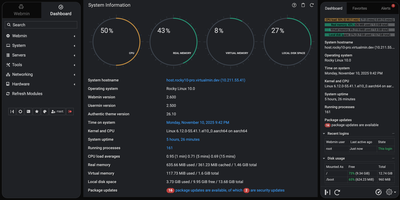
Skip the shell and the configuration file: Webmin handles user accounts, disk quotas, services, and server software on Linux and Unix machines from a browser tab. More than 100 standard modules sit under seven menus: Webmin, System, Servers, Tools, Networking, Hardware, and Cluster. System covers Users and Groups, Scheduled Cron Jobs, Running Processes, System Logs, Log File Rotation, Disk Quotas, Filesystem Backup, and systemd Bootup and Shutdown, plus Software Package Updates, which can hold selected packages on APT and DNF systems. Servers edits Apache, Nginx, BIND DNS, Postfix, Dovecot, MySQL and MariaDB, and PostgreSQL through forms. Networking brings an nftables firewall editor, Fail2Ban jails, and IPsec VPN settings. Tools adds File Manager, Custom Commands, and a Terminal that opens right in the browser. Hardware lists firmware, PCI, USB, storage, and sensor details. The dashboard keeps live CPU, memory, and disk gauges, stats history graphs, and a pending updates alert in view. Webmin Users limits each account to the modules it needs, while two-factor authentication, IP access control, and SSL settings guard the panel itself. Cluster modules reach other hosts registered in the Webmin Servers Index and run cron jobs, shell commands, and package installs on many servers at once. Running on a dedicated VPS on RepoCloud with guaranteed CPU, RAM, and SSD, full root SSH access, and a browser serial console. BSD-3-Clause licensed.
TREK
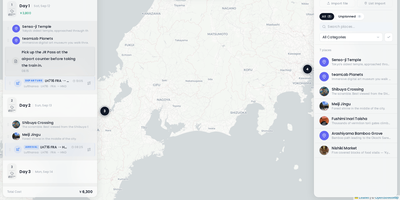
TREK coordinates group expeditions and vacations through a collaborative travel planning workspace that unifies daily itineraries, interactive route maps, shared expense budgets, and packing lists. Travel groups can build day-by-day timelines by dragging activities between dates, attaching transit bookings with flight numbers, and estimating driving intervals directly on OpenStreetMap and Mapbox canvases. Instant WebSocket synchronization mirrors itinerary edits, group chat messages, and decision poll votes across all traveling companions simultaneously without page refreshes. The integrated multi-currency expense manager tracks shared expenditures across lodging, dining, and transit categories, automatically calculating per-person debts and generating simplified debt settlement summaries. An interactive world atlas highlights visited nations and tracks lifetime travel statistics, enabling globe-trotters to manage personal bucket lists and review past journeys. Travelers can organize shared packing checklists from reusable equipment templates, monitor real-time weather forecasts powered by Open-Meteo, and export comprehensive travel schedules to printable PDF guides and calendar feeds. Role-based permission controls safeguard sensitive travel documents and boarding pass uploads while allowing guests to contribute notes and vote on activities. Running on a dedicated VPS on RepoCloud with guaranteed CPU, RAM, and SSD, full root SSH access, and a browser serial console. AGPL-3.0 licensed.
metacubexd
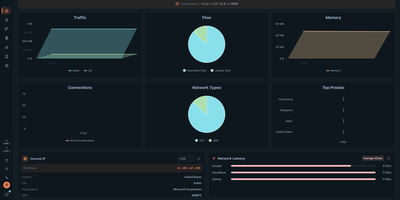
metacubexd gives your Mihomo proxy kernel a proper control room in the browser, from live traffic graphs to a full YAML profile editor. Real-time panels show upload and download speed, totals, active connections, memory use, and the busiest proxies, plus your current exit IP and latency to Google, Cloudflare, and GitHub. Proxy groups appear as cards with per-node latency bars, so switching a selector or running a latency test takes one click. Every connection is listed with its host, process, matched rule chain, and traffic, and can be closed or exported to CSV or JSON. Rules are searchable and filterable by type, and individual rules can be toggled on or off. Live logs stream by level, ready to search or download. With the all-in-one server image, you can also create profiles, import subscriptions by URL, edit configuration with schema-aware completion, validate it, and restart the kernel from the same page. Thirty-two themes, custom CSS, keyboard shortcuts, a responsive mobile layout, and seven interface languages make it comfortable to use anywhere. Running on a dedicated VPS on RepoCloud with guaranteed CPU, RAM, and SSD, full root SSH access, and a browser serial console. MIT licensed.
Neko
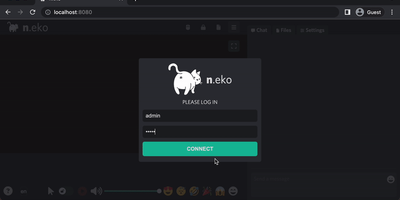
With over 21,000 GitHub stars and six years of steady development through version 3.1.0, Neko transforms any Docker container into a fully interactive browser or desktop environment streamed to web browsers via WebRTC with sub-300-millisecond glass-to-glass latency. The Go backend captures X server display frames using the Pion WebRTC library while the Vue.js frontend renders the remote session with native audio synchronization, delivering a significantly smoother experience than Apache Guacamole or noVNC which rely on image-over-WebSocket approaches. Multiple users simultaneously view and collaboratively control the same session with real-time input synchronization and host-managed control passing between participants. Pre-built Docker images cover Firefox, Chromium, Google Chrome, Tor Browser, Brave, Vivaldi, and Microsoft Edge alongside full desktop environments including XFCE and KDE for running any Linux application. Neko Rooms provides multi-tenant deployment with a REST API for programmatic room provisioning, while Neko Apps extends the platform with additional containerized applications beyond browsers. Sessions persist on the server independently of client connections — close your laptop, reconnect from your phone, and resume exactly where you left off. Optional VPN and Tor integration routes traffic through encrypted tunnels for privacy-sensitive browsing. RTMP broadcasting streams sessions to external platforms. The embeddable client supports iframe integration for custom portals and applications. Running on a dedicated VPS on RepoCloud with guaranteed CPU, RAM, and SSD, full root SSH access, and a browser serial console. Apache-2.0 licensed.
PandaDOS
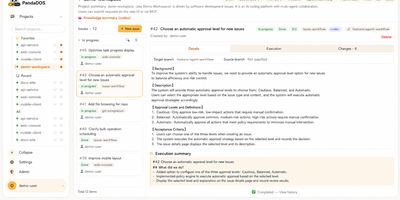
PandaDOS is a self-hosted control plane that turns Claude Code and Codex into long-running coding agents you direct through an issue queue from any browser, instead of babysitting a terminal. You file an issue with the outcome and acceptance criteria, and PandaDOS clarifies missing requirements, plans the work, picks the agent, and drives implementation, verification, and delivery in stages. Three approval levels, cautious, balanced, and automatic, decide which actions proceed alone; safe reversible steps continue automatically while destructive, irreversible, production, or secret-related decisions always come back to you. The browser workspace shows the real agent conversation, a native terminal, project files, Git history and diffs, and an execution summary, so you can inspect or intervene at any moment from a phone or laptop. Agents run on local or SSH-connected executor machines inside tmux sessions, and work sharing one repository is serialized while independent projects proceed in parallel without conflicting edits. Modules keep one assigned agent and durable project knowledge, so context from finished issues carries into the next task instead of evaporating when a chat ends. Teams can sign in through Feishu, ask the project manager questions in chat, and receive subscription notifications and approval cards on their phones. Running on a dedicated VPS on RepoCloud with guaranteed CPU, RAM, and SSD, full root SSH access, and a browser serial console. Apache-2.0 licensed.

Uchiyomi
Uchiyomi is the manga server that also does the fetching, so your library keeps itself up to date while you just read. Follow a series once and new chapters download automatically from MangaDex, from sites you add by URL, or through installable Mihon extensions, with a release radar estimating when the next chapter is likely to land. The reader is built for webtoons first: continuous scrolling flows straight into the next chapter, wide pages split cleanly, borders crop away, and credit pages collapse so you reach the story faster. Your existing CBZ, CBR, PDF, and image files join downloaded series in one searchable library with covers, progress, filters, and smart lists you can share with the household. A health screen hunts down chapter gaps, short or corrupt downloads, duplicates, and failing sources, and Fix Everything works through the repairs on demand or nightly. Reading stats draw a year heat map of your habits, top series, and reading time, while Moments let you star favorite panels with notes. Each household member gets their own account, progress, libraries, and age limits, with two-factor sign-in and offline downloads that keep favorites ready on your phone. Running on a dedicated VPS on RepoCloud with guaranteed CPU, RAM, and SSD, full root SSH access, and a browser serial console. MPL-2.0 licensed.
taOS
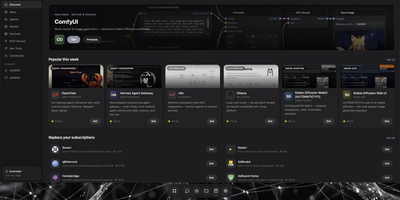
taOS is a self-hosted operating system for AI agents that lives on hardware you already own, offline by default and cloud only when you invite it. Open one URL and a full web desktop appears: floating windows, a dock, launchpad, widgets, notifications, and 43 bundled apps, from mail and kanban projects to an app store with over a hundred one-click installs. Agents deploy through a guided wizard into isolated containers (LXC on bare metal, Docker on a VPS), each with its own memory store, files, secrets, and network identity. taOS owns the agent lifecycle outside the framework, so you can swap SmolAgents for LangChain or OpenClaw and the agent keeps its history, channels, trained adapters, and API keys untouched. Long-term memory is a temporal knowledge graph with hybrid search on your disk, not a row in a vendor database, and the messages app works like a private Discord that also installs as a phone PWA. Local inference spans Apple Silicon, NVIDIA, AMD, Rockchip NPUs, Raspberry Pi boards, and salvaged Android phones, with auto-clustering that pools idle machines into one compute fabric. Messaging connectors cover Telegram, Discord, Slack, Matrix, email, and webhooks, and a rollback command returns the system to a known-good state when an experiment misbehaves. Running on a dedicated VPS on RepoCloud with guaranteed CPU, RAM, and SSD, full root SSH access, and a browser serial console. AGPL-3.0 licensed.
Manifest LLM Gateway
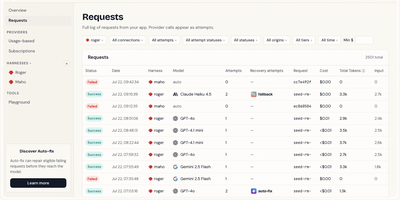
Manifest LLM Gateway is a self-hosted gateway that puts every model you pay for behind one OpenAI- and Anthropic-compatible endpoint. Connect provider API keys, reuse subscriptions like ChatGPT Plus or Claude Max, or point it at Ollama and LM Studio on your own hardware. Send a request with the model set to auto and your routing rules choose the target by model, header, complexity, or task type, with fallbacks that take over the instant a model fails. Each agent or app gets its own harness, a named connection with a private key, spending limits, and notifications when usage climbs. The Requests view logs every call and every retry attempt, with status, cost, tokens, and the full request and response body readable as a conversation. Autofix repairs a malformed request, for example one using a renamed parameter, and resends it before your app ever sees an error. A Playground tests models from the dashboard, a command line tool and MCP server handle setup from a terminal or an AI assistant, and an n8n node plugs it into automations. Over 35 provider connections cover more than 300 models. Running on a dedicated VPS on RepoCloud with guaranteed CPU, RAM, and SSD, full root SSH access, and a browser serial console. MIT licensed.
Wakapi
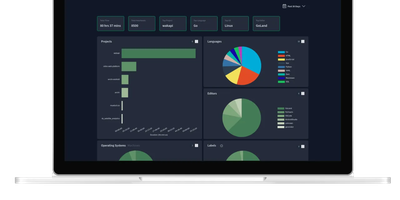
Its author, a student and WakaTime fan, didn't want to pay $9/month for data about his own keystrokes - so Wakapi was born, a self-hosted, WakaTime-compatible backend for coding statistics. The compatibility is the killer design decision: the official WakaTime plugins for VS Code, JetBrains IDEs, Vim, and dozens of other editors work unmodified - just point the plugin's API URL at your Wakapi instance with your personal key, and heartbeats flow to your server instead of a third party's. Duration inference matches WakaTime's own algorithm, with a configurable timeout (10 minutes by default). From that stream Wakapi builds statistics and plots across projects, languages, editors, hosts, and operating systems, plus the fun extras: public leaderboards (optionally login-gated, with configurable aggregation windows), badges for GitHub readmes, and weekly email reports. A REST API serves your data programmatically, Prometheus export feeds your existing Grafana, and a WakaTime relay mode can mirror heartbeats to both services during migration - with one-click import of historical WakaTime data. Written in Go, it is lightning fast and light enough for the smallest instance, storing to SQLite, PostgreSQL, or MySQL, with configurable data retention for GDPR peace of mind. Deliberately smaller than WakaTime, deliberately yours.

Omni Tools
The ad-riddled "free online tools" sites people paste sensitive text into and upload confidential PDFs to - OmniTools replaces that whole ecosystem with one self-hosted app. It bundles 50+ utilities behind one clean React/TypeScript interface: image tools (resize, convert, crop, edit), video and audio tools (trim, reverse, convert), PDF tools (split, merge, edit), text and list utilities (case converters, formatters, shufflers), plus date/time, math, and data-format helpers for JSON, CSV, and XML. The architectural decision that makes it trustworthy is that all file processing happens entirely client-side in the browser - the server only serves static assets, and nothing you process ever leaves your device. That design has a pleasant side effect: the host needs almost no resources (people run it on a Raspberry Pi Zero), because your browser does the work while the server just delivers files. The Docker image is a remarkable 28 MB, making it one of the fastest apps to deploy and cheapest to keep running. There are no ads, no tracking, no accounts, and no upload limits. With multi-language support and an MIT license, it works equally well as a personal toolbox or a team-wide internal utility portal - one URL that replaces a bookmark folder full of questionable converters. Actively developed with 50 contributors and 9,500+ GitHub stars.
Trilium Notes
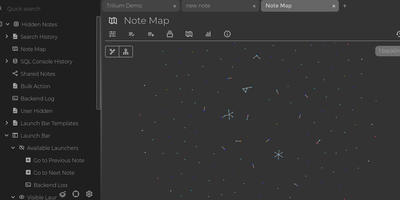
For people whose notes number in the tens of thousands, Trilium Notes is the hierarchical note-taking application built specifically for large personal knowledge bases - actively maintained as TriliumNext. Notes arrange into arbitrarily deep trees where every note is both content and container, and cloning lets a single note live in multiple places at once - bash notes belong under both Linux and Scripting, and Trilium refuses to make you choose. A WYSIWYG editor handles rich text, tables, math, and syntax-highlighted code blocks with Markdown-style shortcuts, while dedicated note types cover Excalidraw sketches, mind maps, geo maps with GPX tracks, relation maps that visualize connections between notes, and tables with typed columns. The attribute system is the power layer: labels attach queryable metadata (#year=1999, #author), relations create named links between notes, and both inherit down the tree - feeding full-text search, saved queries, and scripting. Scripting is Trilium's deepest differentiator: JavaScript code notes run on events like note changes or hourly schedules, build custom widgets, and add server-side logic, turning the knowledge base into a programmable platform. Protected notes encrypt sensitive content, note hoisting focuses on subtrees, and the self-hosted server syncs desktop clients across devices.
Media Preview Generator
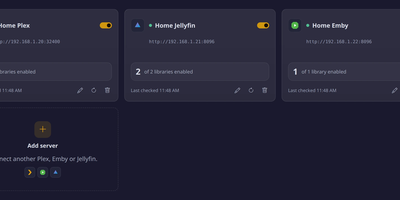
Blank seek bars on freshly imported episodes disappear once Media Preview Generator builds preview thumbnails for Plex, Emby, and Jellyfin as each file arrives, using GPU workers when you have them. When servers share a file, it decodes the video once and writes each server's own format: a BIF in Plex's data folder, a BIF beside the video for Emby, and trickplay tiles for Jellyfin. It also finds intros and end credits from chapters, online skip databases, theme songs, or the credit roll, then sends Skip Intro and Skip Credits markers to every server, and sends nothing when unsure. Named worker groups pick their GPUs, job types, worker count, and weekly hours, with CPU fallback and remote nodes for GPUs on other machines. Webhooks from Sonarr, Radarr, Sportarr, Tdarr, FileFlows, Plex, Emby, and Jellyfin start jobs, schedules poll recently added items, and a title search queues one episode or a whole show. Retries run after 1, 2, 5, 15, and 60 minutes by default while a server indexes a new file. HDR10, HLG, and HDR10+ sources are tone-mapped, and Dolby Vision profiles 7 and 8 use their HDR10 layer. A Setup Health tab names the server setting that blocks previews, and optional Plex loudness analysis runs on CPU workers. New arrivals get working timelines instead of waiting for a scheduled maintenance window. Running on a dedicated VPS on RepoCloud with guaranteed CPU, RAM, and SSD, full root SSH access, and a browser serial console. MIT licensed.
Tautulli
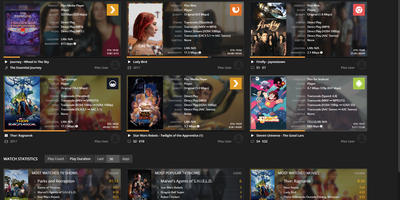
Plex's own dashboard shows current streams and forgets everything else - which is why every Plex server admin eventually installs Tautulli, the analytics layer. This Python web application (descended from PlexWatch and Headphones) logs complete watch history - what was watched, who watched it, when, where, from which device and IP, and whether it played directly or transcoded - and turns it into clean Highcharts graphs of daily plays, concurrent streams, bandwidth, and platform breakdowns. The home page surfaces top statistics over configurable windows: most-watched content, most active users, stream type ratios. For running a server shared with family and friends, this is operational truth: spot the user forcing 4K transcodes on a phone, see which libraries earn their disk space, and track sync activity across users. The notification engine triggers on server events - playback starts, transcode decision changes, recently added media, server down - through dozens of agents (Discord, Telegram, Slack, email, webhooks) with fully customizable text and conditions, plus arbitrary script execution. Scheduled newsletters email your users a styled digest of recently added content. A comprehensive API exposes every statistic for dashboards like Homarr, and an official mobile app monitors activity on the go. Themed to match Plex/Web. GPL-licensed.
Oxynote
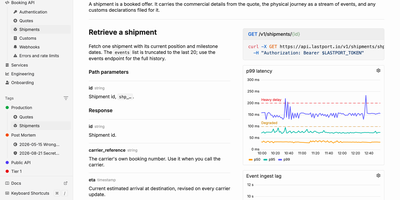
When an alert fires at 3 a.m., the live chart, the runbook, and the fix are already on one page of Oxynote, a self-hosted technical wiki. The chart is a Live Metrics block that runs its own Prometheus or SQL query and draws a time series, bar chart, or gauge. Several such blocks side by side make a dashboard inside the page. Around it, the editor works like Notion, with checklists, callouts, titled code blocks, Mermaid diagrams, Figma embeds, images, and files. Internal APIs get Stripe-style reference pages with the endpoint, a curl example, and a sample response beside the explanation. Mark a page reviewable and every edit lands in a draft. A block-aware diff shows renamed endpoints, fields, and reworded sentences in one red and green view until a reviewer approves. Freshness hooks watch GitHub files, container images, web pages, or dates, and remind maintainers when something a page depends on changes. Teammates edit together live and see who holds which block. Comments attach to a word, a diagram line, or a whole chart, with replies and an inbox for mentions. The Rubber Duck assistant edits pages and runs block queries with Anthropic, OpenAI, Google, OpenRouter, or a local Ollama model, and MCP lets Claude Code and Codex read and write the docs. Running on a dedicated VPS on RepoCloud with guaranteed CPU, RAM, and SSD, full root SSH access, and a browser serial console. Apache-2.0 licensed.