Radicale
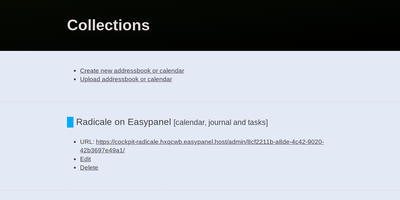
Calendars, to-do lists, journal entries, and contacts, synced over the open CalDAV and CardDAV standards nearly every client already speaks: Radicale is a small pure-Python server that works with Thunderbird, DAVx5 on Android, Apple Calendar and Contacts, GNOME, and many more. Its defining design choice is radical simplicity: there is no database. Events live as plain .ics files and contacts as .vcf files in an ordinary folder structure, which makes backup a copy command, migration a move, and disaster recovery a matter of reading text files. The server works out of the box with no complicated setup, then grows as needed: flexible authentication (htpasswd files among other methods), per-collection authorization rules, TLS-secured connections, and a plugin system for extending storage, auth, and rights handling. Built-in limits on parallel connections, file sizes, and failed authentication attempts harden it for network exposure behind a reverse proxy. A bundled web interface handles creating and managing calendars and address books - useful since many clients cannot create collections themselves. Maintained since 2011 with 140+ contributors, GPLv3-licensed, and light enough to run on the smallest VPS or a Raspberry Pi.
Wallos
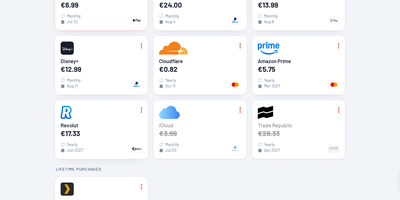
Track every recurring payment you have, from streaming services to SaaS tools, and get AI-powered recommendations on where to cut costs. Wallos manages subscriptions with automatic due date reminders delivered through email, Discord, Telegram, Pushover, Gotify, or custom webhooks so renewal charges never catch you off guard. Multi-currency support handles international subscriptions while the Fixer API converts everything to your primary currency for unified budget visibility. The statistics dashboard breaks down monthly and yearly spending by customizable categories, revealing consumption patterns and highlighting savings opportunities. AI analysis via ChatGPT, Gemini, or a locally-hosted Ollama instance reviews your subscription portfolio and suggests alternatives or consolidation strategies. Logo search automatically fetches brand imagery so your subscription list stays visually organized without manual uploads. Authentication supports OIDC with OAuth for enterprise environments, and the mobile-responsive interface works on any device with customizable themes and multi-language support. The PHP 8.3 application with SQLite backend runs from a single Docker container (bellamy/wallos image) with two persistent volumes for database and logos on port 8282. Deploy on RepoCloud with a dedicated VPS, keeping all financial data private under the GPL-3.0 license.
LinkBreeze
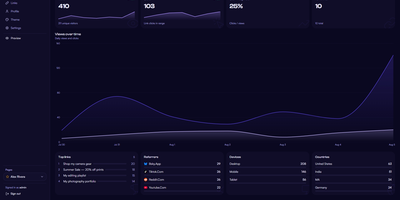
LinkBreeze is a self-hosted link-in-bio platform that lets you publish unlimited, fully themed link pages from your own server instead of renting one by the month. A guided setup wizard covers the admin credentials, profile, and theme, then a floating phone-frame preview refreshes as you edit while autosave stores your changes. Each page gets its own slug, theme, SEO tags, QR code, and analytics, so one install can serve a personal profile, a band, and a shop. Eleven built-in themes cover Aurora, Glassmorphism, Neon Cyberpunk, and Terminal Mono, backed by a token customizer for fonts, backgrounds, card styles, and raw CSS. Links pull in favicons automatically, accept thumbnails, and can be scheduled to appear and vanish on set dates, while embed widgets drop in YouTube, Spotify, SoundCloud, Vimeo, and Bandcamp players. A migration wizard imports profiles from Linktree, Bento, Hopp.bio, LittleLink, or an HTML or JSON export. Visitors can subscribe with an email address that you export to CSV, save your page as a vCard contact, or scan a QR code that downloads as SVG or PNG. Cookieless analytics track views, clicks, referrers, devices, and countries with hashed visitor IPs, and Plausible, Umami, Matomo, or Google Analytics can be added with one paste. The admin panel supports TOTP two-factor authentication, a UTM builder, JSON backup and restore, and seven interface languages. Running on a dedicated VPS on RepoCloud with guaranteed CPU, RAM, and SSD, full root SSH access, and a browser serial console. MIT licensed.
Journiv
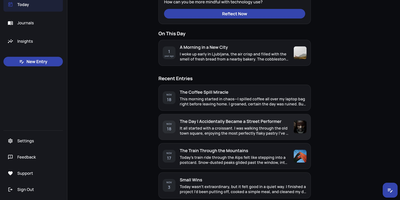
A Day One alternative that keeps your most personal writing on your own server: Journiv is journaling purpose-built for self-hosters. The FastAPI backend runs on SQLite by default with optional PostgreSQL, Redis, and Celery for background work, behind a clean, minimal web UI. Unlike general note-taking apps, it ships the features journaling actually needs: customizable moods and mood groups, activity tracking, goals with automated progress from logged activities, and daily writing prompts filterable by category and difficulty so a blank page never stalls you. Quick Log captures a moment in seconds and expands into a full entry later; "On This Day" resurfaces entries from past weeks, months, and years. Multiple journals separate work, gratitude, and personal writing, with tags and full-text search across everything, plus media uploads with automatic thumbnails and an Immich integration for linking photo-library memories. Analytics chart mood trends and writing patterns over time. Data portability is taken seriously: native import of Day One exports, JSON/Markdown/HTML export, and a standalone HTML viewer that opens your archive in any browser with no server running. OIDC single sign-on works with Authentik or Keycloak, and multi-arch images cover amd64 and arm64.
ExpenseOwl
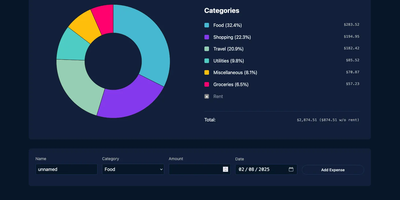
Log a date, amount, and category; get a clean monthly pie chart and a cashflow strip showing income, expenses, and net balance - ExpenseOwl is expense tracking stripped to what actually matters. The MIT-licensed Go application deliberately is not a budgeting system - no envelopes, no accounts, no double-entry, no bank sync - because its author found tools like Firefly III and Actual too heavy for the simple question "where did this month's money go?" The dashboard makes that question fast: click a pie slice to exclude fixed costs like rent and see discretionary spending clearly, then drill into a chronological table view to inspect or delete individual transactions. Recurring transactions handle salaries and subscriptions automatically, optional tags add a second classification axis, and settings cover custom categories, currency symbol, and a configurable month start date for non-calendar pay cycles. CSV import migrates data from virtually any other tool, and CSV export keeps your data portable. It ships as a self-contained binary and multi-architecture Docker image with zero internet interaction, stores data in flat JSON files by default (PostgreSQL optional), and installs as a PWA on phones. Single-user by design; pair it with an authenticating reverse proxy if exposed publicly.
Monetr
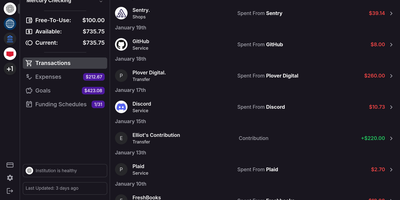
After the bills are covered, how much is actually safe to spend? monetr organizes an entire budgeting application around that one question. Inspired by the defunct Simple bank, it budgets paycheck by paycheck rather than month by month. Funding schedules encode when you get paid - including multiple schedules per account and a weekend-exclusion option for deposits that land early - and every expense or savings goal is tied to one. monetr then calculates how much of each recurring obligation (rent, car payment, subscriptions, on any repeat interval) to set aside from each paycheck, so a large bill never has to come out of a single check. What remains after allocations is surfaced as Free-To-Use, and a forecasting timeline projects contributions, due dates, and leftover funds forward so low-balance periods are visible before they happen. Transactions arrive either as OFX uploads from your bank or automatically through a Plaid connection using your own API credentials, keeping balances and transactions synced without manual entry. The app is mobile-friendly and installable as a PWA on desktop or phone. Self-hosting via Docker Compose is completely free, with all source code public and your financial data on your own hardware.
OpenBudgeteer
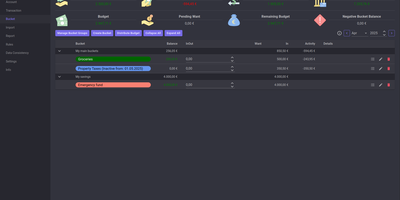
Allocating every incoming dollar into purposeful spending and savings buckets before transactions occur, OpenBudgeteer gives households complete financial control through a self-hosted zero-based envelope budgeting platform. Users can organize expenditures into customizable bucket hierarchies, grouping everyday living costs, debt repayments, and sinking funds into distinct categories with target balances. Financial planners can import bank statement files via flexible CSV mapping profiles that parse transaction descriptions, clean up merchant strings, and auto-assign records to corresponding expense buckets. The transaction registry provides split-transaction functionality, allowing shoppers to divide a single department store receipt across grocery, household, and clothing envelopes with exact currency precision. Interactive progress bars display bucket health throughout the billing month, signaling when spending velocity threatens allocated limits and calculating suggested contributions for forthcoming paychecks. Advanced forecasting reports plot multi-month net worth trajectories, track category expenditure patterns, and calculate burn rates against long-term retirement and emergency savings goals. Account balances synchronize across multiple physical checking accounts, credit cards, and cash wallets, ensuring total bucket balances reconcile perfectly against real bank reserves. Running on a dedicated VPS on RepoCloud with guaranteed CPU, RAM, and SSD, full root SSH access, and a browser serial console. AGPL v3 licensed.
PayMe
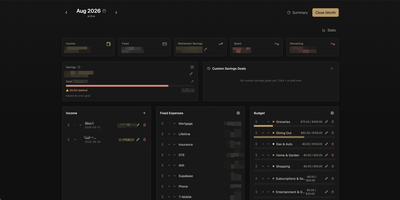
PayMe is a privacy-first personal finance dashboard that runs entirely on your own hardware with zero third-party service dependencies. The Rust backend compiled to a single binary serves a React 19 frontend built with Vite, TypeScript, and Tailwind CSS 4, storing all financial data in a local SQLite database that auto-migrates on startup. Monthly dashboards track income entries, fixed expenses like mortgage and utilities, and budget categories with real-time progress bars showing spending against configurable limits. The savings module includes goal tracking with percentage-based progress indicators, custom savings goals for targeted objectives, retirement savings projections with breakdown analysis, and projected savings calculations. Variance analysis compares actual spending against budgets across categories. Drag-and-drop reordering powered by dnd-kit lets you arrange income sources, expenses, and budget items to match your workflow. The interactive charts rendered by Recharts visualize spending trends, income patterns, and savings trajectories. Month-by-month navigation tracks financial history over time, while the Summary and Stats views aggregate data across periods. JWT-based authentication secures access, and the full OpenAPI Swagger documentation at the /swagger-ui endpoint exposes every API route for automation and integration. Docker Compose deployment creates a minimal image with the compiled Rust binary and static frontend assets, running on port 3001 behind nginx, Caddy, or Traefik reverse proxy with HTTPS. On RepoCloud, deploy PayMe on a dedicated VPS with persistent SQLite storage, root SSH access, and complete privacy over your household financial data, all under the MIT license.
Eclaire
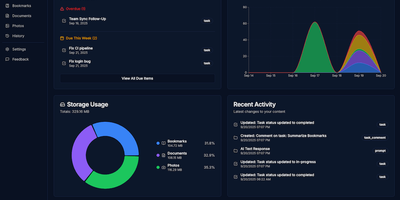
Built to consolidate fragmented digital life into a private personal cloud, Eclaire centralizes tasks, notes, documents, photos, and web bookmarks into a unified workspace powered by local artificial intelligence. Users can save web articles to generate clean Markdown copies and searchable PDF archives, automatically bypassing clutter and dead links. The integrated document ingestion engine extracts tabular data from spreadsheets, performs optical character recognition across uploaded receipts and handwritten images, and indexes multi-page PDF manuals for rapid full-text search. Conversational assistant panels allow operators to interrogate their accumulated library using natural language, asking for cross-document summaries, research timelines, or action items extracted from meeting transcripts. Background workers prioritize asynchronous indexing queues, categorizing image libraries with visual object tags and managing recurring task deadlines with automated Telegram alert notifications. External automation flows can interact directly with the unified storage layer via an OpenAI-compatible REST API, allowing mobile shortcuts and custom scripts to ingest bookmarks and dictate notes remotely. Running on a dedicated VPS on RepoCloud with guaranteed CPU, RAM, and SSD, full root SSH access, and a browser serial console. MIT licensed.
Black Candy
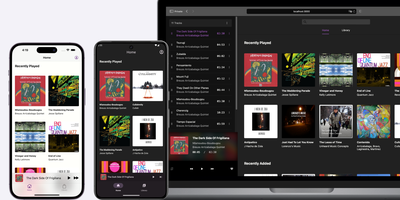
With 4,300+ GitHub stars and native mobile apps on three platforms, Black Candy transforms any VPS into a private Spotify-style streaming service for your personal music collection. The Ruby on Rails 7 backend with Hotwire Turbo and Stimulus delivers a responsive single-page-feeling web player supporting album browsing, artist views, playlists, favorites, and queue management without full page reloads. Point it at a media directory containing MP3, FLAC, OGG, AAC, or WAV files and Black Candy indexes metadata, fetches album artwork from Discogs API, and begins streaming immediately with on-the-fly transcoding that adapts bitrate to client bandwidth. Multi-user support gives each account independent playlists, favorites, and listening history while sharing the same music library — ideal for families or shared households. Native iOS, Android, and F-Droid apps maintained as separate repositories provide offline caching, background playback, and server discovery for mobile listening. The admin panel manages user accounts, configures media paths, and sets Discogs API tokens for automatic cover art retrieval. Deployment requires one Docker command — `docker run -p 80:80 ghcr.io/blackcandy-org/blackcandy:latest` — with persistent storage volumes for the SQLite database and media directory. For larger deployments, switch to PostgreSQL via environment variables with dedicated database URLs for ActionCable, SolidQueue, and SolidCache. Running on a dedicated VPS on RepoCloud with guaranteed CPU, RAM, and SSD, full root SSH access, and a browser serial console. MIT licensed.
PenX
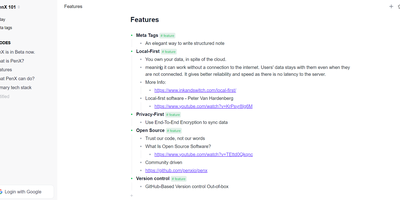
PenX delivers an open-source structured note-taking application that functions as a personal database disguised as an elegant editor — combining the outline workflow of Workflowy and Roam Research with the structured data capabilities of Tana through MetaTags that transform every note into a queryable database record. The local-first architecture stores all data on-device using PGLite, an in-process PostgreSQL-compatible engine, ensuring data ownership regardless of cloud connectivity. End-to-end encryption protects all synchronized data so that even the sync server cannot read your notes, tasks, ideas, or documents. GitHub-based version control provides out-of-the-box backup and history with full commit-level recovery. MetaTags are the core innovation — attaching structured tags to any note converts it into a database entry with typed fields, enabling table views, filters, and queries across your knowledge base without imposing rigid folder hierarchies. The daily notes workflow encourages free-form capture while MetaTags handle organization automatically, letting you record thoughts without deciding physical location upfront. AI-driven features assist with content generation, summarization, and intelligent search across your personal data hub. Real-time sync keeps web, desktop, and mobile in perfect alignment. Cross-platform availability includes web, desktop for Windows, macOS, and Linux, iOS, and Chrome extension. Deploy the web service via Next.js with pnpm using tRPC and Prisma. Running on a dedicated VPS on RepoCloud with guaranteed CPU, RAM, and SSD, full root SSH access, and a browser serial console. AGPL-3.0 licensed.
DumbBudget
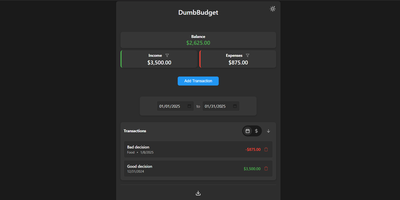
"Stupid simple software" is the entire philosophy at DumbWare.io, and DumbBudget delivers it: no over-engineering, no complexity, no accounts, no bank connections - just a clean, modern ledger for money in and money out. Log income and expenses, assign categories, and watch real-time balance calculations update as you type. Finding transactions is quick: filter by type, narrow by date range, sort by date or amount. When tax season or spreadsheet analysis calls, everything exports to CSV. Access control matches the philosophy - a single PIN (set via one environment variable) gates the app, backed by real security engineering: rate limiting on PIN attempts, temporary lockout after failures, secure session handling, and no sensitive data in browser storage. Multi-currency support covers the ISO codes, and a SITE_TITLE variable names each instance - deliberately useful, because running separate instances per account or family member is the intended pattern for multi-user needs. The responsive UI ships light and dark themes and installs as a PWA on phones, where expense logging actually happens. Configuration is five environment variables; data persists in one folder. If Actual Budget and Firefly III feel like accounting software, this is the notepad that gets used. GPL-licensed.
Silicon Notes
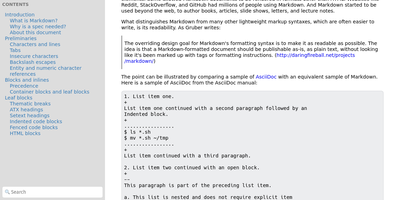
"Somewhat lightweight, low-friction" is how Silicon Notes' author describes the personal knowledge base - written after DokuWiki's editor "drove me mad" and no existing wiki quite fit. The philosophy is that small frequent annoyances compound into cognitive load with no return, so everything here is optimized for frictionless daily use. Notes are written in plaintext Markdown and rendered as clean HTML with Pygments syntax highlighting for code blocks; pages get bi-directional relationships (backlinks), so the knowledge base becomes a connected web rather than a folder tree; and full-text plus title search retrieves anything fast. A table of contents lives in the left sidebar - "where it belongs" - editable while you read without scrolling away. Page history tracks revisions for auditing and rollback, JSON export/import keeps everything portable, and the mobile layout is genuinely usable. The stack is deliberately minimal: Python and Flask with Mistune for Markdown and SQLite for storage - no big frameworks, just a few small dependencies. One honest caveat: there is no built-in authentication, so deploy it behind a VPN, private network, or reverse-proxy auth layer. For a solo engineer's brain, it is exactly enough.
Nanote
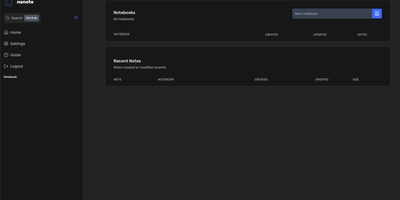
100% portability is Nanote's one non-negotiable principle as a self-hosted note-taking app. There is no database - notebooks are plain folders and notes are plain Markdown files on your filesystem, so the same notes remain fully manageable from a terminal, Notepad, or any other editor, and walking away from Nanote costs nothing because your data was never in a proprietary format to begin with. Built with Nuxt and TypeScript around the Milkdown editor, it layers modern conveniences on that plain-file foundation: fast content search across all notes using OS-optimized tooling (ugrep), native Markdown rendering, image and file attachments, and a mobile-friendly layout for reading and editing on a phone. Clever remark directives make plain text interactive - typing ::file inserts an inline upload picker, while ::today, ::now, and ::tomorrow expand to live dates and times. A fully typed REST API with validation covers automation, and access is protected by a configurable secret key. Deployment is one container with three env vars: paths for notes, uploads, and config, all bind-mountable so your Markdown lives wherever you want it - including inside an existing sync setup. AGPL-licensed and actively daily-driven by its author.