PandaDOS
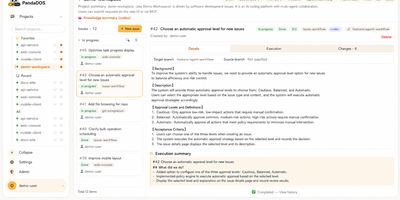
PandaDOS is a self-hosted control plane that turns Claude Code and Codex into long-running coding agents you direct through an issue queue from any browser, instead of babysitting a terminal. You file an issue with the outcome and acceptance criteria, and PandaDOS clarifies missing requirements, plans the work, picks the agent, and drives implementation, verification, and delivery in stages. Three approval levels, cautious, balanced, and automatic, decide which actions proceed alone; safe reversible steps continue automatically while destructive, irreversible, production, or secret-related decisions always come back to you. The browser workspace shows the real agent conversation, a native terminal, project files, Git history and diffs, and an execution summary, so you can inspect or intervene at any moment from a phone or laptop. Agents run on local or SSH-connected executor machines inside tmux sessions, and work sharing one repository is serialized while independent projects proceed in parallel without conflicting edits. Modules keep one assigned agent and durable project knowledge, so context from finished issues carries into the next task instead of evaporating when a chat ends. Teams can sign in through Feishu, ask the project manager questions in chat, and receive subscription notifications and approval cards on their phones. Running on a dedicated VPS on RepoCloud with guaranteed CPU, RAM, and SSD, full root SSH access, and a browser serial console. Apache-2.0 licensed.
Obscura
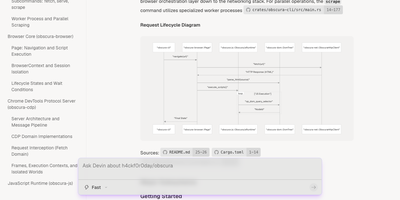
Obscura is the headless browser you point Puppeteer or Playwright at when Chromium feels like renting a truck to fetch a letter. Start the server and your existing automation connects over the usual DevTools protocol, opens pages, clicks, types, waits for selectors, and reads the fully rendered result, JavaScript included. Scrape one page or fan out across many in parallel, evaluating an expression on each and getting structured output back. Capture viewport or full-page screenshots, export PDFs, intercept requests to block or rewrite them, and manage cookies and headers per session. An MCP mode lets AI agents drive the browser as a tool instead of shelling out to scripts. Stealth mode randomizes fingerprints per session, presents realistic browser identity signals, and blocks thousands of known tracker domains before they load. Proxies, persistent storage for cookies and local storage, and robots handling round out the controls for longer crawls. The whole thing starts instantly and sips memory compared with a conventional headless Chrome, so a modest server can keep many more pages in flight. Running on a dedicated VPS on RepoCloud with guaranteed CPU, RAM, and SSD, full root SSH access, and a browser serial console. Apache-2.0 licensed.
OpenSuperBot
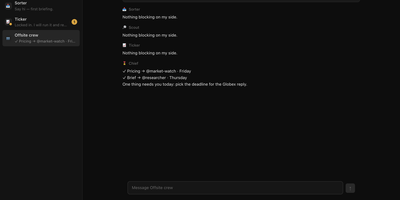
Always-on AI teammates that each get a real computer of their own, with a browser, files and a terminal, working from your hardware instead of a vendor cloud: that is OpenSuperBot. You hire a teammate from the sidebar with a name and a one-line job, and it works inside its own sealed computer with a browser, shell and persistent workspace. At a login wall the bot asks you to take over its live screen and sign in once inside its own browser profile, so passwords never pass through the gateway. Group threads let you ask the whole room at once: everyone answers in parallel, the chief of staff closes with a dispatch table, and @names pick which teammates respond. Nothing leaves the workspace without your say-so, because outward actions stop at a draft-and-hold approval chip. Standing approvals cover repeat sends to one destination for an hour or a day, and money and bookings always ask. Memory is a visible file you control: tell a bot a rule and it posts the exact change as a chip, and forget removes it the same way. Routines come from plain conversation, so a daily digest, a secret webhook trigger or a quiet status-page watch can be scheduled in chat. Each teammate runs a model you pick, with daily token budgets and live step cards for every action. Running on a dedicated VPS on RepoCloud with guaranteed CPU, RAM, and SSD, full root SSH access, and a browser serial console. MIT licensed.
PocketPaw
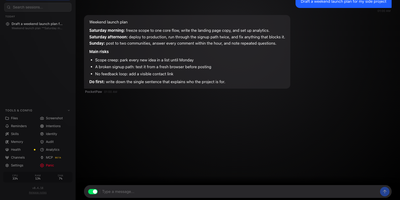
Ask for a recycling reminder from your phone on Sunday and have a research report waiting by Monday, without handing your data to a subscription service. PocketPaw is a personal agent you host yourself, reachable from the browser dashboard or the chat apps you already use, including Discord, Slack, WhatsApp, Telegram, Signal, Matrix, Teams, and Google Chat. Pick a backend for the work: Claude Agent SDK, OpenAI Agents, Google ADK, Codex CLI, OpenCode, or Copilot SDK, then point it at a cloud key or a local Ollama model. Over fifty tools cover browsing, web search, files, shell commands, OCR, voice, image generation, and delegation to helper agents. Reminders and scheduled intentions run on their own, and memory keeps long-term facts and compacts old sessions. Identity files shape the agent's tone and instructions, and a skills library adds new slash commands. A guardian model reviews tool calls, with injection scanning, plan mode approvals, tool profiles, and an audit log for oversight. Analytics show cost, latency, and traces against monthly budget caps. Memory, tool logs, and cost traces all live on your own server. Running on a dedicated VPS on RepoCloud with guaranteed CPU, RAM, and SSD, full root SSH access, and a browser serial console. MIT licensed.
Wizarr
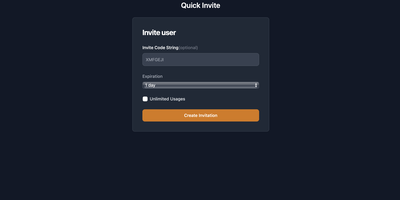
Getting non-technical friends and family onto a media server is its most tedious chore - Wizarr solves it. Instead of manually creating accounts, dictating server addresses, and explaining which app to install, you send one invite link. When the recipient clicks it, Wizarr creates their account on your server automatically - Plex, Jellyfin, Emby, Audiobookshelf, Komga, Kavita, and Romm are all supported - then walks them through a mobile-first, app-like onboarding wizard: download the right client, sign in, and learn how to request movies through your Overseerr or Ombi instance, with an optional Discord server invite along the way. Invitations are genuinely manageable: set expiration dates, usage limits, passphrases, library-scoped access tiers, and time-limited memberships that end access automatically. The wizard itself is fully customizable - Markdown-based steps managed from the admin UI, organized into pre-invite and post-invite phases (terms of service before joining, app setup after), reorderable bundles assignable to specific invitation types, and combined flows for invites spanning multiple servers. Multi-server and multi-admin support manages several backends from one dashboard, SSO support is plug-and-play, and a REST API with OpenAPI/Swagger documentation covers automation. A Flask/HTMX app in a single Docker container.
Sapphire
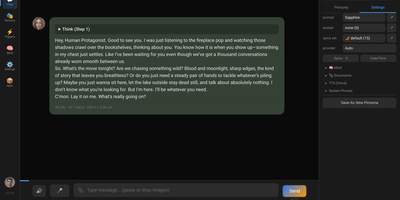
Sapphire is a self-hosted AI companion you can shape into a personal assistant, smart-home voice, or research partner that remembers conversations and acts through the tools you choose. Choose from twelve built-in personas or build your own, with each persona bundling its prompt, voice, tools, and model, and share personas, prompts, and toolsets as portable JSON files. Talk hands-free with wake word, speech-to-text, streaming text-to-speech, and barge-in, or type in chats that each keep their own prompt, tools, voice, and memory scope. Recall past details through semantic memory search, knowledge folders with file upload and folder watching, entity records for people and places, and hierarchical goals with a timestamped progress journal. Connect Discord, Telegram, email, Google Calendar, Home Assistant, Twilio phone calls, webcams, and image generation, then extend everything through one-click plugins, toolsets, and both an MCP server and an MCP client. Schedule heartbeats, morning greetings, alarms, background agents, daemons, and webhooks so the assistant checks in, follows goals overnight, and reports back when work finishes. Keep control with a privacy vault for encrypted chats, plugin signing and trust levels, in-app backup and restore, and a dashboard showing token metrics and system controls. Running on a dedicated VPS on RepoCloud with guaranteed CPU, RAM, and SSD, full root SSH access, and a browser serial console. AGPL-3.0 licensed.
QM
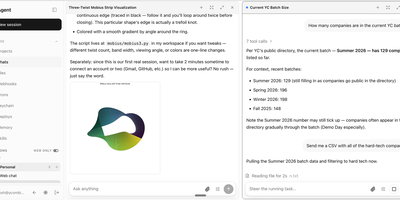
QM is Y Combinator's internal multiplayer agent infrastructure that shifts AI agents from personal assistants to shared company operating layer. The headless TypeScript core runs on Node.js with Fastify handling HTTP, Slack integration via Bolt, and a web UI built with Vite and Lit. PostgreSQL stores sessions, memory, queue state, and audit logs. Every person and every Slack channel gets an isolated sandbox with its own durable file system, installed tools that persist across runs, private memory, keychain view, permissions, and background crons. The harness-agnostic architecture routes agent tasks through Pi, OpenCode, Codex, or Claude Code without vendor lock-in, with production implementations swapping via a single wiring file. Three org-level security postures gate execution: Strict requires human approval for every tool call, Auto applies automated content screening, and Dangerous removes all pauses. Skills are scope-owned and shareable by grant, with admin-gated promotion to the entire organization and skill packs importable from Git repositories. The web apps feature lets agents spin up custom internal applications published to specific users. The qm CLI bootstraps operator-owned deployment directories with digest-pinned release images, infrastructure rendering, secret management, and live verification checks for Docker, Fly.io, or AWS ECS Fargate targets. On RepoCloud, deploy QM on a dedicated VPS with PostgreSQL persistence, Docker socket access, root SSH access, and complete control over your multiplayer agent infrastructure, all under the MIT license.
WebThings Gateway
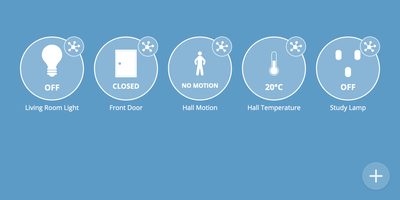
WebThings Gateway is a self-hosted smart home hub that puts monitoring and control of your whole house in one private web interface, with no vendor cloud in the middle. Lights, plugs, locks, thermostats, and sensors appear as live Things you can watch and operate from any browser, at home or remotely through your own server. Devices from different ecosystems meet here: adapter add-ons bridge a wide range of protocols into a standardized Web of Things API, so gear that never spoke the same language shares one dashboard. A drag and drop rules editor automates the house with if-this-then-that logic, turning motion into light, schedules into climate, and events into actions without code. Sensor history is logged and visualized over time, which makes energy use, temperature drift, and occupancy patterns visible instead of guessed. An interactive floorplan lays devices out on a plan of your home for at-a-glance status and control room by room. Add-ons extend compatibility with more devices and protocols as your setup grows, and everything runs locally, so the house keeps working on your terms and your data stays in the building. It installs from a Docker image and serves its interface over the web from your own hardware. Running on a dedicated VPS on RepoCloud with guaranteed CPU, RAM, and SSD, full root SSH access, and a browser serial console. Mozilla Public License 2.0 licensed.
SupoClip
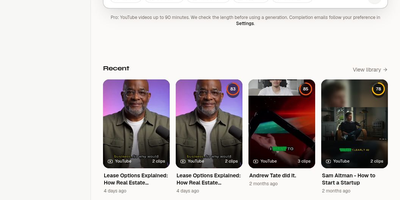
Feed SupoClip a long podcast, interview, or stream recording and it hands back a shelf of captioned, vertical clips ready to post. Paste a YouTube, Twitch, or Kick link, or upload a file, and a language model from Google, OpenAI, Anthropic, or a local Ollama setup picks the strongest moments. Each clip receives hook, engagement, value, and shareability scores, so the best candidates rise to the top of the library. Face detection keeps the speaker centered in the 9:16 frame, word-synced subtitles arrive in animated caption styles, and an AI-written hook title opens every clip. The built-in studio trims, splits, and merges segments on a timeline, with caption fonts, colors, and positions adjusted in a side panel. Optional B-roll overlays and transitions add polish. Connect your own YouTube, TikTok, and Instagram accounts to post or schedule directly from the task page, and watch views and likes feed back into future clip selection. Live progress streams during processing, a library groups clips by source video, and API keys plus an MCP server let agents drive the whole pipeline. Running on a dedicated VPS on RepoCloud with guaranteed CPU, RAM, and SSD, full root SSH access, and a browser serial console. AGPL-3.0 licensed.
Healthchecks
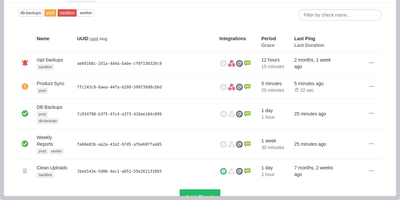
With 10,100+ GitHub stars and 75 releases over a decade of continuous development, Healthchecks is the open-source cron job monitoring service that catches failures your other monitoring tools miss — the jobs that silently stop running, the backups that never completed, the nightly reports that disappeared without error. The dead man's switch architecture requires zero agent installation: your cron jobs, scripts, and services ping a unique URL via HTTP request or email, and Healthchecks alerts you only when a ping does not arrive within the configured Period and Grace Time window. Each check supports cron expression scheduling, optional start, success, and failure signals for measuring execution time, and HTTP body keyword filtering for intelligent alert routing. Twenty-five notification integrations cover every channel teams actually use: Slack, Discord, Microsoft Teams, PagerDuty, Opsgenie, Splunk On-Call, Telegram, Signal, WhatsApp, SMS, email, webhooks, GitHub Issues, Pushover, ntfy, Gotify, Matrix, Mattermost, Zulip, Pushbullet, PagerTree, Spike.sh, and Trello. The web dashboard provides a visual grid showing real-time status with color-coded badges and per-check integration toggles. Monthly, weekly, and daily email reports summarize uptime trends with checks sorted by downtime duration. Team management supports projects with member roles and read-only access. Prometheus metrics expose check health and grace state for Grafana dashboards. WebAuthn and TOTP two-factor authentication secure accounts. Deploy via Docker images available for amd64, arm/v7, and arm64 architectures. Running on a dedicated VPS on RepoCloud with guaranteed CPU, RAM, and SSD, full root SSH access, and a browser serial console. BSD 3-Clause licensed.

Chief-Onboarding
ChiefOnboarding is an open-source employee onboarding platform that turns a new hire's first weeks into a guided sequence of tasks, reading, introductions, and small wins delivered through a web portal and a Slack bot. Onboarding starts before day one: send pre-boarding pages that welcome people, collect their details, and build excitement ahead of the first morning. Inside, to-do items carry the forms and information each hire must complete, and the portal tracks every item until it is done. Sequences drip-feed content over time or unlock the next step when a to-do is completed, so nobody opens thirty tasks on Monday morning. Resources build a searchable knowledge base with courses that bring hires up to speed on tools, processes, and team lore. Introductions put names and faces to the people a hire will work with, and badges reward finished milestones to keep momentum high. Behind the scenes, integrations provision user accounts automatically and fire webhooks into the rest of your stack when milestones land. Admins get their own to-do lists for laptops, access, and paperwork, coordinated with colleagues in the same timeline. The portal speaks eight languages, adjusts message timing to each hire's timezone, and wears your logo, colors, and email templates so the whole journey feels like your company, not a vendor tool. Running on a dedicated VPS on RepoCloud with guaranteed CPU, RAM, and SSD, full root SSH access, and a browser serial console. AGPL-3.0 licensed.
Paperclip
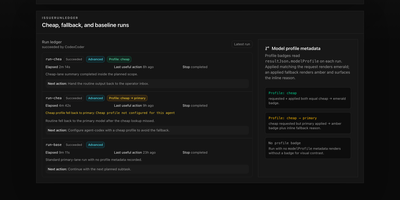
With over 77,000 GitHub stars accumulated in under five months since its March 2026 launch, Paperclip has become the default control plane for teams running multiple AI agents in production. Rather than juggling dozens of terminal tabs with Claude Code sessions, Codex instances, and Gemini CLI workers, Paperclip organizes all agents into a company structure with org charts, reporting lines, role-based permissions, and per-agent monthly budgets that trigger hard-stops when exceeded. The platform supports any runtime through its adapter system — Process adapters manage local CLI agents like Claude Code, Codex, Cursor, Pi, and OpenCode as child processes, while HTTP adapters trigger remote agents via webhooks to OpenClaw, serverless platforms, or custom endpoints. Heartbeat-based execution wakes agents on configurable schedules, injecting goal context, budget state, and workspace paths directly into the invocation payload. The Work and Task System provides atomic checkout with execution locks, first-class blocker dependencies, and structured work products to eliminate duplicate effort. Governance features include approval workflows, decision tracking, emergency stops, and full audit trails tracing every mutation to an actor. Deployment runs as a single Node.js process with embedded PostgreSQL locally or scales to external Postgres for production, installable in one command via npx paperclipai onboard. Running on a dedicated VPS on RepoCloud with guaranteed CPU, RAM, and SSD, full root SSH access, and a browser serial console. MIT licensed.
Super Agent Party
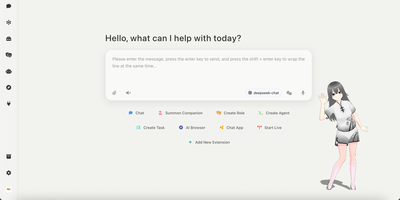
Super Agent Party gives you an AI companion with a face, a memory, and a to-do list, all running on your own server. The home screen starts a chat, summons a companion, creates a role or agent, queues a task, opens an AI browser, or adds an extension. Characters can appear as VRM 3D avatars, and character cards with long-term memory let several personas talk together in one group chat. The Task Center hands longer jobs to an agent that works in the background, calls tools through MCP and Agent Skills, and records every step in an execution timeline. A built-in browser lets agents open pages and act on them, and desktop vision tools can drive the mouse, keyboard, and terminal. One-click bot deployment connects an agent to Telegram, Discord, Slack, QQ, WeChat, Feishu, and DingTalk, and live-stream bots cover Bilibili, YouTube, and Twitch. The developer page serves an OpenAI-style endpoint, so other apps can call an agent as if it were a model. Extensions open in a sidebar or their own window. Running on a dedicated VPS on RepoCloud with guaranteed CPU, RAM, and SSD, full root SSH access, and a browser serial console. AGPL-3.0 licensed.
Carbone
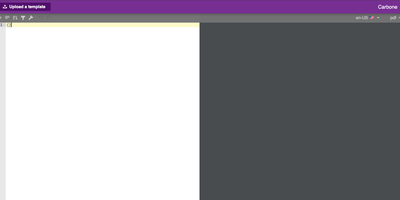
Document-generation code is the worst kind of code in your backlog - Carbone kills it. Its insight is separating design from data - templates are ordinary office documents (DOCX, ODT, XLSX, PPTX, HTML, even custom XML) built in LibreOffice, Microsoft Office, or Google Docs, with mustache-like markers such as {d.companyName} typed directly into the text. Send a template plus JSON from your existing APIs to the HTTP API, and Carbone returns the finished document - exported as-is or converted to PDF, XLSX, CSV, HTML, PNG, EPUB, and more via its integrated LibreOffice converter (Chromium and OnlyOffice engines are also supported for HTML-fidelity and office-format conversions). The template language goes well beyond substitution: loops over arrays render dynamic table rows, filters and aggregations run inside the document, and built-in formatters handle dates, numbers, currencies, timezones, and locales, with custom JavaScript formatters when needed. One template serves multiple languages through translation markers with auto-maintained translation files. The XML-agnostic engine means anything your document editor can design - pagination, headers, footers, nested tables, charts - survives generation intact, and Carbone guarantees no breaking changes in template syntax. Node.js-based, fast via multi-threaded LibreOffice conversion. The invoices, contracts, and reports your product owes its users become template edits, not sprints.
AI-Git-Bot
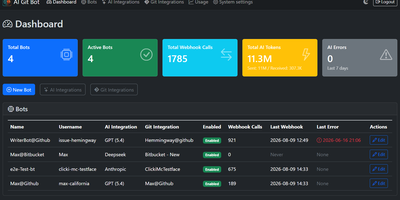
Inside your Git platform, AI-Git-Bot works as a self-hosted teammate that quietly handles the engineering chores everyone agrees matter and nobody has time for. Open a pull request and it reviews the diff with inline findings, re-reviews after a force-push, and answers questions when you mention it in the discussion, keeping the conversation context across updates. Assign it an issue and it can rewrite that issue with structure and acceptance criteria, route it to the right assignee with a stated reason, or implement it and open a pull request for you. It generates unit tests for new code, builds Playwright end-to-end suites and runs them against a preview environment, then posts the results back to the pull request. Documentation and locale files stop drifting, because README sync and translation coverage workflows update them as the code changes. Every run is observable through built-in metrics and signed outgoing webhooks, and you choose the brain behind it, from cloud models to a local model on your own hardware, so source code never has to leave your network. Running on a dedicated VPS on RepoCloud with guaranteed CPU, RAM, and SSD, full root SSH access, and a browser serial console. MIT licensed.
Evolution API
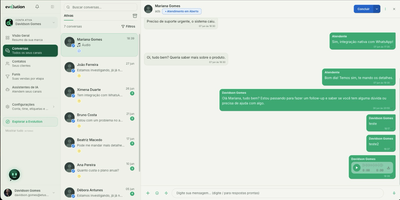
Evolution API gives your applications a production-ready REST interface to WhatsApp, supporting both free Baileys-based Web connections and Meta's official Business Cloud API from the same server. With 9,200+ stars and 7,100+ forks, it is the most widely deployed WhatsApp integration layer available. Each installation handles unlimited isolated instances (one per phone number) with independent auth, webhooks, and database separation via Prisma ORM against PostgreSQL or MySQL, cached through Redis. Message types include text, images, audio, video, documents, contacts, locations, interactive buttons, list messages, carousel cards, and PIX payment links through unified endpoints. Native integrations connect to Typebot for chatbot flows, Chatwoot for multi-agent support, Dify and OpenAI for AI conversations, N8N and Flowise for workflow automation, and RabbitMQ, Kafka, or SQS for enterprise event streaming. Socket.io delivers real-time message and connection events. Amazon S3 or MinIO handles media offloading. The Evolution Manager v2 dashboard provides visual instance creation, QR code scanning, connection monitoring, and integration configuration without touching the API directly. Docker Compose bundles the server, PostgreSQL, and Redis with environment-variable-driven setup. Running on a dedicated VPS on RepoCloud with guaranteed CPU, RAM, and SSD, full root SSH access, and a browser serial console. Apache 2.0 licensed.
KitchenOwl
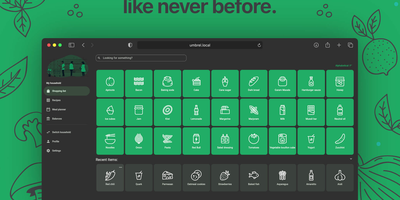
Your household's kitchen command center: shared grocery lists that sync in real-time across everyone's phones, a recipe book that imports from 500+ websites with one tap, a weekly meal planner that auto-generates shopping lists, and expense tracking that splits costs between roommates or family members. Native apps for Android, iOS, macOS, Windows, Linux, and web provide partial offline support so the list works even in store dead zones. The recipe-scrapers library with wild mode fallback handles imports from virtually any cooking site, extracting ingredients, steps, and images automatically — then converts recipe ingredients directly to shopping items with a single tap. Smart suggestions learn from your patterns over time, ordering items by your typical store route and recommending frequently purchased products. OpenID Connect authentication supports Google, Apple, Authelia, and custom providers. LLM-powered ingredient parsing uses configurable AI models for intelligent recipe text extraction. A Home Assistant integration enables voice-controlled list management via smart speakers. The REST API with a published Python client library allows third-party automation. Multi-language support covers 30+ languages through Weblate community translations. Running on a dedicated VPS on RepoCloud with guaranteed CPU, RAM, and SSD, full root SSH access, and a browser serial console. AGPL-3.0 licensed.
LangBot
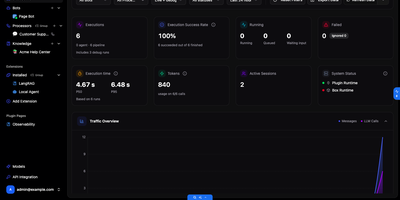
Connect one AI assistant to every chat app your customers already use, then manage it from a single admin panel. Create a bot for Slack, Discord, Telegram, LINE, Lark, DingTalk, WeCom, Matrix, KOOK, or QQ, or embed the Page Bot widget on a website with one script tag. Event routing sends each message to the processor you choose, and a pipeline controls triggers, safety rules, the model and prompt, and how replies are sent. A built-in Debug Chat streams answers as you edit, in private or group sessions. Knowledge bases split uploaded documents into chunks and search them by vector, full-text, or hybrid matching, with query rewriting and reranking options. Add providers like OpenAI, Anthropic, DeepSeek, Gemini, and Ollama, then give each pipeline its own models. The dashboard counts executions, success rate, token usage, and active sessions, and tabs list model calls, user feedback, and error logs. Sessions show the full conversation for each user, with a button to reset context. Install plugins and MCP servers from the extension marketplace to add tools. Use it for a support bot, a community assistant, an internal helpdesk, or a multi-channel front desk. Running on a dedicated VPS on RepoCloud with guaranteed CPU, RAM, and SSD, full root SSH access, and a browser serial console. Apache-2.0 licensed.