Astrum Repository
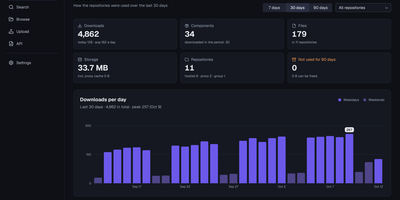
One server can hold every package your builds pull, publish, and cache, so the team stops juggling a different registry for every language. Astrum Repository hosts your own artifacts, proxies public registries so builds keep working when an upstream is down, and groups both behind a single address your tools already understand. Thirty-nine formats share that address: Docker and OCI images, Maven, npm, PyPI, Cargo, Go modules, Helm charts, NuGet, Terraform modules, APT and Yum packages, Hugging Face models, browser extensions, Git LFS, and even remote caches for Nx and Turborepo. Blob storage grows with you, moving between disk, S3, and agent-connected stores that combine into groups without relocating data. Access stays deliberate through users, roles, privileges, and content selectors, with LDAP and OpenID Connect sign-in and access tokens minted for CI pipelines. Day-to-day operations are visible rather than guessed: health endpoints, Prometheus metrics, scheduled tasks, cleanup policies, audit trails, and backups are built in, and several servers can share one database when a single node is no longer enough. The web interface speaks twelve languages, so a platform team spread across regions still works in one console. Running on a dedicated VPS on RepoCloud with guaranteed CPU, RAM, and SSD, full root SSH access, and a browser serial console. MIT licensed.
Qeli
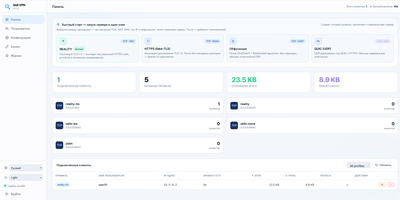
Qeli is a self-hosted VPN built for networks where ordinary VPN protocols get recognized and blocked, disguising its traffic as ordinary web traffic while keeping the classic full-tunnel experience. Where WireGuard, OpenVPN, and IKEv2 carry fingerprints that deep packet inspection has learned to spot, Qeli answers with five wire modes: plain, TLS mimicry, ChaCha20 obfuscation behind WebSocket fronting, REALITY, and a flagship mode that carries the private stream inside a genuine HTTP/2 request within a real TLS 1.3 exchange. A probe without a valid token never learns the difference, because the server bridges it to the configured public target site. The handshake is hybrid post-quantum, X25519 plus ML-KEM-768, with a ChaCha20-Poly1305 data plane, and the tunnel itself behaves like the VPNs people already know: full-tunnel or split routing, OS-level DNS, and per-app include or exclude rules on Windows, macOS, and Android. A one-command installer on a clean Debian or Ubuntu server asks for a profile and a port, writes the NAT configuration, creates the first users, and prints ready-to-paste connection links. The web panel then issues qeli:// links and QR codes per person behind an Argon2id login, so onboarding a phone is a camera scan instead of a config file. Clients cover Linux, Windows, macOS, Android, and Keenetic and OpenWrt routers, and published lab benchmarks average around 1220 Mbit/s across all twelve profiles. Running on a dedicated VPS on RepoCloud with guaranteed CPU, RAM, and SSD, full root SSH access, and a browser serial console. AGPL-3.0 licensed.
Drydock
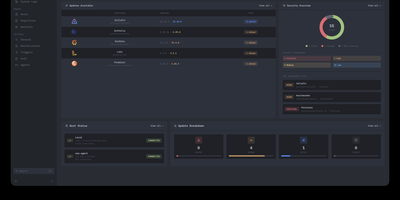
Deploying container updates without blind surprises is what Drydock delivers through a monitor-first inspection plane that evaluates image registries, scans CVE vulnerabilities, and automates rollbacks across distributed Docker infrastructure. Systems engineers track container fleets across twenty-three public and private registries including Docker Hub, GitHub Container Registry, Harbor, and Quay using cursor-based pagination and semver classification. The integrated Update Bouncer runs Trivy and Grype static scanners against incoming candidate layers, blocking deployments that fail configurable CVE severity policies while verifying cryptographic signatures through cosign. Operators configure declarative update schedules with stabilization countdown gates that hold back brand-new releases until defined burn-in periods elapse. When updates execute, Drydock creates pre-upgrade container snapshots and evaluates post-launch container health checks, instantly restoring previous image digests and network configs if failures occur. Distributed Portwing edge agents stream live container output and system logs over encrypted WebSockets, allowing central consoles to coordinate remote daemon updates without opening inbound host firewall ports. Automated event triggers dispatch granular notifications and update payloads across seventeen communication channels including Slack, Discord, Telegram, and Home Assistant MQTT brokers. Running on a dedicated VPS on RepoCloud with guaranteed CPU, RAM, and SSD, full root SSH access, and a browser serial console. AGPL-3.0 licensed.
HyCanvas
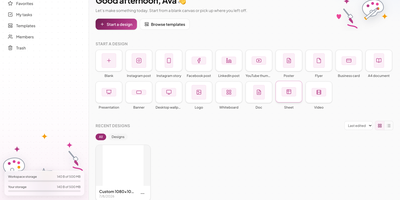
HyCanvas folds graphics, presentations, videos, whiteboards, documents, and spreadsheets into one self-hosted browser editor, covering work that usually takes several separate design subscriptions. Start from one of 140 templates across social, print, events, business, and presentations, or import a PowerPoint file and keep editing it. The canvas carries shapes, frames, tables, nine chart types, QR codes, image filters, crop and masks, background removal, and Magic Resize for one-click reformatting. Video projects get a multi-track timeline with trims, transitions, keyframes, styled captions, green-screen keying, and screen or webcam recording. Whiteboards add sticky notes, connectors, a shared timer, and dot voting, and a finished board converts straight into a slide deck. Teammates co-edit in realtime with presence cursors, comments with mentions, version history, and approvals, while share links open view-only, comment, or edit access. Brand kits hold your colors, fonts, and logos, and a brand lock warns or blocks off-brand edits before they ship. Connect your own AI provider key to generate decks, documents, images, and charts from a prompt, then export PNG, JPG, PDF, SVG, PPTX, MP4, or GIF with no watermark. Running on a dedicated VPS on RepoCloud with guaranteed CPU, RAM, and SSD, full root SSH access, and a browser serial console. AGPL-3.0 licensed.
Synch
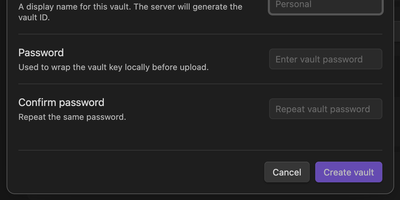
Synch keeps your Obsidian vault in step across desktop and mobile with end-to-end encryption, on a sync server you host yourself. Every note is encrypted on your device before upload, so the server stores sealed blobs and cannot read your notes, your file paths, or your vault keys. Edits travel between devices in seconds over a realtime connection, and the encrypted version history brings back earlier drafts and deleted files when a cleanup goes too far. When the same note changes on two devices, a three-way merge combines edits that do not overlap and keeps a conflict copy when they do, so work is never silently overwritten. Markdown, images, audio, video, and PDFs sync by default, and folder exclusions keep big or private corners of the vault at home. Run the server with Docker Compose or as a systemd service, point the plugin at your own API address, and allow only the email addresses you invite. Each vault gets its own database file on your disk, and blob storage can move to any S3-compatible bucket when the vault outgrows local storage. Running on a dedicated VPS on RepoCloud with guaranteed CPU, RAM, and SSD, full root SSH access, and a browser serial console. MIT licensed.
ComposeToolbox
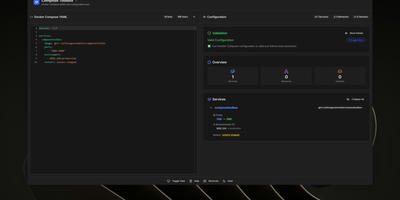
To eliminate YAML indentation errors and cryptic container misconfigurations before running docker compose up, ComposeToolbox pairs a full-featured code editor with a live configuration analyzer in a single self-hostable web workspace. Paste or write any docker-compose.yml file in the left pane to see immediate syntax validation alongside actionable best-practice warnings, such as unpinned latest image tags, missing healthchecks, or deprecated version declarations. On the right side, an interactive Configuration Overview breaks down every defined service, exposed port mapping, persistent volume mount, environment variable, and custom network into structured tabs. Built-in Quick Insert buttons let operators drop new service blocks, volume definitions, or network stanzas into the editor with one click. By mounting the persistent /app/data directory, administrators can define custom quick-insert YAML snippets with selectable hardware and networking icons in custom-templates.yml. Teams can also customize startup-template.yml so the editor opens with their organization's standard homelab or production boilerplate every time the page loads. Keyboard shortcuts, light and dark themes, and one-click YAML formatting or file export streamline daily container authoring. Running on a dedicated VPS on RepoCloud with guaranteed CPU, RAM, and SSD, full root SSH access, and a browser serial console. MIT licensed.
Moneat
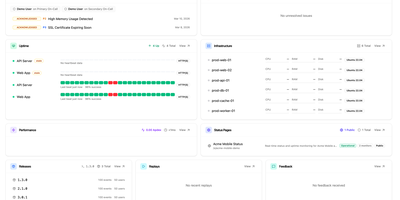
Moneat is the open-source observability platform that unifies error tracking, session replay, performance monitoring, logging, uptime checks, synthetics, product analytics, and AI observability into a single self-hosted application — replacing Sentry, Datadog, and Statuspage with one deployment. The Sentry SDK compatibility layer accepts data from @sentry/browser, @sentry/node, @sentry/react, @sentry/nextjs, sentry-sdk for Python, sentry-kotlin, sentry-java, sentry-android, sentry-cocoa, sentry-go, sentry-ruby, and Sentry.NET by updating one DSN endpoint. Datadog Agent compatibility redirects existing fleets by setting dd_url, and native OpenTelemetry OTLP ingestion accepts logs, traces, and metrics from any exporter or Collector. Error monitoring groups exceptions with smart deduplication, session replay records DOM-based user interactions linked to errors, distributed tracing visualizes transaction and span breakdowns with live service maps, and continuous profiling renders flamegraphs in pprof, JFR, and Sentry formats. Uptime monitoring runs HTTP, TCP, and ping checks with public status pages, while synthetics executes API tests, multi-step workflows, SSL checks, and DNS probes. Custom dashboards support drag-and-drop widgets with Grafana import, product analytics provides funnels and retention cohorts, release tracking surfaces crash-free rates with source map upload, and AI observability traces LLM calls end to end. Built on Kotlin and Java with ClickHouse for analytical storage, PostgreSQL for relational data, and Redis for caching, deployment uses Docker Compose with an interactive installer automating secrets and service orchestration. Running on a dedicated VPS on RepoCloud with guaranteed CPU, RAM, and SSD, full root SSH access, and a browser serial console. AGPL-3.0 licensed.
May
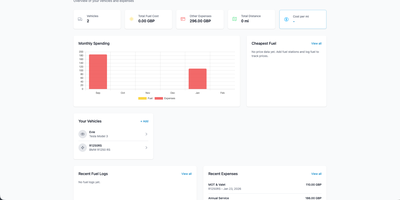
May is a self-hosted dashboard that tracks everything your vehicles cost and everything they are about to need, from fuel fill-ups to the MOT renewal you would otherwise forget. Log a fill-up and consumption in L/100km or MPG calculates itself, with a quick-entry mode for the forecourt and receipts attachable to every record. Cars, vans, motorbikes, and scooters each get their own history: expenses by category, recurring insurance and tax payments, trip logs for mileage claims, tire sets with distance worked out per set, and maintenance schedules driven by mileage, engine hours, or dates. Reminders for MOT, service, insurance, and tax arrive by email, ntfy, Pushover, or webhook, and subscribe into Apple, Google, or Outlook calendars. The analytics dashboard charts spending trends and consumption statistics, while PDF reports package a vehicle's whole story for record-keeping, receipts included. Vehicles share between family or team accounts with full, fuel-and-charging-only, or read-only roles. UK drivers get DVLA MOT and tax lookups plus live forecourt prices for saved stations from government feeds, no API key required. Documents, favourite stations, Fuelly CSV import, full JSON and CSV export, custom units and currencies, and a Home Assistant integration complete the garage. Running on a dedicated VPS on RepoCloud with guaranteed CPU, RAM, and SSD, full root SSH access, and a browser serial console. MIT licensed.
LangGraph GUI
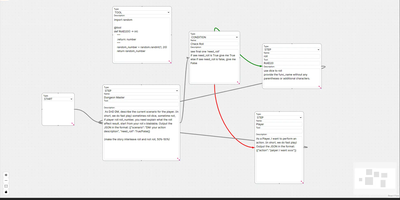
Building LangGraph agents in code means imagining the graph; LangGraph GUI turns that graph into something you draw, wire, and run from the browser instead. You place a start node, add step nodes, and drag edges between ports to define the flow, with cycles created by simply connecting nodes back toward each other. Condition nodes split execution into green true paths and red false paths, info nodes append context to stage output, and subgraph nodes run a whole named graph inside another one. Tool steps call real Python functions that you define in tool nodes with the familiar decorator style, so file saving, lookups, and custom logic sit inside the visual flow. Graphs save to JSON on your computer, load back for editing, and upload to the server as workflow files ready to execute. You configure which LLM to use and its API key in the panel, run against local models through Ollama or hosted APIs, then download every file the run produced in the workspace. Files upload to the server workspace as working environment, and a cache clean clears it between runs. Example graphs for role-playing loops, lottery branch switches, and tool-using flows show patterns you can copy and refine with your own prompts. Running on a dedicated VPS on RepoCloud with guaranteed CPU, RAM, and SSD, full root SSH access, and a browser serial console. MIT licensed.
Docling Studio
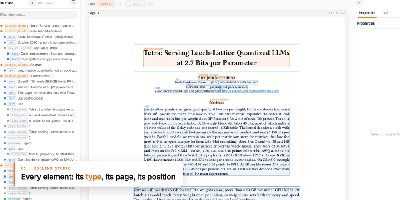
Docling Studio shows you exactly what a document parser sees, drawing a colored box around every title, paragraph, table, and picture it extracts from your PDFs. Import a PDF, run an analysis, and the result opens with three linked panels: the document tree on the left, the paged preview in the center, and the selected element on the right with its type, page, position, and text or table. Click any box on the page and the same element lights up in the tree and properties panel as other boxes fade away. The layers bar counts each element type and toggles boxes per type, or hides them all to reveal the bare page. You can analyze several documents at once from the list, watch progress percentages on long files, and queue work three analyses at a time. Ask a question and a local model answers from the document, with a reasoning timeline that links each step back to the passage it read. Finished results download as the original PDF, clean Markdown, or Docling JSON for downstream pipelines. AI agents connect over MCP to read and cite your documents, and an optional connection to your own Docling Serve server handles heavier parsing loads. Running on a dedicated VPS on RepoCloud with guaranteed CPU, RAM, and SSD, full root SSH access, and a browser serial console. MIT licensed.
AgentBox
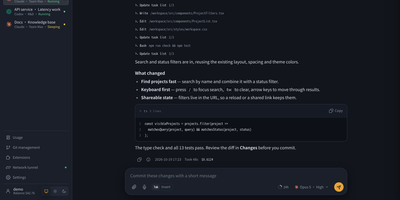
AgentBox is a self-hosted browser workspace that runs Claude Code and Codex CLI on a server you control, so a task goes from chat to reviewed code without leaving one place. Open a workspace from an empty project, an uploaded archive, or a Git clone, then talk to the agent in streaming web chat or drop into its original interactive terminal when you want the CLI itself. Files persist between sessions along with your home configuration and chat history, so a project picked up on a laptop continues on a phone exactly where it stopped. Review per-file diffs line by line before committing, pushing, or opening a pull request, and download the result when no Git connection is configured. Shared files, layered home templates, Claude skills, and MCP configuration carry your setup into every new workspace, with per-workspace overrides when a project differs. A trusted team shares central account pools with per-user scopes, while every model request is recorded with tokens, cache hit rate, cost, and latency, exportable to CSV and optionally capped by credits. An optional tunnel reaches allowlisted repositories and databases on private networks, and six interface styles with light and dark modes keep long sessions comfortable. Running on a dedicated VPS on RepoCloud with guaranteed CPU, RAM, and SSD, full root SSH access, and a browser serial console. Apache-2.0 licensed.
MillionSend
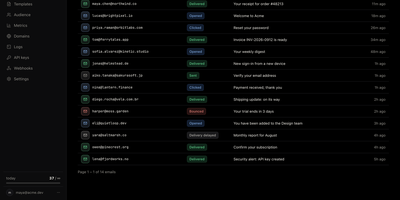
MillionSend is an open-source email platform you run yourself that sends transactional and marketing mail through your own AWS SES account behind a Resend-compatible API. Every message you send becomes a row in the dashboard, and every row opens into a timeline of SES events with the raw payload and the SMTP diagnostic when something bounces. Daily metrics chart sent, delivered, opened, clicked, bounced, and complained volumes against SES thresholds, and broadcasts stop on their own at five percent bounces or 0.1 percent complaints before Amazon can pause your account. Contacts live once for the whole team with custom properties and subscribe state, while segments and topics decide exactly who receives each broadcast. You compose broadcasts from reusable templates with per-contact merge fields, schedule them ahead, and cancel them while they wait. Applications that only speak SMTP send through the relay on port 2587 with an API key as the password, and HTTP integrations use idempotency keys, request logs with secrets redacted, and signed webhooks with a delivery history. Guided domain setup handles DKIM records, hard bounces and complaints are suppressed automatically, and every recipient gets an RFC 8058 one-click unsubscribe. Receiving and agent-ready inboxes are included in beta for mail sent to your verified domains. Running on a dedicated VPS on RepoCloud with guaranteed CPU, RAM, and SSD, full root SSH access, and a browser serial console. AGPL-3.0 licensed.
Domain Monitor
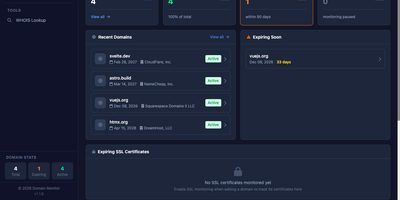
The renewal notice always seems to land in an inbox nobody checks anymore, so Domain Monitor tracks every domain you own from your own server and warns you long before each expiry date arrives. It pulls expiration dates and registrar details automatically through WHOIS and RDAP across more than 1,400 supported TLDs, keeping the whole portfolio current without anyone remembering to look. Add domains one at a time or import them in bulk, group them with tags and watchlists, and let scheduled cron checks refresh the data on their own. Alerts escalate on your schedule, at 60, 30, 21, 14, 7, 5, 3, 2, and 1 day before expiry, and arrive through email, Telegram, Discord, Slack, Mattermost, Pushover, or webhooks, routed by notification groups so the right people hear about the right domains. Each domain also gets tabbed views for its DNS records, SSL certificate validity, billing notes, notification history, and raw WHOIS output, with per-domain toggles for DNS and certificate monitoring. The dashboard surfaces what expires soon, how domains distribute across registrars, and whether every domain is actually covered by an alert channel. Multiple users get their own accounts with two-factor authentication, tracked sessions, and an in-app notification center. Running on a dedicated VPS on RepoCloud with guaranteed CPU, RAM, and SSD, full root SSH access, and a browser serial console. MIT licensed.
Terrapod
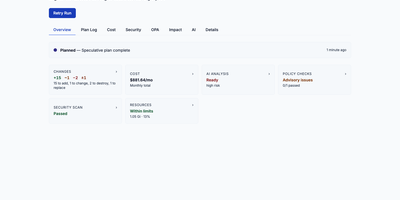
Terrapod gives you the Terraform Enterprise control plane on your own Kubernetes cluster, with remote state, run approvals, and policy checks, and no per-resource bill at the end of the month. Point your existing cloud block at it and terraform or tofu keep working unchanged, because Terrapod answers the same backend protocol the CLI already speaks. Workspaces isolate state, variables, and runs per team or environment, with versioned state you can lock, inspect, and roll back. Server-side agent pools execute plans and applies on ephemeral Kubernetes jobs, while CLI-driven runs stay available for local workflows. Approvals gate every apply, and conditional auto-apply only proceeds when a plan adds or updates resources without destroying anything. Label-based RBAC decides who may read, plan, write, or administer each workspace, with OIDC and SAML single sign-on on top. A private registry hosts your own modules and providers with GPG signing, and OPA Rego policy sets enforce rules as mandatory or advisory checks before apply. Drift detection flags infrastructure that wandered from its state, run triggers chain dependent workspaces, and an interactive impact graph shows a plan's blast radius before you approve it. Optional AI review summarizes each plan's changes and risks, and an MCP server lets AI assistants inspect workspaces and runs under the same permissions. Running on a dedicated VPS on RepoCloud with guaranteed CPU, RAM, and SSD, full root SSH access, and a browser serial console. MPL-2.0 licensed.
Miru
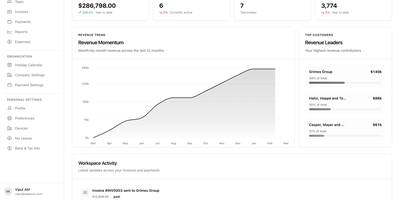
For agencies that bill by the hour, Miru replaces the stitched-together timer, spreadsheet, invoicing app, and payment tool whose numbers never quite agree. It puts the whole money workflow in one place, from the first tracked minute to the paid invoice. Start a timer or log time against a project, then turn the accumulated billable hours into an invoice without retyping a single line. Log expenses as they happen, attach them to the right client work, and review them before they reach an invoice. Send the invoice and collect through Stripe or PayPal, watching status and amounts from a single cash flow view instead of chasing payment threads. The dashboard keeps revenue, active projects, and team momentum visible at a glance, while reports break down utilization and aging so overdue money gets a follow-up before it gets forgotten. Manage clients, projects, and team members with their roles in the same system that records their hours, and keep employee records and payroll reminders alongside the billing data they support. Running on a dedicated VPS on RepoCloud with guaranteed CPU, RAM, and SSD, full root SSH access, and a browser serial console. MIT licensed.
ControlR
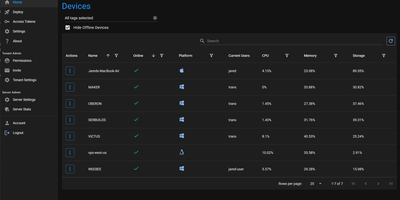
Helping someone fix their computer should not start with a phone call full of instructions nobody can follow: ControlR puts every machine you look after into one browser tab. Install the agent on Windows, Mac, or Linux machines once, and they appear in your device grid with their status ready for action. Open a remote desktop session and see and control the screen as if you were sitting there, drop into a cross-platform PowerShell terminal when a fix is faster typed than clicked, browse the file system to fetch a log or drop off a file, or just open chat when a quick question is all that is needed. Devices are organized with tags, and access follows them: a technician sees the machines their tags cover, while roles decide who can install agents, manage installer keys, administer the tenant, or reach every device. Agent logs stream to the server in real time, which turns bug reports into something you can actually read. Run one tenant for your own fleet, or enable public registration and let each new account become its own isolated tenant, with the database keeping every tenant's devices and users apart. Sensitive settings can arrive through Docker Secrets instead of environment variables, and the whole server runs from a single compose file. Running on a dedicated VPS on RepoCloud with guaranteed CPU, RAM, and SSD, full root SSH access, and a browser serial console. MIT licensed.
Stormkit
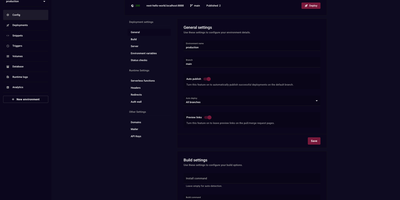
Stormkit delivers a self-hostable PaaS that eliminates vendor lock-in while providing Vercel-class deployment workflows. The Go backend handles build orchestration, hosting, and background job processing while the React frontend provides a complete management dashboard for applications, environments, and team collaboration. Git integration with GitHub, GitLab, and Bitbucket enables push-to-deploy workflows where every commit triggers automated builds with preview links posted directly to pull requests. Serverless functions use filesystem-based routing — each TypeScript or Node.js file in the API directory becomes an endpoint automatically, deploying to AWS Lambda with configurable timeouts. PostgreSQL database schemas ship with automatic migrations, isolated credentials per environment, and secure environment variable injection preventing credential leakage between staging and production. Custom domains provision TLS certificates automatically through Let's Encrypt with support for custom certificates and headers. The environment system creates isolated deployment contexts for production, staging, and development with independent variables, domain bindings, and auto-publish rules per branch. Privacy-respecting server-side analytics track visitors, referrers, and top paths without client cookies or third-party scripts. Role-based access control manages team permissions across applications. Docker Compose deployment provisions the full stack including the API server, hosting service, build runner, and worker server. Running on a dedicated VPS on RepoCloud with guaranteed CPU, RAM, and SSD, full root SSH access, and a browser serial console. AGPL-3.0 licensed.
LinkBreeze
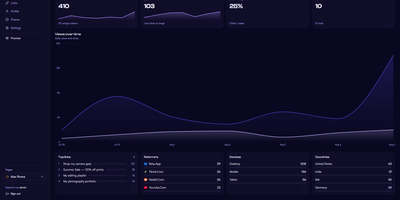
LinkBreeze is a self-hosted link-in-bio platform that lets you publish unlimited, fully themed link pages from your own server instead of renting one by the month. A guided setup wizard covers the admin credentials, profile, and theme, then a floating phone-frame preview refreshes as you edit while autosave stores your changes. Each page gets its own slug, theme, SEO tags, QR code, and analytics, so one install can serve a personal profile, a band, and a shop. Eleven built-in themes cover Aurora, Glassmorphism, Neon Cyberpunk, and Terminal Mono, backed by a token customizer for fonts, backgrounds, card styles, and raw CSS. Links pull in favicons automatically, accept thumbnails, and can be scheduled to appear and vanish on set dates, while embed widgets drop in YouTube, Spotify, SoundCloud, Vimeo, and Bandcamp players. A migration wizard imports profiles from Linktree, Bento, Hopp.bio, LittleLink, or an HTML or JSON export. Visitors can subscribe with an email address that you export to CSV, save your page as a vCard contact, or scan a QR code that downloads as SVG or PNG. Cookieless analytics track views, clicks, referrers, devices, and countries with hashed visitor IPs, and Plausible, Umami, Matomo, or Google Analytics can be added with one paste. The admin panel supports TOTP two-factor authentication, a UTM builder, JSON backup and restore, and seven interface languages. Running on a dedicated VPS on RepoCloud with guaranteed CPU, RAM, and SSD, full root SSH access, and a browser serial console. MIT licensed.