CodeRail
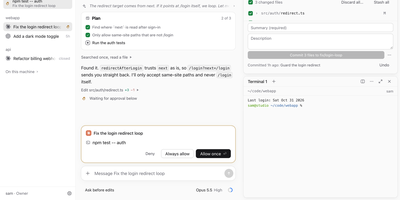
Close the laptop, walk away, and your coding agents keep working; CodeRail is the remote control that lets you supervise them from a browser or your phone without handing your machines to anyone's cloud. A small bridge on each computer connects outbound to your server, so there are no open ports and no VPN to babysit, and each machine keeps its own Claude Code and Codex logins because CodeRail never holds your AI keys. Chats show plans, tool calls, models, modes, and background tasks, and when an agent wants to run something sensitive, the approval lands with you wherever you are, including as a phone push notification. Real terminals outlive the browser tab, files can be viewed, edited, uploaded, and downloaded in place, and git work, pull requests included, sits beside the conversation that produced it. Each chat even gets a browser on the computer itself, shared live with everyone in the chat and drivable by the agent. Roles run Owner, Operator, or Viewer per computer, narrowed down to folders and agents, with every change audited, and sessions keep running with every browser closed while history stays readable offline. Running on a dedicated VPS on RepoCloud with guaranteed CPU, RAM, and SSD, full root SSH access, and a browser serial console. Apache-2.0 licensed.
Event Schedule
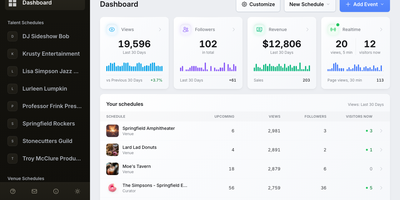
One self-hosted site can publish your event calendar, sell tickets, take bookings, and send the newsletter. Event Schedule gives venues, performers, and curators their own schedule types, and a curator page gathers events from the venues and performers it follows. Recurring patterns cover daily, weekly, monthly-by-weekday, and yearly dates with per-date exceptions, and calendars import from ICS feeds, Google Calendar, or Eventbrite. Tickets come in several types with promo codes, waitlists, gift cards, and a drag-and-drop seating plan, and payments go through Stripe, PayPal, Payfast, Razorpay, or cash straight to your own accounts. Door staff scan QR tickets in a browser and a live dashboard counts arrivals. Appointment pages sync both ways with Google Calendar, Outlook, and CalDAV. The newsletter editor sends segmented, A/B tested campaigns through your own SMTP server, and optional AI features turn pasted text or flyer images into draft events. Analytics, an audit log, TOTP two-factor login, signed webhooks, a REST API, and twelve interface languages cover the admin side. Running on a dedicated VPS on RepoCloud with guaranteed CPU, RAM, and SSD, full root SSH access, and a browser serial console. AAL licensed.
ReadyLLM
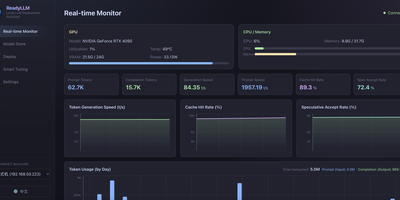
Your inference server should not sit mostly idle while a model crawls along at ten tokens per second, so ReadyLLM gives you a visual way to deploy, watch, and tune LLMs until the hardware is actually earning its keep. Add the machine under your desk or a remote box over SSH, let hardware detection read its GPU, VRAM, CPU, and memory, and get model recommendations that fit what you own instead of wishful downloads. A model store catalogs text, image, and video models with parameter counts, precision, resolutions, and real weight filenames, background downloads from multiple sources, and integrity checks when they land. One click starts or stops llama.cpp, vLLM, or SGLang services, installs a missing engine matched to your GPU backend, and leaves runtime parameters open for manual tweaks. Live curves track GPU utilization, memory, throughput, and latency as requests flow. When speed disappoints, two-phase auto tuning searches the knobs that matter, checks VRAM feasibility before it wastes your time, and benchmarks honestly against latency, throughput, or prefill goals; an AI tuning mode can reason through the same loop across several rounds. Beyond chat models, ComfyUI generation covers text-to-image and text-to-video, storyboards, shot-by-shot long video, and upscaling, with prompts optionally expanded first. Running on a dedicated VPS on RepoCloud with guaranteed CPU, RAM, and SSD, full root SSH access, and a browser serial console. MIT licensed.
loci
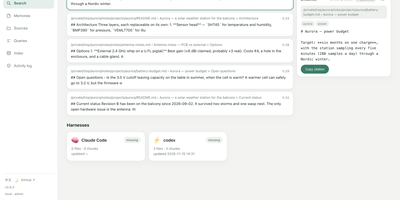
Point Claude Desktop, Cursor, Cline, or any other MCP host at one loci instance and every assistant searches the same notes, project docs, and saved memories. Hybrid retrieval fuses vector hits with BM25 using reciprocal rank fusion, so an exact identifier like user_id still surfaces, and every answer cites the file and section it came from, with optional claim-by-claim verification. Notes stay readable as Markdown, and the index updates incrementally from folders of text, HTML, org files, PDF, and Word documents or an Obsidian vault. Durable memories are saved with one command, structured task state is stored and fetched by exact key, and decision notes can declare what they supersede so a history command shows the chain and answers stop quoting retired policy. A memory health report shows which notes were cited, corrected, or never used. The web console has a dashboard, search with an evidence pane, memory editing, sources and file uploads, a query log, a note graph, and an activity log, in English or Chinese with light and dark themes. Role-based tokens separate viewers, editors, and admins. Embedding and chat calls go only to the providers you configure, and local endpoints like Ollama keep the whole workflow offline. Running on a dedicated VPS on RepoCloud with guaranteed CPU, RAM, and SSD, full root SSH access, and a browser serial console. MIT licensed.
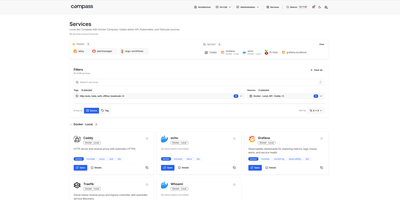
Compass
Every homelab outgrows the browser bookmark folder, and Compass answers by building the front page for you, discovering your services automatically instead of asking you to maintain cards by hand. Point it at Docker, Kubernetes, Tailscale, Headscale, NetBird, DNS records, a JSON API, or a plain static list, and it renders everything it finds as a searchable directory with icons, descriptions, and tags filled in from a catalog when a source leaves them blank. Each card shows whether the service is actually up, using the Prometheus or Gatus monitor you already run, and pinned and recent services keep daily tools one click away. Opening a service reveals its connection details, source metadata, extra links such as runbooks and health endpoints, and panels you embed from Grafana. Markdown pages live beside the directory, so architecture notes and on-call runbooks sit in the same navigation, with live service cards and charts embedded directly inside the prose. A debug view shows per-source health, what each source returned, and why a service you expected is missing, while group-based access decides which sources each person can see. Running on a dedicated VPS on RepoCloud with guaranteed CPU, RAM, and SSD, full root SSH access, and a browser serial console. Apache License 2.0 licensed.
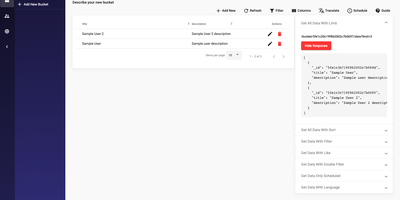
Spica
Spica skips the month of backend plumbing every new project starts with: data models, CRUD endpoints, logins, file storage, and an admin panel nobody wants to build. It hands you that whole layer as a running platform, so your first day is spent modeling your actual product. Define your data in Buckets and the REST API, with a GraphQL API alongside it, is generated automatically, complete with rules on each bucket as an entry-level security layer. Add custom policies so each user role reaches exactly the data and technical areas it should, then place your business logic in cloud functions triggered by events. Content teams get a back-office they can actually use: customized bucket views with a few clicks, inline image editing, data history, and localization for editors working in more than one language. Identities cover your users and editors, storage serves your files, and webhooks push events out to tools like Slack or Zapier when something changes. Run it as a backend engine for an application you are building, or purely as a headless CMS feeding a frontend that lives somewhere else. Running on a dedicated VPS on RepoCloud with guaranteed CPU, RAM, and SSD, full root SSH access, and a browser serial console. AGPL-3.0 licensed.
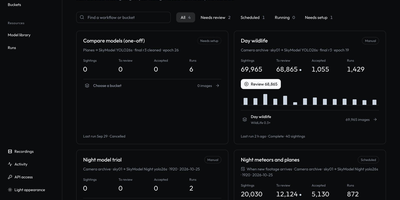
OpenSkyCam
OpenSkyCam records a sky-facing IP camera around the clock on hardware you own, and searches the footage for meteors, planes, and anything else that moves. A small Linux relay by the camera copies the RTSP stream into one-minute MP4 files without re-encoding, kept on your disk under a rolling 40-day window: browse by day, scrub by hour, zoom into the 4K frame, download originals. Workshop workflows sample frames from any time window, run up to four detection or classification models over them, and sort each frame into buckets by class, score, count, time of day, or motion, once or nightly as footage lands. Detections of one object link across a recording into tracks labeled moving, stationary, or brief, so fixed stars and porch lights are discarded and aircraft kept. A trained night detector for planes and meteors ships with the project; every detection waits in a review view where you confirm or correct its label and box, then freeze the approved set as a versioned training dataset. The processor lives on your machine too (Apple or NVIDIA GPU, or plain CPU), and the footage itself never leaves your disk. Every website action is also a /v1 API call, and an MCP server lets an AI agent find last night's clearest meteors, take a photo at any second of stored video, or schedule the next workflow. Running on a dedicated VPS on RepoCloud with guaranteed CPU, RAM, and SSD, full root SSH access, and a browser serial console. MIT licensed.
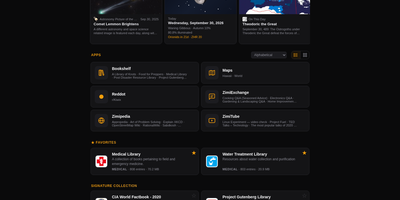
Zimi
When the internet goes away, your library does not have to: Zimi serves Kiwix ZIM archives of Wikipedia, books, videos and forums through a rich web interface, with one search box querying every archive across more than 100 million articles. Each content type gets its own app: Zimipedia for wikis, the Dictionary for Wiktionary, Bookshelf for books, ZimiTube for video, ZimiExchange for Q&A, Reddot for subreddits and offline street Maps. Bookmarks, lists, likes and highlights live in every app and sync across devices when you sign in, and any article can switch into whichever language edition you hold. The library manages itself: browse the Kiwix catalog of over 1,000 archives, download with one click, let auto-updates keep editions fresh, and seed downloads over BitTorrent with a ratio cap you set. Zimi servers on the same network find each other and pass archives at LAN speed, and one offline switch turns off every internet-bound feature for air-gapped rooms. You can also make your own ZIMs from a web page, a whole site, a video playlist or a folder of files. Access ranges from public to sign-in only with per-archive allowlists, and the JSON API plus MCP server let AI agents search the same library. Docker runs Zimi on port 8899 with your ZIM files and config mounted as volumes. Running on a dedicated VPS on RepoCloud with guaranteed CPU, RAM, and SSD, full root SSH access, and a browser serial console. GPL-3.0 licensed.
dinkydash
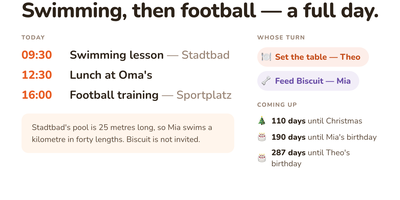
The family calendar nobody opens helps nobody, so DinkyDash puts it on a screen the household walks past. Paste in iCal links from Google, iCloud and Outlook calendars and the board merges them into one agenda in time order, big enough to read from across the kitchen, with tomorrow tucked underneath when the day leaves room. A personal calendar can share only the events marked for a partner and keep work and private appointments to itself. Chores answer the daily argument on their own: whose turn it is moves on with the date, so nobody ticks anything off. Birthdays, holidays and special dates count down in the corner, and once a day the board gets a fresh headline written about your actual day, with a useful note parked under the agenda. Light and dark themes come from the settings page, and that same settings page on your phone edits the configuration file directly, comments preserved. A preview page shows the board at Pi, TV and tablet sizes side by side before you mount anything. There is deliberately no login: it assumes your home network, rewards you with a board you never sign into, and asks to stay behind a VPN or an authenticated proxy if you view it away from home. Running on a dedicated VPS on RepoCloud with guaranteed CPU, RAM, and SSD, full root SSH access, and a browser serial console. MIT licensed.
ProxMate
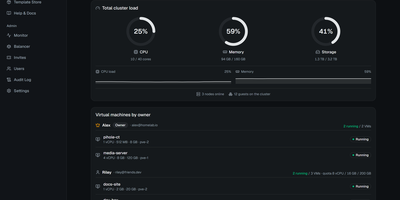
You have a Proxmox cluster with spare capacity and people who keep asking you for a VM: ProxMate turns that cluster into an invite-only cloud where those people help themselves, inside limits you set. Invite links carry CPU, memory, and disk quotas, and tenants spin up VMs or LXC containers from an ISO, the Template Store, or twenty curated cloud images, pasting an SSH key to get a ready-to-SSH box in about a minute. Automatic placement picks the node with the image and the most free capacity, so nobody needs to learn your topology. Projects group machines with per-project usage totals and whole-project start and stop, and any VM can be shared with another tenant as viewer, operator, or manager, never with delete rights. Both a graphical noVNC console and a text console with copy and paste run in the browser, so access never needs open ports, and an optional per-VM browser IDE puts VS Code inside the guest. Backups run on schedules with rolling retention and one-click restore, snapshots are instant, power schedules stop dev boxes overnight, and time-boxed invites suspend access without deleting anything. Admins watch live per-VM sparklines, audit every action, and balance memory across nodes with live migration. Running on a dedicated VPS on RepoCloud with guaranteed CPU, RAM, and SSD, full root SSH access, and a browser serial console. AGPL-3.0 licensed.
AiPBX
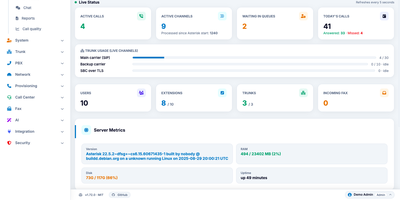
One server replaces the phone system, the meeting link, and the fax line: AiPBX turns a Linux machine into a business phone system with extensions, video meetings, chat, and call queues. Every employee gets one extension that rings a desk phone, the browser softphone, and the mobile app, while ring groups, multi-level IVRs, and time conditions route callers without anyone editing dialplan files. Queues staff your support line with dynamic agent sign-in, hold music, and position announcements, and a live wallboard lets supervisors watch waiting callers and agent states, then listen, whisper, or barge into a call. Meetings run in the browser: schedule conferences with PINs, send guests a magic link into a WebRTC room with screen sharing, and let streams forward without transcoding. Chat lives in the same portal: photos, files, presence, read receipts, and fax is composed in a rich-text editor or uploaded as PDF and delivered over T.38. Desk phones provision themselves: a discovery daemon spots new Yealink, Fanvil, Grandstream, Snom, and Cisco handsets and writes their configuration files. An AI assistant plans dialplan changes in plain language with dry-run preview and one-click undo, cloud voices from Google, Polly, Azure, ElevenLabs, or OpenAI read announcements aloud, and GDPR, KVKK, HIPAA, and PCI-DSS presets govern recording consent and retention purges. A 100-plus-endpoint REST API with scoped keys and HMAC-signed webhooks makes everything scriptable. Running on a dedicated VPS on RepoCloud with guaranteed CPU, RAM, and SSD, full root SSH access, and a browser serial console. MIT licensed.
DispatchSEO
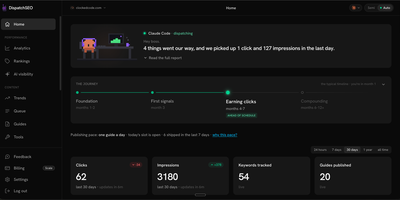
DispatchSEO runs an SEO program through your own AI agent: it researches keywords, queues ideas for your approval, and publishes a guide every morning. Connect Claude Code, Codex, Cursor, or the Claude app over MCP and the agent mines keywords from Search Console data and Google Autocomplete, then drops each idea into a queue showing volume, difficulty, and the reasoning behind it. Approve, reject, or drag to reorder, or switch on auto mode and skip the queue. Each morning the oldest approved idea becomes a real guide, delivered as a GitHub pull request or posted straight to a self-hosted WordPress site, checked against the live search results before it ships. Home greets you with a plain-language daily briefing, a journey tracker, publishing pace, and click and impression counters. Rankings charts daily positions with thirty-day sparklines, Search Traffic plots Search Console history, and an AI visibility page shows how often Claude cites your domain. A backlink playbook lists free and paid submissions with copy ready to paste. One deployment manages many sites, each with its own MCP token. Running on a dedicated VPS on RepoCloud with guaranteed CPU, RAM, and SSD, full root SSH access, and a browser serial console. AGPL-3.0 licensed.
RelayTV
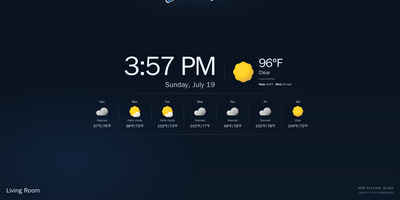
Your couch becomes the control room with RelayTV, a self-hosted media hub that runs on the Linux box plugged into your TV. Connect Plex, Jellyfin, or Emby once, then search films, open a series, pick an episode, resume where you stopped, or drop the pick into the shared queue. Paste a web video link to play it on the big screen, or queue an entire YouTube playlist of up to a thousand videos in order without pausing tonight's movie. The TV idles on a dashboard with a QR code, and anyone in the room scans it to join the same remote, browse, and add picks to the queue. Add M3U playlists to build a My Channels lineup, pin favorites to the top, rewind inside the buffered window when you miss a line, and jump straight back to live. Playback, queue advancement, history, and overlays all run on the box itself, so the TV keeps playing after your phone leaves the page. Every screen appears in Home Assistant as a media player, and the local HTTP API takes play, queue, overlay, and snapshot calls from scripts and dashboards. A second RelayTV in the bedroom can receive the active queue from the living room, and the optional API token locks control down on shared networks. Running on a dedicated VPS on RepoCloud with guaranteed CPU, RAM, and SSD, full root SSH access, and a browser serial console. GPL-3.0 licensed.
Geo-Monitor
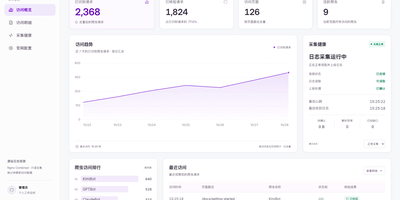
Search is being answered by AI crawlers first and humans second, yet most site owners cannot name a single bot that read their pages last week; Geo-Monitor answers that from the access logs you already have. A small collector sits beside Nginx or OpenResty, mounts the log read-only, and streams only new lines in batches, resuming after outages and surviving log rotation without ever touching your site's code. The console separates today, the last week, and the last month into identified requests, crawled pages, active crawlers, and trend lines, then drills into every visit with time, path, method, status code, claimed identity, and verification state. Identification and verification are deliberately different things here: a user agent only proves what a request claims to be, while a verified badge requires trusted log addresses and official IP evidence to agree. Twenty built-in identities cover OpenAI, Anthropic, Perplexity, Kimi, and Bytespider crawlers, and you can add, edit, or disable rules as new bots appear. Your sitemap syncs or imports as the content catalog, so coverage views show which pages crawlers actually reached, and collector health exposes heartbeat, backlog, and parsing problems. Running on a dedicated VPS on RepoCloud with guaranteed CPU, RAM, and SSD, full root SSH access, and a browser serial console. Apache-2.0 licensed.
Netra
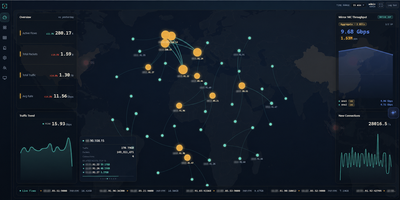
Netra watches your network from the side, plugged into a switch mirror port, and turns everything it sees into a live picture of your traffic without ever sitting in the forwarding path. A single binary loads its eBPF collectors in the kernel, so aggregation happens before packets reach user space and multi-gigabit mirror feeds stay observable instead of dropping samples. The dashboard opens on totals, protocol share, and traffic trends, then lets you drill into flows by address, port, domain, or service, check which countries your traffic talks to on a world map, and read the internal topology as a live graph. Domains surface passively from TLS handshakes, public addresses are enriched with country and organization data, and heuristic detectors flag scanning, flooding, and single-host surges, pushing alerts to your team chat with an optional AI-written explanation. You can ask the built-in assistant questions about real recorded history, connect external MCP servers so it can call your own tools while it answers, and stream flows onward to Kafka for other consumers. History rolls into compressed columnar files on a schedule and stays queryable for a month by default. Running on a dedicated VPS on RepoCloud with guaranteed CPU, RAM, and SSD, full root SSH access, and a browser serial console. GPL-3.0 licensed.
TutorLoom
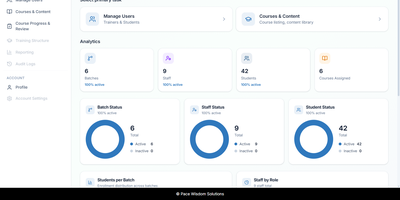
A training institute can run its courses, batches, trainers, and students from a single self-hosted TutorLoom installation it fully controls. One deployment serves many organizations at once, and every query is scoped to the organization, so trainers and learners only ever see their own data. Institute admins manage people and time-boxed batches, inviting trainers and students one by one or in bulk from CSV and Excel files. Courses are built as levels, chapters, and steps mixing videos, documents, tasks, and quizzes, with prerequisites and sequential unlocking so learners follow the path you designed instead of wandering. Students work through a guided step-by-step roadmap on the web or in the mobile app, watching completion fill in as they go and earning points and levels along the way. When learners submit work, trainers review everything in a single grading queue, approving or rejecting with a score and written feedback, then export progress to Excel when management asks for a report. Finishing a course produces a PDF completion certificate automatically. One account can hold several roles at once, so a trainer who also administers an institute switches portals without signing out. Branded email notifications keep learners informed under your own institute's name, and a documented REST API with interactive documentation powers the web app, the mobile app, and your own integrations. Running on a dedicated VPS on RepoCloud with guaranteed CPU, RAM, and SSD, full root SSH access, and a browser serial console. Apache-2.0 licensed.
PaperPull
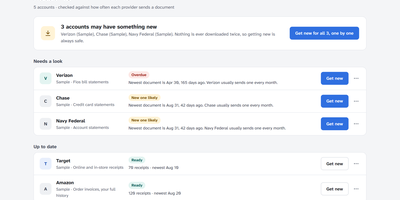
Years of bank statements, pay stubs and receipts sit scattered across dozens of websites, each demanding a login and offering one PDF at a time. PaperPull fetches that whole history for you: sign in yourself in a real browser window, answer the two-factor prompt, and it downloads statements, receipts, pay statements, W-2s and tax forms from 73 supported providers including Chase, Amex, ADP, Amazon, Walmart, Vanguard and Verizon. The tool only ever downloads; it never pays a bill, moves money or changes a setting, and that read-only promise is enforced by construction rather than by policy. Every archive is checked for freshness and for holes in the middle, so a series that looks current but quietly skipped three months is flagged by name, with per-account cadence learned from your own documents. Receipts become one long spreadsheet of every item you have ever bought across every store, with prices and dates, while transactions are read out of statement PDFs into workbook rows that are verified against each statement's printed beginning and ending balances. New documents can flow straight into a Paperless-ngx consume folder, everything runs under a password you choose on your own network, and no cloud account is involved anywhere. Running on a dedicated VPS on RepoCloud with guaranteed CPU, RAM, and SSD, full root SSH access, and a browser serial console. AGPL-3.0 licensed.
Quickly
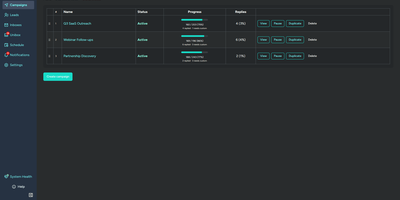
Cold outreach works better when your sending platform does not charge per seat and per contact for the privilege. Quickly runs multi-step email sequences across unlimited connected Gmail and Microsoft 365 inboxes, rotating sends automatically while respecting each inbox's daily limit. Because messages go out through Google and Microsoft's official OAuth APIs, they ride those providers' own infrastructure and reputation instead of a shared SMTP pool. You personalize every step with template variables drawn from your CSV import, split subject and body variants for A/B testing, and let bounce detection stop bad addresses before they hurt your domains. Replies from every account land in one unified inbox with threaded conversations, and AI classification sorts each reply as interested, not interested, out of office, wrong person, auto-reply, or unsubscribed, with Ollama available for fully offline classification. Analytics break performance down per campaign and per step with open, click, and reply rates and timeline charts, while a system health dashboard watches inbox token health and tracking domain reachability. Fifteen webhook event types and more than ninety REST endpoints feed tools like n8n, an MCP server exposes lead tools to AI assistants, and a test mode simulates sends, opens, and clicks without delivering anything. Running on a dedicated VPS on RepoCloud with guaranteed CPU, RAM, and SSD, full root SSH access, and a browser serial console. MIT licensed.