DevTrack
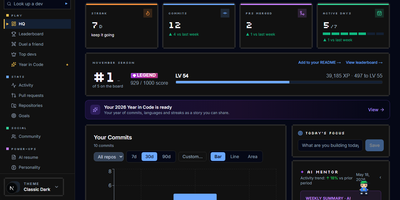
DevTrack turns your GitHub activity into a living dashboard of commit streaks, pull-request analytics, and goals that quietly update themselves. Sign in with GitHub and your last year appears as a contribution heatmap you can filter by repository and language, next to the streak you are protecting and the freeze you are saving for a holiday. Pull requests get the honest treatment: merge rate, average review time, and open-versus-closed breakdowns that show whether reviews or authors are the bottleneck. Weekly and monthly goals fill themselves in from live activity, while the consistency score and activity rings tell you whether your rhythm is steady or heroic but rare. When you want the story told back to you, an AI mentor who knows your history offers guidance, a résumé generator builds an ATS-friendly CV from merged pull requests for the role you name, and a weekly summary explains your own graphs in plain words. Opt into the public leaderboard to rank your streak, commits, and PRs against other developers, or keep everything private and share only the profile page and embeddable badges you choose. Running on a dedicated VPS on RepoCloud with guaranteed CPU, RAM, and SSD, full root SSH access, and a browser serial console. MIT licensed.
Calagopus
When hosting multiplayer game servers for communities or friends requires container isolation and low-overhead administration, Calagopus steps in as a modern game server management panel. Server operators use it to deploy and control Minecraft, Rust, ARK, Valheim, FiveM, and any other Linux containerized workload while reusing existing Pterodactyl and Pelican eggs without modification. From the live WebSocket console, administrators monitor real-time CPU, memory, and network graphs, autocomplete saved command snippets, inspect per-layer Docker image pull progress bars, and pop the terminal out into a secondary window. Managing configuration files and modpacks happens directly in the browser through a split-pane tabbed editor featuring real-time collaborative editing, side-by-side revision diffs with one-click rollback, a visual disk usage treemap, in-place archive browsing, and VS Code workspace mounting. Database workflows are equally streamlined: you can provision MySQL, PostgreSQL, MongoDB, or Redis instances, browse and edit rows or SQLite files in a built-in data explorer, and run read-only or writable SQL queries without external database clients. Automated schedules support conditional if-else branching, regex variable extraction from console output, crash-detection triggers, and eight backup storage drivers including S3, Restic, Kopia, ZFS, Btrfs, and Proxmox Backup Server. Running on a dedicated VPS on RepoCloud with guaranteed CPU, RAM, and SSD, full root SSH access, and a browser serial console. MIT licensed.
Eclipse Che
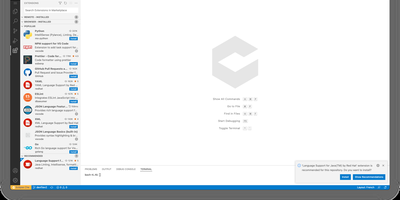
Eclipse Che spins up complete development environments on Kubernetes from a Devfile in the project repository, so new developers click a factory link and open a browser IDE with dependencies, runtimes, and debugging already configured instead of spending their first day installing toolchains. Each workspace runs as a DevWorkspace custom resource in the user's namespace, making environments API-manageable with kubectl and GitOps tooling alike. Developers choose their editor per workspace, from Visual Studio Code Open Source to JetBrains IDEs via Projector, and the 7.124 release adds Orca, an agent development environment for working alongside AI coding agents. Workspaces carry their own containers for build and run, so code executes in a production-like environment with direct Kubernetes API access from the IDE. Teams standardize stacks as Devfile templates, onboard contributors in minutes, and open a fresh workspace per branch or pull request in a new browser tab. The 7.124 release also builds workspace lifecycle commands into chectl, including SSH connections with port forwarding to desktop editors, and DevWorkspace Operator 1.0 adds optional per-workspace NetworkPolicy isolation. Running on a dedicated VPS on RepoCloud with guaranteed CPU, RAM, and SSD, full root SSH access, and a browser serial console. EPL-2.0 licensed.
MCSManager
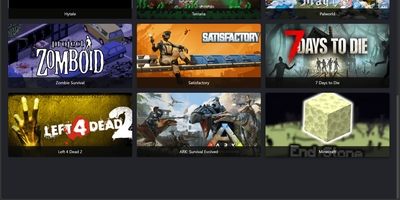
Hosting a Minecraft survival world, a Terraria server, and a Palworld host no longer means juggling SSH sessions and screen windows, because MCSManager puts every instance behind one web panel. A built-in marketplace installs game servers from ready-made templates, filtered by operating system and tagged with the Java version each one needs, while any Docker Hub image, uploaded ZIP archive, or plain process can run as an instance with its own start command, stop command, and live terminal. Docker instances get memory, CPU, port mapping, and volume settings, and each instance can auto start, auto restart, and run scheduled tasks. For Minecraft servers, the plugin and mod manager (Beta) searches Modrinth and CurseForge, and the file manager handles maps, configs, and uploads. Administrators create user accounts and assign instances to them, so friends or paying customers only see their own servers, which suits small hosting businesses that sell game servers. Extra machines join as nodes and connect to the same panel, and the drag-and-drop dashboard can be rearranged to taste. The interface supports many languages. Running on a dedicated VPS on RepoCloud with guaranteed CPU, RAM, and SSD, full root SSH access, and a browser serial console. Apache-2.0 licensed.