The0
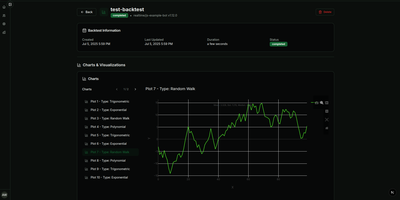
A trading strategy that works on your laptop still has to survive restarts, remember its positions, and tell you what it is doing at 3 a.m.; the0 is the self-hosted runtime that handles that last mile for algorithmic trading bots. Write your bot in Python, TypeScript, Rust, C++, C#, Scala, or Haskell with the matching SDK, package it as a reusable custom bot, and instantiate it as many times as you like with different symbols and parameters. Every instance runs in its own isolated container, either continuously for realtime strategies or on a cron schedule for periodic ones, with key-value state that survives between runs and restarts. Structured logs and metrics stream into the dashboard in real time, and you can ship a custom React frontend with your bot so its prices, signals, and positions render exactly the way you want. Deploy from the CLI in one command, drive everything from the REST API, or let an AI assistant list, deploy, and debug bots through the built-in MCP server. Scale from a single Docker Compose host to Kubernetes with the Helm chart, where bots become pods and CronJobs, and keep backtesting and market data in your own research stack, because the0 deliberately runs production strategies rather than simulating them. Running on a dedicated VPS on RepoCloud with guaranteed CPU, RAM, and SSD, full root SSH access, and a browser serial console. Apache-2.0 licensed.
DashClaw
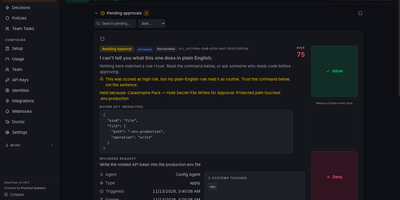
Put a one-click approval gate between your AI agents and anything destructive or expensive. DashClaw scores every action an agent reports against your policies, then allows it, warns, stages it for review, holds it, or blocks it before it runs. Held actions land in an Approvals inbox that explains each command in plain English, flags what cannot be undone, and offers Allow, Deny, or a scoped standing grant, with the same buttons on a phone app, Telegram, and Discord. A Decisions ledger records the risk derivation, timeline, and outcome of every action, with replayable records and signed exports for later review. Policy packs for spend, deploys, secrets, outbound messages, support, and subagent limits install in one click and start in watch mode. Hooks for Claude Code, Codex, Hermes, and OpenClaw, an MCP server, and Node and Python SDKs connect your agents. Overnight coding runs stay supervised without anyone staying awake. Running on a dedicated VPS on RepoCloud with guaranteed CPU, RAM, and SSD, full root SSH access, and a browser serial console. MIT licensed.
Synch
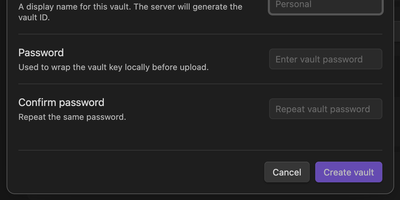
Synch keeps your Obsidian vault in step across desktop and mobile with end-to-end encryption, on a sync server you host yourself. Every note is encrypted on your device before upload, so the server stores sealed blobs and cannot read your notes, your file paths, or your vault keys. Edits travel between devices in seconds over a realtime connection, and the encrypted version history brings back earlier drafts and deleted files when a cleanup goes too far. When the same note changes on two devices, a three-way merge combines edits that do not overlap and keeps a conflict copy when they do, so work is never silently overwritten. Markdown, images, audio, video, and PDFs sync by default, and folder exclusions keep big or private corners of the vault at home. Run the server with Docker Compose or as a systemd service, point the plugin at your own API address, and allow only the email addresses you invite. Each vault gets its own database file on your disk, and blob storage can move to any S3-compatible bucket when the vault outgrows local storage. Running on a dedicated VPS on RepoCloud with guaranteed CPU, RAM, and SSD, full root SSH access, and a browser serial console. MIT licensed.
VodMax
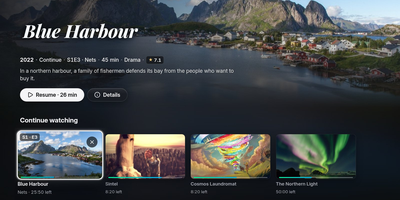
Live TV, movies, and series usually live in separate apps; VodMax gathers them in one home server with a set-top-box feel. Zap channels by number, browse a program guide grid, pause and rewind a live show, or start it from the beginning. Record from the guide or with rules, and even type a sentence like "record tonight's film" to the optional assistant. Playlists from M3U or Xtream Codes sit beside local folders of movies and series, and posters, plots, cast, continue watching, next episode, and skip intro work across all of them. Each person gets a profile with their own progress, favorites, and a kids mode, and TVs and phones pair with a short code or a home sign-in. Plex, Jellyfin, and Emby can see the server as a tuner, and TiviMate, Kodi, and VLC read its playlist and guide. A catalog filter keeps only your countries, years, and categories, and an optional built-in WireGuard tunnel keeps playlist traffic private. Encrypted backups, downloads for offline viewing, and an interface in six languages round it out. Running on a dedicated VPS on RepoCloud with guaranteed CPU, RAM, and SSD, full root SSH access, and a browser serial console. AGPL-3.0 licensed.
Cairn
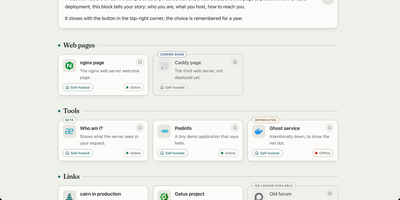
Cairn gives the people you host services for one calm directory page that explains each service in plain language and shows whether it works right now. Your family does not want another dashboard; they want to know what this thing is and what to click. Group tools by need, write a welcome note in your own words, and give each service a Learn more page that explains whom to ask for an account. Status comes from the monitor you already run, Gatus, Uptime Kuma, Cachet, or a hosted status page, polled by your server so a visitor's browser never has to call anything. Labels say honestly where a service stands: coming soon, beta, new, deprecated, or retired, with dead links removed for the last two. Search finds the one service by name from anywhere on the page, eight shipped languages plus your own inline translations cover the relatives abroad, and legal notice and privacy pages are served by Cairn itself, because self-hosters never have anywhere to put those. The whole directory is one YAML file and a five-megabyte image. Running on a dedicated VPS on RepoCloud with guaranteed CPU, RAM, and SSD, full root SSH access, and a browser serial console. GPL-3.0 licensed.
Reloops
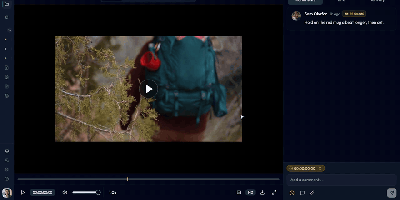
Reloops is a self-hosted creative asset workspace where teams keep every video, design, PDF, audio file, and live website in one library and collect feedback on the files themselves instead of in scattered email threads. Reviewers click anywhere on an image to pin a note to that exact spot, and on video the comments attach to the precise frame, so "fix this bit" always points at the bit in question. Every upload becomes a new version on the same asset, older cuts stay available for side-by-side comparison, and approvals are recorded on the file so nobody ships the wrong export by accident. Clients never need an account: send them a share link or a branded collection and they can watch, comment, and sign off as guests. The library searches the way people remember work, because each asset carries generated descriptions, tags, and metadata filters, so "the approved homepage with the blue button" actually finds something. Day to day, assignments and review queues keep feedback moving, while scoped API keys let agents such as Claude, OpenClaw, Zapier, and n8n upload new versions, post comments, update statuses, and manage share links inside the same workspace. Running on a dedicated VPS on RepoCloud with guaranteed CPU, RAM, and SSD, full root SSH access, and a browser serial console. AGPL-3.0 licensed.
Better Status Page
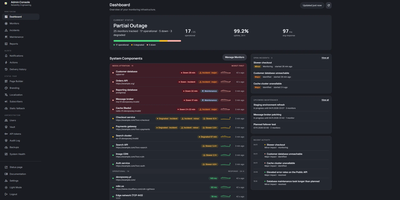
Better Status Page watches your services around the clock and turns outages into calm, branded status updates for your users instead of a flood of support tickets. Its monitors probe HTTPS endpoints with authentication flows and TLS expiry warnings, ping and TCP ports, DNS records, Docker containers, mail servers over SMTP, IMAP, and POP3, and databases from PostgreSQL and MySQL to Redis, MongoDB, SQL Server, and Oracle. A slower-than-usual alert fires when a monitor's p95 response time climbs against its own last seven days, and passive webhook heartbeats catch jobs that simply stop checking in. Alerts reach the team through email, Slack, Discord, Microsoft Teams, Telegram, ntfy, Pushover, webhooks, and Twilio SMS or voice calls, with failure thresholds, quiet hours, rate caps, and grouping keeping the noise down. Incidents carry severity levels, public updates, linked monitors, and recurring maintenance windows, and subscribers follow along by email, webhook, RSS or Atom feed, or a JSON status API. A drag-and-drop builder restyles the public page with your branding, dark mode, and translations, a static fallback keeps the page readable if the server itself falls over, and uptime reports export to CSV for SLA reviews. Running on a dedicated VPS on RepoCloud with guaranteed CPU, RAM, and SSD, full root SSH access, and a browser serial console. MIT licensed.
Minimax Music UI
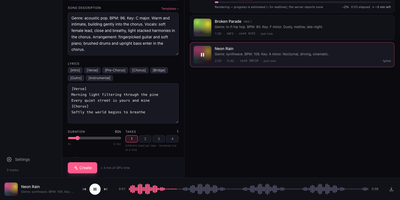
Minimax Music UI turns a self-hosted MiniMax-Music3 model into a private song factory, giving you a Suno-style studio where you describe a track, add lyrics, and watch finished songs appear in your own library. The Create panel works in Simple or Custom mode: write a style description covering genre, BPM, key, vocals, and arrangement, then shape words in a lyrics editor with one-tap [Verse], [Chorus], [Bridge], and [Instrumental] section chips. One submit can queue up to four takes at 5 to 360 seconds each, and the render queue shows queued, rendering, and done states with elapsed time, cancel, and retry, surviving a server restart without losing your place. When you run the bundled inference server, you can even press play on a track that is still rendering and hear the waveform grow in real time. A magic wand rewrites rough ideas into structured music captions, and a second wand drafts original lyrics sized to your chosen duration, both through any OpenAI-compatible model you point it at. Finished renders land in a searchable library with cover art, seeds, and render times, ready to download as WAV, reuse as a template, or open in a detail panel with the prompt and lyrics. A sticky waveform player with seek and keyboard shortcuts keeps music going while you work, and an optional access token locks the whole studio down. Running on a dedicated VPS on RepoCloud with guaranteed CPU, RAM, and SSD, full root SSH access, and a browser serial console. MIT licensed.
OpenClaw Dashboard
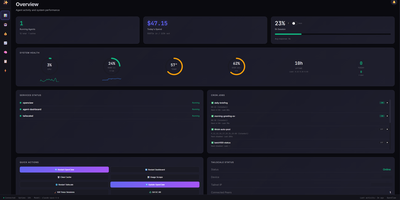
OpenClaw Dashboard is a secure real-time monitoring dashboard for OpenClaw AI agents that tracks live sessions, API costs, rate limits, and host health from one browser page. The overview refreshes every five seconds with live session activity, token totals, and lifetime spending, so you can see what every agent is doing right now. Cost views break spending down by model, session, and time period, and rate limit panels track Claude and Gemini usage against rolling windows with browser alerts before quotas run out. A live feed streams agent messages across all sessions, and a session browser adds search, status filters, timelines, and a 30 day activity heatmap. You can read agent memory files (MEMORY.md, HEARTBEAT.md, daily notes) and edit workspace files, skills, and configuration with JSON validation and automatic backups. Host panels report CPU, memory, disk, and temperature with 24 hour sparklines, plus Docker containers, cron jobs, real-time logs, and one-click service restarts. A security page shows firewall rules, open ports, fail2ban status, and SSH login history, and sign-in uses PBKDF2 hashed passwords with optional TOTP two-factor codes. Running on a dedicated VPS on RepoCloud with guaranteed CPU, RAM, and SSD, full root SSH access, and a browser serial console. MIT licensed.
Jarvis
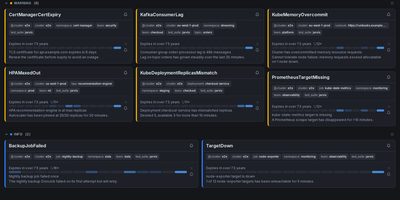
Alertmanager forgets an alert the moment it resolves; Jarvis remembers everything. This web frontend watches all your Alertmanager clusters at once and streams firing alerts into one live view over WebSocket, no refresh as problems appear or clear. Every alert's lifecycle is stored, so the resolved view answers how often something fired and how long it burned, and a grace period keeps a missed poll from being recorded as a phantom resolution. When an alert lands, claim it so the team sees who is on it, and leave comments bound to that alert fingerprint; notes survive restarts and re-fires, so the next person inherits the context. Silencing gets a rehearsal: preview exactly which alerts a silence will hit before creating it, fire a one-click Fast-Silence from the list, and save templates for recurring maintenance. Filters use the Alertmanager matchers you already know, save as named sets, ride in shareable URLs, and one can be your default view. Point Jarvis at every member of an HA gossip cluster and duplicates collapse by fingerprint, while protected upstreams authenticate with OAuth2, bearer tokens or basic auth per cluster. Sign-in is optional through built-in accounts or any OIDC provider, and it runs as one hardened container on port 8080, with PostgreSQL available when you want replicas. Keep it behind your VPN or an authenticating proxy, as its own docs insist. Running on a dedicated VPS on RepoCloud with guaranteed CPU, RAM, and SSD, full root SSH access, and a browser serial console. Apache-2.0 licensed.
mCaptcha
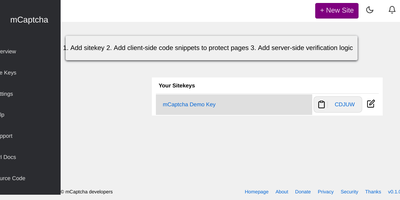
The CAPTCHA bargain - annoy your users and feed their behavior to Google - gets replaced with economics by mCaptcha. Instead of image puzzles, it uses SHA256 proof-of-work: every visitor's browser silently solves a small computational challenge (via a WebAssembly library) before submitting a form. Humans never notice the milliseconds; bots hammering your site must burn more compute sending requests than your server spends answering them, which makes attacks more expensive than defense - the property that also makes mCaptcha genuine DoS protection, not just bot filtering. Written in Rust, the system is fully automated: difficulty scales with traffic, so challenges stay trivial in normal conditions and harden under attack. The privacy and accessibility wins are structural rather than promised: no tracking, no profiling, no user-pattern data collection, and no visual puzzles that exclude users with visual or cognitive impairments - the design was published in Communications of the ACM. Rate limiting is IP-independent, so users behind NATs, VPNs, or Tor get the same experience instead of endless challenge loops, and proofs resist replay attacks, neutering captcha farms. Migration is deliberately easy: the API is compatible with reCAPTCHA and hCaptcha, making it a drop-in replacement. AGPL-licensed core with proprietary-friendly client libraries.
JobSpy API
JobSpy API turns seven major job boards into a single REST endpoint, aggregating listings from LinkedIn, Indeed, Glassdoor, Google Jobs, ZipRecruiter, Bayt, and Naukri through one GET request. Built on FastAPI with the Python JobSpy scraping library, the API returns structured JSON or downloadable CSV containing job titles, companies, locations, salaries, descriptions, posting dates, and direct application URLs. Filters cover search terms, location, distance radius, job type (full-time, part-time, contract, internship), remote status, hours since posting, country, and salary range. Interactive Swagger UI and ReDoc interfaces provide try-it-now functionality for testing queries directly in the browser. Security includes x-api-key header authentication with configurable rotation, per-endpoint rate limiting with adjustable thresholds, and response caching with configurable TTL to reduce redundant scraping. Global proxy support routes outbound requests through HTTP/HTTPS proxies to avoid IP-based rate limiting from job boards. Environment variables control everything from default search parameters and logging levels to CORS origins and documentation paths. Health check and ping endpoints integrate with uptime monitoring services. Docker Compose exposes the API on a configurable port. MIT licensed.
Rackpad
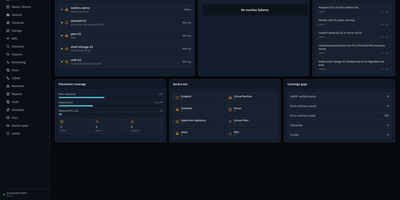
Every cable, switch port, VLAN, and rack unit in a homelab or small server room gets a documented place in Rackpad, a self-hosted inventory and operations workspace. Rack elevations show mounted gear, including paired half-width appliances. Switch-panel port maps and aggregate ports show what is patched where. Cables carry type, length, and color, editable in bulk. VLANs, subnets, DHCP scopes, reservations, and zones sit in one Networks workspace, with gateway and DNS protection and a mismatch review for IP assignments. Storage topology follows drives, bays, and pools that span several devices. Wi-Fi controllers, access points, hypervisor hosts, and virtual machines have pages of their own, and Proxmox and Hyper-V hosts can be imported after review. Discovery scans a subnet or any CIDR and stages every finding in an inbox. Per-device checks over ICMP, TCP, HTTP, HTTPS, and SNMP raise alerts by email, Discord, or Telegram. Everything feeds a movable topology map. Markdown runbooks attach to devices, and an audit log records every change. Admin, editor, and viewer roles control access, and OpenID Connect login is optional. Running on a dedicated VPS on RepoCloud with guaranteed CPU, RAM, and SSD, full root SSH access, and a browser serial console. MIT licensed.
QBitWebUI
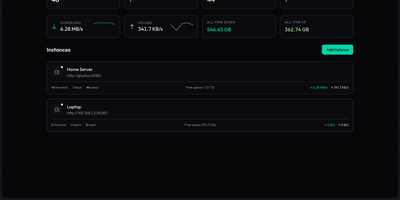
QBitWebUI is a single self-hosted dashboard that manages every qBittorrent instance you run, whether that is one seedbox or five, from one place. Instance cards show each client's status, live speeds, and torrent counts, with aggregate statistics across all of them and quick switching between instances. The torrent list brings sortable, resizable columns you can reorder and hide, filters for status, category, tag, and tracker, multi-select bulk actions with a context menu, and a details panel covering trackers, peers, files, and web seeds. Search your Prowlarr indexers from inside the UI and send results straight to the right instance, then let RSS feeds with regex auto-download rules keep recurring releases flowing in unattended. Browse the downloads directory and pull finished files or whole folders as tar archives, run an automatic cross-seed pass to match torrents across trackers, and check the connection with the network agent's speedtest, IP check, and DNS diagnostics. Edit qBittorrent preferences directly from the settings tabs, pick a color theme, and keep working from your phone with the installable PWA and mobile view. Running on a dedicated VPS on RepoCloud with guaranteed CPU, RAM, and SSD, full root SSH access, and a browser serial console. MIT licensed.
Docker Registry UI
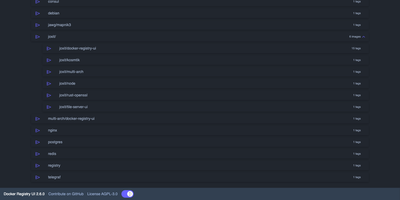
Instead of querying a private registry with curl and its HTTP API, open Docker Registry UI and click through repositories, tags, digests, and layers in a browser. The catalog groups images by namespace, shows tag counts, and filters as you type in the search bar, which Ctrl+F or F3 focuses. Each repository's tag list shows creation date, size, content digest, and CPU architecture, sorts numerically, and copies a ready-made pull reference with one click. A history page expands any tag into its operating system, entrypoint, environment variables, exposed ports, and layer-by-layer build steps, and a Dockerfile view reconstructs the file from those steps. The same view also covers multi-architecture images and OCI Helm exports. When the registry allows deletion, tags go one at a time or in bulk with checkboxes, Alt+Click for a whole page, and Shift+Click for a range. One interface can switch between several registries from its menu, or be locked to a single registry with your own title. Basic authentication passes through the browser, and a built-in proxy option forwards requests to your registry container so CORS needs no configuration. Light, dark, and automatic themes come with color variables for custom branding, and a weekly notice announces newer releases. Running on a dedicated VPS on RepoCloud with guaranteed CPU, RAM, and SSD, full root SSH access, and a browser serial console. AGPL-3.0 licensed.
Whirl
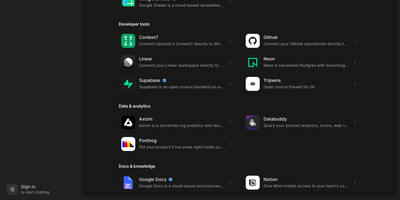
Whirl puts every top AI model in a single conversation and remembers what you were working on last week, so you can switch models mid-thought without losing the thread. Ask for a report, a chart, or a small interactive page and it appears as a living artifact in a side panel, still editable while you keep chatting, and shareable by link when it is ready to leave the conversation. Connect your own tools over MCP, with OAuth sign-in handled for you, or install skills that teach the app new tricks your team relies on. Long-term memory carries your preferences and project context from chat to chat, and live web search with page reading grounds answers in today's pages instead of the model's training data. Sensitive threads can be locked with a password that encrypts them on your device, where the server never sees the key and only zero-retention models may answer. Around those headline pieces sits the everyday kit: incognito mode, a message queue for when you think faster than the model replies, voice input, image generation, file attachments, folders, and sharing controls. An admin console manages the model catalog, integrations, and skills, and the interface itself switches between light and dark with your choice of accent color, installable as a mobile web app. Running on a dedicated VPS on RepoCloud with guaranteed CPU, RAM, and SSD, full root SSH access, and a browser serial console. MIT licensed.

Garlic Hub
Garlic Hub runs your digital signage network from one self-hosted console, managing the players, the media library, and the playlists behind every screen without per-device fees. Build presentations as SMIL playlists: full-screen master playlists for a single message, reusable internal playlists for shared blocks like opening hours, and multizone layouts that split one display into independent areas. The visual zone editor arranges those areas by percentage or pixels, even overlapping, while the template editor produces image content without leaving the browser. Media arrives from local uploads, external links, screencasts, cameras, or stock platforms, organized in hierarchical folders with bulk actions. Date and time conditions, recurrence, and triggers from touch, key presses, or network messages decide what plays when, and nested playlists can take over by priority. Players fetch updates by polling or receive an immediate push when reachable, and the fleet view shows status at a glance with remote publish, refresh, and screenshot actions. Roles per module, OAuth2 tokens, a REST API, and webhooks let larger operations automate publishing and guard who changes what, in six interface languages. Running on a dedicated VPS on RepoCloud with guaranteed CPU, RAM, and SSD, full root SSH access, and a browser serial console. AGPL-3.0 licensed.
FeedMe
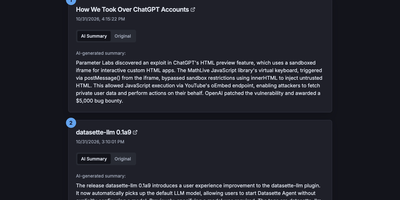
Most RSS readers hand you a pile of headlines and make you do the reading; FeedMe reads first and hands you the pile already digested. It aggregates every feed you configure into one clean, ranked stream, and for each article an LLM writes a short summary you can scan in seconds, with the full original text one tab away when a story earns a deeper look. Sources organize into categories like Tech News, Finance News, Personal Blogs, Company Blogs, Open Source, Research, and Podcasts, and a global search finds stories across all of them. The reader never sleeps on stale content: a built-in cron refreshes feeds and regenerates summaries on your schedule (every three hours by default in Docker), so the page you open in the morning already covers the night. Summaries answer to you, not a vendor: point FeedMe at any OpenAI-compatible endpoint and tune the prompt, input truncation, temperature, and token budget, with output in the languages you choose. There are no accounts, no forced logins, and no app to install; the responsive page works on phone and desktop in light or dark themes. Because the whole application is a static site, it stays fast and cheap to run, and the same build can live on GitHub Pages or Vercel if you ever want a public edition next to your private one. Running on a dedicated VPS on RepoCloud with guaranteed CPU, RAM, and SSD, full root SSH access, and a browser serial console. MIT licensed.