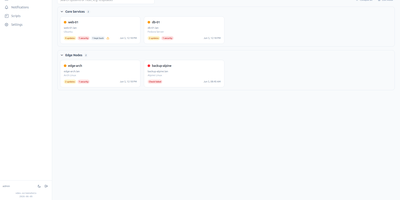
Linux Update Dashboard
Linux Update Dashboard is a self-hosted web app that lets you check and apply package updates across a whole fleet of Linux servers from one browser dashboard, over SSH, with no agent installed on any managed machine. It discovers each server's package managers, operating system, installed packages, reboot state, and distribution lifecycle, then lets you refresh, upgrade selected packages, run full upgrades, autoremove leftovers, cancel running work, or reboot remotely while watching real-time command output stream into the page. Groups with health badges and explicit priorities organize fleets for clear overviews and ordered Upgrade All batches that run as waves across eligible systems. An encrypted SSH credential vault stores reusable passwords, private keys, and OpenSSH certificates with AES-256-GCM, and you can view or edit repository source files through sudoedit with diff review and activity history. Cron-based schedules automate refreshes, updates, autoremove, reboots, and notifications for chosen systems, while alerts go out by email, Gotify, MQTT, ntfy.sh, Telegram, or webhooks, with Home Assistant MQTT discovery entities for every server. Sign-in supports passwords with optional TOTP, passkeys and WebAuthn, OpenID Connect SSO, and API tokens, and the interface speaks ten languages with dark and light themes and custom branding. Because this tool can run commands on your servers, keep it on trusted networks behind TLS, a reverse proxy, or a VPN. Running on a dedicated VPS on RepoCloud with guaranteed CPU, RAM, and SSD, full root SSH access, and a browser serial console. AGPL-3.0 licensed.
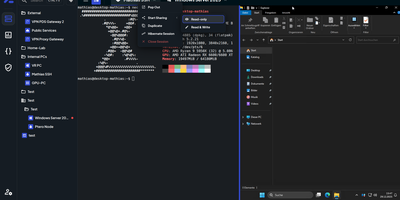
Nexterm
Terminals, remote desktops, and file browsers for every server you run: Nexterm opens them over SSH, VNC, RDP, Telnet, or SFTP from a self-hosted web page. Servers live in folders with tags and custom icons. Connections open as tabs or split views, keep running across browsers and devices, and can hibernate and resume later. The file manager handles SFTP and FTP: drag files in, upload whole folders, search, and edit in place with syntax highlighting. Live metrics track CPU, memory, disk, network, and processes for each host. Snippets store the commands you retype most. Scripts run whole maintenance jobs. Git repositories added as sources bring ready-made ones filtered by operating system. Organizations share servers through role-based permissions, and every action is logged. Record full terminal sessions for audits and training, or send a shared-session link so a colleague can join, read-only or writable. Authentication covers local accounts with TOTP and passkeys, OIDC providers such as Keycloak, Authentik, and Microsoft Entra ID, and LDAP or Active Directory. Saved passwords, SSH keys, and passphrases stay encrypted at rest. A Proxmox integration lists LXC containers and QEMU virtual machines and can start or stop them. An opt-in AI assistant drafts shell commands from plain-language requests. Running on a dedicated VPS on RepoCloud with guaranteed CPU, RAM, and SSD, full root SSH access, and a browser serial console. MIT licensed.
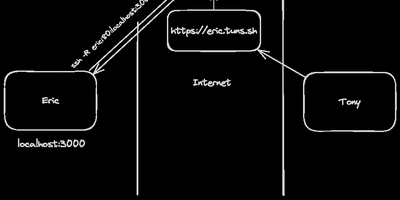
sish
Private machines hide their services behind routers and firewalls; sish gives those services a public address, reached with nothing more exotic than the SSH client already on your laptop. Point a standard remote forward at the server and a local web app appears at its own subdomain over HTTPS, ready to share with testers, clients, or a webhook provider. Raw TCP forwards work the same way, publishing a database, a game server, or an SSH port on a fixed external port you choose. Private aliases keep sensitive services off the public internet entirely, reachable only through an authenticated SSH jump from another machine you control. SNI routing passes encrypted TLS connections to the right backend by hostname, so several services share one public endpoint without the tunnel terminating their encryption. Aliases can spread traffic across multiple backends with built-in load balancing modes, handy when several replicas sit behind one name. The service console lists live tunnels and inspects forwarded requests as they pass, turning tunnel debugging into reading a log instead of guessing. Access rests on SSH keys or passwords with hot-reloaded key directories, and binding policies cap which subdomains and ports each user may claim. Because clients need no agent software, locked-down laptops, CI runners, and embedded devices can open tunnels with the tools already installed. Running on a dedicated VPS on RepoCloud with guaranteed CPU, RAM, and SSD, full root SSH access, and a browser serial console. MIT licensed.
Wetty
Open a browser tab and you are at a real login prompt on your server. Wetty puts a full terminal inside the web page, so SSH access survives firewalls, borrowed laptops, and networks where only HTTPS gets out. The emulator is a complete xterm.js implementation rather than a crippled web console, so colors, Unicode, mouse interaction, and full-screen programs like vim, top, and tmux behave the way they do in a desktop terminal. Websockets carry the session instead of Ajax polling, which keeps keystrokes responsive enough to forget you are in a browser. Point it at any SSH server with host, port, user, and key options, or let it launch the local login prompt when it runs on the machine itself. Visiting /ssh/yourname skips the username question and goes straight to the password prompt for that account. Serve it over HTTPS with your own certificates, restrict which browser origins may connect, run it on a Unix socket behind a reverse proxy, and confine it to a base path when it shares a domain with other tools. A YAML configuration file and environment friendly flags make the same setup reproducible across a fleet, and an official container image keeps installation to one command. Running on a dedicated VPS on RepoCloud with guaranteed CPU, RAM, and SSD, full root SSH access, and a browser serial console. MIT licensed.
ShellHub
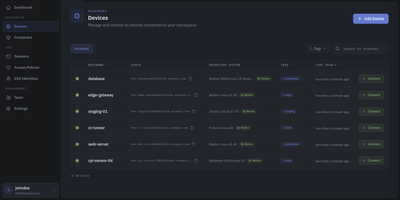
Every server, embedded board, and edge gateway you manage becomes reachable through one SSH address in ShellHub, even when it sits behind NAT with no public IP and no open inbound port. A small agent on each device dials out to your server, so a box on a customer LAN or a cellular link needs nothing beyond outbound web access. Connect with the stock ssh client by typing [email protected]@server, or open a terminal in the browser, and scp, sftp, rsync, and port forwarding work unchanged. SSH identities tie every key to a named team member, so removing someone ends their access on every device at once. Default-deny access policies grant or block members, roles, users, or API keys by device tag, Linux login, and source address, and can require a fresh browser confirmation before a session opens. Provisioning keys enroll whole fleets through automatic, manual, webhook, or allowlist acceptance, with usage limits, expiry dates, and tags. The Sessions page records who connected to which device, as which login, and from where, and browser terminals can be recorded and replayed. A Docker connector turns containers into devices that policies can grant one by one. Four member roles shape what each person can change, and the HTTP API, API keys, and an MCP server let scripts and AI assistants list devices and review sessions. Running on a dedicated VPS on RepoCloud with guaranteed CPU, RAM, and SSD, full root SSH access, and a browser serial console. Apache-2.0 licensed.
Skiff
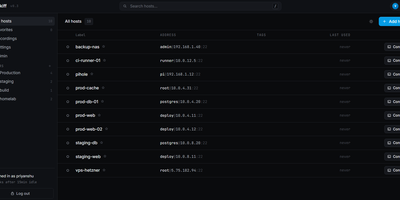
Skiff is a self-hosted SSH manager that remembers every command you ran on your servers and exactly what it printed, so the fix you found at 2 a.m. last March takes seconds to find again. Open a host's history beside its terminal, or search commands and captured output across every host, filter to just the failed attempts, and expand an entry to see its full output. When you edit a small text file, Skiff reads it over SFTP and keeps the before-and-after diff and both versions, so you can see what changed instead of guessing. Useful entries pin to a host's notes, save as reusable snippets, or go back into the terminal with Run again, where you review and press Enter yourself. The browser is only a viewer: sessions live in the Skiff server process, so closing a tab or losing Wi-Fi does not kill your work, and you reattach with recent scrollback intact. Hosts organize into nested folders with favorites and full-text search, existing SSH configs import in one paste, and host keys pin on first connect with a loud warning if one ever changes. Credentials sit in an encrypted vault that locks itself after an idle timeout, team mode shares one vault with per-user logins, and there is no cloud account, telemetry, or agent to install on any target server. Running on a dedicated VPS on RepoCloud with guaranteed CPU, RAM, and SSD, full root SSH access, and a browser serial console. AGPL-3.0 licensed.