LLM Wiki v2
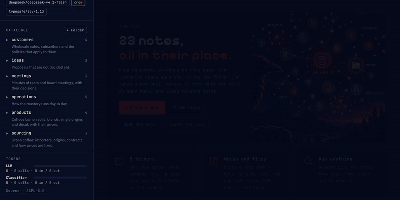
Instead of burying your documents in a vector index you cannot inspect, LLM Wiki v2 files them into a Markdown wiki you can read, browse, and question. Drop text, Markdown, or PDF files anywhere on the page and each one is catalogued automatically, filed into a folder that says what it holds, and linked to the notes it relates to. Ask a question and the answer cites the exact notes it used, with clickable sources you can open, verify, and correct. New documents update the note on their subject instead of piling up as disconnected chunks, so what you teach it stays taught. A small classifier routes filing and questions through the folder tree, keeping the wiki quick and cheap as it grows, and you can browse the tree, follow see-also links, move or delete notes, and watch the tokens spent by both the model and the classifier. Connect OpenRouter, OpenAI, Gemini, a local Ollama, or any compatible endpoint, and expose the same wiki to Claude Code or Codex as long-term memory they can recall from and write to. Because every note is plain Markdown in a folder you own, the whole knowledge base can live in git beside your other files. Running on a dedicated VPS on RepoCloud with guaranteed CPU, RAM, and SSD, full root SSH access, and a browser serial console. AGPL-3.0 licensed.
Academic Commercialization Agent
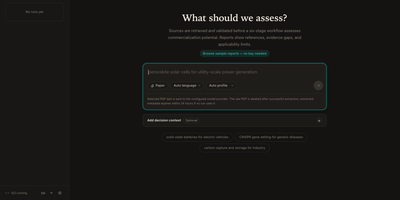
Got a research paper and no idea if anyone would pay for it? Academic Commercialization Agent answers with a cited triage report instead of a hunch. Type a topic or attach a paper PDF, pick a report language and scoring profile, and follow the run as it works through academic, patent, and market evidence. The result opens with a decision brief: an overall readiness score out of 100, the strongest evidence, the biggest risk, and a recommended first step. A scorecard breaks that number into technology readiness, manufacturing readiness, patent position, market accessibility, and evidence confidence, with a short reason behind each bar. The full report adds opportunities, risks, evidence limitations, reviewer notes, and a numbered reference list. Optional decision context captures who is deciding, what they own, and what choice is on the table, so the verdict reads as a license, invest, pilot, or spin-out call. Run history keeps every analysis searchable, interrupted runs resume from their last checkpoint, and two runs can be compared side by side. Reports export to Markdown or PDF and share by link, and a Sources search finds saved excerpts by ID or keyword. Six finished sample reports, one in Chinese, open without any key. A technology transfer office facing a pile of new disclosures can rank them in a first pass before spending expert time. Running on a dedicated VPS on RepoCloud with guaranteed CPU, RAM, and SSD, full root SSH access, and a browser serial console. MIT licensed.
ArchiveBox
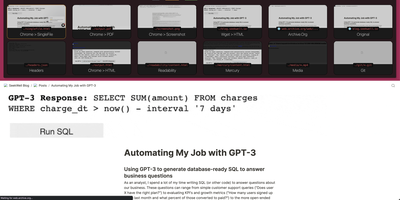
Backed by 27,700+ GitHub stars and actively developed with the v0.9.x architectural overhaul introducing an event-driven plugin ecosystem, ArchiveBox delivers the open-source self-hosted web archiving platform that preserves websites, bookmarks, social posts, media, source code, and research material in durable formats before link rot, platform shutdowns, and censorship erase them permanently. Feed it URLs one at a time or schedule automated imports from browser history, RSS feeds, Pocket, Pinboard, Instapaper, Wallabag, Shaarli, JSON, CSV, HTML bookmark exports, and browser extension captures. Each snapshot stores redundant copies as original HTML, rendered single-file HTML via SingleFile, full-page PDF, screenshot PNG, WARC archive, article text via Readability, favicons, HTTP headers, media files via yt-dlp, git repository clones, and structured metadata in SQLite. The Docker Compose deployment bundles Chrome, wget, curl, yt-dlp, SingleFile, and Readability parsers with automatic dependency management and isolation. Interact through the self-hosted web UI with search, tagging, and admin controls, the comprehensive CLI for batch operations, the REST API for programmatic access, or the Python API for custom integrations. The new abx-plugins system enables community extractors with per-plugin configuration, while the append-only-log architecture provides resumable crawls and audit trails. S3, B2, and Google Cloud storage backends sync archives to remote storage via rclone. Running on a dedicated VPS on RepoCloud with guaranteed CPU, RAM, and SSD, full root SSH access, and a browser serial console. MIT licensed.
Uwazi
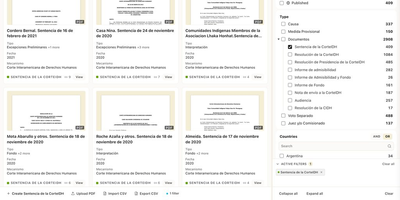
Human rights teams, legal researchers, and archivists use Uwazi to turn scattered documents and case records into searchable, structured collections that the public or trusted partners can explore online. You design templates that define exactly which fields each record carries, from dates and locations to people, organizations, and document types, then import material through the interface or in bulk from CSV files. Uploaded PDFs and documents become full-text searchable, so a phrase buried inside a scanned report is as findable as the metadata typed beside it. Relationships connect related entities across the collection, letting you trace how a person, an event, and a piece of evidence fit together instead of keeping them in isolated folders. Curators build public pages with live filters, maps, and visualizations drawn directly from collection data, while granular permissions decide which records stay private, which are shared with specific groups, and which are published for everyone. Multi-language support lets the same collection serve readers in several languages, and activity logs keep an audit trail of edits. Running on a dedicated VPS on RepoCloud with guaranteed CPU, RAM, and SSD, full root SSH access, and a browser serial console. MIT licensed.

FoJin
Ask a question about Buddhist scripture in plain language and get an answer that points to the exact passage it came from. FoJin brings thousands of texts from hundreds of digital libraries into one search box, so a reader no longer jumps between a dozen archives with different layouts. The AI assistant, called XiaoJin, answers with clickable citations that open the original text, and it can also reply in the voice of historical masters scoped to their own tradition. Search covers classics, translators, and catalog numbers, with filters by country and collection. Reading pages show full text, and parallel views line up translations in many languages, with Chinese, Pali, and Tibetan versions of the same sutra side by side. Thirty-nine dictionaries answer term lookups, a knowledge graph maps people, lineages, and places, and a data source directory shows what each collection offers. Readers can save collections, bookmarks, and annotations, then export citations in BibTeX, RIS, or APA. A read-aloud mode highlights each sentence in sync with audio. Quote verification confirms that a sentence really exists in the canon, and where. Running on a dedicated VPS on RepoCloud with guaranteed CPU, RAM, and SSD, full root SSH access, and a browser serial console. Apache-2.0 licensed.
ThoughtDAG
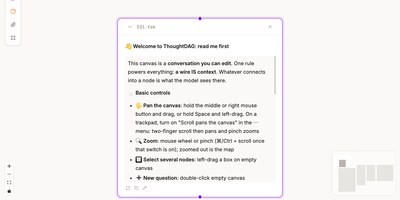
ThoughtDAG turns a long AI conversation from a scroll you cannot rearrange into a map you can edit, branch, and reconnect. Every question and answer becomes a node on an infinite canvas, and the wires between nodes are not decoration: they decide exactly what context the model sees next. Follow a promising thread, park a side question on its own branch, or cut a wire when an early assumption starts poisoning later answers, all without deleting the work that led there. Zoom out to read the shape of an investigation, then zoom back in to full answers, attachments, and highlighted passages. Drop in documents and files as material nodes, ask questions from them, and preview precisely what will be sent before a model runs. Past coding agent sessions can be opened as read-only graph mirrors, so a discussion that started in a terminal can be inspected, cited, and continued on the canvas. Memory lives in readable dossiers that collect decisions and open questions per topic, with sources attached, and relevant dossiers join new questions when you ask. Export a backup, a Markdown context chain, or a thought map that shares the structure of your thinking without dumping the whole transcript. Running on a dedicated VPS on RepoCloud with guaranteed CPU, RAM, and SSD, full root SSH access, and a browser serial console. MIT licensed.
Aldine
Paper co-authors usually trade .tex files by email or pay for a hosted editor seat by seat; Aldine replaces both with a self-hosted LaTeX workspace where the whole team types in one document at once and sees a typeset PDF seconds later. Live cursors and presence show who is editing which paragraph, and the underlying sync is conflict-free, so two authors can rewrite the same section without overwriting each other. Every project is a real git repository: branch a draft, edit it independently, and merge it back from the interface when the argument holds together. Connect GitHub, GitLab, Gitea, or Forgejo to push and pull without leaving the editor, watch ahead and behind indicators, resolve conflicts, and open a pull or merge request on the merged result. Moving in is painless, since an exported Overleaf project ZIP dropped on the home screen imports with its root file detected and its first typeset automatic. Citations come from your own Zotero library or a single collection, kept in sync as a .bib file and inserted from a search panel or \cite autocomplete. Reviewers select text and leave anchored, threaded comments, optionally with a suggested replacement the author accepts in one click. Compiles run in a sandboxed container with no network access, warm recompiles land in about two seconds, and errors jump to the offending line. Running on a dedicated VPS on RepoCloud with guaranteed CPU, RAM, and SSD, full root SSH access, and a browser serial console. AGPL-3.0 licensed.
Overleaf
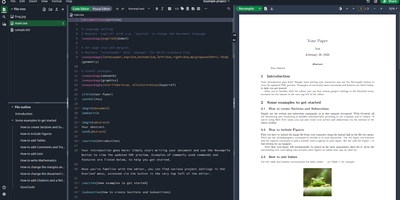
Multiple authors can edit the same LaTeX document simultaneously in the browser with live cursor tracking, conflict-free merging, and instant PDF compilation on every save. Overleaf Community Edition brings the collaborative editing experience that millions of researchers and academics rely on, with no compile time limits, storage quotas, or collaborator caps imposed by the hosted tiers. The web editor provides syntax highlighting, auto-completion, and bracket matching alongside an integrated PDF preview panel powered by a bundled TeX Live distribution supporting pdfLaTeX, XeLaTeX, and LuaLaTeX engines. The file tree panel organizes multi-file projects with separate files for chapters, figures, bibliography references, and style definitions. BibTeX and Biber handle bibliography management, and detailed compilation logs offer clickable error navigation to the exact source line causing each issue. Users upload images, PDFs, and data files directly through the browser, and a template gallery provides starting points for journal articles, conference papers, theses, presentations, and CVs. Over 17,800 GitHub stars and a decade of active development anchor the project. The application runs as containerized microservices including the Node.js web application, MongoDB for persistence, and Redis for session management. Running on a dedicated VPS on RepoCloud with guaranteed CPU, RAM, and SSD, full root SSH access, and a browser serial console. AGPL-3.0 licensed.
OHIF Viewer
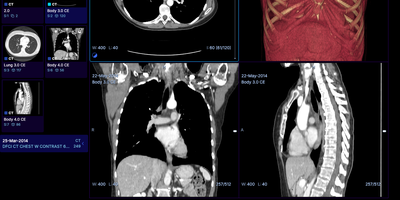
The OHIF Viewer reads CT, MR, PET, and slide microscopy studies straight from a DICOMweb archive and shows them in any browser tab, with no workstation software to install. The study list filters by patient name, MRN, study date, description, modality, and accession number. Each study launches into the workflow mode that fits its modalities. Basic Viewer mode tracks the measurements drawn on images and gathers them in a side panel for review. Layouts include MPR, four-up 3D, volume rendering, and PET/CT fusion with maximum intensity projection. Labelmap tools offer brush, eraser, threshold, and shape segmentation, and DICOM segmentation, RT Structure, and structured report objects display alongside the pixels. PDFs, video clips, ECG waveforms, 4D series, and whole slide microscopy open in the same interface. Hanging protocols arrange series the way each workflow expects. An iframe embed drops the viewer into a portal or research app. Pair it with Orthanc or DCM4CHEE for storage and Keycloak for sign-in. Oncology trial reads, imaging research, and web front ends for a PACS are the usual jobs. Running on a dedicated VPS on RepoCloud with guaranteed CPU, RAM, and SSD, full root SSH access, and a browser serial console. MIT licensed.
SourceWeft
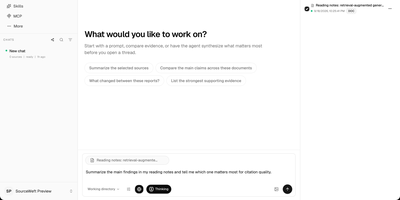
SourceWeft is an AI workstation you host yourself, where agents, your documents, and your model keys work in one place instead of scattering across chat tabs you do not control. Describe a job and a lead agent breaks it down, handing research, exploration, and execution to focused sub-agents that share the same working context and files. Agents draw on a skill library covering presentations, HTML pages, images, meeting summaries, and study guides, and you can add your own skills so good workflows become repeatable. MCP servers, web search, and web extraction connect agents to outside tools, while approved commands run inside a sandboxed environment that cannot touch the rest of your server. Feed it PDFs, web pages, notes, YouTube videos, Notion, Drive, Gmail, or Slack, then follow citations from any answer back to the source material it came from. Bring your own keys for the chat and indexing models you prefer, organize the team into workspaces with roles and access controls, and pick up any conversation from the web app or desktop clients. Running on a dedicated VPS on RepoCloud with guaranteed CPU, RAM, and SSD, full root SSH access, and a browser serial console. Apache-2.0 licensed.
Potato Annotation Tool
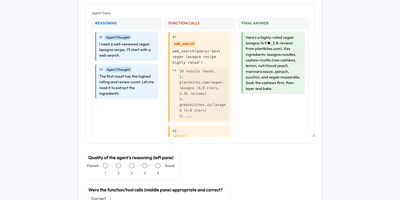
Collect trustworthy human labels and judgments for your datasets, models, and AI agents from one self-hosted annotation server, whether the item is a sentence, a bird call, a microscope image, or a long agent trace. A study is one YAML file plus your data, written by hand, designed in the browser, or generated by a coding agent through the Potato skill or an MCP server. For agent and LLM evaluation, Potato reads traces from OpenAI, Claude, LangChain, LangFuse, SWE-bench, OpenTelemetry, CrewAI, AutoGen, and LangGraph, then lets reviewers rate whole trajectories, single steps, text spans, or two agents side by side. Web-agent runs replay with click and scroll overlays, LLM judges are calibrated against human labels, and pytest evaluations fail CI when scores regress. Models from OpenAI, Anthropic, Gemini, Ollama, vLLM, and OpenRouter pre-label items for people to correct, active learning puts the most uncertain items first, models train on your annotations from the admin page, and a labeling engine certifies machine labels against a blind human sample. Solo Mode lets one person hand labeling to an LLM as agreement grows. Attention checks, gold items, adjudication, Krippendorff's alpha, and annotator timing keep quality visible. Recruit through Prolific, CloudResearch Connect, SONA, or invite links, or code interview transcripts with a living codebook, in-vivo codes, and memos. Running on a dedicated VPS on RepoCloud with guaranteed CPU, RAM, and SSD, full root SSH access, and a browser serial console. GPL-3.0-or-later licensed.
Depictio
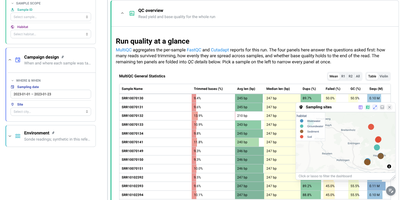
For teams drowning in pipeline output nobody reads, Depictio turns workflow results into dashboards you can hand to a collaborator. A MultiQC tab answers the first questions about a sequencing run: how many reads survived trimming, how evenly they spread across samples, and whether base quality holds to the end of the read, all in one glanceable table. Filter by sample, habitat, site, or sampling date on the left and every panel on the page follows, from community composition cards counting distinct taxa and phyla to differential abundance views that show what was tested, what survives correction, and how large the effects are. Alpha diversity tabs summarise richness and evenness per sample with rarefaction curves, and a sampling sites map lets you click or lasso points to filter the whole dashboard by geography. Forty two ready-made templates cover nf-core pipelines such as ampliseq, atacseq, and airrflow, while outputs from Nextflow, Snakemake, Galaxy, or plain shell scripts feed the same builder. Even a classic tabular dataset becomes an overview of distributions, box plots, and threshold counts, so the same tool serves a wet lab and a data science team. Running on a dedicated VPS on RepoCloud with guaranteed CPU, RAM, and SSD, full root SSH access, and a browser serial console. MIT licensed.
Latent Scope
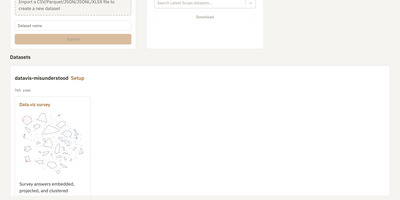
Survey answers, support tickets, and documents become an interactive map where similar rows sit together, so patterns show up before anyone reads a single row. Latent Scope imports a CSV, Parquet, JSON, JSONL, or XLSX file in the browser, then walks through five setup steps: embed the text with a local or hosted model, project the vectors to two dimensions, cluster the points, label every cluster, and publish the result as a scope. The Explore view pairs a searchable table with the map, so you can type a phrase to run a nearest-neighbor search, browse cluster lists, and open any row's full text. Setup keeps every experiment in a gallery with thumbnails and quality scores, which makes comparing parameters painless. Image collections get a zoomable image map, and ColBERT multi-vector embeddings support late-interaction search. Export tables, or render publication-ready plots with dark mode, glow, and custom fonts. A read-only mode and a Hugging Face downloader help you share finished scopes. Running on a dedicated VPS on RepoCloud with guaranteed CPU, RAM, and SSD, full root SSH access, and a browser serial console. MIT licensed.
ENZO
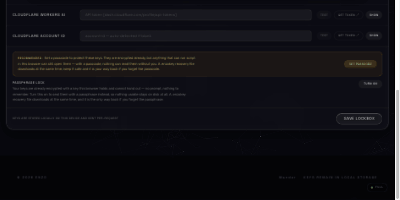
ENZO is a self-hosted AI workspace where you bring your own provider API keys and chat with more than 300 models from nine providers in one streaming interface with normal, thinking, research, and coding modes. You describe an agent in plain English and a two-pass builder drafts its full operating manual, picks the tools the task needs, and keeps improving from your activity through a per-agent neural layer you can inspect. Seventy-four bundled skills give agents ready-made domain playbooks, and a skill editor lets you write your own. Agents can read Gmail, check Calendar, search the web, and run a deep-research loop that writes its own queries under hard budgets so it cannot burn your key. Coding mode writes a multi-file project, boots it, and previews it live while telling you when something is broken. A unified model marketplace compares providers with live health checks, download counts, and benchmarks, and a built-in music player streams songs with a five-band equalizer. Your keys stay sealed in a passphrase-encrypted browser vault and travel only to the provider you picked, so there is no ENZO account, usage meter, or subscription taking a cut. Running on a dedicated VPS on RepoCloud with guaranteed CPU, RAM, and SSD, full root SSH access, and a browser serial console. Apache-2.0 licensed.