Glideship
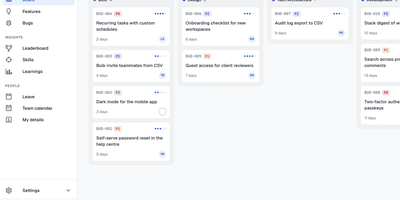
As a self-hosted alternative to Jira and Linear, Glideship swaps sprint ceremonies for twelve AI agents that handle intake, specs, estimates, test plans, and retrospectives while your team keeps every decision. Post a request in Slack and the Triage agent interviews you in-thread, checks existing work for duplicates by vector search, and queues a proposed BUD for a product manager to create or reject. Each BUD, short for Business Understanding Document, holds the spec, tech spec, test plan, acceptance criteria, and history of one feature as it moves from design through development, testing, and UAT to production. Delivery dates come from AI-PERT and 10,000 Monte Carlo simulations, reported as P50, P70, and P85 per phase instead of story points. A code-graph indexer scans multiple repositories, clusters features across them, and answers blast-radius questions such as what breaks if this file changes. Skill profiles rebuilt nightly from git history suggest the best-fit developer, while XP, levels, and a leaderboard reward work that reaches production. Choose Claude Code, GitHub Copilot, OpenAI Codex, or Ollama per organization, and a built-in MCP server lets any MCP client draft BUDs and read team context. Bring existing issues over from Jira, then give HR and Sales a People workspace with leave and work-from-home requests, loss-of-pay warnings, Slack approvals, policies per location, a team calendar, and encrypted employee records. Running on a dedicated VPS on RepoCloud with guaranteed CPU, RAM, and SSD, full root SSH access, and a browser serial console. Apache-2.0 licensed.
Work-Calendar
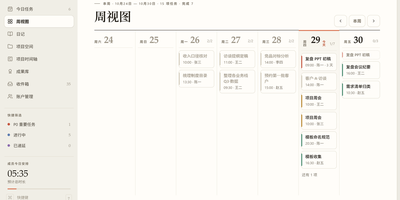
Small teams do not need another cloud subscription to know who is doing what this week: Work-Calendar runs your whole plan, do, finish, archive loop on one little server you own. The week view lays out every member's tasks across seven day columns with today highlighted, so standups start from the same picture instead of five private lists. Three kinds of tasks cover real work: project tasks, one-off tasks you can assign to yourself or teammates, and fixed recurring tasks on daily, weekday, monthly, or specific-date schedules. Anything unfinished carries over to the next day automatically, and completion records can be corrected by the assignee or sent back with a reason by the owner. Projects get spaces with folders, files up to 20MB, meetings with AI-generated minutes from pasted or dictated transcripts, timelines, and closing reports that an admin approves. Roles for superadmin, admin, and member, plus per-group rules, decide who may create projects directly, who needs approval, and who can use the built-in AI assistant, which drafts task and project changes as reviewable cards rather than acting silently. Inbox notifications, personal diaries, and daily statistics round out the routine, and keyboard shortcuts drive the whole interface. Running on a dedicated VPS on RepoCloud with guaranteed CPU, RAM, and SSD, full root SSH access, and a browser serial console. MIT licensed.
Neohabit
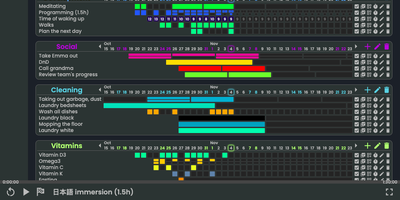
Most habit trackers punish a single missed day, so Neohabit lets you build routines that happen X times in Y days, like three workouts in five days or one deep-work session every three days, and adjust the target mid-streak as the habit gets easier. Your progress renders as GitHub-style contribution heatmaps in three styles: monochromatic grids for simple check-ins, numeric grids that record values such as calories, spending, reps, or hours up to two billion, and fractured grids that split each period into up to sixteen segments for habits done many times a day. Related habits group into projects with a one-dimensional daily view, and skill trees let you plan progressions, for example raising a reading target from twenty minutes to an hour in planned steps. You can ease into a new routine by starting at once in four days instead of daily, track things you want to reduce as well as build, hover any cell for period details, and rearrange projects and habits by dragging them. Multiple accounts, light and dark themes, keyboard shortcuts, and a polished mobile browser interface round out daily use, and a single command brings the whole thing up with prebuilt images ready to go. Running on a dedicated VPS on RepoCloud with guaranteed CPU, RAM, and SSD, full root SSH access, and a browser serial console. AGPL-3.0 licensed.
SimpleDMS
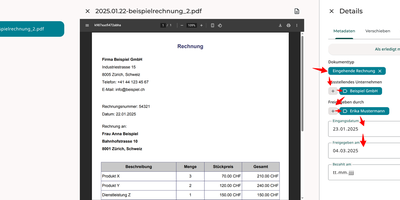
Small businesses file every invoice, contract, and letter by what it is instead of by folder with SimpleDMS, a document management system built around types, tags, and searchable metadata. Upload a document to the inbox, pick its type, and the sidebar offers exactly the tags and fields that type needs, so an incoming invoice asks for the issuing company and receipt date instead of a blank properties page. Name-giving attributes label each file automatically from its own metadata, and the Browse view finds it again by company, date, or approver in seconds. Spaces act as workspaces with their own document types, tags, and permissions, so the team shares project files in one space, exchanges papers with an accountant or customers in another, and keeps private records apart. Tag groups such as companies and employees stay consistent across thousands of documents, date and text fields capture the facts you search by later, and values can be corrected at any time when a document was filed in haste. Dark mode is built in, the interface runs comfortably on a tablet at the scanner, and no analytics or tracking watch how your office works. Running on a dedicated VPS on RepoCloud with guaranteed CPU, RAM, and SSD, full root SSH access, and a browser serial console. AGPL-3.0 licensed.
Freshrss
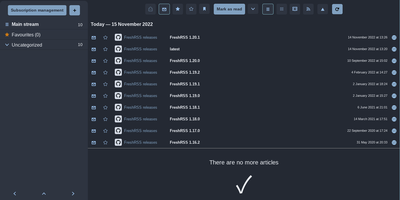
Where Miniflux strips reading down, FreshRSS gives you knobs - the feature-rich pole of self-hosted RSS, comfortable with thousands of feeds. It's a multi-user PHP aggregator (host family and friends on one instance, with an anonymous reading mode) with the reading workflow refined over a decade: favorites, custom tags, powerful filter and search queries, three reading views, and statistics that reveal each site's publishing frequency - useful for pruning subscriptions. Two properties make it the standard choice. First, the Google Reader-compatible API (plus a Fever API) syncs with virtually every serious RSS client - Reeder, NetNewsWire, ReadYou, FeedMe, Fluent Reader - so your phone reads from your server. Second, native WebSub support means compatible sources (WordPress, Blogger, Medium, Friendica) push new articles instantly instead of waiting for polling. A 50+ extension ecosystem adds what truncated feeds omit - full-text content fetching, reading-time estimates, trending views, auto-unsubscribe for dead feeds - alongside community themes and custom CSS. OPML import/export keeps subscriptions portable, a CLI handles administration, and article sharing posts to many services. AGPL-licensed, running on SQLite, MySQL, or PostgreSQL. Feedly Pro's feature set, minus Feedly's subscription and its algorithms.
dinkydash
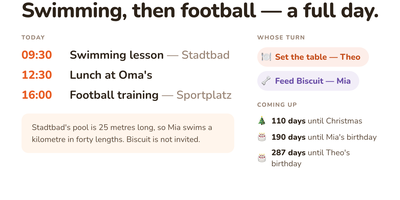
The family calendar nobody opens helps nobody, so DinkyDash puts it on a screen the household walks past. Paste in iCal links from Google, iCloud and Outlook calendars and the board merges them into one agenda in time order, big enough to read from across the kitchen, with tomorrow tucked underneath when the day leaves room. A personal calendar can share only the events marked for a partner and keep work and private appointments to itself. Chores answer the daily argument on their own: whose turn it is moves on with the date, so nobody ticks anything off. Birthdays, holidays and special dates count down in the corner, and once a day the board gets a fresh headline written about your actual day, with a useful note parked under the agenda. Light and dark themes come from the settings page, and that same settings page on your phone edits the configuration file directly, comments preserved. A preview page shows the board at Pi, TV and tablet sizes side by side before you mount anything. There is deliberately no login: it assumes your home network, rewards you with a board you never sign into, and asks to stay behind a VPN or an authenticated proxy if you view it away from home. Running on a dedicated VPS on RepoCloud with guaranteed CPU, RAM, and SSD, full root SSH access, and a browser serial console. MIT licensed.
Chiyogami
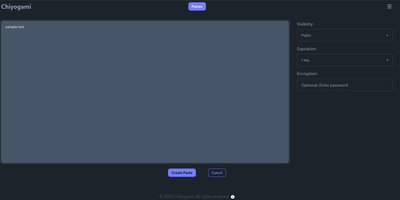
Chiyogami is a pastebin you host yourself for sharing code, logs, notes, and text snippets through short links that expire on your terms. Paste into the web editor and the content comes back formatted, with syntax highlighting for code and rendered Markdown for prose, so a stack trace or a runbook reads the way it was written. Anything sensitive can be encrypted in the browser before it leaves your machine, and the server never stores the password, which makes an encrypted paste safe to pass through chat or email. Every paste carries a configurable lifetime, from minutes to never, and visibility choices keep a snippet public, unlisted, or private behind an unguessable address. Registered users manage their own pastes from an account, and anonymous quick pastes stay available for one-off sharing. The public paste list supports search, so a team instance doubles as a small shared snippet library. Developers can skip the browser entirely: one curl command creates a paste from a file or a JSON body, and the API returns a short title that fetches the content later. Sharing extends to QR codes for moving text onto a phone, and built-in rate limiting throttles spam and abuse before it fills the database. Running on a dedicated VPS on RepoCloud with guaranteed CPU, RAM, and SSD, full root SSH access, and a browser serial console. BSD-3-Clause licensed.
Middleware
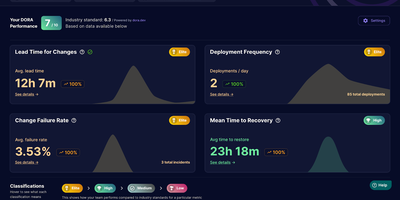
Middleware turns the pull request history your team already has into live DORA metrics, so engineering leads can see deployment frequency, lead time, recovery time, and change failure rate without building a reporting pipeline. Connect GitHub with a personal access token, group repositories into teams, and the dashboard starts charting how often you ship and how long changes take to reach production. Lead time is not one opaque number; it breaks into first commit to pull request, first response time, rework time, merge time, and merge to deploy, so the actual bottleneck is visible instead of guessed at. Merged pull requests count as deployments and revert pull requests count as incidents, which means recovery time and change failure rate appear even if your team has no separate incident tool wired up. You can exclude bot and dependency pull requests, define which branches count as production, and filter incidents in settings, so the metrics match how your team actually ships rather than how a generic template assumes. Bring it to a weekly engineering review to catch a review queue quietly doubling merge times, or open it after an incident to see if failure rate is trending the wrong way across a team. Running on a dedicated VPS on RepoCloud with guaranteed CPU, RAM, and SSD, full root SSH access, and a browser serial console. Apache-2.0 licensed.
HabitSync
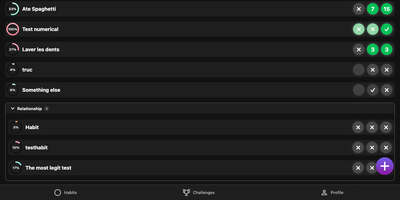
HabitSync treats habit tracking as a team sport, because willpower alone rarely survives February. Set each habit up the way life actually works: daily, weekly, monthly, on chosen weekdays, or at a custom interval, with a target value to reach or a ceiling to stay under for the habits you are trying to quit. Logging takes one tap, or a long press when today's effort deserves a custom number or a stopwatch. Share a habit with a partner, a sibling, or the whole household and everyone's progress sits side by side, which turns "did you go to the gym" into a question the dashboard answers. Monthly challenges raise the stakes with community voting, leaderboards, and medals for the top performers, while gentle automation watches your back: scheduled reminders when a habit goes unlogged, an alert when your completion slips under a threshold, and a quiet nudge when a friend overtakes you. Years of Loop Habit Tracker history import instead of being abandoned, and the installable web app keeps the streak one tap away on any device. Running on a dedicated VPS on RepoCloud with guaranteed CPU, RAM, and SSD, full root SSH access, and a browser serial console. BSD-3-Clause licensed.
DispatchMail
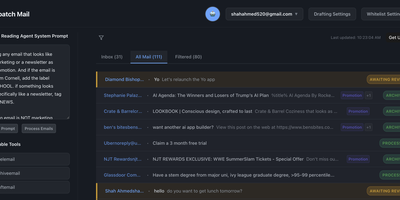
DispatchMail is an SuperHuman alternative and delivers a self-hosted AI email assistant that processes your Gmail inbox through configurable OpenAI prompts without sending data to third-party cloud services beyond the LLM API itself. The Flask backend connects to Gmail via IMAP, retrieves new messages according to your schedule, and routes them through customizable whitelist rules based on sender address, subject keywords, or natural language descriptions before AI processing begins. Two distinct prompt configurations control behavior — the Reading Prompt instructs how the AI should analyze and classify incoming messages, while the Draft Prompt defines how responses should be composed, letting you maintain consistent tone and policy across all automated replies. Whitelist filtering ensures the AI only processes messages you explicitly authorize, preventing unnecessary API costs and keeping sensitive emails out of the LLM pipeline entirely. The React web interface provides inbox management with message previews, AI-generated summaries, draft editing with human-in-the-loop approval before sending, and configuration panels for prompts and rules. Automatic labeling and archival organize processed messages into categories without manual intervention. The sender research feature uses LLM-powered deep analysis to build background profiles of email contacts. All email content, credentials, and processing results persist in a local SQLite database with zero cloud storage dependencies. Running on a dedicated VPS on RepoCloud with guaranteed CPU, RAM, and SSD, full root SSH access, and a browser serial console. Apache-2.0 licensed.

Ambry
Ambry is a personal audiobook streaming server that keeps a collection you own on hardware you control, ready to stream to any browser or phone. Upload your audiobook files once, and the library becomes streamable to any device through a browser or the native mobile application. The server reads durations, tags, and chapter markers straight from the audio files, so a long novel arrives with its structure intact instead of as one anonymous ten-hour blob, and the original files are served untouched. First boot walks you through creating the initial administrator account, after which the instance restarts ready for listening. Households can open registration to family members or close it entirely, keeping the library an invitation-only shelf. Forgotten passwords and registration messages go out through the configured mail provider, so account recovery works without manual intervention. The collection itself lives in PostgreSQL with uploads on a persistent volume, and the whole service runs from a container image on a configurable port. Put a commute listen on your phone, a history title on a kitchen tablet, and a shared family library behind one address, all served from hardware you control. Running on a dedicated VPS on RepoCloud with guaranteed CPU, RAM, and SSD, full root SSH access, and a browser serial console. MIT licensed.
Crumbs
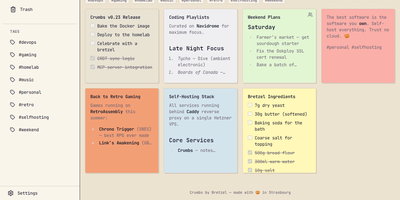
Capture a thought before it evaporates: Crumbs is a self-hosted, privacy-first alternative to Google Keep for notes you would rather keep on your own server. You write rich notes with Markdown, checklists, and image attachments, then give each one a personality from twelve color themes. Hashtags organize everything without folders, pinning keeps the important notes on top, and archive and trash clear the rest out of sight. Full-text search reaches across titles, content, and tags, so last month's idea is one query away. Every note keeps a version history you can browse and restore, which turns accidental deletions and bad edits into non-events. Notes can be shared with other users on your instance, with optional email notifications over SMTP for share alerts and account events. The installable PWA works offline through IndexedDB with last-write-wins CRDT sync, so a note captured on a plane reconciles when you land. Accounts are protected with Argon2 password hashing, and Google, GitHub, or any OIDC provider can handle sign-in instead. A built-in MCP server even lets AI assistants manage your notes on your behalf. Running on a dedicated VPS on RepoCloud with guaranteed CPU, RAM, and SSD, full root SSH access, and a browser serial console. MIT licensed.
Nanote
100% portability is Nanote's one non-negotiable principle as a self-hosted note-taking app. There is no database - notebooks are plain folders and notes are plain Markdown files on your filesystem, so the same notes remain fully manageable from a terminal, Notepad, or any other editor, and walking away from Nanote costs nothing because your data was never in a proprietary format to begin with. Built with Nuxt and TypeScript around the Milkdown editor, it layers modern conveniences on that plain-file foundation: fast content search across all notes using OS-optimized tooling (ugrep), native Markdown rendering, image and file attachments, and a mobile-friendly layout for reading and editing on a phone. Clever remark directives make plain text interactive - typing ::file inserts an inline upload picker, while ::today, ::now, and ::tomorrow expand to live dates and times. A fully typed REST API with validation covers automation, and access is protected by a configurable secret key. Deployment is one container with three env vars: paths for notes, uploads, and config, all bind-mountable so your Markdown lives wherever you want it - including inside an existing sync setup. AGPL-licensed and actively daily-driven by its author.
Hiccup
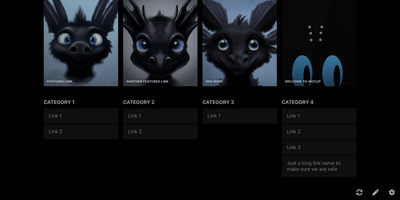
"Get to your most important links, FAST" - Hiccup's README states its whole mission in that one line, and the static start page delivers it. It is a client-side React single-page app - no backend, no database, no accounts - driven entirely by a config.json that defines featured link cards, categorized sections, and search providers. The search bar is the power feature: it queries your own links by name, URL, and tag while simultaneously offering external providers like Google, DuckDuckGo, and Amazon (plus custom URL-template providers you define), with arrow-key navigation and Enter to launch, so muscle memory replaces mousing. Editing happens in the browser - drag and drop links and background images, tweak cards in edit mode - with changes persisting to localStorage; a built-in config manager exports the JSON for hosting, and remote profile loading pulls a shared config across every browser and device you use. Multiple profiles keep home-server, work, and dev-tool link sets separate. PWA support installs it on a phone home screen, caching strategies keep it fast offline, read-only mode suits kiosk displays, and Cmd/Ctrl+/ reveals the full hotkey reference. Serve it from any static host and point your new tab at it.
HedgeDoc
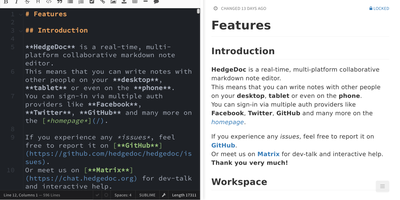
Real-time collaborative Markdown behind your own firewall: HedgeDoc (formerly CodiMD, descended from HackMD's open-source edition) keeps team notes on team infrastructure. Share a note's URL and collaborators are editing together instantly - live cursors, changes appearing keystroke by keystroke - in a three-mode interface that toggles between raw Markdown, rendered preview, and side-by-side split. The Markdown dialect is extended where engineers need it: Mermaid, Graphviz, and Vega-Lite diagrams, MathJax for equations, syntax-highlighted code blocks, embedded content, and a presentation mode that turns a note into reveal.js slides with a single YAML header. A dropdown permission system controls each note - freely editable, limited to signed-in users, or locked read-only - and published notes become clean read-only pages for wider distribution. Revisions track every change with the ability to revert to any earlier version. The AGPL-3.0 codebase is light enough to run on a Raspberry Pi and deploys via Docker with PostgreSQL, MySQL, or SQLite. Authentication covers LDAP, SAML, OAuth2, and email. It deliberately stays a focused document editor - no page trees or kanban - and does that one job with excellent keyboard-first ergonomics for meeting notes, RFCs, runbooks, and shared scratchpads.