ClassicPress
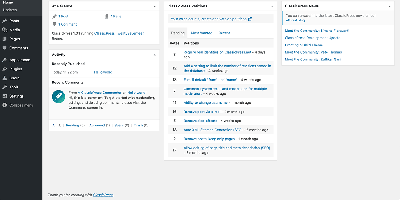
WordPress without Gutenberg: ClassicPress, the community-led fork, keeps the TinyMCE classic editor as the default and strips the block editor and Full Site Editing out of core entirely. The result is roughly half WordPress's size - obsolete libraries like jQueryUI, Thickbox, and Flash support are gone, replaced by native HTML5 elements and modern alternatives like SortableJS - which translates to a measurably faster admin and a leaner attack surface. Forked from WordPress 6.2, it remains compatible with the vast plugin and theme ecosystem targeting that lineage (anything not requiring blocks generally works, helped by a blocks-compatibility mode), and the PHP-first WordPress API developers have used for over a decade works unchanged - no React required to extend your CMS. The fork adds its own improvements: built-in media categories and tags with bulk editing, revision management that lets you prune database bloat, native HTML5 dialogs for accessible touch-friendly menus, and recent releases bring APCu object-cache support, vanilla-JS core widgets, and performant translations. Governance is democratic and community-driven rather than corporate. For content sites, business sites, and blogs where the classic editing workflow is the feature, ClassicPress is stability as a philosophy.
Zomboid Control Panel
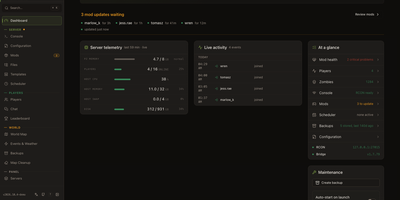
Friends are joining your Project Zomboid server, a mod just broke, and the log is scrolling faster than anyone can read. Zomboid Control Panel puts the fix in a browser tab. Start, stop, restart, and save the server from a dashboard that shows status, uptime, players online, host memory and CPU, disk space, and mods waiting for updates. A setup wizard installs a fresh Build 41 or Build 42 server through SteamCMD, or connects to one that already exists locally or over RCON. The mod manager tracks Workshop items, flags updates, imports Steam collections, scans for file conflicts, duplicate mod IDs, and missing dependencies, and sorts the load order. A structured INI editor covers server settings, sandbox options, spawn points, and regions, with a raw view for power users. Player pages handle kicks, bans, whitelists, access levels, and notes, and the live world map shows who is where. Events and weather controls trigger storms, hordes, and sounds. A scheduler runs timed restarts with countdown warnings, backups keep restorable world snapshots, and a Discord bot relays chat and answers slash commands. Admin, technician, moderator, and custom roles, plus OpenID Connect sign-in, decide who touches what. Community servers with several moderators, friends-only worlds, and hosts managing multiple servers from one panel all fit. Running on a dedicated VPS on RepoCloud with guaranteed CPU, RAM, and SSD, full root SSH access, and a browser serial console. MIT licensed.
DHIS2
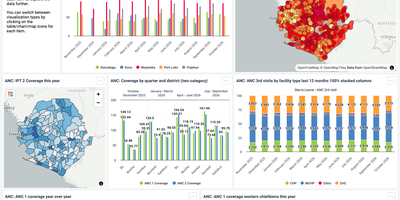
Health programs that tally clinic visits, vaccine doses, and disease cases on paper or in spreadsheets can switch to DHIS2, which turns those routine reports into live dashboards, maps, and charts. Data Entry opens a form for each facility and reporting period, grouped into sections like Immunization and Nutrition, with validation checks and a mark for complete or incomplete reports; Capture follows registered people through program stages like Birth and Baby Postnatal, with scheduled events, notes, and relationships. Dashboards gather charts, maps, tables, and text into one page per topic, with a filter bar, a slideshow mode, sharing, and interpretations, and the Data Visualizer builds column, line, pie, gauge, scatter, and radar charts or pivot tables from indicators, data elements, periods, and organisation units. Maps overlays thematic layers, facility markers, and boundaries on a choice of basemaps, with legends that count the areas in each class, and Metadata Management defines data elements, data sets, indicators, organisation units, programs, option sets, validation rules, and approval workflows from one sidebar. Users, roles, and groups control access; Messaging, Scheduler, Data Quality, and Import/Export apps cover notifications, jobs, checks, and bulk exchange; and Android devices, SMS, and a RESTful API bring in data from remote sites and other systems. Running on a dedicated VPS on RepoCloud with guaranteed CPU, RAM, and SSD, full root SSH access, and a browser serial console. BSD-3-Clause licensed.
Uwazi
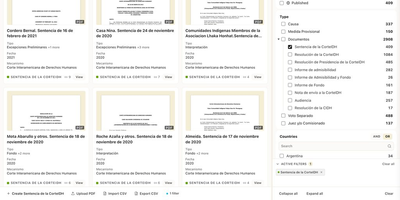
Human rights teams, legal researchers, and archivists use Uwazi to turn scattered documents and case records into searchable, structured collections that the public or trusted partners can explore online. You design templates that define exactly which fields each record carries, from dates and locations to people, organizations, and document types, then import material through the interface or in bulk from CSV files. Uploaded PDFs and documents become full-text searchable, so a phrase buried inside a scanned report is as findable as the metadata typed beside it. Relationships connect related entities across the collection, letting you trace how a person, an event, and a piece of evidence fit together instead of keeping them in isolated folders. Curators build public pages with live filters, maps, and visualizations drawn directly from collection data, while granular permissions decide which records stay private, which are shared with specific groups, and which are published for everyone. Multi-language support lets the same collection serve readers in several languages, and activity logs keep an audit trail of edits. Running on a dedicated VPS on RepoCloud with guaranteed CPU, RAM, and SSD, full root SSH access, and a browser serial console. MIT licensed.
Faveo Helpdesk
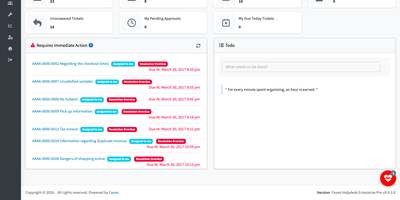
A shared support inbox works until two agents answer the same customer or nobody answers at all, and Faveo Helpdesk, an open-source ticketing system, swaps that guesswork for a queue of tickets with owners, priorities, and deadlines. Each department connects its own mailbox over IMAP or POP3, so incoming email becomes a ticket routed to the right team, and replies go out from that department's address. Colour-coded priorities, custom statuses, and nested help topics sort the queue, tickets can be assigned to an agent, a department, or a team with a lead, and optional ticket locking warns other agents when a colleague already has a ticket open. SLA plans set grace periods against business hours and escalate overdue tickets automatically, while the dashboard counts inbox, unassigned, overdue, and due-today tickets. Workflow rules can set a department or reject spam by subject or channel, a close-ticket workflow auto-closes tickets after a set number of days, and a ban list stops unwanted senders. Customers rate replies and whole tickets on a star scale that defaults to five, a knowledge base with nested categories and public or private articles answers repeat questions, and internal notes stay hidden from customers. Social login, a token-authenticated HTTP API, uploadable language packs, and zip-installed plugins suit IT desks, customer service teams, and internal service teams. Running on a dedicated VPS on RepoCloud with guaranteed CPU, RAM, and SSD, full root SSH access, and a browser serial console. OSL-3.0 licensed.
ILIAS
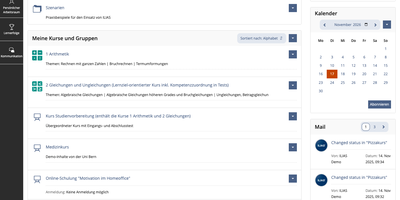
ILIAS is an open-source learning management system that puts courses, SCORM modules, online exams, surveys, wikis, and portfolios on one platform for universities, schools, and companies. Content lives in a repository where categories and courses hold files, learning modules, and tests, and a fine-grained permission system decides who may read, edit, or administer each object. Authors write learning modules, glossaries, and wikis in the browser, import SCORM 1.2 and SCORM 2004 packages, and connect external tools through IMS LTI. The Test and Assessment tool covers everything from self-check quizzes to complete e-exams, and the Scoring tab lets markers work participant by participant or question by question, anonymously if needed, with Markdown feedback. Preconditions unlock the next activity from a test result, so a score of 0 to 30 percent can open one follow-up test while 31 to 50 percent opens another. Study Programmes map whole study and training courses, and an optional progress bar shows learners their completion percentage. Every learner gets a personal workspace for portfolios and blogs, drag-and-drop file upload, profiles, contacts, mail, and chat. Administrators can add guided tours that point at tabs and buttons, assign short links to categories, and export data as XML, CSV, or Excel. The OER Harvester spots Creative Commons material and publishes it in a dedicated category. Running on a dedicated VPS on RepoCloud with guaranteed CPU, RAM, and SSD, full root SSH access, and a browser serial console. GPL-3.0 licensed.
LinShare
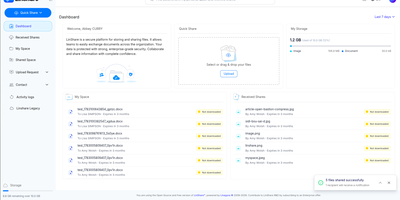
LinShare gives organizations a file sharing service they run themselves, where every upload, share, and download is accounted for instead of scattering across inboxes nobody can audit, retract, or find six months later. Your personal space keeps files organized and versioned, ready to share by link or email with the people who should have them and no one else. Teams work in shared spaces with roles, nested folders, and shared drives, so a project keeps one canonical copy instead of eleven emailed variants. Need files from someone outside? Send an upload request and they drop documents into a secure, expiring drop box without ever getting an account. Regular external collaborators become guests with restricted, time-limited accounts, and contact lists make recurring groups of recipients reusable in one click. Administrators see the whole picture in activity logs that trace every download, share, and change, while antivirus scanning checks files as they move through the system. Previews spare everyone the download-just-to-check dance, and directory integration with LDAP and OpenID Connect single sign-on means accounts follow your existing identity rules. Everything an administrator can click, automation can call through the REST API, and an MCP server even lets AI assistants manage files, shares, and guests on your behalf. Running on a dedicated VPS on RepoCloud with guaranteed CPU, RAM, and SSD, full root SSH access, and a browser serial console. AGPL-3.0 licensed.
Icinga Web 2
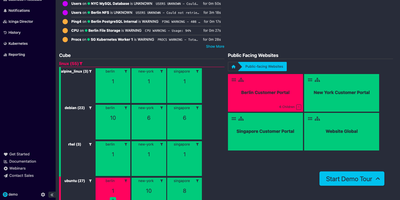
Icinga Web 2 is the browser interface for Icinga monitoring, giving operations teams one place to see which hosts and services are failing, how long they have been down, and what to fix first. Service problems, host problems, and summary tiles share a single dashboard page, and any filtered view can be added to a dashboard or the menu. Host and service lists switch between minimal, common, detailed, and table layouts, sort by severity, and filter through a search bar that autocompletes and accepts wildcards. A click on a service opens details beside the list, with plugin output, check statistics, performance data, comments, downtimes, and custom variables, plus buttons for Check Now, Comment, Downtime, and Reschedule. Modal dialogs keep acknowledgements and scheduled downtimes in context, and bulk operations act on a whole filtered list. The Tactical Overview condenses host and service states into two donut charts, and the Event Overview lists state changes and recoveries with their check output. Modules add Business Processes that group hosts and services into AND and OR trees, plus Cube, Director, Reporting, Notifications, and Kubernetes views. Roles combine permissions, refusals, and restrictions so each team sees only its own hosts, and logins run through Active Directory, LDAP, a database, or the web server. Language, time zone, and light or dark mode are set per user. Running on a dedicated VPS on RepoCloud with guaranteed CPU, RAM, and SSD, full root SSH access, and a browser serial console. GPL-3.0 licensed.
RSSMonster
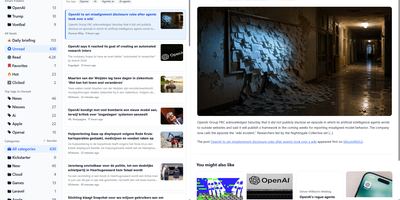
Staying on top of hundreds of RSS feeds is impossible when every reader just dumps articles in chronological order. RSSMonster takes a different approach: it evaluates, scores, and prioritizes every article so the signal rises above the noise. The three-pane reading interface automatically marks articles as read when you scroll past them, while the built-in quality scoring engine rates content by freshness, originality, trust, and attention metrics. Compose advanced search expressions using field operators like star:true, quality:>0.6, hot:true, and date filters like @today or @lastweek, then save those expressions as persistent Smart Folders for one-click access to curated views. Semantic event clustering groups related articles across sources so you see one coherent story instead of fifteen duplicates. Connect your favorite mobile client through the Fever API (supporting Reeder for iOS) or the Google Reader API (compatible with News+, FeedMe, Vienna RSS, and ReadKit). The AI chat assistant powered by the Model Context Protocol lets you ask questions about your feed content and get summarized answers. Import your existing subscriptions via OPML, switch between light and dark themes, and install the app as a Progressive Web App for offline reading. On RepoCloud, deploy RSSMonster on a dedicated VPS with root SSH access, full data ownership, and persistent storage under the MIT license.
Thelia
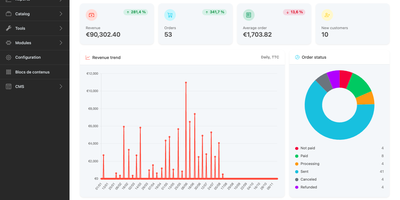
From the first product page to the last parcel out the door, Thelia runs an online shop on your own server, with catalog, checkout, orders, and shipments in a single back office. Products come with variants, each carrying its own reference, stock, price, sale price, weight, GTIN, and manufacturer part number, and category pages filter by color, brand, material, availability, and price. Orders move through Not paid, Paid, Processing, Sent, Canceled, and Refunded, with invoice and delivery slip PDFs on every row and bulk status changes across a selection. An order can leave in several parcels, each with its own carrier and tracking number. Sale units let one install sell from several domains or pick-up points, each with separate prices, stock, and orders. Promotions cover coupon codes for a percentage or a fixed amount, scheduled sales with start and end dates, catalog price rules, and a newsletter list. Customers can carry a percentage discount, a reseller flag, and company and VAT numbers. CMS pages move from draft to scheduled to published in several languages, alongside menus, forms, and a media library. Stripe, PayPal, and PayPlug payments plus Chronopost, DPD, Colissimo, and Mondial Relay delivery arrive as modules, and a REST API links the shop to ERP, PIM, and CRM systems. Running on a dedicated VPS on RepoCloud with guaranteed CPU, RAM, and SSD, full root SSH access, and a browser serial console. GPL-3.0 licensed.
CiviCRM
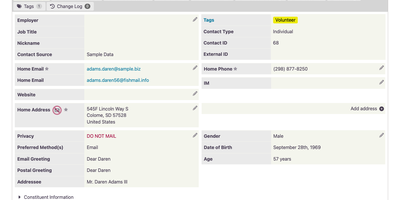
For nonprofits, advocacy groups, and NGOs that want donors, members, volunteers, and event guests in one database, CiviCRM is a constituent relationship management system you can host yourself. Contacts come first: people and organizations link through relationships, groups, tags, smart groups, and custom fields, and dedupe rules merge duplicates automatically or after review. CiviContribute takes one-time, recurring, and in-kind gifts on online pages, plus pledges and personal fundraising pages. Transaction batches export to accounting software. Events get online registration, fees, waitlists, and on-site check-in through CiviEvent. CiviMember handles membership types, online sign-up, auto-renewal where the payment processor supports it, and reminder emails. Mass mailings go out through CiviMail with optional open and click tracking, A/B testing, delivery reports, and unsubscribe records. CiviCase turns casework into a sequence of follow-up activities. CiviCampaign tracks events, mailings, and gifts against goals, and runs surveys and petitions. CiviGrant processes grant applications. SearchKit builds saved searches and result displays in the browser; FormBuilder designs custom data-entry forms for a directory or volunteer portal. Reports are built into every component. A stable API and community extensions add payment processors and integrations. Standalone mode needs no separate CMS, and the same code also installs into Drupal, WordPress, Joomla, or Backdrop. Running on a dedicated VPS on RepoCloud with guaranteed CPU, RAM, and SSD, full root SSH access, and a browser serial console. AGPL-3.0 licensed.
Zenphoto
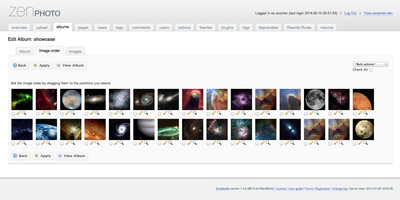
For photographers, illustrators, and filmmakers, the portfolio is the business: Zenphoto is a self-hosted gallery CMS that turns folders of images, video, and audio into a polished media website you fully control. Upload through the admin panel or drop files and folders in by FTP, and albums appear from the file system itself, complete with automatically sized derivatives, watermarks, and EXIF and IPTC metadata read straight from your camera files. Visitors search the whole archive with boolean expressions, browse slideshows, leave comments, and rate work, and dynamic albums rebuild themselves from saved searches so a "best of this year" collection never needs manual upkeep. The integrated Zenpage plugin adds a blog with nested categories and custom pages with their own menus, so the gallery, the news, and the about pages live in one site instead of three tools. Multiple photographers or clients get separate accounts with per-user rights, and individual albums or pages can sit behind passwords for client proofs. Sites can run in several languages at once, each on its own subdomain, with the admin backend translated as well. Fifty-plus themes change the look without touching the media library, and the plugin system adds anything from statistics to new media handling. Running on a dedicated VPS on RepoCloud with guaranteed CPU, RAM, and SSD, full root SSH access, and a browser serial console. GPL-2.0 licensed.
Froxlor
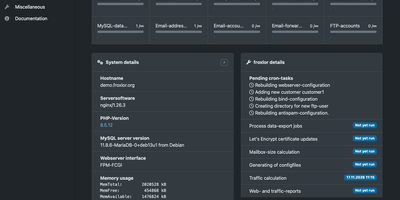
Froxlor lets an administrator host many customers on Debian and Ubuntu servers, with resellers, resource limits, and every service managed from one browser panel. Customers get their own panel for domains, subdomains, email, FTP accounts, and MySQL databases, and resellers receive a pool of resources to hand out. Domains can run on Apache 2.4 or Nginx, use a PHP-FPM configuration chosen per domain, and bind to specific IPv4 addresses, IPv6 addresses, or ports. Let's Encrypt certificates are issued and renewed from the panel, customers can store their own certificate per domain, and Nginx domains can enable HTTP/3. Email addresses, forwarders, and catchall mailboxes run on Postfix and Dovecot, and Rspamd spam filtering is tuned for each email account. Bind9 or PowerDNS serves the DNS zones, and ProFTPd provides FTP accounts with their own directories. Customers can add SSH keys for shell access, protect directories with passwords, set path options, and export their data. Traffic for HTTP, FTP, and mail is collected per customer and charted by month, and several MySQL servers can be assigned to customers. A JSON API with per-user keys, a console tool, and a CSV domain importer cover automation, and the interface can be themed. A configuration page shows ready-made service templates for the chosen distribution and exports the selection as JSON for use on another server. Running on a dedicated VPS on RepoCloud with guaranteed CPU, RAM, and SSD, full root SSH access, and a browser serial console. GPL-2.0-or-later licensed.
TYPO3
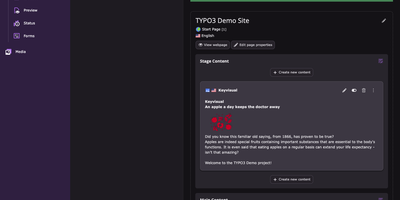
TYPO3 lets an organization run any number of multilingual websites from one installation, with editors working in a page tree and administrators deciding who may touch what. Editing happens in a context panel that slides in beside the page layout, and a guided wizard creates new pages step by step. Translations can be copied or connected to their source with change tracking, and sites can mix languages, including right-to-left scripts. Workspaces keep edits away from the live site until they are previewed and approved, while access lists, page permissions, and mounts control which parts of the tree each backend user may change. Marketing teams get a QR code module and a short URL module with hit counters and expiry dates, and redirects are created automatically whenever a page slug changes. The Form Framework builds forms with multiple file uploads in one field, CKEditor 5 text editing, and email notifications customized in the backend. A dashboard shows widgets such as recent documents and backend logins, and a Bookmark Manager groups shortcuts into large page trees. The Camino starter theme gives integrators a ready-made frontend with several color schemes, and developers shape sites further with Fluid templates and TypoScript, plus extensions from extensions.typo3.org. Running on a dedicated VPS on RepoCloud with guaranteed CPU, RAM, and SSD, full root SSH access, and a browser serial console. GPL-2.0 licensed.
phpMyFAQ
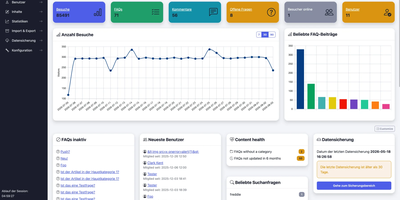
Publish the answers your team keeps repeating as a multilingual, searchable FAQ with phpMyFAQ, a knowledge base whose admin area handles writing, review, and permissions. Organize entries in nested categories that you rearrange by drag and drop, attach files, add tags and related FAQs, and let visitors leave comments. A WYSIWYG editor with an image manager writes each answer, a wiki-style revision history restores earlier versions, and a news system posts announcements. Full-text search covers every language, and optional Elasticsearch or OpenSearch backends handle larger collections. The interface covers more than 40 languages with right-to-left layouts, automatic content negotiation, and translated categories and entries. Privileges work per user and per group, so an editor can change an entry without being allowed to delete it, and categories can be limited to chosen readers. Sign in through LDAP, Active Directory, or Microsoft Entra ID, protect accounts with two-factor authentication, or try experimental passkeys. The dashboard charts 30 days of visits, lists inactive FAQs, and checks installed files against published hashes. Export entries to PDF, publish a dynamic sitemap, back up your content, and filter spam with built-in protections. Dark, light, and high-contrast themes keep the public site comfortable to read. Scripts and AI assistants reach the knowledge base through a REST API with an OpenAPI specification or an experimental MCP server, and plugins extend it. Running on a dedicated VPS on RepoCloud with guaranteed CPU, RAM, and SSD, full root SSH access, and a browser serial console. MPL-2.0 licensed.
Textpattern
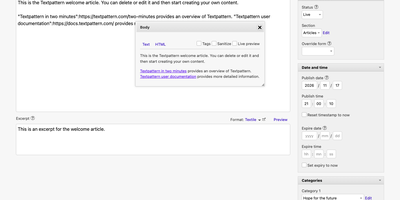
Writers who want to keep their markup in their own hands publish blogs, magazines, portfolios, and company sites with Textpattern, a lightweight open-source CMS driven by a readable tag-based template language. An author fills Title, Body, and Excerpt in the Write panel, flips between Text, HTML, and Preview tabs, formats with Textile or plain HTML, and files each piece under a section with up to two categories and a URL-only title for a clean permalink. Draft, Pending, Hidden, Live, and Sticky statuses track where a piece stands, publish and expire dates schedule its arrival and departure, and freelancers submit work as Pending for review before anything goes live. Six built-in roles (Publisher, Managing Editor, Copy Editor, Staff Writer, Freelancer, and Designer) limit each account to the panels it needs. Designers edit page templates, form templates, and stylesheets in the browser and reshape the markup without touching the server. Custom fields, an article image, and per-article form overrides make one setup work as a photoblog, a portfolio, or a news site. The Images panel creates thumbnails and stores captions and alternate text once for every place a picture appears. Plugins extend the editor and admin area, admin themes restyle the back end, the interface is translated into over 50 languages, and one codebase can power several websites, each with its own theme and admin login. Running on a dedicated VPS on RepoCloud with guaranteed CPU, RAM, and SSD, full root SSH access, and a browser serial console. GPL-2.0 licensed.
UptimeKit
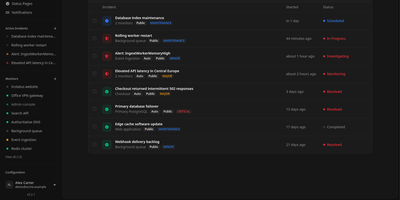
UptimeKit watches your services from several regions at once and publishes the verdict on a status page your customers can actually read. A central dashboard assigns checks to worker probes that run them on schedule, covering HTTP and HTTPS, TCP, ICMP ping, DNS, keyword matches, and JSON responses. Monitors are sorted into nested groups and tags, and HTTPS targets get automatic certificate expiry tracking. When something breaks, an incident takes shape with severity, status transitions, comments, and a resolution flow, either from the dashboard or from a Prometheus AlertManager alert. Status pages come in multiple flavors: public, password protected, or tied to a custom domain, with themes, uptime history bars, and email subscribers who hear about every update. Notifications reach Discord, Google Chat, Telegram, ntfy, Apprise, and plain webhooks. Organizations with roles keep several teams in one installation, and OIDC single sign-on connects the login to an existing identity provider. Response time charts break latency into percentiles per region over any period you pick. A planned maintenance window announces itself on the status page before it begins. Running on a dedicated VPS on RepoCloud with guaranteed CPU, RAM, and SSD, full root SSH access, and a browser serial console. MIT licensed.
Veritas Kanban
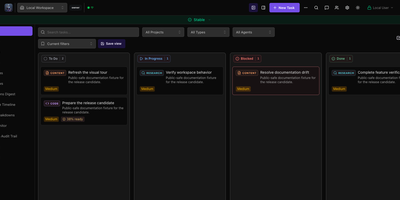
A drag-and-drop task board that works fine on its own and can also hand cards to AI coding agents, Veritas Kanban shows what each agent is doing, what it changed, and what is waiting for your approval. Start with no agents at all. Cards move through To Do, In Progress, Blocked, and Done, and each one carries subtasks, dependencies, time tracking, comments, and an activity log. When you are ready, connect Codex, Claude Code, Copilot CLI, Hermes, or OpenClaw, give every agent an Intern, Specialist, or Lead permission level, and follow each agent's status and model on a live dashboard. Let a task run in its own Git worktree, read the diff, leave inline comments, approve or request changes, and open a GitHub pull request from the task panel. Squad Chat gives agents one shared channel that posts spawned, completed, and failed events. Workflows chain steps with parallel branches, loops, and human approval gates. Policy rules allow, deny, or hold agent actions for review. Assistants reach the board through an MCP server, a command-line client, or a REST API. Running on a dedicated VPS on RepoCloud with guaranteed CPU, RAM, and SSD, full root SSH access, and a browser serial console. MIT licensed.