Sugabots
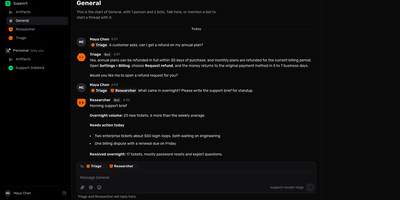
Give your team a shared chat workspace where AI bots sit next to people, answer questions, and pick up recurring work. Organize conversations into pods with channels and threads, and keep a private personal pod for each member. Mention a bot with @ to hand it a task, mention several and each one replies, or let a bot ask another bot for help. Every bot gets its own name, avatar, instructions, and model, picked from OpenRouter, Anthropic, OpenAI, Google Gemini, or any OpenAI-compatible endpoint you add. Connections link a pod to GitHub, Linear, Stripe, Notion, Sentry, Jira, any MCP server, or any HTTP API, and bots act through them with approvals where you want a human check. Routines run a bot on a schedule, a webhook, or a GitHub event, then post the result to the pod channel. Computers give bots an isolated machine for heavier jobs, and web search lets them look things up and cite pages. A Usage page breaks down what bots cost by bot, model, and pod. Use it for a support desk, an engineering ops room, a morning briefing, or a shared research assistant. Running on a dedicated VPS on RepoCloud with guaranteed CPU, RAM, and SSD, full root SSH access, and a browser serial console. MIT licensed.
Price Comparison
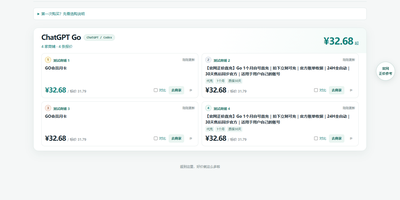
Where is ChatGPT Plus cheapest this week, and which seller actually honors the warranty? Price Comparison (Zhitu Shijia) is a self-hosted platform that gathers AI subscription and account offers from many card shops into one catalog you can search, compare, and question. Tell the built-in guide your budget and need, for example a Plus top-up under a monthly cap with warranty cover, and it filters offers, explains recharge channels and purchase conditions, and narrows the list through follow-up questions. Browse by platform, delivery method, term, and warranty to compare prices and stock for ChatGPT and Codex, Claude, Gemini, Grok, and Cursor offers side by side, including finished accounts, shared accounts, and redeem codes. Price history shows how an offer moved before you buy, and official regional prices give a reference point when a quote looks suspiciously cheap or expensive. Email accounts, SMS verification, and residential IP offers sit in the same catalog, so the extras a subscription needs can be priced in the same pass. Install the comparison Skill or connect the MCP service and your own AI assistant can search products, compare merchant quotes, and pull price history with source links and collection times attached. In the admin console you add and review shops, run collection, and supervise the pipeline that identifies, classifies, and publishes products into the catalog. Running on a dedicated VPS on RepoCloud with guaranteed CPU, RAM, and SSD, full root SSH access, and a browser serial console. GPL-3.0 licensed.
APIPark
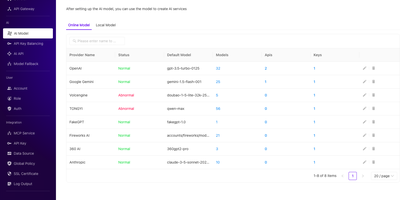
One gateway, every AI model: APIPark gives your applications a single, consistent API for OpenAI, Anthropic, Google Gemini, DeepSeek, and 100+ other models, and gives your team a portal to publish and share whatever gets built on top. Standardized request and response formats mean swapping a provider or rewriting a prompt never touches client code. Pair a model with a prompt template and it becomes a ready-made API for sentiment analysis or translation, listed in the developer portal with its own readme and generated API docs. Model Fallback swaps in the highest-priority available model when one misbehaves. API key balancing spreads traffic across several keys for the same provider. Already have REST services? Import an OpenAPI document, file the service under a category and tags, and let consumers subscribe, with optional manual review before anyone gets access. Any service can be switched on as an MCP tool that AI assistants can discover and call, and local open-source models can be deployed and exposed the same way. Usage charts follow requests, traffic, and tokens per service and consumer. Request logs flow out to files, HTTP endpoints, Kafka, NSQ, or Syslog. Running on a dedicated VPS on RepoCloud with guaranteed CPU, RAM, and SSD, full root SSH access, and a browser serial console. Apache-2.0 licensed.
PiClaw
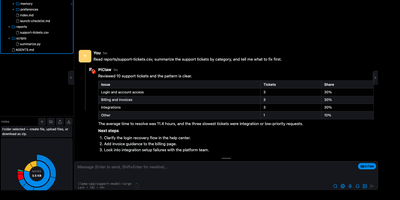
Chat, files, editor, and shell share one browser window, so nothing the agent does happens out of sight. PiClaw streams replies from the model provider you configure, hosted or a local OpenAI-compatible server, and you can steer a running turn, queue follow-ups, or branch a side question with /btw. The workspace sidebar shows a file tree with folder sizes. Open a Markdown note for a live preview with checklists and tables, a CSV for a table view, or a script in the code editor with syntax highlighting and an optional Vim mode. A detachable terminal runs shell commands in the same workspace, and the agent's own file and shell tools work there too. Scheduled tasks run on cron timings, chat history stays searchable between visits, and nightly Dream memory consolidates notes into plain files. Settings pages cover providers, models, MCP servers, keychain secrets, budgets, and session recordings. Optional add-ons bring Draw.io, kanban boards, and Proxmox or Portainer tools. Browser sign-in supports authenticator codes and passkeys, and the layout adapts to phones. A homelab server, a laptop, and a phone can all open the same private agent workspace, which suits solo developers and small teams. Running on a dedicated VPS on RepoCloud with guaranteed CPU, RAM, and SSD, full root SSH access, and a browser serial console. MIT licensed.
Open Connector
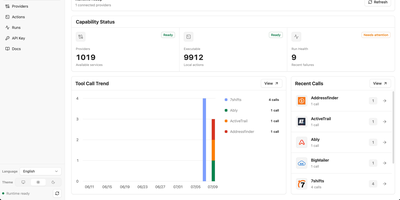
With over 5,000 GitHub stars since its June 2026 launch, OOMOL OpenConnector bridges the gap between AI agents and the real world by handling the authentication nightmare that stops LLMs from calling external APIs safely. The runtime connects to more than 1,000 SaaS providers — GitHub, Gmail, Notion, Slack, Microsoft, HubSpot, Google Workspace, and hundreds more — through 10,000+ prebuilt typed Actions that agents can discover and execute without ever touching raw credentials. OAuth2 flows, API key rotation, custom credentials, and no-auth providers are all managed centrally with AES-encrypted storage, scoped runtime tokens, and configurable action allowlists and blocklists that enforce least-privilege access. Agents interact through five access surfaces: the Model Context Protocol endpoint at /mcp for Claude and other MCP-capable hosts, a full REST API at /v1 for programmatic control, an auto-generated OpenAPI specification for code generation, a TypeScript SDK for application integration, and the oo CLI for local agent relay. The built-in Web Console provides browser-based administration for configuring OAuth apps, managing connections, inspecting action schemas, and reviewing execution logs with redacted inputs. Deploy via Docker Compose with SQLite for single-server setups, run from source on Node.js 22+, or push to Cloudflare Workers with D1 and R2 for edge deployment. Running on a dedicated VPS on RepoCloud with guaranteed CPU, RAM, and SSD, full root SSH access, and a browser serial console. Apache 2.0 licensed.
Fusio
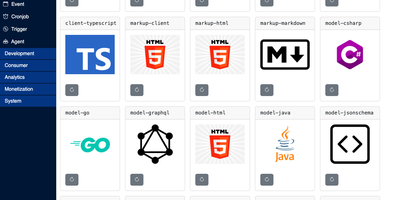
Fusio turns the data and services you already run into a managed API that partners, apps, and AI agents can actually use. The workflow starts small: add a database connection and a table becomes a REST endpoint, or proxy a remote service and route traffic between internal microservices. Each operation pairs an HTTP path with an action and a schema, so requests are validated and an OpenAPI specification plus client SDKs for major languages come out without extra effort. Custom behavior lives in reusable actions, and an AI assistant can draft actions and schemas from a plain-language prompt. Native Model Context Protocol support then offers those actions to autonomous agents as tools. Third-party developers get a self-service portal with documentation, testing tools, and their own keys. Every endpoint can be protected with scopes and rate limits. Asynchronous work runs through events, webhooks, cronjobs, and triggers. When the API becomes a product, plans, quotas, and transactions handle billing, and analytics follow usage, performance, and errors. A marketplace installs ready-made actions and apps, and the generator and test panels speed up development. Running on a dedicated VPS on RepoCloud with guaranteed CPU, RAM, and SSD, full root SSH access, and a browser serial console. Apache-2.0 licensed.
AgentMesh
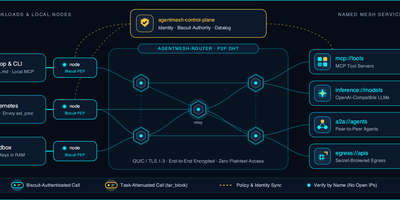
A node beside each AI agent gives your fleet a private network where agents publish tools and models, discover what other nodes offer, and call those services under policy you control. Nothing is reachable by default, because a node exposes no service until its configuration says so, and no node may call a service your mesh policy has not granted. Identity comes from your own identity provider, since a node enrolls with an OpenID Connect or bootstrap token and receives a short-lived credential bound to its own key that peers can verify offline. Nodes connect directly when they can and relay through well-known routers when NAT or firewalls say no, so the same mesh stretches across laptops, containers, clusters, and phones. The node beside your agent exposes the mesh as a local MCP server and an OpenAI-compatible endpoint, so model requests route to whichever node serves that model. The control plane verifies who is joining, issues the credentials, and holds the grants, which are evaluated on service names rather than network addresses. For small deployments, a single binary bundles the control plane, a router, and a web console, so a private mesh for your agents runs on one modest host. A shared developer testnet lets you rehearse the whole enrollment and calling flow in minutes before standing up infrastructure of your own. Running on a dedicated VPS on RepoCloud with guaranteed CPU, RAM, and SSD, full root SSH access, and a browser serial console. Apache-2.0 licensed.
AKB
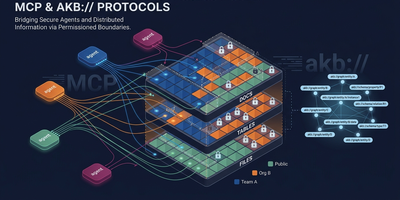
Achieving 98.4% Recall@5 on LongMemEval-S without a reranker, AKB is the agent-native knowledge infrastructure giving Claude Code, Cursor, Windsurf, and any MCP-aware agent persistent organizational memory — a drop-in replacement for Confluence or Notion where AI agents read and write directly rather than scraping human-formatted pages. Documents are stored as Markdown with YAML frontmatter in Git bare repositories (full version history, branching, diff), while PostgreSQL 16 serves as source of truth for chunk text, metadata, and BM25 vocabulary, with dense embeddings handled by a pluggable vector store (pgvector default, Qdrant optional, or managed Seahorse). Agents interact through 20+ MCP tools — akb_put, akb_search, akb_browse, akb_relations, akb_sql, akb_edit, akb_history — performing hybrid dense plus BM25 search fused via Reciprocal Rank Fusion in one call. The URI graph (depends_on, related_to, implements relations) lets agents traverse knowledge connections without external graph databases. Multi-tenant vault isolation is enforced at the PostgreSQL ACL level with per-user roles and SET LOCAL ROLE for SQL sandboxing. Event fanout streams structured events to Redis Streams for external consumers (synthesis bots, digest agents, audit trails), and a hash-chained append-only audit log integrates with enterprise SIEMs. Ships with agent plugins for Claude Code and Codex (session capture, wiki ingest, lifecycle hooks), Kubernetes kustomize manifests, and Open Knowledge Format export. Running on a dedicated VPS on RepoCloud with guaranteed CPU, RAM, and SSD, full root SSH access, and a browser serial console. BSL 1.1 licensed (free under 100 seats, auto-converts to Apache 2.0 after four years).
Supernote
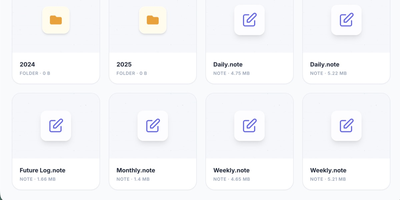
Your Supernote tablet fills with handwritten journals, meeting notes, and sketches, and this server gives that handwriting a private home: Supernote is a self-hosted sync cloud for Ratta Supernote tablets that stores notebooks on your own hardware and can transcribe, summarize, and search them with AI. Point the tablet at your server under its Private Cloud sync setting and notebooks upload automatically, ready to browse in the web interface alongside your task lists and AI insights. Turn on the intelligence layer and each synced page is transcribed by a vision model, either Google Gemini or a local model served by Ollama or another OpenAI-compatible endpoint, so notes never leave your network. Analyzers then read your journals to surface tasks, themes, and Daily, Weekly, and Monthly summaries. Every word is indexed for semantic search, which understands concepts: searching for budget also finds pages about expenses or money, even when that exact word never appears. Tasks discovered in your handwriting export as calendar feeds that drop into Home Assistant, Apple Calendar, Google Calendar, and Outlook. An MCP server lets assistants such as Claude, Gemini, and ChatGPT answer questions against your notebooks, and notebooks convert to PDF, PNG, SVG, or plain text for use anywhere else. The hub idles at about 160 MB of memory, or roughly 135 MB in bare sync mode. Running on a dedicated VPS on RepoCloud with guaranteed CPU, RAM, and SSD, full root SSH access, and a browser serial console. Apache 2.0 licensed.
Doop
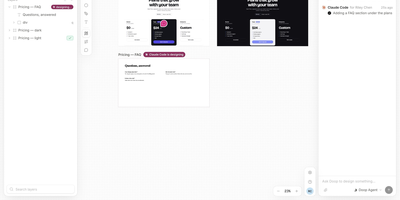
On a Doop design canvas every frame is real HTML, so Claude Code, Codex, Cursor, or any MCP client can design beside you as teammates watch every cursor and edit arrive live. Agents connect with one command or a one-click install and, once access is approved through OAuth, work as you and report their status and tasks on the canvas. The built-in Doop Agent has six roles, among them UX Lead, Copywriter, and Accessibility, picks up board cards and @mentions in comments, and runs on a connected ChatGPT subscription or an OpenAI, Claude, Gemini, or OpenRouter key. The editor covers frames, shapes, pen paths, rich text, flex layout, layers, pages, rulers, design tokens, and version history. Prototype mode wires clicks, hovers, and key presses to screen transitions, and the finished flow plays full screen or goes out as a shareable link. Marking a frame ready for dev can start an automation that queues agent steps, creates Linear tickets, or posts to Slack. Websites, live apps, GitHub repositories, and PDF pages import as starting points. Frames export as PNG, JPG, or PDF, or as public image links that re-render when the design changes. Running on a dedicated VPS on RepoCloud with guaranteed CPU, RAM, and SSD, full root SSH access, and a browser serial console. AGPL-3.0 licensed.
OpenTakeoff
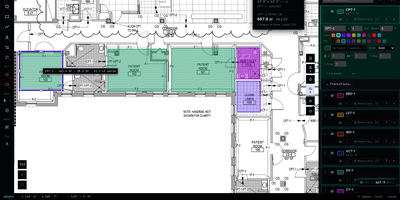
From a PDF plan set to a waste-adjusted material order takes one browser tab: OpenTakeoff measures floors, walls, and fixtures at the drawn scale and never uploads a single drawing. Drag in a PDF, image, or zip plan set, view up to four sheets side by side, and search sheet text, while stitching joins floors split across a match line. Scale comes from the drawn scale note or a known dimension, and a check tool reports percent error before a wrong scale can skew a bid. Area, linear, and count tools carry condition colors, CAD hatches, waste percentages, and wall heights, and a marquee over the architect's finish schedule turns approved rows into conditions. Supporting materials convert coverage rates into rounded-up order quantities, and roll-goods mode lays out lanes, seams, and cuts to scale. Totals in SF, SY, LF, and EA export to CSV, JSON, Excel, print, or a marked-set PDF, while named revisions compare addenda as quantity deltas. Highlighters, revision clouds, callouts, and notes mark up sheets on a layer that is never counted, and dimension lines label measured lengths at the sheet scale. An MCP server with more than 50 tools lets AI agents open plans, set scale, and measure rooms, and each shape they draw stays a dashed proposal until a person accepts it. Running on a dedicated VPS on RepoCloud with guaranteed CPU, RAM, and SSD, full root SSH access, and a browser serial console. AGPL-3.0 licensed.
CUGA
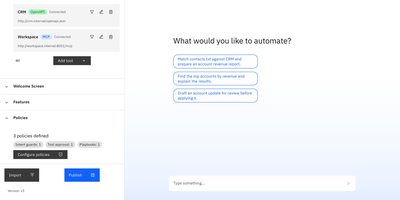
Turn a plain business request into a finished workflow, with a human sign-off on anything risky. CUGA is an agent harness you run on your own infrastructure, with a browser workspace where you build agents, test them beside a draft chat, and publish a versioned configuration when it behaves. Connect tools through MCP servers or OpenAPI specs, then write five kinds of policy: intent guards, playbooks, tool guides, tool approvals, and output formatters. A supervisor agent can route work to specialists that each carry their own tools and instructions. The chat workspace keeps conversation threads, uploaded files, and a knowledge panel for cited answers from company documents. Event Studio runs watchers on cron schedules, polling, or push triggers, with run history showing tools used and results. Memory records task guidance and user preferences, shows where each came from, and lets users switch it off or forget items, and administrators set retention rules. OIDC sign-in separates chat users from managers. Point it at any OpenAI-compatible endpoint, including a private inference server. Operations teams, internal tooling groups, and platform engineers can automate CRM reports, document review, and recurring briefs without sending data outside their boundary. Running on a dedicated VPS on RepoCloud with guaranteed CPU, RAM, and SSD, full root SSH access, and a browser serial console. Apache-2.0 licensed.
InsForge
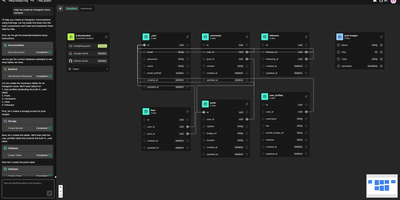
With 12,600 GitHub stars and 52 releases in under a year of development, InsForge is the fastest-growing open-source backend platform purpose-built for AI coding agents — giving Claude, Cursor, and any MCP-compatible tool direct access to database, authentication, storage, compute, and AI model infrastructure through a single self-hosted stack. The native MCP server exposes every InsForge operation as callable tools, letting coding agents autonomously create database tables, manage user authentication, upload files, deploy edge functions, and ship complete full-stack applications without human intervention. The Model Gateway provides an OpenAI-compatible API that routes requests across multiple LLM providers (OpenAI, Anthropic, Google, and open-source models) with unified billing, rate limiting, and fallback logic. PostgreSQL with pgvector handles both relational data and vector embeddings for RAG pipelines, while S3-compatible storage manages file uploads and static assets. Edge Functions run serverless TypeScript code on Deno with sub-millisecond cold starts for API endpoints, webhooks, and scheduled tasks. The authentication system provides user management, OAuth2 flows, sessions, and magic links with JWT token handling built in. Site Deployment builds and serves frontend applications with automatic SSL and custom domain configuration. The CLI paired with Agent Skills enables terminal-based workflows where agents invoke InsForge operations directly from the command line. Deploy via Docker with PostgreSQL as the only required external dependency. Running on a dedicated VPS on RepoCloud with guaranteed CPU, RAM, and SSD, full root SSH access, and a browser serial console. Apache-2.0 licensed.
LiteLLM Agent Control Plane
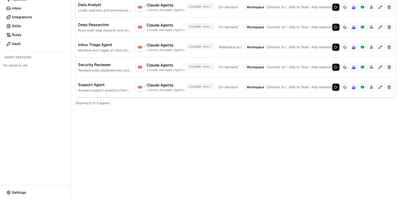
Agents scattered across vendor consoles become one tidy workspace in LiteLLM Agent Control Plane, which puts Claude Managed Agents, Cursor, OpenCode, OpenClaw, Deep Agents, and Hermes behind a single login, one API, and one dashboard. Describe an agent in plain language or start from a template for a deep researcher, an inbox triager, or a security reviewer, then tick the tools, skills, and MCP integrations it may use and pick the runtime that executes it. Chat happens inline with streamed output, sessions persist across runs, and a memory layer carries context from one session to the next. Routines launch agents on a cron schedule, and each scheduled run lands in the history as its own session. An MCP proxy injects upstream credentials at the wire, so agents never hold real secrets, and provider keys sit encrypted in a vault. Colleagues can reach the same agents from Slack, Microsoft Teams, Google Chat, or a webhook, and developers can drive everything through a REST API with a live try-it reference. Administrators issue per-user virtual keys with budgets, model limits, and expiry dates, and an inbox gathers anything that needs a human decision. Running on a dedicated VPS on RepoCloud with guaranteed CPU, RAM, and SSD, full root SSH access, and a browser serial console. MIT licensed.
Claude Code Karma
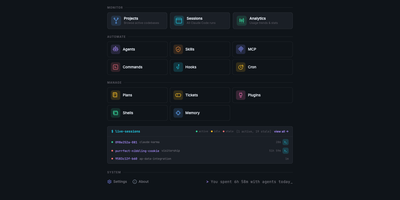
Anyone running Claude Code all day can open Claude Code Karma to see each session as a searchable timeline with its cost, file activity, and live status. It reads the session files Claude Code already saves on disk. The Timeline tab puts prompts, tool calls, skills, subagent spawns, and compactions in order, filterable by sender. Tasks appear as a flow diagram with status and dependencies. Every file operation lands in a sortable table. Subagents are grouped by type, with tokens and cost. Cost and token estimates sit beside each session, and a toggle adds every subagent to the totals. Hooks installed in Claude Code feed badges marking each session running, waiting for you, stopped, or stale. Projects group sessions by git repository. Analytics track spend, velocity, cache hit rate, and coding rhythm. Further pages cover MCP servers and tools, agents, skills, hooks by lifecycle phase, plugins, and plans. Paste a link, run a slash command, or add a branch-name hook to tie sessions to Linear, Jira, or GitHub tickets, with nothing written back. Synced copies of other computers' ~/.claude folders join as extra roots under machine badges. There are no accounts and no telemetry, and the index never leaves the server. The dashboard has no login screen, so keep it private and reach it through an SSH tunnel. Running on a dedicated VPS on RepoCloud with guaranteed CPU, RAM, and SSD, full root SSH access, and a browser serial console. Apache-2.0 licensed.
Executor
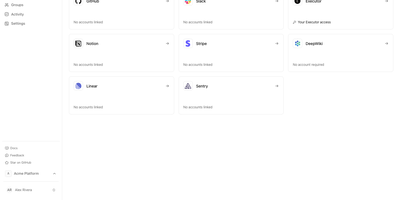
Connect your services once and let every AI agent use them through a single MCP endpoint, without a credential ever reaching the agent. Executor packages each integration as an app: a small TypeScript program that turns saved accounts into tools. Install one from a catalog of more than 1,800 ready-made apps, add a remote MCP server by URL, or have your agent write and deploy a new one. Agents get two tools, skills and execute, so they search for what they need and run a short program across as many apps as a task takes. Each tool decides when to ask first: always, never, or only when the input looks risky, and you approve in your agent, your MCP client, or a browser page. The dashboard shows every app with its tools, skills, workflows, schedules, webhooks, source files, and version history, and every deploy can be rolled back. Connections give each agent its own MCP URL that reaches only the apps you pick, with copy-paste setup steps for Claude, ChatGPT, Codex, and others. Organizations, groups, invitations, shared accounts, and optional single sign-on cover teams. Running on a dedicated VPS on RepoCloud with guaranteed CPU, RAM, and SSD, full root SSH access, and a browser serial console. MIT licensed.
Agents Platform
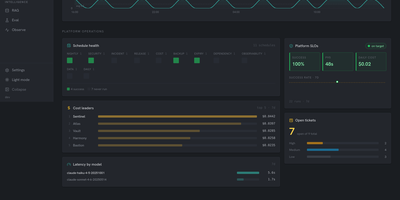
Twenty ready-made AI agent personas, a scheduler, a pipeline builder and a ticket board share one dashboard in Agents Platform, so recurring operations audits run, get summarized and turn into tracked work. Each agent carries a system prompt, skills in the SKILL.md format (adopted from the Anthropic skills catalog or imported by URL), MCP tool servers provisioned into SSH runs, and memories distilled from earlier results. Work runs in parallel, in sequence or as structured meetings, through conditional DAG pipelines or saved crews, on cron schedules or from inbound webhooks such as Prometheus alerts, git pushes and n8n flows. Execution happens over SSH on a host with Claude Code, through the Anthropic API, or against any OpenAI-compatible endpoint including local Ollama models. On SSH runs every tool call streams live into a step timeline, safety tiers stop read-only agents from writing files, supervised runs wait for approval, and scoped API keys guard the trigger endpoints. Recurring runs fuse into Combined Reports with a health score and metric trends, critical verdicts open tickets on a Kanban, Table or Gantt board, and Discord announces results. Cost, latency and SLO dashboards show per-agent spend, while eval suites with LLM-as-judge scoring and prompt A/B tests promote better prompts. A demo mode seeds weeks of sample history so everything can be explored without an API key. Running on a dedicated VPS on RepoCloud with guaranteed CPU, RAM, and SSD, full root SSH access, and a browser serial console. MIT licensed.
Varin
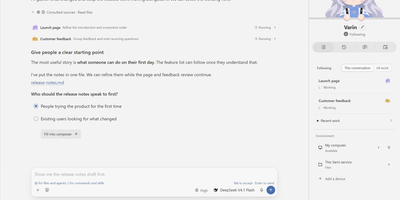
Talk to one assistant and a small team of agents quietly does the heavy lifting in the background. Ask for something in plain conversation and it answers, delegates tasks to other agents, and shows their progress in a side panel next to the thread. Answers are not just paragraphs: choices, checkboxes, tabbed drafts, tables, and live charts with adjustable sliders appear right inside the conversation. Open the Workbench to follow a task and message the agent doing it, or switch to the IDE for a Monaco editor, diffs, terminals, and Git beside the chat. Agents can read and edit files, run shell commands, search the web, work with PDF and Office documents, browse pages, and call MCP servers, skills, and extensions. Memory is inspectable and editable, work can be scheduled, and Codex or Claude Code can join as external agents. Connect any model provider or local service and watch usage and estimated cost per model. Running on a dedicated VPS on RepoCloud with guaranteed CPU, RAM, and SSD, full root SSH access, and a browser serial console. AGPL-3.0 licensed.