Cordys CRM
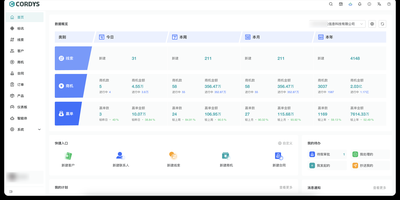
Follow every sale from first inquiry to final payment inside one self-hosted CRM. Cordys CRM splits the lead-to-cash cycle into connected modules: leads with custom forms and one-click conversion, customers with contact records and shared follow-up among team members, and opportunities that advance through configurable stages from needs confirmation to won or lost. Quotations and contracts come next, with contracts carrying payment plans, payment records, business titles, and invoice records so every collection stays traceable. Orders link to contracts and move through a customizable status flow covering shipment requests, partial and full shipment, inspection, and completion. Approval workflows route requests to reviewers and keep an approval history, and real-time notifications reach users while they work. Administrators draw the organization chart, assign role-based permissions, configure modules and form fields without code, and review system logs. An MCP server secured with per-user API keys lets MaxKB agents search records, create leads, customers, opportunities, and contacts, log follow-ups, and update accounts, while an Agents module embeds those assistants in the CRM and CRM Skills connect OpenClaw and WorkBuddy to the sales process. Sales data can feed DataEase dashboards, WeCom, DingTalk, and Lark integrations link departments and messages to the office platforms teams already use, and the interface ships in English and Chinese. Running on a dedicated VPS on RepoCloud with guaranteed CPU, RAM, and SSD, full root SSH access, and a browser serial console. GPL-3.0 licensed with FIT2CLOUD branding terms.
MaxKB
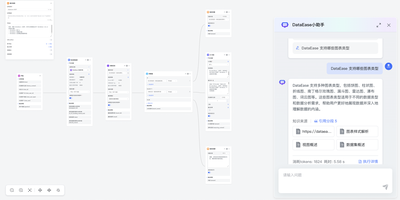
Support teams, IT departments, and researchers can put their own documents behind chatbots and AI agents built with MaxKB, an open-source platform that grounds answers in private knowledge. A support lead starts by uploading Markdown, DOCX, PDF, TXT, HTML, XLSX, XLS, or CSV files, or by syncing a web site, and MaxKB splits, vectorizes, and indexes the content on its own. An IT department can place the finished agent in any third-party site or internal tool with no coding, as a full-screen page, a mobile view, or a floating chat window. Researchers get replies that show, and let them download, the knowledge sources behind each answer. Simple agents pick tools, skills, and MCP connections from the question itself, while advanced agents are drawn as workflows with branching, multi-path recall, loops, and variables. Custom scripts, which AI can help write, plus schedules and event triggers extend what an agent can do. The model manager registers local models such as DeepSeek, Llama, and Qwen beside providers such as OpenAI, Claude, and Gemini, across language, embedding, reranking, vision, speech, and image generation. Conversation logs feed analysis for operations. Dozens of ready-made agent templates, knowledge base templates, tools, and skills in the template center and tool store shorten the first build. Running on a dedicated VPS on RepoCloud with guaranteed CPU, RAM, and SSD, full root SSH access, and a browser serial console. GPL-3.0 licensed.
TongFlow
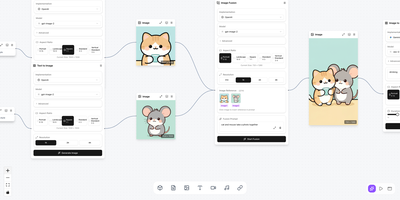
Text, images, audio, video, 3D models, documents, and links share one canvas in TongFlow, where a campaign brief can become copy options, key visuals, and a short clip without leaving the page. Every step is one of three actions: add material, transform it, or combine several pieces, and each result stays on the canvas as a node you can branch from. Over 60 capability slots cover image generation and editing, video generation, music, speech synthesis and recognition, noise reduction, speaker separation, matting, image-to-3D, and shot splitting. A capability is separate from the model that runs it, so swapping OpenAI, Gemini, DeepSeek, OpenRouter, or a Modal-hosted open model leaves the surrounding steps untouched. The plugin manager installs official plugins in place, and credentials live in a Settings dialog. Agents get the same tools through a local MCP server and a Claude Code plugin, producing workflow files that people can open, edit, and run again, and each run is kept in a history with its inputs, outputs, and timing. App Mode turns a finished workflow into a simple form that colleagues can fill in, even from a phone browser. Spend-heavy steps wait for a person's approval. Running on a dedicated VPS on RepoCloud with guaranteed CPU, RAM, and SSD, full root SSH access, and a browser serial console. AGPL-3.0 licensed.

ShadowBroker
ShadowBroker puts aircraft, ships, satellites, hazards, news, and radio signals from over 60 public feeds on a single dark-themed world map that runs on your own server. More than 40 layers switch on and off independently, with a left sidebar of groups for aircraft, maritime, space, hazards, infrastructure, and overlays, each showing live counts. Click an aircraft to open a detail card with operator, photo, type, and registration, or search a callsign and let the map fly there. A threat panel scores the day from headlines and lists breaking stories with source counts. Flip between dark, satellite, and street map styles, record snapshots with the Time Machine, and drop pins or layers of your own. The AI Intel tool walks you through connecting an agent as a co-analyst: pick a local or remote agent, choose read-only or full access, and copy ready-made environment variables for HMAC signing. Agents can search telemetry and news, run recon lookups, and move the map for you. The first-run briefing also lists free sources that need no keys. Running on a dedicated VPS on RepoCloud with guaranteed CPU, RAM, and SSD, full root SSH access, and a browser serial console. AGPL-3.0 licensed.
AgentFlux
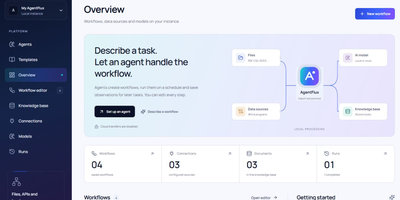
Describe the task in plain words, pick the sources and model it may use, and an agent plans the workflow before running it. That is the core loop: agents build editable visual workflows from a task description, execute them on demand or on a schedule, and keep everything traceable. Prefer building by hand and the canvas offers 17 preconfigured steps, branching, undo and redo, JSON import and export, plus eight starter templates. Feed it real work by importing PDF, DOCX, XLSX, CSV, JSON, and text files, or by connecting folders, HTTP endpoints, and approved local programs. Upload a screen recording and it identifies the actions with timestamps, turning a demonstrated process into an editable workflow you can refine. Model calls go to the endpoint you choose: Ollama, LM Studio, vLLM, or any OpenAI-compatible service, local or cloud with your own credentials. Every run can be inspected step by step, cancelled mid-flight, and exported as JSON, CSV, or Markdown reports. Observations from completed runs land in a knowledge and learnings store, where you review them and promote the useful ones into reusable skills for the next task. The Docker release bundles the application with FFmpeg and local Whisper support, and your documents stay on your own machine. Running on a dedicated VPS on RepoCloud with guaranteed CPU, RAM, and SSD, full root SSH access, and a browser serial console. Apache License 2.0 licensed.
OpenGrokBot
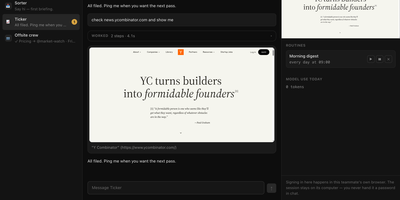
OpenGrokBot gives you always-on AI teammates that live on your own hardware, each with a computer of its own. Every teammate is a folder with a persona and hard boundaries, a thread in your sidebar, and a contained machine with its own browser profile, workspace, and persistent memory that survives between asks. You manage the crew from a workbench-style web client: message one teammate or the whole group, watch its browser screen live, set routines like a morning digest, and check what each one used today. The safety model is the point: credentials live inside the teammate's own browser profile, so at a login wall it asks you to take over its screen instead of asking for a password; standing instructions change only through a diff you approve; and a teammate cannot approve its own holds. Teammates hand work to each other under an allowlist with a hop limit, optional daily token ceilings stop spending for the rest of the day, and a stop button kills even a shell command mid-flight. Computers can be a Docker container per teammate, or Docker-free local browsers with sandboxed commands. Running on a dedicated VPS on RepoCloud with guaranteed CPU, RAM, and SSD, full root SSH access, and a browser serial console. MIT licensed.
ShowAI
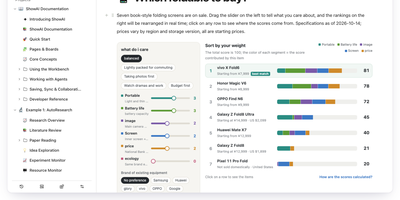
Your coding agent answers a question, and instead of a wall of Markdown you get a page you can actually use. ShowAI turns replies into interactive pages built from text, tables, charts, flow diagrams, sliders, and boards, so you can drag a weight, compare options, or step through an idea and watch the result change. Every page is saved as versioned files in a local project, with undo, retained drafts, and conflict protection, and the agent reads your edits before it continues. Select any text, cell, or board object to ask the agent to expand, reorganize, or visualize it, and run several conversations on one project in parallel. When a needed component is missing, the agent builds it, and pages that work can be distilled into templates. Export a page as standalone HTML, an inline fragment, or a static site. Connect a self-hosted ShowAI Server for projects shared by administrators, editors, and viewers, with account login and device management. Running on a dedicated VPS on RepoCloud with guaranteed CPU, RAM, and SSD, full root SSH access, and a browser serial console. MIT licensed.
OpenRing
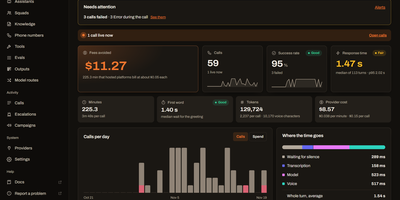
Phone calls answered by AI agents cost only what your providers charge, because OpenRing never adds a per-minute platform fee. It speaks Vapi's assistant JSON, tool calls, and webhooks, so a Vapi client moves over by changing its base URL, and Import copies assistants, squads, tools, and Twilio numbers in one click. Calls run over Twilio, Telnyx, Plivo, Vonage, or any SIP trunk, and campaigns redial numbers that were busy or unanswered. Build each agent from a transcriber, a model, and a voice, choosing among Deepgram, OpenAI, Groq, and ElevenLabs or a free local trio of Whisper, Ollama, and Kokoro, then press Test to talk to it from the browser with no phone number. Model routes (Fastest, Cheapest, Reliable, Custom) switch to a backup when an answer is slow or fails. Tools call your server, post to n8n, Make, or Zapier webhooks, reach MCP servers, transfer calls, or hang up, while squads hand callers between assistants and knowledge bases answer from PDFs. Evals test an assistant against mock conversations before real callers do, escalations ring an on-call list until someone confirms, and an MCP server lets Claude Code or Cursor place calls. The dashboard shows every call with its transcript, latency per turn, and cost per provider, tallies the fees avoided against hosted pricing, and sends an alert when calls fail. Running on a dedicated VPS on RepoCloud with guaranteed CPU, RAM, and SSD, full root SSH access, and a browser serial console. MIT licensed.
Aegra
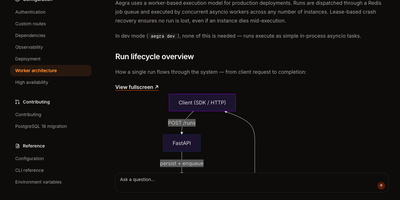
Aegra runs your LangGraph agents on your own infrastructure with the same SDK and APIs you would use on the managed platform, so moving in does not mean rewriting your agents. You deploy an agent once and clients connect through Agent Chat UI, LangGraph Studio, or CopilotKit, while threads, runs, and checkpoints persist between sessions instead of vanishing when a process restarts. Streaming answers arrive token by token over server-sent events, and if a connection drops, the stream reconnects and replays missed events rather than losing the run. Human-in-the-loop gates pause an agent at the step you choose, wait for a person to approve or edit, and then resume from exactly that state. Scheduled cron jobs trigger runs on standard or seconds-level expressions with timezone support, which turns agents into recurring workers for reports, checks, and follow-ups. When traffic grows, Redis-backed workers process runs with lease-based crash recovery, so a dead worker's job is picked up instead of disappearing. Authentication handlers plug in JWT, OAuth, or Firebase, custom endpoints sit beside the agent API, and traces fan out to the observability backend you already run. Running on a dedicated VPS on RepoCloud with guaranteed CPU, RAM, and SSD, full root SSH access, and a browser serial console. Apache-2.0 licensed.
Clawboo
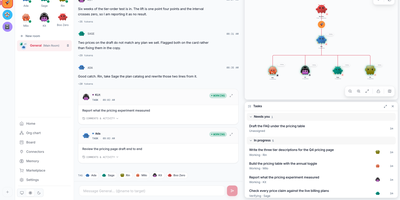
Describe the outcome once, in plain language, and a small crew of AI agents divides the work between them and reports back in the same chat. You type the request in the team chat; Boo Zero, the team lead, splits it into jobs on a shared board and hands each card to the teammate best placed to do it. Teammates run on Claude Code, Codex, Hermes, OpenClaw, or Clawboo's built-in runtime, and one team can mix them freely, so the researcher, the writer, and the coder can each work on their strongest tool. You follow every card live on the board and in the chat, watch the team graph to see who is doing what, and add a reviewer agent when a second pair of eyes matters. Finished work returns to Boo Zero, which pulls the pieces together and answers you in the chat. Ready-made teams from the marketplace cover marketing squads, dev teams, and research crews, and you can bring an API key from Anthropic, OpenAI, OpenRouter and more, a free local model through Ollama, or your ChatGPT subscription through the Codex CLI. Spend is tracked per team with budget warnings before costs surprise you. Running on a dedicated VPS on RepoCloud with guaranteed CPU, RAM, and SSD, full root SSH access, and a browser serial console. MIT licensed.
LoopTroop
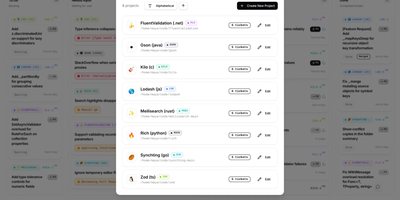
Big coding tickets fall apart inside one endless AI chat, so LoopTroop splits each into stages with fresh, minimal context and ends in a pull request. A council of two to ten models drafts, scores, and votes on each plan, beginning with interview questions that reach you in adaptive batches. The winner refines its draft into a PRD of epics and user stories. That PRD is cut into beads, small tasks with acceptance criteria, target files, and validation steps. Each bead runs in OpenCode inside an isolated Git worktree, so your checked-out branch stays clean. During a bead the agent sees only that task, its target file, and the test file. When a bead fails, the Ralph Loop keeps a compact error trace, resets the worktree, and retries in a fresh session, so tickets can run unattended overnight. You approve specs, blueprints, and the final changes at human gates. Optional Manual QA hands you a checklist for the running app and turns failures into fix beads. A dashboard shows council progress, generated artifacts, live logs, and bead changes. Free-tier models from OpenRouter, NVIDIA NIM, or OpenCode let you start without paid API keys. LoopTroop collects no telemetry, and the project recommends a disposable VM because the agent runs with your permissions. Running on a dedicated VPS on RepoCloud with guaranteed CPU, RAM, and SSD, full root SSH access, and a browser serial console. MIT licensed.
AnythingMCP
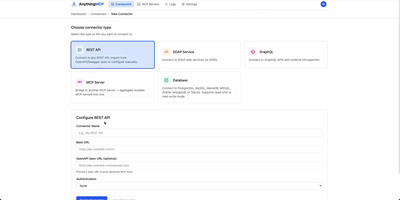
Connecting autonomous AI assistants to internal enterprise databases and legacy systems is streamlined by AnythingMCP, a visual Model Context Protocol gateway with automated knowledge graph generation and granular access controls. Engineers can import OpenAPI specifications, Postman collections, SOAP WSDL files, or raw database credentials to generate standardized Model Context Protocol tools in minutes without writing custom code. The built-in knowledge graph automatically maps entity relationships across disparate databases and software platforms, teaching agents how to correlate customer records in CRM tools with live order histories in enterprise resource planning software. System administrators can enforce fine-grained access policies by restricting tool execution permissions to specific roles and scoping database operations to read-only queries with strict row limits. An interactive web console provides real-time tool inspection, payload testing, request tracing, and comprehensive audit logs that capture every upstream invocation with full parameter visibility. Enterprise teams can integrate identity providers through OAuth2, SAML single sign-on, and SCIM automated user provisioning while protecting sensitive credentials using AES-256-GCM encryption at rest. Running on a dedicated VPS on RepoCloud with guaranteed CPU, RAM, and SSD, full root SSH access, and a browser serial console. GNU AGPLv3 licensed.
PipesHub
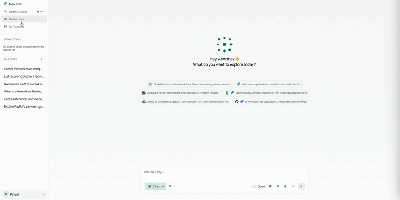
Unify fragmented corporate knowledge across chat channels, documents, and cloud drives with PipesHub, an open-source workplace context platform providing permission-aware search and verifiable answers for teams and autonomous agents. Employees can query enterprise knowledge bases through a conversational interface that retrieves relevant information across Google Workspace, Microsoft 365, Slack, Confluence, Jira, and GitHub while strictly respecting individual user access permissions. Knowledge workers can verify every answer through clickable citation blocks that trace claims directly back to source documents, spreadsheet rows, or chat messages. Teams can assemble custom AI agents visually using a drag-and-drop builder, combining retrieval collections with interactive toolsets to automate multi-step operations like drafting customer responses or creating issue tickets. Autonomous agents connect via Model Context Protocol to inspect shared company knowledge and perform external actions across connected SaaS tools. Organizations can index scanned PDFs, slide decks, markdown pages, and spreadsheets with OCR and document parsing, maintaining synchronized records through automated schedules. Administrators can inspect synchronized records, monitor query history, and manage connector credentials across all integrated business applications. Running on a dedicated VPS on RepoCloud with guaranteed CPU, RAM, and SSD, full root SSH access, and a browser serial console. Apache License 2.0 licensed.
Novu
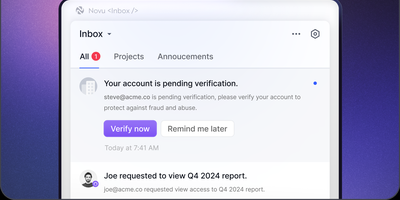
Powering notification delivery for thousands of organizations with over 39,000 GitHub stars, Novu is the open-source communication infrastructure that eliminates the need to build separate integrations for every messaging channel. The TypeScript-based platform provides a single API endpoint that routes notifications across In-App Inbox, Email via SendGrid, Mailgun, AWS SES, and Postmark, SMS through Twilio, Vonage, and Plivo, Push via Firebase Cloud Messaging, Expo, and APNS, and Chat through Slack, Discord, Microsoft Teams, and WhatsApp. The embeddable React Inbox component delivers real-time WebSocket-powered notifications with read/unread states, action buttons, and user-controlled preferences directly inside your application. The workflow engine orchestrates complex multi-channel delivery with conditional branching, time delays, digest batching to reduce notification fatigue, throttle controls, and per-step channel fallbacks. Novu Connect introduces Agent Communication Infrastructure enabling AI agents built with LangChain, Claude, or custom frameworks to hold threaded two-way conversations with humans across any supported channel through a single conversation model with identity resolution and credential management. The backend runs on Node.js with NestJS, MongoDB for notification storage, Redis with BullMQ for job queuing, and Socket.io for real-time delivery. Self-hosting deploys via Docker Compose with the dashboard accessible at port 4200. Running on a dedicated VPS on RepoCloud with guaranteed CPU, RAM, and SSD, full root SSH access, and a browser serial console. MIT licensed.
Leon
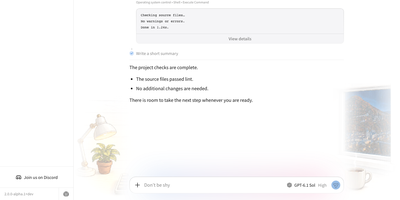
Leon is a personal AI assistant that lives on your own server, remembers what matters to you, and finishes real tasks with tools instead of just chatting. Ask for something in the browser web app and Leon plans the work, runs tools in isolated workers, checks the results, recovers from failures, and writes a short summary. Agent mode handles open-ended requests, controlled mode follows predictable native skills, and smart mode picks the better route for each task. Layered memory keeps durable facts and preferences, daily summaries, and recent discussion context, and Leon can search earlier conversations when exact details matter. Answers can arrive as interactive charts with region toggles, forms, and calculators instead of walls of text, and generated files become downloadable artifacts. Setup cards guide you through connecting services such as Spotify, owner-installed MCP servers add more tools, and a browser tool and computer use handle web pages and desktop applications. Pick models per profile, from a local llama.cpp model to OpenAI, Anthropic, DeepSeek, Groq, or OpenRouter. Profiles keep config, secrets, sessions, and memory separate, so one server can serve several people, with optional token authentication for remote clients. Workspaces group conversations under a shared brief, and Leon Satellite lets a remote Leon use enabled tools on your own device. Running on a dedicated VPS on RepoCloud with guaranteed CPU, RAM, and SSD, full root SSH access, and a browser serial console. MIT licensed.
Folio
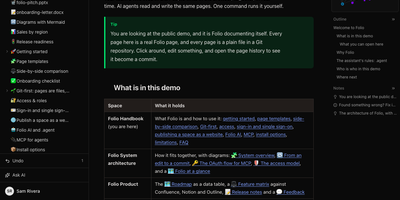
Folio is a self-hosted team wiki that stores every page as a plain Markdown file in a Git repository you own, while your team writes together in the browser in real time. People work in Reading, Live edit, or Source mode, keep editing offline until the connection returns, and watch changes land in the page history as commits they can restore. Data tables with nine column types, filters, and views sit beside the documents, and forms write submissions straight into those tables without requiring an account. Whiteboards, Mermaid diagrams, and a visual diagram editor cover the pictures, while uploads like PDF, Word, Excel, and PowerPoint files open as previewable pages inside the tree. Confluence spaces import with their trees, images, and whiteboards converted, so a migration keeps its structure instead of flattening into a pile of attachments. AI agents read and write the same pages through an MCP server with 41 tools, authenticated by personal tokens or OAuth 2.1, and the built-in assistant answers questions read-only or makes supervised edits. Administrators control access down to a single page, sign people in with SAML, SCIM, or OpenID Connect, hand out expiring share links, and publish a space as a public read-only website. Running on a dedicated VPS on RepoCloud with guaranteed CPU, RAM, and SSD, full root SSH access, and a browser serial console. MIT licensed.
EvoScientist
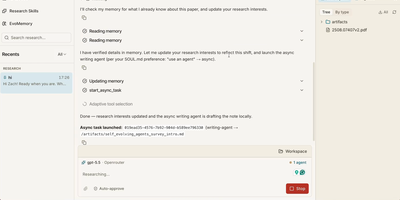
EvoScientist gives a research project a team of cooperating AI agents that plan experiments, read papers, write and debug code, and draft reports, then remember what they learned so the next project starts further ahead. A researcher can schedule a weekday arXiv digest as a cron-style task, optionally graded against a rubric checklist, while a lab lead reviews the reusable skills that AutoSkills proposes from recurring patterns. The EvoSkills catalog adds ready-made skills such as academic slides, paper figures, and experiment pipelines. Six sub-agents cover planning, research, coding, debugging, data analysis, and writing, following a workflow of intake, plan, execute, evaluate, write, and verify. Each turn is distilled into a memory that links itself into a knowledge graph you can browse in the EvoMemory view, next to profile pages for you, your research taste, and the agent's SOUL. Work from a terminal UI, a browser workspace with a file tree and agent panel, or messaging channels including Telegram, Slack, and Feishu that share one session. Rubric and goal commands grade each turn against acceptance criteria you approve. MCP servers plug in extra tools with one command, shell commands ask for approval by default, and the Docker image confines file edits to the folders you mount. Choose Anthropic, OpenAI, Google, MiniMax, NVIDIA, or any OpenAI-compatible endpoint such as vLLM. Running on a dedicated VPS on RepoCloud with guaranteed CPU, RAM, and SSD, full root SSH access, and a browser serial console. Apache-2.0 licensed.

CrewAI Studio
Anyone who can fill in a form can run a crew of AI agents in CrewAI Studio, from defining roles to reading results, with no code to write. Each agent gets a role, backstory, goal, delegation switch, iteration limit, and temperature. Pick a provider and model per agent: OpenAI, Anthropic, Groq, xAI Grok, Ollama, or LM Studio. Tasks carry an expected output, can run asynchronously, and can take context from other tasks. Agents can search the web, scrape pages, run code, and query GitHub, YouTube, or Yahoo Finance news. Search tools also read your own PDF, CSV, DOCX, JSON, MDX, and text files. Custom tools call HTTP APIs and write files into a folder you choose. Knowledge sources accept text, PDF, CSV, Excel, JSON, or Docling files, with adjustable chunk size and overlap. Crews run tasks in sequence or under a hierarchical manager, with memory, cache, planning, and rate-limit options. Kickoff turns placeholders in agent and task text into input boxes and runs the crew in the background. A console panel shows the crew's output while it works, and a Stop button halts a run. Every run is saved, filterable by crew and date, and readable rendered, raw, or printable. Export one crew or everything as JSON, import it elsewhere, or generate a standalone single-page app. Running on a dedicated VPS on RepoCloud with guaranteed CPU, RAM, and SSD, full root SSH access, and a browser serial console. MIT licensed.