Drydock
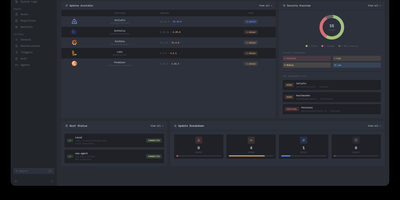
Deploying container updates without blind surprises is what Drydock delivers through a monitor-first inspection plane that evaluates image registries, scans CVE vulnerabilities, and automates rollbacks across distributed Docker infrastructure. Systems engineers track container fleets across twenty-three public and private registries including Docker Hub, GitHub Container Registry, Harbor, and Quay using cursor-based pagination and semver classification. The integrated Update Bouncer runs Trivy and Grype static scanners against incoming candidate layers, blocking deployments that fail configurable CVE severity policies while verifying cryptographic signatures through cosign. Operators configure declarative update schedules with stabilization countdown gates that hold back brand-new releases until defined burn-in periods elapse. When updates execute, Drydock creates pre-upgrade container snapshots and evaluates post-launch container health checks, instantly restoring previous image digests and network configs if failures occur. Distributed Portwing edge agents stream live container output and system logs over encrypted WebSockets, allowing central consoles to coordinate remote daemon updates without opening inbound host firewall ports. Automated event triggers dispatch granular notifications and update payloads across seventeen communication channels including Slack, Discord, Telegram, and Home Assistant MQTT brokers. Running on a dedicated VPS on RepoCloud with guaranteed CPU, RAM, and SSD, full root SSH access, and a browser serial console. AGPL-3.0 licensed.
Iso
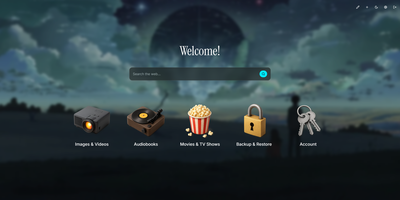
Drop a single container onto your host to launch Iso, a minimalist self-hosted startpage and service launcher that organizes every homelab web application behind a clean isometric icon grid and integrated search bar. No external database is required. Everything lives inside one human-readable JSON file or gets edited directly through the in-browser visual configuration modal. Add new service tiles in seconds, drag to reorder their display priority, and pick from a curated library of 3D isometric icons or upload custom graphics up to 25 megabytes. Switch instantly between built-in color palettes like Amethyst or upload a custom wallpaper with adjustable background blur and opacity sliders. A central search bar sits at the top of your startpage, routing queries directly to Google, DuckDuckGo, Startpage, Qwant, Searx, Bing, or any custom query URL template. Localize the interface into English, Spanish, French, or German with a single toggle. Custom greeting banners and optional page-load animations personalize the daily browsing experience for family members or lab users. Protect the dashboard and its visual editor behind shared password authentication configured via environment variables. Running on a dedicated VPS on RepoCloud with guaranteed CPU, RAM, and SSD, full root SSH access, and a browser serial console. MIT licensed.
MillionSend
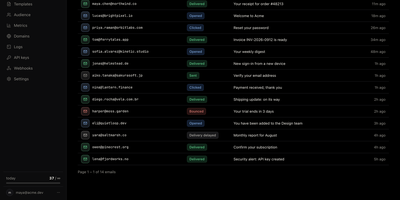
MillionSend is an open-source email platform you run yourself that sends transactional and marketing mail through your own AWS SES account behind a Resend-compatible API. Every message you send becomes a row in the dashboard, and every row opens into a timeline of SES events with the raw payload and the SMTP diagnostic when something bounces. Daily metrics chart sent, delivered, opened, clicked, bounced, and complained volumes against SES thresholds, and broadcasts stop on their own at five percent bounces or 0.1 percent complaints before Amazon can pause your account. Contacts live once for the whole team with custom properties and subscribe state, while segments and topics decide exactly who receives each broadcast. You compose broadcasts from reusable templates with per-contact merge fields, schedule them ahead, and cancel them while they wait. Applications that only speak SMTP send through the relay on port 2587 with an API key as the password, and HTTP integrations use idempotency keys, request logs with secrets redacted, and signed webhooks with a delivery history. Guided domain setup handles DKIM records, hard bounces and complaints are suppressed automatically, and every recipient gets an RFC 8058 one-click unsubscribe. Receiving and agent-ready inboxes are included in beta for mail sent to your verified domains. Running on a dedicated VPS on RepoCloud with guaranteed CPU, RAM, and SSD, full root SSH access, and a browser serial console. AGPL-3.0 licensed.
OpenAgentCore
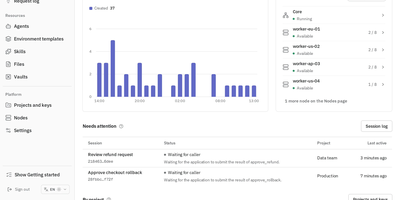
OpenAgentCore puts Codex, Claude Code, and MiniMax Code behind one self-hosted Agents API, so your applications start agent sessions through the official OpenAI SDK while the work runs on machines you control. Set OPENAI_BASE_URL to your installation and issue a Project API key, and the same client code that talks to OpenAI now talks to your Core. Each session runs a native harness, exactly as it runs on a developer's machine, with the model provider, model ID, and protocol you configure per harness or per session. Choose where sessions execute: microsandbox nodes you operate, Docker, E2B, or a self-hosted workstation, VM, or container connected by the oac-daemon with a credential scoped to one environment. Idle microsandbox sessions release their compute and resume on a compatible node with workspace files intact, so long investigations do not rent a machine while they sleep. The Web console walks operators through setup, tracks sessions and turns, manages models and credentials, and issues keys, while the separate Core API serves operators and the Agents API serves applications. Durable execution state in PostgreSQL keeps events, results, and schedules recoverable across restarts. Sandbox providers, workspace filesystems, harnesses, and model providers all plug in through defined protocols, so every layer can be replaced on its own. Running on a dedicated VPS on RepoCloud with guaranteed CPU, RAM, and SSD, full root SSH access, and a browser serial console. MIT licensed.
db-ui
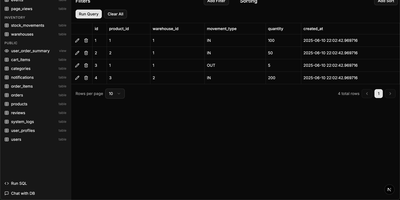
Traditional database management tools like pgAdmin and phpMyAdmin were built for DBAs, not for the rest of the team that just needs to look up a record or run a quick query. db-ui strips away the complexity and gives you a clean, modern interface that anyone can use. Browse tables in a paginated grid view with inline editing, filtering, and sorting built right into the column headers. The sidebar lists every table and view across all schemas with fuzzy search (Cmd+K to focus) that filters results as you type. Click any table to see its data, or switch to the schema introspection view to visualize columns, types, constraints, and relationships without writing a single query. The SQL editor provides syntax highlighting, result visualization in tabular format, and one-click CSV export for downstream analysis. For questions about your data model, the integrated AI chat assistant has full access to your database schema and can help you understand table relationships, write complex queries, suggest indexes, and provide optimization recommendations with streaming responses. Connect to PostgreSQL, MySQL, or Microsoft SQL Server through environment variables and deploy the whole application as a single Docker container. On RepoCloud, deploy db-ui on a dedicated VPS with root SSH access and direct connectivity to your database servers under the MIT license.