Homeio
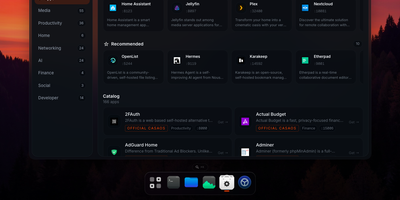
Homeio turns a Linux box into a desktop you open in a browser tab, with draggable windows, a dock, a lock screen, and a command palette sitting on top of your Docker apps, files, and disks. The App Store installs Docker Compose stacks from the CasaOS catalog or your own store sources, and each app's ports, volumes, environment variables, and compose file stay editable before and after install. Containers you started elsewhere still appear with live CPU and memory stats, streaming logs with keyword filters, and one-click restarts. The file manager uploads with progress, previews images, audio, video, and PDFs, edits text in a built-in code editor, mounts USB drives and SMB shares, and shares folders over Samba. A real login shell lives in the Terminal window, with exec access into any container, so routine fixes never need a separate SSH client. Cron-style scheduled tasks restart apps, pull images, or run backups on a timer, and scheduled archives of the database, files, and compose stacks restore from the same interface. Tailscale puts the whole desktop on your private network, while Cloudflare Tunnel can publish a single app on a public hostname with its DNS record created for you. Live metrics stream to widgets and the status bar, and notifications flag crashed containers, filling disks, and failed tasks. Running on a dedicated VPS on RepoCloud with guaranteed CPU, RAM, and SSD, full root SSH access, and a browser serial console. AGPL-3.0 licensed.
FeedCraft
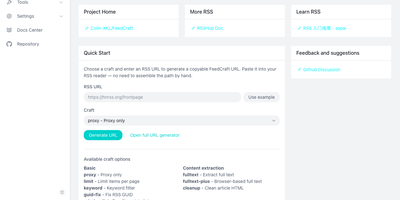
Excerpt-only feeds, truncated teasers, and articles in languages you do not read make RSS feel broken; FeedCraft sits between the source and your reader and fixes the feed itself. Pick from more than twenty single-step crafts: extract the full article text, even from JavaScript-rendered pages through a headless browser, translate titles or whole articles, add AI introductions and summaries, strip ads and clutter, or filter items by keyword, embedding similarity, or a natural-language prompt to your own LLM. Chain crafts into FlowCraft pipelines, so one pass can limit a feed to ten items, fetch every full text, drop the advertorials, and summarize what survives. Save the result as a recipe and FeedCraft hands you a permanent crafted feed URL that drops straight into the reader you already use, while portable mode transforms any feed on the fly from a single crafted URL prefix. When a site has no feed at all, the visual generators build one from a webpage with CSS selectors, from a JSON API with curl import, or straight from search results. Running on a dedicated VPS on RepoCloud with guaranteed CPU, RAM, and SSD, full root SSH access, and a browser serial console. GPL-3.0 licensed.
Moneat
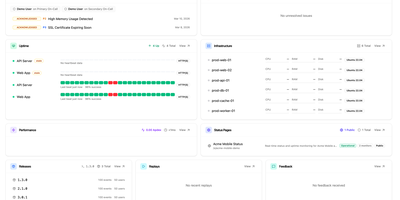
Moneat is the open-source observability platform that unifies error tracking, session replay, performance monitoring, logging, uptime checks, synthetics, product analytics, and AI observability into a single self-hosted application — replacing Sentry, Datadog, and Statuspage with one deployment. The Sentry SDK compatibility layer accepts data from @sentry/browser, @sentry/node, @sentry/react, @sentry/nextjs, sentry-sdk for Python, sentry-kotlin, sentry-java, sentry-android, sentry-cocoa, sentry-go, sentry-ruby, and Sentry.NET by updating one DSN endpoint. Datadog Agent compatibility redirects existing fleets by setting dd_url, and native OpenTelemetry OTLP ingestion accepts logs, traces, and metrics from any exporter or Collector. Error monitoring groups exceptions with smart deduplication, session replay records DOM-based user interactions linked to errors, distributed tracing visualizes transaction and span breakdowns with live service maps, and continuous profiling renders flamegraphs in pprof, JFR, and Sentry formats. Uptime monitoring runs HTTP, TCP, and ping checks with public status pages, while synthetics executes API tests, multi-step workflows, SSL checks, and DNS probes. Custom dashboards support drag-and-drop widgets with Grafana import, product analytics provides funnels and retention cohorts, release tracking surfaces crash-free rates with source map upload, and AI observability traces LLM calls end to end. Built on Kotlin and Java with ClickHouse for analytical storage, PostgreSQL for relational data, and Redis for caching, deployment uses Docker Compose with an interactive installer automating secrets and service orchestration. Running on a dedicated VPS on RepoCloud with guaranteed CPU, RAM, and SSD, full root SSH access, and a browser serial console. AGPL-3.0 licensed.

TLDR Radio
Every morning, TLDR Radio converts the day's TLDR newsletters into chapterized podcast episodes you listen to instead of read, generated entirely on your own server. Pick a date at the Broadcast Desk, hit Broadcast, and a few minutes later chapterized episodes wait in your browser, one per newsletter with each story as its own track. All fourteen TLDR newsletters can sit on the Desk for manual runs, join the overnight build, or both, and the overnight selection shows an estimated listening time measured from your own episodes. Scheduled builds retry until the day's issue appears and can send an ntfy notification when the audio is ready. The player groups your library by day, shows each chapter with its section heading, source summary, and link to the original, and offers 15-second skips, playback speed up to 2.5x, auto-advance, resume, and keyboard shortcuts. Sponsor segments become their own clearly marked chapters in a different voice, announced out loud so an ad is never mistaken for news, and easy to skip. Sixty-eight voices can be auditioned in Settings, and every episode downloads as a single tagged MP3 with album, title, and author set for podcast and audiobook apps. Running on a dedicated VPS on RepoCloud with guaranteed CPU, RAM, and SSD, full root SSH access, and a browser serial console. MIT licensed.
MakersVault
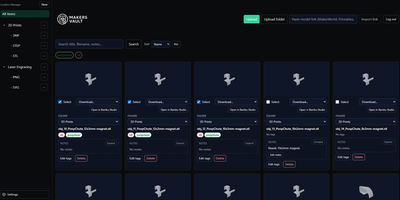
MakersVault gives your scattered 3D print files and creative artwork one searchable home, so you stop loading models into a slicer just to remember what they are. You create folders and subfolders for projects, then drag and drop single files, batches, or whole folders straight into the library from your browser. Every model tile carries a rendered preview, and double-clicking opens an interactive 3D view you can rotate and inspect before downloading anything. Tags attach to any file, batch tagging covers many selected models at once, and tag tabs plus sorting by name, size, type, or folder keep large collections browsable. Notes on individual files record print settings, filament choices, or assembly reminders right beside the model they describe. Imports pull models directly from MakerWorld, Thingiverse, and Printables links, and zip archives prompt you to keep only the files you actually want. Supporting documents ride along with each model and travel inside its ZIP downloads, and prepared print data surfaces printer, material, nozzle, and time estimates on the card. The Open in Slicer button hands a model to your configured slicer through the desktop bridge, and themes from light and dark to neon accents restyle the whole workspace. Running on a dedicated VPS on RepoCloud with guaranteed CPU, RAM, and SSD, full root SSH access, and a browser serial console. MIT licensed.
Oxigen
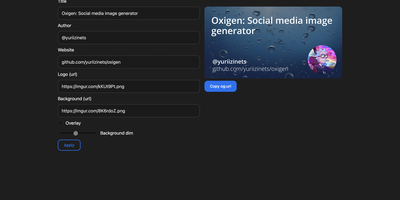
The social preview cards shown when links hit Twitter, LinkedIn, Slack, or Discord, generated on the fly: Oxigen is a small Go service for dynamic Open Graph images, no designer required per page. Instead of exporting static images per page, you compose a card once and drive it with parameters: title, author, website, logo, background image, and background dimming all arrive as URL query arguments, so your og:image meta tag simply points at the Oxigen endpoint with the page's own values substituted in. Every blog post, product page, and doc gets a branded, correctly sized preview generated on the fly. A built-in web UI covers interactive composition - tweak the text and imagery, watch the preview update, copy the resulting URL - while the same rendering path serves programmatic API use from static site generators, CMS templates, or build pipelines. Rendering is pure Go using the gg 2D graphics library, freetype fonts, and the imaging package, built on the kyoto framework by that project's author. Deployment is one stateless container on port 80 with no database and no external dependencies, so instances scale and restart freely.
Owlmail
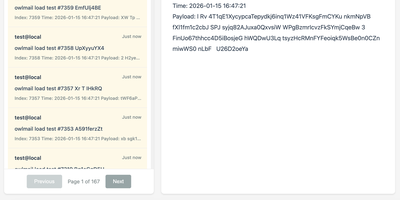
Every email your app sends while you build and test it lands in OwlMail's browser inbox instead of a customer's mailbox. Point any application's SMTP settings at OwlMail and every message is ready to open as rendered HTML, plain text, headers, or raw source. Attachments and inline images sit beside the body, and seven preset preview widths show how the message lays out on phones, tablets, and desktops before anyone real sees it. A Verify panel checks subject, body, and link hosts against expectations, while CI pipelines use the REST API with delivery cursors to wait for exactly the messages their test run produced, assert on them, and clean up afterwards. Coding agents get the same inbox read-only over MCP, so an assistant can confirm a signup email arrived without touching your mail server. When a message proves itself, relay it onwards to a real SMTP server, by hand or automatically under filtering rules, or fire webhooks with HMAC signatures and retry queues into the rest of your automation. Everything stores as plain .eml files on disk, with optional SQLite indexing, S3 attachment storage, and ZIP exports for archiving. Running on a dedicated VPS on RepoCloud with guaranteed CPU, RAM, and SSD, full root SSH access, and a browser serial console. MIT licensed.
Moocup
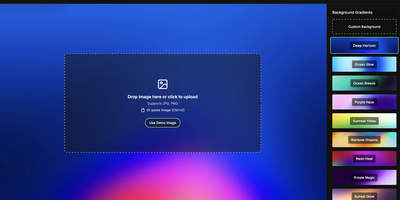
Drop your screenshot, a base style is applied, style it however you wish, and export - "that's basically it," says Moocup's own author, and the description holds. The workflow is genuinely seconds long. Drag an image in and it lands on an attractive backdrop immediately; from there you adjust backgrounds, gradients, padding, borders, shadows, and framing with live preview until it matches your taste, then export a high-quality image ready for a portfolio page, README, blog post, tweet, or slide deck. There are no accounts, no watermarks, and no upload to anyone's cloud - as a self-hosted static app, your screenshots never leave your infrastructure, which matters when the screenshot shows a proprietary dashboard or unreleased product. It runs entirely in the browser from a tiny nginx container, works on any device, and requires zero design skill: the smart defaults do the heavy lifting, and everything else is optional tinkering.
KoShelf
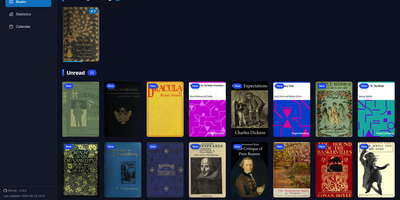
Your e-reader already knows everything about your reading life, and KoShelf turns that KOReader metadata into a beautiful dashboard you can browse from any browser. The library overview gathers currently reading, completed, and unread books and comics, while each item's page collects your highlights, annotations, ratings, and review notes in one place. Reading statistics chart your time and pages with customizable activity heatmaps and weekly breakdowns, and per-item statistics reveal session counts, average session length, and reading speed for every book. A monthly calendar shows what you read on each day, and the yearly recap celebrates completions with monthly summaries of finished items and hours read. Supported books open right inside KoShelf's own reader, with keyboard navigation, a progress scrubber, and inline highlight notes. Metadata entries survive even when the original document disappears, because library archives preserve covers and reading data until the source returns. With writeback enabled in server mode, you can edit annotations, ratings, status, and covers from the browser, protected by revision checks and recoverable backups so external changes are never overwritten blindly. Search by title, author, or series, filter by reading status, and download original files whenever you need them. Running on a dedicated VPS on RepoCloud with guaranteed CPU, RAM, and SSD, full root SSH access, and a browser serial console. EUPL-1.2 licensed.
Watchtower
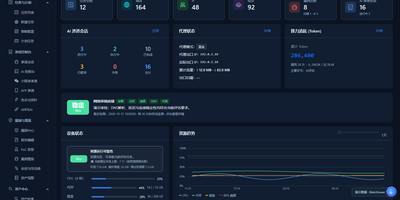
Watchtower puts AI-driven security assessments into one web console, where sessions probe your attack surface while every request, finding, and piece of evidence is captured as it happens. The AI session console follows the attack surface, session progress, tool calls, and findings as an assessment runs, so you can watch an engagement unfold instead of reading a log afterwards. A built-in proxy workflow records HTTP and HTTPS traffic history with highlighted patterns, and any captured request can be sent to the Repeater for editing, replay, and response comparison. Mobile work is covered too: connect phones over USB or wireless, capture app traffic separately from accessibility control, and import WeChat mini-program packages to configure an assessment session. A public vulnerability intelligence library can be searched by component, severity, and source and kept synchronized locally, giving assessments current context without sending your targets anywhere. Findings are managed by source, severity, and status, each linked back to its supporting evidence, and the report editor assembles them with a live preview, impact notes, and remediation guidance. The dashboard tracks assets, tasks, AI sessions, token usage, and runtime resources, and task admission is budgeted against physical memory so heavy scans do not starve the host. Running on a dedicated VPS on RepoCloud with guaranteed CPU, RAM, and SSD, full root SSH access, and a browser serial console. GPL-3.0 licensed.
OpenSkyCam
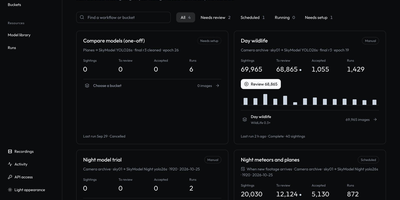
OpenSkyCam records a sky-facing IP camera around the clock on hardware you own, and searches the footage for meteors, planes, and anything else that moves. A small Linux relay by the camera copies the RTSP stream into one-minute MP4 files without re-encoding, kept on your disk under a rolling 40-day window: browse by day, scrub by hour, zoom into the 4K frame, download originals. Workshop workflows sample frames from any time window, run up to four detection or classification models over them, and sort each frame into buckets by class, score, count, time of day, or motion, once or nightly as footage lands. Detections of one object link across a recording into tracks labeled moving, stationary, or brief, so fixed stars and porch lights are discarded and aircraft kept. A trained night detector for planes and meteors ships with the project; every detection waits in a review view where you confirm or correct its label and box, then freeze the approved set as a versioned training dataset. The processor lives on your machine too (Apple or NVIDIA GPU, or plain CPU), and the footage itself never leaves your disk. Every website action is also a /v1 API call, and an MCP server lets an AI agent find last night's clearest meteors, take a photo at any second of stored video, or schedule the next workflow. Running on a dedicated VPS on RepoCloud with guaranteed CPU, RAM, and SSD, full root SSH access, and a browser serial console. MIT licensed.
Pinchflat NGX
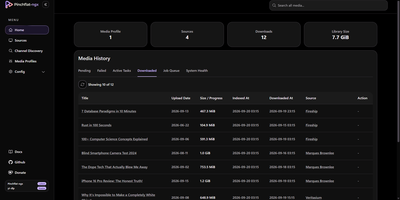
Pinchflat NGX is a self-hosted media manager that subscribes to YouTube channels and playlists, then downloads new videos into your own library automatically. Sources can be channels, playlists, or single videos, added by pasting a URL, searching in Browse, or importing a Google Takeout subscription list. Media profiles set quality, output templates, and retention, and each source can route its files to its own folder. The Sources page switches between a poster grid and a sortable table, with start, pause, and stop controls on every row. Channel Discovery suggests related channels with a score and evidence, and nothing is added until you accept it. A diagnostics page shows queue health, database size, and integrity checks, and notifications can use Discord embed formatting. Finished downloads trigger library refreshes on Plex, Jellyfin, and Emby, and an OPML feed serves podcast clients. OIDC single sign-on protects the web interface through providers like Authentik and Authelia. Running on a dedicated VPS on RepoCloud with guaranteed CPU, RAM, and SSD, full root SSH access, and a browser serial console. AGPL-3.0 licensed.
Wildbox
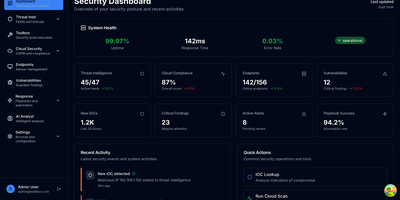
Enterprise security stacks assume an enterprise budget; Wildbox assumes a server you already own. It runs your whole security operation as a set of cooperating services behind a single HTTPS gateway: threat intelligence collectors pull indicators from seven public feeds on a schedule, starting with abuse.ch's Feodo Tracker, and every indicator is searchable in one place. Fifty-two security tools sit behind one API, covering DNS, TLS, email security, headers, and port analysis. The cloud posture service runs 22 configuration checks against your live AWS accounts and keeps each scan's report, while the vulnerability service inventories your assets, prioritizes findings by risk, and tracks them through remediation with SLA checks and alert rules. When something needs doing, YAML playbooks execute response workflows as background jobs, and the agents service writes Claude-generated threat-enrichment reports for suspicious indicators when you give it an API key. An osquery-based sensor streams endpoint telemetry from your hosts into the platform, kept separate per team. Users, teams, roles, and scoped API keys live in the identity service, and the backends accept nothing that did not arrive through the gateway, so your security data never leaves hardware you control. Optional Compose profiles add n8n automation and Prometheus monitoring. Running on a dedicated VPS on RepoCloud with guaranteed CPU, RAM, and SSD, full root SSH access, and a browser serial console. MIT licensed.
YAFFA
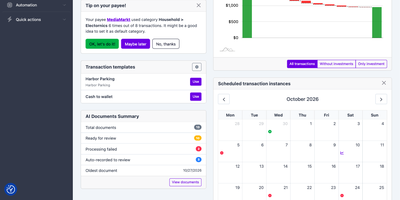
If your money is split across a bank app, a brokerage portal, and a half-abandoned spreadsheet, YAFFA, a self-hosted personal finance application, gathers it into one ledger with budgets, scheduled transactions, and forecasts. Record withdrawals, deposits, and transfers across unlimited accounts, and split a single supermarket receipt across categories so it lands in both Food and Household. Suggestions surface your most-used accounts and payees, and each payee's default category fills in automatically. Define rent, salary, or a loan payment once as a scheduled transaction; it appears on the dashboard calendar, enters with one action or records itself, and feeds the forecast. Import bank history from CSV or QIF files with rules for country- and bank-specific formats, and review every row before it is recorded. Optional AI document processing turns a receipt, invoice, or forwarded email into a draft transaction with payee, date, amount, and line items, using your own OpenAI or Gemini key and self-hosted Tesseract OCR for images. Accounts in different currencies roll up into your default currency using daily rates from the free Frankfurter service. Investments track gain and loss, with optional daily prices from Alpha Vantage. The dashboard summarizes accounts and upcoming schedules, the cash flow report can look ahead with a forecast, and Find Transactions filters history by payee, category, tag, or date. Running on a dedicated VPS on RepoCloud with guaranteed CPU, RAM, and SSD, full root SSH access, and a browser serial console. MIT licensed.
Murmur
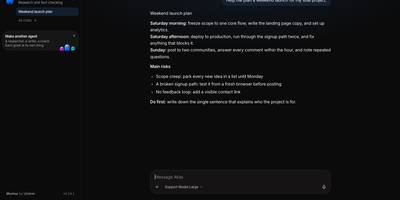
Every AI agent gets a face, a colour, and a job in Murmur, a chat app that makes running Hermes Agent as friendly as texting a colleague. Start from a template (Researcher, Writer, Planner, Coder, Coach, or Chef) or describe a new agent from scratch, then talk to one at a time or drop several into a group room and call on a single one with an at-mention. Replies stream in live, long jobs show a plan that ticks itself off, and every step appears in plain words. Connect a model with a ChatGPT plan, a local model server, or an API key from OpenRouter, OpenAI, Anthropic, and others, with the model and thinking effort chosen per agent or chat. Agents can reach Notion, Linear, Todoist, Figma, and dozens of other apps, and they ask for an Allow or Don't allow before changing anything important. Morning briefings run as routines, a memory view shows what each agent knows with controls to edit or forget it, and WhatsApp or Telegram can be linked by scanning a code. A voice call mode lets an agent answer out loud, and slash commands set long-running goals or ask quick side questions. Chats sync across browser, desktop, and phone. Solo builders, homelab fans, and small teams get a calm front door to their own agents. Running on a dedicated VPS on RepoCloud with guaranteed CPU, RAM, and SSD, full root SSH access, and a browser serial console. MIT licensed.
Fail2Ban Report
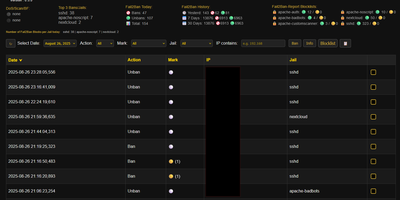
Fail2Ban quietly bans thousands of bots on a typical VPS and just as quietly keeps the whole story buried in a log file nobody reads, and Fail2Ban Report digs that story out into a dashboard you will actually open. Shell scripts convert each day of fail2ban.log into JSON, and the web interface lays every ban and unban on a searchable, filterable timeline you can slice by jail, server, or time window. Aggregated statistics for today, yesterday, seven days, and thirty days show which jails absorb the most attacks, while markers flag repeat offenders and escalating ban counts so persistent scanners stand out from one-time noise. Blocklists live per jail and per server as plain JSON, and ban or unban actions execute through UFW, giving you permanent bans that survive independently of jail restarts. Bulk actions handle whole ranges at once, with a pending state until the next sync applies them. Multiple servers feed one console through a pull-based HTTPS endpoint, so a fleet of small machines reports to a single pane without exposing SSH. Optional AbuseIPDB and IP-Info lookups add reputation and region context to any address. Running on a dedicated VPS on RepoCloud with guaranteed CPU, RAM, and SSD, full root SSH access, and a browser serial console. GPL-3.0 licensed.
pi-dispatch
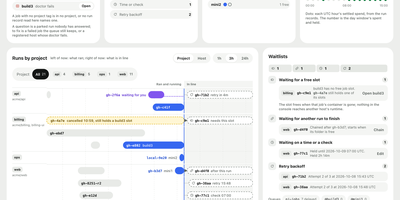
pi-dispatch turns one AI coding agent into a swarm that works in the background and reports to a single web page. Jobs start from a nightly schedule, a labeled issue, or a comment, then wait in one shared queue until a machine has room. Each job runs in a sealed box that is thrown away afterwards, reaches only the internet addresses you allow, and stops at the dollar limits you set per day, week, and month. When an agent hits a decision, it parks a question with options and a recommendation, and no model spend accrues until you answer. The overview shows what needs you, what is queued, what is running, and what today has cost. A Zero touch page tracks how often runs needed a person, per project, so you can see how far to step back. On GitHub, GitLab, Forgejo, and Azure DevOps the work ends as a proposed change that a human merges. Fleet, Spend, Triggers, and Models pages cover several machines, budgets per project, and fallback models. Running on a dedicated VPS on RepoCloud with guaranteed CPU, RAM, and SSD, full root SSH access, and a browser serial console. MIT licensed.
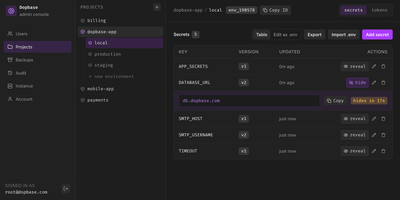
Dopbase
Dopbase keeps your application secrets out of scattered .env files and stores them, encrypted one by one, in a single self-hosted server you run as one file. You organize everything by project and environment, so the payment service has its own development, staging, and production values, and the same key can hold a different encrypted value in each place. Every secret is an individual record that can be updated, revealed, versioned, or rolled back without touching the others, and reading metadata never exposes a value. When an application starts, one command asks the server for an environment and injects exactly those values into the process, removing its own token before the child process runs. People sign in to the Admin UI with roles for root, admins, members, and even AI agents that can read metadata but change nothing. CI jobs and servers use runner tokens scoped to a single environment, so a staging credential can never read production. You can import and export .env files, edit secrets as a table or as raw env text, connect single sign-on through providers like Keycloak, and read an audit history of checks, reveals, and changes. Full-instance backups and the master key stay under your control on your own disk. Running on a dedicated VPS on RepoCloud with guaranteed CPU, RAM, and SSD, full root SSH access, and a browser serial console. Apache-2.0 licensed.