OpenVidu
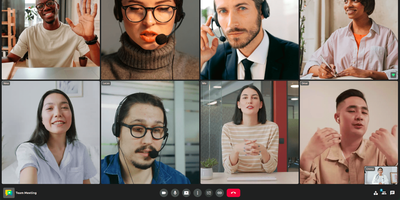
For online classes, telehealth visits, and support calls, OpenVidu Meet is a video meeting app that anyone with a link can join from a browser, with no account or download. A room needs only a name, and an optional wizard adds limits on participants (up to 30) and meeting length (up to a day), plus microphone and camera defaults. A shared Moderator or Speaker link admits anonymous guests, a personal link identifies each invited guest, and registered users sign in with their accounts. Developers can embed a room with an iframe or web component, and webhooks report meeting events to as many endpoints as needed. A smart mosaic favors recent speakers and counts the participants it hides, and a status rail shows the recording light, an encryption badge, and the time left. Moderators mute one participant's microphone, camera, or screen share, switch them off for everyone, remove people, and promote others. Virtual backgrounds blur the room or swap in an image, before joining or mid-call. Recordings start by hand or when the first participant, the second participant, or a moderator joins, in grid, speaker, or single-speaker layout. Permitted members can play, download, delete, or share saved recordings by link. End-to-end encryption protects audio, video, chat, and names behind a shared passphrase, though encrypted rooms cannot be recorded. Running on a dedicated VPS on RepoCloud with guaranteed CPU, RAM, and SSD, full root SSH access, and a browser serial console. Apache-2.0 licensed.
Screego
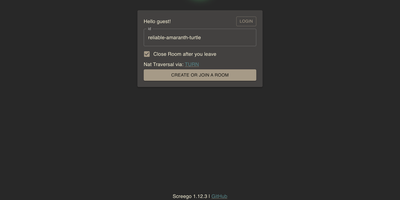
With over 10,000 GitHub stars and a reputation forged in the frustration of laggy corporate screen sharing, Screego delivers what Microsoft Teams and Zoom screen share consistently fail to provide: instant, high-resolution screen streaming that lets remote colleagues actually read your code. Built on WebRTC peer-to-peer connections, Screego transmits screen data directly between browsers without routing through centralized servers, achieving sub-second latency and native-resolution quality that makes pair programming and code reviews genuinely productive. The server component, written in Go with a TypeScript frontend, deploys as a single binary or Docker container with minimal configuration — set your external URL, generate a secret key, and you're live. An integrated TURN server handles NAT traversal automatically, eliminating the need for separate STUN/TURN infrastructure, with configurable UDP port ranges and support for external TURN servers when scaling beyond a single instance. Authentication supports three modes — requiring login for all actions, only for TURN connections, or none — with user management via simple credential files. Rooms are created instantly and support multiple simultaneous viewers, with system and tab audio sharing available for demonstrations that need sound. The architecture supports reverse proxy deployment behind Nginx, Caddy, or Apache with automatic TLS termination, and recent releases added riscv64 architecture support alongside existing amd64 and arm64 builds. Running on a dedicated VPS on RepoCloud with guaranteed CPU, RAM, and SSD, full root SSH access, and a browser serial console. GPL-3.0 licensed.
BigBlueButton
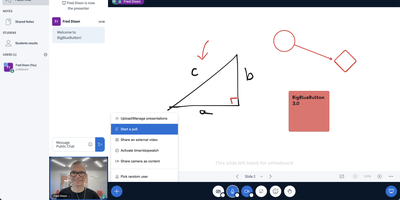
Used daily by millions of educators and learners in over 65 languages and embedded as the default virtual classroom in Moodle Cloud, Canvas, Sakai, D2L, Jenzabar, and Schoology — together comprising more than 75% of the worldwide learning management system market — BigBlueButton has been the leading open-source web conferencing platform for education since its creation at Carleton University in 2007. The platform delivers WebRTC-based real-time audio, video, and screen sharing with a tldraw v2-powered multi-user whiteboard featuring infinite canvas support, allowing multiple participants to annotate slides and draw simultaneously. Breakout rooms support up to eight concurrent groups with collaborative whiteboards enabled by default, and polling with customizable response types lets instructors assess understanding in real time. The built-in Learning Analytics Dashboard answers three questions at a glance: who is attending, who is participating, and who is learning based on poll responses, providing actionable engagement metrics without requiring webcam surveillance. Session recording captures audio, video, slides, chat, and whiteboard annotations for asynchronous playback on any device. The plugin architecture introduced in version 3.0 enables custom extensions, while IMS LTI 1.0 compliance allows integration with Blackboard, Desire2Learn, Pearson Learning Studio, and any conformant platform without custom code. The REST API enables programmatic session management, user authentication, and recording access for custom frontends like the included Greenlight application. Version 4.0 introduces LiveKit-based media and a redesigned interface. Running on a dedicated VPS on RepoCloud with guaranteed CPU, RAM, and SSD, full root SSH access, and a browser serial console. LGPL-3.0 licensed.
Jitsi Meet
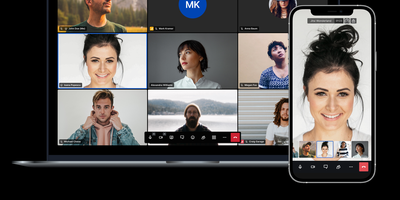
Backed by nearly 30,000 GitHub stars and powering millions of meetings through meet.jit.si, Jitsi Meet is the open-source video conferencing platform that runs entirely in the browser with no plugins or downloads required. The WebRTC-based architecture delivers HD audio and video through the Jitsi Videobridge selective forwarding unit, while Prosody handles XMPP signaling and Jicofo manages conference focus and orechestration. End-to-end encryption uses AES-GCM 128-bit keys exchanged via the Olm protocol, protecting audio, video, and screen sharing through the Insertable Streams API in Chromium-based browsers. Moderators can split participants into breakout rooms with individual password protection, enable lobby waiting rooms for admission control, set meeting passwords, and track speaker statistics with per-participant talk time metrics. Virtual backgrounds leverage TensorFlow.js body segmentation with WebGPU and WebGL acceleration, automatically adapting quality through device tier detection. Server-side recording and YouTube live streaming run through Jibri, while Jigasi provides a SIP gateway for PSTN dial-in and speech-to-text transcription. The platform includes in-meeting chat with private conversations, polls, raise-hand functionality, emoji reactions, and tile and speaker view layouts. Mobile applications for iOS and Android complement the web client, and both web and native SDKs enable embedding video conferences into custom applications. Running on a dedicated VPS on RepoCloud with guaranteed CPU, RAM, and SSD, full root SSH access, and a browser serial console. Apache-2.0 licensed.

Galene
Galene is a self-hosted video conferencing system that runs full meetings, lectures, and tutorials in the browser while asking remarkably little of the server it runs on. Every group gets its own page with video tiles, a user list, and a chat pane, and participants join from desktop or mobile browsers with nothing to install. Presenters share a screen or individual windows, stream a video or audio file straight from disk, and switch to blackboard mode when a slide needs resolution more than frame rate. Moderators can warn or remove participants and lock the group, raise-hand status keeps question queues orderly, and anyone can blur their background or exchange files directly with peers. Groups are simple configuration files: set public or private rooms, passwords or login tokens, client limits, and expiry windows, then create users with moderator or presenter privileges using the galenectl command. Automatic subgroups spin up identical breakout rooms on demand, the pattern its author uses to supervise forty students working in pairs during computer science practicals. Calls stay smooth on poor networks because the server adapts video quality per participant, recovers lost packets, and relays media through its built-in TURN server when firewalls block direct paths. Running on a dedicated VPS on RepoCloud with guaranteed CPU, RAM, and SSD, full root SSH access, and a browser serial console. MIT licensed.
Chitchatter
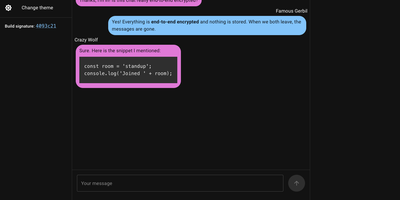
Chitchatter is a browser-based chat room for text, voice, video, screen sharing, and file transfers that exists only while its members are connected and keeps no record of what was said. Every visit starts with a random room name generated on your device, a UUID or a readable passphrase, and you invite people with the link or a QR code. Public rooms admit anyone with the link; private rooms also require a matching password. Messages support Markdown, multiline text, and code blocks, and clicking a name opens a direct conversation. Newcomers to public rooms receive the earlier conversation from peers already there, and typing indicators show who is writing. Start an audio or video call, share your screen to walk a relative through a settings problem, or hand over a file of any size, encrypted before it leaves your browser. Public-key checks verify each peer automatically, with a green lock marking everyone who passes and an icon showing whether the link is direct or relayed. Embed a room in any web page with an iframe or a web component that takes a room name, user name, and color mode. Light and dark themes are built in, and notifications and sounds announce new messages while you work in another tab. Close the tab and the transcript disappears. Running on a dedicated VPS on RepoCloud with guaranteed CPU, RAM, and SSD, full root SSH access, and a browser serial console. GPL-2.0 licensed.