Doca
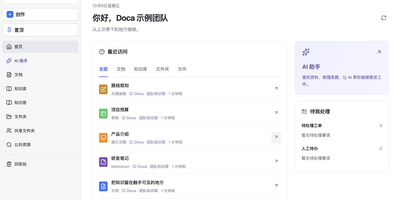
Doca puts rich text, Markdown, spreadsheets, slides, and an infinite canvas under one login and one permission model, giving individuals and small teams a self-hosted workspace for writing together. Every format supports real-time co-editing with presence, comments, saved history, and manual snapshots, and rich text and Markdown documents can be restored to an earlier version. Documents live in knowledge libraries with tree navigation, invitations, inherited permissions, share links, and trash, while personal files and shared folders sit on local disk or S3-compatible storage. Knowledge books go further: they subscribe to sources, run an editable workflow, keep source evidence, and route results through human review. A personal AI assistant, powered by whichever model you configure, searches authorized documents, reads PDF and Office attachments, edits images, and prepares browser drafts. MCP services let external AI clients such as Codex use those tools under your permissions. Sign in with a password, OIDC, Google, GitHub, WeChat, or QQ, review registrations before they go live, and send webhooks to other systems. A plugin SDK and marketplace add business modules, and a browser extension clips pages into documents. The interface ships in Chinese and English. Running on a dedicated VPS on RepoCloud with guaranteed CPU, RAM, and SSD, full root SSH access, and a browser serial console. MIT licensed.
Suite Docs
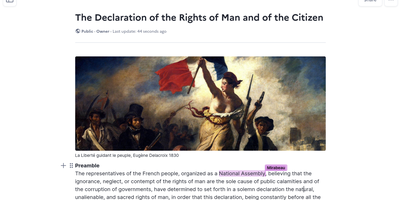
An open-source alternative to Notion and Google Docs developed jointly by France's DINUM and Germany's ZenDiS that prioritizes data sovereignty, real-time collaboration, and structured knowledge management. The Yjs-powered CRDT engine provides live cursors, presence indicators, and inline comments enabling teams to edit simultaneously without conflicts, while BlockNote.js renders a clean block-based editing experience with rich text formatting, Markdown shortcuts, and drag-and-drop content organization. Hierarchical sub-documents create wiki-style knowledge bases where documentation nests naturally into navigable structures, and a dedicated slide mode transforms any document into a presentation without separate tooling. The document API separates content from metadata with distinct endpoints for formatted content, raw content streams, and document properties. Optional AI integration connects to configurable language models for writing assistance, summarization, and content generation directly within the editor. Access control supports granular permissions per document with team sharing, public links, and invitation flows. DOCX import brings existing documents into the platform while maintaining formatting fidelity. The Django backend serves a REST API with PostgreSQL storage, Redis caching, and S3-compatible media handling. Deploy via Docker Compose, Kubernetes with the official Helm chart, Nix, or YunoHost on your own infrastructure. Running on a dedicated VPS on RepoCloud with guaranteed CPU, RAM, and SSD, full root SSH access, and a browser serial console. MIT licensed.
Cryptpad
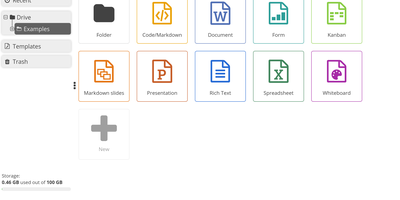
End-to-end encrypted by design, CryptPad is a real-time office suite where teams write documents, plan on kanban boards, collect answers with forms, and draw diagrams without the hosting server ever seeing their content. Rich text pages come with comments, replies, @mentions, and a document outline, while the Markdown editor adds a live preview, Mermaid diagrams, mind maps, and math. Kanban columns hold colored, tagged cards with Markdown bodies, and the diagram editor exports PNG, JPG, SVG, or PDF. Optional ONLYOFFICE editors add spreadsheets, word-processing documents, and presentations that several people can edit together. The form builder offers text, choice, grid, date, ranking, and poll questions, conditional sections, and separate author, auditor, and participant roles. Documents can be shared with contacts or teams, by link, or as embed code, with view, edit, present, or view-once access. Passwords, expiry dates, owner lists, and access lists limit who gets in, and every edit lands in a history you can step through, restore, or pin as a named snapshot. CryptDrive keeps files in folders, tags, templates, and a trash bin, while teams get their own drive, chat, and member roles. Running on a dedicated VPS on RepoCloud with guaranteed CPU, RAM, and SSD, full root SSH access, and a browser serial console. AGPL-3.0 licensed.
Etherpad
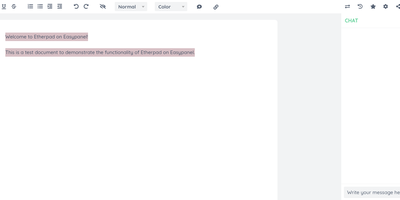
In continuous open-source development since 2009, Etherpad is the original really-real-time collaborative editor - used by Wikimedia, governments, EU public-sector institutions, and tens of thousands of self-hosters. Its core idea is visible authorship: every keystroke is attributed with author colors, every revision preserved, and the timeslider lets you scrub through a document's entire history character by character. Multiple people type into the same pad and see each other's changes instantly - it scales to thousands of simultaneous editors per pad. The base install is deliberately lightweight; capability comes from roughly 290 plugins installable from the admin web UI: comments, images, tables, drawing, video chat via WebRTC, math rendering, code highlighting, and authentication via OAuth, LDAP, or OpenID. AI is pointedly a plugin, not a default - you choose the model and infrastructure, or never turn it on. There is no telemetry. For integrators, an HTTP API (with OpenAPI definitions at /api/openapi.json) manages pads, users, and groups for embedding in your own applications, and the ueberDB abstraction layer supports PostgreSQL, MySQL, Redis, MongoDB, and SQLite backends. Full data export is built in, the format is open, it is translated into 105 languages, and it runs on anything from a Raspberry Pi to a server farm. Apache 2.0 licensed, Node.js based.
Collabora Office
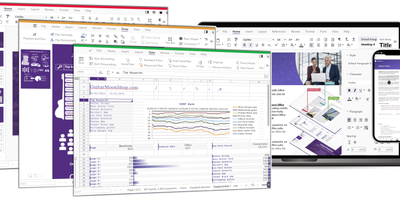
Real LibreOffice document engineering in the browser: Collabora Online is built by the company employing much of the former SUSE LibreOffice team - not a reimplementation. This deployment runs CODE (Collabora Online Development Edition), the collabora/code server that renders and edits documents entirely server-side while browsers get high-fidelity WYSIWYG output, so layout and formatting survive round-trips that break lesser converters. Four editors ship in one container: Writer for text documents (comments, track changes with comparison and restoration, form handling), Calc for spreadsheets (advanced formulas, macros, pivot tables, per-user sheet views, server-enforced cell protection), Impress for presentations, and Draw for Visio-class diagrams. Format compatibility spans DOCX, XLSX, PPTX, the ODF family, PDF, and dozens more - including Visio and Publisher import. Real-time collaborative editing supports multiple simultaneous editors with visible cursors and commenting. The architectural point: documents are processed on your server and never leave it, which is why Collabora is the engine behind Nextcloud Office and integrates with ownCloud, Seafile, and any WOPI-speaking host - or embeds in your own application via the SDK. An admin console monitors sessions and memory. For organizations that need Google Docs-style collaboration with actual data sovereignty, this is the reference open-source answer.
OnlyOffice
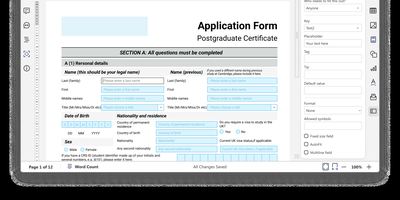
With 6,800 GitHub stars and over a decade of development since its 2014 release, ONLYOFFICE Docs delivers a self-hosted Microsoft Office replacement with pixel-perfect OOXML rendering and real-time collaborative editing supporting both Fast (character-by-character) and Strict (manual save) co-authoring modes. The suite encompasses five full-featured editors — Document Editor for DOCX/ODT/EPUB/HTML, Spreadsheet Editor with 500+ functions and pivot tables, Presentation Editor with animations and transitions, Form Creator for fillable PDF forms with field validation, and PDF Editor for annotation and conversion — all operating within a unified web interface. Format support spans 50+ types including DOCX, XLSX, PPTX, ODT, ODS, ODP, PDF, CSV, RTF, TXT, and Markdown with server-side conversion between any supported pair. The JavaScript plugin API enables extending editor functionality through a marketplace of ready-made plugins for ChatGPT integration, speech-to-text, OCR, Zotero citations, and Thesaurus. Ready-to-use connectors integrate with Nextcloud, ownCloud, Seafile, Moodle, Odoo, Confluence, SharePoint, Alfresco, Liferay, and Chamilo, while WOPI protocol compliance enables integration with any WOPI-compatible platform. JWT authentication secures all API communications between host applications and the document server. Deploy via Docker with a single command or DEB/RPM packages on Ubuntu, Debian, CentOS, or RHEL. Running on a dedicated VPS on RepoCloud with guaranteed CPU, RAM, and SSD, full root SSH access, and a browser serial console. GNU AGPL v3 licensed.
HedgeDoc
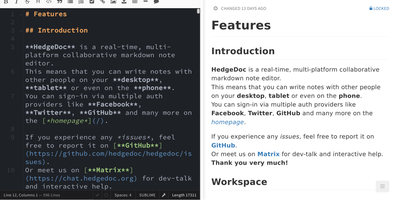
Real-time collaborative Markdown behind your own firewall: HedgeDoc (formerly CodiMD, descended from HackMD's open-source edition) keeps team notes on team infrastructure. Share a note's URL and collaborators are editing together instantly - live cursors, changes appearing keystroke by keystroke - in a three-mode interface that toggles between raw Markdown, rendered preview, and side-by-side split. The Markdown dialect is extended where engineers need it: Mermaid, Graphviz, and Vega-Lite diagrams, MathJax for equations, syntax-highlighted code blocks, embedded content, and a presentation mode that turns a note into reveal.js slides with a single YAML header. A dropdown permission system controls each note - freely editable, limited to signed-in users, or locked read-only - and published notes become clean read-only pages for wider distribution. Revisions track every change with the ability to revert to any earlier version. The AGPL-3.0 codebase is light enough to run on a Raspberry Pi and deploys via Docker with PostgreSQL, MySQL, or SQLite. Authentication covers LDAP, SAML, OAuth2, and email. It deliberately stays a focused document editor - no page trees or kanban - and does that one job with excellent keyboard-first ergonomics for meeting notes, RFCs, runbooks, and shared scratchpads.