PipesHub
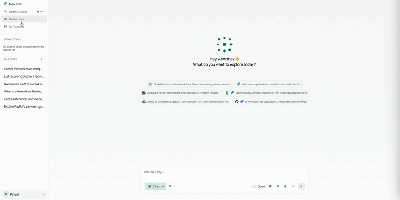
Unify fragmented corporate knowledge across chat channels, documents, and cloud drives with PipesHub, an open-source workplace context platform providing permission-aware search and verifiable answers for teams and autonomous agents. Employees can query enterprise knowledge bases through a conversational interface that retrieves relevant information across Google Workspace, Microsoft 365, Slack, Confluence, Jira, and GitHub while strictly respecting individual user access permissions. Knowledge workers can verify every answer through clickable citation blocks that trace claims directly back to source documents, spreadsheet rows, or chat messages. Teams can assemble custom AI agents visually using a drag-and-drop builder, combining retrieval collections with interactive toolsets to automate multi-step operations like drafting customer responses or creating issue tickets. Autonomous agents connect via Model Context Protocol to inspect shared company knowledge and perform external actions across connected SaaS tools. Organizations can index scanned PDFs, slide decks, markdown pages, and spreadsheets with OCR and document parsing, maintaining synchronized records through automated schedules. Administrators can inspect synchronized records, monitor query history, and manage connector credentials across all integrated business applications. Running on a dedicated VPS on RepoCloud with guaranteed CPU, RAM, and SSD, full root SSH access, and a browser serial console. Apache License 2.0 licensed.
keinsaas Navigator
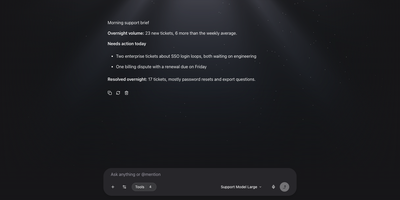
Chat apps, agent builders, workflow tools, and tool servers usually live in four separate products, and keinsaas Navigator folds them into one self-hosted AI workspace. Point it at Ollama, LM Studio, or any OpenAI-compatible endpoint, register the models you want, and pick one for each conversation. Type an at sign in the composer to pull an agent, a workflow, or a tool straight into the message. Agents carry their own role, instructions, model, and tool list, and each one stays private or is shared with the team. The workflow editor connects Input, LLM, Condition, Tool, HTTP, Template, Note, and Output nodes on a canvas, and a published workflow becomes a tool that any chat can call. MCP servers connect over HTTP or local commands, and a built-in tester runs each tool with JSON input before an agent depends on it. Projects keep shared documents and memory with vector search. Agents can run on a schedule for recurring jobs like morning briefs. Teams get accounts and sharing, and the first person to sign up becomes the administrator. A support desk copilot, a private assistant, or a prototype for the next automation all start from the same screen. Running on a dedicated VPS on RepoCloud with guaranteed CPU, RAM, and SSD, full root SSH access, and a browser serial console. MIT licensed.
OneCLI
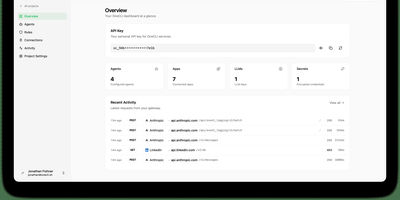
OneCLI gives every employee a sandboxed personal AI agent that works across company tools without ever seeing the real credentials it uses. Create an agent for each person, grant only the services that person may touch, and chat with it from its dashboard page or directly inside Slack channels and direct messages. The agent keeps its own filesystem, shell, memory, and skills between conversations, so follow up messages can redirect work in progress instead of starting over. Schedules wake agents at the right time to run recurring checks, reports, and follow ups without a person remembering to prompt them. When an agent calls Gmail, Salesforce, HubSpot, GitHub, Sentry, or another connected service, the gateway checks the request against team policy and injects the stored credential only for that call. Sensitive actions can pause for a deterministic human approval in chat, so sending an email, deleting a ticket, or changing a deal stage waits for your yes. Shared team connections let administrators connect a service once and grant it per agent, while memory remains readable and editable by the owner at any time. Running on a dedicated VPS on RepoCloud with guaranteed CPU, RAM, and SSD, full root SSH access, and a browser serial console. Apache 2.0 licensed.
Clawboo
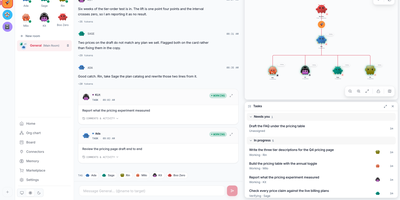
Describe the outcome once, in plain language, and a small crew of AI agents divides the work between them and reports back in the same chat. You type the request in the team chat; Boo Zero, the team lead, splits it into jobs on a shared board and hands each card to the teammate best placed to do it. Teammates run on Claude Code, Codex, Hermes, OpenClaw, or Clawboo's built-in runtime, and one team can mix them freely, so the researcher, the writer, and the coder can each work on their strongest tool. You follow every card live on the board and in the chat, watch the team graph to see who is doing what, and add a reviewer agent when a second pair of eyes matters. Finished work returns to Boo Zero, which pulls the pieces together and answers you in the chat. Ready-made teams from the marketplace cover marketing squads, dev teams, and research crews, and you can bring an API key from Anthropic, OpenAI, OpenRouter and more, a free local model through Ollama, or your ChatGPT subscription through the Codex CLI. Spend is tracked per team with budget warnings before costs surprise you. Running on a dedicated VPS on RepoCloud with guaranteed CPU, RAM, and SSD, full root SSH access, and a browser serial console. MIT licensed.