Termix
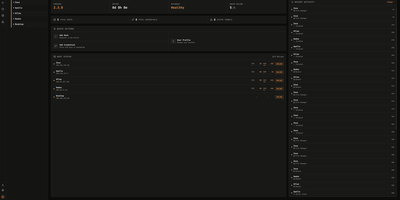
Termix delivers a unified, self-hosted infrastructure control center that consolidates SSH terminals, remote desktop streaming, and fleet automation into an intuitive browser workspace that replaces proprietary tools like Termius. Administrators connect to Linux servers and desktop environments using embedded RDP, VNC, and Telnet protocols powered by Apache Guacamole without requiring local client installations. The multi-panel terminal interface supports four-way split screens, allowing operators to broadcast keystrokes simultaneously across multiple production hosts or execute saved reusable script snippets with dynamic parameters. Real-time multiplayer session sharing lets engineers invite teammates via secure, time-limited links with configurable read-only or collaborative write permissions for troubleshooting incidents. Advanced networking layers handle SSH jump hosts, SOCKS5 proxy chains, Warpgate relays, and port knocking sequences to access segmented private networks securely. Integrated SFTP file managers provide drag-and-drop file transfers with editable path bars, inline text editing, and folder synchronization across remote machines. Background telemetry monitors CPU loads, memory utilization, disk IOPS, and container statuses, while built-in session recording captures complete terminal sessions for compliance auditing. Running on a dedicated VPS on RepoCloud with guaranteed CPU, RAM, and SSD, full root SSH access, and a browser serial console. Apache 2.0 licensed.
OpenMeter
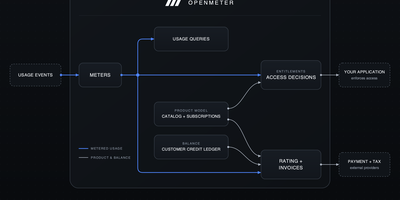
AI and API products live or die by usage, and OpenMeter is the open-source stack that measures it, rations it, and bills for it. Your application emits CloudEvents for every billable action; OpenMeter validates and deduplicates them, then aggregates usage in real time so dashboards and enforcement checks never wait for a nightly batch. Meters slice that usage by customer, time window, or any dimension you attach, which turns raw events into answers like tokens per workspace this month. Entitlements decide who gets what: metered allowances with balances and overage, boolean switches for features like SSO, and static JSON configuration for per-customer model access. Grants top allowances up once or on a schedule, resets roll balances over each usage period, and one API call tells your app whether a customer still has access right now. On the money side, plans carry flat, per-unit, tiered, package, or dynamic prices; subscriptions, credit balances, and the invoice lifecycle run alongside, with webhooks announcing everything to your other systems. Running on a dedicated VPS on RepoCloud with guaranteed CPU, RAM, and SSD, full root SSH access, and a browser serial console. Apache-2.0 licensed.
Autobase
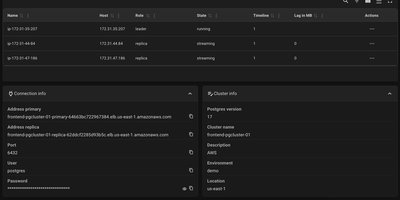
Provisioning, scaling, and maintaining production-grade PostgreSQL clusters becomes completely automated with Autobase, an internal database-as-a-service control plane. Through a unified web console, database administrators provision multi-node replication topologies, execute non-disruptive minor version updates, and orchestrate automated failovers without manual intervention. Operators can configure continuous physical backups and point-in-time recovery to S3-compatible object storage, ensuring resilient disaster recovery for mission-critical workloads. The integrated dashboard provides granular visibility into cluster topology, replication lag, connection pool saturation, and query throughput across primary and replica instances. Teams can scale read capacity on demand by provisioning dedicated read replicas and load-balanced query endpoints managed by intelligent routing layers. Comprehensive backup verification routines run scheduled restore rehearsals to confirm data integrity before emergencies occur. Automated maintenance playbooks handle index reindexing, vacuum scheduling, and parameter tuning without requiring custom shell scripts. Running on a dedicated VPS on RepoCloud with guaranteed CPU, RAM, and SSD, full root SSH access, and a browser serial console. MIT licensed.
PeaNUT
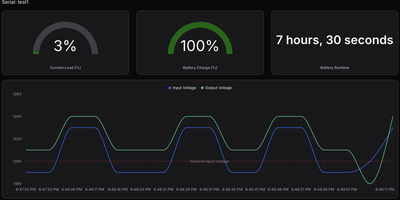
When a power outage hits your server rack, deciphering raw command-line output from Network UPS Tools should not stand between you and a safe shutdown; PeaNUT wraps your NUT servers in a real-time web dashboard that monitors battery charge, load capacity, and voltage telemetry across every uninterruptible power supply on your network. Operators can connect multiple local or remote NUT servers into a single interface and switch between devices with one click. Live gauges track battery percentage, estimated runtime, real power draw in watts, and apparent power in volt-amperes. Interactive line charts plot input and output voltage alongside load fluctuations over time. Need to test a battery or silence an alarm? You can execute instant UPS hardware commands, edit writable device variables, or open a browser-based terminal directly to the underlying NUT daemon without leaving the web interface. Configuration works either through the visual settings panel or a declarative YAML file, protected by built-in account authentication. For broader infrastructure observability, you can stream time-series power data to InfluxDB v2, scrape the native Prometheus metrics endpoint into Grafana, query the REST and WebSocket APIs, or embed live UPS status cards inside Homepage and Glance dashboards. Running on a dedicated VPS on RepoCloud with guaranteed CPU, RAM, and SSD, full root SSH access, and a browser serial console. Apache-2.0 licensed.
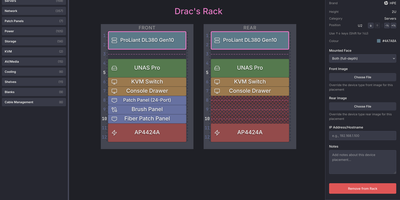
Rackula
Before lifting a heavy four-unit storage server or rewiring a cramped network closet, you can map every unit of cabinet space in Rackula, an interactive drag-and-drop rack layout designer and capacity planner. Instead of staring at generic grey rectangles in a spreadsheet, you pull switches, routers, patch panels, UPS battery banks, and rackmount chassis from a hardware catalog populated with authentic front and rear faceplates from the NetBox device library. Equipment snaps cleanly to standard EIA-310 rack unit boundaries, while half-width gear and mini PCs nest inside one-unit carrier shelves and mounting brackets. Audiovisual technicians can group bayed cabinets side by side to plan amplifier racks, signal processor chains, and patch bays across multi-rack installations. Network engineers and data center operators can rearrange hardware with full undo and redo history, attach custom device graphics, and export crisp diagrams as PNG, SVG, or PDF files for runbooks and change control tickets. Sharing a proposed cabinet topology with a colleague in the field takes seconds using an encoded URL or a scannable QR code that opens on mobile browsers. Server-side persistence stores your rack definitions as portable YAML files and supports optional local accounts or OpenID Connect single sign-on for shared infrastructure teams. Running on a dedicated VPS on RepoCloud with guaranteed CPU, RAM, and SSD, full root SSH access, and a browser serial console. MIT licensed.
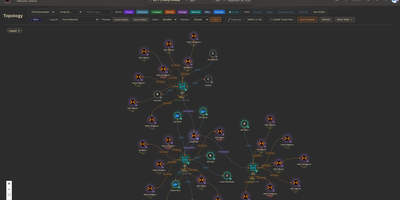
Circuit Breaker
Mapping every physical server, virtual machine, container, and network link across a sprawling homelab into a live interactive canvas, Circuit Breaker gives infrastructure operators real-time topology visualization, IP address management, and rack elevation modeling on a single screen. Operators can switch between hierarchical, concentric, cortex ring, radial, and force-directed graph layouts where animated edges reflect link speeds and color-coded status rings display live hardware health. Automated discovery scans local subnets using nmap, SNMP, and ARP while querying Proxmox VE clusters, TrueNAS storage pools, and UniFi controllers, staging newly detected nodes in a review queue before adding them to the map. For multi-site labs or isolated VLANs, lightweight remote agents connect outbound over Noise-encrypted links after fingerprint approval to report host telemetry and run scoped network scans without opening inbound firewall ports. Rack diagrams let administrators drag servers into U slots with cabling overlays using a built-in catalog covering Dell, HPE, Supermicro, Ubiquiti, MikroTik, Synology, and APC gear alongside live iDRAC, iLO, and UPS metrics. Role-based access control, OIDC single sign-on, TOTP multi-factor authentication, encrypted full-state snapshots, and a SHA-256 hash-chained audit log keep multi-user operations accountable. Running on a dedicated VPS on RepoCloud with guaranteed CPU, RAM, and SSD, full root SSH access, and a browser serial console. MIT licensed.
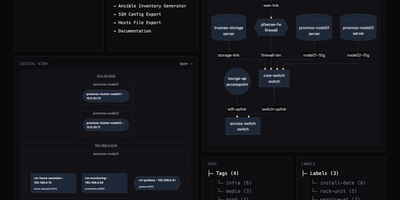
RackPeek
Every server, switch port, virtual machine, and network VLAN in a homelab or small IT environment can be cataloged, visualized, and exported through RackPeek's unified web interface and command-line toolkit. Operators record rack-mounted servers, managed switches, routers, firewalls, wireless access points, and uninterruptible power supplies alongside their CPU, memory, and storage specifications in a clean browser dashboard. Beyond physical gear, the inventory tracks operating systems, containerized or bare-metal services, IP subnets, and port-to-port cable connections while organizing assets with searchable tags and key-value labels. From that structured inventory, the interactive visualization engine renders live physical wiring diagrams and logical subnet-grouped service maps that export directly as high-resolution PNG graphics or Mermaid flowcharts. Because all state lives in a single human-readable configuration file backed by built-in Git repository synchronization, teams can version-control infrastructure changes or push automated updates through the authenticated REST API with dry-run diff previews. Day-to-day administration becomes faster with built-in generators that turn your cataloged hosts into ready-to-use Ansible inventory files, SSH client configurations, and tag-filtered hosts tables. Line-and-column validation feedback in the web editor catches schema mistakes immediately before changes are committed. Running on a dedicated VPS on RepoCloud with guaranteed CPU, RAM, and SSD, full root SSH access, and a browser serial console. AGPL-3.0 licensed.
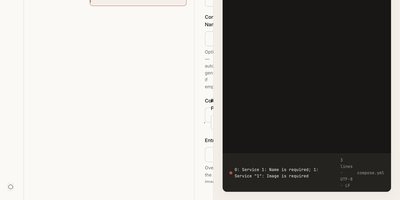
Dock-Dploy
Visual drag-and-drop assembly replaces manual text editing in Dock-Dploy, a Docker Compose builder and configuration management suite that turns complex multi-service container topologies into validated YAML manifests. DevOps engineers and self-hosters can visually assemble application stacks by selecting container base images, defining healthcheck probes, mapping bridge networks, and assigning persistent volume mounts through a reactive web interface. An integrated marketplace catalog allows teams to search, preview, and import battle-tested templates for services like PostgreSQL, Redis, and Nginx with one click. Real-time Zod schema validation inspects every service parameter as you type, flagging port collisions, missing environment variables, and malformed volume syntax before deployment. A split-screen CodeMirror editor provides continuous synchronization between graphic form fields and generated YAML definitions with automatic code sanitization and clipboard exports. Beyond Compose stacks, operators can design blueprint templates, generate reverse proxy routing profiles, and assemble recurring cron schedules for automated backup and maintenance routines. Running on a dedicated VPS on RepoCloud with guaranteed CPU, RAM, and SSD, full root SSH access, and a browser serial console. AGPL-3.0 licensed.