Shaper
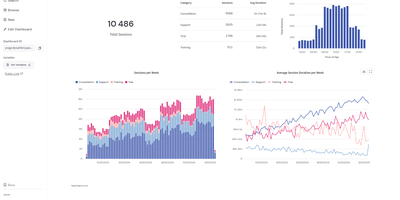
Write standard SQL queries and watch Shaper turn them into interactive dashboards, scheduled reports, and customer-facing analytics widgets without maintaining a heavy business intelligence stack. Every query maps directly to a visual component through simple type casts like BARCHART, LINECHART, GAUGE, BOXPLOT, or DROPDOWN. Analysts can attach external PostgreSQL and MySQL databases, read Parquet, CSV, JSON, and Excel files straight from S3 object storage, or stream live events into the HTTP ingest API. Interactive filter controls let viewers slice metrics by date ranges, multi-select dropdowns, and dynamic parameter variables that automatically re-evaluate downstream charts. Teams version-control their entire reporting layer as plain SQL files in Git, making dashboard updates auditable in pull requests and simple for AI coding assistants to generate. Product engineers embed white-labeled analytics directly into customer web apps without iframes, issuing per-tenant JWT tokens to enforce row-level data isolation. Need scheduled deliverables for stakeholders? Configure SQL-driven background tasks that transform datasets on a cron schedule, send threshold alerts to Slack or Microsoft Teams, and generate downloadable PDF, PNG, Excel, or CSV reports. External collaborators can also view live metrics through password-protected sharing links. Running on a dedicated VPS on RepoCloud with guaranteed CPU, RAM, and SSD, full root SSH access, and a browser serial console. MPL-2.0 licensed.
Streamystats
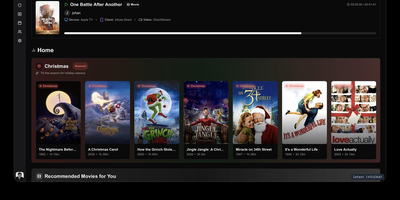
To uncover deep viewing insights and AI-powered content recommendations across your self-hosted Jellyfin media server, Streamystats delivers a comprehensive analytics and watch-history platform. Once connected to one or more Jellyfin instances using native MediaBrowser authentication, the dashboard tracks live playback sessions, per-user watch durations, device and client breakdowns, and library-wide growth metrics without requiring third-party reporting plugins. You can import existing historical logs from Jellystat or the Playback Reporting plugin so years of viewing habits carry over immediately, then explore interactive watch-time graphs, genre radar charts, actor and director leaderboards, and a yearly Wrapped summary. When you enable vector embeddings through OpenAI, OpenRouter, Google Gemini, Voyage AI, or a local Ollama model, the recommendation engine calculates cosine similarity against your watch history and explains exactly which watched movies or series inspired each suggestion. An integrated AI chat assistant equipped with thirteen specialized function-calling tools lets you search your catalog semantically, ask natural-language questions about your viewing statistics, and generate shared movie recommendations for multiple household members at once. Administrators can also mark titles as watched or unwatched with automatic watch-time inference, manage watchlists over an external API, and connect Janitorr for automated media cleanup. Running on a dedicated VPS on RepoCloud with guaranteed CPU, RAM, and SSD, full root SSH access, and a browser serial console. MIT licensed.
Open DroneLog
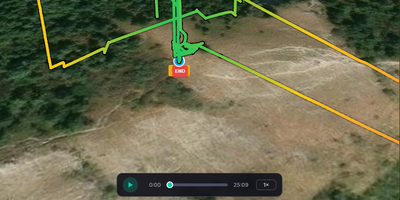
Every DJI and Litchi flight you have ever logged becomes a searchable dashboard on your own server with Open DroneLog, a free, open-source alternative to DroneLogbook, Airdata UAV, and Flight Reader. Drop in DJI .txt logs, Litchi CSV files, or Airdata CSV exports and units are detected automatically, while deduplication on drone serial, battery serial, and start time lets you re-import a folder without duplicate flights. Each flight opens as a 3D terrain map with satellite, topographic, and OpenStreetMap layers, then replays from 0.5x to 16x speed with live telemetry and an RC joystick overlay. Synchronized charts plot height, speed, battery cell voltages, attitude, RC signal, GPS, and distance to home, with drag-to-zoom. Filters narrow flights by date, drone, battery, controller, duration, altitude, distance, tag, or map area, and automatic tags such as Night Flight and Low Battery arrive with offline reverse-geocoded locations. The overview dashboard adds an activity heatmap, per-drone and per-battery charts, and a cluster map. Battery health bars track cycle counts and capacity history, and maintenance thresholds show as color-coded progress bars. Export flights as CSV, JSON, GPX, or KML, build printable HTML flight reports that save as PDF, or generate a FlyCard image for social media. A sync folder imports new logs automatically, pilot profiles can sit behind passwords, and full-database backup and restore moves data between desktop and Docker. Running on a dedicated VPS on RepoCloud with guaranteed CPU, RAM, and SSD, full root SSH access, and a browser serial console. AGPL-3.0 licensed.