Norish
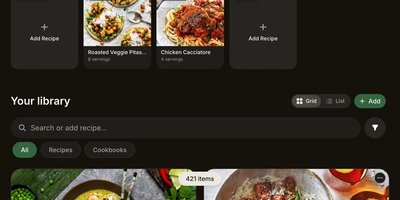
Planning weekly dinners across a busy household becomes effortless with Norish, a real-time recipe manager, meal planner, and smart grocery list platform that captures dishes from any link, video, or cookbook photo. Families and roommates can paste a food blog URL, drop in a YouTube Short, Instagram Reel, or TikTok link, or snap up to ten photos of handwritten recipe cards to generate a clean, structured dish with automatic tags, cuisines, and allergen alerts. When you drag meals onto the shared household calendar or sync your schedule over CalDAV, every ingredient flows into a live grocery list that remembers which supermarket aisle or store each item belongs to and automatically excludes staples already sitting in your pantry inventory. Splitting up in the supermarket aisles works seamlessly because checked-off items disappear on your partner's phone screen the instant you tap them, even across fifteen supported interface languages. In the kitchen, step-by-step cooking mode keeps your screen awake, embeds countdown timers directly inside preparation steps, links fractional ingredient quantities to the exact step where they are used, and scales servings or swaps between metric and US measurements with a single tap. Automatic macro calculations powered by USDA FoodData Central and CIQUAL databases break down calories, protein, carbohydrates, and fat per serving. Running on a dedicated VPS on RepoCloud with guaranteed CPU, RAM, and SSD, full root SSH access, and a browser serial console. AGPL-3.0 licensed.
OxiCloud
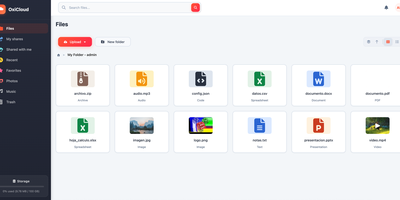
OxiCloud is a self-hosted cloud for files, photos, calendars, contacts, and office documents. Drives can be personal or shared, with configurable storage quotas. Multi-gigabyte uploads travel as parallel, resumable chunks with integrity verification. Images, PDFs, audio tracks, and video streams preview right in the browser, and photos show EXIF details and map locations. Files sync over WebDAV. Calendars sync over CalDAV. Contacts sync over CardDAV. Desktop file managers, Thunderbird, Apple Calendar, and mobile DAVx5 clients connect without proprietary software. Collabora Online or OnlyOffice plug in through WOPI for real-time co-editing of spreadsheets, presentations, and text documents. Administrators enforce role-based access controls. Sign-in runs through OpenID Connect providers such as Keycloak, Authentik, or Azure AD. Public share links can carry a password and an expiration. Identical files are stored once, and adaptive compression keeps footprints compact. Local disks, Amazon S3, and Azure Blob can be mounted at the same time, with live background migration and automated consistency checks. Running on a dedicated VPS on RepoCloud with guaranteed CPU, RAM, and SSD, full root SSH access, and a browser serial console. MIT licensed.
OpenVidu
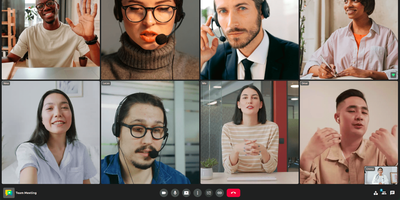
For online classes, telehealth visits, and support calls, OpenVidu Meet is a video meeting app that anyone with a link can join from a browser, with no account or download. A room needs only a name, and an optional wizard adds limits on participants (up to 30) and meeting length (up to a day), plus microphone and camera defaults. A shared Moderator or Speaker link admits anonymous guests, a personal link identifies each invited guest, and registered users sign in with their accounts. Developers can embed a room with an iframe or web component, and webhooks report meeting events to as many endpoints as needed. A smart mosaic favors recent speakers and counts the participants it hides, and a status rail shows the recording light, an encryption badge, and the time left. Moderators mute one participant's microphone, camera, or screen share, switch them off for everyone, remove people, and promote others. Virtual backgrounds blur the room or swap in an image, before joining or mid-call. Recordings start by hand or when the first participant, the second participant, or a moderator joins, in grid, speaker, or single-speaker layout. Permitted members can play, download, delete, or share saved recordings by link. End-to-end encryption protects audio, video, chat, and names behind a shared passphrase, though encrypted rooms cannot be recorded. Running on a dedicated VPS on RepoCloud with guaranteed CPU, RAM, and SSD, full root SSH access, and a browser serial console. Apache-2.0 licensed.
Fluxer
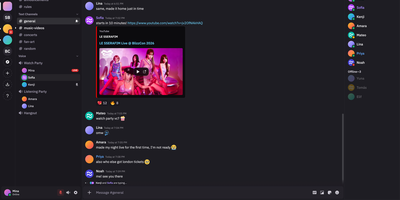
Fluxer gives friends, gaming groups, and private communities their own self-hosted instant messaging and VoIP platform that replaces Discord with private text channels, voice rooms, video calls, and screen sharing. Members can chat one-on-one in direct messages, form multi-person group conversations, or organize large community servers into categorized text and voice channels with threaded replies, reactions, and typing indicators. When a conversation moves to voice, participants can join low-latency audio and video rooms from multiple devices simultaneously, share application windows or full screens, and rely on built-in noise suppression and echo cancellation for clear calls. Rich media support allows users to share file attachments, preview embedded links, search animated GIFs through KLIPY, and upload custom community emojis and stickers. Server administrators control access through role-based permission hierarchies, member timeouts, kicks, bans, and detailed moderation audit logs that track every configuration change across the community. Integrated full-text search lets members quickly locate historical messages, code snippets, and shared files across every channel they can access. Running on a dedicated VPS on RepoCloud with guaranteed CPU, RAM, and SSD, full root SSH access, and a browser serial console. AGPL-3.0 licensed.
4ga Boards
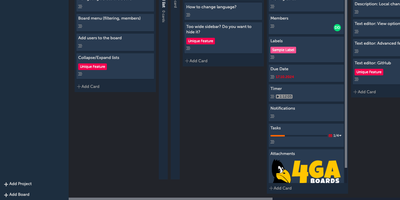
Instant board updates, side-by-side card multitasking, and a five-level task hierarchy make 4ga Boards a fast, clutter-free Kanban workspace for teams tired of sluggish project trackers. Work organizes cleanly from top-level projects down into boards, collapsible lists, cards, and granular subtask checklists. You can switch between classic drag-and-drop Kanban columns and compact to-do list views with a single click. While editing a card description in the rich Markdown editor with colored text, you can still scroll, filter, and rearrange other cards on the board without losing unsaved changes. Every move, label change, due date update, or comment syncs live across connected browsers without page reloads. Collapsible lists and a retractable sidebar free up wide-screen horizontal space during sprint reviews. Teams migrating existing workflows can import boards directly from Trello JSON exports or CSV files and export backups on demand. Cards support file attachments, custom cover images, multi-member assignments, and @mentions with instant activity notifications. Authentication integrates with Google, GitHub, Microsoft, and custom OIDC single sign-on providers alongside role-based board privacy. The interface includes dark mode, full keyboard shortcuts, and localization across 16 languages. Running on a dedicated VPS on RepoCloud with guaranteed CPU, RAM, and SSD, full root SSH access, and a browser serial console. MIT licensed.
OpenCloud
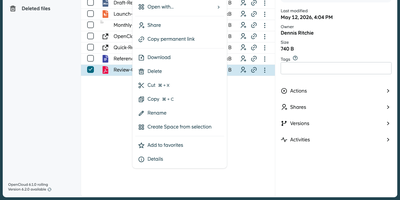
Organizations seeking complete data sovereignty over their documents, spreadsheets, and shared project folders can deploy OpenCloud as a self-hosted workspace for file sync, sharing, and real-time collaboration across web, desktop, iOS, and Android clients. Teams organize departmental assets inside dedicated Spaces where files belong to the project rather than individual user accounts, ensuring continuity when personnel change and enabling delegated space managers to assign granular read, edit, or upload permissions. Through built-in WOPI integration with Collabora Online, multiple colleagues can co-edit Microsoft Office and OpenDocument files simultaneously in the browser with automatic conflict locking and version history recovery. External partners and clients can access files via password-protected public links with custom expiration dates or upload deliverables into write-only File Drop folders without seeing existing directory contents. Cross-organization collaboration works seamlessly over the Open Cloud Mesh federation protocol, while full-text and tag-based search locates documents across personal and shared drives in seconds. Client devices synchronize changes in real time with support for virtual files on demand, resumable chunked uploads, and offline mobile access with camera document scanning. Running on a dedicated VPS on RepoCloud with guaranteed CPU, RAM, and SSD, full root SSH access, and a browser serial console. Apache-2.0 licensed.
Deft
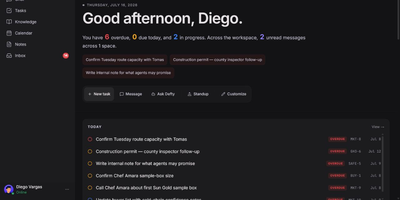
One self-hosted workspace holds your team's chat, tasks, notes, and calendar, and Deft lets AI agents work in it beside your people. People get real-time chat with spaces, direct messages, threads, mentions, reactions, files, and presence. Tasks open as Board, Table, Timeline, or Calendar views, with dependencies, subtasks, recurrence, and bulk actions. Notes, decisions, and channel memory become durable knowledge, with graph views and links back to the source conversation. Native calendar events sit beside read-only ICS subscriptions. Agent employees can join channels and receive task assignments. Tag the built-in assistant Defty to draft a task, answer a workspace question, or take a governed action, then review the proposal in an approval card before anything changes. Personal connections let Codex, Claude, ChatGPT, and other streamable HTTP MCP clients act as the signed-in user within revocable scopes. Approval tiers, trust levels, token scopes, revocation, activity history, and action receipts record who or what acted and what changed. OpenAI, Anthropic, OpenRouter, OpenAI-compatible endpoints, and local Ollama-style models are supported providers. Chat, tasks, notes, and calendars keep working with no AI key. Modules add company-specific records, relationships, and views, with a bundled Contacts module as the first example. Running on a dedicated VPS on RepoCloud with guaranteed CPU, RAM, and SSD, full root SSH access, and a browser serial console. AGPL-3.0-only licensed.
salt.md
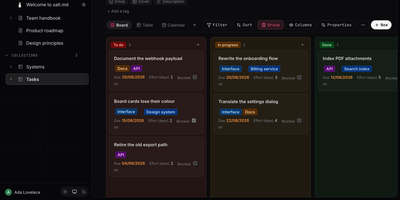
salt.md is an open-source, self-hosted workspace where your team and its AI agents work on the same documents and databases, under the same permissions and with the same history. A slash-menu block editor handles checklists, tables, callouts, columns, code, diagrams, and embeds. Page links, backlinks, and a graph view show how pages connect. Any page can become a collection with typed properties like select, date, person, relation, rollup, and formula, shown as a table, board, list, gallery, calendar, timeline, or form. Ctrl+K searches titles, body text, row values, and the text inside uploaded PDFs. Two people can type in the same paragraph at once with live cursors. Comments, page history, and an activity log record who changed what. Publish a page as a read-only link with an optional password and expiry, or hand people without accounts a form that adds rows to a collection. Agents connect over MCP with 33 tools for searching, writing, building databases, and commenting, using tokens scoped to one workspace or read-only. Signed webhooks, iCalendar feeds, and Google or Microsoft sign-in link it to the rest of your stack. Import Markdown, ZIP archives, or a Notion export, and export pages as Markdown, HTML, or PDF. Use it for handbooks, meeting notes, project boards, and a knowledge base your assistants can read. Running on a dedicated VPS on RepoCloud with guaranteed CPU, RAM, and SSD, full root SSH access, and a browser serial console. AGPL-3.0 licensed.
TeamMapper
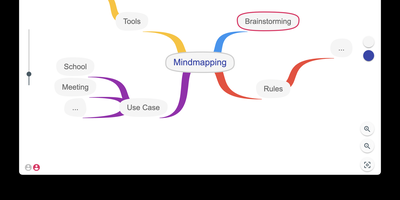
Turning chaotic group brainstorming sessions into structured visual diagrams, TeamMapper provides a real-time collaborative mind mapping workspace that teams and classrooms can join instantly without creating user accounts. Workshop facilitators, teachers, and product squads start from a central root topic and branch outward into hierarchical radial trees, using keyboard shortcuts and full undo-redo history to capture ideas at the speed of conversation. Every node can be styled with custom branch and background colors, adjustable font weights and sizes, external reference links, uploaded raster images, and visual pictograms from the ARASAAC library to reinforce memory and visual association. Sharing a live session takes a single click: hosts distribute either a view-only link, a full modification invite URL, or a scannable QR code so remote colleagues and students in the same room can edit branches simultaneously. When enabled by the administrator, an integrated AI assistant can automatically generate initial mind map branches and subtopics from a text prompt to jump-start planning sessions. Completed maps export cleanly to JSON, Mermaid diagram syntax, scalable SVG vectors, high-resolution PNG images, or printable PDF documents, and existing JSON maps can be re-imported at any time for follow-up workshops. Built-in privacy controls automatically purge inactive mind maps and orphaned image attachments after a configurable retention window, simplifying GDPR compliance for schools and enterprises. Running on a dedicated VPS on RepoCloud with guaranteed CPU, RAM, and SSD, full root SSH access, and a browser serial console. MIT licensed.
Safebucket
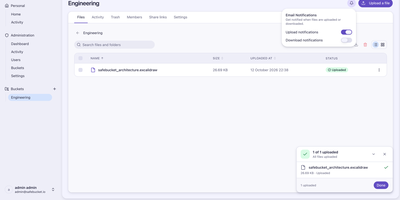
By routing file transfers directly between client browsers and S3-compatible object storage through time-limited presigned URLs, Safebucket enables organizations to share large files and folders without bottlenecking their application server. Teams organize documents into logical buckets with nested folder hierarchies, preview images, videos, audio tracks, and PDFs inside a sandboxed browser viewer, or bundle up to one hundred selected items into a single client-side ZIP download. Public Quick Share links let external recipients download files or entire folders from a browser or via command-line curl redirects, while Reverse Share turns any shared folder into a secure dropbox where guests can upload files back under size and count quotas. Every shared link supports optional password protection, expiration dates, and maximum view limits, complemented by per-file expiration timers and a soft-delete trash bin with configurable retention. Two-tier role-based access control pairs platform roles (Admin, User, and Guest) with bucket-level permissions (Owner, Contributor, and Viewer), allowing teams to invite external collaborators via challenge-verified email links. Authentication integrates with OpenID Connect identity providers and LDAP or Active Directory servers alongside TOTP multi-factor authentication. Administrators gain a four-view governance console covering platform storage metrics, user and bucket inventories, and searchable audit trails filtered by action, user, and date range. Running on a dedicated VPS on RepoCloud with guaranteed CPU, RAM, and SSD, full root SSH access, and a browser serial console. Apache-2.0 licensed.
Claper
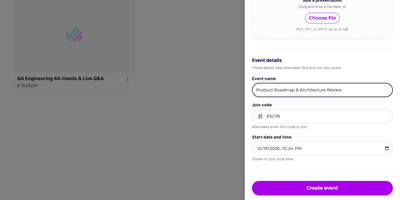
Passive slide decks put audiences to sleep, which is why Claper turns any presentation into a two-way live session where every attendee can vote in polls, submit questions, and react in real time from their phone. Speakers upload existing PDF or PowerPoint decks directly into the web studio and interleave interactive poll, quiz, form, and web embed slides between their static pages without rebuilding presentations from scratch. Conference organizers and educators share a short join code or QR link so hundreds of participants can enter the attendee room instantly from any mobile browser without installing an app or creating an account. During the talk, the presenter console displays incoming audience questions sorted by upvote popularity, alongside moderation controls to approve, pin, hide, or mark inquiries as answered on the main screen. Live polling supports multiple-choice, rating scale, and open-text prompts that animate into real-time bar charts and percentage breakdowns as votes arrive, while timed quizzes grade participant responses automatically. Integrated real-time speech transcription generates live captions and searchable session transcripts so international and hearing-impaired attendees can follow every spoken word. Universities and corporate training teams connect Claper directly to Moodle or OpenID Connect identity providers via LTI 1.3 to synchronize student rosters, push quiz scores to gradebooks, and export complete CSV engagement reports after every session. Running on a dedicated VPS on RepoCloud with guaranteed CPU, RAM, and SSD, full root SSH access, and a browser serial console. AGPL-3.0 licensed.

Surmai
When a family vacation or group expedition spans multiple airlines, hotels, rental cars, and currencies, Surmai brings every reservation and shared cost into one collaborative travel planner. Each trip breaks down into dedicated sections for transportation legs, lodging stays, daily activities, and travel notes. Confirmation codes, terminal numbers, departure times, and street addresses stay right where everyone in your party can find them. Built-in airport, city, and airline directories auto-complete flight routes in seconds, or you can forward booking confirmation emails directly into an active trip for automatic parsing. The chronological itinerary view then weaves flights, hotel check-ins, and excursions into a clean day-by-day timeline so your group can spot layover gaps immediately. Boarding passes, train tickets, and PDF vouchers live inside a central attachment vault. Installing the Progressive Web App caches your entire itinerary and travel documents on your phone for offline viewing at airport gates or remote trailheads. A built-in expense ledger logs shared purchases across multiple currencies so nobody has to guess who paid for dinner. Administrators can invite fellow travelers over SMTP email, enable OAuth2 or OpenID Connect login with Authentik, Keycloak, Google, or Microsoft, and replicate backups continuously to S3-compatible object storage. Running on a dedicated VPS on RepoCloud with guaranteed CPU, RAM, and SSD, full root SSH access, and a browser serial console. MIT licensed.
Ideon
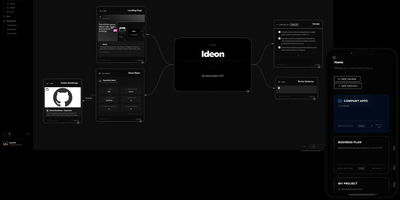
Scattered browser tabs, buried wiki folders, and disconnected issue trackers fragment engineering context across too many tools, which is why Ideon unifies your repositories, notes, and tasks on a shared infinite canvas. Rather than forcing projects into rigid folder hierarchies, you arrange interactive blocks spatially on a two-dimensional map where related documents, checklists, calendar schedules, and code references sit right beside one another. Teams can embed live repository cards and open issue streams directly from GitHub, GitLab, Gitea, and Forgejo onto the workspace, keeping code status visible alongside architecture documentation. Rich content blocks render Markdown notes with threaded comments, Mermaid flowcharts, uploaded files, images, and bookmarked links on the same board. Real-time multiplayer collaboration lets teammates edit blocks simultaneously, follow live cursors across the canvas, and map system designs together without edit conflicts. Built-in Time Travel snapshots capture historical states of the workspace so you can scrub backward to review how a project evolved or trace past design decisions. You can even synchronize an entire project canvas directly to a Git repository, storing notes and spatial block layouts as versioned files. Running on a dedicated VPS on RepoCloud with guaranteed CPU, RAM, and SSD, full root SSH access, and a browser serial console. AGPL-3.0 licensed.