Corteza
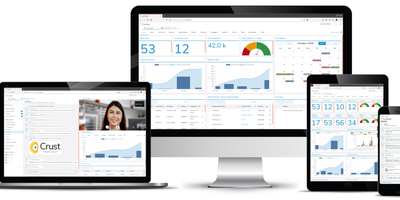
Salesforce's platform model, 100% open-source (Apache 2.0): Corteza is a Go/Vue.js low-code platform developed under a foundation, so there is no open-core bait to grow out of. The heart is Corteza Compose: namespaces contain applications, modules define record structures the way Salesforce objects do, and a drag-and-drop page builder assembles record pages, list pages, dashboards, and charts from configurable blocks. Automation comes from a visual, BPMN-style workflow engine plus JavaScript automation scripts, so cross-application business logic - approval chains, field updates, notifications - is configured rather than programmed. Granular role-based permissions reach down to individual modules, fields, and records, mirroring real organizational hierarchies. Corteza CRM ships as the flagship application built entirely on Compose: leads, accounts, opportunities, campaigns, and cases with a 360-degree customer view, covering most Salesforce standard objects - and because it is just a Compose app, adding or reshaping modules is configuration, not a fork. Everything is reachable over REST APIs, deliberately familiar tooling eases Salesforce admin migration, and a CLI can even generate synthetic records for load-testing what you build.
MantisBT
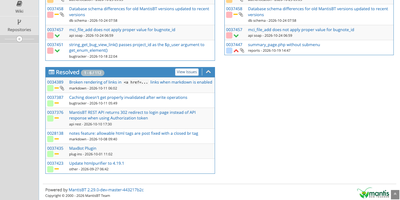
Every bug a team finds, from the first report to the day it is marked resolved, lives in one shared list in MantisBT, an open-source issue tracker. Reporters file issues with a summary, steps to reproduce, severity, and attachments, and email notifications reach the reporter, the handler, monitors, and note authors. Six access levels, from viewer to administrator, can be overridden project by project, and private projects stay hidden from users below the configured level. Administrators define their own status values, workflow transitions, and custom fields. Sub-projects inherit versions and categories from their parents, and issues link as related, parent and child, or duplicates. @mentions pull colleagues into a discussion, tags group related work, and a chronological history records who changed what. Triage works from stored and shared filters, the My View page, and summary charts, while a roadmap and changelog track what each version contains. Reporting comes through CSV and Excel export, optional time tracking with billing totals, and RSS feeds. Sign-in can use LDAP or Active Directory, scripts reach the tracker through REST and SOAP APIs, plugins extend the interface, and 50 languages are included. Running on a dedicated VPS on RepoCloud with guaranteed CPU, RAM, and SSD, full root SSH access, and a browser serial console. GPL-2.0-or-later licensed.
OpenOps
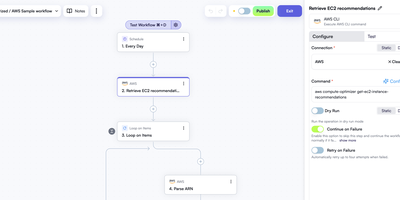
Cloud cost dashboards show what is being wasted; OpenOps is the no-code FinOps platform that acts on it, finding idle resources, asking the right owner for approval, and cleaning up once someone clicks yes. A visual editor starts each workflow from a schedule, cron expression, webhook, new Jira or Linear issue, or incoming email, and chains 120+ actions covering AWS, Azure, and Google Cloud operations, loops, conditions, delays, and code steps. Approval requests arrive as buttons in Slack or Microsoft Teams, or as approve and reject links by email, and the workflow waits for the answer before branching. Connectors for CloudHealth, Cloudability, Vantage, Finout, Flexera, and Umbrella feed in recommendations and anomalies. The template catalog ships with workflows for idle resource cleanup and rightsizing across AWS, Azure, and Google Cloud, and a free OpenOps Cloud account extends it. Findings land in built-in Tables where they can be approved, dismissed, marked as false positives, or snoozed. Analytics turns those tables, CSV files, Google Sheets, or Postgres data into dashboards. Test any step against live systems or sample data, inspect every run, and track changes in version history. Bring your own LLM key to generate CLI commands, SQL queries, and code right in the editor. Running on a dedicated VPS on RepoCloud with guaranteed CPU, RAM, and SSD, full root SSH access, and a browser serial console. Apache-2.0 licensed.
Chief-Onboarding
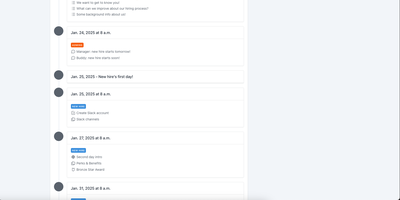
ChiefOnboarding is an open-source employee onboarding platform that turns a new hire's first weeks into a guided sequence of tasks, reading, introductions, and small wins delivered through a web portal and a Slack bot. Onboarding starts before day one: send pre-boarding pages that welcome people, collect their details, and build excitement ahead of the first morning. Inside, to-do items carry the forms and information each hire must complete, and the portal tracks every item until it is done. Sequences drip-feed content over time or unlock the next step when a to-do is completed, so nobody opens thirty tasks on Monday morning. Resources build a searchable knowledge base with courses that bring hires up to speed on tools, processes, and team lore. Introductions put names and faces to the people a hire will work with, and badges reward finished milestones to keep momentum high. Behind the scenes, integrations provision user accounts automatically and fire webhooks into the rest of your stack when milestones land. Admins get their own to-do lists for laptops, access, and paperwork, coordinated with colleagues in the same timeline. The portal speaks eight languages, adjusts message timing to each hire's timezone, and wears your logo, colors, and email templates so the whole journey feels like your company, not a vendor tool. Running on a dedicated VPS on RepoCloud with guaranteed CPU, RAM, and SSD, full root SSH access, and a browser serial console. AGPL-3.0 licensed.
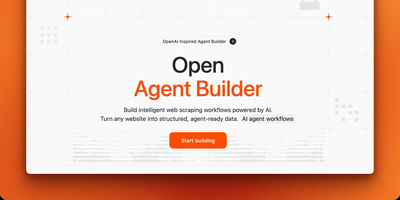
Open Agent Builder
Open Agent Builder delivers a visual canvas for orchestrating AI agent workflows without writing Python scripts or managing complex codebases. The React Flow-powered drag-and-drop interface supports seven node types — Agent, Scraper, Transform, If/Else, Loop, User Approval, and MCP Tool — each configurable with provider-specific settings for Anthropic Claude (Haiku 4.5 and Sonnet 4.5), OpenAI GPT-5, Groq, or any OpenAI-compatible endpoint. The LangGraph orchestration engine handles state management, conditional routing, and human-in-the-loop approval gates while Firecrawl integration converts any website into structured, LLM-ready data through scrape, crawl, and map operations. E2B sandboxed code execution powers Transform nodes for secure data manipulation without risking host system integrity. Real-time streaming updates show execution progress node-by-node as workflows run, with Convex providing reactive database synchronization for workflow state and execution history. The TypeScript-first architecture (96.8% TypeScript) built on Next.js 16 App Router with Tailwind CSS delivers a responsive interface across devices. Clerk handles multi-user authentication with JWT integration for secure workspace isolation. Deploy via npm install and environment configuration with Firecrawl, Convex, and Clerk API keys. Running on a dedicated VPS on RepoCloud with guaranteed CPU, RAM, and SSD, full root SSH access, and a browser serial console. MIT licensed.
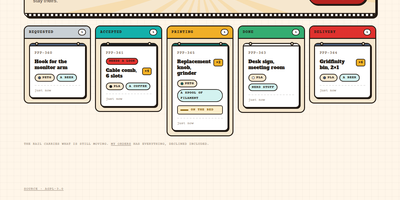
PrettyPleasePrint
Pretty Please Print turns one office's shared 3D printer into an invite-only request board: colleagues upload a model and follow it from request to delivery. Requesters upload an STL or 3MF file, or start from a Printables link the owner enabled, and the mesh renders in the browser, auto-framed and draggable, so everyone checks the geometry first. Every request becomes a ticket that the printer owner moves through Requested, Accepted, Printing, and Delivery, or declines with a reason, and requesters can withdraw their own print before it reaches the bed. Slicer specifics like layer height, infill, supports, and temperatures ride along as notes on the ticket, a low, medium, or high priority keeps the owner's queue ordered, and a conversation thread on each ticket replaces lost chat threads. The owner curates the materials and colours on the shelf, with swatches and a rainbow whatever option, and defines the tips requesters can offer, preferred ones starred. Finished jobs collect in a filterable history: Print again reopens the form with the model copied server-side and fields adjustable, and one click sends a model straight to PrusaSlicer. Accounts are invitation-only; access can be revoked with a global sign-out, every change lands in an audit trail that cannot be edited, and the same tickets are exposed over a JSON API documented in OpenAPI 3.1 with a Swagger console. Running on a dedicated VPS on RepoCloud with guaranteed CPU, RAM, and SSD, full root SSH access, and a browser serial console. AGPL-3.0 licensed.
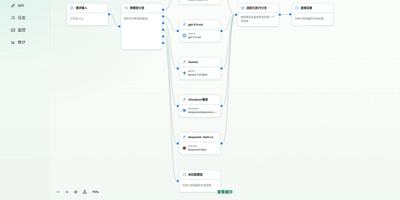
1FlowBase
1FlowBase gives teams a single self-hosted foundation that connects model providers, retains every AI conversation, and turns that activity into working business applications. You connect OpenAI, Anthropic, Gemini, DeepSeek, Alibaba Cloud Bailian, or any OpenAI-compatible API through provider plugins and publish one stable endpoint for clients. Requests convert between Anthropic Messages, OpenAI Chat Completions, and OpenAI Responses, so applications keep working when a provider changes. You can route traffic by model name, fall back across branches when a provider fails, and combine planning, execution, and review models into a virtual model that callers use like any other model. Every gateway conversation is recorded with its model, reasoning effort, status, token totals, recorded cost, and latency, then broken down by model and by user in statistics views. You define data models and data sources, expose CRUD APIs, schedule workflows, and publish an OpenAPI 3.1 document for each application. Agents reach the same runtime through MCP with progressive list, get, and call tool discovery, and you manage MCP instances and third-party servers from the console. Pages come from native React blocks that you edit in place with a built-in AI assistant. Running on a dedicated VPS on RepoCloud with guaranteed CPU, RAM, and SSD, full root SSH access, and a browser serial console. Apache-2.0 licensed.
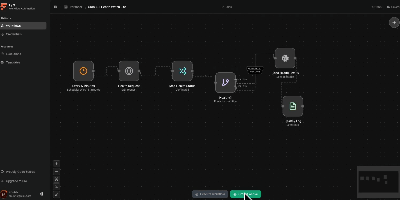
Fynt
A clean alternative to n8n and Zapier that puts AI-native workflows front and center, Fynt is the MIT-licensed workflow automation platform where you drag nodes onto a React Flow canvas, wire them together with typed connections, and let a distributed BullMQ engine execute them — with every step streamed live to your browser over WebSockets so you never wonder what happened inside a run. The node library spans triggers (manual, webhook, cron scheduling), AI providers (OpenAI, Anthropic, and Gemini with structured output parsing), service integrations (GitHub webhooks, Notion databases, Slack channels, Discord bots, arbitrary HTTP endpoints), logic gates (conditional branching, filtering, data transformation), and utility nodes (delay, logging, payload mapping). The execution architecture separates concerns across three services: a Next.js 16 web application serving the React 19 workflow builder and tRPC API, a BullMQ worker processing jobs with node-level retries and checkpointing for crash-safe execution, and a dedicated WebSocket relay server broadcasting real-time run events via Redis Pub/Sub. All stored credentials are encrypted at rest using AES-256-GCM with per-credential initialization vectors. The full-stack deploys as a single Docker Compose stack (web, worker, realtime, PostgreSQL, Redis) or individually via pnpm workspaces in a Turborepo monorepo. Authentication is handled through better-auth with configurable OAuth providers. Running on a dedicated VPS on RepoCloud with guaranteed CPU, RAM, and SSD, full root SSH access, and a browser serial console. MIT licensed.
ShibaClaw
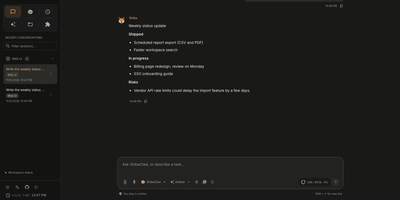
Meet an AI assistant that lives on your own server, remembers who you are, and keeps working after you close the tab. ShibaClaw opens with a four-step onboarding wizard for provider, credentials, and model, then drops you into a chat workspace with agent profiles for building, planning, reviewing, administering, and security work. Long-term memory lives in editable files, a dream diary records what the agent learned, and a Library view maps how profiles relate to each other. Agents call file, shell, and web tools, plug into external MCP servers, and hand work to isolated or forked sub-agents. The Automations page schedules one-shot, interval, or cron jobs like a weekday morning support brief, and a plugin catalog adds services like GitHub, Notion, PostgreSQL, and Google Workspace in one click. An optional knowledge base searches your own documents, and channel integrations reach the agent from Discord, Telegram, Slack, and Matrix. Provider choices span OpenRouter, Anthropic, OpenAI, Gemini, DeepSeek, Groq, Ollama, and any OpenAI-compatible endpoint. A credential vault encrypts keys, and file tools stay inside a restricted workspace. Anyone who wants research, drafting, and recurring chores handled by an assistant they host themselves will feel at home. Running on a dedicated VPS on RepoCloud with guaranteed CPU, RAM, and SSD, full root SSH access, and a browser serial console. Apache-2.0 licensed.
LangGraph GUI
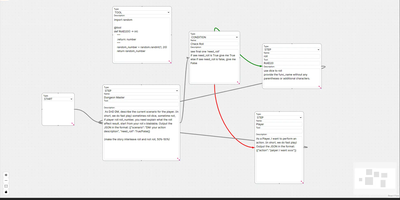
Building LangGraph agents in code means imagining the graph; LangGraph GUI turns that graph into something you draw, wire, and run from the browser instead. You place a start node, add step nodes, and drag edges between ports to define the flow, with cycles created by simply connecting nodes back toward each other. Condition nodes split execution into green true paths and red false paths, info nodes append context to stage output, and subgraph nodes run a whole named graph inside another one. Tool steps call real Python functions that you define in tool nodes with the familiar decorator style, so file saving, lookups, and custom logic sit inside the visual flow. Graphs save to JSON on your computer, load back for editing, and upload to the server as workflow files ready to execute. You configure which LLM to use and its API key in the panel, run against local models through Ollama or hosted APIs, then download every file the run produced in the workspace. Files upload to the server workspace as working environment, and a cache clean clears it between runs. Example graphs for role-playing loops, lottery branch switches, and tool-using flows show patterns you can copy and refine with your own prompts. Running on a dedicated VPS on RepoCloud with guaranteed CPU, RAM, and SSD, full root SSH access, and a browser serial console. MIT licensed.