Securo
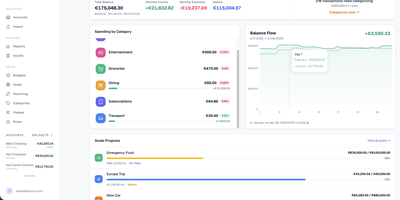
Securo is a privacy-first personal finance platform that keeps all your financial data in your own PostgreSQL instance while connecting to 2,500+ banks across three continents for automated transaction sync. The FastAPI backend with React/TypeScript frontend deploys via Docker Compose on ports 3000 and 8000, with Redis-backed Celery workers handling background synchronization. Bank connections span approximately 2,500 European PSD2 institutions through Enable Banking across 29 countries, US and international banks via SimpleFIN's open protocol, and Brazilian banks through Pluggy, all refreshing automatically every four hours. Multi-account management tracks checking, savings, credit cards, and investments with running balances. The auto-categorization rules engine applies pattern-matching across merchants and amounts. Goal tracking monitors savings targets with progress visualization, asset management handles stocks and custom instruments with configurable valuation growth rules, and reports generate Net Worth and Income vs Expenses charts with category sparklines. Optional AI Agents provide LLM chat with tool-use over your financial data through MCP, supporting OpenAI, Anthropic, Ollama, and compatible providers with per-agent RAG knowledge bases accessible via a global command palette. Multi-user support includes OIDC login, passkey authentication, TOTP two-factor, privacy mode, and multi-currency FX conversion via Open Exchange Rates. 1,500+ stars since March 2026. Running on a dedicated VPS on RepoCloud with guaranteed CPU, RAM, and SSD, full root SSH access, and a browser serial console. AGPL-3.0 licensed.
MoneyMatter
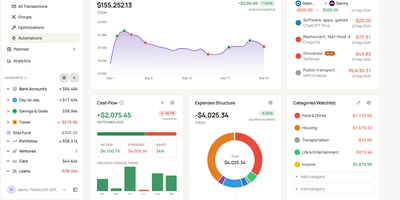
Your bank balance is only part of what you own, and MoneyMatter adds the rest: cash accounts, brokerage portfolios, cars, loans, and private deals roll into one net worth figure in your base currency. Add transactions by hand, import CSV, OFX, QFX, YNAB, Wallet, or Microsoft Money files, or let an AI model you provide parse a statement, while Monobank, SimpleFIN, Lunch Flow, and Walutomat connections sync accounts automatically. Each transaction can carry categories, tags, payees, notes, attachments, and splits, transfers and refunds link to their counterparts, and automation rules tidy new entries. Envelope-style budgets assign money to lines with Assigned, Activity, and Available columns and rollover rules, savings goals read progress from account balances, subscriptions and bills send reminders, and loans show payoff projections. Stocks, ETFs, and crypto are priced daily, vehicles depreciate along a curve, and a FIRE planner estimates years to Lean, Regular, Fat, Barista, and Coast FIRE. A customizable dashboard, cash flow, money flow, net worth history, trends comparison, and pivot table chart the results. Share accounts with a household member, export JSON, CSV, or XLSX, back up everything, or connect Claude, ChatGPT, or Claude Code through the built-in MCP server. Running on a dedicated VPS on RepoCloud with guaranteed CPU, RAM, and SSD, full root SSH access, and a browser serial console. AGPL-3.0 licensed.
TriliumNext
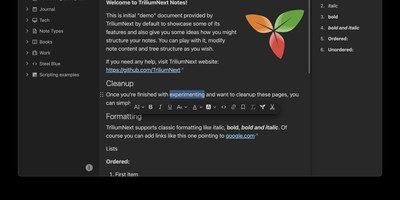
TriliumNext organizes notes in an infinitely deep tree where any single note can be cloned into multiple branches without duplication, building personal knowledge bases that mirror how ideas actually connect rather than forcing a single rigid folder hierarchy. Carrying forward the original Trilium project under active community stewardship with nearly 37,000 GitHub stars, the application is built on TypeScript with a CKEditor 5 WYSIWYG editor supporting rich text, tables, images, KaTeX math expressions, Mermaid diagrams, Excalidraw canvases, mind maps, spreadsheets with XLSX and CSV import/export, and code blocks with full syntax highlighting. A built-in JavaScript scripting engine runs on both frontend and backend, enabling custom widgets, automated workflows, scheduled tasks, and direct interaction with external REST services through a typed Script API. Full-text and fuzzy search with attribute-based queries locates any note instantly across databases tested at over 100,000 notes without performance degradation. The v0.104 release introduced importers for OneNote, Notion, Google Keep, Anytype, and Obsidian alongside 16 dedicated security fixes. Per-note AES encryption, OpenID Connect authentication, and TOTP two-factor protection safeguard sensitive content. The sync server keeps desktop clients, the progressive web app, and mobile devices in lockstep with zero third-party cloud dependency. Web Clipper captures content directly from browsers. Running on a dedicated VPS on RepoCloud with guaranteed CPU, RAM, and SSD, full root SSH access, and a browser serial console. AGPL-3.0 licensed.
VanBlog
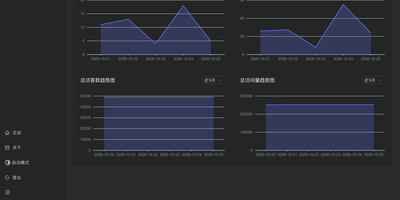
Publish a personal blog you fully own, with a Markdown writing desk, an admin dashboard, and reader-facing pages all in one install. Write posts with live preview, Mermaid diagrams, math formulas, and custom highlight blocks, then paste or upload images straight from the editor or import existing Markdown files when moving over from another platform. Posts and drafts can be managed in bulk, filed under categories and tags, and locked behind passwords for individual articles or whole categories. Readers get a table of contents, code copy buttons, search, RSS feeds, friend links, and donation links, and pages follow their light or dark preference on phones and desktops. The dashboard charts visitors and page views, with Google Analytics and Baidu Analytics as optional add-ons, while Waline comments bring email notifications and webhooks. Image storage is built in, with compression and watermarking, or can be handed to PicGo, object storage, or GitHub. Pipelines run custom code or call webhooks after selected events, custom pages and CSS, HTML, or JavaScript reshape the layout, and collaborator accounts with permissions plus API tokens let several authors share one site or feed a separate frontend. Backups, import and export, and update notices live in the admin panel, and HTTPS certificates for your domain are issued and renewed automatically. Running on a dedicated VPS on RepoCloud with guaranteed CPU, RAM, and SSD, full root SSH access, and a browser serial console. GPL-3.0 licensed.
Memos
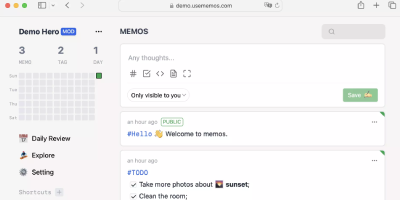
Open the page, write a Markdown note, move on - Memos is a lightweight, self-hosted service built for quick capture. Instead of folders, notebooks, and titles, it presents a timeline: open the page, write a Markdown note, and move on. Notes support headings, code blocks with syntax highlighting, task lists, tables, and file attachments, with tags auto-extracted from #hashtags in the text. Each memo carries a visibility level, private, protected (logged-in users), or public, so one instance works as a personal log, a small team wiki, or a lightweight microblog. The backend is a single Go binary with a React frontend, around 50 MB of memory at runtime and a ~20 MB Docker image, so it fits comfortably on the smallest instance size with near-zero maintenance. SQLite is the default store, with MySQL and PostgreSQL supported for multi-user deployments needing more concurrency, and full REST and gRPC APIs - Connect RPC for browsers, gRPC-Gateway for external tools - make capture scriptable from CLIs, bots, and automation platforms. Fast full-text search spans all memos, pinned notes keep references handy, and a masonry view suits visual browsing. MIT-licensed with zero telemetry; content is stored as plain Markdown in a database you control, so notes remain readable, exportable, and free of proprietary formats.
PenX
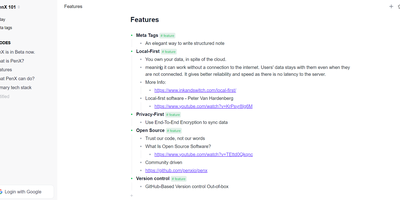
PenX delivers an open-source structured note-taking application that functions as a personal database disguised as an elegant editor — combining the outline workflow of Workflowy and Roam Research with the structured data capabilities of Tana through MetaTags that transform every note into a queryable database record. The local-first architecture stores all data on-device using PGLite, an in-process PostgreSQL-compatible engine, ensuring data ownership regardless of cloud connectivity. End-to-end encryption protects all synchronized data so that even the sync server cannot read your notes, tasks, ideas, or documents. GitHub-based version control provides out-of-the-box backup and history with full commit-level recovery. MetaTags are the core innovation — attaching structured tags to any note converts it into a database entry with typed fields, enabling table views, filters, and queries across your knowledge base without imposing rigid folder hierarchies. The daily notes workflow encourages free-form capture while MetaTags handle organization automatically, letting you record thoughts without deciding physical location upfront. AI-driven features assist with content generation, summarization, and intelligent search across your personal data hub. Real-time sync keeps web, desktop, and mobile in perfect alignment. Cross-platform availability includes web, desktop for Windows, macOS, and Linux, iOS, and Chrome extension. Deploy the web service via Next.js with pnpm using tRPC and Prisma. Running on a dedicated VPS on RepoCloud with guaranteed CPU, RAM, and SSD, full root SSH access, and a browser serial console. AGPL-3.0 licensed.
Usermemos
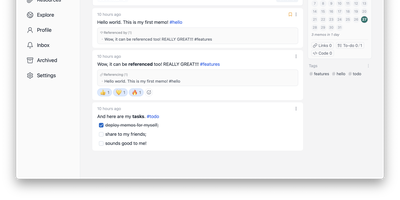
Memos, the lightweight open-source note service from the usememos project, packaged as a containerized deployment for multi-architecture Docker hosts (x86-64 and arm64): that is Usermemos. The model is frictionless capture: no folders or titles, just a chronological stream of Markdown notes with code blocks, task lists, tables, and file attachments, organized by #hashtags pulled automatically from the text. Per-memo visibility - private, protected for logged-in users, or public - lets a single instance serve as a personal journal, a shared team log, or a public microblog simultaneously. Multi-user support with authentication makes it workable for small teams, and full REST and gRPC APIs open capture and retrieval to CLIs, bots, and automation tools. The runtime is a single Go binary with a React frontend that idles around 50 MB of memory and stores content as plain Markdown in SQLite by default, with MySQL and PostgreSQL available for heavier deployments. Configuration happens through environment variables, access works over HTTP or HTTPS behind a reverse proxy, and there is no telemetry - notes stay on your server in a portable format.
Wally
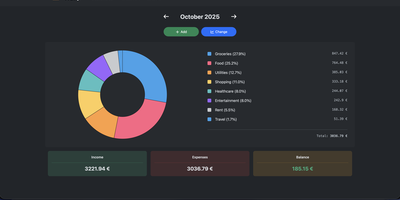
Started as an ExpenseOwl-inspired project, Wally grew into a lightweight, self-hosted expense tracker more capable in every direction its author touched. The backend is Python FastAPI over SQLite, which means every deployment ships a full REST API with interactive documentation at /api/docs - automating imports or wiring in external tools requires no reverse engineering, and when the optional login page is enabled you can mint scoped API keys from the Settings page for token-based integrations. The transactions view is built on AG Grid, bringing real search, column sorting, and per-column filtering to your ledger, with a footer totaling rows, income, and expenses for whatever slice you have filtered. Dashboards go beyond the usual monthly doughnut: a Change button swaps in year-scale line graphs so you can track a single category - restaurants, say - across time. Recurring transactions edit intelligently, letting you apply changes to all instances or only future ones. CSV import and export use a simple six-column format handled from Settings, the refined dark theme is genuinely easy on the eyes, and the interface is translated into more than ten languages. The whole thing runs from one small container with a single data volume.
Actual Budget
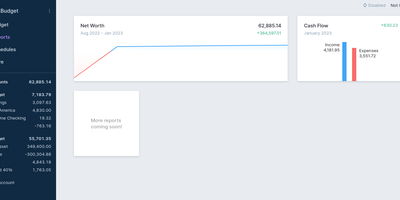
Every unit of income gets a job in Actual Budget - a local-first personal finance app built on envelope (zero-sum) budgeting, where you can only budget cash you actually have, which keeps the plan honest by construction. The data model is a SQLite file that lives on your device and works fully offline; the self-hosted Node.js sync server adds background multi-device synchronization using CRDT-based distributed-systems machinery, browser and mobile access as an installable web app, and automated backups. Optional end-to-end encryption makes the synced data unreadable even to the server hosting it. Transactions enter three ways: manual entry, file import (CSV, QIF, OFX, QFX, CAMT.053), or automatic bank syncing through GoCardless for EU/UK banks and SimpleFIN for US/Canada. Built-in YNAB4 and nYNAB importers migrate complete budget histories, and reports, schedules for recurring transactions, and rule-based transaction cleanup handle the day-to-day. A fully featured local API lets developers script custom importers and automation against their own data. 100% free, open source, and 26k stars strong.
MediKeep
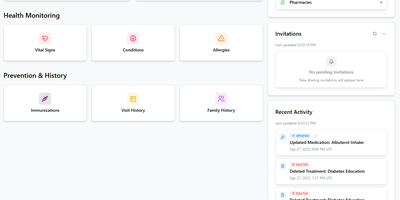
Your medical history, fragmented across a dozen patient portals, in one place on your server: MediKeep (formerly Personal Medical Records Keeper) is a self-hosted health record system. Built with a React frontend and FastAPI backend over PostgreSQL, it organizes 14 categories of medical data - medications with dosages and schedules, conditions, procedures, allergies, immunizations, symptoms, injuries, doctor visits and encounters, treatments, lab results, and even medical equipment with service dates and supplier info. Treatment management is genuinely sophisticated: an advanced mode links treatments to their medications with per-medication overrides for prescriber, pharmacy, and effective dates, and reverse lookup shows which treatments use a given medication. A dashboard summarizes records and recent activity, file uploads attach documents to records, and tagging works across categories. When a new specialist asks for your history, the report builder assembles custom reports by category and exports to PDF, JSON, or CSV - a curated, portable summary instead of a folder of photocopies. Authentication supports Google and GitHub SSO with OIDC providers like Keycloak and Authelia expected to work, and the built-in backup system protects the archive. Health data is exactly what should never live in someone else's cloud.
openGym
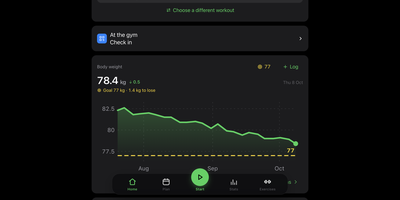
openGym is a self-hosted gym and body-weight tracker that plans your weekly routines, guides every set with pre-filled weights and rest timers, and keeps your training data on a server you control instead of inside a subscription app. Over 5,600 exercises come with animated demos, searchable by body part and the equipment you own, and you can add custom ones with your own photo or video. Progression follows a rule you pick per routine (linear, Greyskull LP, double, triple, or added time), and each target explains where it came from. Supersets, warm-ups, drop sets, rest-pause, timed planks, and cardio by time and speed all log properly, and plate math shows what goes on each side of the bar. A muscle map shows where your volume went, what is still recovering, and what went untrained, beside estimated one-rep maxes, a year-long heatmap, and body weight charted against your goal. Imports from FitNotes, Strong, and Hevy carry your history over. Several people can share one server, each with a private passkey profile, and an optional admin dashboard handles invite-only signup. An optional AI coach, off by default, drafts routines and suggests changes through your own Anthropic, OpenAI, Gemini, or Ollama endpoint, and nothing applies without your approval. The interface speaks 19 languages. Running on a dedicated VPS on RepoCloud with guaranteed CPU, RAM, and SSD, full root SSH access, and a browser serial console. AGPL-3.0 licensed.
Ghostfolio
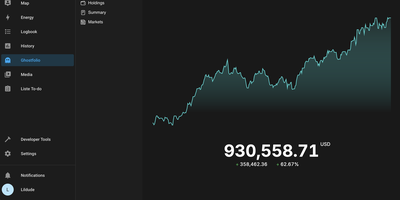
Stocks, ETFs, crypto, bonds, precious metals, and cash across every account and currency, in one privacy-first dashboard: Ghostfolio is open-source wealth management software. The deliberate design decision is no brokerage linking: positions enter by manual entry, CSV import, or the REST API, so your holdings never pass through a data aggregator. Performance is measured as return on average investment across Today, WTD, MTD, YTD, 1Y, 5Y, and Max timeframes, with benchmark comparison against indices like the S&P 500, dividend tracking, and allocation breakdowns by asset class, region, and sector. A static X-ray analysis flags concentration and other portfolio risks, and a FIRE calculator projects progress toward financial independence. Multi-currency support converts holdings using historical exchange rates, market data comes from Yahoo Finance and CoinGecko among other pluggable providers, and everything exports back out as CSV or JSON. Built with Angular and NestJS on PostgreSQL and Redis, shipped as Docker images for amd64 and ARM, with a mobile-first PWA interface, dark mode, and a distraction-free Zen mode. AGPL-licensed.
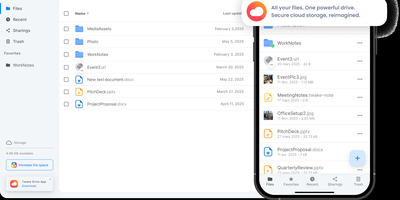
Cozy Cloud
With over 1,200 GitHub stars, 12,000+ commits, and more than a decade of active development distributed under the AGPL-3.0 license, Cozy Cloud operates as a comprehensive personal data hub that goes far beyond file storage by connecting your documents, contacts, calendars, banking transactions, energy bills, and productivity tools into a single self-hosted platform where no third party profiles you. The cozy-stack Go binary handles file storage, CouchDB document management, job scheduling, app serving, and the REST API in a single process consuming approximately 150MB of RAM idle. Sandboxed konnectors import data from 50+ external services — banks, utility providers, telecom operators, cloud drives — running as isolated jobs via nsjail to prevent untrusted code from accessing other user data. The built-in app store serves web applications in subdomain-isolated environments with Content Security Policy headers, each app communicating exclusively through the documented REST API. Real-time synchronization via PouchDB replication and WebSocket keeps files, contacts, and documents consistent across desktop clients, mobile apps for iOS and Android with automatic photo backup, and the web interface. Security features include automatic Let's Encrypt TLS certificates, Argon2id password hashing, optional TOTP two-factor authentication, and GDPR-compliant data export via the CLI. Each user receives their own isolated instance with independent storage, database, and application configuration. Running on a dedicated VPS on RepoCloud with guaranteed CPU, RAM, and SSD, full root SSH access, and a browser serial console. AGPL-3.0 licensed.
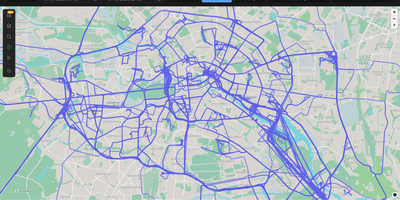
Dawarich
With over 9,000 GitHub stars earned since Google killed its browser-based Timeline, Dawarich fills the gap with a fully self-hosted location history platform that keeps your movement data under your control. Built on Ruby on Rails 8.0 with PostgreSQL and the PostGIS spatial extension for geometry-based queries, Dawarich imports your entire Google Takeout location archive in minutes and begins rendering interactive maps immediately. The visualization engine supports five map layers — heatmaps, points, lines, Fog of War exploration tracking, and a 3D globe view — each powered by Leaflet and spatial SQL rather than browser-side computation. Native iOS and Android apps handle background GPS tracking with offline support, automatically uploading location points when connectivity returns, while third-party integrations support OwnTracks, GPSLogger, Overland, Home Assistant, Traccar, and PhoneTrack. The trip system lets you create route visualizations between any two dates, attach notes, replay travel paths with a timeline scrubber, and share trips publicly with phrase-protected links and per-section visibility controls. Immich and PhotoPrism integrations automatically overlay geotagged photos on your maps and trips, while AirTrail integration renders flight history as arcs. Statistics dashboards break down countries visited, cities explored, total distance traveled, and active days by year and month, with visit detection suggesting places you have frequented. Running on a dedicated VPS on RepoCloud with guaranteed CPU, RAM, and SSD, full root SSH access, and a browser serial console. AGPL-3.0 licensed.
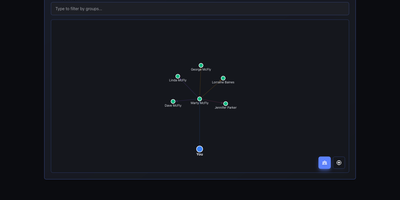
Nametag
CRM mechanics applied to your actual relationships instead of a sales pipeline: Nametag is a Personal Relationship Manager (PRM). It exists to fix the things you keep forgetting: when you last talked to an old friend, their kids' names, the birthday you missed twice. Contacts are tracked with flexible attributes - names, birthdays, important dates, and free-form notes for everything else - and organized into custom groups. Where it goes beyond a contacts app is relationship mapping: you define how people connect to each other (family, friends, colleagues, or custom relationship types), and an interactive D3.js-powered graph renders your entire personal network so you can see clusters and connections at a glance. Staying in touch is automated: scheduled reminders fire for birthdays, important dates, and reach-out nudges, with optional email delivery via a Resend API key for password resets and reminder notifications. Built with Next.js, it is mobile-responsive, ships with full dark mode, and supports multiple languages including English and Spanish. Because it is self-hosted, there are no account tiers or contact limits - unlimited people and relationships, with every note about your personal life stored on your own server rather than a social-graph company's cloud. A lightweight, single-container deployment makes it one of the easiest personal tools to run.
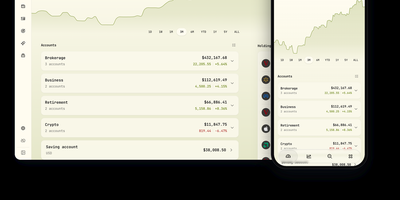
Wealthfolio
Wealthfolio is a portfolio tracker offering a complete wealth management platform where financial data never leaves your infrastructure. Built on Rust with an Axum HTTP server, Diesel ORM, and SQLite storage, paired with a React 19 and Vite frontend, version 3.6 tracks stocks, ETFs, mutual funds, crypto, and cash savings across unlimited accounts with unified holdings. The performance engine calculates time-weighted returns (TWR), internal rate of return (IRR), volatility, maximum drawdown, and benchmark comparisons against the S&P 500 and custom indices, scoped per-account or across the entire portfolio. Net worth tracking monitors assets including real estate, vehicles, collectibles, and precious metals alongside liabilities, with stale-valuation warnings for items not updated in 90+ days. The spending module categorizes transactions automatically, supports multi-currency credit cards, builds budgets with monthly targets and rollovers, and generates narrative insights. A built-in AI assistant answers portfolio questions, suggests asset classifications, and imports transactions conversationally — bring your own API key from OpenAI, Anthropic, or use local LLMs. The addon system provides sandboxed extensions with granular permission declarations across 16 capability domains. CSV import maps broker exports with per-broker recipes for Interactive Brokers, Schwab, Fidelity, and dozens more. Market data streams from Yahoo Finance with automatic currency conversion. Running on a dedicated VPS on RepoCloud with guaranteed CPU, RAM, and SSD, full root SSH access, and a browser serial console. AGPL-3.0 licensed.
Monetr
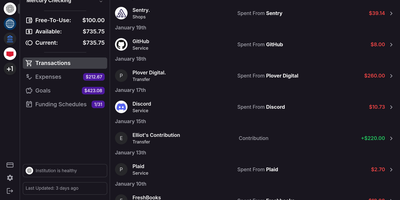
After the bills are covered, how much is actually safe to spend? monetr organizes an entire budgeting application around that one question. Inspired by the defunct Simple bank, it budgets paycheck by paycheck rather than month by month. Funding schedules encode when you get paid - including multiple schedules per account and a weekend-exclusion option for deposits that land early - and every expense or savings goal is tied to one. monetr then calculates how much of each recurring obligation (rent, car payment, subscriptions, on any repeat interval) to set aside from each paycheck, so a large bill never has to come out of a single check. What remains after allocations is surfaced as Free-To-Use, and a forecasting timeline projects contributions, due dates, and leftover funds forward so low-balance periods are visible before they happen. Transactions arrive either as OFX uploads from your bank or automatically through a Plaid connection using your own API credentials, keeping balances and transactions synced without manual entry. The app is mobile-friendly and installable as a PWA on desktop or phone. Self-hosting via Docker Compose is completely free, with all source code public and your financial data on your own hardware.
OpenBudgeteer
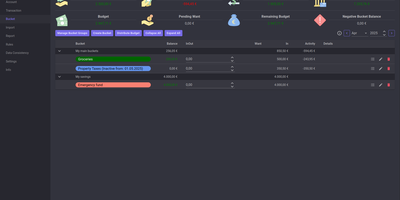
Allocating every incoming dollar into purposeful spending and savings buckets before transactions occur, OpenBudgeteer gives households complete financial control through a self-hosted zero-based envelope budgeting platform. Users can organize expenditures into customizable bucket hierarchies, grouping everyday living costs, debt repayments, and sinking funds into distinct categories with target balances. Financial planners can import bank statement files via flexible CSV mapping profiles that parse transaction descriptions, clean up merchant strings, and auto-assign records to corresponding expense buckets. The transaction registry provides split-transaction functionality, allowing shoppers to divide a single department store receipt across grocery, household, and clothing envelopes with exact currency precision. Interactive progress bars display bucket health throughout the billing month, signaling when spending velocity threatens allocated limits and calculating suggested contributions for forthcoming paychecks. Advanced forecasting reports plot multi-month net worth trajectories, track category expenditure patterns, and calculate burn rates against long-term retirement and emergency savings goals. Account balances synchronize across multiple physical checking accounts, credit cards, and cash wallets, ensuring total bucket balances reconcile perfectly against real bank reserves. Running on a dedicated VPS on RepoCloud with guaranteed CPU, RAM, and SSD, full root SSH access, and a browser serial console. AGPL v3 licensed.