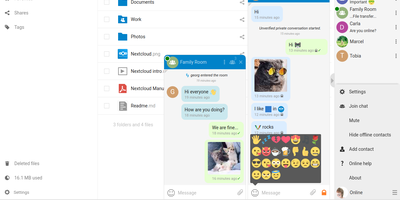
Nextcloud
Google Workspace and Microsoft 365, replaced by a platform you actually control: Nextcloud is the self-hosted digital workspace. Files is the core: file storage and sync across desktop, mobile, and web clients, with sharing, versioning, and collaboration built in. Around it, Talk provides private text chat, audio/video conferencing with screen sharing, SIP integration, and persistent voice rooms; Groupware bundles calendar, contacts, and mail with delegation support; and Office offers two collaborative suites - the Collabora-based option with deep ODF support, and Euro-Office, whose local-processing architecture delivers strong Microsoft Office compatibility and fast browser rendering with reduced server load. The Nextcloud Assistant threads AI through the platform via a context-aware sidebar, Whiteboard covers visual collaboration, Flow handles automation, and an app ecosystem of hundreds of extensions adds everything from Kanban boards to end-to-end encryption. Hub 26 brings a lighter UI with a unified app switcher and Nextcloud Governance for organizations under strict regulatory requirements. This is the flagship of data sovereignty: your files, chats, calendars, and documents live on your server, under your jurisdiction, with GDPR compliance by architecture rather than by contract.
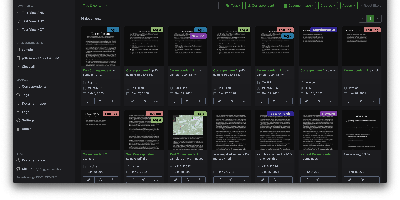
Paperless-ngx
A pile of paper becomes a searchable digital archive under Paperless-ngx, the community-maintained document management system. The pipeline is what makes it work: drop a file into the consumption folder (or let it poll an email inbox), and a worker hashes it for duplicate detection, routes it by type, runs OCRmyPDF with Tesseract (100+ languages) on anything without a text layer, and produces an archivable PDF/A with invisible selectable text embedded - so Ctrl+F works on your scans. Then the smart part: a scikit-learn classifier (TF-IDF plus multi-label prediction) trained on your own tagged documents automatically assigns tags, correspondents, and document types to new arrivals, alongside rule-based exact, keyword, and regex matching for deterministic cases. Full-text search includes relevance ranking, match highlighting, autocomplete, and "more like this" similarity search. Apache Tika integration extends consumption to Word, Excel, PowerPoint, and LibreOffice formats. The Django/Angular app adds custom fields, saved views on a customizable dashboard, bulk editing, workflow automation triggered on upload or matching, shareable public links with expiration, and a robust permissions system with per-document access control. Metadata lives in PostgreSQL with Redis-queued Celery workers processing documents in parallel. Your tax records, invoices, and contracts stay on your server - searchable in seconds, never in someone else's cloud.
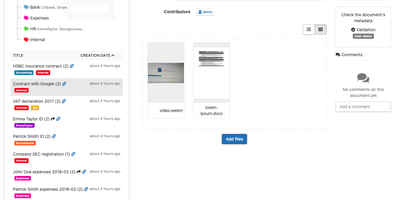
Teedy
Every scan and PDF you drop into Teedy becomes searchable text in a self-hosted document archive, filed by nested tags instead of folders. OCR reads images in more than twenty languages, and the search box offers suggestions and highlights matches, even inside ODT, DOCX, and PPTX files. Video files are supported as well. Each record carries Dublin Core fields plus custom metadata of your own design, with comments and earlier file versions attached. When a document needs a second pair of eyes, workflow steps with assigned reviewers move it along in order until someone signs off. Pull in EML emails, let the server poll an inbox, or point the bulk importer at a whole folder, and incoming paperwork needs no manual filing. Share a single document through a public link, or keep it behind user and group permissions with a storage quota for each person. LDAP and two-factor authentication guard sign-in, 256-bit AES encryption protects stored files, and an audit log records who changed what. Webhooks alert other services, a documented REST API lets scripts take part, and an Android client carries the archive on a phone. Running on a dedicated VPS on RepoCloud with guaranteed CPU, RAM, and SSD, full root SSH access, and a browser serial console. GPL-2.0 licensed.
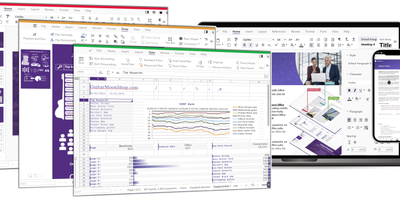
Collabora Office
Real LibreOffice document engineering in the browser: Collabora Online is built by the company employing much of the former SUSE LibreOffice team - not a reimplementation. This deployment runs CODE (Collabora Online Development Edition), the collabora/code server that renders and edits documents entirely server-side while browsers get high-fidelity WYSIWYG output, so layout and formatting survive round-trips that break lesser converters. Four editors ship in one container: Writer for text documents (comments, track changes with comparison and restoration, form handling), Calc for spreadsheets (advanced formulas, macros, pivot tables, per-user sheet views, server-enforced cell protection), Impress for presentations, and Draw for Visio-class diagrams. Format compatibility spans DOCX, XLSX, PPTX, the ODF family, PDF, and dozens more - including Visio and Publisher import. Real-time collaborative editing supports multiple simultaneous editors with visible cursors and commenting. The architectural point: documents are processed on your server and never leave it, which is why Collabora is the engine behind Nextcloud Office and integrates with ownCloud, Seafile, and any WOPI-speaking host - or embeds in your own application via the SDK. An admin console monitors sessions and memory. For organizations that need Google Docs-style collaboration with actual data sovereignty, this is the reference open-source answer.
StirlingPDF
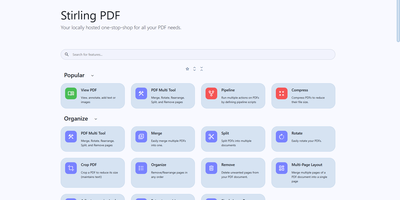
Adobe Acrobat and Smallpdf, answered by a self-hosted Java web application: Stirling PDF processes every file with its 60+ tools on your own server and deletes it after the task completes. Nothing is uploaded to a third party, which is the whole point for contracts, invoices, and medical records. The toolbox covers page operations (merge, split at page numbers or scanned dividers, rotate, reorder, crop, extract), conversion in both directions between PDF and Word, Excel, PowerPoint, images, HTML, and Markdown, OCR that turns scans into searchable PDFs via Tesseract/OCRmyPDF (including PDF/A archival conversion), and security tools for passwords, permissions, watermarks, signatures, and true UI-driven text redaction. A built-in viewer handles annotation, drawing, and text or image insertion, and V2 added stateful processing - upload once, chain multiple tools - plus undo/redo history. For automation, nearly every tool has a REST API endpoint, no-code pipelines combine operations into custom logic chains, and watched folders process files automatically. Enterprise deployments get SSO, user management, and audit logging; the interface ships in 40+ languages. With 84K+ GitHub stars it is the most popular PDF tool in self-hosting, replacing $20/month Acrobat subscriptions with flat infrastructure cost.
Doca
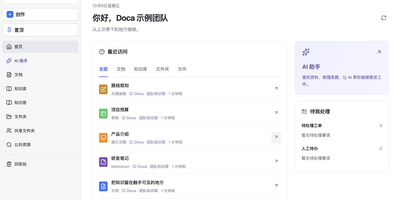
Doca puts rich text, Markdown, spreadsheets, slides, and an infinite canvas under one login and one permission model, giving individuals and small teams a self-hosted workspace for writing together. Every format supports real-time co-editing with presence, comments, saved history, and manual snapshots, and rich text and Markdown documents can be restored to an earlier version. Documents live in knowledge libraries with tree navigation, invitations, inherited permissions, share links, and trash, while personal files and shared folders sit on local disk or S3-compatible storage. Knowledge books go further: they subscribe to sources, run an editable workflow, keep source evidence, and route results through human review. A personal AI assistant, powered by whichever model you configure, searches authorized documents, reads PDF and Office attachments, edits images, and prepares browser drafts. MCP services let external AI clients such as Codex use those tools under your permissions. Sign in with a password, OIDC, Google, GitHub, WeChat, or QQ, review registrations before they go live, and send webhooks to other systems. A plugin SDK and marketplace add business modules, and a browser extension clips pages into documents. The interface ships in Chinese and English. Running on a dedicated VPS on RepoCloud with guaranteed CPU, RAM, and SSD, full root SSH access, and a browser serial console. MIT licensed.
OnlyOffice
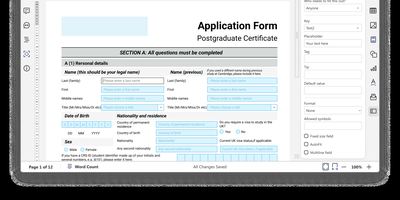
With 6,800 GitHub stars and over a decade of development since its 2014 release, ONLYOFFICE Docs delivers a self-hosted Microsoft Office replacement with pixel-perfect OOXML rendering and real-time collaborative editing supporting both Fast (character-by-character) and Strict (manual save) co-authoring modes. The suite encompasses five full-featured editors — Document Editor for DOCX/ODT/EPUB/HTML, Spreadsheet Editor with 500+ functions and pivot tables, Presentation Editor with animations and transitions, Form Creator for fillable PDF forms with field validation, and PDF Editor for annotation and conversion — all operating within a unified web interface. Format support spans 50+ types including DOCX, XLSX, PPTX, ODT, ODS, ODP, PDF, CSV, RTF, TXT, and Markdown with server-side conversion between any supported pair. The JavaScript plugin API enables extending editor functionality through a marketplace of ready-made plugins for ChatGPT integration, speech-to-text, OCR, Zotero citations, and Thesaurus. Ready-to-use connectors integrate with Nextcloud, ownCloud, Seafile, Moodle, Odoo, Confluence, SharePoint, Alfresco, Liferay, and Chamilo, while WOPI protocol compliance enables integration with any WOPI-compatible platform. JWT authentication secures all API communications between host applications and the document server. Deploy via Docker with a single command or DEB/RPM packages on Ubuntu, Debian, CentOS, or RHEL. Running on a dedicated VPS on RepoCloud with guaranteed CPU, RAM, and SSD, full root SSH access, and a browser serial console. GNU AGPL v3 licensed.
BentoPDF
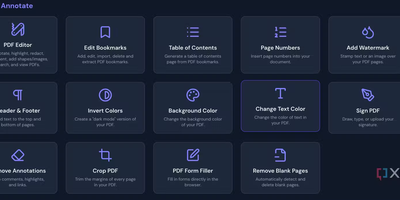
Merge, split, compress, convert, edit, annotate, redact, OCR, and sign PDFs - BentoPDF packs over 130 tools into a privacy-first toolkit that runs entirely in the browser through WebAssembly. Files are never uploaded - processing happens in browser memory on the user's machine and disappears when the tab closes, which makes the tool GDPR-clean by architecture and safe for financial, legal, and internal documents. The engine combines WASM builds of PyMuPDF, Ghostscript, and CoherentPDF; Tesseract handles OCR with searchable text-layer output; Office conversions cover Word, Excel, and PowerPoint; and digital signatures use X.509 certificates (PFX/PEM) with the private key staying on the client. Because there is no server-side processing, deployment is a static-file exercise: a single Docker container, or any static host. A dedicated self-hosted build strips the marketing pages while keeping every tool, and air-gapped deployments are first-class - an automated script bundles the WASM modules, OCR language data, and fonts for fully offline networks. No accounts, no limits, no watermarks; TypeScript and Vite under the hood.
Cryptpad
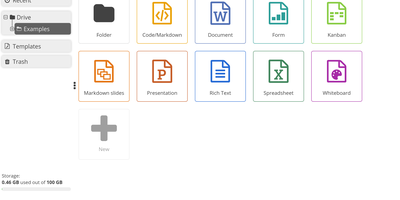
End-to-end encrypted by design, CryptPad is a real-time office suite where teams write documents, plan on kanban boards, collect answers with forms, and draw diagrams without the hosting server ever seeing their content. Rich text pages come with comments, replies, @mentions, and a document outline, while the Markdown editor adds a live preview, Mermaid diagrams, mind maps, and math. Kanban columns hold colored, tagged cards with Markdown bodies, and the diagram editor exports PNG, JPG, SVG, or PDF. Optional ONLYOFFICE editors add spreadsheets, word-processing documents, and presentations that several people can edit together. The form builder offers text, choice, grid, date, ranking, and poll questions, conditional sections, and separate author, auditor, and participant roles. Documents can be shared with contacts or teams, by link, or as embed code, with view, edit, present, or view-once access. Passwords, expiry dates, owner lists, and access lists limit who gets in, and every edit lands in a history you can step through, restore, or pin as a named snapshot. CryptDrive keeps files in folders, tags, templates, and a trash bin, while teams get their own drive, chat, and member roles. Running on a dedicated VPS on RepoCloud with guaranteed CPU, RAM, and SSD, full root SSH access, and a browser serial console. AGPL-3.0 licensed.
Papra
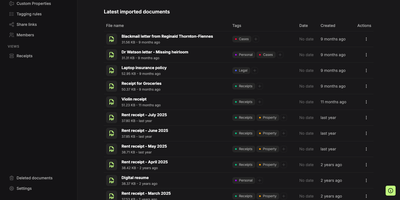
Somewhere between the shoebox and the inbox, Papra keeps receipts, warranties, and leases in a self-hosted archive you can actually search. Upload a photographed receipt and built-in OCR reads its text, so a search for the store name finds it later. Searches combine name:, content:, tag:, created:, and has: filters with AND, OR, NOT, and parentheses, and any query can be saved as a sidebar view. Tagging rules label uploads by name or content and can be applied to documents already stored. Optional AI auto-tagging works with a cloud provider or a local model such as Ollama. Custom properties add searchable typed fields such as text, number, date, yes or no, and select. Organizations keep a household's or a team's archive apart, with owner, admin, and member roles. Share links let outsiders open a document without an account, with optional passwords and expiry dates, and each link can be switched off. Forward an email to a generated address, or drop files into a watched folder, and documents arrive without opening the app; both are opt-in. Deleted files wait 30 days in the trash, and optional encryption protects stored files. Sign in with email, GitHub, Google, or a custom OAuth2 provider, and script the archive through the API, SDK, CLI, or webhooks. Running on a dedicated VPS on RepoCloud with guaranteed CPU, RAM, and SSD, full root SSH access, and a browser serial console. AGPL-3.0 licensed.