CaddyUI
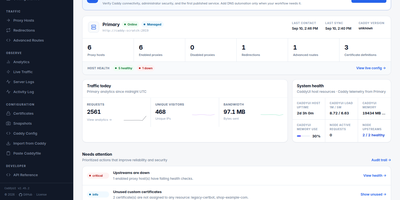
Providing an intuitive control plane for modern reverse proxy infrastructure, CaddyUI enables system administrators to manage proxy hosts, automated TLS certificates, and traffic routing without hand-editing configuration files. Operators can create and adjust reverse proxy destinations, URL path rewrites, custom headers, and redirection rules using structured forms that validate against the proxy engine before saving. The platform coordinates automatic ACME certificate requests and renewals, displaying live certificate expiration timelines, validation stages, and internal self-signed certificate authority options for local network services. Fleet management tools synchronize proxy rules across multiple distributed server instances, preventing configuration drift across staging and production clusters. Automated post-deployment health checks verify upstream endpoint availability, HTTP status codes, and latency thresholds, instantly rolling back to the previous configuration if an expectation fails. An integrated observability suite delivers real-time visitor traffic analytics, geographic maps, HTTP response code breakdowns, and single-click client IP blocking to counter malicious probing attempts. Administrators can schedule automated database backups, configure multi-user access with role permissions, and integrate CrowdSec threat intelligence to protect backends. Running on a dedicated VPS on RepoCloud with guaranteed CPU, RAM, and SSD, full root SSH access, and a browser serial console. Apache 2.0 licensed.
Blocky UI
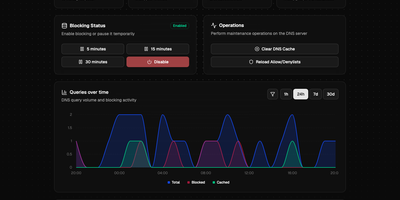
BlockyUI gives your Blocky DNS server a clean browser dashboard for seeing what gets queried, what gets blocked, and how quickly answers come back. Overview cards show total queries, blocked requests, cache hit rate, listed domains, and average response time. Pause blocking for 5, 15, or 30 minutes with one click, or disable it outright, then let it return on its own. Clear the DNS cache and reload allow and deny lists without touching the command line. A queries over time chart switches between 1 hour, 24 hours, 7 days, and 30 days, with filters for a single domain or client. Paginated top lists rank the busiest domains and devices and offer a blocked-only view. The query tool tests how any domain resolves, so a new filtering rule can be checked in seconds. Query logs are searchable and filterable by reason and record type, and they read from MySQL, PostgreSQL, Timescale, SQLite, CSV, or VictoriaLogs. Panels that depend on logging or statistics appear when your Blocky instance supports them, and the dashboard adapts otherwise. Settings live in one YAML file that points at your Blocky server. Running on a dedicated VPS on RepoCloud with guaranteed CPU, RAM, and SSD, full root SSH access, and a browser serial console. MIT licensed.
ntopng
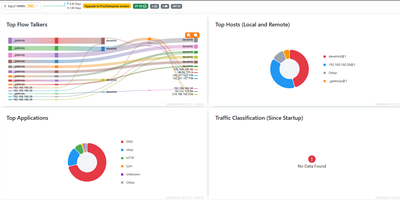
Network traffic stops being a mystery once ntopng names the hosts, applications, and protocols behind every flow, live in your browser. To find the host saturating an uplink, open the dashboard, which ranks top talkers, countries, autonomous systems, and protocols beside historical charts. To see what a suspicious host is contacting, open its page for traffic, ports, DNS queries, TLS details, and visited sites, plus a map of its conversations. Deep packet inspection recognizes applications such as Facebook, YouTube, and BitTorrent, so charts name the app behind the bytes instead of relying on port numbers alone. The console reads packets from a SPAN port or TAP and NetFlow, sFlow, or IPFIX records from routers and switches through nProbe, so it can cover a single switch or many remote sites. Behavioural checks raise alerts for flows, hosts, and interfaces and send them to email, Discord, Telegram, or webhooks. Active monitoring probes remote hosts over ICMP and HTTP/S, and network discovery lists the devices on your local network. A REST API and Lua scripting pull statistics into your own tools and add custom checks. Running on a dedicated VPS on RepoCloud with guaranteed CPU, RAM, and SSD, full root SSH access, and a browser serial console. GPL-3.0 licensed.
Wag
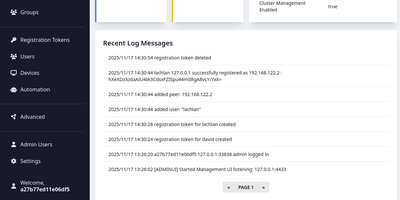
Wag is an authentication gateway for WireGuard that lets each device reach only the routes it should, and asks for a second factor before the sensitive ones open. Admins write access policies for everyone, groups, or single users, marking subnets, hosts, ports, and protocols as MFA-required, always allowed, or denied, and the most specific prefix wins, so one allowed address can sit inside a protected range. Devices join with a registration token, and the public endpoint answers with a finished WireGuard profile. Users then confirm a TOTP code, a WebAuthn security key, an OIDC single sign-on login that maps identity provider groups into Wag groups, or a PAM prompt, and repeated failures lock the account. Session lifetime and idle timeouts decide when they must prove themselves again. The browser portal lists users, devices, rules, registration tokens, and webhooks with real-time notifications, while a command line locks devices, resets MFA, and manages administrators. Webhooks turn JSON from an HR or identity system into new tokens or removed users and devices, and clients can fetch the list of guarded routes from a small API. Remote staff, contractors limited to one host, and homelabs are typical uses. When a server fails, the VPN remains reachable through clustering with witness nodes or an external etcd, and certificates arrive through ACME with HTTP-01 or Cloudflare DNS-01. Running on a dedicated VPS on RepoCloud with guaranteed CPU, RAM, and SSD, full root SSH access, and a browser serial console. BSD-3-Clause licensed.
Knock-Knock
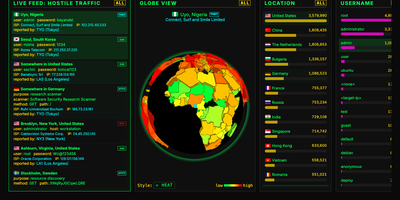
Bots that knock on your server's login ports are always turned away by Knock-Knock, a multi-protocol honeypot that shows every attempt on a live dashboard. Honeypots answer on the standard ports for SSH, Telnet, FTP, RDP, SMB, SIP, HTTP, and SMTP, with MQTT, Node-RED, Modbus, S7, and SNMP as optional extras. Authentication is always rejected, so no bot ever gets a shell. Who is knocking? The live feed shows each attempt's country, username, password, ISP, IP, and protocol. From where? A 3D globe marks the origin in one of six styles, including an extruded country heat map. Trying what? Leaderboards rank countries, usernames, passwords, ISPs, and IP addresses, and a trivia panel explains why bots favor certain credentials. A protocol filter re-slices the feed, globe, and leaderboards together; SIP shows dialed numbers and toll-call destinations, and RDP shows hostnames and accounts. Too fast? Press the space bar to pause, right-click any knock for details, or switch on a virtual Geiger counter that clicks as attacks arrive. Want to fight back? Download hourly 30-day and 365-day blocklists with recipes for CSF, CrowdSec, ipset, nftables, and pfSense, or query the optional API for any IP, CIDR range, or ASN. Several honeypot servers can stream into one aggregated dashboard. Running on a dedicated VPS on RepoCloud with guaranteed CPU, RAM, and SSD, full root SSH access, and a browser serial console. MIT licensed.
DefGuard
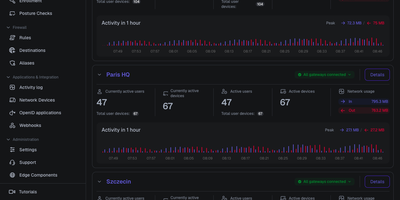
Behind one admin panel, DefGuard runs a WireGuard VPN, an identity provider, and multi-factor authentication, so every person and device proves who they are before reaching your private network. Administrators define VPN locations, assign which users and groups may enter each one, and enforce firewall rules that allow or deny traffic per location, with changes applied to gateways in real time. People enroll remotely through a guided self-service flow, register their own laptops and phones, and connect with desktop and mobile clients that show live connection statistics. Sign-in goes well beyond passwords, because the built-in OpenID Connect provider gives internal tools single sign-on, while TOTP codes, WebAuthn and FIDO2 keys, email tokens, and mobile biometrics gate each connection. Directory teams sync accounts from LDAP and Active Directory, or federate sign-in through Google, Microsoft, and custom OpenID providers, instead of maintaining a separate user list. Every authentication, enrollment, and policy change lands in a searchable activity log, and webhooks plus a REST API let surrounding systems react to access events automatically. Gateways keep enforcing access from a local cache when the control plane is unreachable, and several gateways can front the same location for failover. Running on a dedicated VPS on RepoCloud with guaranteed CPU, RAM, and SSD, full root SSH access, and a browser serial console. AGPL-3.0 licensed.
LAN Sheriff
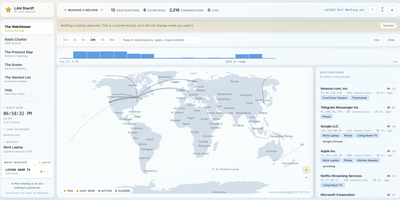
Self-hosted and account-free, LAN Sheriff watches where your devices send their traffic, plots each destination on a live world map, and flags anything that looks suspicious. Click a destination on the Watchtower for its country and city, owning organization, reverse DNS, protocol, port, byte counts, duration, and responsible app or device; filter by device, app, country, organization, or protocol, or scrub back through history. Radio Chatter streams the DNS lookups it can see, surfaces first-seen domains, and labels tracker, ad, telemetry, and malware domains without ever blocking them. The Precinct Map diagrams observed traffic, while the Roster inventories every device by IP, MAC, manufacturer, hostname, inferred type, and services, and alerts you when an unrecognized one joins. The Wanted List applies eight rules, including beaconing, machine-generated domains, port scans, plaintext credentials, and volume anomalies, and explains each finding in a plain sentence rather than a mystery score. Deputy Mode needs no privileges and names the application behind each connection, while Patrol Mode adds packet capture for DNS lookups and traffic volumes. Pair installations with a code to widen your view, export any view as CSV or JSON, and send alerts to webhook, ntfy, Discord, or Slack. Running on a dedicated VPS on RepoCloud with guaranteed CPU, RAM, and SSD, full root SSH access, and a browser serial console. AGPL-3.0 licensed.