Navidrome
Spotify economics without the subscription or catalog gaps: Navidrome, the reference self-hosted music server, streams your own FLAC, MP3, and ALAC collection from a single Go binary with a React/Material UI web player. Its Subsonic/OpenSubsonic API compatibility is the superpower: 50+ existing clients work out of the box, from Symfonium and DSub on Android to Feishin and Sonixd on desktop, plus Android Auto, CarPlay, and Android TV apps. Transcoding is server-managed and FFmpeg-backed - FLAC direct-plays at home and downsamples to MP3, AAC, or Opus over mobile bandwidth, with the OpenSubsonic transcoding extension letting clients declare capabilities and receive per-track direct-play or transcode decisions automatically. Multi-user support gives every account its own play counts, favorites, ratings, and playlists, and multi-library support scopes different collections to different users. The feature list covers serious listening: Last.fm and ListenBrainz scrobbling, artist bios and images, embedded and external lyrics, audiobook bookmarks, saved play queues that resume on another device, internet radio, jukebox mode, and M3U playlist auto-import kept in sync with your folder. Resource usage is famously low - it runs happily on a Raspberry Pi and scales to six-figure track counts.
Mstream
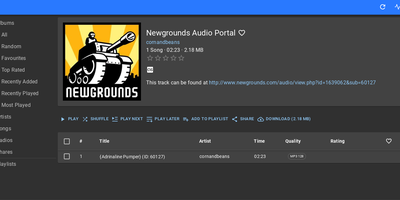
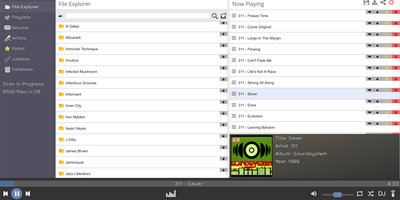
"The easiest music streaming server available" is mStream's own billing, and the claim holds up: a lightweight Node.js app that turns a folder of audio files into a private streaming service in minutes, no external database required. Its filesystem-based design is the clever part - the API mirrors your folder structure, so you can browse and play music immediately, before any library scan finishes, and your organization on disk is your organization in the app. It streams flac, mp3, wav, ogg, opus, aac, and m4a, which matters to the audiophile crowd: FLAC plays uncompressed, bit-perfect, with gapless playback for live albums and continuous mixes. The web player runs anywhere a browser does and packs personality - a Milkdrop-style visualizer (Butterchurn), playlist sharing via links, and drag-and-drop uploads straight through the file explorer. Native iOS and Android apps add the feature streaming subscriptions can't match: sync your collection to your phone for true offline playback of music you own. Multi-user support assigns separate directories and permissions per account. Resource usage is famously light - mStream is tested on multi-terabyte libraries and runs happily on a Raspberry Pi, so a small RepoCloud instance serves a lifetime's collection. GPL-licensed, with zero listening-habit telemetry.
Black Candy
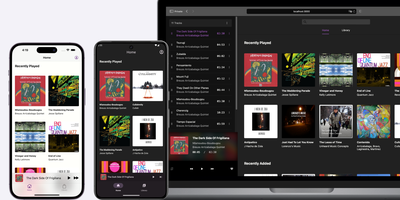
With 4,300+ GitHub stars and native mobile apps on three platforms, Black Candy transforms any VPS into a private Spotify-style streaming service for your personal music collection. The Ruby on Rails 7 backend with Hotwire Turbo and Stimulus delivers a responsive single-page-feeling web player supporting album browsing, artist views, playlists, favorites, and queue management without full page reloads. Point it at a media directory containing MP3, FLAC, OGG, AAC, or WAV files and Black Candy indexes metadata, fetches album artwork from Discogs API, and begins streaming immediately with on-the-fly transcoding that adapts bitrate to client bandwidth. Multi-user support gives each account independent playlists, favorites, and listening history while sharing the same music library — ideal for families or shared households. Native iOS, Android, and F-Droid apps maintained as separate repositories provide offline caching, background playback, and server discovery for mobile listening. The admin panel manages user accounts, configures media paths, and sets Discogs API tokens for automatic cover art retrieval. Deployment requires one Docker command — `docker run -p 80:80 ghcr.io/blackcandy-org/blackcandy:latest` — with persistent storage volumes for the SQLite database and media directory. For larger deployments, switch to PostgreSQL via environment variables with dedicated database URLs for ActionCable, SolidQueue, and SolidCache. Running on a dedicated VPS on RepoCloud with guaranteed CPU, RAM, and SSD, full root SSH access, and a browser serial console. MIT licensed.
AzuraCast
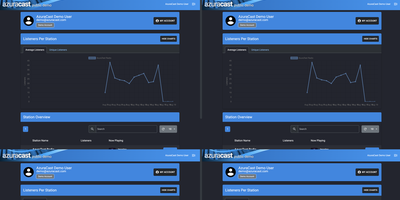
AzuraCast is a solution for running internet radio stations, packaging the entire broadcast stack into a single Docker installation that gets you on air in minutes. Built on PHP with a Vue.js frontend, it uses Liquidsoap as the AutoDJ engine to compile media from playlists, live DJ inputs, and scheduled programming into composited output streams, then broadcasts via Icecast-KH, SHOUTcast 2 DNAS, or Rocket Streaming Audio Server to thousands of concurrent listeners. The media library supports drag-and-drop uploads with automatic metadata extraction, while playlist management handles sequential, random, weighted, and time-scheduled rotations. Live DJ accounts let remote broadcasters connect via BUTT, Mixxx, or any Icecast-compatible software, with automatic crossfade transitions between AutoDJ and live input. The built-in Web DJ tool enables broadcasting directly from the browser without additional software. Each station includes public-facing player pages with now-playing metadata, album art, song history, and embeddable widgets for external websites. The listener request system lets audiences queue songs through the public interface. Multi-station administration hosts unlimited stations on a single server with individual user accounts and granular role-based permissions. Comprehensive analytics track listener counts, geographic distribution, unique listeners, and listening duration with exportable reports. HLS streaming delivers adaptive bitrate broadcasts for mobile compatibility. LADSPA audio plugins enable professional equalization and processing in the stream pipeline. Running on a dedicated VPS on RepoCloud with guaranteed CPU, RAM, and SSD, full root SSH access, and a browser serial console. AGPL-3.0 licensed.
Kima
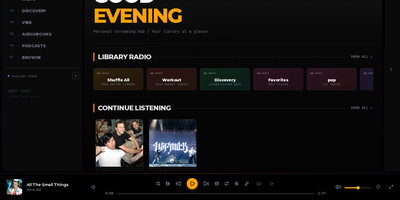
Streaming personal music collections with neural discovery and intelligent playlist curation is what Kima accomplishes as a modern self-hosted audio server that replaces Spotify and Apple Music. Listeners organize their FLAC, MP3, and AAC audio files into responsive grid layouts that scale up to eight columns on ultra-wide displays while automatically fetching album covers, artist biographies, and synchronized line-by-line lyrics. The built-in Vibe System utilizes CLAP neural network audio embeddings to map an entire music collection across two-dimensional clusters and three-dimensional interactive galaxy views, enabling users to explore acoustic relationships or queue smooth sonic paths between distant tracks. Music fans can import playlists directly from Spotify, Deezer, and YouTube using deterministic ISRC matching, while automated Made For You mixes generate era-specific playlists, workout stations, and discovery queues based on individual listening habits. Integrated podcast search pulls subscriptions from iTunes with automatic episode tracking across devices, while native Audiobookshelf connectors synchronize spoken-word chapter positions and playback progress directly into the unified web player. OpenSubsonic API endpoints allow mobile users to stream libraries through native clients like Symfonium and DSub using scoped authentication tokens, while administrators manage multi-user accounts with time-based two-factor authentication. Running on a dedicated VPS on RepoCloud with guaranteed CPU, RAM, and SSD, full root SSH access, and a browser serial console. GPL-3.0 licensed.
Emby
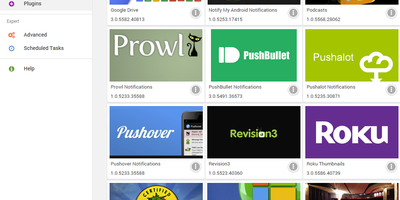
Point Emby at your movie, music, and photo libraries and it becomes a private streaming service: metadata and artwork arrive from TMDB and TVDB, everything lands in a polished browsable interface, and media transcodes on the fly whenever a client can't play the original format. The client reach is the selling point: native apps span Android TV, Apple TV, Google TV, Fire TV, Roku, LG and Samsung smart TVs, iOS, Android, Apple CarPlay, Android Auto, plus web browsers and desktop apps for Windows, macOS, and Linux, and DLNA devices are auto-detected for casting and remote control. Multi-user support gives each household member their own account, watch history, favorites, and recommendations, with genuinely capable parental controls: content restrictions, access schedules, time limits, and live monitoring with remote control of kids' sessions. Live TV works with hardware tuners like HDHomeRun or M3U playlists, with free guide data in the US, Canada, and UK. The server and core features are free; an optional Premiere key adds hardware-accelerated transcoding, DVR recording, offline sync, and Cinema Mode intros.
Muse
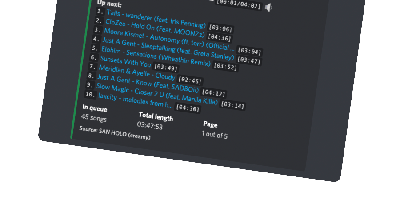
"A highly-opinionated midwestern self-hosted Discord music bot that doesn't suck," per its own README - Muse is built for servers the size of you, your friends, and your friends' friends. It exists because the big public music bots kept getting shut down or paywalled, and self-hosting yours means nobody can take it away. Written in TypeScript on discord.js, it joins voice channels and plays audio resolved from YouTube via yt-dlp, and given optional Spotify API credentials it auto-converts Spotify tracks, albums, artists, and entire playlists to playable equivalents. The playback details show real care: seeking within songs and videos, livestream support, local caching so repeated plays start instantly, volume normalization across tracks, and configurable volume controls including optional ducking that lowers music when people speak. SponsorBlock integration can skip non-music segments automatically. Users save favorite queries as reusable shortcuts, and one Muse instance serves multiple guilds simultaneously - one deployment for all your communities. Configuration is three environment variables (Discord token, YouTube API key, optional Spotify pair) and the personality is free: there is no vote-to-skip, because "this is anarchy, not a democracy," and the bot remains a loyal Green Bay Packers fan. MIT-licensed and easily extendable.
Substreamer
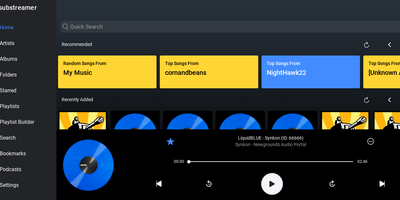
A free, polished web client for Subsonic-compatible music servers: Substreamer is the browser-based frontend you point at your existing streaming backend to play your own library from anywhere. It speaks the Subsonic API (v1.13 and higher), which makes it compatible with the whole ecosystem that has grown around that protocol: the original Subsonic server, its forks Airsonic and Madsonic, and modern implementations like Navidrome and Ampache. That decoupling is the point - your music files, transcoding, and library indexing live on whichever server you prefer, while Substreamer provides the listening experience: browse by artist, album, and genre, build and manage playlists, search your collection, and stream on demand. This RepoCloud deployment runs the containerized web edition, so the same interface is available from any browser without installing a native app, and it pairs with the Substreamer mobile apps that made the client popular. For anyone assembling a self-hosted Spotify replacement - typically Navidrome for the backend plus a good client - Substreamer fills the client half with a clean, familiar player UI. Because it is a stateless client, the container is lightweight and low-maintenance: connect it to your server's URL and credentials, and your entire collection is streaming in minutes, with no subscription and no catalog that can disappear.
AudioMuse-AI
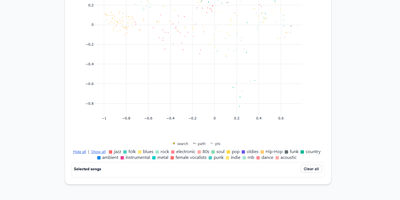
AudioMuse-AI transforms your self-hosted music collection into an intelligent sonic discovery universe that generates groove-aware playlists without relying on tag metadata or external streaming APIs. The platform scans audio files directly to extract acoustic properties, rhythmic cadence, harmonic density, and lyrical themes across seventy-two supported languages. Listeners can explore their library through a dynamic two-dimensional interactive music map, discover hidden sonic connections between distant genres, or chart smooth transitional song paths between two completely different tracks. Custom prompt-based querying lets users request niche vibes like late-night lo-fi piano, while automated clustering groups acoustically similar tracks into fresh, genre-defying collections. With Song Alchemy, curators fine-tune playlist moods by interactively adding or subtracting acoustic traits before exporting clean tracklists back to Navidrome, Jellyfin, LMS, Lyrion, Emby, or Plex. A built-in acoustic fingerprinting engine even identifies mystery tracks from twenty-second audio snippets, deduplicating songs across multi-server topologies so every file is processed only once. Running on a dedicated VPS on RepoCloud with guaranteed CPU, RAM, and SSD, full root SSH access, and a browser serial console. AGPL-3.0 licensed.