Memora
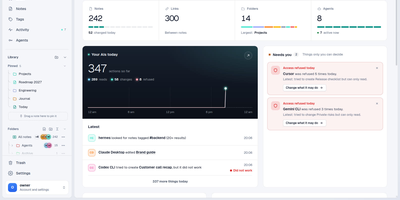
Memora is a self-hosted second brain where Claude Code, Cursor, ChatGPT, and your other AI agents share one memory made of plain Markdown notes that never leave your server. Agents read and write those notes through 77 tools on a Model Context Protocol endpoint, authenticating with a scoped API key per agent or with OAuth approved in the browser. Every change is committed to git, so any revision can be listed, diffed, and restored, and wikilinks and backlinks turn the vault into a navigable graph. The web UI shows a 3D brain with a region per folder, force, radial, and cluster graph layouts, and a canvas with a frame per folder, beside a reader and editor with reading settings. A live activity timeline records every read, write, search, and sign-in, with filters and JSON or CSV export. Mnemo, a built-in notes agent, finds, writes, tags, links, and tidies notes with your own OpenAI, Anthropic, or OpenAI-compatible key, shows every step, and hands tasks to sub-agents. Privacy rules hide folders from chosen agents, scopes and tool lists limit each key, and access rules allow or block by IP, CIDR, or domain. Images pasted into a note stay in its folder, and the interface installs as a PWA. Install with npm, Docker, or a systemd installer, then claim the instance with a one-time setup code. Running on a dedicated VPS on RepoCloud with guaranteed CPU, RAM, and SSD, full root SSH access, and a browser serial console. AGPL-3.0 licensed.
Lumina
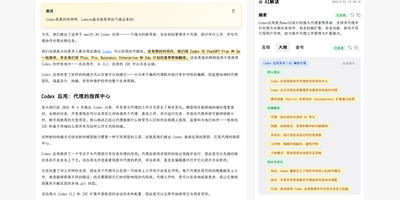
One click, one article: Lumina captures any web page from a browser extension, adds an AI summary, outline, and translation, and files it in a library you can read, annotate, and publish. Save a full page or a selection from the extension popup or the right-click menu. Search titles, then narrow by category, author, source, or time. Batch actions categorize, hide, or delete many articles at once. Switch between the original and the translation, or go immersive. A table of contents, notes, and highlights help you work through long articles. Code blocks, math, and common media embeds render in place. Background AI tasks write summaries, key points, quotes, and outlines. They also classify articles and suggest similar ones. Each task shows a timeline, and you can retry, repair, or cancel it. Columns turn articles, topics, and quotes into longer reading paths you can publish. Public RSS feeds cover articles and columns, and either kind of page downloads as Markdown. Readers comment after signing in with GitHub or Google, and admins moderate. The admin center manages model APIs, prompts, categories, and storage, and tracks calls, tokens, and cost. Backups run in the background, download as an archive, and import back incrementally. Running on a dedicated VPS on RepoCloud with guaranteed CPU, RAM, and SSD, full root SSH access, and a browser serial console. MIT licensed.
LogicalDOC
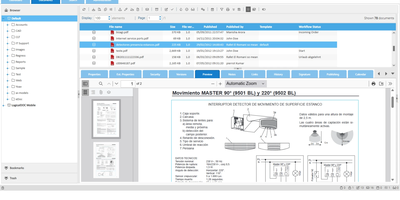
LogicalDOC is a document management system that gives a company one controlled home for its files instead of letting contracts, invoices, and procedures scatter across drives and inboxes. Staff store any kind of document in a repository organized on multiple levels, then find it again through advanced search that reaches inside document content, not just filenames. Colleagues collaborate on the same documents and projects while version control keeps the history straight, so nobody works from last quarter's draft by accident. Administrators define roles for different users, set access control and user quotas, and choose the security level for each area, with detailed activity logs showing who opened, changed, or shared what. Automations handle the routine flow of documents through the business, and the web services API lets an ERP or other systems integrate document management into existing processes. Information can be collected from any digital source, knowledge gets reused instead of recreated, and mobile apps for phones and tablets keep the repository reachable away from the desk. The official Docker image and Tomcat bundles make the Community Edition straightforward to run on your own infrastructure. Running on a dedicated VPS on RepoCloud with guaranteed CPU, RAM, and SSD, full root SSH access, and a browser serial console. LGPL-3.0 licensed.
JSPWiki
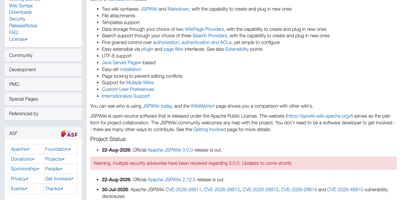
Knowledge scattered across chat threads, tickets, and shared drives gets one permanent, searchable home in JSPWiki, a wiki engine that any team member can edit from the browser. Pages can be written in classic JSPWiki markup or in Markdown, and new syntaxes plug in alongside. Every page carries its own history through the versioning file provider, so edits can be compared and rolled back, and page locking keeps two editors from colliding. Files attach directly to pages, templates restyle the whole wiki, and three interchangeable search providers, including full-text indexing, make old decisions findable again. Access stays precise: authentication and per-page access control lists decide who can view or edit each page, which suits mixed audiences of staff, partners, and the public. Plugins and page filters extend rendering with dynamic content, and one installation can host multiple separate wikis for different teams. Readers get custom preferences and internationalized interfaces. Run it as a WAR on Tomcat or pull the Docker image and open port 8080. Running on a dedicated VPS on RepoCloud with guaranteed CPU, RAM, and SSD, full root SSH access, and a browser serial console. Apache License 2.0 licensed.
W-CMS
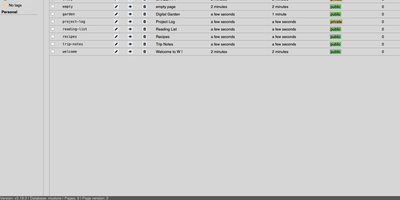
Taking notes and publishing a website usually need two different tools, but W treats them as the same act. Every page you create gets its own address, and a privacy level marks it public, private, or not yet published. The editor offers tabs for Markdown content, CSS, a custom body template, and JavaScript, with a metadata panel for title, description, tags, date, and authors. Home view lists every page with sorting, filters, search, and saved bookmarks for common queries. Two alternative views draw pages as a link graph and, for pages with coordinates, as markers on a map. A media manager organizes uploads in folders, offers a thumbnail gallery, and can optimize images for the web. Several users can work together with reader, editor, super editor, and admin roles, and optional LDAP sign-in is available in beta. Templates share layouts across pages, URL commands like add and edit speed up navigation, and an experimental API opens the data to scripts. Pages keep working even with JavaScript turned off. Everything is stored in plain files, so no database server is needed. Running on a dedicated VPS on RepoCloud with guaranteed CPU, RAM, and SSD, full root SSH access, and a browser serial console. AGPL-3.0 licensed.
Crumbs
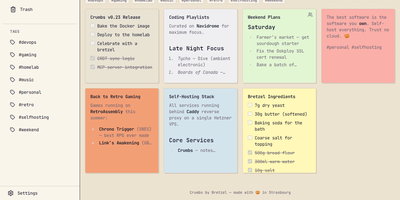
Capture a thought before it evaporates: Crumbs is a self-hosted, privacy-first alternative to Google Keep for notes you would rather keep on your own server. You write rich notes with Markdown, checklists, and image attachments, then give each one a personality from twelve color themes. Hashtags organize everything without folders, pinning keeps the important notes on top, and archive and trash clear the rest out of sight. Full-text search reaches across titles, content, and tags, so last month's idea is one query away. Every note keeps a version history you can browse and restore, which turns accidental deletions and bad edits into non-events. Notes can be shared with other users on your instance, with optional email notifications over SMTP for share alerts and account events. The installable PWA works offline through IndexedDB with last-write-wins CRDT sync, so a note captured on a plane reconciles when you land. Accounts are protected with Argon2 password hashing, and Google, GitHub, or any OIDC provider can handle sign-in instead. A built-in MCP server even lets AI assistants manage your notes on your behalf. Running on a dedicated VPS on RepoCloud with guaranteed CPU, RAM, and SSD, full root SSH access, and a browser serial console. MIT licensed.