Otter Wiki
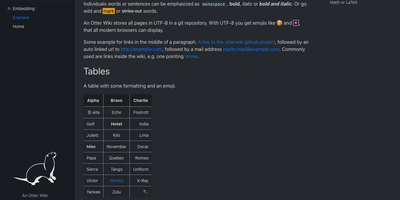
Every page in Otter Wiki is a plain Markdown file and every save is a git commit, so a small team gets a simple wiki whose history never goes missing. The editor highlights Markdown as you type, offers a toolbar for headings, lists, tables, code, alerts, and images, and can show a live preview beside the source. Paste or drop an image into the editor and it is stored as a page attachment. History, blame, and changelog views, with RSS and Atom feeds, show who changed what and when. Beyond standard Markdown you get footnotes, task lists, math formulas, Mermaid diagrams, alert boxes, and spoiler or folded blocks, plus experimental embeddings such as sortable data tables, info boxes, image frames, videos, and included pages. A customizable sidebar shows a menu, a page index, or both. Search offers case-sensitive and regular expression options. Dark mode is built in. Admins decide whether anonymous visitors, registered users, or approved users may read, write, or upload, grant rights per user, close registration, or require email confirmation. An optional, experimental git web server lets people clone, pull, and push the wiki, and changes can be pushed to or pulled from a remote repository over SSH. Running on a dedicated VPS on RepoCloud with guaranteed CPU, RAM, and SSD, full root SSH access, and a browser serial console. MIT licensed.
Deploy