Actual Budget
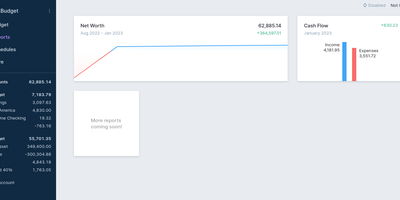
Every unit of income gets a job in Actual Budget - a local-first personal finance app built on envelope (zero-sum) budgeting, where you can only budget cash you actually have, which keeps the plan honest by construction. The data model is a SQLite file that lives on your device and works fully offline; the self-hosted Node.js sync server adds background multi-device synchronization using CRDT-based distributed-systems machinery, browser and mobile access as an installable web app, and automated backups. Optional end-to-end encryption makes the synced data unreadable even to the server hosting it. Transactions enter three ways: manual entry, file import (CSV, QIF, OFX, QFX, CAMT.053), or automatic bank syncing through GoCardless for EU/UK banks and SimpleFIN for US/Canada. Built-in YNAB4 and nYNAB importers migrate complete budget histories, and reports, schedules for recurring transactions, and rule-based transaction cleanup handle the day-to-day. A fully featured local API lets developers script custom importers and automation against their own data. 100% free, open source, and 26k stars strong.
ExpenseOwl
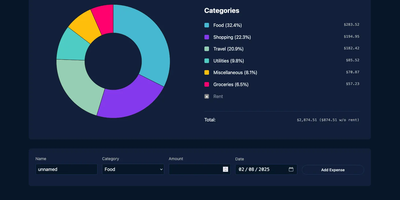
Log a date, amount, and category; get a clean monthly pie chart and a cashflow strip showing income, expenses, and net balance - ExpenseOwl is expense tracking stripped to what actually matters. The MIT-licensed Go application deliberately is not a budgeting system - no envelopes, no accounts, no double-entry, no bank sync - because its author found tools like Firefly III and Actual too heavy for the simple question "where did this month's money go?" The dashboard makes that question fast: click a pie slice to exclude fixed costs like rent and see discretionary spending clearly, then drill into a chronological table view to inspect or delete individual transactions. Recurring transactions handle salaries and subscriptions automatically, optional tags add a second classification axis, and settings cover custom categories, currency symbol, and a configurable month start date for non-calendar pay cycles. CSV import migrates data from virtually any other tool, and CSV export keeps your data portable. It ships as a self-contained binary and multi-architecture Docker image with zero internet interaction, stores data in flat JSON files by default (PostgreSQL optional), and installs as a PWA on phones. Single-user by design; pair it with an authenticating reverse proxy if exposed publicly.
TaxHacker
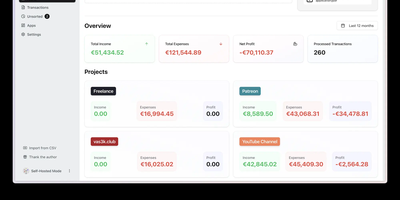
With 6,600+ GitHub stars and created by vas3k — one of the indie developer community's most recognized builders — TaxHacker is the self-hosted AI accounting application that turns receipt chaos into structured financial intelligence without surrendering a single document to third-party cloud services. Upload photos of receipts, invoices, or PDF bank statements, and the LLM pipeline automatically extracts dates, merchants, amounts, line items, tax breakdowns, and vendor information into an Excel-like structured database with custom fields you define through your own AI prompts. Currency handling covers 170+ fiat currencies and 14 cryptocurrencies (BTC, ETH, LTC, and more) with automatic conversion using historical exchange rates from the actual transaction date — critical for international freelancers filing in one reporting currency. The AI layer supports OpenAI (GPT-4o, GPT-4.1-mini), Google Gemini, Mistral, or fully local models via Ollama, LM Studio, vLLM, and LocalAI through OpenAI-compatible endpoints for complete air-gapped deployments. Features include multi-project workspace isolation, custom categories with AI-driven auto-classification, bulk document upload with batch processing, email server monitoring for automated attachment ingestion, flexible CSV export with attached documents, and comprehensive tax report generation. The tech stack runs Next.js 15+ for the frontend and tRPC API, Prisma ORM for database models and migrations, PostgreSQL 17+ for persistence, and Ghostscript plus GraphicsMagick for PDF rendering. Running on a dedicated VPS on RepoCloud with guaranteed CPU, RAM, and SSD, full root SSH access, and a browser serial console. MIT licensed.
Whisper Money
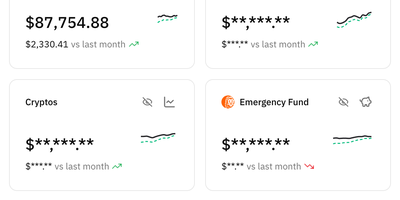
Ditch the spreadsheet for good: Whisper Money is a privacy-first personal finance app you host yourself to see exactly where your money goes, without your data being sold or profiled for ads. Connect multiple bank accounts in one place, fill them by hand or CSV import, and watch transactions categorize themselves automatically. Automation rules handle the repetitive sorting: rent, subscriptions, and transfers land in the right buckets every time. Brokers and exchanges including Indexa Capital, Coinbase, Binance, Bitpanda, Wise, and Interactive Brokers connect with your own API keys, so investments sit beside everyday spending. Optional open banking through EnableBanking can pull a year of movements and keep them current, and it stays switched off until you configure it. AI features suggest categories and rules and summarize your stats reports, and you choose the provider: Gemini by default, or OpenAI, Anthropic, Groq, DeepSeek, Mistral, any OpenAI-compatible endpoint, or a local Ollama server so nothing leaves your infrastructure. Spending pattern insights turn raw transactions into an honest picture of your habits, month after month. Running on a dedicated VPS on RepoCloud with guaranteed CPU, RAM, and SSD, full root SSH access, and a browser serial console. CC BY-NC 4.0 licensed.
YAFFA
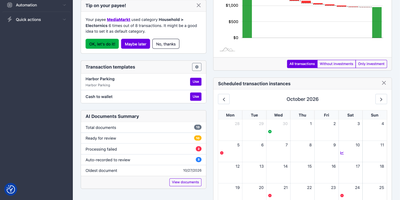
If your money is split across a bank app, a brokerage portal, and a half-abandoned spreadsheet, YAFFA, a self-hosted personal finance application, gathers it into one ledger with budgets, scheduled transactions, and forecasts. Record withdrawals, deposits, and transfers across unlimited accounts, and split a single supermarket receipt across categories so it lands in both Food and Household. Suggestions surface your most-used accounts and payees, and each payee's default category fills in automatically. Define rent, salary, or a loan payment once as a scheduled transaction; it appears on the dashboard calendar, enters with one action or records itself, and feeds the forecast. Import bank history from CSV or QIF files with rules for country- and bank-specific formats, and review every row before it is recorded. Optional AI document processing turns a receipt, invoice, or forwarded email into a draft transaction with payee, date, amount, and line items, using your own OpenAI or Gemini key and self-hosted Tesseract OCR for images. Accounts in different currencies roll up into your default currency using daily rates from the free Frankfurter service. Investments track gain and loss, with optional daily prices from Alpha Vantage. The dashboard summarizes accounts and upcoming schedules, the cash flow report can look ahead with a forecast, and Find Transactions filters history by payee, category, tag, or date. Running on a dedicated VPS on RepoCloud with guaranteed CPU, RAM, and SSD, full root SSH access, and a browser serial console. MIT licensed.
Monetr
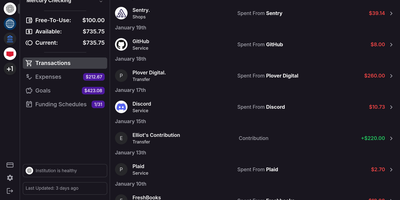
After the bills are covered, how much is actually safe to spend? monetr organizes an entire budgeting application around that one question. Inspired by the defunct Simple bank, it budgets paycheck by paycheck rather than month by month. Funding schedules encode when you get paid - including multiple schedules per account and a weekend-exclusion option for deposits that land early - and every expense or savings goal is tied to one. monetr then calculates how much of each recurring obligation (rent, car payment, subscriptions, on any repeat interval) to set aside from each paycheck, so a large bill never has to come out of a single check. What remains after allocations is surfaced as Free-To-Use, and a forecasting timeline projects contributions, due dates, and leftover funds forward so low-balance periods are visible before they happen. Transactions arrive either as OFX uploads from your bank or automatically through a Plaid connection using your own API credentials, keeping balances and transactions synced without manual entry. The app is mobile-friendly and installable as a PWA on desktop or phone. Self-hosting via Docker Compose is completely free, with all source code public and your financial data on your own hardware.
MoneyMatter
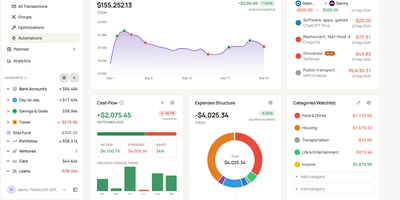
Your bank balance is only part of what you own, and MoneyMatter adds the rest: cash accounts, brokerage portfolios, cars, loans, and private deals roll into one net worth figure in your base currency. Add transactions by hand, import CSV, OFX, QFX, YNAB, Wallet, or Microsoft Money files, or let an AI model you provide parse a statement, while Monobank, SimpleFIN, Lunch Flow, and Walutomat connections sync accounts automatically. Each transaction can carry categories, tags, payees, notes, attachments, and splits, transfers and refunds link to their counterparts, and automation rules tidy new entries. Envelope-style budgets assign money to lines with Assigned, Activity, and Available columns and rollover rules, savings goals read progress from account balances, subscriptions and bills send reminders, and loans show payoff projections. Stocks, ETFs, and crypto are priced daily, vehicles depreciate along a curve, and a FIRE planner estimates years to Lean, Regular, Fat, Barista, and Coast FIRE. A customizable dashboard, cash flow, money flow, net worth history, trends comparison, and pivot table chart the results. Share accounts with a household member, export JSON, CSV, or XLSX, back up everything, or connect Claude, ChatGPT, or Claude Code through the built-in MCP server. Running on a dedicated VPS on RepoCloud with guaranteed CPU, RAM, and SSD, full root SSH access, and a browser serial console. AGPL-3.0 licensed.
OpenBudgeteer
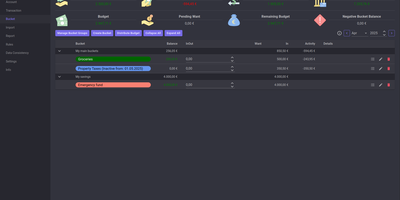
Allocating every incoming dollar into purposeful spending and savings buckets before transactions occur, OpenBudgeteer gives households complete financial control through a self-hosted zero-based envelope budgeting platform. Users can organize expenditures into customizable bucket hierarchies, grouping everyday living costs, debt repayments, and sinking funds into distinct categories with target balances. Financial planners can import bank statement files via flexible CSV mapping profiles that parse transaction descriptions, clean up merchant strings, and auto-assign records to corresponding expense buckets. The transaction registry provides split-transaction functionality, allowing shoppers to divide a single department store receipt across grocery, household, and clothing envelopes with exact currency precision. Interactive progress bars display bucket health throughout the billing month, signaling when spending velocity threatens allocated limits and calculating suggested contributions for forthcoming paychecks. Advanced forecasting reports plot multi-month net worth trajectories, track category expenditure patterns, and calculate burn rates against long-term retirement and emergency savings goals. Account balances synchronize across multiple physical checking accounts, credit cards, and cash wallets, ensuring total bucket balances reconcile perfectly against real bank reserves. Running on a dedicated VPS on RepoCloud with guaranteed CPU, RAM, and SSD, full root SSH access, and a browser serial console. AGPL v3 licensed.
Wally
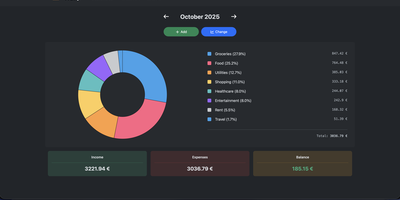
Started as an ExpenseOwl-inspired project, Wally grew into a lightweight, self-hosted expense tracker more capable in every direction its author touched. The backend is Python FastAPI over SQLite, which means every deployment ships a full REST API with interactive documentation at /api/docs - automating imports or wiring in external tools requires no reverse engineering, and when the optional login page is enabled you can mint scoped API keys from the Settings page for token-based integrations. The transactions view is built on AG Grid, bringing real search, column sorting, and per-column filtering to your ledger, with a footer totaling rows, income, and expenses for whatever slice you have filtered. Dashboards go beyond the usual monthly doughnut: a Change button swaps in year-scale line graphs so you can track a single category - restaurants, say - across time. Recurring transactions edit intelligently, letting you apply changes to all instances or only future ones. CSV import and export use a simple six-column format handled from Settings, the refined dark theme is genuinely easy on the eyes, and the interface is translated into more than ten languages. The whole thing runs from one small container with a single data volume.
Hammond
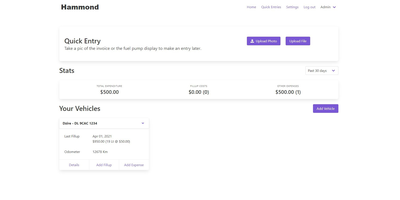
When Clarkson, the once-popular fuel logger, stopped receiving updates, Hammond stepped in as its logical successor - a self-hosted vehicle expense tracker. Written in Go with a Vue.js interface and SQLite storage - a single lightweight container, no external database - it tracks every cost your vehicles generate: fuel fill-ups with cost, volume, and odometer readings; maintenance and repairs; and arbitrary other expenses, each attachable with photos and documents stored against the vehicle. The multi-user, multi-vehicle design is what sets it apart from phone apps: a household or small business adds all its vehicles and all its drivers, shares vehicles across users, and every fill-up lands in one ledger no matter who was driving. The Quick Entries feature respects how expenses actually happen - snap a photo of the receipt or pump screen at the gas station, then complete the structured entry later when you have a minute. Reporting works at both the vehicle level (cost per distance, fuel economy trends) and across the whole fleet. Migration matters here: importers for Clarkson, Fuelly, and Drivvo bring years of fill-up history along, so switching does not mean starting your data over.