Calibre-Web
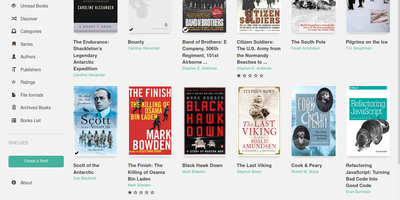
With over 17,700 GitHub stars and continuous development since 2015, Calibre-Web has become the definitive self-hosted digital library solution for book enthusiasts who want beautiful web access to their Calibre collections. The responsive Bootstrap 3 interface delivers instant browsing, searching, and filtering across titles, authors, tags, series, book formats, and languages, with custom shelves for organizing personal reading collections. In-browser reading supports EPUB, PDF, TXT, CBR, CBT, CBZ, and DJVU formats with a configurable EPUB reader featuring multiple themes and page location tracking, while one-click email delivery sends books directly to Kindle, Kobo, and other E-Readers without leaving the interface. Native Kobo sync lets Kobo device owners synchronize their entire Calibre library wirelessly, maintaining reading progress and bookmarks across devices. Metadata management includes editing capabilities with automatic metadata downloading from Google Books, Amazon, and other configurable sources, plus eBook format conversion through Calibre binaries for on-the-fly EPUB, MOBI, AZW3, and PDF conversion. User management provides fine-grained per-user permissions controlling download access, upload rights, editing capabilities, and content visibility based on categories or Custom Column values. Authentication supports local accounts, LDAP directory integration, Google and GitHub OAuth, proxy authentication, and Magic Link login for easy E-Reader access. The OPDS catalog feed enables any compliant E-Reader app to browse and download from the library. Running on a dedicated VPS on RepoCloud with guaranteed CPU, RAM, and SSD, full root SSH access, and a browser serial console. GPL-3.0 licensed.
Project NOMAD
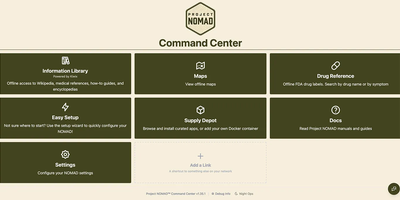
When the connection drops, Project NOMAD keeps serving offline Wikipedia, Khan Academy courses, maps, and an optional private AI assistant from a single Debian-based Linux server. The core needs only about 5 GB of disk and under 1 GB of RAM. Content is what fills the drive, and a setup wizard sorts it into Essential, Standard, and Comprehensive tiers while a storage bar tracks the running total. Wikipedia runs from a quick-reference set of the top 100,000 articles to the complete English edition with images at about 121 GB, and Kiwix also serves medical references, survival and repair guides, and Project Gutenberg ebooks. Kolibri adds Khan Academy courses with multi-user progress tracking, and any browser on the network can study. Offline maps cover the whole globe, single countries, or regions, with markers you can search, color, and navigate to by coordinate. The AI assistant is the heavy part, bringing the install to roughly 25 GB. It chats through Ollama or any OpenAI-compatible server such as LM Studio, searches uploaded documents, lists sources with dates when known, and lets vision models read attached images. CyberChef handles encoding and hashing, and FlatNotes keeps Markdown notes. The Supply Depot adds one-click apps or your own Docker containers. Opt-in auto-updates for the Command Center, installed apps, and downloaded content run inside a window you set. Running on a dedicated VPS on RepoCloud with guaranteed CPU, RAM, and SSD, full root SSH access, and a browser serial console. Apache 2.0 licensed.

Suwayomi
Manga collections tend to get trapped on a single phone; Suwayomi moves the library, downloads, and reading progress onto a server you run, so every browser and device sees the same shelf. In the browser, a built-in reader handles single page, double page, continuous vertical, continuous horizontal, and webtoon layouts, adding image filters, custom keybinds, auto scrolling, and separate desktop and mobile views. Content comes from Mihon (Tachiyomi) extensions, which can be searched, browsed, and sorted into categories, with custom extension stores loaded from JSON or Protobuf indexes. Downloads save chapters as CBZ archives for offline reading, and the server checks the library for new chapters every 12 hours by default, fetching them automatically if you allow it. Progress follows you through MyAnimeList, AniList, and MangaUpdates, a Suwayomi extension and tracker for Mihon, SyncYomi servers, and KOReader. E-reader apps connect over OPDS feeds, scheduled Mihon-compatible backups protect the library, and FlareSolverr or Byparr support handles Cloudflare-protected sources. Public instances can be locked down with basic authentication, a simple login page, or JWT-based UI login, and a PostgreSQL backend, still in beta, can replace the default file store. Running on a dedicated VPS on RepoCloud with guaranteed CPU, RAM, and SSD, full root SSH access, and a browser serial console. MPL-2.0 licensed.

FoJin
Ask a question about Buddhist scripture in plain language and get an answer that points to the exact passage it came from. FoJin brings thousands of texts from hundreds of digital libraries into one search box, so a reader no longer jumps between a dozen archives with different layouts. The AI assistant, called XiaoJin, answers with clickable citations that open the original text, and it can also reply in the voice of historical masters scoped to their own tradition. Search covers classics, translators, and catalog numbers, with filters by country and collection. Reading pages show full text, and parallel views line up translations in many languages, with Chinese, Pali, and Tibetan versions of the same sutra side by side. Thirty-nine dictionaries answer term lookups, a knowledge graph maps people, lineages, and places, and a data source directory shows what each collection offers. Readers can save collections, bookmarks, and annotations, then export citations in BibTeX, RIS, or APA. A read-aloud mode highlights each sentence in sync with audio. Quote verification confirms that a sentence really exists in the canon, and where. Running on a dedicated VPS on RepoCloud with guaranteed CPU, RAM, and SSD, full root SSH access, and a browser serial console. Apache-2.0 licensed.
Comigo
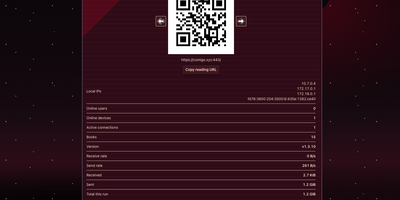
Your comic and manga collection becomes one tidy library with Comigo, readable in any browser on any device in the house. Point it at a folder and it indexes image folders plus zip, rar, tar, cbz, cbr, and epub archives, then serves pages in scroll or page-turning layouts. Pages arrive cropped and compressed for the screen in front of you, and modern heic and avif files read beside plain jpg and png. A QR code on the server screen brings phones and tablets straight into the same library, and reading position follows you between devices mid-chapter. Your history is tracked automatically, so a series paused last month reopens at the exact page where you stopped. The built-in player handles audio and video stored beside your books, which covers drama CDs and anime extras in the same shelves. Plugins add automatic page turning and an on-screen clock, and you can write your own to change how reading sessions behave. Libraries can live on another Comigo server across the network, whole image folders download in batches, and epub files convert for dedicated e-readers. The offline mode reads archives directly inside the browser with nothing uploaded, which suits borrowed machines and locked-down networks. Running on a dedicated VPS on RepoCloud with guaranteed CPU, RAM, and SSD, full root SSH access, and a browser serial console. MIT licensed.
Pinakes
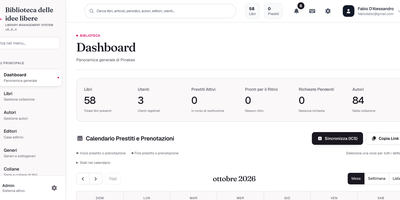
A small library deserves real library software, not a spreadsheet with aspirations: Pinakes runs the whole operation, from the barcode on the spine to the reminder in a reader's inbox. Catalogers add a book by ISBN and watch metadata and covers arrive from Open Library and Google Books, then file it under Dewey categories with barcodes for every physical copy. Circulation handles requests, approvals, pickups, renewals, and returns, with FIFO reservation queues that notify the next reader the moment a copy frees up, and due dates that respect the library's own closure calendar. Patrons browse a public catalog with instant search and filters, reserve from home, renew loans, read ebooks and listen to audiobooks in the browser, and get due-date reminders automatically. The same installation can describe archives to ISAD(G) standards, exchange records through MARC, SRU, Z39.50, and OAI-PMH, and present digitized pages through IIIF viewers. Sixteen bundled plugins, custom staff roles, a homepage editor, and ten themes make it feel like your library, and it installs on ordinary shared hosting with a guided setup. Running on a dedicated VPS on RepoCloud with guaranteed CPU, RAM, and SSD, full root SSH access, and a browser serial console. GPL-3.0 licensed.
BookOrbit
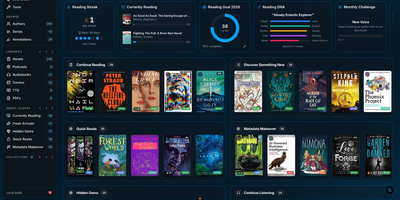
Consolidate your entire digital library into a self-hosted reading sanctuary with BookOrbit, an open-source media platform that organizes ebooks, audiobooks, comic archives, and research PDFs within a personal private cloud. Readers can enjoy multi-format media directly through responsive browser readers that support EPUB, CBZ, and M4B formats without external browser extensions. The platform synchronizes reading bookmarks, highlights, and completion statuses across web interfaces, Kobo ereaders, and KOReader devices. An automated metadata enrichment engine queries fourteen upstream bibliographic indexes, downloading cover artwork, chapter breakdowns, author biographies, and series taxonomies. The staging workspace allows librarians to inspect incoming files, review suggested metadata revisions, and embed updated tags directly into physical storage archives before shelving. Custom reading dashboards track annual book goals, calculate daily streaks, and plot reading habit radar charts. Multi-user configurations support distinct per-user collections, granular content permissions, and single sign-on authentication through OpenID Connect providers. Power users can export private OPDS feeds to external mobile reading applications or push books directly to connected Kindle hardware. Running on a dedicated VPS on RepoCloud with guaranteed CPU, RAM, and SSD, full root SSH access, and a browser serial console. GNU AGPL v3.0 licensed.
Zimi
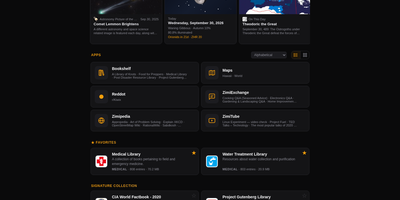
When the internet goes away, your library does not have to: Zimi serves Kiwix ZIM archives of Wikipedia, books, videos and forums through a rich web interface, with one search box querying every archive across more than 100 million articles. Each content type gets its own app: Zimipedia for wikis, the Dictionary for Wiktionary, Bookshelf for books, ZimiTube for video, ZimiExchange for Q&A, Reddot for subreddits and offline street Maps. Bookmarks, lists, likes and highlights live in every app and sync across devices when you sign in, and any article can switch into whichever language edition you hold. The library manages itself: browse the Kiwix catalog of over 1,000 archives, download with one click, let auto-updates keep editions fresh, and seed downloads over BitTorrent with a ratio cap you set. Zimi servers on the same network find each other and pass archives at LAN speed, and one offline switch turns off every internet-bound feature for air-gapped rooms. You can also make your own ZIMs from a web page, a whole site, a video playlist or a folder of files. Access ranges from public to sign-in only with per-archive allowlists, and the JSON API plus MCP server let AI agents search the same library. Docker runs Zimi on port 8899 with your ZIM files and config mounted as volumes. Running on a dedicated VPS on RepoCloud with guaranteed CPU, RAM, and SSD, full root SSH access, and a browser serial console. GPL-3.0 licensed.

DSpace
With DSpace, a library or research office can give every thesis, journal article, and dataset its own permanent web address, a searchable metadata record, and files visitors download from the archive. Content sits in a tree of communities and collections, and each collection decides who may deposit and how many review steps follow; reviewers accept a submission or reject it with a note that sends it back to the author. Embargoes hold files back until a set date, access policies limit other files to chosen groups, and sign-in works through LDAP, Shibboleth, SAML, OpenID Connect, or ORCID. Search covers metadata and the extracted full text of uploaded files, facets narrow the results, and browse pages sort by title, issue date, author, or subject. Editors can correct a published item through the submission form. Administrators inspect an audit trail and rewrite homepage news from an admin form. Entity types for people, organizations, projects, journals, and datasets link each publication to the work behind it, and DOIs can be registered through Crossref. Optional settings let authors keep an email address private on their researcher profile and download their own restricted files. Usage reports count visits, downloads, and top countries per item. REST, OAI-PMH, SWORD, and Google Scholar metadata connect the archive to harvesters, deposit tools, and search engines. Running on a dedicated VPS on RepoCloud with guaranteed CPU, RAM, and SSD, full root SSH access, and a browser serial console. BSD-3-Clause licensed.
Calibre-Web Automated
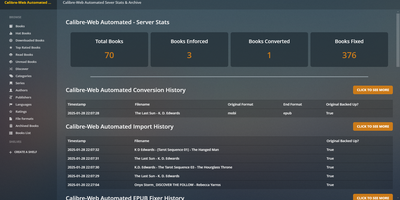
Turn any chaotic digital book archive into an autonomous, self-organizing reading portal using Calibre-Web Automated, a digital library manager featuring hands-free format conversions, metadata fetching, and e-reader synchronization. Readers can drop raw ebook files into the automated intake directory and watch the system instantly convert between twenty-eight distinct file types, repair malformed EPUB internal markup, and fetch enriched metadata from Hardcover, Kobo, and ISBN databases. The responsive web reader lets you browse collections, read directly in any desktop or mobile browser, and organize titles into dynamic rules-based Magic Shelves that update automatically. Built-in KOReader sync harmonizes reading progress and bookmarks across mobile devices and e-ink readers, while native OPDS feeds connect seamlessly to your favorite external reader applications. Administrative tools empower you to run hybrid SQL and fuzzy duplicate detection scans, perform batch metadata editing across entire series, enforce cover art changes directly into source files, and auto-dispatch newly ingested books to Kindle or Kobo devices via scheduled email delivery. Granular multi-user controls allow administrators to assign folder permissions, restrict downloads, enforce dark mode themes, and authenticate readers securely through OAuth and OpenID Connect identity providers. Running on a dedicated VPS on RepoCloud with guaranteed CPU, RAM, and SSD, full root SSH access, and a browser serial console. GNU General Public License v3.0 licensed.
BookLore
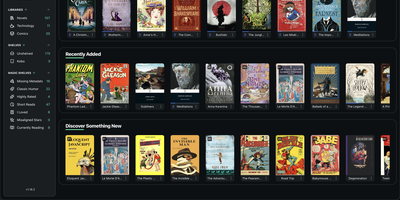
BookLore centralizes personal electronic book, audiobook, and comic collections into an organized private media server equipped with automated metadata scrapers and e-reader synchronization. Users can drop EPUB, PDF, CBZ, and MOBI files into a watched BookDrop directory to trigger automated format parsing, background cover retrieval, and staged queue imports. Integrated metadata scrapers query Google Books, Open Library, Goodreads, and Amazon to automatically fill synopsis summaries, author records, publishing dates, and review scores. Dynamic Magic Shelves categorize volumes through custom rule-based filters, author collections, and full-text search indexes across your complete literature catalog. The browser-based reader renders documents with adjustable typography, night modes, audio playback controls, text annotations, and persistent bookmarking. Hardware e-readers and mobile devices connect through native Kobo Store emulation APIs, bidirectional KOReader progress synchronization, and OPDS catalog feeds. Multi-tenant permissions provide each household member with private reading statistics, personalized shelves, email book delivery, and direct send-to-Kindle dispatch. Running on a dedicated VPS on RepoCloud with guaranteed CPU, RAM, and SSD, full root SSH access, and a browser serial console. GNU AGPLv3 licensed.
Kiwix Serve
Websites such as Wikipedia, Project Gutenberg, and Stack Overflow pack into single ZIM files, and Kiwix Serve publishes a folder of them as a searchable library that opens in any browser, with no connection to the originals. Point it at individual files, a directory, or a library file, and visitors get a welcome page where they filter books by language, category, or words in the title and description. Each book opens in a built-in viewer without downloading the archive, with toolbar buttons for the library, a random article, and in-book search. Title suggestions appear as you type, and full-text search returns highlighted snippets from indexed books, across several at once when they share a language. OPDS catalogs let reader apps browse and fetch the collection, and the library reloads automatically when its file changes. Admins can swap in a custom welcome page, publish under a URL prefix, hide the library button or search box, block links that leave the archive, and cap connections per visitor. Interface translations cover dozens of languages. Universities, community networks, and home labs get a reference shelf that stays available when the original sites are slow, blocked, or gone, with developer documentation and Q&A always within reach. Running on a dedicated VPS on RepoCloud with guaranteed CPU, RAM, and SSD, full root SSH access, and a browser serial console. GPL-3.0 licensed.