SpatiumDDI
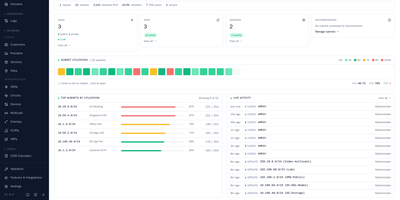
SpatiumDDI is the open alternative to commercial DDI platforms that charge by the IP, by the appliance, and by the feature, then lock every zone and subnet you own inside a renewal cycle. It does not just render configuration for servers somebody else runs, but deploys and operates BIND9, PowerDNS, Technitium, and Kea itself. Manage zones and records with per-server sync state, hand out DHCP scopes, pools, and static reservations per server group, and watch live leases reported back by the Kea agents. The IPAM side keeps spaces, blocks, and subnets in a tree with per-address DNS and DHCP sync, while the dashboard shows utilization, capacity, and platform health at a glance. Bring an existing estate with you through importers for BIND, Windows, PowerDNS, Technitium, Kea, ISC, and NetBox, and manage Windows DNS and DHCP agentlessly over WinRM when a full cutover is not on the table. Delegate safely with group-based roles over LDAP, OIDC, SAML, RADIUS, or TACACS+, search every object globally, and keep an append-only audit log of who changed what. Running on a dedicated VPS on RepoCloud with guaranteed CPU, RAM, and SSD, full root SSH access, and a browser serial console. Apache 2.0 licensed.
AutoXpose
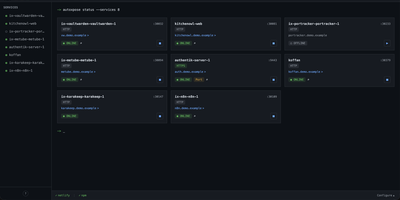
Tag a Docker container with two labels, and AutoXpose turns it into a published service with a DNS record, a reverse proxy route, and HTTPS, without you opening a single provider dashboard. From the web dashboard you connect one of six DNS providers, Cloudflare, Netlify, DigitalOcean, Porkbun, Aliyun, or Tencent DNSPod, and point it at the Nginx Proxy Manager or Caddy instance you already run. It watches your containers continuously after that: a new label creates the record, propagation is verified before the service shows as live, and removing the container removes its public entries too. Auto-expose mode publishes containers the moment they appear, while manual mode stages them in the dashboard for approval first. Color-coded service tags sort what you run into web, database, and media groups at a glance, and dashboard warnings flag misconfigurations before they become broken links. Nginx Proxy Manager access lists attach by label, so an admin panel stays reachable only from the networks you trust. When containers vanish, orphaned cleanup hunts down the stale DNS records and proxy hosts they left behind. Settings and state live inside the same single container, so the publishing pipeline for a homelab or a small fleet stays one compose service you can back up as a unit. Running on a dedicated VPS on RepoCloud with guaranteed CPU, RAM, and SSD, full root SSH access, and a browser serial console. MIT licensed.
Poweradmin
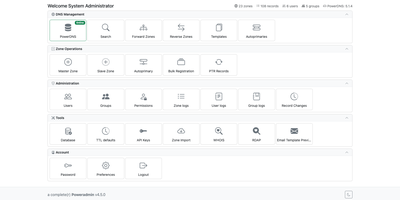
PowerDNS answers the queries; Poweradmin gives you a browser-based control panel for its zones, records, DNSSEC keys, and users, with a REST API for automation. Create master, native, and slave zones, and let zone templates stamp predefined record sets onto new ones. Edit records inline with filters, or open the optional Record Wizard for DMARC, SPF, DKIM, CAA, TLSA, and SRV. Reverse zones link to their forward zones. The batch PTR tool fills whole network ranges, bulk add takes one CSV line per record, and secondary zones can be imported over AXFR. For DNSSEC, manage keys and copy DS and DNSKEY records for your registrar; changes are applied or rectified through the PowerDNS API so signed zones stay consistent. Every record and zone edit is logged with before and after snapshots, and the logs can be filtered and exported. The panel is translated into 43 languages, including right-to-left ones. Permission templates, users, and groups control who touches which zones, sign-in works through LDAP, OIDC, or SAML, and administrators can switch on authenticator-app or email two-factor codes. API keys can be read-only, limited to chosen operations, or restricted to specific zones, and companion projects link Terraform, ExternalDNS, cert-manager, and Certbot. Dynamic DNS clients such as ddclient and inadyn update records through a dyndns2-compatible endpoint. Running on a dedicated VPS on RepoCloud with guaranteed CPU, RAM, and SSD, full root SSH access, and a browser serial console. GPL-3.0 licensed.
JT-IPAM
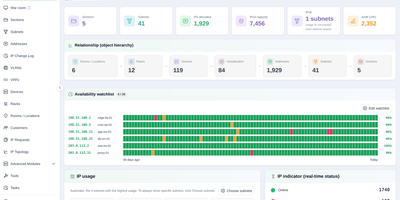
Spreadsheets and sticky notes stop scaling the day your network grows past a rack or two, so JT-IPAM keeps every address, subnet, and device in one searchable system of record. Track subnets and individual IPs with their hostnames, MAC addresses, and owners, then reconcile what you documented against what scan agents actually find through ICMP, ARP, reverse DNS, and SNMP collection from routers and switches. Connect the DNS servers you already run, from PowerDNS and BIND 9 to Windows DNS and Technitium, and flag records that have no matching address in IPAM. Pull devices and virtual machines in from LibreNMS, Zabbix, Proxmox VE, ESXi, Hyper-V, and OpenStack so monitoring and address records stop drifting apart. Draw floor plans and rack elevations, trace a cable across multiple hops, and open an SSH terminal, SFTP browser, or RDP desktop to a device straight from its address page. Route new address requests through configurable multi-stage approval workflows, distribute certificates to web servers and firewalls from central encrypted storage, and keep a full audit trail of every change and console session. Running on a dedicated VPS on RepoCloud with guaranteed CPU, RAM, and SSD, full root SSH access, and a browser serial console. AGPL-3.0 licensed.