OpenOps
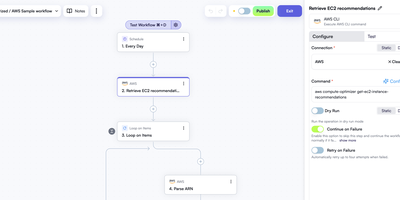
Cloud cost dashboards show what is being wasted; OpenOps is the no-code FinOps platform that acts on it, finding idle resources, asking the right owner for approval, and cleaning up once someone clicks yes. A visual editor starts each workflow from a schedule, cron expression, webhook, new Jira or Linear issue, or incoming email, and chains 120+ actions covering AWS, Azure, and Google Cloud operations, loops, conditions, delays, and code steps. Approval requests arrive as buttons in Slack or Microsoft Teams, or as approve and reject links by email, and the workflow waits for the answer before branching. Connectors for CloudHealth, Cloudability, Vantage, Finout, Flexera, and Umbrella feed in recommendations and anomalies. The template catalog ships with workflows for idle resource cleanup and rightsizing across AWS, Azure, and Google Cloud, and a free OpenOps Cloud account extends it. Findings land in built-in Tables where they can be approved, dismissed, marked as false positives, or snoozed. Analytics turns those tables, CSV files, Google Sheets, or Postgres data into dashboards. Test any step against live systems or sample data, inspect every run, and track changes in version history. Bring your own LLM key to generate CLI commands, SQL queries, and code right in the editor. Running on a dedicated VPS on RepoCloud with guaranteed CPU, RAM, and SSD, full root SSH access, and a browser serial console. Apache-2.0 licensed.
ManageIQ
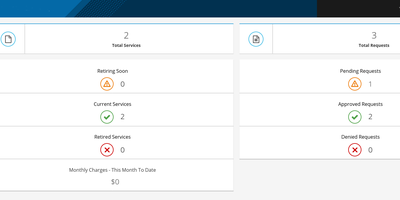
ManageIQ gives operators one console for every cloud and hypervisor the organization runs, connecting to VMware, OpenStack, AWS, Azure, Google Cloud, Kubernetes, OpenShift, and Nutanix to continuously discover inventory, map relationships, and listen for changes without installing agents. Discovered estates become manageable: operators publish bundles of resources into a self-service catalog that end users order like apps, then govern the full life cycle through policy, compliance, delegated operations, and retirement. SmartState analysis scans the contents of VMs, hosts, and containers agentlessly, even foreign or uncooperative ones, feeding security and compliance policies that flag drift automatically. Utilization metrics reveal idle systems and right-sizing opportunities, with capacity planning and what-if scenarios before hardware purchases. Chargeback and showback assign rates to tenants, group VMs by tag or container images by label, and generate reports in multiple currencies. Embedded Ansible automation executes playbooks for provisioning and remediation, and the Spassky release adds Nutanix and Terraform Enterprise providers on a Rails 7.2 core. Running on a dedicated VPS on RepoCloud with guaranteed CPU, RAM, and SSD, full root SSH access, and a browser serial console. Apache-2.0 licensed.
OCI Core
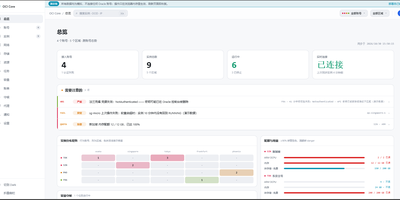
Anyone juggling several Oracle Cloud accounts knows the tab-switching ritual; OCI Core ends it by pulling every tenancy's instances into one self-hosted panel. The cross-account list shows state, shape, volumes, and public IPs for each machine, and you can start, stop, resize, rename, or terminate instances without opening Oracle's console. A creation wizard offers every shape in an availability domain, not just the free presets, while long operations such as IP swaps, resizes, and terminations run as background jobs with visible progress. Capacity hunting watches Oracle's read-only capacity reports and retries creation until a scarce shape appears, notifying you when it lands. Networking tools edit VCNs, subnets, and security rules visually, swap public IPs, enable IPv6, and manage extra network cards. Storage views resize boot and block volumes, and a rescue mode moves a broken system disk to a healthy machine for repair. Billing breaks spend down by service and region, tracks the monthly free egress allowance, and shows real usage for free-tier accounts. Accounts are checked for connectivity, quotas, and credential health, with emails, IPs, and OCIDs masked by default and revealed only on demand. Alerts reach Telegram, WeCom, DingTalk, email, or webhooks, and access is guarded by argon2id passwords, TOTP two-factor sign-in, session controls, and an audit log. Running on a dedicated VPS on RepoCloud with guaranteed CPU, RAM, and SSD, full root SSH access, and a browser serial console. MIT licensed.
Composr
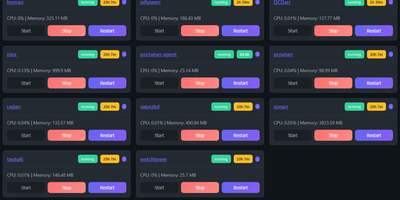
Managing multi-server container fleets often deteriorates into fragmented SSH sessions, mismatched compose files, and conflicting port allocations. Composr consolidates multiple Docker host daemons into a unified web dashboard that controls running containers, stack definitions, and system metrics from a single interface. Operators can connect remote Docker daemons through encrypted TCP sockets, inspect container health, and stream live execution logs with sub-second responsiveness. A built-in project creation wizard guides administrators through drafting new Compose topologies across local directories or remote server nodes. In-browser CodeMirror editors deliver live syntax highlighting for YAML files, configuration dotfiles, and reverse proxy definitions without detaching containers from disk. The platform tracks service properties directly, letting you toggle Compose profiles, relocate services between YAML manifests with pre-flight risk checks, and detect target port collisions before redeployment. Integrated backup managers bundle container metadata, compose files, and environment definitions into downloadable archive packages for automated disaster recovery. System operators can open interactive browser terminals into any active container, execute batch maintenance tasks, and configure scheduled image update checks. Running on a dedicated VPS on RepoCloud with guaranteed CPU, RAM, and SSD, full root SSH access, and a browser serial console. MIT licensed.