Toonflow
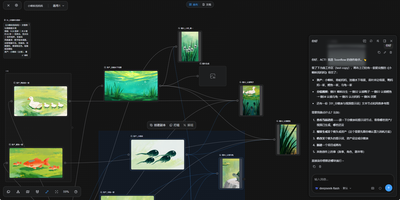
Toonflow, an open-source AI studio for short dramas, animated comics, and short videos, lets you plan, generate, and direct every shot as nodes on a canvas that runs on your own server. Text nodes hold the story, characters, and shot descriptions. Image generation nodes create character sheets with close-up, front, side, and back views. Video generation nodes take numbered reference images. Aspect ratio, resolution, and duration options depend on the selected model. Connectors link the nodes, so a character sheet made once is reusable in every shot. The 3D director's studio blocks a scene with camera framing, lighting, and keyframes. Export the scene as a video node. An assistant panel reads the project and reports which assets and videos have been generated. It offers next steps: generate a shot, revise a prompt, or start a new canvas. Finished images and clips preview on the canvas and download for further production work. Models come from third-party APIs, local ComfyUI workflows, or local language models. Plugins for nodes, skills, tools, and agents install from the marketplace. MCP links external tools and services. Projects, settings, and plugins live in one data directory. The interface offers 21 languages. There is no built-in login, so a firewall or an authenticating reverse proxy decides who can reach it. Running on a dedicated VPS on RepoCloud with guaranteed CPU, RAM, and SSD, full root SSH access, and a browser serial console. MIT licensed.
Doop
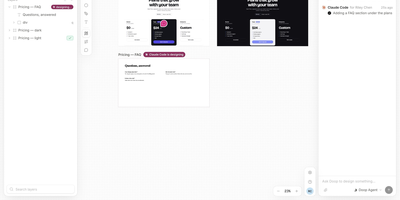
On a Doop design canvas every frame is real HTML, so Claude Code, Codex, Cursor, or any MCP client can design beside you as teammates watch every cursor and edit arrive live. Agents connect with one command or a one-click install and, once access is approved through OAuth, work as you and report their status and tasks on the canvas. The built-in Doop Agent has six roles, among them UX Lead, Copywriter, and Accessibility, picks up board cards and @mentions in comments, and runs on a connected ChatGPT subscription or an OpenAI, Claude, Gemini, or OpenRouter key. The editor covers frames, shapes, pen paths, rich text, flex layout, layers, pages, rulers, design tokens, and version history. Prototype mode wires clicks, hovers, and key presses to screen transitions, and the finished flow plays full screen or goes out as a shareable link. Marking a frame ready for dev can start an automation that queues agent steps, creates Linear tickets, or posts to Slack. Websites, live apps, GitHub repositories, and PDF pages import as starting points. Frames export as PNG, JPG, or PDF, or as public image links that re-render when the design changes. Running on a dedicated VPS on RepoCloud with guaranteed CPU, RAM, and SSD, full root SSH access, and a browser serial console. AGPL-3.0 licensed.
Canvix
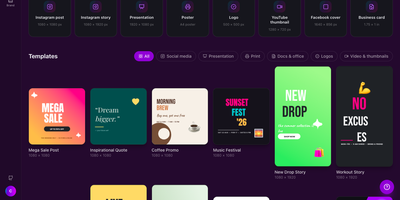
Canvix is a self-hosted design studio that lets anyone create social posts, presentations, posters, logos, and thumbnails in the browser with a drag-and-drop editor, 110 ready-made templates, and exports with no watermarks. You start from a template sized for the platform you are publishing to, then drag in shapes, lines, stickers, and your own images, moving, resizing, and rotating everything directly on the canvas. Text gets proper typography controls, with bundled fonts, styles, spacing, alignment, and curved text that arcs across the design. Layers can be reordered and locked while smart guides snap elements into alignment, and a full undo history plus autosave means a closed tab never costs you the work. Finished designs export as PNG, JPG, SVG, PDF, or video at up to three times resolution, ready to publish anywhere. Free accounts keep each person's designs private to them, while share links open a design for anyone to view or continue editing. Version snapshots let you roll a design back when an experiment goes wrong. The AI tools, magic edit, magic write, background removal, and translation, run against your own API keys, so nothing is metered. An optional MCP endpoint even lets AI assistants create and edit designs for you. Running on a dedicated VPS on RepoCloud with guaranteed CPU, RAM, and SSD, full root SSH access, and a browser serial console. MIT licensed.
Infinite Canvas
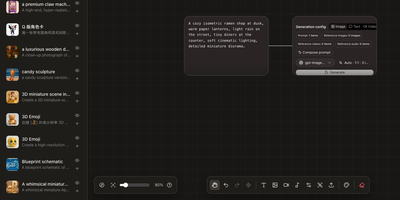
Instead of juggling a chat window, a folder of reference images, and a notebook of half-remembered prompts, Infinite Canvas puts the whole image-making process on one zoomable board. Drop in text, image, video, and generation-settings nodes, then wire them together so every result stays connected to the prompt and references behind it. Add one or several OpenAI-compatible endpoints, choose default text, image, and video models, and set image count, aspect ratio, quality, and transparent backgrounds per node. Batch results arrive as linked nodes that remember their prompt, model, and dimensions, so any of them can be retried later with the same settings. A prompt library searches seven built-in sources plus your own JSON sources and inserts the winner straight onto the board. An asset shelf keeps reusable images, clips, and audio within reach. Projects can be duplicated, exported, and synced between devices over WebDAV. Want a helper? A local Canvas Agent lets Codex read the active board and edit it through MCP, with approvals and permissions shown in a side panel. Plugins add node types, inspectors, and toolbar actions. Running on a dedicated VPS on RepoCloud with guaranteed CPU, RAM, and SSD, full root SSH access, and a browser serial console. MIT licensed.
ThoughtDAG
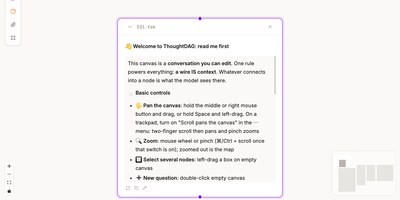
ThoughtDAG turns a long AI conversation from a scroll you cannot rearrange into a map you can edit, branch, and reconnect. Every question and answer becomes a node on an infinite canvas, and the wires between nodes are not decoration: they decide exactly what context the model sees next. Follow a promising thread, park a side question on its own branch, or cut a wire when an early assumption starts poisoning later answers, all without deleting the work that led there. Zoom out to read the shape of an investigation, then zoom back in to full answers, attachments, and highlighted passages. Drop in documents and files as material nodes, ask questions from them, and preview precisely what will be sent before a model runs. Past coding agent sessions can be opened as read-only graph mirrors, so a discussion that started in a terminal can be inspected, cited, and continued on the canvas. Memory lives in readable dossiers that collect decisions and open questions per topic, with sources attached, and relevant dossiers join new questions when you ask. Export a backup, a Markdown context chain, or a thought map that shares the structure of your thinking without dumping the whole transcript. Running on a dedicated VPS on RepoCloud with guaranteed CPU, RAM, and SSD, full root SSH access, and a browser serial console. MIT licensed.
ProductFlow
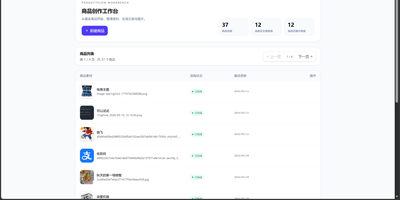
ProductFlow turns a product photo and a few facts into finished selling material, giving solo merchants and small teams one workspace for copy, posters, and repeatable image generation. You start by creating a product record, attaching original and reference images, then arranging product data, copy nodes, and image nodes on a zoomable canvas with drag, pan, multi-select, and connections. Copy nodes generate editable structured text that you can review, confirm, and keep in history before downstream image nodes read it. Poster generation runs in template mode with local rendering or generated mode through an image provider, and completed results can be downloaded, saved as product references, or promoted to the main product image slot. A separate image session view supports text-to-image and image-to-image runs with base image selection, candidate comparison, queue position, progress, cancel, and retry. Every finished image can move into the gallery with its source session, linked product, prompt, size, and model recorded for later reuse. Runtime settings cover provider profiles, model bindings, image tool parameters, prompt templates, upload limits, and concurrency, guarded by a separate settings token. The built-in help pages document the canvas, gallery, image sessions, and configuration in searchable sections. Running on a dedicated VPS on RepoCloud with guaranteed CPU, RAM, and SSD, full root SSH access, and a browser serial console. MIT licensed.