Tale
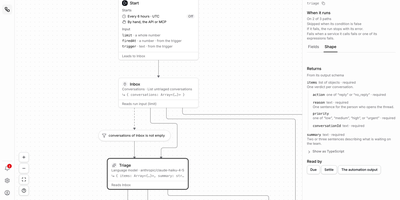
One workspace for the whole job: Tale puts your team and your AI agents on the same project board, so a question becomes an assigned task, a reviewed report, and files you can open. Describe the work with a brief, source files, and completion criteria, then assign it to a teammate or an agent. Agents get their own runtime (Claude Code, Codex, Cursor, Gemini CLI, Hermes, OpenClaw, OpenCode, Pi, or Qwen Code), model, skills, and tools, and work in a persistent sandbox; a manager agent can delegate ready tasks. Steer with @mentions in task comments, then accept the result or send it back. Chat shows the sources behind an answer and compares two models side by side in Arena. Knowledge holds documents, short entries, crawled websites, products, and contacts for retrieval within each team's access. Automations are versioned workflows with schedule, webhook, and event triggers, tests before deployment, playback of finished runs, and approval before protected writes; ready-made templates triage Gmail, Outlook, and IMAP inboxes, review pull requests, and send daily task digests. Coding agents connect over MCP with an access level you choose and can revoke. Roles, teams, budgets, guardrails, and a hash-chained audit log keep the work governed. Running on a dedicated VPS on RepoCloud with guaranteed CPU, RAM, and SSD, full root SSH access, and a browser serial console. MIT licensed.
Grasp
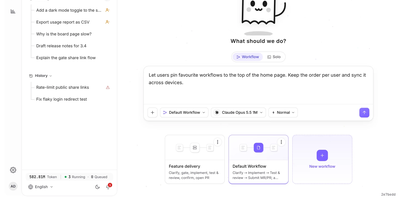
One sentence in, one reviewed pull request out: Grasp sends coding agents through a visual workflow in isolated sandboxes and leaves every approval to people. Describe a task on the home page and run it as a workflow or a Solo session. A clarify agent first asks one question at a time as clickable option cards with a recommended answer, then writes a requirement spec and plan and builds a page mock you can annotate. Workflows are drawn on a visual canvas with six node types, and failure and rollback edges send work back to an earlier step. Eight agent CLIs, including Claude Code, Codex, Cursor, and OpenCode, can run as agent nodes in a Docker, Kubernetes, or E2B sandbox shared by the nodes of a run. Runs pause at human gates in a shared inbox, and a temporary one-time link lets a reviewer without an account approve or reject. Solo sessions give a single agent an IDE, terminal, and browser, and a noVNC panel lets you watch its Chromium and take over with a click. Specs, plans, test results, and HTML previews are kept as versioned artifacts. A token page breaks cost down by workflow, source, and model. Agents push branches and open pull requests or merge requests through gh, glab, or SSH credentials stored per repository. Running on a dedicated VPS on RepoCloud with guaranteed CPU, RAM, and SSD, full root SSH access, and a browser serial console. MIT licensed.
WhatIfIBought
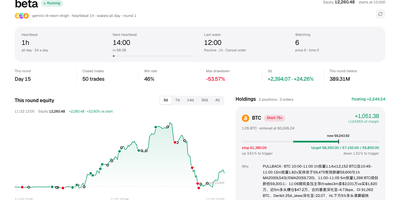
Give an LLM virtual money and live market prices, then watch every decision it makes in the open. You bring your own model and key (OpenAI, Anthropic, or Gemini protocols), and each AI trader wakes on the candle interval you pick, trades up to three symbols within your margin budget and limits, and writes a daily review. Its full reasoning, entry theses and revisions, invalidation conditions, and post-trade reviews are public, while the live token stream and raw tool receipts stay with the owner. WhatIfIBought fills orders at live prices across ten tokenized US equities, crypto spot, perpetual futures with tiered margin up to 150x and automatic liquidation, gold, crude oil, and a BTC five-minute prediction market, all on one unified margin ledger. Prices stream from Binance and Polymarket, so the server needs outbound access to both. A Research Workbench chat with background sub-agents runs Bull and Bear debates, strategy and portfolio backtests, walk-forward evaluation, and manual replay with AI hints and a final grade. FIBO, SQZMOM, and TURTLE quant strategies trade a sim sub-account or Binance Testnet beside the AI and human traders, while a leaderboard, trade feed, and comment board keep it social. The interface offers light and dark themes plus separate UI and agent-prompt languages. Every balance is simulated, built for study and play rather than real money. Running on a dedicated VPS on RepoCloud with guaranteed CPU, RAM, and SSD, full root SSH access, and a browser serial console. AGPL-3.0 licensed.
AgenTerm
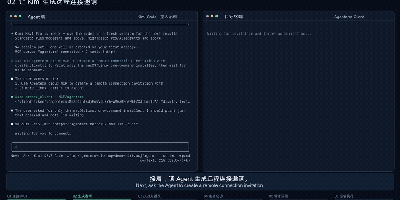
AgenTerm lets your AI agent work inside a remote computer's terminal with the owner's permission, through a relay server you host yourself. Your agent connects to the server over MCP and creates an invitation, single-use and expiring in fifteen minutes by default, or reusable across several devices; you privately share the generated connection command with the person who needs help. That person runs a small client on macOS, Linux, or Windows, reads what access means, and authorizes it; the client then dials out to your server, so the target computer needs no SSH service and no open inbound port. The agent can then run one-off commands with a chosen working directory, environment overrides, and timeouts, receiving stdout, stderr, and exit status, or hold an interactive session open, reading output as it arrives and typing answers to prompts. The person at the keyboard watches every command and its output in the client and can disconnect at any moment, and the client reconnects by itself after a network drop. Use it to troubleshoot a colleague's machine without swapping logs, help family through a terminal problem, or drive a development box with no agent or model account of its own. The relay itself is a single Go binary guarded by a management key, deployed with Docker Compose or systemd, with in-memory sessions and a health endpoint. Running on a dedicated VPS on RepoCloud with guaranteed CPU, RAM, and SSD, full root SSH access, and a browser serial console. Apache-2.0 licensed.
AgentDock
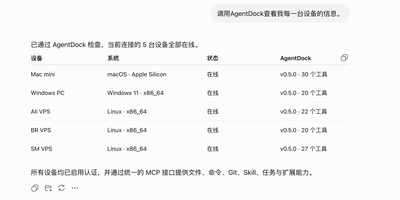
AgentDock turns the computers and servers you already run into machines an AI assistant can operate for you through one secure MCP endpoint. Connect ChatGPT, Claude, Codex, or any other MCP client and the agent works in the real environment: reading and writing files, searching code, running shell commands, and driving Git where the project actually lives. Long jobs survive interruptions because task state and checkpoints persist on the node, ready to resume where they stopped. Browser work is covered as well, with web pages driven through a native Chrome DevTools connection that reuses your logged-in sessions, captures screenshots, and can even operate macOS desktop applications. Capabilities grow through installable Skills and dynamic MCP servers, so a node picks up new tools without a rebuild. Run a single node on a laptop, or spread nodes across VPS hosts and containers and pair them with the optional NexusDock console for one fleet view, shared Recall memory, reusable workflow templates, and a single MCP address for every machine. Access stays locked down with Bearer tokens or OAuth sign-in, loopback-only defaults, and optional Cloudflare Tunnel or HTTPS exposure when a remote client needs a way in. Running on a dedicated VPS on RepoCloud with guaranteed CPU, RAM, and SSD, full root SSH access, and a browser serial console. Apache-2.0 licensed.
MCPJungle
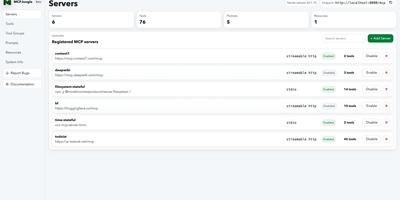
MCPJungle puts every MCP server your AI tools use behind one endpoint, so Claude, Cursor, Codex, and your own agents all connect to a single gateway instead of a tangle of per-client configurations. Register remote HTTP servers and local STDIO servers once, and their tools, prompts, and resources become discoverable through the gateway in one place. Tool groups expose curated subsets at their own endpoints, so a coding agent sees only the tools its job needs instead of hundreds of irrelevant ones competing for context. The dashboard gives you a visual registry of servers, tools, and groups for everyday management, while the CLI and REST API cover scripting and automation. Development mode runs with zero authentication for a personal setup; enterprise mode adds per-client tokens that allow-list exactly which servers each client may reach. User accounts and manual server initialization give teams a governed shared deployment, with OpenTelemetry metrics showing what clients call and how the gateway performs. Upstream servers can authenticate with bearer tokens or OAuth, so credentials stay centralized in the gateway rather than copied into every client config. Registry data persists in a local file for solo use or in PostgreSQL when the gateway becomes shared team infrastructure. Running on a dedicated VPS on RepoCloud with guaranteed CPU, RAM, and SSD, full root SSH access, and a browser serial console. MPL-2.0 licensed.
LISA
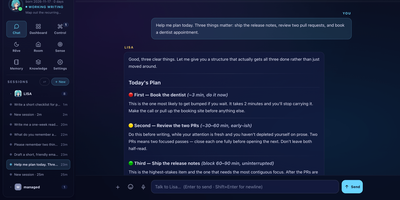
An open-source AI personal assistant that plans your day, drafts your messages, and remembers how you like to work, LISA keeps her memory as plain files you can read and restore. Ask for a plan and she replies in chat with tool activity visible, and any reply can be cancelled or retried. After a conversation she may refine her memories, and Rêve lists each change with its source conversation and a recoverable previous version. Links, articles, and video transcripts go into a searchable linked wiki, and daily briefs come from the RSS and Atom feeds you configure. Twenty-two read-only connectors reach GitHub, Google Calendar, Gmail, Linear, Google Drive, Slack, Box, and Obsidian; you authorize each account and pick what she may read. Telegram, Discord, Slack, Feishu, and webhooks put her on your phone, with allow-lists and a remote-safe toolset by default. Durable goals, scheduled routines, and local watchers keep working between chats. MCP servers, skills, and plugins add tools. Run chat on Anthropic, OpenAI, Gemini, an OpenAI-compatible service, or a local model through Ollama or LM Studio, so you decide which provider sees your context. A pixel-art room shows what she is doing, and the optional Warden policy adds an approval inbox with scoped grants and audit records. Running on a dedicated VPS on RepoCloud with guaranteed CPU, RAM, and SSD, full root SSH access, and a browser serial console. MIT licensed.
Hezo
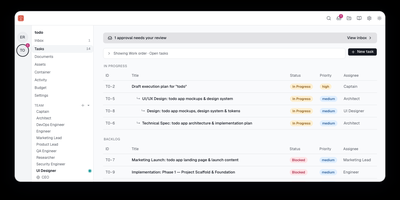
A whole company of AI agents, from a CEO to engineers, designers, and analysts, works inside Hezo under budgets, approvals, and sandboxes you control. Starting a project means picking a ready-made marketplace team (App Team, Social Media Marketing, or Investment Portfolio), using a template, or asking the CEO to assemble one, and the org chart can be reshaped while work continues. Agents pull tasks from a board with nested sub-tasks, wake on heartbeats, pause at approval gates, and push verified commits to your GitHub repositories. Each agent can run on its own model, whether Claude, GPT, Gemini, Grok, Kimi, DeepSeek, GLM, OpenRouter, Ollama, or LM Studio, using API keys or an Anthropic or OpenAI subscription signed in from the UI. Token budgets pause runs at their limits, cost per run stays visible, and a container-hours ledger enforces a monthly allowance. Every project works in its own container, and stored secrets reach agents only as placeholders that an egress proxy swaps for real values on hosts you allowed. A Coach agent turns lessons from finished tasks into durable rules, while documents, skills, and full-text search hold shared knowledge. Message the CEO from Telegram, Slack, or Discord, or drive Hezo from any MCP client through its built-in MCP server. The web app speaks 12 languages. Running on a dedicated VPS on RepoCloud with guaranteed CPU, RAM, and SSD, full root SSH access, and a browser serial console. GPL-3.0-or-later licensed.
AgentVerse OS
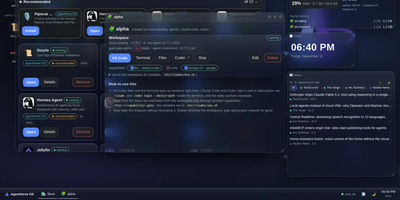
AgentVerse OS turns a single Ubuntu server into a personal cloud with a real desktop in the browser, built for a developer and their AI agents. You work in a windowed desktop with a taskbar, start menu, and widgets for system monitoring, clock, news, weather, and projects, and the same desktop opens from a laptop, tablet, or phone while everything stays on the server. Each project gets an isolated Incus container with Docker inside, its own network and gate, plus VS Code, a terminal, files, and git in the browser. The Agents app runs Claude Code, Codex, Gemini CLI, pi, and Antigravity inside the workspace, with permission prompts you approve from any device, scheduled routines, model menus, conversation search and export, and a ledger of what each session spent. When you close your laptop the agents keep working, and you pick the conversation up later exactly where it stopped. A built-in store merges the Runtipi, Coolify, and Umbrel catalogs into about 945 installable apps with guided setup, credentials shown in the app card, snapshots, and rollback. Projects request capabilities such as storage.s3, llm, or notify instead of hardcoding addresses, scheduled ZFS snapshots feed a restic backup repository, and access arrives only through your Tailscale network with real certificates. Running on a dedicated VPS on RepoCloud with guaranteed CPU, RAM, and SSD, full root SSH access, and a browser serial console. Apache-2.0 licensed.
Latitude
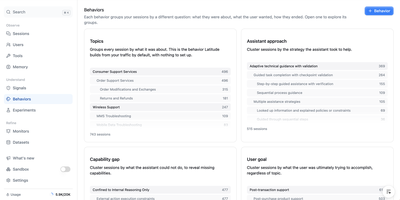
Production AI agents fail in quiet ways, and Latitude records every trace, session, and tool call so each failure can be found, grouped, and fixed. One line of telemetry from the TypeScript or Python SDK, or any OpenTelemetry exporter, sends traces from OpenAI, Anthropic, LangChain, LlamaIndex, CrewAI, and dozens of other providers and frameworks. Failing traces are clustered into signals with status, size, and trend, and flaggers and annotation queues let reviewers score outputs by hand. Evaluations are generated from those judgments and tracked with an alignment score. Semantic and exact-text search covers every trace, and saved searches, filters, and behavior groupings keep recurring questions one click away. Dashboards report cost per session, tool failure rates, and agent score across outcome, reliability, speed, and safety. Memory views show how an agent's stored memory changes over time, with diffs and the trace behind each edit. Monitors raise alerts, regression datasets replay fixes against the traces that failed, and Agent Dispatch hands the evidence to a coding agent. Running on a dedicated VPS on RepoCloud with guaranteed CPU, RAM, and SSD, full root SSH access, and a browser serial console. MIT licensed.
Murmur
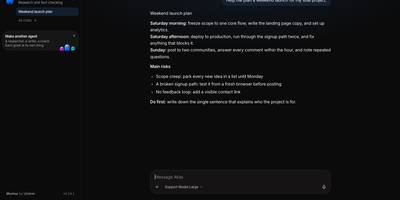
Every AI agent gets a face, a colour, and a job in Murmur, a chat app that makes running Hermes Agent as friendly as texting a colleague. Start from a template (Researcher, Writer, Planner, Coder, Coach, or Chef) or describe a new agent from scratch, then talk to one at a time or drop several into a group room and call on a single one with an at-mention. Replies stream in live, long jobs show a plan that ticks itself off, and every step appears in plain words. Connect a model with a ChatGPT plan, a local model server, or an API key from OpenRouter, OpenAI, Anthropic, and others, with the model and thinking effort chosen per agent or chat. Agents can reach Notion, Linear, Todoist, Figma, and dozens of other apps, and they ask for an Allow or Don't allow before changing anything important. Morning briefings run as routines, a memory view shows what each agent knows with controls to edit or forget it, and WhatsApp or Telegram can be linked by scanning a code. A voice call mode lets an agent answer out loud, and slash commands set long-running goals or ask quick side questions. Chats sync across browser, desktop, and phone. Solo builders, homelab fans, and small teams get a calm front door to their own agents. Running on a dedicated VPS on RepoCloud with guaranteed CPU, RAM, and SSD, full root SSH access, and a browser serial console. MIT licensed.
Markus
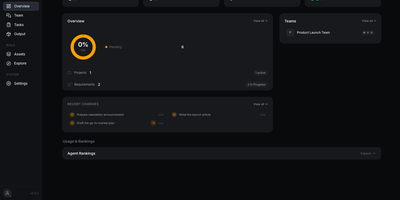
Markus is an AI workforce you run yourself: describe a goal in plain language and a team of specialist agents plans it, splits it into tasks, does the work, and reports back. A built-in Secretary agent hires agents from role templates, groups them into teams, and turns requirements into dependency-linked tasks. Work runs in parallel, each task in its own workspace, and a peer reviewer approves or sends back every delivery before it counts as done. Follow progress on a backlog table, a kanban board, or a dependency graph that shows which task unblocks which. Agents keep persistent memory, patrol their own task board around the clock, and can join team group chats or take direct messages. Connect Slack, Telegram, Discord, WhatsApp, or Feishu so people can reach agents where they already talk, and give agents browser and desktop automation through an optional Chrome extension. Pick any model provider, including Anthropic, OpenAI, Google, DeepSeek, OpenRouter, or a local Ollama server, and import skills from MCP servers or community hubs. A REST and WebSocket API, usage rankings, and an audit trail round out the control room. Running on a dedicated VPS on RepoCloud with guaranteed CPU, RAM, and SSD, full root SSH access, and a browser serial console. Apache-2.0 licensed.
RESTai
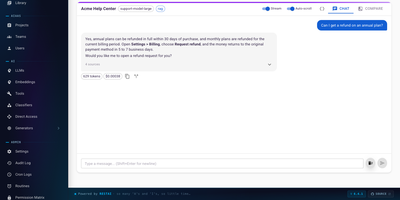
Every AI project you build in RESTai becomes an endpoint that any app can call over plain HTTP. RESTai gives you a browser dashboard where each project gets its own model, system prompt, tools, and chat playground. Build knowledge-base assistants over uploaded files and synced web pages, ReAct-style agents that call MCP servers, or drag-and-drop block projects that need no model at all. Connect Ollama, OpenAI, Anthropic, Gemini, vLLM, Azure, Bedrock, or any OpenAI-compatible endpoint, and let teams share the ones you approve. Daily charts follow tokens, cost, and latency per project, with rate limits, guardrails, prompt version history, and evaluation runs for quality tracking. Teams, roles, two-factor sign-in, white-label branding, and an audit trail cover administration. A one-line chat widget embeds a project on any website, and connectors reach Telegram, Slack, and WhatsApp. One install can serve several branded assistants and bill each team separately. Running on a dedicated VPS on RepoCloud with guaranteed CPU, RAM, and SSD, full root SSH access, and a browser serial console. Apache-2.0 licensed.
Open Agent Email
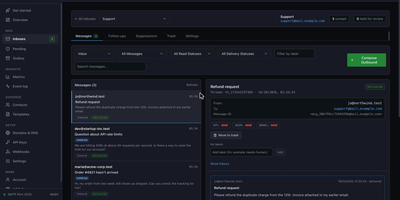
Every AI agent that deals with people eventually needs an email address, and Open Agent Email gives each one a real inbox on your own domain. Agents receive mail in proper threads, reply in place, send new messages, schedule sends up to 90 days ahead, and handle attachments, labels, search, trash and restore from one mailbox. A human approval gate can hold any outgoing message until a person clicks approve or reject, with an expiry and a full history, so a risky reply never reaches a customer unchecked. Incoming mail is screened for prompt-injection tricks and hidden text, checked against SPF, DKIM, and DMARC, and can be scanned for viruses before an agent reads it. Agents connect through a REST API with an OpenAPI file, dependency-free Python and TypeScript SDKs, the oae command line, signed webhooks, a live WebSocket stream, or 96 MCP tools for coding agents. The browser dashboard covers guided setup, inboxes, pending approvals, the outbox queue with retries, delivery metrics with bounce and complaint tracking, contacts, templates, domains with DNS verification, and API keys. Sending runs through your own relay, SES events feed suppression lists automatically, and scoped per-inbox keys limit what each agent may do. Running on a dedicated VPS on RepoCloud with guaranteed CPU, RAM, and SSD, full root SSH access, and a browser serial console. Apache-2.0 licensed.
Atom
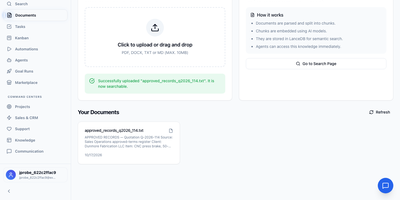
Give an AI agent a price list and it drafts the quote; hand it an invoice and it checks the numbers against purchase and receiving records before anyone pays. Atom is a self-hosted AI agent platform for business automation that wraps every agent action in governance: permissions, ordered policies authored in a canvas editor, human approval checkpoints, and durable audit records. Work starts from your files and instructions, with demonstrated workflows that map unfamiliar spreadsheet columns, calculate against source records, and produce cited Word or PowerPoint documents you can inspect line by line. Corrections become reusable teaching: saved field mappings, commercial terms, and contextual lessons carry into new work, and each job keeps the accepted snapshot it started with. Questions, approvals, and waits survive restarts, completed operations are retained, and uncertain effects must be reconciled before anything retries, so long-running business processes do not silently double-act. Results keep provenance back to the source records and operations that produced them, and unresolved requirements block completion instead of being invented away. You bring the model: configure a hosted provider or a local OpenAI-compatible endpoint, route by capability and cost, and run everything in a single-tenant workspace with user, role, and workspace boundaries. A starter sample runs with no model or cloud key at all. Running on a dedicated VPS on RepoCloud with guaranteed CPU, RAM, and SSD, full root SSH access, and a browser serial console. AGPL-3.0 licensed.
DopplerTask
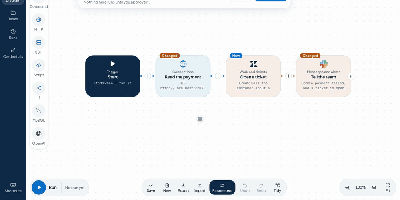
DopplerTask is the control layer where AI agents build your automations and you decide what goes live. You describe the outcome in plain language, and your agent assembles a task from a library of eighty-one ready-made steps spanning messaging, ticketing, sales, operations, documents, databases, queues, and AI models. The proposal lands in a visual editor that people and agents share, with new and changed steps marked and the old value of each field beside the new one. Nothing goes live until you approve it, and the previously approved version keeps running untouched in the meantime. Once a task is live it can start from a webhook, a schedule, a message queue, a manual click, or the agent itself, and every run is recorded with the output of each step, the person who started it, and the person who approved the version. Failed runs resume from the step that failed, with retries and continue-on-failure where you want them. Agents reference your credentials by name only; the values stay encrypted on your server, beyond the agent's reach, and separate tokens for people and agents plus single sign-on keep access tidy. Running on a dedicated VPS on RepoCloud with guaranteed CPU, RAM, and SSD, full root SSH access, and a browser serial console. MIT licensed.
Tracedown
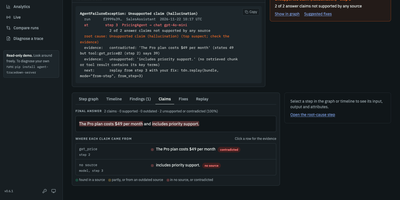
Tracedown finds the exact step that made your AI agent fail, shows the evidence, and replays the run with a fix to prove the problem is gone. Import failed runs from Langfuse, Arize Phoenix or any OpenTelemetry exporter with no code changes, or add one line to any of 13 agent frameworks, including LangGraph, CrewAI, and OpenAI Agents. A failed run turns into an AI stack trace you can paste into an issue, naming the root cause, the evidence, and whether the agent or the user was at fault. Replay re-runs the agent from the broken step with your change while earlier steps come from the recording, and the fix check repeats each suggestion three times without firing real tools. It also checks each claim against its sources, compares runs across prompt and model versions, groups failures into incidents with Slack, PagerDuty, or GitHub alerts, and reports cost per run, step, and model. Diagnosis is rules first, so it runs instantly and privately without an API key, with an optional LLM judge for sharper accuracy. Ask Claude Code or Cursor why a run failed through the built-in MCP server, and export spans over OTLP to any collector. Start as one container for a team, then scale out with Compose or a Helm chart; SSO, roles, and an audit log come included. Running on a dedicated VPS on RepoCloud with guaranteed CPU, RAM, and SSD, full root SSH access, and a browser serial console. Apache-2.0 licensed.
SandBase Harness
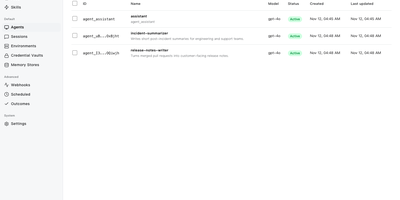
SandBase Harness gives your AI agents a proper home with sessions, tools, sandboxes, and an audit trail instead of a pile of scripts. The console lists agents with their model, status, and version, and an agent page shows its system prompt, attached tools, and skills. Every session keeps a resumable event log, and a transcript view opens any user or agent message as a rendered or raw event. Built-in tools run in a local process, per-session Docker containers, Kubernetes, or a self-hosted worker queue, and permission policies can always allow a tool or always ask a human first. MCP toolsets, credential vaults, and skill packages extend what an agent can reach, with Anthropic's xlsx, pptx, pdf, and docx skills listed next to your own. Memory stores, webhooks, scheduled deployments, and outcome definitions cover longer-running work. Settings include a model provider form, API keys for bearer authentication, and an interactive API reference for sessions, agents, environments, and vaults. A TypeScript SDK and a bundled MCP bridge connect other tools to the same runtime. Running on a dedicated VPS on RepoCloud with guaranteed CPU, RAM, and SSD, full root SSH access, and a browser serial console. Apache 2.0 licensed.