Busabase
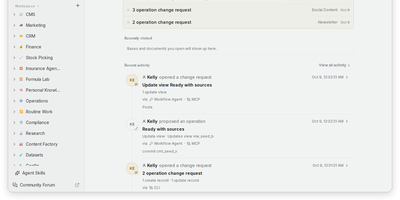
Every AI agent session starts from zero, and Busabase fixes that: it is an open-source workspace where agents and people share records, docs, skills, and apps, and every agent write arrives as a reviewable change. Bases hold typed records with relations, views, and forms, while Docs, Files, Whiteboards, and Workflows live in the same tree, so a project's data and context stay together. Skills are SKILL.md playbooks that any connected agent can look up before it acts. Each write becomes a Change Request carrying a message, a field-level diff, an author, and history; your permissions decide whether it merges at once or waits in the Inbox for approval, and any change can be reversed. Ask an agent to turn a Base into a dashboard, CRM, or content desk and it runs as an AirApp on live workspace data. Claude Code, Codex, Cursor, Gemini CLI, n8n, or your own process can connect through MCP, OpenAPI, the CLI, TypeScript and Python SDKs, or an in-app chat session. Templates install a complete setup, with sample data and an agent manual, in one command. Start it with one command and no accounts, because the open-source edition is a single-user workspace with no sign-in screen. Running on a dedicated VPS on RepoCloud with guaranteed CPU, RAM, and SSD, full root SSH access, and a browser serial console. MIT licensed.
Glass Keep
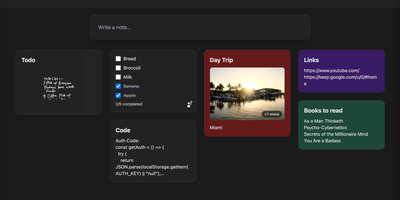
With nearly 600 GitHub stars and a feature set that rivals commercial note apps, Glass Keep is the self-hosted Google Keep alternative that wraps a full-featured notes system in a glassmorphism UI with blurred backdrops, translucent modals, and smooth transitions. The React and Vite frontend renders notes in a masonry card grid with pinning, color themes, tag chips, and drag-and-drop reordering. Text notes support Markdown with headings, bold, italic, strikethrough, blockquotes, and fenced code blocks, while checklists offer inline editing, drag-to-reorder items, and direct toggle from the grid without opening the note. A freehand drawing mode provides customizable brush sizes and colors for handwritten notes. The private AI assistant runs an optimized Llama 3.2 (1B) model entirely inside the Docker container using RAG over your own notes, answering queries like "what are my AWS commands?" without any data leaving your server. Deep search spans titles, Markdown text, tags, checklist items, and image names. Import notes from Google Keep via Takeout JSON files or export your entire vault as JSON with per-note Markdown downloads. The Express backend with better-sqlite3 requires no external database. Real-time collaboration enables shared checklists with live item toggling. Dark and light themes persist across sessions, and the PWA manifest supports installation on any device. Running on a dedicated VPS on RepoCloud with guaranteed CPU, RAM, and SSD, full root SSH access, and a browser serial console. MIT licensed.
Ever Teams
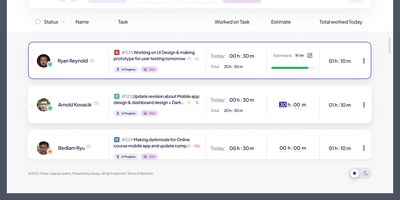
Powering distributed teams seeking full visibility into work patterns and productivity, Ever Teams is an open-source platform unifying time tracking, task management, project coordination, and team collaboration in a single self-hosted application. The real-time timer tracks work against tasks and projects with one-click start/stop, while the Electron desktop app captures periodic screenshots at configurable intervals, monitors keyboard and mouse activity levels, detects idle periods, and syncs offline sessions automatically. Kanban boards with drag-and-drop, calendar views, and daily planning tools organize work across custom statuses, priorities, and sizes. Built-in video conferencing powered by Jitsi or LiveKit enables meetings without leaving the platform. Timesheet management supports submission, review, and approval workflows with configurable time limits and budgets. The backend runs on the Ever Gauzy NestJS platform providing REST and GraphQL APIs, multi-tenant architecture with organization and team scoping, role-based access control, and an integration framework connecting GitHub issues and pull requests bidirectionally plus JIRA import and sync. Infrastructure includes PostgreSQL, Redis for caching and pub/sub, MinIO for S3-compatible storage, Elasticsearch for full-text search, and Cube.js for OLAP analytics. Built with Next.js 16, React 19, Tailwind CSS, and Recoil, with native iOS and Android clients via Expo, Electron desktop apps for Windows, macOS, and Linux, and Plasmo browser extensions for Chrome and Firefox. Internationalization spans 13-plus locales with dark, light, and system themes. Running on a dedicated VPS on RepoCloud with guaranteed CPU, RAM, and SSD, full root SSH access, and a browser serial console. AGPL v3.0 licensed.

Koha
Circulation desk, cataloging workbench, acquisitions office, serials room, and public catalog all share one roof in Koha, an open-source library system that scales across school libraries, branch networks, and consortia. Staff search the catalog with facets for availability, authors, holding libraries, and item types, then open a record to see its cover, subjects, classification numbers, and every copy with its call number, status, and barcode. Catalogers edit MARC 21 or UNIMARC records field by field, copy records in via Z39.50 and SRU searches, and link authorities automatically. At the desk, staff check out, check in, and renew items, work with holds, bookings, and claims, and see overdue warnings and outstanding charges beside each patron. Circulation and fine rules vary by library, patron category, and item type. Acquisitions handles vendors, baskets, budgets, and funds. Serials track subscriptions and issue receiving. A guided report wizard, SQL reports, and statistics wizards summarize circulation and collections. Patrons search the public catalog, place holds, save lists, tag and rate titles, and suggest purchases. Staff tools design notices and slips, print patron cards, set holiday calendars, and import or batch-edit patrons. SIP2 serves self-checkout kiosks, OAI-PMH sets share records, and a REST API exposes patrons, holds, checkouts, and biblios. Lending continues during outages with offline circulation. Running on a dedicated VPS on RepoCloud with guaranteed CPU, RAM, and SSD, full root SSH access, and a browser serial console. GPL-3.0 licensed.
Operately
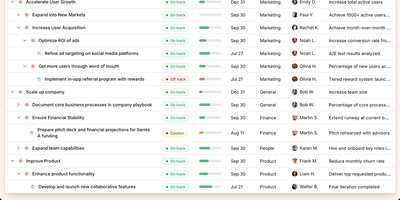
Operately is an opinionated operating system for growing companies that connects strategic goals directly to execution without the overhead of assembling separate tools. The OKR module tracks company-wide, team-level, and individual goals with measurable success conditions showing progress bars against numeric targets, timeframe deadlines, and automated progress aggregation from linked projects. Project management includes champion ownership, milestone tracking, Kanban task boards with TODO, In Progress, and Done columns, and scheduled check-ins that generate async progress updates on a configurable cadence. Team Spaces give departments organized homes for their goals, projects, documents, and discussions with configurable access controls at the space, goal, and project level. Message boards replace scattered email threads with focused project conversations, while the document and file system provides centralized content management. The Review screen aggregates everything requiring attention or approval into a single actionable view. The Elixir Phoenix backend uses Absinthe for GraphQL queries and mutations, Oban for background job processing, and Swoosh for email notifications. The React TypeScript frontend leverages Apollo Client for GraphQL state management. Full CLI and API access enables programmatic interaction, and MCP tools added in version 1.7 allow AI agents to create goals, update projects, manage tasks, and post check-ins. On RepoCloud, deploy Operately on a dedicated VPS with PostgreSQL persistence, root SSH access, and complete control over your organizational data, all under the Apache 2.0 license.
Hammond
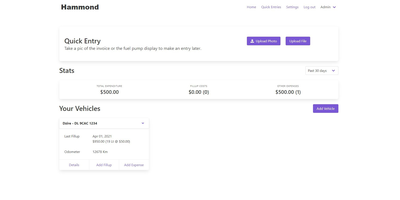
When Clarkson, the once-popular fuel logger, stopped receiving updates, Hammond stepped in as its logical successor - a self-hosted vehicle expense tracker. Written in Go with a Vue.js interface and SQLite storage - a single lightweight container, no external database - it tracks every cost your vehicles generate: fuel fill-ups with cost, volume, and odometer readings; maintenance and repairs; and arbitrary other expenses, each attachable with photos and documents stored against the vehicle. The multi-user, multi-vehicle design is what sets it apart from phone apps: a household or small business adds all its vehicles and all its drivers, shares vehicles across users, and every fill-up lands in one ledger no matter who was driving. The Quick Entries feature respects how expenses actually happen - snap a photo of the receipt or pump screen at the gas station, then complete the structured entry later when you have a minute. Reporting works at both the vehicle level (cost per distance, fuel economy trends) and across the whole fleet. Migration matters here: importers for Clarkson, Fuelly, and Drivvo bring years of fill-up history along, so switching does not mean starting your data over.
REI3
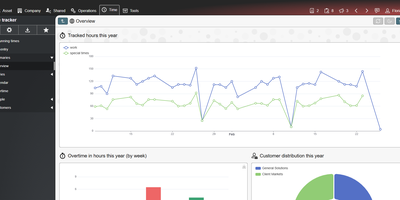
Replace the spreadsheet that quietly runs your department with a proper multi-user application that you design in a browser with REI3, a self-hosted low-code platform. Authors define their data model once, then assemble forms, lists, calendars, Gantt plans, Kanban boards, and charts around it, with form states that show, hide, or require inputs as a record moves through its workflow. Calendars create records from a drag-selected time range, Kanban cards change state by drag and drop, and bulk-update forms edit hundreds of records at once. Phones scan barcodes and QR codes through the camera, and signature pads capture drawings. Roles and record-level access policies decide who sees what, sign-in runs through LDAP, OpenID Connect, or multi-factor authentication, and end-to-end encryption keeps selected fields unreadable even to administrators. REST endpoints work in both directions, ICS feeds publish calendars, CSV moves data in bulk, and IMAP and SMTP accounts connect applications to email. A drag-and-drop PDF editor produces letterheads, labels, and documents with signatures and barcodes. More than a dozen free ready-made applications, including tickets, time tracking, IT assets, a password safe, and a CRM, install from the admin panel. Running on a dedicated VPS on RepoCloud with guaranteed CPU, RAM, and SSD, full root SSH access, and a browser serial console. MIT licensed.
Wavelog
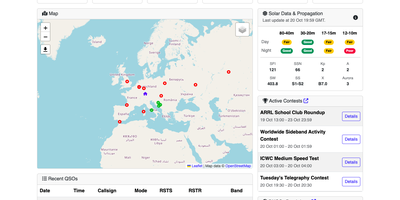
Whether operating from a home shack, a portable Parks on the Air activation, or a multi-operator club station, Wavelog gives amateur radio operators a browser-accessible logbook for recording and confirming QSO contacts from anywhere. Real-time transceiver frequency and mode data flow directly into the Live QSO logging interface from Hamlib, FLRig, and WSJT-X through the companion WavelogGate helper or REST API endpoints. An integrated DX Cluster and visual band waterfall display active spots filtered by continent, band, and DXCC status so operators can click a spot and QSY their rig immediately. Built-in two-way synchronization handles QSL confirmations and log uploads across Logbook of The World (LoTW), eQSL, QRZ.com, HRDLog, ClubLog, and the QO-100 DX Club alongside ADIF 3.1.8 and Cabrillo file imports and exports. Interactive Maidenhead grid maps, satellite pass tracking, and automated progress matrices for over 20 international awards (including DXCC, WAS, WAC, WAZ, IOTA, SOTA, POTA, and WWFF) show exactly which bands and modes still need confirmation. Dedicated contest logging windows and role-based club station permissions let teams work the same event simultaneously without log conflicts. Running on a dedicated VPS on RepoCloud with guaranteed CPU, RAM, and SSD, full root SSH access, and a browser serial console. MIT licensed.
Bex
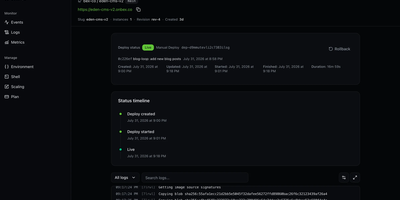
To give engineering teams a Render-style workflow of connecting a repository and getting a live HTTPS URL on infrastructure they control, Bex builds and runs web services, private services, background workers, cron jobs, and static sites from Git or container images. Dockerfiles and native builds for Node.js, Python, Go, Ruby, Rust, and Elixir deploy from public or private GitHub repositories with push-to-deploy, health checks, pre-deploy commands, and manual or policy-driven autoscaling. Blueprints in render.yaml format describe multi-resource environments in one file, and a Render-compatible CLI and API let existing tooling carry over where supported. Deploy history with cancel and rollback, live log tailing with search and filters, CPU and memory charts marked with deploy events, and suspend, resume, restart, native SSH, and browser shell controls cover daily operations. Custom domains receive automatic TLS certificates, and environment variables and secret files save and deploy in one step. Managed PostgreSQL provides backups with point-in-time recovery, high availability, and read replicas, and managed Valkey-compatible Key Value adds persistence and backups. Workspaces, projects, and environments come with OpenFGA roles, OAuth 2.1, API keys, audit logs, and signed outbound webhooks. Coding agents operate the same control plane through a remote or stdio MCP server with OAuth consent, deploy-from-chat, managed sandboxes, and structured machine-readable status, since no action is dashboard-only. Running on a dedicated VPS on RepoCloud with guaranteed CPU, RAM, and SSD, full root SSH access, and a browser serial console. Apache-2.0 licensed.
Ocular
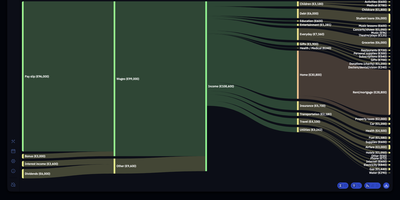
Ocular provides a modern personal finance workspace that plots your household income and expenditures across multi-year horizons to eliminate surprises in annual budgeting. Users can define custom income streams, configure recurring fixed obligations like rent and utilities, and allocate discretionary spending allowances into designated category groups. Interactive Sankey diagrams and cumulative balance curves visualize projected net savings trajectories, signaling upcoming cash crunches months in advance. The annual planning matrix breaks down monthly figures across twelve periods, calculates automatic net savings, and highlights active fiscal cycles. Keyboard shortcuts accelerate data entry with inline arithmetic expression evaluation directly inside currency cells. Built-in multi-currency conversion and localization settings allow international households and remote professionals to manage diverse revenue streams effortlessly. A dedicated privacy mode masks sensitive monetary amounts when working in public spaces, while complete ledgers export cleanly as portable JSON archives. Running on a dedicated VPS on RepoCloud with guaranteed CPU, RAM, and SSD, full root SSH access, and a browser serial console. MIT licensed.

RSSMonster
Staying on top of hundreds of RSS feeds is impossible when every reader just dumps articles in chronological order. RSSMonster takes a different approach: it evaluates, scores, and prioritizes every article so the signal rises above the noise. The three-pane reading interface automatically marks articles as read when you scroll past them, while the built-in quality scoring engine rates content by freshness, originality, trust, and attention metrics. Compose advanced search expressions using field operators like star:true, quality:>0.6, hot:true, and date filters like @today or @lastweek, then save those expressions as persistent Smart Folders for one-click access to curated views. Semantic event clustering groups related articles across sources so you see one coherent story instead of fifteen duplicates. Connect your favorite mobile client through the Fever API (supporting Reeder for iOS) or the Google Reader API (compatible with News+, FeedMe, Vienna RSS, and ReadKit). The AI chat assistant powered by the Model Context Protocol lets you ask questions about your feed content and get summarized answers. Import your existing subscriptions via OPML, switch between light and dark themes, and install the app as a Progressive Web App for offline reading. On RepoCloud, deploy RSSMonster on a dedicated VPS with root SSH access, full data ownership, and persistent storage under the MIT license.
StackRender
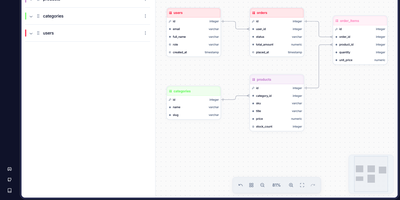
To design relational database schemas visually and generate production-ready SQL migrations without writing boilerplate DDL by hand, developers use StackRender, an interactive browser-based schema modeling studio. Users can start from a blank drag-and-drop Entity Relationship Diagram canvas or import existing SQL DDL scripts directly from PostgreSQL, MySQL, MariaDB, SQLite, Oracle, and Microsoft SQL Server databases. Each table node provides granular control over column data types, lengths, precision, character sets, collations, nullability, uniqueness, primary keys, composite indexes, and custom PostgreSQL enum types. When connecting tables across one-to-one, one-to-many, and many-to-many relationships, the schema analyzer checks for circular foreign key dependencies and suggests performance indexes on frequently joined columns. As a schema evolves over time, the visual state-diff engine records every structural modification and generates paired UP forward-migration and DOWN rollback scripts, accurately translating table and column renames into non-destructive ALTER statements rather than dropping and recreating data. Running on a dedicated VPS on RepoCloud with guaranteed CPU, RAM, and SSD, full root SSH access, and a browser serial console. AGPL-3.0 licensed.
MediKeep
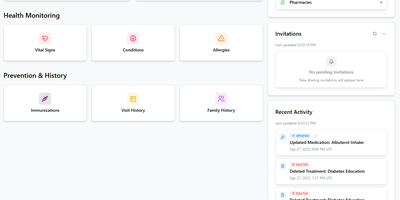
Your medical history, fragmented across a dozen patient portals, in one place on your server: MediKeep (formerly Personal Medical Records Keeper) is a self-hosted health record system. Built with a React frontend and FastAPI backend over PostgreSQL, it organizes 14 categories of medical data - medications with dosages and schedules, conditions, procedures, allergies, immunizations, symptoms, injuries, doctor visits and encounters, treatments, lab results, and even medical equipment with service dates and supplier info. Treatment management is genuinely sophisticated: an advanced mode links treatments to their medications with per-medication overrides for prescriber, pharmacy, and effective dates, and reverse lookup shows which treatments use a given medication. A dashboard summarizes records and recent activity, file uploads attach documents to records, and tagging works across categories. When a new specialist asks for your history, the report builder assembles custom reports by category and exports to PDF, JSON, or CSV - a curated, portable summary instead of a folder of photocopies. Authentication supports Google and GitHub SSO with OIDC providers like Keycloak and Authelia expected to work, and the built-in backup system protects the archive. Health data is exactly what should never live in someone else's cloud.

OpenReader
With OpenReader, any EPUB, PDF, Word document, Markdown file, or plain text book transforms into an interactive reading workspace paired with natural text-to-speech playback and multi-chapter audiobook export. Documents render natively in their original page layout rather than flattening into plain text, using layout-aware block detection and cross-page stitching so multi-column academic papers, technical manuals, and textbooks flow in the right reading order while skipping headers and footnotes. As narration plays, word-level forced alignment highlights each spoken word directly on the page in real time, and progressive background generation starts audio playback on the first segment while synthesizing upcoming pages ahead of your cursor. Readers can connect local speech engines such as Kokoro, KittenTTS, and Orpheus or cloud voice providers, select language-aware voices for multilingual books, adjust playback speed, and switch among thirteen light and dark reading themes. Cached audio segments persist across seeks and browser reloads, allowing the background worker to assemble complete M4B or MP3 audiobooks for offline listening on mobile devices while syncing reading progress, queues, and library imports across sessions. Running on a dedicated VPS on RepoCloud with guaranteed CPU, RAM, and SSD, full root SSH access, and a browser serial console. MIT licensed.
AMUX
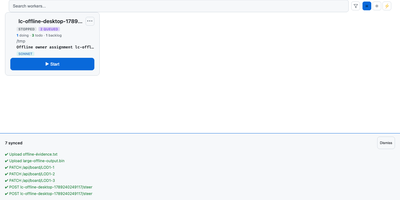
To coordinate swarms of autonomous coding agents across complex software projects, AMUX provides a concurrency-safe kanban workspace with real-time thought stream inspection and live steering controls. Engineers assign development tasks through an interactive board where autonomous worker processes claim cards using compare-and-swap mutexes to eliminate race conditions between parallel sessions. Operators monitor active reasoning streams, inspect streaming terminal outputs, and inject guidance commands mid-turn without interrupting background execution. A cryptographic origin router relays messages between agents, enabling workers to delegate sub-tasks, request automated peer code reviews, and share environment state safely. Built-in schedulers trigger recurring automated maintenance routines, dependency updates, and bug triage sweeps on cron-like timers or autonomous loop cadences. Teams can switch language models dynamically on active sessions to tackle complex architecture challenges with high-capability reasoning engines while conserving resources on routine tasks. An integrated self-healing supervisor watches over agent runtimes, automatically compacting context windows, restarting crashed terminal sessions, and resuming pending instructions seamlessly. Running on a dedicated VPS on RepoCloud with guaranteed CPU, RAM, and SSD, full root SSH access, and a browser serial console. MIT licensed.
Yep Anywhere
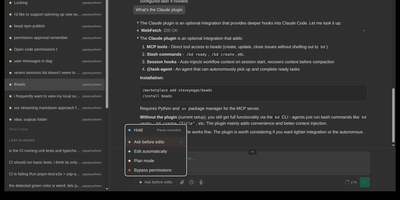
Designed for developers on the go, Yep Anywhere turns any smartphone browser into a full-featured control center for supervising, steering, and reviewing autonomous AI coding agents. Operators can monitor live execution across multiple active projects simultaneously without sitting at a desktop terminal. Real-time reasoning feeds. Instant push alerts for permission prompts. One-tap tool approvals. Developers can unblock pending tasks mid-turn, redirect active workflows, or queue sequential follow-up prompts for automatic delivery at the next safe milestone. An integrated source control viewer displays syntax-highlighted working-tree and commit diffs, allowing reviewers to attach line-level comment bundles directly back into the agent context. Mobile voice transcription lets users dictate instructions straight into running sessions, while photo library integration makes uploading bug screenshots effortless. All agent credentials, CLI configurations, and repository data remain private on the host server without requiring third-party cloud database accounts or proprietary device pairing. Running on a dedicated VPS on RepoCloud with guaranteed CPU, RAM, and SSD, full root SSH access, and a browser serial console. MIT licensed.
PotatoMesh
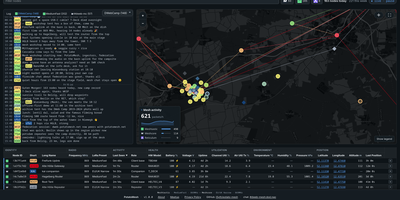
When your community asks what its LoRa mesh is doing right now, PotatoMesh answers with a live map, chat log, and node table built from the traffic your own radios hear. It is a self-hosted dashboard for Meshtastic, Meshcore, and Reticulum networks, with no MQTT clutter. Each node gets a detail page charting battery, voltage, channel utilization, temperature, humidity, and air quality over the past week, plus the neighbors it hears with signal strength and the trace routes it appears in. New nodes and telemetry reports pop up in the chat as they arrive, and a charts page follows telemetry and packets per hour across the whole network. Federation finds other PotatoMesh communities automatically and plots them on a world map with active-node counts per protocol. Ingestors feed the dashboard from radios over serial, TCP, Bluetooth, or passive UDP, and several can report to one instance. Open browsers update live, a Prometheus endpoint exports metrics, and Markdown pages publish your rules, contact details, or legal notice. Add a stop-sign emoji to a node's name to hide it, or switch on private mode to drop the chat entirely. Running on a dedicated VPS on RepoCloud with guaranteed CPU, RAM, and SSD, full root SSH access, and a browser serial console. Apache-2.0 licensed.
Trade Journal
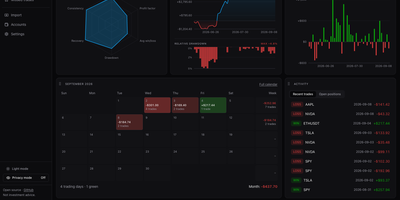
A trading journal you host yourself, Trade Journal rebuilds broker fills and statement exports into round-trip trades, a profit and loss calendar, and daily notes that show what actually works. Read-only sync covers more than twenty brokers and exchanges, including Alpaca, Binance, Coinbase, Kraken, and IBKR Flex. Statement import auto-detects TradingView, MetaTrader, NinjaTrader, Tradovate, and thinkorswim files, handles TradeZella and Tradervue CSV migrations, and maps columns for anything else. Trades can be matched first-in-first-out, last-in-first-out, or by weighted average, with partial fills, scale-ins, and futures multipliers handled. The dashboard offers gauges, cumulative and daily P&L, an Edge Score radar, and cards you can rearrange into named layouts, while Reports break results down by symbol, tag, mistake, playbook, weekday, and time of day. Each trade page charts entries and exits and can replay candles you load, with estimated MAE and MFE. Daily journal pages hold Markdown notes, templates, attachments, and voice dictation, and optional AI recaps use your own Anthropic or OpenAI key or a local Ollama model. Playbook checklists score rule adherence, a prop firm ledger tracks costs and payouts, and privacy mode masks every amount. Running on a dedicated VPS on RepoCloud with guaranteed CPU, RAM, and SSD, full root SSH access, and a browser serial console. MIT licensed.